MODULE 5
• The application layer provides services to the user.
• Communication is provided using a logical connection, which means
that the two application layers assume that there is an imaginary direct
connection through which they can send and receive messages
Providing Services
• The protocols in this layer do not provide services to any other
protocol in the suite; they only receive services from the protocols in
the transport Layer
• New protocols can be also be added to this layer as long as the new
protocols can use the services provided by one of the transport-layer
protocols.
Standard and Nonstandard Protocols
• To provide smooth operation of the Internet, the protocols used in the
first four layers of the TCP/IP suite need to be standardized and
documented.
• They normally become part of the package that is included in operating
systems such as Windows or UNIX.
• To be flexible, however, the application-layer protocols can be both
standard and nonstandard.
Standard Application-Layer Protocols
Each standard protocol is a pair of computer programs that interact
with the user and the transport layer to provide a specific service to
the user.
Nonstandard Application-Layer Protocols
A private company can create a new customized application protocol
to communicate with all of its offices around the world using the
services provided by the first four layers of the TCP/IP protocol suite
without using any of the standard application programs.
Application-Layer Paradigms
• To use the Internet we need two application programs to interact with each other:
one running on a computer somewhere in the world, the other running on
another computer somewhere else in the world
• The client-server paradigm and the peer-to-peer paradigm.
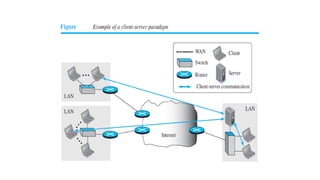
Traditional Paradigm: Client-Server
• In this paradigm, the service provider is an application program, called
the server process; it runs continuously, waiting for another application
program, called the client process, to make a connection through the
Internet and ask for service.
• There are normally some server processes that can provide a specific
type of service, but there are many clients that request service from
any of these server processes.
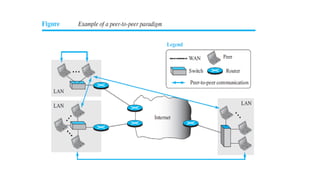
New Paradigm: Peer-to-Peer
• A new paradigm, called the peer-to-peer paradigm (often abbreviated
P2P paradigm) has emerged to respond to the needs of some new
applications.
• In this paradigm, there is no need for a server process to be running all
the time and waiting for the client processes to connect. The
responsibility is shared between peers.
• A computer connected to the Internet can provide service at one time
and receive service at another time.
• A computer can even provide and receive services at the same time.
Mixed Paradigm
• An application may choose to use a mixture of the two paradigms by combining
the advantages of both.
• For example, a light-load client-server communication can be used to find the
address of the peer that can offer a service.
• When the address of the peer is found, the actual service can be received from the
peer by using the peer-to peer paradigm.
WORLD WIDE WEB AND HTTP
World Wide Web
• The idea of the Web was first proposed by Tim Berners-Lee in 1989, commercial Web started in
the early 1990s.
• The European Organization for Nuclear Research, to allow several researchers at different locations
throughout Europe to access each others’ researches.
• The Web today is a repository of information in which the documents, called web pages, are
distributed all over the world and related documents are linked together.
• Distribution allows the growth of the Web. Each web server in the world can add a new web
page to the repository and announce it to all Internet users without overloading a few servers.
• Linking allows one web page to refer to another web page stored in another server somewhere
else in the world. The linking of web pages was achieved using a concept called hypertext,
• The idea was to use a machine that automatically retrieved another document stored in the
system when a link to it appeared in the document.
• The Web implemented this idea electronically to allow the linked document to be retrieved when
the link was clicked by the user.
• Term hypertext, coined to mean linked text documents, has been changed to hypermedia, to
show that a web page can be a text document, an image, an audio file, or a video file.
Architecture
• The WWW today is a distributed client-server service, in which a client
using a browser can access a service using a server.
• The service provided is distributed over many locations called sites.
• Each site holds one or more web pages. Each web page, however, can
contain some links to other web pages in the same or other sites.
• A web page can be simple or composite.
• A simple web page has no links to other web pages; a composite web
page has one or more links to other web pages.
• Each web page is a file with a name and address.
Web Client (Browser)
• A variety of vendors offer commercial browsers that interpret and display a
web page, and all of them use nearly the same architecture.
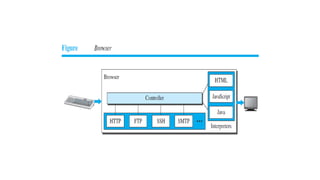
• Each browser usually consists of three parts: a controller, client protocols, and
interpreters.
• The controller receives input from the keyboard or the mouse and uses the
client programs to access the document.
• After the document has been accessed, the controller uses one of the
interpreters to display the document on the screen.
• The client protocol can be one of the protocols, such as HTTP or FTP.
• The interpreter can be HTML, Java, or JavaScript, depending on the type of
document.
• Some commercial browsers include Internet Explorer, Netscape Navigator, and
Firefox.
Web Server
• The web page is stored at the server.
• Each time a request arrives, the corresponding document is sent to the client. To
improve efficiency, servers normally store requested files in a cache in memory;
memory is faster to access than a disk.
• A server can also become more efficient through multithreading or multiprocessing.
• A server can answer more than one request at a time.
• Some popular web servers include Apache and Microsoft Internet Information Server.
Uniform Resource Locator (URL)
• A web page, as a file, needs to have a unique identifier to distinguish it
from other web pages.
• To define a web page, we need three identifiers: host, port, and path.
• Four identifiers are needed to define the web page.
• The first is the type of vehicle to be used to fetch the web page; the last
three make up the combination that defines the destination object (web
page).
• Protocol. The first identifier is the abbreviation for the client-server program that
we need in order to access the web page. Although most of the time the
protocol is HTTP (HyperText Transfer Protocol), we can also use other protocols
such as FTP (File Transfer Protocol).
• Host. The host identifier can be the IP address of the server or the unique name
given to the server. IP addresses can be defined in dotted decimal notation; the
name is normally the domain name that uniquely defines the host, such as
forouzan.com,
• Port. The port, a 16-bit integer, is normally predefined for the client-server
application. For example, if the HTTP protocol is used for accessing the web
page, the well-known port number is 80.
• Path. The path identifies the location and the name of the file in the underlying
operating system. The format of this identifier normally depends on the
operating system. In UNIX, a path is a set of directory names followed by the file
name, all separated by a slash. For example, /top/next/last/myfile is a path that
uniquely defines a file named myfile, stored in the directory last, which itself is
part of the directory next, which itself is under the directory top. The path lists
the directories from the top to the bottom, followed by the file name.
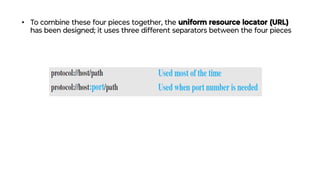
• To combine these four pieces together, the uniform resource locator (URL)
has been designed; it uses three different separators between the four pieces
Web Documents
The documents in the WWW can be grouped into three broad categories: static,
dynamic, and active.
Static documents are fixed-content documents that are created and stored
in a server.
• The client can get a copy of the document only.
• The contents of the file are determined when the file is created, not when it is
used.
• The contents in the server can be changed, but the user cannot change them.
• When a client accesses the document, a copy of the document is sent.
• The user can then use a browser to see the document.
• Static documents are prepared using one of several languages: HyperText
Markup Language (HTML), Extensible Markup Language (XML), Extensible
Style Language (XSL), and Extensible Hypertext Markup Language (XHTML).
Dynamic Documents
• A dynamic document is created by a web server whenever a browser requests the
document.
• When a request arrives, the web server runs an application program or a script that
creates the dynamic document.
• The server returns the result of the program or script as a response to the browser
that requested the document.
• Because a fresh document is created for each request, the contents of a dynamic
document may vary from one request to another.
• Example: Retrieval of the time and date from a server.
• The client can ask the server to run a program such as the date program in UNIX and
send the result of the program to the client.
• Common Gateway Interface (CGI) was used to retrieve a dynamic document in the
past,
• Today’s options include one of the scripting languages such as Java Server Pages
(JSP), which uses the Java language for scripting, or Active Server Pages (ASP), a
Microsoft product that uses Visual Basic language for scripting, or ColdFusion, which
embeds queries in a Structured Query Language (SQL) database in the HTML
Active Documents
• For many applications, we need a program or a script to be run at the
client site. These are called active documents.
• For example, suppose we want to run a program that creates animated
graphics on the screen or a program that interacts with the user. The
program definitely needs to be run at the client site where the
animation or interaction takes place.
• When a browser requests an active document, the server sends a copy
of the document or a script. The document is then run at the client
(browser) site.
• One way to create an active document is to use Java applets, a
program written in Java on the server. It is compiled and ready to be
run.
• The document is in bytecode (binary) format. Another way is to use
JavaScripts but download and run the script at the client site.
HyperText Transfer Protocol (HTTP)
• The HyperText Transfer Protocol (HTTP) is used to define how the
client-server programs can be written to retrieve web pages from the
Web.
• An HTTP client sends a request; an HTTP server returns a response. The
server uses the port number 80; the client uses a temporary port
number.
• HTTP uses the services of TCP, a connection-oriented and reliable
protocol.
• The client and server, do not need to worry about errors in messages,
exchanged or loss of any message, because the TCP is reliable
Nonpersistent versus Persistent Connections
• The hypertext concept embedded in web page documents may require
several requests and responses.
• If the web pages, objects to be retrieved, are located on different servers, we
do not have any other choice than to create a new TCP connection for
retrieving each object.
• If some of the objects are located on the same server, we have two choices:
to retrieve each object using a new TCP connection or to make a TCP
connection and retrieve them all.
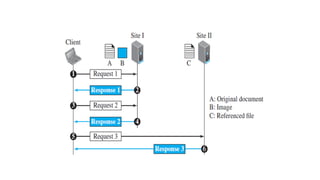
• The first method is referred to as a nonpersistent connection,
• The second as a persistent connection. HTTP, prior to version 1.1, specified
nonpersistent connections, while persistent connections are the default in
version 1.1, but it can be changed by the user.
Nonpersistent Connections
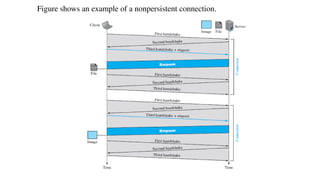
• In a nonpersistent connection, one TCP connection is made for each
request/response.
• The following lists the steps in this strategy:
1. The client opens a TCP connection and sends a request.
2. The server sends the response and closes the connection.
3. The client reads the data until it encounters an end-of-file marker; it then closes the
connection.
• In this strategy, if a file contains links to N different pictures in different
files (all located on the same server), the connection must be opened
and closed N + 1 times.
• The nonpersistent strategy imposes high overhead on the server
because the server needs N + 1 different buffers each time a
connection is opened.
Figure shows an example of a nonpersistent connection.
Persistent Connections
• HTTP version 1.1 specifies a persistent connection by default.
• In a persistent connection, the server leaves the connection open for more requests after
sending a response.
• The server can close the connection at the request of a client or if a time-out has been
reached.
• The sender usually sends the length of the data with each response.
• There are some occasions when the sender does not know the length of the data. This is the
case when a document is created dynamically or actively. In these cases, the server informs
the client that the length is not known and closes the connection after sending the data so
the client knows that the end of the data has been reached.
• Time and resources are saved using persistent connections.
• Only one set of buffers and variables needs to be set for the connection at each site. The
round trip time for connection establishment and connection termination is saved.
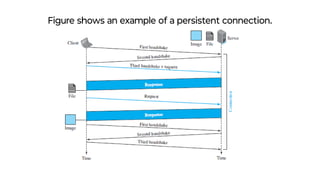
Figure shows an example of a persistent connection.
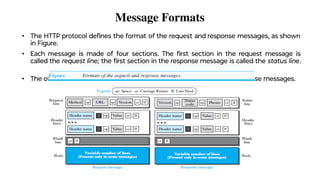
Message Formats
• The HTTP protocol defines the format of the request and response messages, as shown
in Figure.
• Each message is made of four sections. The first section in the request message is
called the request line; the first section in the response message is called the status line.
• The other three sections have the same names in the request and response messages.
Request Message
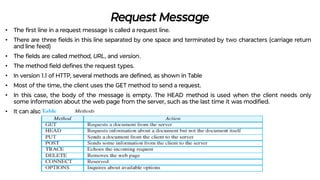
• The first line in a request message is called a request line.
• There are three fields in this line separated by one space and terminated by two characters (carriage return
and line feed)
• The fields are called method, URL, and version.
• The method field defines the request types.
• In version 1.1 of HTTP, several methods are defined, as shown in Table
• Most of the time, the client uses the GET method to send a request.
• In this case, the body of the message is empty. The HEAD method is used when the client needs only
some information about the web page from the server, such as the last time it was modified.
• It can also be used to test the validity of a URL.
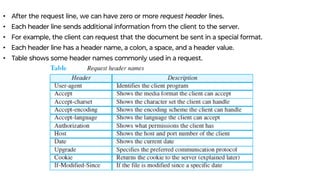
• After the request line, we can have zero or more request header lines.
• Each header line sends additional information from the client to the server.
• For example, the client can request that the document be sent in a special format.
• Each header line has a header name, a colon, a space, and a header value.
• Table shows some header names commonly used in a request.
Response Message
• A response message consists of a status line, header lines, a blank line, and sometimes a body.
• The first line in a response message is called the status line. There are three fields in this line
separated by spaces and terminated by a carriage return and line feed.
• The first field defines the version of HTTP protocol, currently 1.1. The status code field defines the
status of the request.
• It consists of three digits. Whereas
the codes in the 100 range are only informational,
the codes in the 200 range indicate a successful request.
The codes in the 300 range redirect the client to another URL,
the codes in the 400 range indicate an error at the client site.
Finally, the codes in the 500 range indicate an error at the server site.
• After the status line, we can have zero or more response header lines.
• Each header line sends additional information from the server to the client.
• For example, the sender can send extra information about the document.
• Each header line has a header name, a colon, a space, and a header value.
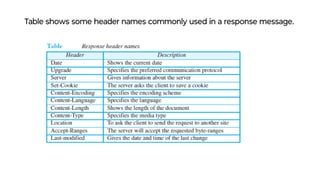
Table shows some header names commonly used in a response message.
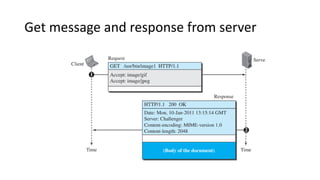
Get message and response from server
Cookies
• The World Wide Web was originally designed as a stateless entity.
• A client sends a request; a server responds.
• The original purpose of the Web, retrieving publicly available documents,
exactly fits this design.
• Today the Web has other functions and some are listed below:
❑ Websites are being used as electronic stores that allow users to browse through
the store, select wanted items, put them in an electronic cart, and pay at the end
with a credit card.
❑ Some websites need to allow access to registered clients only.
❑ Some websites are used as portals: the user selects the web pages he wants to
see.
❑ Some websites are just advertising agencies.
Creating and Storing Cookies
The creation and storing of cookies depend on the implementation; however, the
principle is the same.
1. When a server receives a request from a client, it stores information about the client
in a file or a string. The information may include the domain name of the client, the
contents of the cookie a timestamp, and other information depending on the
implementation.
2. The server includes the cookie in the response that it sends to the client.
3. When the client receives the response, the browser stores the cookie in the cookie
directory, which is sorted by the server domain name.
Using Cookies
• When a client sends a request to a server, the browser looks in the cookie directory to see if it
can find a cookie sent by that server. If found, the cookie is included in the request.
• When the server receives the request, it knows that this is an old client, not a new one. The
contents of the cookie are never read by the browser or disclosed to the user.
• It is a cookie made by the server and eaten by the server.
❑ An electronic store (e-commerce) can use a cookie for its client shoppers.
❑ The site that restricts access to registered clients only sends a cookie to the client when the
client registers for the first time. For any repeated access, only those clients that send the
appropriate cookie are allowed.
❑ A web portal uses the cookie in a similar way. When a user selects her favorite pages, a cookie is
made and sent. If the site is accessed again, the cookie is sent to the server to show what the
client is looking for.
❑ A cookie is also used by advertising agencies. An advertising agency can place banner ads on
some main website that is often visited by users. The advertising agency supplies only a URL that
Web Caching: Proxy Servers
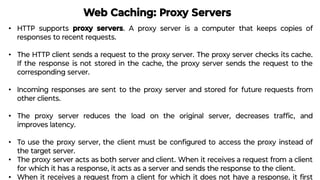
• HTTP supports proxy servers. A proxy server is a computer that keeps copies of
responses to recent requests.
• The HTTP client sends a request to the proxy server. The proxy server checks its cache.
If the response is not stored in the cache, the proxy server sends the request to the
corresponding server.
• Incoming responses are sent to the proxy server and stored for future requests from
other clients.
• The proxy server reduces the load on the original server, decreases traffic, and
improves latency.
• To use the proxy server, the client must be configured to access the proxy instead of
the target server.
• The proxy server acts as both server and client. When it receives a request from a client
for which it has a response, it acts as a server and sends the response to the client.
• When it receives a request from a client for which it does not have a response, it first
Proxy Server Location
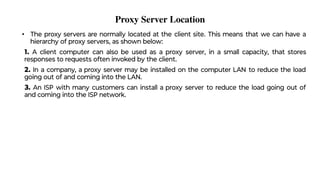
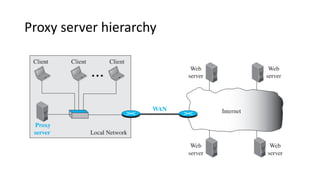
• The proxy servers are normally located at the client site. This means that we can have a
hierarchy of proxy servers, as shown below:
1. A client computer can also be used as a proxy server, in a small capacity, that stores
responses to requests often invoked by the client.
2. In a company, a proxy server may be installed on the computer LAN to reduce the load
going out of and coming into the LAN.
3. An ISP with many customers can install a proxy server to reduce the load going out of
and coming into the ISP network.
Proxy server hierarchy
Cache Update
• How long a response should remain in the proxy server before being deleted and replaced.
• Several different strategies are used for this purpose.
• One solution is to store the list of sites whose information remains the same for a while.
• Another recommendation is to add some headers to show the last modification time of the information.
HTTP Security
• HTTP per se (alone) does not provide security.
• HTTP can be run over the Secure Socket Layer (SSL).
• HTTP is referred to as HTTPS. HTTPS provides confidentiality, client and server authentication, and
data integrity.
File Transfer Protocol (FTP)
• FTP is the standard protocol provided by TCP/IP for copying a file from one host to another.
• Although data can transfer files using HTTP, FTP is a better choice to transfer large files or to transfer
files using different formats.
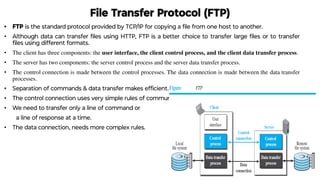
• The client has three components: the user interface, the client control process, and the client data transfer process.
• The server has two components: the server control process and the server data transfer process.
• The control connection is made between the control processes. The data connection is made between the data transfer
processes.
• Separation of commands & data transfer makes efficient.
• The control connection uses very simple rules of communication.
• We need to transfer only a line of command or
a line of response at a time.
• The data connection, needs more complex rules.
Two Connections
• The two connections in FTP have different lifetimes.
• The control connection remains connected during the entire interactive FTP
session.
• The data connection is opened and then closed for each file transfer activity.
• It opens each time commands that involve transferring files are used, and it closes
when the file is transferred.
• when a user starts an FTP session, the control connection opens.
• While the control connection is open, the data connection can be opened and
closed multiple times if several files are transferred.
• FTP uses two well-known TCP ports: port 21 is used for the control connection,
and port 20 is used for the data connection.
Control Connection
• For control communication, FTP uses the same approach as TELNET.
• It uses the NVT ASCII character set as used by TELNET.
• Communication is achieved through commands and responses. This simple method
is adequate for the control connection because we send one command (or response)
at a time.
• Each line is terminated with a two-character (carriage return and line feed) end-of-
line token.
• During this control connection, commands are sent from the client to the server and
responses are sent from the server to the client.
• Commands, which are sent from the FTP client control process, are in the form of
ASCII uppercase, which may or may not be followed by an argument.
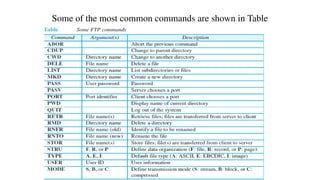
Some of the most common commands are shown in Table
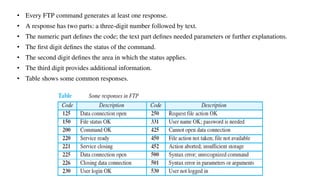
• Every FTP command generates at least one response.
• A response has two parts: a three-digit number followed by text.
• The numeric part defines the code; the text part defines needed parameters or further explanations.
• The first digit defines the status of the command.
• The second digit defines the area in which the status applies.
• The third digit provides additional information.
• Table shows some common responses.
Data Connection
• The data connection uses the well-known port 20 at the server
site.
• The following steps are for data connection:
1. The client, not the server, issues a passive open using an ephemeral port. This
must be
done by the client because it is the client that issues the commands for transferring
files.
2. Using the PORT command the client sends this port number to the server.
3. The server receives the port number and issues an active open using the well-
known
port 20 and the received ephemeral port number.
An ephemeral port is a communications endpoint of a transport layer protocol
of the Internet protocol suite that is used for only a short period of time for
the duration of a communication session.
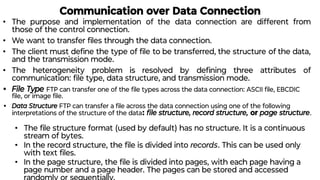
Communication over Data Connection
• The purpose and implementation of the data connection are different from
those of the control connection.
• We want to transfer files through the data connection.
• The client must define the type of file to be transferred, the structure of the data,
and the transmission mode.
• The heterogeneity problem is resolved by defining three attributes of
communication: file type, data structure, and transmission mode.
• File Type FTP can transfer one of the file types across the data connection: ASCII file, EBCDIC
file, or image file.
• Data Structure FTP can transfer a file across the data connection using one of the following
interpretations of the structure of the data: file structure, record structure, or page structure.
• The file structure format (used by default) has no structure. It is a continuous
stream of bytes.
• In the record structure, the file is divided into records. This can be used only
with text files.
• In the page structure, the file is divided into pages, with each page having a
page number and a page header. The pages can be stored and accessed
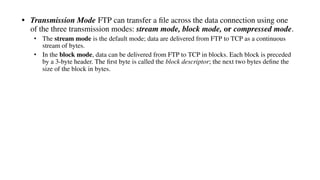
• Transmission Mode FTP can transfer a file across the data connection using one
of the three transmission modes: stream mode, block mode, or compressed mode.
• The stream mode is the default mode; data are delivered from FTP to TCP as a continuous
stream of bytes.
• In the block mode, data can be delivered from FTP to TCP in blocks. Each block is preceded
by a 3-byte header. The first byte is called the block descriptor; the next two bytes define the
size of the block in bytes.
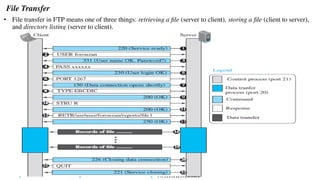
File Transfer
• File transfer in FTP means one of three things: retrieving a file (server to client), storing a file (client to server),
and directory listing (server to client).
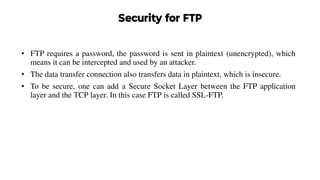
Security for FTP
• FTP requires a password, the password is sent in plaintext (unencrypted), which
means it can be intercepted and used by an attacker.
• The data transfer connection also transfers data in plaintext, which is insecure.
• To be secure, one can add a Secure Socket Layer between the FTP application
layer and the TCP layer. In this case FTP is called SSL-FTP.
ELECTRONIC MAIL
• Electronic mail (or e-mail) allows users to exchange messages.
• In an application such as HTTP or FTP, the server program is running all the time, waiting for a
request from a client. It has request (client) and response(server).
• e-mail is considered a one-way transaction. The client/server programming should be implemented in
another way: using some intermediate computers (servers).
• The users run only client programs when they want and the intermediate servers apply the client/server
paradigm.
Architecture
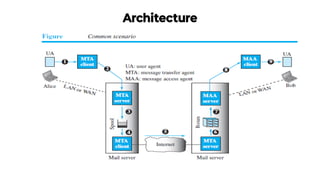
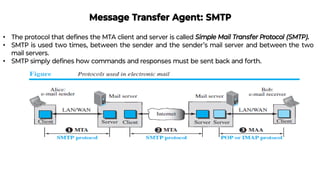
• In the common scenario, the sender and the receiver of the e-mail, Alice and Bob respectively,
are connected via a LAN or a WAN to two mail servers.
• A simple e-mail from Alice to Bob takes nine different steps, as shown in the figure.
• Alice and Bob use three different agents: a user agent (UA), a message transfer agent (MTA),
and a message access agent (MAA).
• The electronic mail system needs two UAs, two pairs of MTAs (client and server), and a pair of
MAAs (client and server).
• User Agent
User Agent
• user agent (UA) provides service to the user to make the process of sending and receiving a
message easier.
• It is a software package (program) that composes, reads, replies to, and forwards messages.
• It also handles local mailboxes on the user computers.
• There are two types of user agents: command-driven and GUI-based.
• A command-driven UA normally accepts a one character command from the keyboard to
perform its task. Examples: mail, pine, and elm.
• Modern user agents are GUI-based which contain graphical user interface (GUI) components that
allow the user to interact with the software by using both the keyboard and the mouse.
Examples: Eudora and Outlook. Sending Mail
• It has an envelope and a message.
• The envelope usually contains the sender address, the receiver address, and other information.
• The message contains the header and the body.
• The header of the message defines the sender, the receiver, the subject of the message,
and some other information.
• The body of the message contains the actual information to be read by the recipient
Receiving Mail
• The UA is triggered by the user (or a timer).
• If a user has mail, the UA informs the user with a notice.
• If the user is ready to read the mail, a list is displayed in which each line contains a
summary of the information about a particular message in the mailbox.
• The summary usually includes the sender mail address, the subject, and the time the
mail was sent or received.
• The user can select any of the messages and display its contents on the screen.
Addresses
• To deliver mail, a mail handling system must use an addressing system with unique addresses.
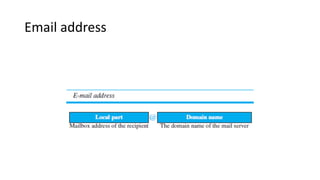
• In the Internet, the address consists of two parts: a local part and a domain name, separated
by an @ sign.
• The local part defines the name of a special file, called the user mailbox, where all the mail
received for a user is stored for retrieval by the message access agent.
• The second part of the address is the domain name. An organization usually selects one or
more hosts to receive and send e-mail; they are sometimes called mail servers or exchangers.
Email address
Mailing List or Group List
• Electronic mail allows one name, an alias, to represent several different e-mail
addresses; this is called a mailing list.
• Every time a message is to be sent, the system checks the recipient’s name against
the alias database; if there is a mailing list for the defined alias, separate messages,
one for each entry in the list, must be prepared and handed to the MTA.
Message Transfer Agent: SMTP
• The protocol that defines the MTA client and server is called Simple Mail Transfer Protocol (SMTP).
• SMTP is used two times, between the sender and the sender’s mail server and between the two
mail servers.
• SMTP simply defines how commands and responses must be sent back and forth.
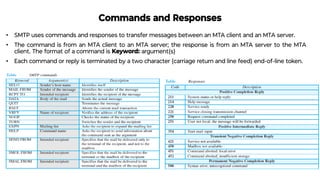
Commands and Responses
• SMTP uses commands and responses to transfer messages between an MTA client and an MTA server.
• The command is from an MTA client to an MTA server; the response is from an MTA server to the MTA
client. The format of a command is Keyword: argument(s)
• Each command or reply is terminated by a two character (carriage return and line feed) end-of-line token.
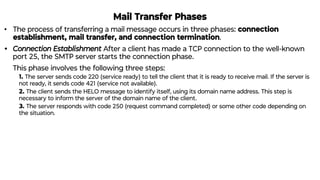
Mail Transfer Phases
• The process of transferring a mail message occurs in three phases: connection
establishment, mail transfer, and connection termination.
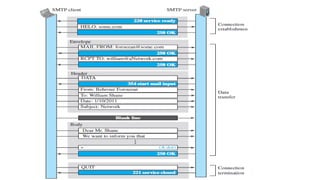
• Connection Establishment After a client has made a TCP connection to the well-known
port 25, the SMTP server starts the connection phase.
This phase involves the following three steps:
1. The server sends code 220 (service ready) to tell the client that it is ready to receive mail. If the server is
not ready, it sends code 421 (service not available).
2. The client sends the HELO message to identify itself, using its domain name address. This step is
necessary to inform the server of the domain name of the client.
3. The server responds with code 250 (request command completed) or some other code depending on
the situation.
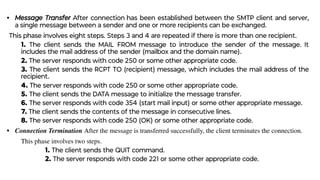
• Message Transfer After connection has been established between the SMTP client and server,
a single message between a sender and one or more recipients can be exchanged.
This phase involves eight steps. Steps 3 and 4 are repeated if there is more than one recipient.
1. The client sends the MAIL FROM message to introduce the sender of the message. It
includes the mail address of the sender (mailbox and the domain name).
2. The server responds with code 250 or some other appropriate code.
3. The client sends the RCPT TO (recipient) message, which includes the mail address of the
recipient.
4. The server responds with code 250 or some other appropriate code.
5. The client sends the DATA message to initialize the message transfer.
6. The server responds with code 354 (start mail input) or some other appropriate message.
7. The client sends the contents of the message in consecutive lines.
8. The server responds with code 250 (OK) or some other appropriate code.
• Connection Termination After the message is transferred successfully, the client terminates the connection.
This phase involves two steps.
1. The client sends the QUIT command.
2. The server responds with code 221 or some other appropriate code.
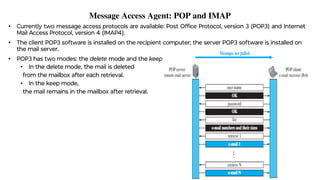
Message Access Agent: POP and IMAP
• Currently two message access protocols are available: Post Office Protocol, version 3 (POP3) and Internet
Mail Access Protocol, version 4 (IMAP4).
• The client POP3 software is installed on the recipient computer; the server POP3 software is installed on
the mail server.
• POP3 has two modes: the delete mode and the keep mode.
• In the delete mode, the mail is deleted
from the mailbox after each retrieval.
• In the keep mode,
the mail remains in the mailbox after retrieval.
IMAP4
IMAP4 provides the following extra functions:
❑ A user can check the e-mail header prior to downloading.
❑ A user can search the contents of the e-mail for a specific string of characters prior to
downloading.
❑ A user can partially download e-mail. This is especially useful if bandwidth is limited and the
e-mail contains multimedia with high bandwidth requirements.
❑ A user can create, delete, or rename mailboxes on the mail server.
❑ A user can create a hierarchy of mailboxes in a folder for e-mail storage.
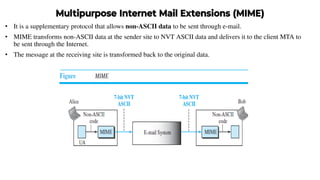
Multipurpose Internet Mail Extensions (MIME)
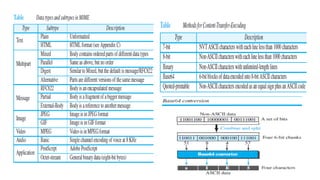
• It is a supplementary protocol that allows non-ASCII data to be sent through e-mail.
• MIME transforms non-ASCII data at the sender site to NVT ASCII data and delivers it to the client MTA to
be sent through the Internet.
• The message at the receiving site is transformed back to the original data.
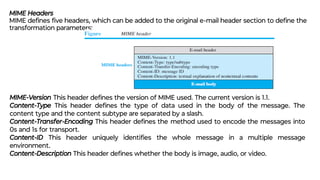
MIME Headers
MIME defines five headers, which can be added to the original e-mail header section to define the
transformation parameters:
MIME-Version This header defines the version of MIME used. The current version is 1.1.
Content-Type This header defines the type of data used in the body of the message. The
content type and the content subtype are separated by a slash.
Content-Transfer-Encoding This header defines the method used to encode the messages into
0s and 1s for transport.
Content-ID This header uniquely identifies the whole message in a multiple message
environment.
Content-Description This header defines whether the body is image, audio, or video.
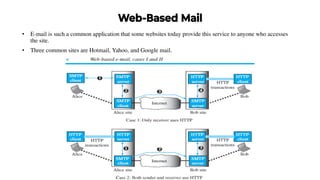
Web-Based Mail
• E-mail is such a common application that some websites today provide this service to anyone who accesses
the site.
• Three common sites are Hotmail, Yahoo, and Google mail.
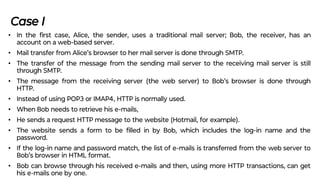
Case I
• In the first case, Alice, the sender, uses a traditional mail server; Bob, the receiver, has an
account on a web-based server.
• Mail transfer from Alice’s browser to her mail server is done through SMTP.
• The transfer of the message from the sending mail server to the receiving mail server is still
through SMTP.
• The message from the receiving server (the web server) to Bob’s browser is done through
HTTP.
• Instead of using POP3 or IMAP4, HTTP is normally used.
• When Bob needs to retrieve his e-mails,
• He sends a request HTTP message to the website (Hotmail, for example).
• The website sends a form to be filled in by Bob, which includes the log-in name and the
password.
• If the log-in name and password match, the list of e-mails is transferred from the web server to
Bob’s browser in HTML format.
• Bob can browse through his received e-mails and then, using more HTTP transactions, can get
his e-mails one by one.
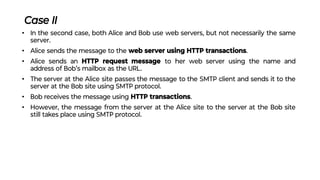
Case II
• In the second case, both Alice and Bob use web servers, but not necessarily the same
server.
• Alice sends the message to the web server using HTTP transactions.
• Alice sends an HTTP request message to her web server using the name and
address of Bob’s mailbox as the URL.
• The server at the Alice site passes the message to the SMTP client and sends it to the
server at the Bob site using SMTP protocol.
• Bob receives the message using HTTP transactions.
• However, the message from the server at the Alice site to the server at the Bob site
still takes place using SMTP protocol.
E-Mail Security
• e-mail exchanges can be secured using two application-layer securities
designed in particular for e-mail systems.
• Two of these protocols, Pretty Good Privacy (PGP) and Secure/
Multipurpose Internet Mail Extensions (S/MIME)
DOMAIN NAME SYSTEM (DNS)
• The Internet needs to have a directory system that can map a name to an IP
addresses.
• The Internet is so huge today, a central directory system cannot hold all the
mapping and if the central computer fails, the whole communication network will
collapse.
• The information is distributed among many computers in the world.
• In this method, the host that needs mapping can contact the closest computer
holding the needed information. This method is used by the Domain Name
System (DNS).
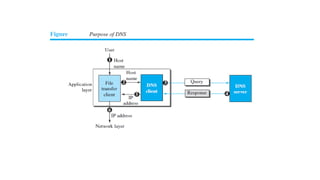
• Figure shows how TCP/IP uses a DNS client and a DNS server to map a name to an
address.
• A user wants to use a file transfer client to access the corresponding file transfer
server running on a remote host. The user knows only the file transfer server name,
such as afilesource.com.
• However, the TCP/IP suite needs the IP address of the file transfer server to make
the connection.
The following six steps map the host name to an IP address:
1. The user passes the host name to the file transfer client.
2. The file transfer client passes the host name to the DNS client.
3. Each computer, after being booted, knows the address of one DNS server. The DNS
client sends a message to a DNS server with a query that gives the file transfer server
name using the known IP address of the DNS server.
4. The DNS server responds with the IP address of the desired file transfer server.
5. The DNS server passes the IP address to the file transfer client.
6. The file transfer client now uses the received IP address to access the file transfer
server.
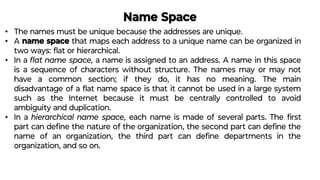
Name Space
• The names must be unique because the addresses are unique.
• A name space that maps each address to a unique name can be organized in
two ways: flat or hierarchical.
• In a flat name space, a name is assigned to an address. A name in this space
is a sequence of characters without structure. The names may or may not
have a common section; if they do, it has no meaning. The main
disadvantage of a flat name space is that it cannot be used in a large system
such as the Internet because it must be centrally controlled to avoid
ambiguity and duplication.
• In a hierarchical name space, each name is made of several parts. The first
part can define the nature of the organization, the second part can define the
name of an organization, the third part can define departments in the
organization, and so on.
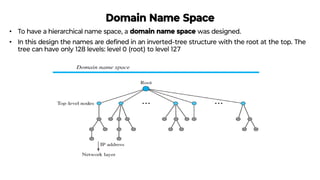
Domain Name Space
• To have a hierarchical name space, a domain name space was designed.
• In this design the names are defined in an inverted-tree structure with the root at the top. The
tree can have only 128 levels: level 0 (root) to level 127
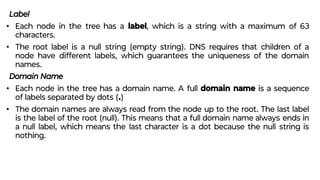
Label
• Each node in the tree has a label, which is a string with a maximum of 63
characters.
• The root label is a null string (empty string). DNS requires that children of a
node have different labels, which guarantees the uniqueness of the domain
names.
Domain Name
• Each node in the tree has a domain name. A full domain name is a sequence
of labels separated by dots (.)
• The domain names are always read from the node up to the root. The last label
is the label of the root (null). This means that a full domain name always ends in
a null label, which means the last character is a dot because the null string is
nothing.
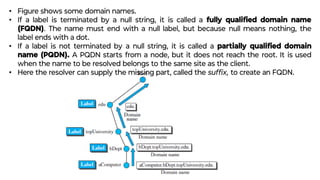
• Figure shows some domain names.
• If a label is terminated by a null string, it is called a fully qualified domain name
(FQDN). The name must end with a null label, but because null means nothing, the
label ends with a dot.
• If a label is not terminated by a null string, it is called a partially qualified domain
name (PQDN). A PQDN starts from a node, but it does not reach the root. It is used
when the name to be resolved belongs to the same site as the client.
• Here the resolver can supply the missing part, called the suffix, to create an FQDN.
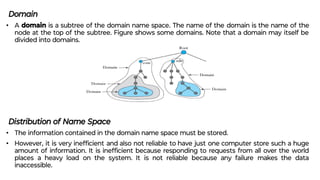
Domain
• A domain is a subtree of the domain name space. The name of the domain is the name of the
node at the top of the subtree. Figure shows some domains. Note that a domain may itself be
divided into domains.
Distribution of Name Space
• The information contained in the domain name space must be stored.
• However, it is very inefficient and also not reliable to have just one computer store such a huge
amount of information. It is inefficient because responding to requests from all over the world
places a heavy load on the system. It is not reliable because any failure makes the data
inaccessible.
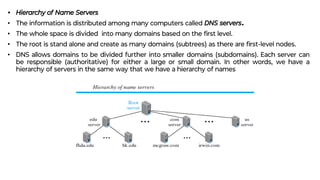
• Hierarchy of Name Servers
• The information is distributed among many computers called DNS servers.
• The whole space is divided into many domains based on the first level.
• The root is stand alone and create as many domains (subtrees) as there are first-level nodes.
• DNS allows domains to be divided further into smaller domains (subdomains). Each server can
be responsible (authoritative) for either a large or small domain. In other words, we have a
hierarchy of servers in the same way that we have a hierarchy of names
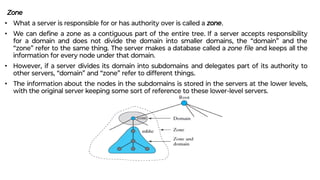
Zone
• What a server is responsible for or has authority over is called a zone.
• We can define a zone as a contiguous part of the entire tree. If a server accepts responsibility
for a domain and does not divide the domain into smaller domains, the “domain” and the
“zone” refer to the same thing. The server makes a database called a zone file and keeps all the
information for every node under that domain.
• However, if a server divides its domain into subdomains and delegates part of its authority to
other servers, “domain” and “zone” refer to different things.
• The information about the nodes in the subdomains is stored in the servers at the lower levels,
with the original server keeping some sort of reference to these lower-level servers.
Root Server
• A root server is a server whose zone consists of the whole tree.
• A root server usually does not store any information about domains but delegates
its authority to other servers, keeping references to those servers.
• There are several root servers, each covering the whole domain name space. The
root servers are distributed all around the world
Primary and Secondary Servers
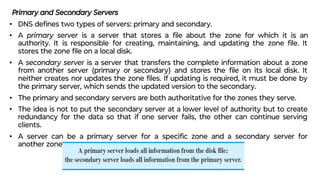
• DNS defines two types of servers: primary and secondary.
• A primary server is a server that stores a file about the zone for which it is an
authority. It is responsible for creating, maintaining, and updating the zone file. It
stores the zone file on a local disk.
• A secondary server is a server that transfers the complete information about a zone
from another server (primary or secondary) and stores the file on its local disk. It
neither creates nor updates the zone files. If updating is required, it must be done by
the primary server, which sends the updated version to the secondary.
• The primary and secondary servers are both authoritative for the zones they serve.
• The idea is not to put the secondary server at a lower level of authority but to create
redundancy for the data so that if one server fails, the other can continue serving
clients.
• A server can be a primary server for a specific zone and a secondary server for
another zone.
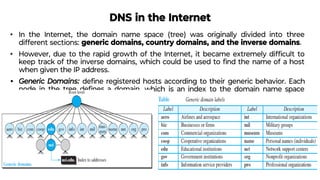
DNS in the Internet
• In the Internet, the domain name space (tree) was originally divided into three
different sections: generic domains, country domains, and the inverse domains.
• However, due to the rapid growth of the Internet, it became extremely difficult to
keep track of the inverse domains, which could be used to find the name of a host
when given the IP address.
• Generic Domains: define registered hosts according to their generic behavior. Each
node in the tree defines a domain, which is an index to the domain name space
database.
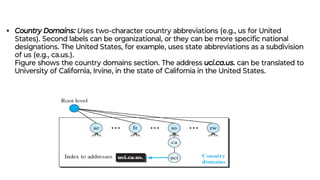
• Country Domains: Uses two-character country abbreviations (e.g., us for United
States). Second labels can be organizational, or they can be more specific national
designations. The United States, for example, uses state abbreviations as a subdivision
of us (e.g., ca.us.).
Figure shows the country domains section. The address uci.ca.us. can be translated to
University of California, Irvine, in the state of California in the United States.
Resolution
• Mapping a name to an address is called name-address resolution.
• A host that needs to map an address to a name or a name to an address calls a DNS client
called a resolver.
• The resolver accesses the closest DNS server with a mapping request. If the server has the
information, it satisfies the resolver; otherwise, it either refers the resolver to other servers
or asks other servers to provide the information.
• After the resolver receives the mapping, it interprets the response to see if it is a real
resolution or an error, and finally delivers the result to the process that requested it.
• A resolution can be either recursive or iterative.
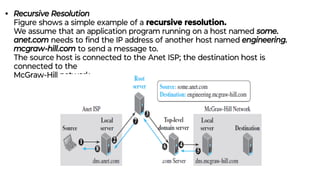
• Recursive Resolution
Figure shows a simple example of a recursive resolution.
We assume that an application program running on a host named some.
anet.com needs to find the IP address of another host named engineering.
mcgraw-hill.com to send a message to.
The source host is connected to the Anet ISP; the destination host is
connected to the
McGraw-Hill network.
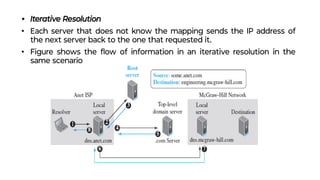
• Iterative Resolution
• Each server that does not know the mapping sends the IP address of
the next server back to the one that requested it.
• Figure shows the flow of information in an iterative resolution in the
same scenario
Caching
• Each time a server receives a query for a name that is not in its domain, it needs to search its database
for a server IP address.
• Reduction of this search time would increase efficiency. DNS handles this with a mechanism called
caching.
• When a server asks for a mapping from another server and receives the response, it stores this
information in its cache memory before sending it to the client. If the same or another client asks for
the same mapping, it can check its cache memory and resolve the problem.
• However, to inform the client that the response is coming from the cache memory and not from an
authoritative source, the server marks the response as unauthoritative.
• If a server caches a mapping for a long time, it may send an outdated mapping to the client.
• To counter this, two techniques are used.
• First, the authoritative server always adds information to the mapping called time to live (TTL). It defines
the time in seconds that the receiving server can cache the information. After that time, the mapping is
invalid and any query must be sent again to the authoritative server.
• Second, DNS requires that each server keep a TTL counter for each mapping it caches. The cache
memory must be searched periodically and those mappings with an expired TTL must be purged.
Resource Records
• The zone information associated with a server is implemented as a set of resource
records.
• A name server stores a database of resource records.
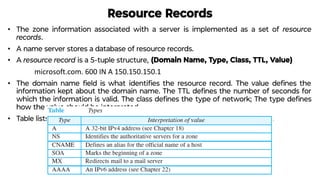
• A resource record is a 5-tuple structure, (Domain Name, Type, Class, TTL, Value)
microsoft.com. 600 IN A 150.150.150.1
• The domain name field is what identifies the resource record. The value defines the
information kept about the domain name. The TTL defines the number of seconds for
which the information is valid. The class defines the type of network; The type defines
how the value should be interpreted.
• Table lists the common types and how the value is interpreted for each type.
DNS Messages
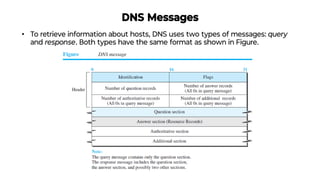
• To retrieve information about hosts, DNS uses two types of messages: query
and response. Both types have the same format as shown in Figure.
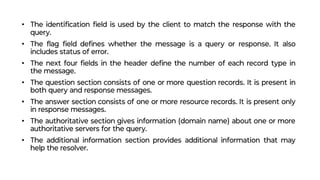
• The identification field is used by the client to match the response with the
query.
• The flag field defines whether the message is a query or response. It also
includes status of error.
• The next four fields in the header define the number of each record type in
the message.
• The question section consists of one or more question records. It is present in
both query and response messages.
• The answer section consists of one or more resource records. It is present only
in response messages.
• The authoritative section gives information (domain name) about one or more
authoritative servers for the query.
• The additional information section provides additional information that may
help the resolver.
Encapsulation
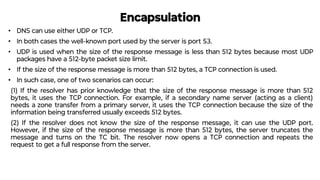
• DNS can use either UDP or TCP.
• In both cases the well-known port used by the server is port 53.
• UDP is used when the size of the response message is less than 512 bytes because most UDP
packages have a 512-byte packet size limit.
• If the size of the response message is more than 512 bytes, a TCP connection is used.
• In such case, one of two scenarios can occur:
(1) If the resolver has prior knowledge that the size of the response message is more than 512
bytes, it uses the TCP connection. For example, if a secondary name server (acting as a client)
needs a zone transfer from a primary server, it uses the TCP connection because the size of the
information being transferred usually exceeds 512 bytes.
(2) If the resolver does not know the size of the response message, it can use the UDP port.
However, if the size of the response message is more than 512 bytes, the server truncates the
message and turns on the TC bit. The resolver now opens a TCP connection and repeats the
request to get a full response from the server.
Registrars
• New domains are added to DNS through a registrar, a commercial entity
accredited by ICANN.
• A registrar first verifies that the requested domain name is unique and then
enters it into the DNS database. A fee is charged.
• Today, there are many registrars; their names and addresses can be found at
http://www.intenic.net
• To register, the organization needs to give the name of its server and the IP
address of the server. For example, a new commercial organization named
wonderful with a server named ws and IP address 200.200.200.5 needs to
give the following information to one of the registrars:
Domain name: ws.wonderful.com IP address: 200.200.200.5
DDNS
• In DNS, when there is a change, such as adding a new host, removing a host, or
changing an IP address, the change must be made to the DNS master file.
• These types of changes involve a lot of manual updating. The size of today’s Internet
does not allow for this kind of manual operation.
• The DNS master file must be updated dynamically. The Dynamic Domain Name
System (DDNS) therefore was devised to respond to this need.
• In DDNS, when a binding between a name and an address is determined, the information
is sent, usually by to a primary DNS server.
• The primary server updates the zone.
• The secondary servers are notified either actively or passively.
• In active notification, the primary server sends a message to the secondary servers
about the change in the zone, whereas in passive notification, the secondary servers
periodically check for any changes.
• In either case, after being notified about the change, the secondary server requests
information about the entire zone (called the zone transfer).
• To provide security and prevent unauthorized changes in the DNS records, DDNS can use
Security of DNS
• DNS is one of the most important systems in the Internet infrastructure; it provides
crucial services to Internet users.
• Applications such as Web access or e-mail are heavily dependent on the proper
operation of DNS.
• DNS can be attacked in several ways including:
1. The attacker may read the response of a DNS server to find the nature or names of
sites the user mostly accesses. This type of information can be used to find the user’s
profile. To prevent this attack, DNS messages need to be confidential.
2. The attacker may intercept the response of a DNS server and change it or create a
totally new bogus response to direct the user to the site or domain the attacker wishes
the user to access. This type of attack can be prevented using message origin
authentication and message integrity.
3. The attacker may flood the DNS server to overwhelm it or eventually crash it. This type
of attack can be prevented using the provision against denial-of-service attack.
• To protect DNS, IETF has devised a technology named DNS Security (DNSSEC) that
provides message origin authentication and message integrity using a security service
called digital signature. DNSSEC, however, does not provide confidentiality for the DNS

Module notes artificial intelligence and

  • 1.
  • 2.
    • The applicationlayer provides services to the user. • Communication is provided using a logical connection, which means that the two application layers assume that there is an imaginary direct connection through which they can send and receive messages
  • 3.
    Providing Services • Theprotocols in this layer do not provide services to any other protocol in the suite; they only receive services from the protocols in the transport Layer • New protocols can be also be added to this layer as long as the new protocols can use the services provided by one of the transport-layer protocols.
  • 4.
    Standard and NonstandardProtocols • To provide smooth operation of the Internet, the protocols used in the first four layers of the TCP/IP suite need to be standardized and documented. • They normally become part of the package that is included in operating systems such as Windows or UNIX. • To be flexible, however, the application-layer protocols can be both standard and nonstandard.
  • 5.
    Standard Application-Layer Protocols Eachstandard protocol is a pair of computer programs that interact with the user and the transport layer to provide a specific service to the user. Nonstandard Application-Layer Protocols A private company can create a new customized application protocol to communicate with all of its offices around the world using the services provided by the first four layers of the TCP/IP protocol suite without using any of the standard application programs.
  • 6.
    Application-Layer Paradigms • Touse the Internet we need two application programs to interact with each other: one running on a computer somewhere in the world, the other running on another computer somewhere else in the world • The client-server paradigm and the peer-to-peer paradigm.
  • 7.
    Traditional Paradigm: Client-Server •In this paradigm, the service provider is an application program, called the server process; it runs continuously, waiting for another application program, called the client process, to make a connection through the Internet and ask for service. • There are normally some server processes that can provide a specific type of service, but there are many clients that request service from any of these server processes.
  • 9.
    New Paradigm: Peer-to-Peer •A new paradigm, called the peer-to-peer paradigm (often abbreviated P2P paradigm) has emerged to respond to the needs of some new applications. • In this paradigm, there is no need for a server process to be running all the time and waiting for the client processes to connect. The responsibility is shared between peers. • A computer connected to the Internet can provide service at one time and receive service at another time. • A computer can even provide and receive services at the same time.
  • 11.
    Mixed Paradigm • Anapplication may choose to use a mixture of the two paradigms by combining the advantages of both. • For example, a light-load client-server communication can be used to find the address of the peer that can offer a service. • When the address of the peer is found, the actual service can be received from the peer by using the peer-to peer paradigm.
  • 12.
    WORLD WIDE WEBAND HTTP World Wide Web • The idea of the Web was first proposed by Tim Berners-Lee in 1989, commercial Web started in the early 1990s. • The European Organization for Nuclear Research, to allow several researchers at different locations throughout Europe to access each others’ researches. • The Web today is a repository of information in which the documents, called web pages, are distributed all over the world and related documents are linked together. • Distribution allows the growth of the Web. Each web server in the world can add a new web page to the repository and announce it to all Internet users without overloading a few servers. • Linking allows one web page to refer to another web page stored in another server somewhere else in the world. The linking of web pages was achieved using a concept called hypertext, • The idea was to use a machine that automatically retrieved another document stored in the system when a link to it appeared in the document. • The Web implemented this idea electronically to allow the linked document to be retrieved when the link was clicked by the user. • Term hypertext, coined to mean linked text documents, has been changed to hypermedia, to show that a web page can be a text document, an image, an audio file, or a video file.
  • 13.
    Architecture • The WWWtoday is a distributed client-server service, in which a client using a browser can access a service using a server. • The service provided is distributed over many locations called sites. • Each site holds one or more web pages. Each web page, however, can contain some links to other web pages in the same or other sites. • A web page can be simple or composite. • A simple web page has no links to other web pages; a composite web page has one or more links to other web pages. • Each web page is a file with a name and address.
  • 15.
    Web Client (Browser) •A variety of vendors offer commercial browsers that interpret and display a web page, and all of them use nearly the same architecture. • Each browser usually consists of three parts: a controller, client protocols, and interpreters. • The controller receives input from the keyboard or the mouse and uses the client programs to access the document. • After the document has been accessed, the controller uses one of the interpreters to display the document on the screen. • The client protocol can be one of the protocols, such as HTTP or FTP. • The interpreter can be HTML, Java, or JavaScript, depending on the type of document. • Some commercial browsers include Internet Explorer, Netscape Navigator, and Firefox.
  • 17.
    Web Server • Theweb page is stored at the server. • Each time a request arrives, the corresponding document is sent to the client. To improve efficiency, servers normally store requested files in a cache in memory; memory is faster to access than a disk. • A server can also become more efficient through multithreading or multiprocessing. • A server can answer more than one request at a time. • Some popular web servers include Apache and Microsoft Internet Information Server.
  • 18.
    Uniform Resource Locator(URL) • A web page, as a file, needs to have a unique identifier to distinguish it from other web pages. • To define a web page, we need three identifiers: host, port, and path. • Four identifiers are needed to define the web page. • The first is the type of vehicle to be used to fetch the web page; the last three make up the combination that defines the destination object (web page).
  • 19.
    • Protocol. Thefirst identifier is the abbreviation for the client-server program that we need in order to access the web page. Although most of the time the protocol is HTTP (HyperText Transfer Protocol), we can also use other protocols such as FTP (File Transfer Protocol). • Host. The host identifier can be the IP address of the server or the unique name given to the server. IP addresses can be defined in dotted decimal notation; the name is normally the domain name that uniquely defines the host, such as forouzan.com, • Port. The port, a 16-bit integer, is normally predefined for the client-server application. For example, if the HTTP protocol is used for accessing the web page, the well-known port number is 80. • Path. The path identifies the location and the name of the file in the underlying operating system. The format of this identifier normally depends on the operating system. In UNIX, a path is a set of directory names followed by the file name, all separated by a slash. For example, /top/next/last/myfile is a path that uniquely defines a file named myfile, stored in the directory last, which itself is part of the directory next, which itself is under the directory top. The path lists the directories from the top to the bottom, followed by the file name.
  • 20.
    • To combinethese four pieces together, the uniform resource locator (URL) has been designed; it uses three different separators between the four pieces
  • 21.
    Web Documents The documentsin the WWW can be grouped into three broad categories: static, dynamic, and active. Static documents are fixed-content documents that are created and stored in a server. • The client can get a copy of the document only. • The contents of the file are determined when the file is created, not when it is used. • The contents in the server can be changed, but the user cannot change them. • When a client accesses the document, a copy of the document is sent. • The user can then use a browser to see the document. • Static documents are prepared using one of several languages: HyperText Markup Language (HTML), Extensible Markup Language (XML), Extensible Style Language (XSL), and Extensible Hypertext Markup Language (XHTML).
  • 22.
    Dynamic Documents • Adynamic document is created by a web server whenever a browser requests the document. • When a request arrives, the web server runs an application program or a script that creates the dynamic document. • The server returns the result of the program or script as a response to the browser that requested the document. • Because a fresh document is created for each request, the contents of a dynamic document may vary from one request to another. • Example: Retrieval of the time and date from a server. • The client can ask the server to run a program such as the date program in UNIX and send the result of the program to the client. • Common Gateway Interface (CGI) was used to retrieve a dynamic document in the past, • Today’s options include one of the scripting languages such as Java Server Pages (JSP), which uses the Java language for scripting, or Active Server Pages (ASP), a Microsoft product that uses Visual Basic language for scripting, or ColdFusion, which embeds queries in a Structured Query Language (SQL) database in the HTML
  • 23.
    Active Documents • Formany applications, we need a program or a script to be run at the client site. These are called active documents. • For example, suppose we want to run a program that creates animated graphics on the screen or a program that interacts with the user. The program definitely needs to be run at the client site where the animation or interaction takes place. • When a browser requests an active document, the server sends a copy of the document or a script. The document is then run at the client (browser) site. • One way to create an active document is to use Java applets, a program written in Java on the server. It is compiled and ready to be run. • The document is in bytecode (binary) format. Another way is to use JavaScripts but download and run the script at the client site.
  • 24.
    HyperText Transfer Protocol(HTTP) • The HyperText Transfer Protocol (HTTP) is used to define how the client-server programs can be written to retrieve web pages from the Web. • An HTTP client sends a request; an HTTP server returns a response. The server uses the port number 80; the client uses a temporary port number. • HTTP uses the services of TCP, a connection-oriented and reliable protocol. • The client and server, do not need to worry about errors in messages, exchanged or loss of any message, because the TCP is reliable
  • 25.
    Nonpersistent versus PersistentConnections • The hypertext concept embedded in web page documents may require several requests and responses. • If the web pages, objects to be retrieved, are located on different servers, we do not have any other choice than to create a new TCP connection for retrieving each object. • If some of the objects are located on the same server, we have two choices: to retrieve each object using a new TCP connection or to make a TCP connection and retrieve them all. • The first method is referred to as a nonpersistent connection, • The second as a persistent connection. HTTP, prior to version 1.1, specified nonpersistent connections, while persistent connections are the default in version 1.1, but it can be changed by the user.
  • 26.
    Nonpersistent Connections • Ina nonpersistent connection, one TCP connection is made for each request/response. • The following lists the steps in this strategy: 1. The client opens a TCP connection and sends a request. 2. The server sends the response and closes the connection. 3. The client reads the data until it encounters an end-of-file marker; it then closes the connection. • In this strategy, if a file contains links to N different pictures in different files (all located on the same server), the connection must be opened and closed N + 1 times. • The nonpersistent strategy imposes high overhead on the server because the server needs N + 1 different buffers each time a connection is opened.
  • 27.
    Figure shows anexample of a nonpersistent connection.
  • 28.
    Persistent Connections • HTTPversion 1.1 specifies a persistent connection by default. • In a persistent connection, the server leaves the connection open for more requests after sending a response. • The server can close the connection at the request of a client or if a time-out has been reached. • The sender usually sends the length of the data with each response. • There are some occasions when the sender does not know the length of the data. This is the case when a document is created dynamically or actively. In these cases, the server informs the client that the length is not known and closes the connection after sending the data so the client knows that the end of the data has been reached. • Time and resources are saved using persistent connections. • Only one set of buffers and variables needs to be set for the connection at each site. The round trip time for connection establishment and connection termination is saved.
  • 29.
    Figure shows anexample of a persistent connection.
  • 30.
    Message Formats • TheHTTP protocol defines the format of the request and response messages, as shown in Figure. • Each message is made of four sections. The first section in the request message is called the request line; the first section in the response message is called the status line. • The other three sections have the same names in the request and response messages.
  • 31.
    Request Message • Thefirst line in a request message is called a request line. • There are three fields in this line separated by one space and terminated by two characters (carriage return and line feed) • The fields are called method, URL, and version. • The method field defines the request types. • In version 1.1 of HTTP, several methods are defined, as shown in Table • Most of the time, the client uses the GET method to send a request. • In this case, the body of the message is empty. The HEAD method is used when the client needs only some information about the web page from the server, such as the last time it was modified. • It can also be used to test the validity of a URL.
  • 32.
    • After therequest line, we can have zero or more request header lines. • Each header line sends additional information from the client to the server. • For example, the client can request that the document be sent in a special format. • Each header line has a header name, a colon, a space, and a header value. • Table shows some header names commonly used in a request.
  • 33.
    Response Message • Aresponse message consists of a status line, header lines, a blank line, and sometimes a body. • The first line in a response message is called the status line. There are three fields in this line separated by spaces and terminated by a carriage return and line feed. • The first field defines the version of HTTP protocol, currently 1.1. The status code field defines the status of the request. • It consists of three digits. Whereas the codes in the 100 range are only informational, the codes in the 200 range indicate a successful request. The codes in the 300 range redirect the client to another URL, the codes in the 400 range indicate an error at the client site. Finally, the codes in the 500 range indicate an error at the server site. • After the status line, we can have zero or more response header lines. • Each header line sends additional information from the server to the client. • For example, the sender can send extra information about the document. • Each header line has a header name, a colon, a space, and a header value.
  • 34.
    Table shows someheader names commonly used in a response message.
  • 35.
    Get message andresponse from server
  • 36.
    Cookies • The WorldWide Web was originally designed as a stateless entity. • A client sends a request; a server responds. • The original purpose of the Web, retrieving publicly available documents, exactly fits this design. • Today the Web has other functions and some are listed below: ❑ Websites are being used as electronic stores that allow users to browse through the store, select wanted items, put them in an electronic cart, and pay at the end with a credit card. ❑ Some websites need to allow access to registered clients only. ❑ Some websites are used as portals: the user selects the web pages he wants to see. ❑ Some websites are just advertising agencies.
  • 37.
    Creating and StoringCookies The creation and storing of cookies depend on the implementation; however, the principle is the same. 1. When a server receives a request from a client, it stores information about the client in a file or a string. The information may include the domain name of the client, the contents of the cookie a timestamp, and other information depending on the implementation. 2. The server includes the cookie in the response that it sends to the client. 3. When the client receives the response, the browser stores the cookie in the cookie directory, which is sorted by the server domain name.
  • 38.
    Using Cookies • Whena client sends a request to a server, the browser looks in the cookie directory to see if it can find a cookie sent by that server. If found, the cookie is included in the request. • When the server receives the request, it knows that this is an old client, not a new one. The contents of the cookie are never read by the browser or disclosed to the user. • It is a cookie made by the server and eaten by the server. ❑ An electronic store (e-commerce) can use a cookie for its client shoppers. ❑ The site that restricts access to registered clients only sends a cookie to the client when the client registers for the first time. For any repeated access, only those clients that send the appropriate cookie are allowed. ❑ A web portal uses the cookie in a similar way. When a user selects her favorite pages, a cookie is made and sent. If the site is accessed again, the cookie is sent to the server to show what the client is looking for. ❑ A cookie is also used by advertising agencies. An advertising agency can place banner ads on some main website that is often visited by users. The advertising agency supplies only a URL that
  • 39.
    Web Caching: ProxyServers • HTTP supports proxy servers. A proxy server is a computer that keeps copies of responses to recent requests. • The HTTP client sends a request to the proxy server. The proxy server checks its cache. If the response is not stored in the cache, the proxy server sends the request to the corresponding server. • Incoming responses are sent to the proxy server and stored for future requests from other clients. • The proxy server reduces the load on the original server, decreases traffic, and improves latency. • To use the proxy server, the client must be configured to access the proxy instead of the target server. • The proxy server acts as both server and client. When it receives a request from a client for which it has a response, it acts as a server and sends the response to the client. • When it receives a request from a client for which it does not have a response, it first
  • 40.
    Proxy Server Location •The proxy servers are normally located at the client site. This means that we can have a hierarchy of proxy servers, as shown below: 1. A client computer can also be used as a proxy server, in a small capacity, that stores responses to requests often invoked by the client. 2. In a company, a proxy server may be installed on the computer LAN to reduce the load going out of and coming into the LAN. 3. An ISP with many customers can install a proxy server to reduce the load going out of and coming into the ISP network.
  • 41.
  • 42.
    Cache Update • Howlong a response should remain in the proxy server before being deleted and replaced. • Several different strategies are used for this purpose. • One solution is to store the list of sites whose information remains the same for a while. • Another recommendation is to add some headers to show the last modification time of the information. HTTP Security • HTTP per se (alone) does not provide security. • HTTP can be run over the Secure Socket Layer (SSL). • HTTP is referred to as HTTPS. HTTPS provides confidentiality, client and server authentication, and data integrity.
  • 43.
    File Transfer Protocol(FTP) • FTP is the standard protocol provided by TCP/IP for copying a file from one host to another. • Although data can transfer files using HTTP, FTP is a better choice to transfer large files or to transfer files using different formats. • The client has three components: the user interface, the client control process, and the client data transfer process. • The server has two components: the server control process and the server data transfer process. • The control connection is made between the control processes. The data connection is made between the data transfer processes. • Separation of commands & data transfer makes efficient. • The control connection uses very simple rules of communication. • We need to transfer only a line of command or a line of response at a time. • The data connection, needs more complex rules.
  • 44.
    Two Connections • Thetwo connections in FTP have different lifetimes. • The control connection remains connected during the entire interactive FTP session. • The data connection is opened and then closed for each file transfer activity. • It opens each time commands that involve transferring files are used, and it closes when the file is transferred. • when a user starts an FTP session, the control connection opens. • While the control connection is open, the data connection can be opened and closed multiple times if several files are transferred. • FTP uses two well-known TCP ports: port 21 is used for the control connection, and port 20 is used for the data connection.
  • 45.
    Control Connection • Forcontrol communication, FTP uses the same approach as TELNET. • It uses the NVT ASCII character set as used by TELNET. • Communication is achieved through commands and responses. This simple method is adequate for the control connection because we send one command (or response) at a time. • Each line is terminated with a two-character (carriage return and line feed) end-of- line token. • During this control connection, commands are sent from the client to the server and responses are sent from the server to the client. • Commands, which are sent from the FTP client control process, are in the form of ASCII uppercase, which may or may not be followed by an argument.
  • 46.
    Some of themost common commands are shown in Table
  • 47.
    • Every FTPcommand generates at least one response. • A response has two parts: a three-digit number followed by text. • The numeric part defines the code; the text part defines needed parameters or further explanations. • The first digit defines the status of the command. • The second digit defines the area in which the status applies. • The third digit provides additional information. • Table shows some common responses.
  • 48.
    Data Connection • Thedata connection uses the well-known port 20 at the server site. • The following steps are for data connection: 1. The client, not the server, issues a passive open using an ephemeral port. This must be done by the client because it is the client that issues the commands for transferring files. 2. Using the PORT command the client sends this port number to the server. 3. The server receives the port number and issues an active open using the well- known port 20 and the received ephemeral port number. An ephemeral port is a communications endpoint of a transport layer protocol of the Internet protocol suite that is used for only a short period of time for the duration of a communication session.
  • 49.
    Communication over DataConnection • The purpose and implementation of the data connection are different from those of the control connection. • We want to transfer files through the data connection. • The client must define the type of file to be transferred, the structure of the data, and the transmission mode. • The heterogeneity problem is resolved by defining three attributes of communication: file type, data structure, and transmission mode. • File Type FTP can transfer one of the file types across the data connection: ASCII file, EBCDIC file, or image file. • Data Structure FTP can transfer a file across the data connection using one of the following interpretations of the structure of the data: file structure, record structure, or page structure. • The file structure format (used by default) has no structure. It is a continuous stream of bytes. • In the record structure, the file is divided into records. This can be used only with text files. • In the page structure, the file is divided into pages, with each page having a page number and a page header. The pages can be stored and accessed
  • 50.
    • Transmission ModeFTP can transfer a file across the data connection using one of the three transmission modes: stream mode, block mode, or compressed mode. • The stream mode is the default mode; data are delivered from FTP to TCP as a continuous stream of bytes. • In the block mode, data can be delivered from FTP to TCP in blocks. Each block is preceded by a 3-byte header. The first byte is called the block descriptor; the next two bytes define the size of the block in bytes.
  • 51.
    File Transfer • Filetransfer in FTP means one of three things: retrieving a file (server to client), storing a file (client to server), and directory listing (server to client).
  • 52.
    Security for FTP •FTP requires a password, the password is sent in plaintext (unencrypted), which means it can be intercepted and used by an attacker. • The data transfer connection also transfers data in plaintext, which is insecure. • To be secure, one can add a Secure Socket Layer between the FTP application layer and the TCP layer. In this case FTP is called SSL-FTP.
  • 53.
    ELECTRONIC MAIL • Electronicmail (or e-mail) allows users to exchange messages. • In an application such as HTTP or FTP, the server program is running all the time, waiting for a request from a client. It has request (client) and response(server). • e-mail is considered a one-way transaction. The client/server programming should be implemented in another way: using some intermediate computers (servers). • The users run only client programs when they want and the intermediate servers apply the client/server paradigm.
  • 54.
  • 55.
    • In thecommon scenario, the sender and the receiver of the e-mail, Alice and Bob respectively, are connected via a LAN or a WAN to two mail servers. • A simple e-mail from Alice to Bob takes nine different steps, as shown in the figure. • Alice and Bob use three different agents: a user agent (UA), a message transfer agent (MTA), and a message access agent (MAA). • The electronic mail system needs two UAs, two pairs of MTAs (client and server), and a pair of MAAs (client and server). • User Agent
  • 56.
    User Agent • useragent (UA) provides service to the user to make the process of sending and receiving a message easier. • It is a software package (program) that composes, reads, replies to, and forwards messages. • It also handles local mailboxes on the user computers. • There are two types of user agents: command-driven and GUI-based. • A command-driven UA normally accepts a one character command from the keyboard to perform its task. Examples: mail, pine, and elm. • Modern user agents are GUI-based which contain graphical user interface (GUI) components that allow the user to interact with the software by using both the keyboard and the mouse. Examples: Eudora and Outlook. Sending Mail • It has an envelope and a message. • The envelope usually contains the sender address, the receiver address, and other information. • The message contains the header and the body. • The header of the message defines the sender, the receiver, the subject of the message, and some other information. • The body of the message contains the actual information to be read by the recipient
  • 57.
    Receiving Mail • TheUA is triggered by the user (or a timer). • If a user has mail, the UA informs the user with a notice. • If the user is ready to read the mail, a list is displayed in which each line contains a summary of the information about a particular message in the mailbox. • The summary usually includes the sender mail address, the subject, and the time the mail was sent or received. • The user can select any of the messages and display its contents on the screen. Addresses • To deliver mail, a mail handling system must use an addressing system with unique addresses. • In the Internet, the address consists of two parts: a local part and a domain name, separated by an @ sign. • The local part defines the name of a special file, called the user mailbox, where all the mail received for a user is stored for retrieval by the message access agent. • The second part of the address is the domain name. An organization usually selects one or more hosts to receive and send e-mail; they are sometimes called mail servers or exchangers.
  • 58.
  • 59.
    Mailing List orGroup List • Electronic mail allows one name, an alias, to represent several different e-mail addresses; this is called a mailing list. • Every time a message is to be sent, the system checks the recipient’s name against the alias database; if there is a mailing list for the defined alias, separate messages, one for each entry in the list, must be prepared and handed to the MTA.
  • 60.
    Message Transfer Agent:SMTP • The protocol that defines the MTA client and server is called Simple Mail Transfer Protocol (SMTP). • SMTP is used two times, between the sender and the sender’s mail server and between the two mail servers. • SMTP simply defines how commands and responses must be sent back and forth.
  • 61.
    Commands and Responses •SMTP uses commands and responses to transfer messages between an MTA client and an MTA server. • The command is from an MTA client to an MTA server; the response is from an MTA server to the MTA client. The format of a command is Keyword: argument(s) • Each command or reply is terminated by a two character (carriage return and line feed) end-of-line token.
  • 62.
    Mail Transfer Phases •The process of transferring a mail message occurs in three phases: connection establishment, mail transfer, and connection termination. • Connection Establishment After a client has made a TCP connection to the well-known port 25, the SMTP server starts the connection phase. This phase involves the following three steps: 1. The server sends code 220 (service ready) to tell the client that it is ready to receive mail. If the server is not ready, it sends code 421 (service not available). 2. The client sends the HELO message to identify itself, using its domain name address. This step is necessary to inform the server of the domain name of the client. 3. The server responds with code 250 (request command completed) or some other code depending on the situation.
  • 63.
    • Message TransferAfter connection has been established between the SMTP client and server, a single message between a sender and one or more recipients can be exchanged. This phase involves eight steps. Steps 3 and 4 are repeated if there is more than one recipient. 1. The client sends the MAIL FROM message to introduce the sender of the message. It includes the mail address of the sender (mailbox and the domain name). 2. The server responds with code 250 or some other appropriate code. 3. The client sends the RCPT TO (recipient) message, which includes the mail address of the recipient. 4. The server responds with code 250 or some other appropriate code. 5. The client sends the DATA message to initialize the message transfer. 6. The server responds with code 354 (start mail input) or some other appropriate message. 7. The client sends the contents of the message in consecutive lines. 8. The server responds with code 250 (OK) or some other appropriate code. • Connection Termination After the message is transferred successfully, the client terminates the connection. This phase involves two steps. 1. The client sends the QUIT command. 2. The server responds with code 221 or some other appropriate code.
  • 65.
    Message Access Agent:POP and IMAP • Currently two message access protocols are available: Post Office Protocol, version 3 (POP3) and Internet Mail Access Protocol, version 4 (IMAP4). • The client POP3 software is installed on the recipient computer; the server POP3 software is installed on the mail server. • POP3 has two modes: the delete mode and the keep mode. • In the delete mode, the mail is deleted from the mailbox after each retrieval. • In the keep mode, the mail remains in the mailbox after retrieval.
  • 66.
    IMAP4 IMAP4 provides thefollowing extra functions: ❑ A user can check the e-mail header prior to downloading. ❑ A user can search the contents of the e-mail for a specific string of characters prior to downloading. ❑ A user can partially download e-mail. This is especially useful if bandwidth is limited and the e-mail contains multimedia with high bandwidth requirements. ❑ A user can create, delete, or rename mailboxes on the mail server. ❑ A user can create a hierarchy of mailboxes in a folder for e-mail storage.
  • 67.
    Multipurpose Internet MailExtensions (MIME) • It is a supplementary protocol that allows non-ASCII data to be sent through e-mail. • MIME transforms non-ASCII data at the sender site to NVT ASCII data and delivers it to the client MTA to be sent through the Internet. • The message at the receiving site is transformed back to the original data.
  • 68.
    MIME Headers MIME definesfive headers, which can be added to the original e-mail header section to define the transformation parameters: MIME-Version This header defines the version of MIME used. The current version is 1.1. Content-Type This header defines the type of data used in the body of the message. The content type and the content subtype are separated by a slash. Content-Transfer-Encoding This header defines the method used to encode the messages into 0s and 1s for transport. Content-ID This header uniquely identifies the whole message in a multiple message environment. Content-Description This header defines whether the body is image, audio, or video.
  • 70.
    Web-Based Mail • E-mailis such a common application that some websites today provide this service to anyone who accesses the site. • Three common sites are Hotmail, Yahoo, and Google mail.
  • 71.
    Case I • Inthe first case, Alice, the sender, uses a traditional mail server; Bob, the receiver, has an account on a web-based server. • Mail transfer from Alice’s browser to her mail server is done through SMTP. • The transfer of the message from the sending mail server to the receiving mail server is still through SMTP. • The message from the receiving server (the web server) to Bob’s browser is done through HTTP. • Instead of using POP3 or IMAP4, HTTP is normally used. • When Bob needs to retrieve his e-mails, • He sends a request HTTP message to the website (Hotmail, for example). • The website sends a form to be filled in by Bob, which includes the log-in name and the password. • If the log-in name and password match, the list of e-mails is transferred from the web server to Bob’s browser in HTML format. • Bob can browse through his received e-mails and then, using more HTTP transactions, can get his e-mails one by one.
  • 72.
    Case II • Inthe second case, both Alice and Bob use web servers, but not necessarily the same server. • Alice sends the message to the web server using HTTP transactions. • Alice sends an HTTP request message to her web server using the name and address of Bob’s mailbox as the URL. • The server at the Alice site passes the message to the SMTP client and sends it to the server at the Bob site using SMTP protocol. • Bob receives the message using HTTP transactions. • However, the message from the server at the Alice site to the server at the Bob site still takes place using SMTP protocol.
  • 73.
    E-Mail Security • e-mailexchanges can be secured using two application-layer securities designed in particular for e-mail systems. • Two of these protocols, Pretty Good Privacy (PGP) and Secure/ Multipurpose Internet Mail Extensions (S/MIME)
  • 74.
    DOMAIN NAME SYSTEM(DNS) • The Internet needs to have a directory system that can map a name to an IP addresses. • The Internet is so huge today, a central directory system cannot hold all the mapping and if the central computer fails, the whole communication network will collapse. • The information is distributed among many computers in the world. • In this method, the host that needs mapping can contact the closest computer holding the needed information. This method is used by the Domain Name System (DNS). • Figure shows how TCP/IP uses a DNS client and a DNS server to map a name to an address. • A user wants to use a file transfer client to access the corresponding file transfer server running on a remote host. The user knows only the file transfer server name, such as afilesource.com. • However, the TCP/IP suite needs the IP address of the file transfer server to make the connection.
  • 76.
    The following sixsteps map the host name to an IP address: 1. The user passes the host name to the file transfer client. 2. The file transfer client passes the host name to the DNS client. 3. Each computer, after being booted, knows the address of one DNS server. The DNS client sends a message to a DNS server with a query that gives the file transfer server name using the known IP address of the DNS server. 4. The DNS server responds with the IP address of the desired file transfer server. 5. The DNS server passes the IP address to the file transfer client. 6. The file transfer client now uses the received IP address to access the file transfer server.
  • 77.
    Name Space • Thenames must be unique because the addresses are unique. • A name space that maps each address to a unique name can be organized in two ways: flat or hierarchical. • In a flat name space, a name is assigned to an address. A name in this space is a sequence of characters without structure. The names may or may not have a common section; if they do, it has no meaning. The main disadvantage of a flat name space is that it cannot be used in a large system such as the Internet because it must be centrally controlled to avoid ambiguity and duplication. • In a hierarchical name space, each name is made of several parts. The first part can define the nature of the organization, the second part can define the name of an organization, the third part can define departments in the organization, and so on.
  • 78.
    Domain Name Space •To have a hierarchical name space, a domain name space was designed. • In this design the names are defined in an inverted-tree structure with the root at the top. The tree can have only 128 levels: level 0 (root) to level 127
  • 79.
    Label • Each nodein the tree has a label, which is a string with a maximum of 63 characters. • The root label is a null string (empty string). DNS requires that children of a node have different labels, which guarantees the uniqueness of the domain names. Domain Name • Each node in the tree has a domain name. A full domain name is a sequence of labels separated by dots (.) • The domain names are always read from the node up to the root. The last label is the label of the root (null). This means that a full domain name always ends in a null label, which means the last character is a dot because the null string is nothing.
  • 80.
    • Figure showssome domain names. • If a label is terminated by a null string, it is called a fully qualified domain name (FQDN). The name must end with a null label, but because null means nothing, the label ends with a dot. • If a label is not terminated by a null string, it is called a partially qualified domain name (PQDN). A PQDN starts from a node, but it does not reach the root. It is used when the name to be resolved belongs to the same site as the client. • Here the resolver can supply the missing part, called the suffix, to create an FQDN.
  • 81.
    Domain • A domainis a subtree of the domain name space. The name of the domain is the name of the node at the top of the subtree. Figure shows some domains. Note that a domain may itself be divided into domains. Distribution of Name Space • The information contained in the domain name space must be stored. • However, it is very inefficient and also not reliable to have just one computer store such a huge amount of information. It is inefficient because responding to requests from all over the world places a heavy load on the system. It is not reliable because any failure makes the data inaccessible.
  • 82.
    • Hierarchy ofName Servers • The information is distributed among many computers called DNS servers. • The whole space is divided into many domains based on the first level. • The root is stand alone and create as many domains (subtrees) as there are first-level nodes. • DNS allows domains to be divided further into smaller domains (subdomains). Each server can be responsible (authoritative) for either a large or small domain. In other words, we have a hierarchy of servers in the same way that we have a hierarchy of names
  • 83.
    Zone • What aserver is responsible for or has authority over is called a zone. • We can define a zone as a contiguous part of the entire tree. If a server accepts responsibility for a domain and does not divide the domain into smaller domains, the “domain” and the “zone” refer to the same thing. The server makes a database called a zone file and keeps all the information for every node under that domain. • However, if a server divides its domain into subdomains and delegates part of its authority to other servers, “domain” and “zone” refer to different things. • The information about the nodes in the subdomains is stored in the servers at the lower levels, with the original server keeping some sort of reference to these lower-level servers.
  • 84.
    Root Server • Aroot server is a server whose zone consists of the whole tree. • A root server usually does not store any information about domains but delegates its authority to other servers, keeping references to those servers. • There are several root servers, each covering the whole domain name space. The root servers are distributed all around the world
  • 85.
    Primary and SecondaryServers • DNS defines two types of servers: primary and secondary. • A primary server is a server that stores a file about the zone for which it is an authority. It is responsible for creating, maintaining, and updating the zone file. It stores the zone file on a local disk. • A secondary server is a server that transfers the complete information about a zone from another server (primary or secondary) and stores the file on its local disk. It neither creates nor updates the zone files. If updating is required, it must be done by the primary server, which sends the updated version to the secondary. • The primary and secondary servers are both authoritative for the zones they serve. • The idea is not to put the secondary server at a lower level of authority but to create redundancy for the data so that if one server fails, the other can continue serving clients. • A server can be a primary server for a specific zone and a secondary server for another zone.
  • 86.
    DNS in theInternet • In the Internet, the domain name space (tree) was originally divided into three different sections: generic domains, country domains, and the inverse domains. • However, due to the rapid growth of the Internet, it became extremely difficult to keep track of the inverse domains, which could be used to find the name of a host when given the IP address. • Generic Domains: define registered hosts according to their generic behavior. Each node in the tree defines a domain, which is an index to the domain name space database.
  • 87.
    • Country Domains:Uses two-character country abbreviations (e.g., us for United States). Second labels can be organizational, or they can be more specific national designations. The United States, for example, uses state abbreviations as a subdivision of us (e.g., ca.us.). Figure shows the country domains section. The address uci.ca.us. can be translated to University of California, Irvine, in the state of California in the United States.
  • 88.
    Resolution • Mapping aname to an address is called name-address resolution. • A host that needs to map an address to a name or a name to an address calls a DNS client called a resolver. • The resolver accesses the closest DNS server with a mapping request. If the server has the information, it satisfies the resolver; otherwise, it either refers the resolver to other servers or asks other servers to provide the information. • After the resolver receives the mapping, it interprets the response to see if it is a real resolution or an error, and finally delivers the result to the process that requested it. • A resolution can be either recursive or iterative.
  • 89.
    • Recursive Resolution Figureshows a simple example of a recursive resolution. We assume that an application program running on a host named some. anet.com needs to find the IP address of another host named engineering. mcgraw-hill.com to send a message to. The source host is connected to the Anet ISP; the destination host is connected to the McGraw-Hill network.
  • 90.
    • Iterative Resolution •Each server that does not know the mapping sends the IP address of the next server back to the one that requested it. • Figure shows the flow of information in an iterative resolution in the same scenario
  • 91.
    Caching • Each timea server receives a query for a name that is not in its domain, it needs to search its database for a server IP address. • Reduction of this search time would increase efficiency. DNS handles this with a mechanism called caching. • When a server asks for a mapping from another server and receives the response, it stores this information in its cache memory before sending it to the client. If the same or another client asks for the same mapping, it can check its cache memory and resolve the problem. • However, to inform the client that the response is coming from the cache memory and not from an authoritative source, the server marks the response as unauthoritative. • If a server caches a mapping for a long time, it may send an outdated mapping to the client. • To counter this, two techniques are used. • First, the authoritative server always adds information to the mapping called time to live (TTL). It defines the time in seconds that the receiving server can cache the information. After that time, the mapping is invalid and any query must be sent again to the authoritative server. • Second, DNS requires that each server keep a TTL counter for each mapping it caches. The cache memory must be searched periodically and those mappings with an expired TTL must be purged.
  • 92.
    Resource Records • Thezone information associated with a server is implemented as a set of resource records. • A name server stores a database of resource records. • A resource record is a 5-tuple structure, (Domain Name, Type, Class, TTL, Value) microsoft.com. 600 IN A 150.150.150.1 • The domain name field is what identifies the resource record. The value defines the information kept about the domain name. The TTL defines the number of seconds for which the information is valid. The class defines the type of network; The type defines how the value should be interpreted. • Table lists the common types and how the value is interpreted for each type.
  • 93.
    DNS Messages • Toretrieve information about hosts, DNS uses two types of messages: query and response. Both types have the same format as shown in Figure.
  • 94.
    • The identificationfield is used by the client to match the response with the query. • The flag field defines whether the message is a query or response. It also includes status of error. • The next four fields in the header define the number of each record type in the message. • The question section consists of one or more question records. It is present in both query and response messages. • The answer section consists of one or more resource records. It is present only in response messages. • The authoritative section gives information (domain name) about one or more authoritative servers for the query. • The additional information section provides additional information that may help the resolver.
  • 95.
    Encapsulation • DNS canuse either UDP or TCP. • In both cases the well-known port used by the server is port 53. • UDP is used when the size of the response message is less than 512 bytes because most UDP packages have a 512-byte packet size limit. • If the size of the response message is more than 512 bytes, a TCP connection is used. • In such case, one of two scenarios can occur: (1) If the resolver has prior knowledge that the size of the response message is more than 512 bytes, it uses the TCP connection. For example, if a secondary name server (acting as a client) needs a zone transfer from a primary server, it uses the TCP connection because the size of the information being transferred usually exceeds 512 bytes. (2) If the resolver does not know the size of the response message, it can use the UDP port. However, if the size of the response message is more than 512 bytes, the server truncates the message and turns on the TC bit. The resolver now opens a TCP connection and repeats the request to get a full response from the server.
  • 96.
    Registrars • New domainsare added to DNS through a registrar, a commercial entity accredited by ICANN. • A registrar first verifies that the requested domain name is unique and then enters it into the DNS database. A fee is charged. • Today, there are many registrars; their names and addresses can be found at http://www.intenic.net • To register, the organization needs to give the name of its server and the IP address of the server. For example, a new commercial organization named wonderful with a server named ws and IP address 200.200.200.5 needs to give the following information to one of the registrars: Domain name: ws.wonderful.com IP address: 200.200.200.5
  • 97.
    DDNS • In DNS,when there is a change, such as adding a new host, removing a host, or changing an IP address, the change must be made to the DNS master file. • These types of changes involve a lot of manual updating. The size of today’s Internet does not allow for this kind of manual operation. • The DNS master file must be updated dynamically. The Dynamic Domain Name System (DDNS) therefore was devised to respond to this need. • In DDNS, when a binding between a name and an address is determined, the information is sent, usually by to a primary DNS server. • The primary server updates the zone. • The secondary servers are notified either actively or passively. • In active notification, the primary server sends a message to the secondary servers about the change in the zone, whereas in passive notification, the secondary servers periodically check for any changes. • In either case, after being notified about the change, the secondary server requests information about the entire zone (called the zone transfer). • To provide security and prevent unauthorized changes in the DNS records, DDNS can use
  • 98.
    Security of DNS •DNS is one of the most important systems in the Internet infrastructure; it provides crucial services to Internet users. • Applications such as Web access or e-mail are heavily dependent on the proper operation of DNS. • DNS can be attacked in several ways including: 1. The attacker may read the response of a DNS server to find the nature or names of sites the user mostly accesses. This type of information can be used to find the user’s profile. To prevent this attack, DNS messages need to be confidential. 2. The attacker may intercept the response of a DNS server and change it or create a totally new bogus response to direct the user to the site or domain the attacker wishes the user to access. This type of attack can be prevented using message origin authentication and message integrity. 3. The attacker may flood the DNS server to overwhelm it or eventually crash it. This type of attack can be prevented using the provision against denial-of-service attack. • To protect DNS, IETF has devised a technology named DNS Security (DNSSEC) that provides message origin authentication and message integrity using a security service called digital signature. DNSSEC, however, does not provide confidentiality for the DNS