Using SMARTboards to Enhance Classroom InstructionBy: Sara Bergstrom
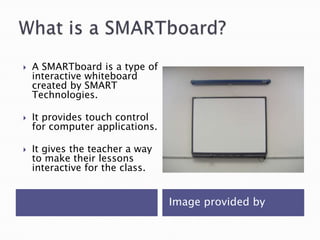
What is a SMARTboard?Image provided by A SMARTboard is a type of interactive whiteboard created by SMART Technologies.It provides touch control for computer applications.It gives the teacher a way to make their lessons interactive for the class.
It was first developed in 1991 and there are 1.6 million used today.SMARTboards are today’s leading brand of interactive whiteboards. They are popular in the educational setting, along with the business world to enhance presentations. When was it developed?
One way is using your finger on the touch sensitive screen to select or move an object.You can also use the SMART pens to write on the board or use the eraser to remove it. How can they be used?
SMARTboards allow a teacher to turn their computer and projector into a powerful teaching tool. Teachers can engage their students and encourage participation. Provides a large display for a teacher to demonstrate how to do somethingWhy use a SMARTboard?
You can save notes taken on the board to a computer file so that you can review them at a later time. There are many interactive games and lessons that you can use to engage your students. Why use a SMARTboard?
SMARTboards can also be great for distance learning opportunities in the classroom.Creates a way for two classrooms to connect with video conferencing. You can also take a class virtual field trip or complete a webquest to build student knowledge on a topic. Distance Education
I have taught second grade for several years and using a SMARTboard to manipulate Base Ten Blocks when demonstrating the concept of regrouping is wonderful! Students can come up and manipulate the blocks to show their understanding and they are all engaged and motivated to learn!Example Lesson
SMARTboards can be expensive.Teacher training is needed.May be difficult for some students to reach the board.Lesson plan preparation time is increased.Possible Drawbacks
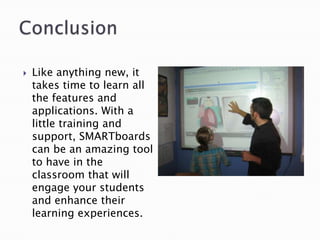
ConclusionLike anything new, it takes time to learn all the features and applications. With a little training and support, SMARTboards can be an amazing tool to have in the classroom that will engage your students and enhance their learning experiences.

Smartboard powerpoint

  • 1.
    Using SMARTboards toEnhance Classroom InstructionBy: Sara Bergstrom
  • 2.
    What is aSMARTboard?Image provided by A SMARTboard is a type of interactive whiteboard created by SMART Technologies.It provides touch control for computer applications.It gives the teacher a way to make their lessons interactive for the class.
  • 3.
    It was firstdeveloped in 1991 and there are 1.6 million used today.SMARTboards are today’s leading brand of interactive whiteboards. They are popular in the educational setting, along with the business world to enhance presentations. When was it developed?
  • 4.
    One way isusing your finger on the touch sensitive screen to select or move an object.You can also use the SMART pens to write on the board or use the eraser to remove it. How can they be used?
  • 5.
    SMARTboards allow ateacher to turn their computer and projector into a powerful teaching tool. Teachers can engage their students and encourage participation. Provides a large display for a teacher to demonstrate how to do somethingWhy use a SMARTboard?
  • 6.
    You can savenotes taken on the board to a computer file so that you can review them at a later time. There are many interactive games and lessons that you can use to engage your students. Why use a SMARTboard?
  • 7.
    SMARTboards can alsobe great for distance learning opportunities in the classroom.Creates a way for two classrooms to connect with video conferencing. You can also take a class virtual field trip or complete a webquest to build student knowledge on a topic. Distance Education
  • 8.
    I have taughtsecond grade for several years and using a SMARTboard to manipulate Base Ten Blocks when demonstrating the concept of regrouping is wonderful! Students can come up and manipulate the blocks to show their understanding and they are all engaged and motivated to learn!Example Lesson
  • 9.
    SMARTboards can beexpensive.Teacher training is needed.May be difficult for some students to reach the board.Lesson plan preparation time is increased.Possible Drawbacks
  • 10.
    ConclusionLike anything new,it takes time to learn all the features and applications. With a little training and support, SMARTboards can be an amazing tool to have in the classroom that will engage your students and enhance their learning experiences.