


A PRESENTATION ON
DISPLAYING IN LCD USING
PROTEUS
GROUP MEMBERS
Name ID
1.Kandil Al Aksa 12131103054
2.Md. Omar Faruq 12131103065
3.Azharul Islam 12131103066
OBJECTIVES
To understand how to Display in LCD
How to use PIC-16F877 Micro-controller
How to use LM016L (16 X 2) LCD
SOFTWARE COMPONENTS
Proteus 8.0 Professional Simulator
MikroC Pro v-5.61
SIMULATING COMPONENTS
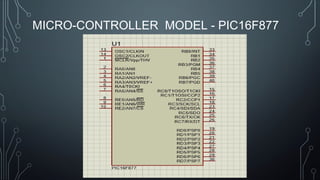
• Micro-Controller PIC16F877
• LCD Display (16X2) Model - LM016L
• POT-HG (Variable Resistor)
• GROUND
MICRO-CONTROLLER
• What is a microcontroller?
A microcontroller is a compact standalone computer, optimized for
control applications. Entire processor, memory and the I/O
interfaces .So it takes less time to read and write to external devices.
FEATURES OF PIC16F877A
• High-performance RISC (Reduced Instruction Set Computing) CPU
• Total 40 Pins , 33 I/O pins & 5 I/O ports.
• Flash memory:14.3KB(8192 words)
• Data SRAM:368 bytes
• Data EEPROM:256 bytes
• Operating speed:20Mhz, 200ns instruction cycle
• Operating voltage:4.0-5.5volts
MICRO-CONTROLLER MODEL - PIC16F877
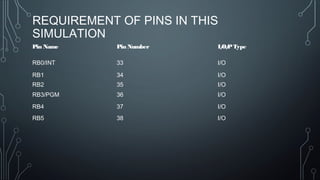
REQUIREMENT OF PINS IN THIS
SIMULATION
Pin Name Pin Number I/O/PType
RB0/INT 33 I/O
RB1 34 I/O
RB2 35 I/O
RB3/PGM 36 I/O
RB4 37 I/O
RB5 38 I/O
LCD DISPLAY(16X2) LM016L
LCD DISPLAY (16X2) LM016L PIN
DESCRIPTION
Pin Number Symbol Function
01 VSS GND
02 VDD + 3V or + 5V
03 VEE + 4.2V for LED Output
04 RS Register Select Signal
05 R/W Read/Write Signal
06 E Enable Signal
07-14 DB0-DB7 Data Bus Line
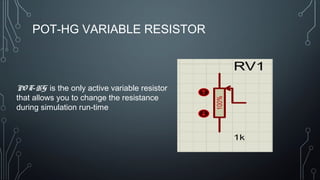
POT-HG VARIABLE RESISTOR
PO T-HG is the only active variable resistor
that allows you to change the resistance
during simulation run-time
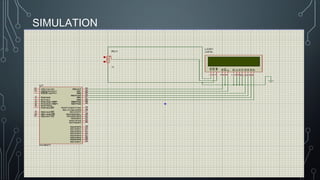
SIMULATION
MIKRO C PRO (5. 6 1 ) FO R PIC
• m ikro C PRO fo r PIC is a full-featured ANSIC co m pile r fo r PIC devices
from Microchip. It is the best solution for developing code for PIC
devices. It features intuitive IDE (Integrated Device Electronics) ,
powerful compiler with advance d o ptim iz atio ns , lots of hardware and
software libraries .
INSTALLATION OF MIKROC PRO FOR PIC
• Install this software just like other simple software .
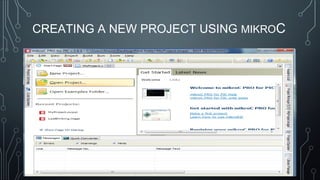
CREATING A NEW PROJECT USING MIKROC
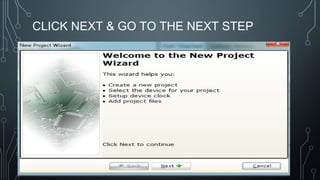
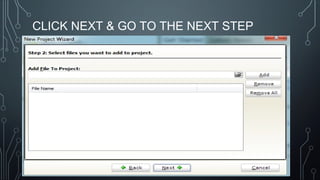
CLICK NEXT & GO TO THE NEXT STEP
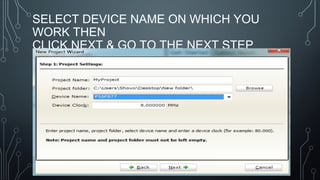
SELECT DEVICE NAME ON WHICH YOU
WORK THEN
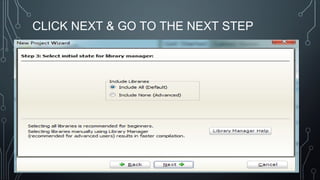
CLICK NEXT & GO TO THE NEXT STEP
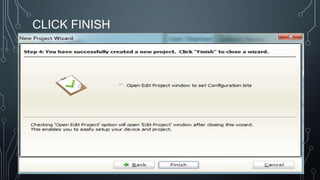
CLICK FINISH
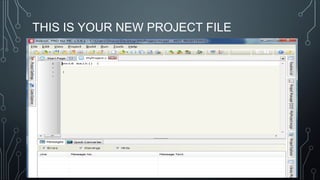
THIS IS YOUR NEW PROJECT FILE
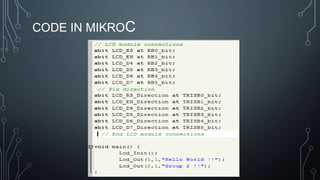
CODE IN MIKROC
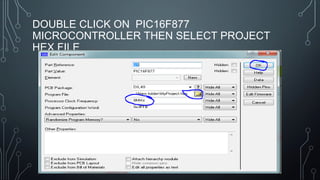
DOUBLE CLICK ON PIC16F877
MICROCONTROLLER THEN SELECT PROJECT
HEX FILE
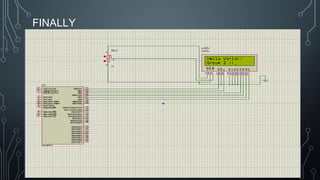
FINALLY
THANK YOU 
HAVE YOU ANY QUESTIONS ?
DROPBOX DOWNLOAD LINK
HTTPS://WWW.DROPBOX.COM/SH/PUGUAI4S7XWM876/AAAQR0FQT4J4OVDEZFOHA-
48A?DL=0

Lcd display with proteus