Kernels, Shells, and Popcorn
The Kernel
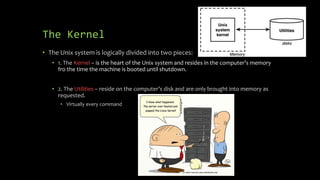
• The Unix system is logically divided into two pieces:
• 1. The Kernel – is the heart of the Unix system and resides in the computer’s memory
fro the time the machine is booted until shutdown.
• 2. The Utilities – reside on the computer’s disk and are only brought into memory as
requested.
• Virtually every command
The Shell
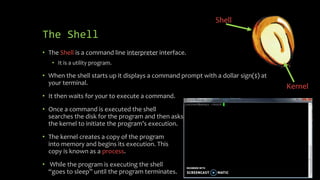
• The Shell is a command line interpreter interface.
• It is a utility program.
• When the shell starts up it displays a command prompt with a dollar sign($) at
your terminal.
• It then waits for your to execute a command.
• Once a command is executed the shell
searches the disk for the program and then asks
the kernel to initiate the program’s execution.
• The kernel creates a copy of the program
into memory and begins its execution. This
copy is known as a process.
• While the program is executing the shell
“goes to sleep” until the program terminates.
Shell
Kernel
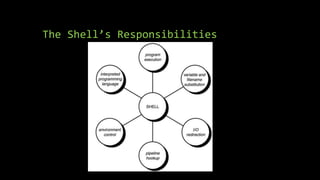
The Shell’s Responsibilities
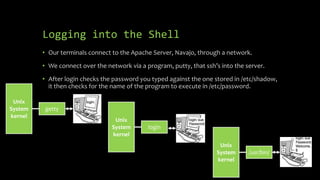
Logging into the Shell
• Our terminals connect to the Apache Server, Navajo, through a network.
• We connect over the network via a program, putty, that ssh’s into the server.
• After login checks the password you typed against the one stored in /etc/shadow,
it then checks for the name of the program to execute in /etc/password.
getty
Unix
System
kernel
/usr/bin/
Unix
System
kernel
login
Unix
System
kernel

Kernels, Shells, and Popcorn

  • 1.
  • 2.
    The Kernel • TheUnix system is logically divided into two pieces: • 1. The Kernel – is the heart of the Unix system and resides in the computer’s memory fro the time the machine is booted until shutdown. • 2. The Utilities – reside on the computer’s disk and are only brought into memory as requested. • Virtually every command
  • 3.
    The Shell • TheShell is a command line interpreter interface. • It is a utility program. • When the shell starts up it displays a command prompt with a dollar sign($) at your terminal. • It then waits for your to execute a command. • Once a command is executed the shell searches the disk for the program and then asks the kernel to initiate the program’s execution. • The kernel creates a copy of the program into memory and begins its execution. This copy is known as a process. • While the program is executing the shell “goes to sleep” until the program terminates. Shell Kernel
  • 4.
  • 5.
    Logging into theShell • Our terminals connect to the Apache Server, Navajo, through a network. • We connect over the network via a program, putty, that ssh’s into the server. • After login checks the password you typed against the one stored in /etc/shadow, it then checks for the name of the program to execute in /etc/password. getty Unix System kernel /usr/bin/ Unix System kernel login Unix System kernel

Editor's Notes

  • #4 Question: Why is it called the shell and kernel? Question: What is the difference between a utility and a process?
  • #6 The Unix system—more precisely a program called init—automatically starts up a getty program on each terminal port whenever the system is allowing users to log in. getty determines the baud rate, displays the message login: at its assigned terminal, and then just waits for someone to type in something. As soon as someone types in some characters followed by Enter, the getty program disappears; but before it goes away, it starts up a program called login to finish the process of logging in. It also gives login the characters you typed in at the terminal—characters that presumably represent your login name. When login begins execution, it displays the string Password: at the terminal and then waits for you to type your password. After you have typed it, login then proceeds to verify your login name and password against the corresponding entry in the file /etc/passwd. This file contains one line for each user of the system. That line specifies, among other things, the login name, home directory, and program to start up when that user logs in. Loads the shell The main point here is that you can set up a login account to automatically run any program whatsoever whenever someone logs in to it. The shell just happens to be the program most often selected. It’s important for you to recognize that the shell is just a program. It has no special privileges on the system, meaning that anyone with the capability and devotion can create his own shell program. This is in fact the reason why various flavors of the shell exist today, including the older Bourne shell, developed by Stephen Bourne; the Korn shell, developed by David Korn; the “Bourne again shell,” mainly used on Linux systems; and the C shell, developed by Bill Joy.