BASICS OF
COMPUTER NETWORKING
BY
AJEESH R
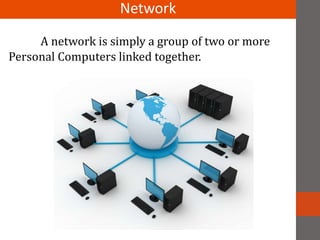
A network is simply a group of two or more
Personal Computers linked together.
Network
Networks are usually classified using three
properties:
 Topology
 Protocol and
 Architecture.
Topology :
Topology specifies the geometric arrangement of the
network. Common topologies are a bus, ring and star.You can
check out a figure showing the three common types of
network topologies here.
Classification
Protocol :
Protocol specifies a common set of rules and signals
the computers on the network use to communicate. Most
networks use Ethernet, but some networks may use IBM's
Token Ring protocol. We recommend Ethernet for both
home and office networking. For more information, please
select the Ethernet link on the left.
Architecture :
Architecture refers to one of the two major types of
network architecture: Peer-to-peer or client/server. In a
Peer-to-Peer networking configuration, there is no server,
and computers simply connect with each other in a
workgroup to share files, printers and Internet access.
Network Topologies
Network Topology refers to the shape of a network, or the
network's layout.
There are five basic topologies:
 Bus
 Ring
 Star
 Mesh
 Hybrid
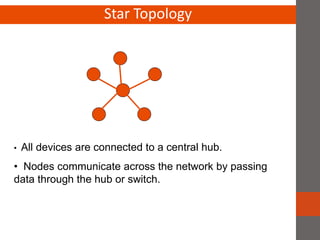
Star Topology
• All devices are connected to a central hub.
• Nodes communicate across the network by passing
data through the hub or switch.
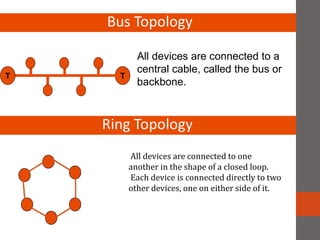
Bus Topology
TT
All devices are connected to a
central cable, called the bus or
backbone.
All devices are connected to one
another in the shape of a closed loop.
Each device is connected directly to two
other devices, one on either side of it.
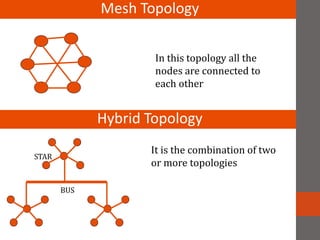
Mesh Topology
In this topology all the
nodes are connected to
each other
Hybrid Topology
STAR
BUS
It is the combination of two
or more topologies
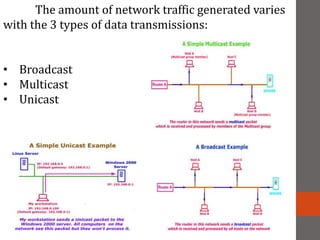
The amount of network traffic generated varies
with the 3 types of data transmissions:
• Broadcast
• Multicast
• Unicast
HUB
BRIDGES AND REPEATERS
A repeater connects two segments of your network cable. It retimes and
regenerates the signals to proper amplitudes and sends them to the other segments.
Bridging occurs at the data link layer of the OSI model with the functionality
of filtering content by reading the MAC addresses of source and destination. It is also
used for interconnecting two LANs working on the same protocol. It has a single input
and single output port, thus making it a 2 port device.
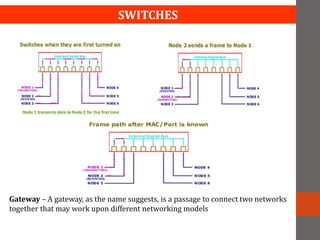
SWITCHES
Gateway – A gateway, as the name suggests, is a passage to connect two networks
together that may work upon different networking models
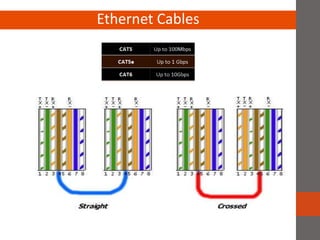
Ethernet Cables
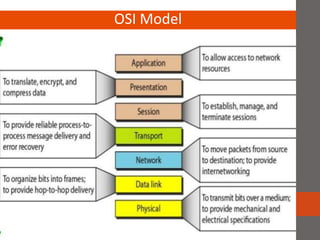
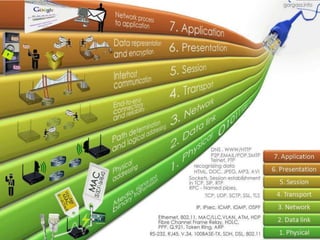
OSI Model
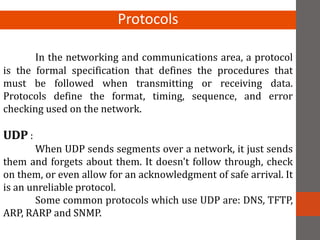
In the networking and communications area, a protocol
is the formal specification that defines the procedures that
must be followed when transmitting or receiving data.
Protocols define the format, timing, sequence, and error
checking used on the network.
UDP :
When UDP sends segments over a network, it just sends
them and forgets about them. It doesn't follow through, check
on them, or even allow for an acknowledgment of safe arrival. It
is an unreliable protocol.
Some common protocols which use UDP are: DNS, TFTP,
ARP, RARP and SNMP.
Protocols
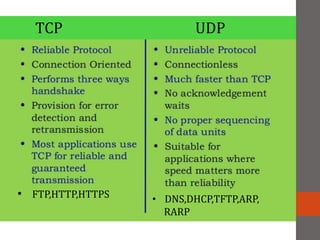
TCP UDP
• FTP,HTTP,HTTPS • DNS,DHCP,TFTP,ARP,
RARP
• PPP - Point to point protocol (PPP). A form of serial line data
encapsulation that is an improvement over SLIP.
• IP - Internet Protocol (IP). Except for ARP and RARP all protocols' data
packets will be packaged into an IP data packet. Provides the mechanism
to use software to address and manage data packets being sent to
computers.
• ICMP - Internet control message protocol (ICMP) provides management
and error reporting to help manage the process of sending data between
computers.
• ARP - Address resolution protocol (ARP) enables the packaging of IP data
into ethernet packages. It is the system and messaging protocol that is
used to find the ethernet (hardware) address from a specific IP number.
• DNS - Domain Name Service, allows the network to determine IP
addresses from names and vice versa.
• RARP - Reverse address resolution protocol (RARP) is used to allow a
computer without a local permanent data storage media to determine its
IP address from its ethernet address.
• BOOTP - Bootstrap protocol is used to assign an IP address to diskless
computers and tell it what server and file to load which will provide it
with an operating system.
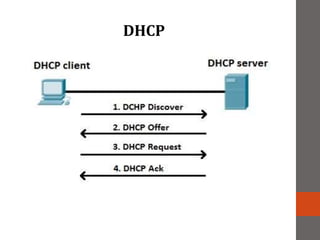
• DHCP - Dynamic host configuration protocol (DHCP) is a method of
assigning and controlling the IP addresses of computers on a given
network. It is a server based service that automatically assigns IP
numbers when a computer boots.
• IGMP - Internet Group Management Protocol used to support
multicasting.
• SNMP - Simple Network Management Protocol (SNMP). Used to manage
all types of network elements based on various data sent and received.
• RIP - Routing Information Protocol (RIP), used to dynamically update
router tables on WANs or the internet.
• OSPF - Open Shortest Path First (OSPF) dynamic routing protocol.
• BGP - Border Gateway Protocol (BGP). A dynamic router protocol to
communicate between routers on different systems.
• CIDR - Classless Interdomain Routing (CIDR).
• FTP - File Transfer Protocol (FTP). Allows file transfer between two
computers with login required.
• TFTP - Trivial File Transfer Protocol (TFTP). Allows file transfer between
two computers with no login required. It is limited, and is intended for
diskless stations.
• SMTP - Simple Mail Transfer Protocol (SMTP).
• NFS - Network File System (NFS). A protocol that allows UNIX and Linux
systems remotely mount each other's file systems.
• Telnet - A method of opening a user session on a remote host.
• Ping - A program that uses ICMP to send diagnostic messages to other
computers to tell if they are reachable over the network.
DHCP
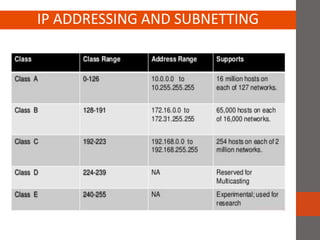
IP ADDRESSING AND SUBNETTING
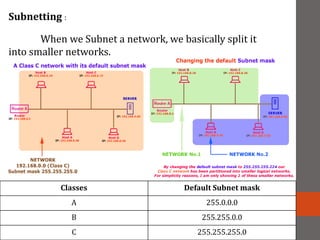
Subnetting :
When we Subnet a network, we basically split it
into smaller networks.
Classes Default Subnet mask
A 255.0.0.0
B 255.255.0.0
C 255.255.255.0

Basic networking

  • 1.
  • 2.
    A network issimply a group of two or more Personal Computers linked together. Network
  • 3.
    Networks are usuallyclassified using three properties:  Topology  Protocol and  Architecture. Topology : Topology specifies the geometric arrangement of the network. Common topologies are a bus, ring and star.You can check out a figure showing the three common types of network topologies here. Classification
  • 4.
    Protocol : Protocol specifiesa common set of rules and signals the computers on the network use to communicate. Most networks use Ethernet, but some networks may use IBM's Token Ring protocol. We recommend Ethernet for both home and office networking. For more information, please select the Ethernet link on the left. Architecture : Architecture refers to one of the two major types of network architecture: Peer-to-peer or client/server. In a Peer-to-Peer networking configuration, there is no server, and computers simply connect with each other in a workgroup to share files, printers and Internet access.
  • 5.
    Network Topologies Network Topologyrefers to the shape of a network, or the network's layout. There are five basic topologies:  Bus  Ring  Star  Mesh  Hybrid
  • 6.
    Star Topology • Alldevices are connected to a central hub. • Nodes communicate across the network by passing data through the hub or switch.
  • 7.
    Bus Topology TT All devicesare connected to a central cable, called the bus or backbone. All devices are connected to one another in the shape of a closed loop. Each device is connected directly to two other devices, one on either side of it.
  • 8.
    Mesh Topology In thistopology all the nodes are connected to each other Hybrid Topology STAR BUS It is the combination of two or more topologies
  • 9.
    The amount ofnetwork traffic generated varies with the 3 types of data transmissions: • Broadcast • Multicast • Unicast
  • 10.
    HUB BRIDGES AND REPEATERS Arepeater connects two segments of your network cable. It retimes and regenerates the signals to proper amplitudes and sends them to the other segments. Bridging occurs at the data link layer of the OSI model with the functionality of filtering content by reading the MAC addresses of source and destination. It is also used for interconnecting two LANs working on the same protocol. It has a single input and single output port, thus making it a 2 port device.
  • 11.
    SWITCHES Gateway – Agateway, as the name suggests, is a passage to connect two networks together that may work upon different networking models
  • 12.
  • 13.
  • 15.
    In the networkingand communications area, a protocol is the formal specification that defines the procedures that must be followed when transmitting or receiving data. Protocols define the format, timing, sequence, and error checking used on the network. UDP : When UDP sends segments over a network, it just sends them and forgets about them. It doesn't follow through, check on them, or even allow for an acknowledgment of safe arrival. It is an unreliable protocol. Some common protocols which use UDP are: DNS, TFTP, ARP, RARP and SNMP. Protocols
  • 16.
    TCP UDP • FTP,HTTP,HTTPS• DNS,DHCP,TFTP,ARP, RARP
  • 17.
    • PPP -Point to point protocol (PPP). A form of serial line data encapsulation that is an improvement over SLIP. • IP - Internet Protocol (IP). Except for ARP and RARP all protocols' data packets will be packaged into an IP data packet. Provides the mechanism to use software to address and manage data packets being sent to computers. • ICMP - Internet control message protocol (ICMP) provides management and error reporting to help manage the process of sending data between computers. • ARP - Address resolution protocol (ARP) enables the packaging of IP data into ethernet packages. It is the system and messaging protocol that is used to find the ethernet (hardware) address from a specific IP number. • DNS - Domain Name Service, allows the network to determine IP addresses from names and vice versa. • RARP - Reverse address resolution protocol (RARP) is used to allow a computer without a local permanent data storage media to determine its IP address from its ethernet address.
  • 18.
    • BOOTP -Bootstrap protocol is used to assign an IP address to diskless computers and tell it what server and file to load which will provide it with an operating system. • DHCP - Dynamic host configuration protocol (DHCP) is a method of assigning and controlling the IP addresses of computers on a given network. It is a server based service that automatically assigns IP numbers when a computer boots. • IGMP - Internet Group Management Protocol used to support multicasting. • SNMP - Simple Network Management Protocol (SNMP). Used to manage all types of network elements based on various data sent and received. • RIP - Routing Information Protocol (RIP), used to dynamically update router tables on WANs or the internet. • OSPF - Open Shortest Path First (OSPF) dynamic routing protocol. • BGP - Border Gateway Protocol (BGP). A dynamic router protocol to communicate between routers on different systems.
  • 19.
    • CIDR -Classless Interdomain Routing (CIDR). • FTP - File Transfer Protocol (FTP). Allows file transfer between two computers with login required. • TFTP - Trivial File Transfer Protocol (TFTP). Allows file transfer between two computers with no login required. It is limited, and is intended for diskless stations. • SMTP - Simple Mail Transfer Protocol (SMTP). • NFS - Network File System (NFS). A protocol that allows UNIX and Linux systems remotely mount each other's file systems. • Telnet - A method of opening a user session on a remote host. • Ping - A program that uses ICMP to send diagnostic messages to other computers to tell if they are reachable over the network.
  • 20.
  • 21.
  • 22.
    Subnetting : When weSubnet a network, we basically split it into smaller networks. Classes Default Subnet mask A 255.0.0.0 B 255.255.0.0 C 255.255.255.0