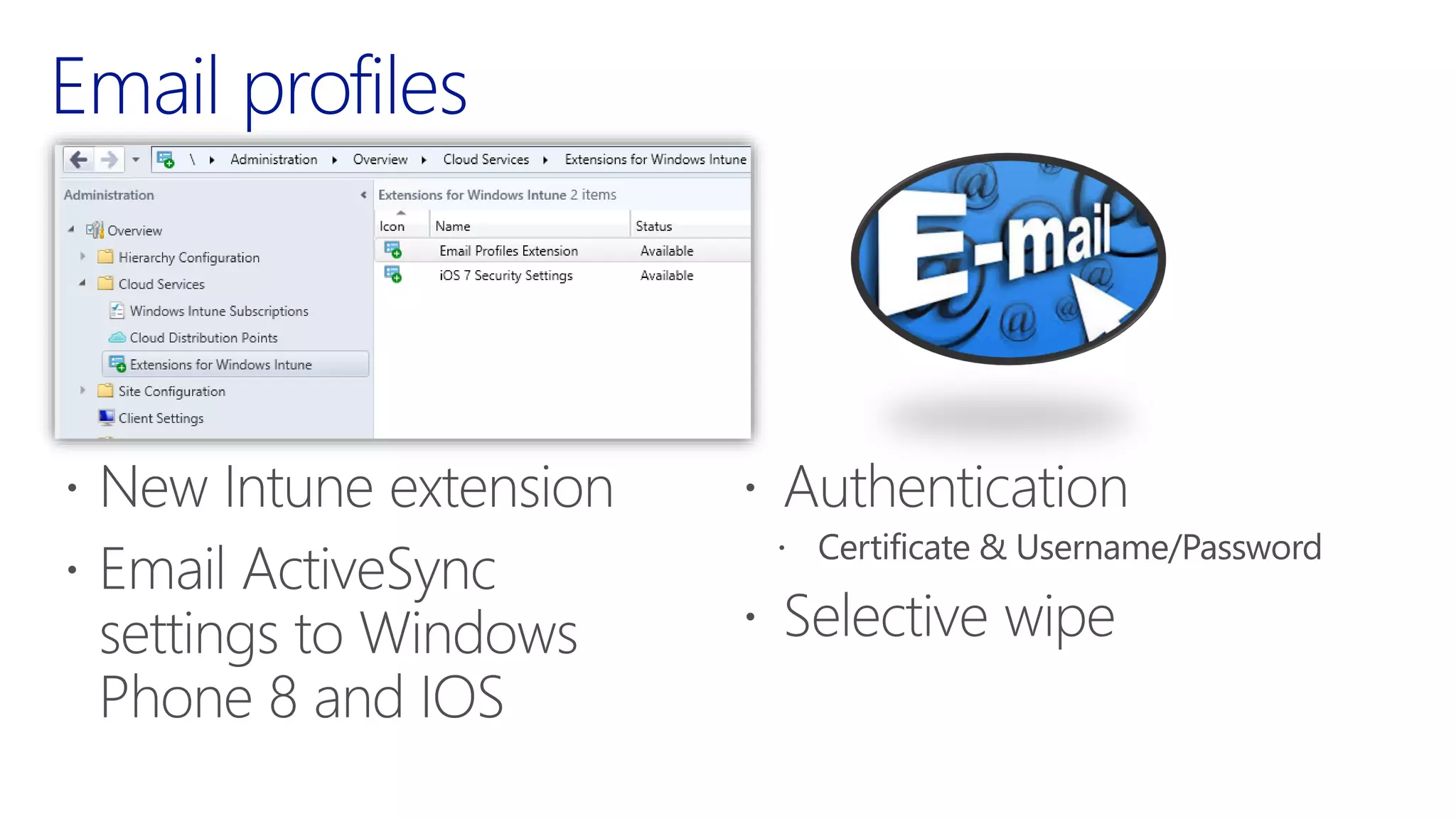
System Center 2012 R2
Configuration Manager with
Windows Intune
Who am I
•
•
•
•
•
•

•
•
•
•

•
•
•
•
•

•
•
•

Microsoft TechNet Forums
System Center Alliance Team
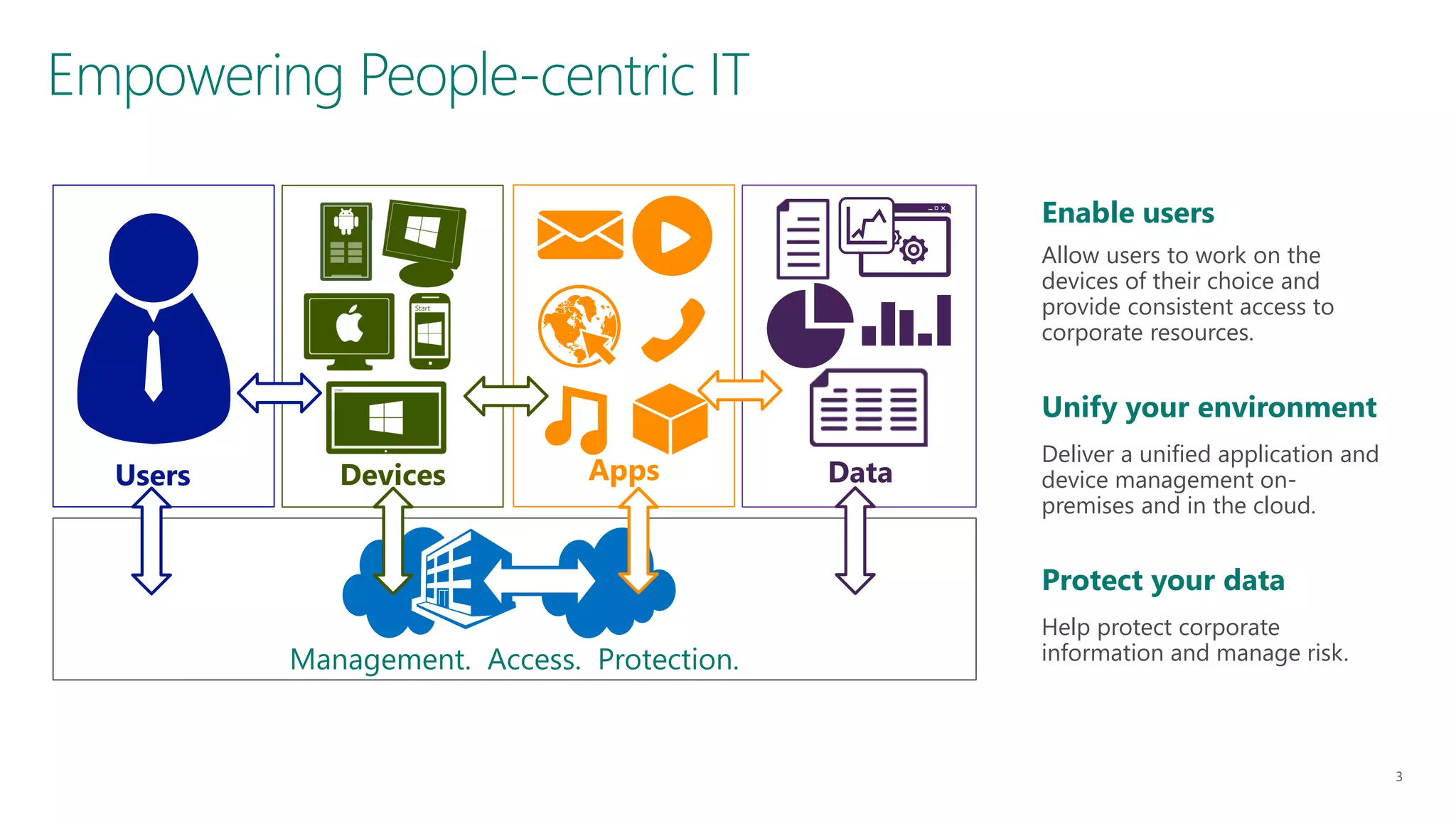
Empowering People-centric IT
Enable users
Allow users to work on the
devices of their choice and
provide consistent access to
corporate resources.

Unify your environment

Users

Devices

Apps

Data

Deliver a unified application and
device management onpremises and in the cloud.

Protect your data
Management. Access. Protection.

Help protect corporate
information and manage risk.
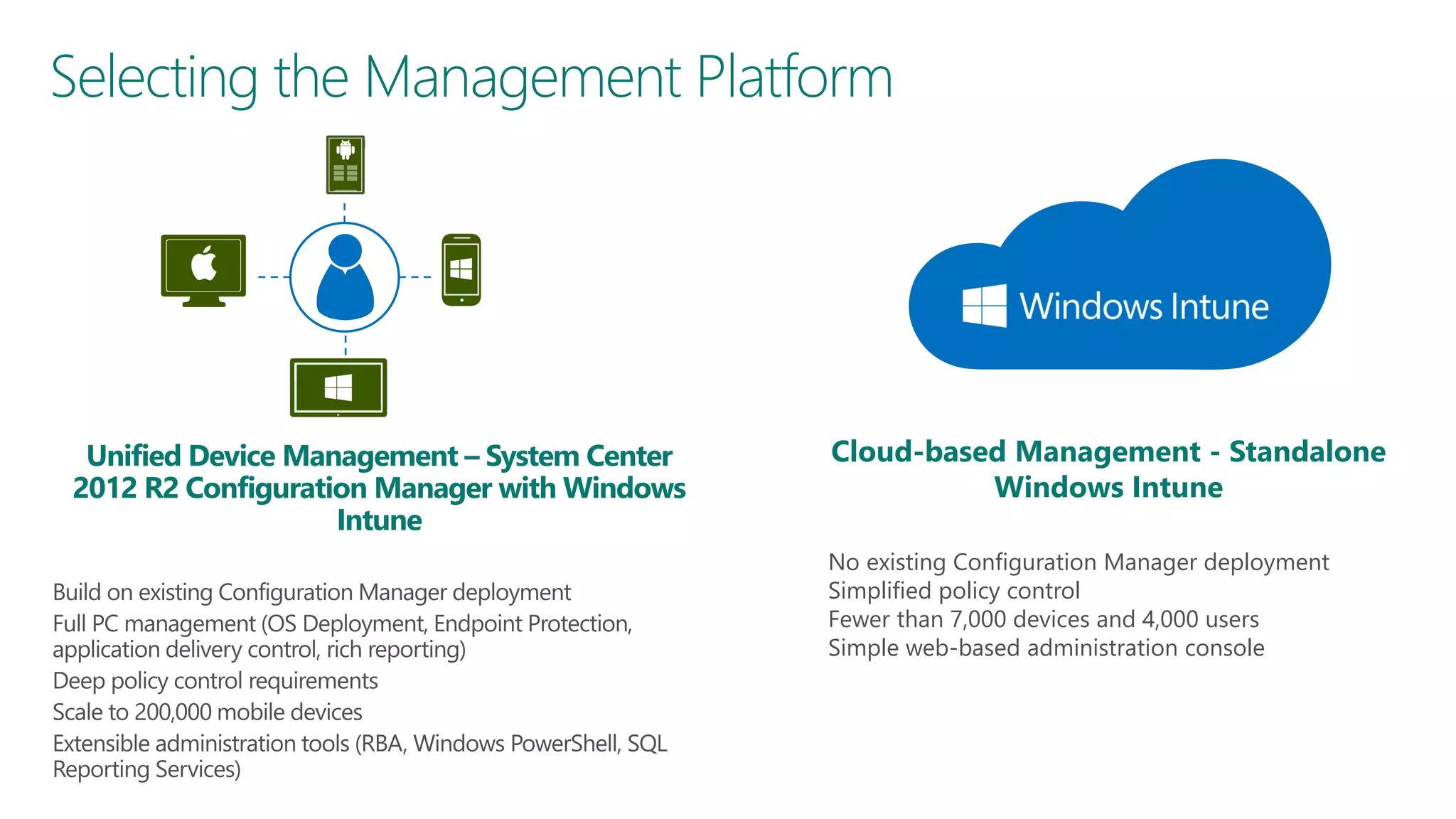
Selecting the Management Platform

Unified Device Management – System Center
2012 R2 Configuration Manager with Windows
Intune

Cloud-based Management - Standalone
Windows Intune
No existing Configuration Manager deployment
Simplified policy control
Fewer than 7,000 devices and 4,000 users
Simple web-based administration console
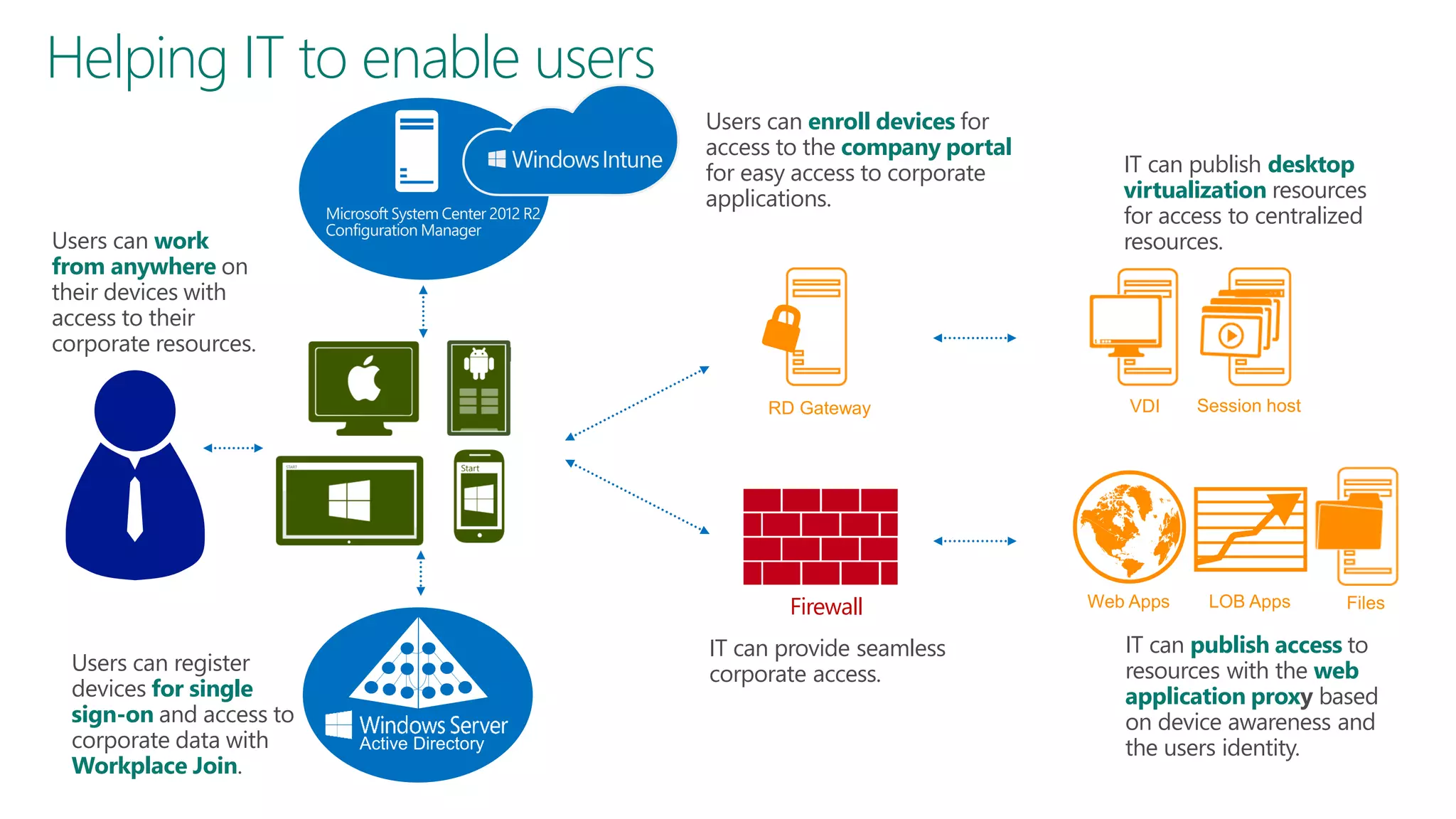
Helping IT to enable users
Users can enroll devices for
access to the company portal
for easy access to corporate
applications.
Users can work
from anywhere on
their devices with
access to their
corporate resources.

IT can publish desktop
virtualization resources
for access to centralized
resources.

Firewall
Users can register
devices for single
sign-on and access to
corporate data with
Workplace Join.

IT can provide seamless
corporate access.

IT can publish access to
resources with the web
application proxy based
on device awareness and
the users identity.
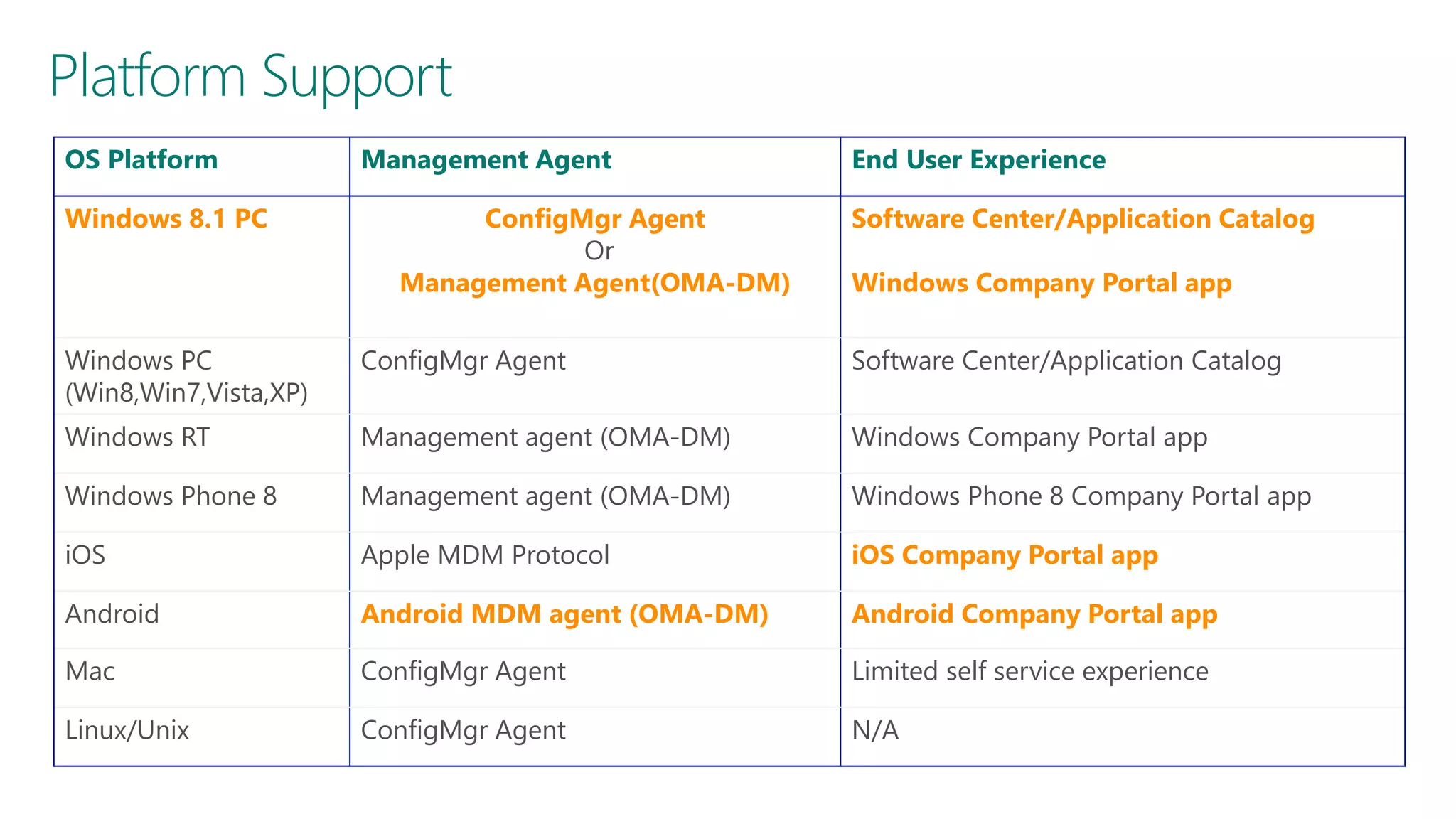
Platform Support
OS Platform
Windows 8.1 PC

Management Agent
ConfigMgr Agent
Or
Management Agent(OMA-DM)

End User Experience
Software Center/Application Catalog
Windows Company Portal app

Windows PC
(Win8,Win7,Vista,XP)

ConfigMgr Agent

Software Center/Application Catalog

Windows RT

Management agent (OMA-DM)

Windows Company Portal app

Windows Phone 8

Management agent (OMA-DM)

Windows Phone 8 Company Portal app

iOS

Apple MDM Protocol

iOS Company Portal app

Android

Android MDM agent (OMA-DM)

Android Company Portal app

Mac

ConfigMgr Agent

Limited self service experience

Linux/Unix

ConfigMgr Agent

N/A
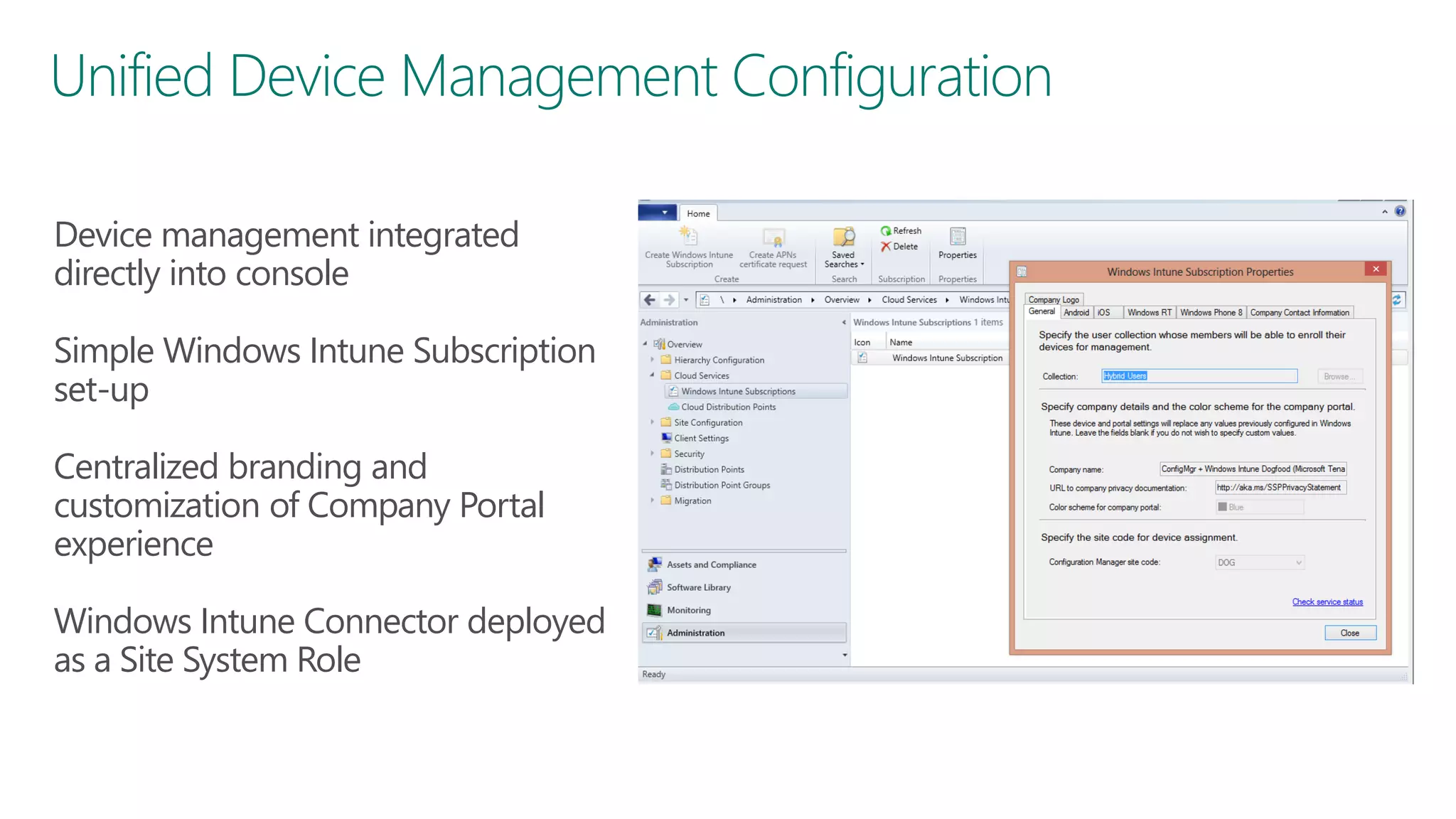
Unified Device Management Configuration
Device management integrated
directly into console

Simple Windows Intune Subscription
set-up
Centralized branding and
customization of Company Portal
experience
Windows Intune Connector deployed
as a Site System Role
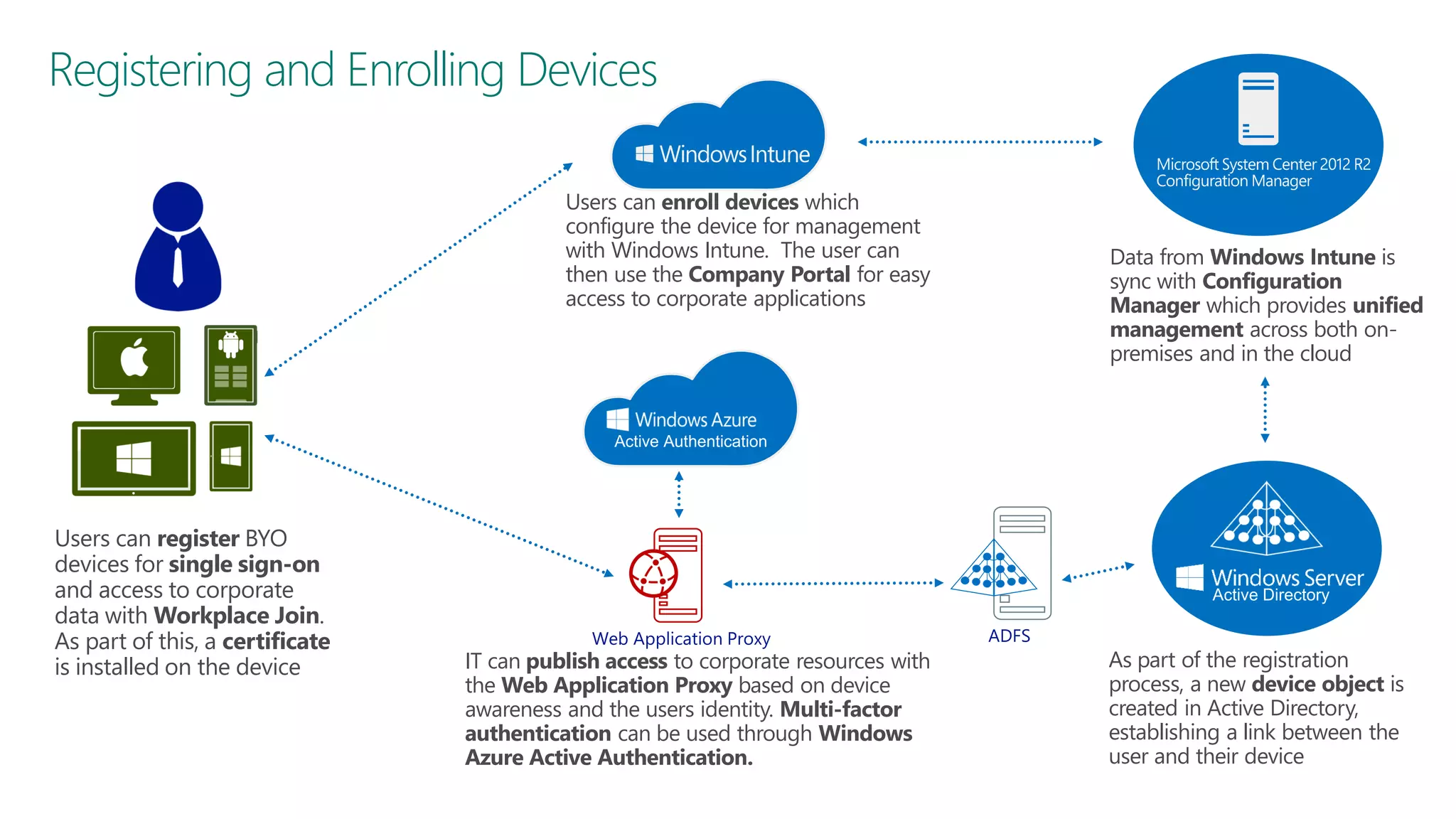
Registering and Enrolling Devices
Users can enroll devices which
configure the device for management
with Windows Intune. The user can
then use the Company Portal for easy
access to corporate applications

Users can register BYO
devices for single sign-on
and access to corporate
data with Workplace Join.
As part of this, a certificate
is installed on the device

IT can publish access to corporate resources with
the Web Application Proxy based on device
awareness and the users identity. Multi-factor
authentication can be used through Windows
Azure Active Authentication.

Data from Windows Intune is
sync with Configuration
Manager which provides unified
management across both onpremises and in the cloud

As part of the registration
process, a new device object is
created in Active Directory,
establishing a link between the
user and their device
How to get started
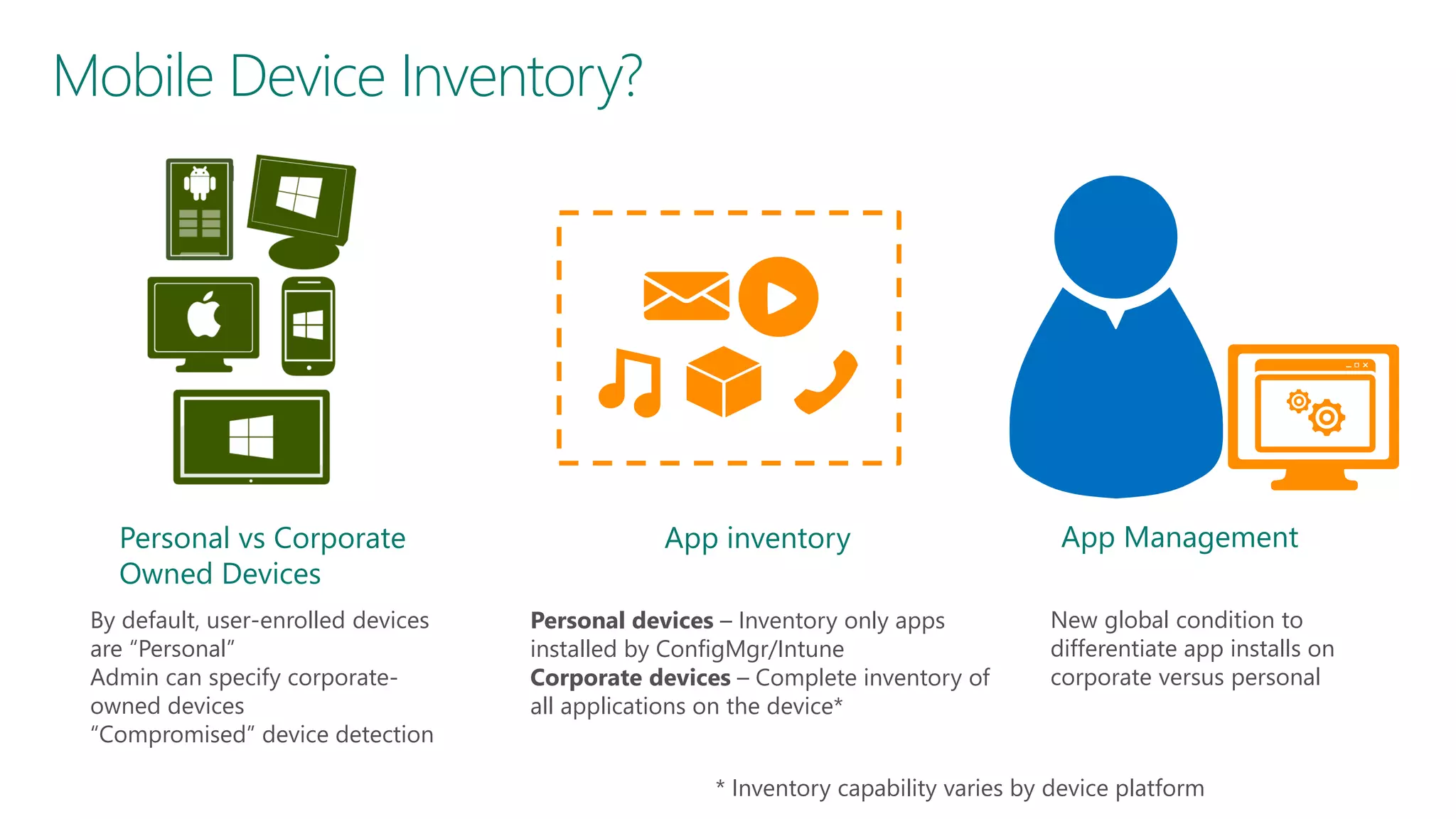
Mobile Device Inventory?

Personal vs Corporate
Owned Devices

App inventory

By default, user-enrolled devices
are “Personal”
Admin can specify corporateowned devices
“Compromised” device detection

Personal devices – Inventory only apps
installed by ConfigMgr/Intune
Corporate devices – Complete inventory of
all applications on the device*

App Management
New global condition to
differentiate app installs on
corporate versus personal

* Inventory capability varies by device platform
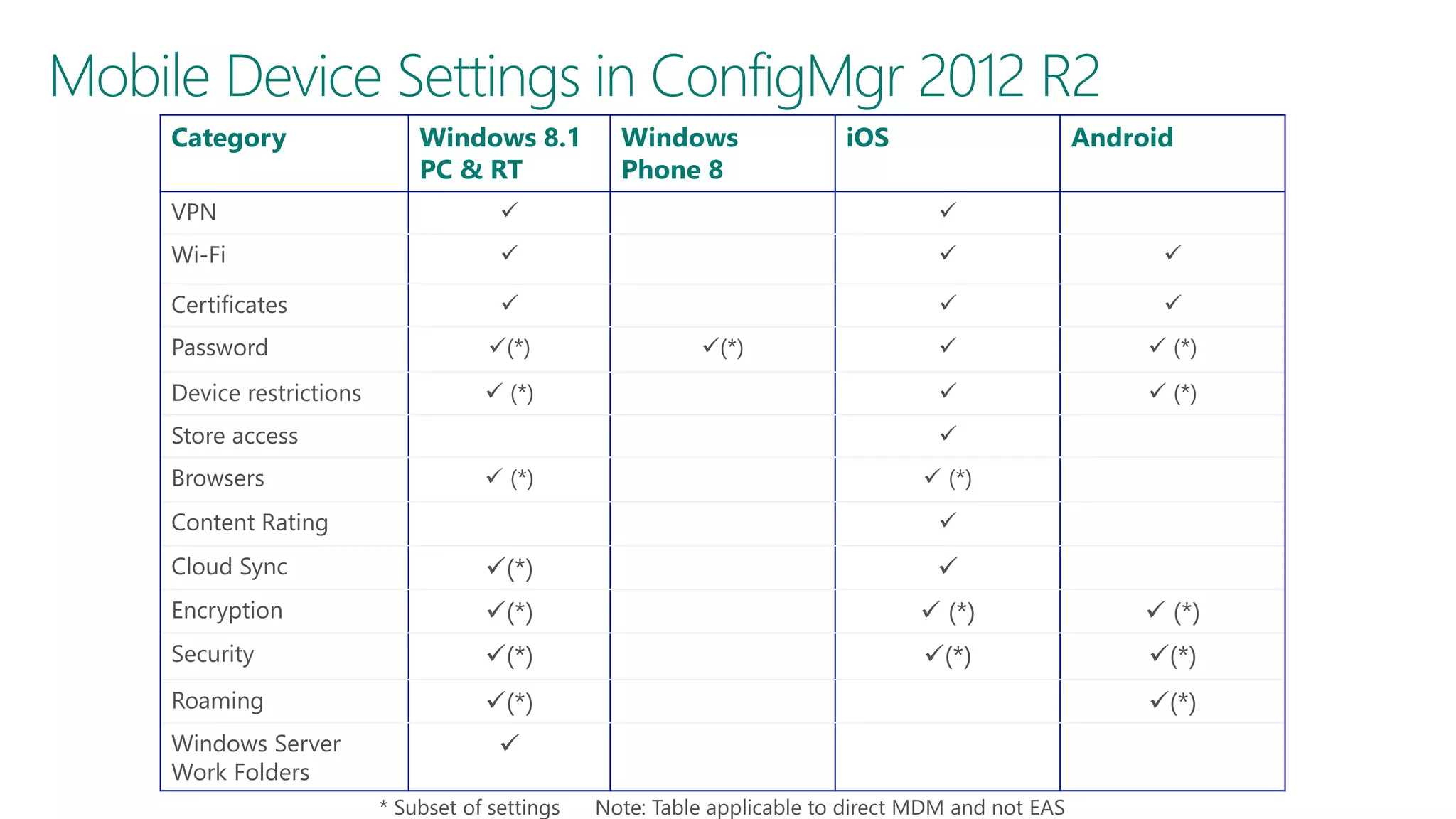
Mobile Device Settings in ConfigMgr 2012 R2
Category

Windows 8.1
PC & RT

Windows
Phone 8

iOS

Android

VPN





Wi-Fi







Certificates









 (*)



 (*)

Password

(*)

Device restrictions

 (*)

Store access
Browsers

(*)


 (*)

Content Rating

 (*)


Cloud Sync

(*)



Encryption

(*)

 (*)

 (*)

Security

(*)

(*)

(*)

Roaming

(*)

Windows Server
Work Folders

(*)


* Subset of settings

Note: Table applicable to direct MDM and not EAS
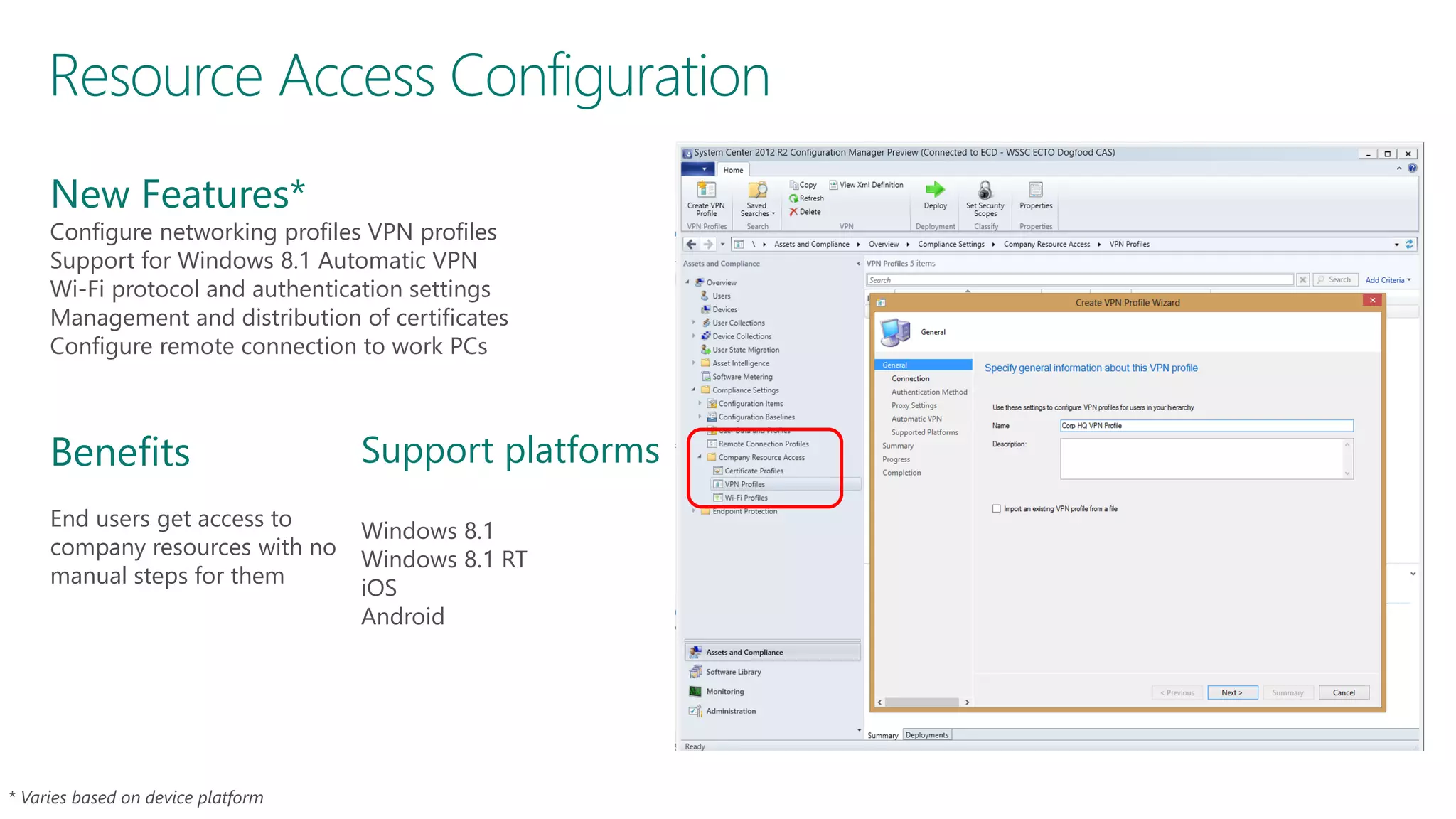
Resource Access Configuration
New Features*

Configure networking profiles VPN profiles
Support for Windows 8.1 Automatic VPN
Wi-Fi protocol and authentication settings
Management and distribution of certificates
Configure remote connection to work PCs

Benefits
End users get access to
company resources with no
manual steps for them

Support platforms
Windows 8.1
Windows 8.1 RT
iOS
Android
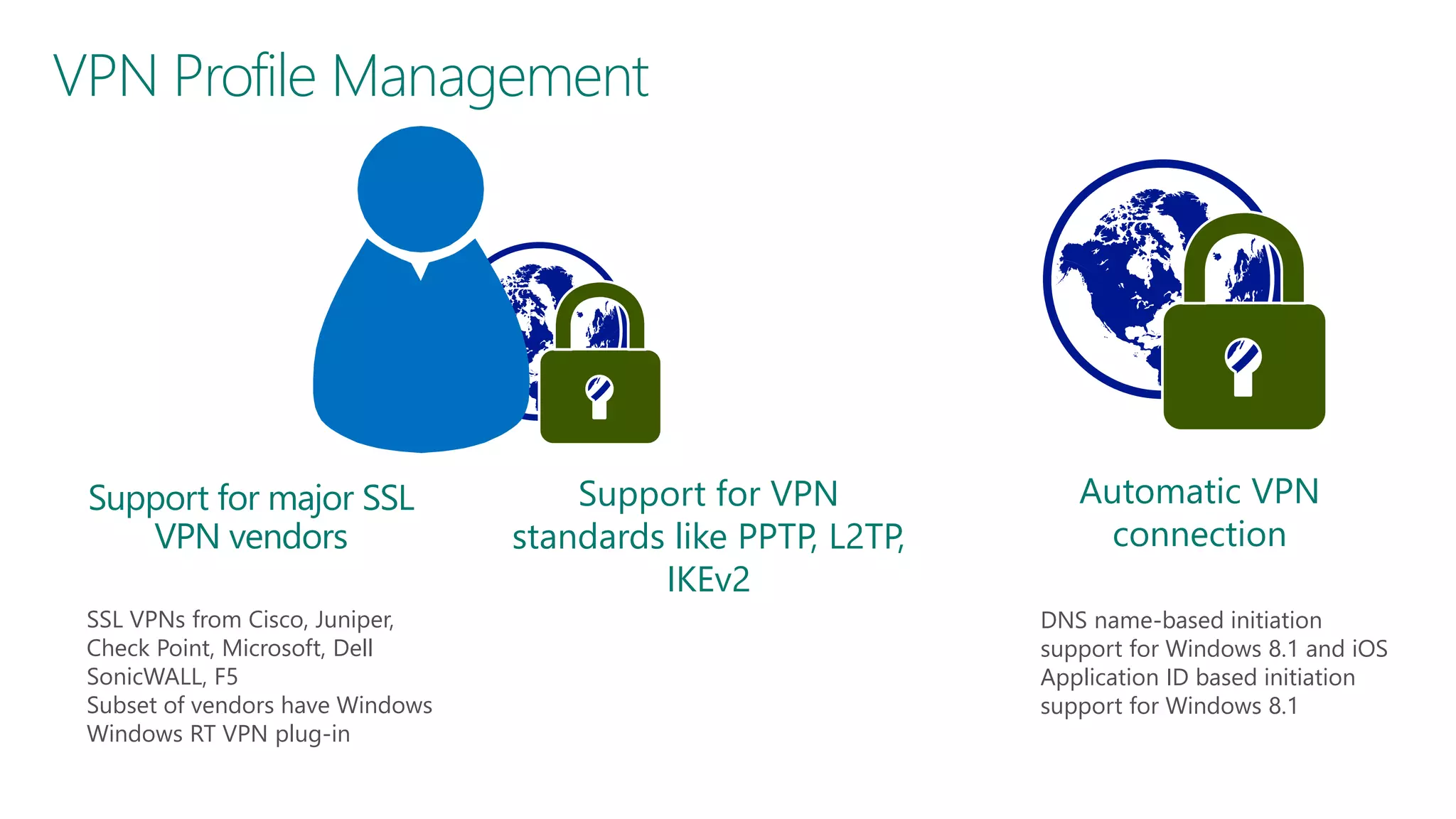
VPN Profile Management

Support for major SSL
VPN vendors
SSL VPNs from Cisco, Juniper,
Check Point, Microsoft, Dell
SonicWALL, F5
Subset of vendors have Windows
Windows RT VPN plug-in

Support for VPN
standards like PPTP, L2TP,
IKEv2

Automatic VPN
connection
DNS name-based initiation
support for Windows 8.1 and iOS
Application ID based initiation
support for Windows 8.1
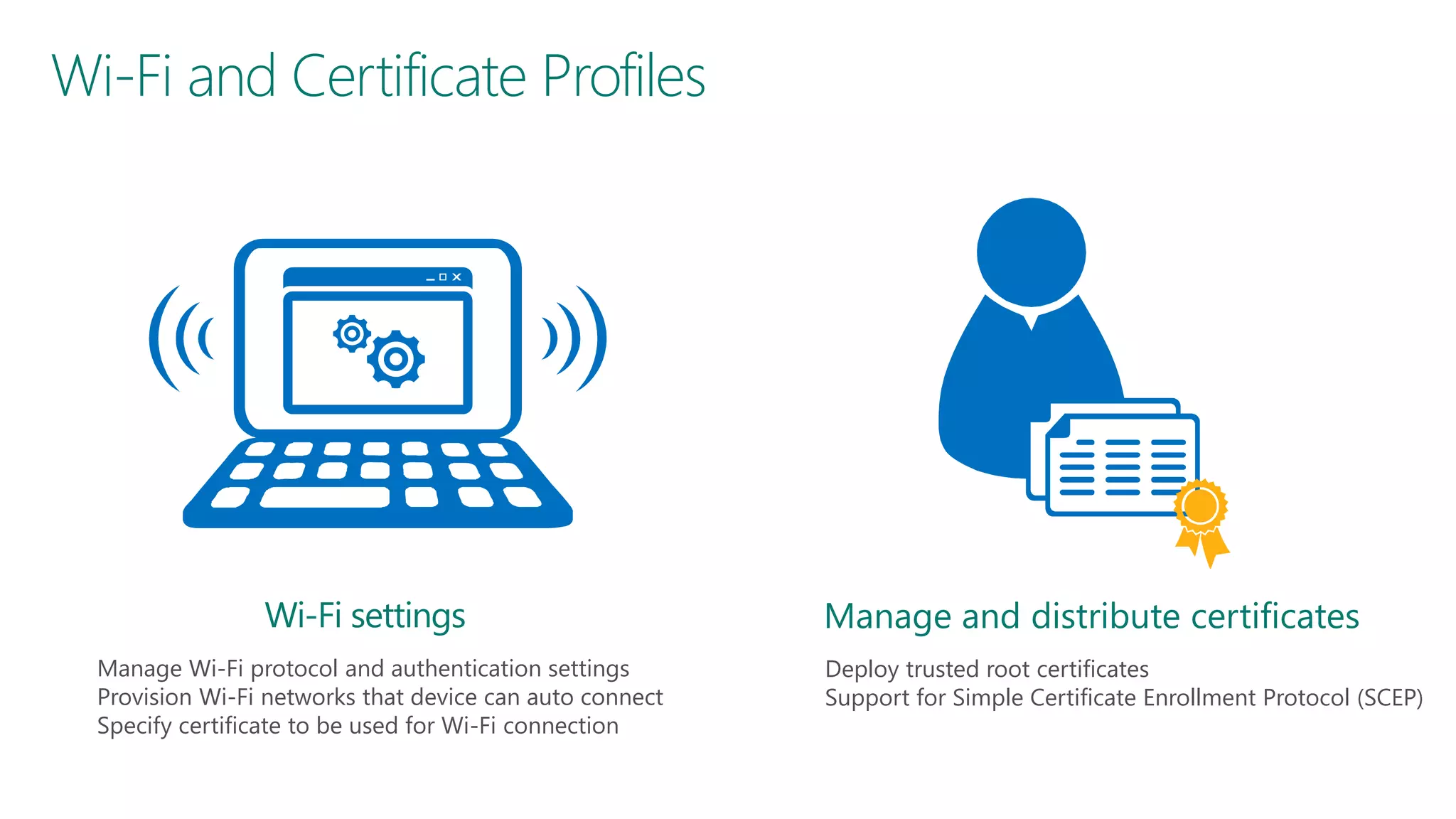
Wi-Fi and Certificate Profiles

Wi-Fi settings
Manage Wi-Fi protocol and authentication settings
Provision Wi-Fi networks that device can auto connect
Specify certificate to be used for Wi-Fi connection

Manage and distribute certificates
Deploy trusted root certificates
Support for Simple Certificate Enrollment Protocol (SCEP)



Inventory & Settings
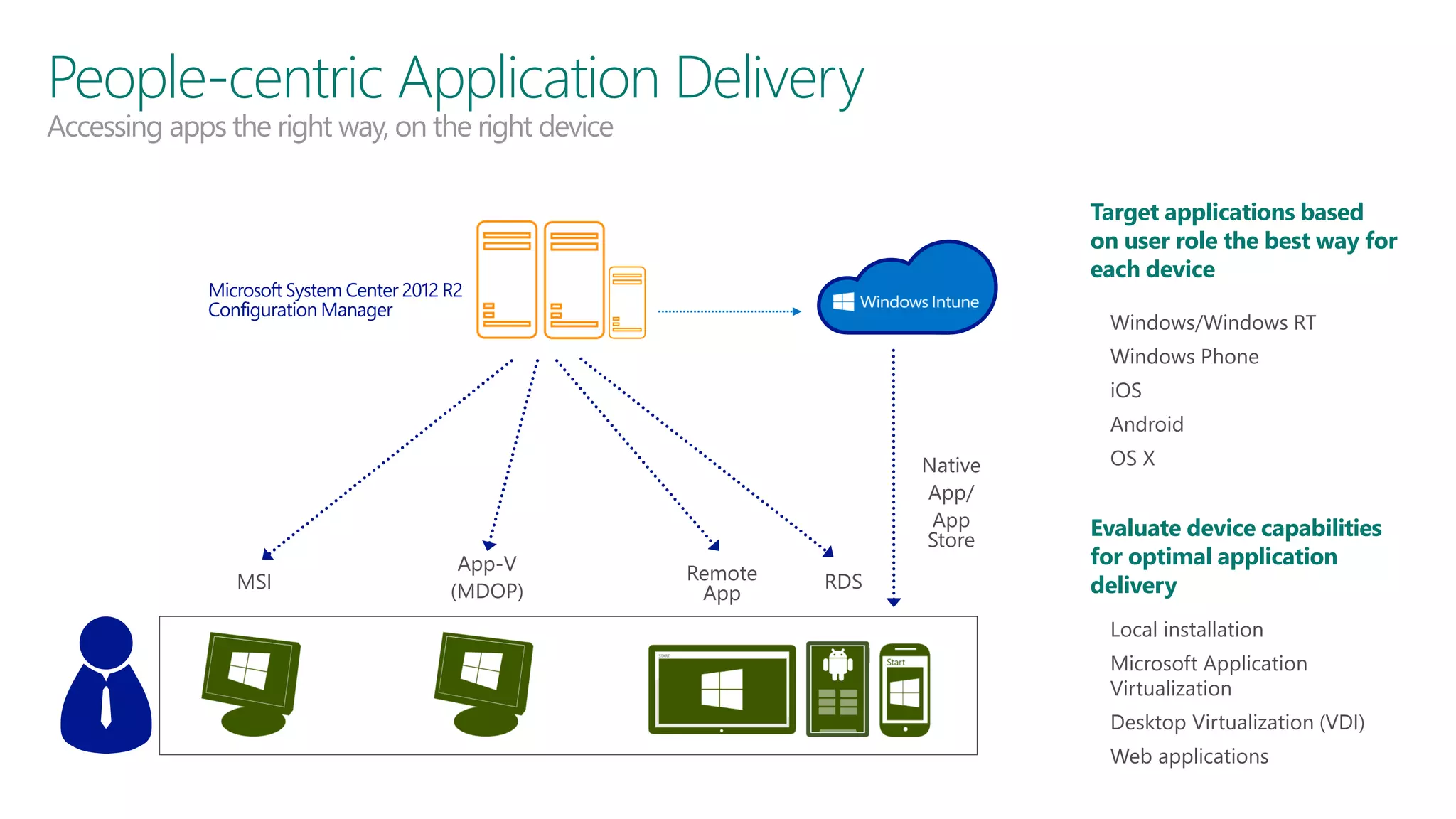
People-centric Application Delivery
Accessing apps the right way, on the right device

Target applications based
on user role the best way for
each device
• Windows/Windows RT
• Windows Phone
• iOS
• Android

MSI

App-V
(MDOP)

Native
App/
App
Store
Remote
App

RDS

• OS X

Evaluate device capabilities
for optimal application
delivery
• Local installation
• Microsoft Application

Virtualization

• Desktop Virtualization (VDI)

• Web applications
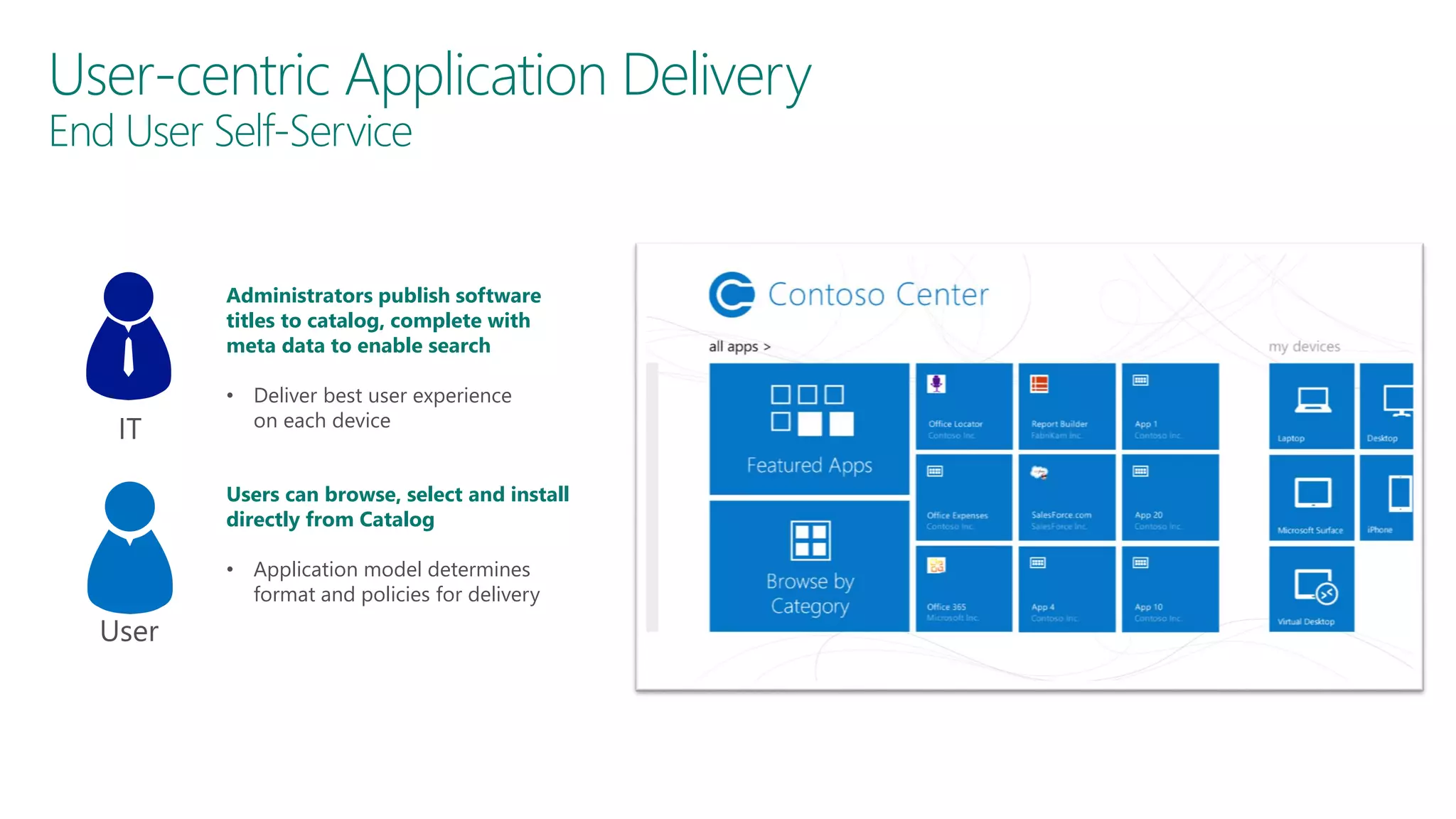
User-centric Application Delivery
End User Self-Service

Administrators publish software
titles to catalog, complete with
meta data to enable search

IT

• Deliver best user experience
on each device
Users can browse, select and install
directly from Catalog
• Application model determines
format and policies for delivery

User
Inventory & Settings
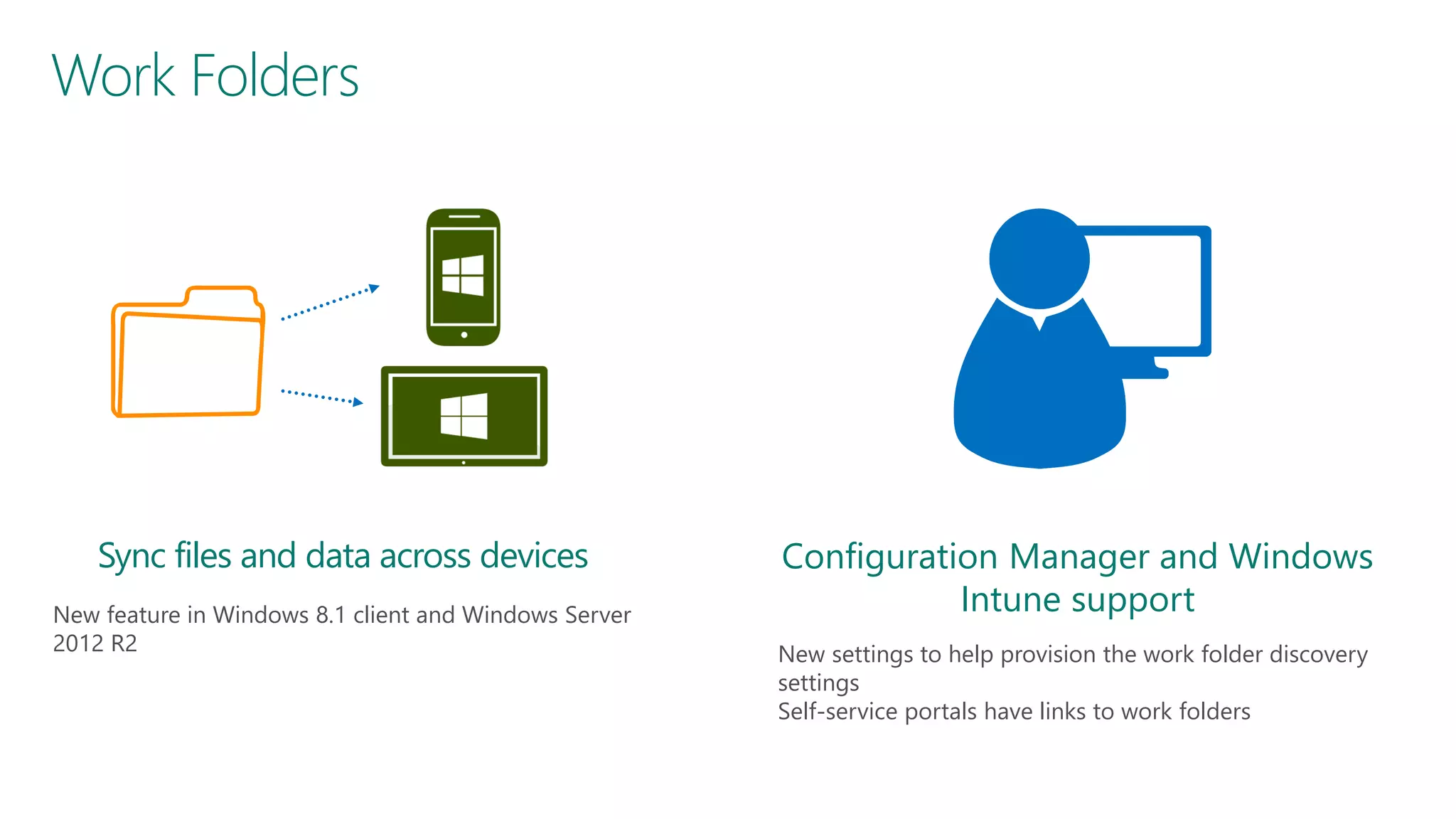
Work Folders

Sync files and data across devices
New feature in Windows 8.1 client and Windows Server
2012 R2

Configuration Manager and Windows
Intune support
New settings to help provision the work folder discovery
settings
Self-service portals have links to work folders
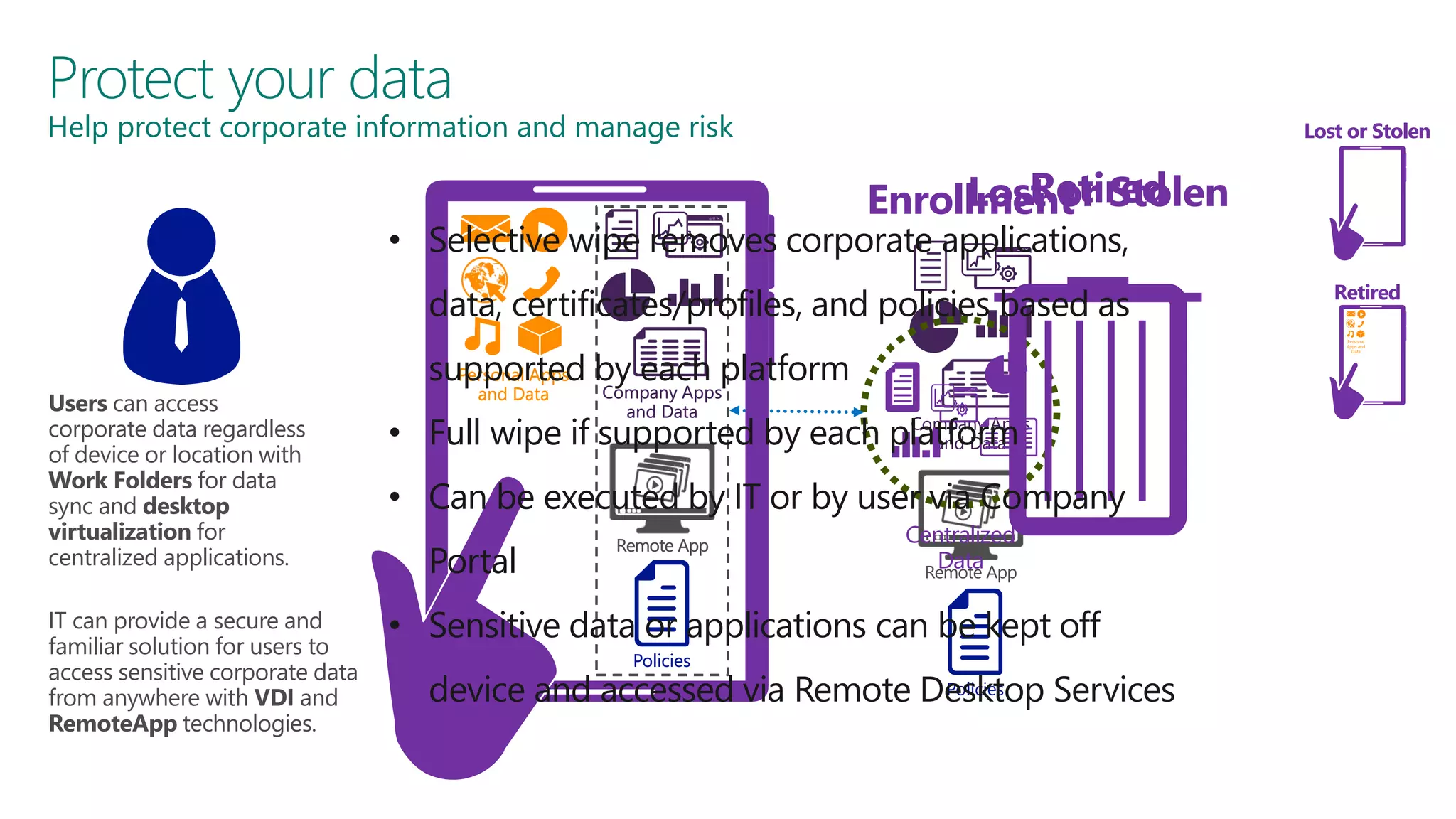
Protect your data

Help protect corporate information and manage risk

Lost or Stolen

Retired
Lost or
Enrollment Stolen

• Selective wipe removes corporate applications,

data, certificates/profiles, and policies based as
Users can access
corporate data regardless
of device or location with
Work Folders for data
sync and desktop
virtualization for
centralized applications.
IT can provide a secure and
familiar solution for users to
access sensitive corporate data
from anywhere with VDI and
RemoteApp technologies.

Personal
Apps and
Data

supported by each platform
Personal Apps
and Data

Company Apps
and Data

Company Apps
• Full wipe if supported by each platform
and Data

• Can be executed by IT or by user via Company
Portal

Remote App

Centralized
Data
Remote App

• Sensitive data or applications can be kept off
Policies

Retired

Policies
device and accessed via Remote Desktop Services
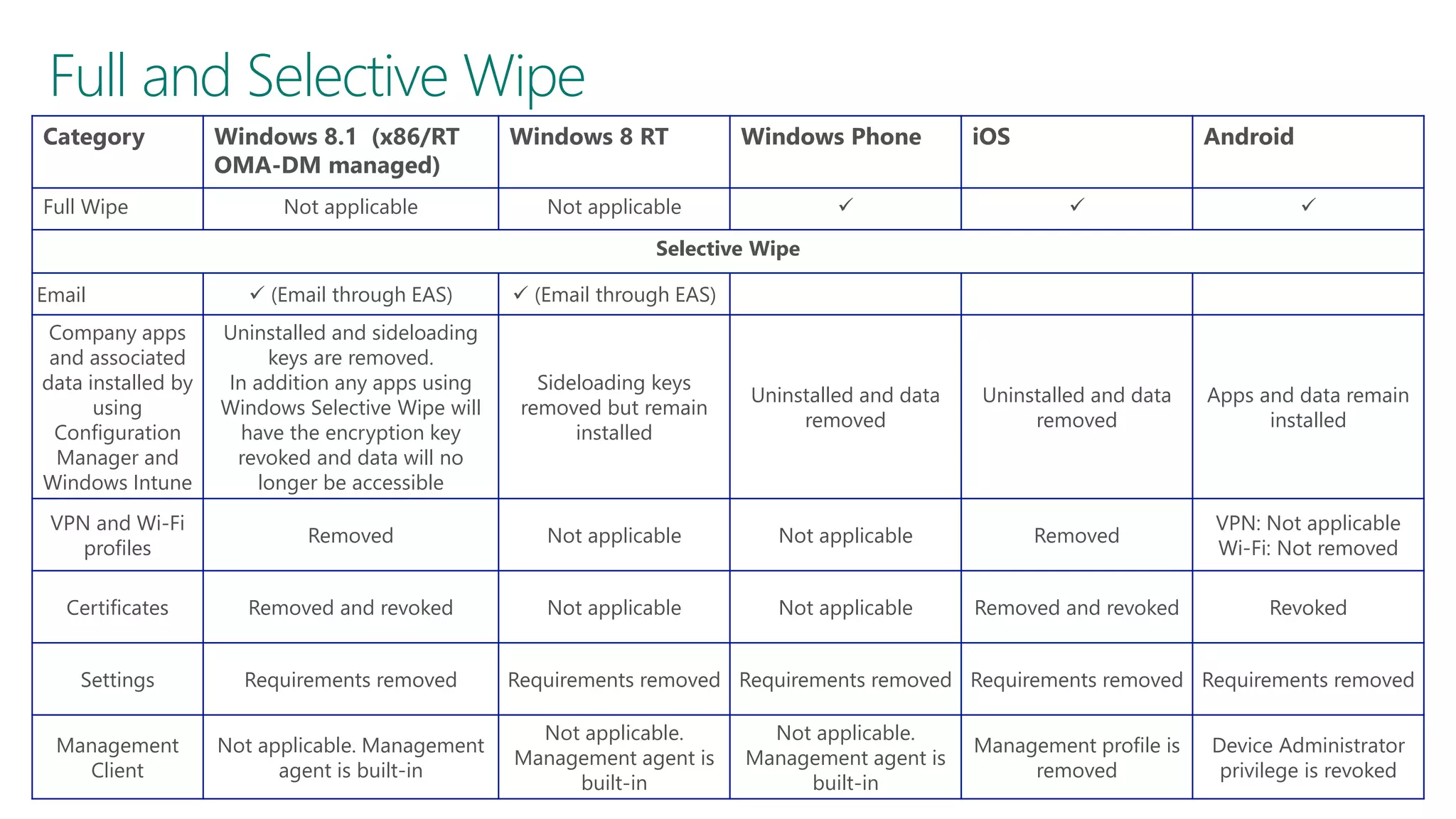
Full and Selective Wipe
Category
Full Wipe

Windows 8.1 (x86/RT
OMA-DM managed)
Not applicable

Windows 8 RT

Windows Phone

Not applicable

iOS

Android







Selective Wipe
 (Email through EAS)

 (Email through EAS)

Company apps
and associated
data installed by
using
Configuration
Manager and
Windows Intune

Uninstalled and sideloading
keys are removed.
In addition any apps using
Windows Selective Wipe will
have the encryption key
revoked and data will no
longer be accessible

Sideloading keys
removed but remain
installed

Uninstalled and data
removed

Uninstalled and data
removed

Apps and data remain
installed

VPN and Wi-Fi
profiles

Removed

Not applicable

Not applicable

Removed

VPN: Not applicable
Wi-Fi: Not removed

Certificates

Removed and revoked

Not applicable

Not applicable

Removed and revoked

Revoked

Settings

Requirements removed

Management
Client

Not applicable. Management
agent is built-in

Email

Requirements removed Requirements removed Requirements removed Requirements removed
Not applicable.
Management agent is
built-in

Not applicable.
Management agent is
built-in

Management profile is
removed

Device Administrator
privilege is revoked
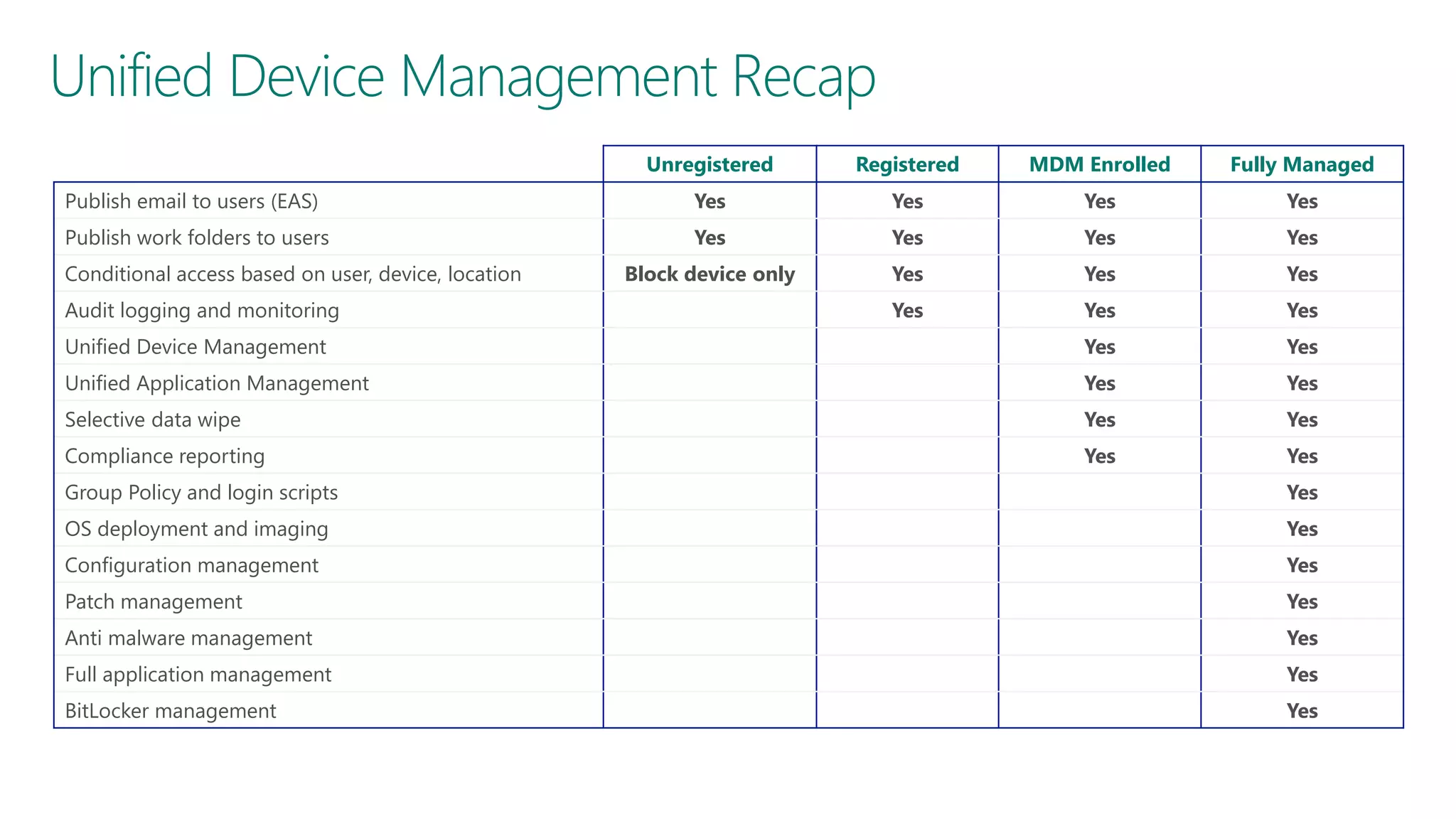
Unified Device Management Recap
Unregistered

Registered

MDM Enrolled

Fully Managed

Publish email to users (EAS)

Yes

Yes

Yes

Yes

Publish work folders to users

Yes

Yes

Yes

Yes

Block device only

Yes

Yes

Yes

Yes

Yes

Yes

Unified Device Management

Yes

Yes

Unified Application Management

Yes

Yes

Selective data wipe

Yes

Yes

Compliance reporting

Yes

Yes

Conditional access based on user, device, location
Audit logging and monitoring

Group Policy and login scripts

Yes

OS deployment and imaging

Yes

Configuration management

Yes

Patch management

Yes

Anti malware management

Yes

Full application management

Yes

BitLocker management

Yes
For More Information
System Center 2012 Configuration Manager
http://technet.microsoft.com/enus/evalcenter/hh667640.aspx?wt.mc_id=TEC_105_1_33

Windows Intune
http://www.microsoft.com/en-us/windows/windowsintune/try-andbuy

Windows Server 2012

http://www.microsoft.com/en-us/server-cloud/windowsserver

More Resources:
http://www.microsoft.com/workstyle
http://www.microsoft.com/server-cloud/user-device-management
Enterprise Mobility (Admin)

Enterprise Mobility (Admin)

  • 1.
    System Center 2012R2 Configuration Manager with Windows Intune
  • 2.
  • 3.
    Empowering People-centric IT Enableusers Allow users to work on the devices of their choice and provide consistent access to corporate resources. Unify your environment Users Devices Apps Data Deliver a unified application and device management onpremises and in the cloud. Protect your data Management. Access. Protection. Help protect corporate information and manage risk.
  • 4.
    Selecting the ManagementPlatform Unified Device Management – System Center 2012 R2 Configuration Manager with Windows Intune Cloud-based Management - Standalone Windows Intune No existing Configuration Manager deployment Simplified policy control Fewer than 7,000 devices and 4,000 users Simple web-based administration console
  • 5.
    Helping IT toenable users Users can enroll devices for access to the company portal for easy access to corporate applications. Users can work from anywhere on their devices with access to their corporate resources. IT can publish desktop virtualization resources for access to centralized resources. Firewall Users can register devices for single sign-on and access to corporate data with Workplace Join. IT can provide seamless corporate access. IT can publish access to resources with the web application proxy based on device awareness and the users identity.
  • 6.
    Platform Support OS Platform Windows8.1 PC Management Agent ConfigMgr Agent Or Management Agent(OMA-DM) End User Experience Software Center/Application Catalog Windows Company Portal app Windows PC (Win8,Win7,Vista,XP) ConfigMgr Agent Software Center/Application Catalog Windows RT Management agent (OMA-DM) Windows Company Portal app Windows Phone 8 Management agent (OMA-DM) Windows Phone 8 Company Portal app iOS Apple MDM Protocol iOS Company Portal app Android Android MDM agent (OMA-DM) Android Company Portal app Mac ConfigMgr Agent Limited self service experience Linux/Unix ConfigMgr Agent N/A
  • 7.
    Unified Device ManagementConfiguration Device management integrated directly into console Simple Windows Intune Subscription set-up Centralized branding and customization of Company Portal experience Windows Intune Connector deployed as a Site System Role
  • 8.
    Registering and EnrollingDevices Users can enroll devices which configure the device for management with Windows Intune. The user can then use the Company Portal for easy access to corporate applications Users can register BYO devices for single sign-on and access to corporate data with Workplace Join. As part of this, a certificate is installed on the device IT can publish access to corporate resources with the Web Application Proxy based on device awareness and the users identity. Multi-factor authentication can be used through Windows Azure Active Authentication. Data from Windows Intune is sync with Configuration Manager which provides unified management across both onpremises and in the cloud As part of the registration process, a new device object is created in Active Directory, establishing a link between the user and their device
  • 9.
    How to getstarted
  • 10.
    Mobile Device Inventory? Personalvs Corporate Owned Devices App inventory By default, user-enrolled devices are “Personal” Admin can specify corporateowned devices “Compromised” device detection Personal devices – Inventory only apps installed by ConfigMgr/Intune Corporate devices – Complete inventory of all applications on the device* App Management New global condition to differentiate app installs on corporate versus personal * Inventory capability varies by device platform
  • 11.
    Mobile Device Settingsin ConfigMgr 2012 R2 Category Windows 8.1 PC & RT Windows Phone 8 iOS Android VPN   Wi-Fi    Certificates      (*)   (*) Password (*) Device restrictions  (*) Store access Browsers (*)   (*) Content Rating  (*)  Cloud Sync (*)  Encryption (*)  (*)  (*) Security (*) (*) (*) Roaming (*) Windows Server Work Folders (*)  * Subset of settings Note: Table applicable to direct MDM and not EAS
  • 12.
    Resource Access Configuration NewFeatures* Configure networking profiles VPN profiles Support for Windows 8.1 Automatic VPN Wi-Fi protocol and authentication settings Management and distribution of certificates Configure remote connection to work PCs Benefits End users get access to company resources with no manual steps for them Support platforms Windows 8.1 Windows 8.1 RT iOS Android
  • 13.
    VPN Profile Management Supportfor major SSL VPN vendors SSL VPNs from Cisco, Juniper, Check Point, Microsoft, Dell SonicWALL, F5 Subset of vendors have Windows Windows RT VPN plug-in Support for VPN standards like PPTP, L2TP, IKEv2 Automatic VPN connection DNS name-based initiation support for Windows 8.1 and iOS Application ID based initiation support for Windows 8.1
  • 14.
    Wi-Fi and CertificateProfiles Wi-Fi settings Manage Wi-Fi protocol and authentication settings Provision Wi-Fi networks that device can auto connect Specify certificate to be used for Wi-Fi connection Manage and distribute certificates Deploy trusted root certificates Support for Simple Certificate Enrollment Protocol (SCEP)
  • 15.
  • 16.
  • 17.
    People-centric Application Delivery Accessingapps the right way, on the right device Target applications based on user role the best way for each device • Windows/Windows RT • Windows Phone • iOS • Android MSI App-V (MDOP) Native App/ App Store Remote App RDS • OS X Evaluate device capabilities for optimal application delivery • Local installation • Microsoft Application Virtualization • Desktop Virtualization (VDI) • Web applications
  • 18.
    User-centric Application Delivery EndUser Self-Service Administrators publish software titles to catalog, complete with meta data to enable search IT • Deliver best user experience on each device Users can browse, select and install directly from Catalog • Application model determines format and policies for delivery User
  • 19.
  • 20.
    Work Folders Sync filesand data across devices New feature in Windows 8.1 client and Windows Server 2012 R2 Configuration Manager and Windows Intune support New settings to help provision the work folder discovery settings Self-service portals have links to work folders
  • 21.
    Protect your data Helpprotect corporate information and manage risk Lost or Stolen Retired Lost or Enrollment Stolen • Selective wipe removes corporate applications, data, certificates/profiles, and policies based as Users can access corporate data regardless of device or location with Work Folders for data sync and desktop virtualization for centralized applications. IT can provide a secure and familiar solution for users to access sensitive corporate data from anywhere with VDI and RemoteApp technologies. Personal Apps and Data supported by each platform Personal Apps and Data Company Apps and Data Company Apps • Full wipe if supported by each platform and Data • Can be executed by IT or by user via Company Portal Remote App Centralized Data Remote App • Sensitive data or applications can be kept off Policies Retired Policies device and accessed via Remote Desktop Services
  • 22.
    Full and SelectiveWipe Category Full Wipe Windows 8.1 (x86/RT OMA-DM managed) Not applicable Windows 8 RT Windows Phone Not applicable iOS Android    Selective Wipe  (Email through EAS)  (Email through EAS) Company apps and associated data installed by using Configuration Manager and Windows Intune Uninstalled and sideloading keys are removed. In addition any apps using Windows Selective Wipe will have the encryption key revoked and data will no longer be accessible Sideloading keys removed but remain installed Uninstalled and data removed Uninstalled and data removed Apps and data remain installed VPN and Wi-Fi profiles Removed Not applicable Not applicable Removed VPN: Not applicable Wi-Fi: Not removed Certificates Removed and revoked Not applicable Not applicable Removed and revoked Revoked Settings Requirements removed Management Client Not applicable. Management agent is built-in Email Requirements removed Requirements removed Requirements removed Requirements removed Not applicable. Management agent is built-in Not applicable. Management agent is built-in Management profile is removed Device Administrator privilege is revoked
  • 23.
    Unified Device ManagementRecap Unregistered Registered MDM Enrolled Fully Managed Publish email to users (EAS) Yes Yes Yes Yes Publish work folders to users Yes Yes Yes Yes Block device only Yes Yes Yes Yes Yes Yes Unified Device Management Yes Yes Unified Application Management Yes Yes Selective data wipe Yes Yes Compliance reporting Yes Yes Conditional access based on user, device, location Audit logging and monitoring Group Policy and login scripts Yes OS deployment and imaging Yes Configuration management Yes Patch management Yes Anti malware management Yes Full application management Yes BitLocker management Yes
  • 24.
    For More Information SystemCenter 2012 Configuration Manager http://technet.microsoft.com/enus/evalcenter/hh667640.aspx?wt.mc_id=TEC_105_1_33 Windows Intune http://www.microsoft.com/en-us/windows/windowsintune/try-andbuy Windows Server 2012 http://www.microsoft.com/en-us/server-cloud/windowsserver More Resources: http://www.microsoft.com/workstyle http://www.microsoft.com/server-cloud/user-device-management