
Saying Yes to Consumerization
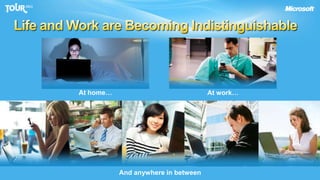
Life and Work are Becoming IndistinguishableAt home…At work…And anywhere in between
ChallengesHow do I…Address the work/life blur?Ensure anywhere productivity?Protect data and maintain compliance?Handle PC and device management?
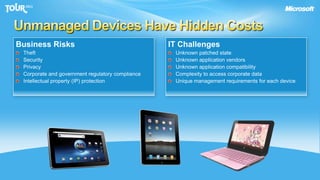
Unmanaged Devices Have Hidden CostsBusiness RisksTheftSecurityPrivacyCorporate and government regulatory complianceIntellectual property (IP) protectionIT ChallengesUnknown patched stateUnknown application vendorsUnknown application compatibilityComplexity to access corporate dataUnique management requirements for each device
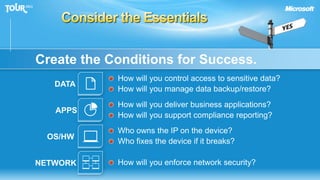
Consider the EssentialsCreate the Conditions for Success.How will you control access to sensitive data?How will you manage data backup/restore?DATAHow will you deliver business applications? How will you support compliance reporting?APPSWho owns the IP on the device?Who fixes the device if it breaks?OS/HWHow will you enforce network security?NETWORK
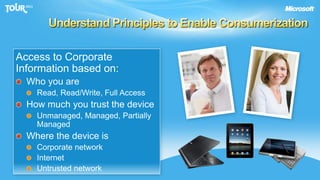
Understand Principles to Enable ConsumerizationAccess to CorporateInformation based on:Who you areRead, Read/Write, Full AccessHow much you trust the deviceUnmanaged, Managed, Partially ManagedWhere the device isCorporate networkInternetUntrusted network
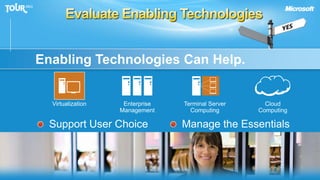
Evaluate Enabling TechnologiesEnabling Technologies Can Help. VirtualizationCloudComputingEnterpriseManagementTerminal ServerComputingSupport User ChoiceManage the Essentials
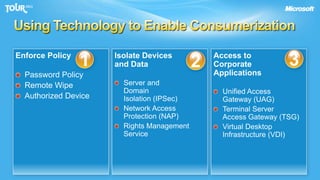
Using Technology to Enable ConsumerizationIsolate Devices and DataServer andDomainIsolation (IPSec)Network AccessProtection (NAP)Rights Management ServiceAccess toCorporateApplicationsUnified AccessGateway (UAG)Terminal ServerAccess Gateway (TSG)Virtual Desktop Infrastructure (VDI)Enforce PolicyPassword PolicyRemote WipeAuthorized Device123
Enforce Policy1
SCCM 2012: Mobile Device Management Through ExchangeProvide basic management for all Exchange ActiveSync (EAS) connected devicesFeatures Supported:Discovery/InventorySettings policyRemote WipeSupports on-premises Exchange 2010 and hosted Exchange
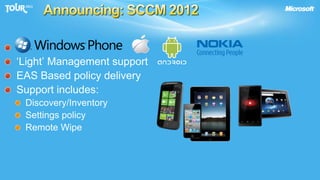
Announcing: SCCM 2012.‘Light’ Management supportEAS Based policy deliverySupport includes:Discovery/InventorySettings policyRemote Wipe
DemoSCCM 2012 Beta Device Management
Isolate Devices and Data2
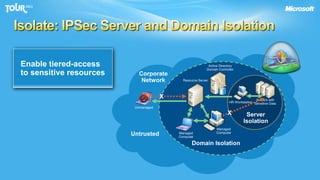
Servers withSensitive DataServerIsolationHR WorkstationManagedComputerManagedComputerDomain IsolationIsolate: IPSec Server and Domain IsolationDefine the logical isolation boundariesDistribute policiesand credentialsManaged computerscan communicateBlock inbound connectionsfrom untrustedEnable tiered-accessto sensitive resourcesActive DirectoryDomain ControllerCorporateNetworkResource ServerXUnmanagedXUntrusted
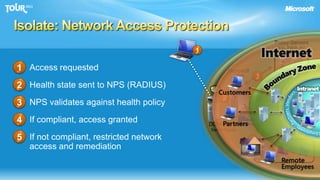
Isolate: Network Access ProtectionPolicy Serverse.g., Patch, AV11Access requestedHealth state sent to NPS (RADIUS)NPS validates against health policyIf compliant, access grantedIf not compliant, restricted network access and remediationMicrosoft NPS32Remediation Serverse.g., Patch5Not policy compliant23RestrictedNetwork4Policy compliantDCHP, VPNSwitch/RouterCorporate Network54
NAP Demo
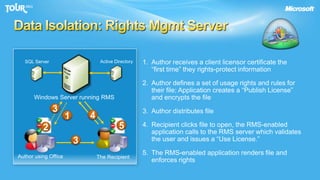
Data Isolation: Rights Mgmt Server1.	Author receives a client licensor certificate the“first time” they rights-protect information Active DirectorySQL Server2.	Author defines a set of usage rights and rules for their file; Application creates a “Publish License”and encrypts the fileWindows Server running RMS33.	Author distributes file4154.	Recipient clicks file to open, the RMS-enabled application calls to the RMS server which validates the user and issues a “Use License.”235.	The RMS-enabled application renders file and enforces rightsAuthor using OfficeThe Recipient
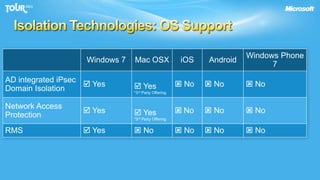
Isolation Technologies: OS Support
Access to Corporate Applications3
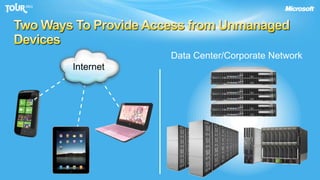
Two Ways To Provide Access from Unmanaged DevicesData Center/Corporate NetworkInternet
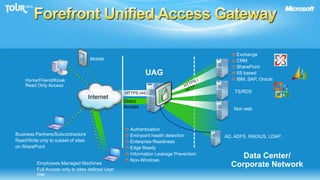
Forefront Unified Access GatewayExchangeCRMSharePointIIS basedIBM, SAP, OracleMobileUAGHome/Friend/KioskRead Only AccessHTTPS / HTTPTS/RDSHTTPS (443)InternetDirect AccessNon webAuthenticationEnd-point health detectionEnterprise ReadinessEdge ReadyInformation Leakage PreventionNon-WindowsBusiness Partners/SubcontractorsRead/Write only to subset of siteson SharePointAD, ADFS, RADIUS, LDAP…Data Center/Corporate NetworkEmployees Managed MachinesFull Access only to sites defined User role
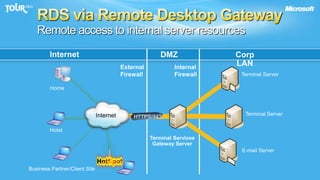
RDS via Remote Desktop GatewayRemote access to internal server resourcesInternetDMZCorp LANExternalFirewallInternalFirewallTerminal ServerHomeTerminal ServerInternetHTTPS/443HotelTerminal ServicesGateway ServerE-mail ServerBusiness Partner/Client Site
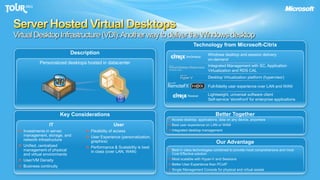
Server Hosted Virtual DesktopsVirtual Desktop Infrastructure (VDI): Another way to deliver the Windows desktopTechnology from Microsoft-CitrixWindows desktop and session deliveryon-demandDescriptionPersonalized desktops hosted in datacenterIntegrated Management with SC, Application Virtualization and RDS CALDesktop Virtualization platform (hypervisor)Full-fidelity user experience over LAN and WANLightweight, universal software client Self-service 'storefront' for enterprise applicationsBetter TogetherKey ConsiderationsAccess desktop, applications, data on any device, anywhere Best user experience on LAN or WANIntegrated desktop managementITInvestments in server, management, storage, and network infrastructureUnified, centralizedmanagement of physical and virtual environmentsUser/VM DensityBusiness continuityUserFlexibility of access User Experience (personalization, graphics)Performance & Scalability is best in class (over LAN, WAN)Our AdvantageBest in class technologies combined to provide most comprehensive and most Cost Effective solutionMost scalable with Hyper-V and SessionsBetter User Experience than PCoIPSingle Management Console for physical and virtual assets
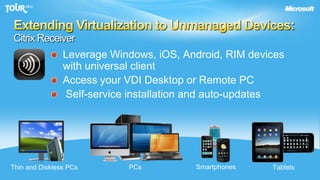
Extending Virtualization to Unmanaged Devices:Citrix ReceiverSmartphonesLeverage Windows, iOS, Android, RIM deviceswith universal clientAccess your VDI Desktop or Remote PC Self-service installation and auto-updatesPCsThin and Diskless PCsTablets
Demo:Citrix VDI Access
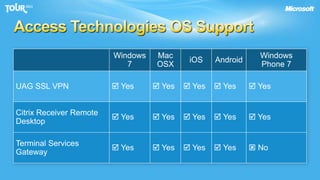
Access Technologies OS Support
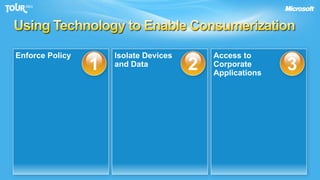
Using Technology to Enable ConsumerizationIsolate Devicesand DataAccess toCorporateApplicationsEnforce Policy123
Microsoft Windows 7 Commercial SlateStrategy and roadmap
Windows Slate Common Questions	Where is the iPad/Android competitor from Microsoft?
Why not use a phone OS on a tablet?
Do I need to buy all new devices?
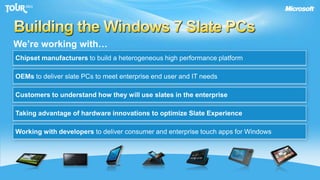
The best is yet to come… why?Building the Windows 7 Slate PCsWe’re working with…Chipset manufacturers to build a heterogeneous high performance platformOEMs to deliver slate PCs to meet enterprise end user and IT needsCustomers to understand how they will use slates in the enterpriseTaking advantage of hardware innovations to optimize Slate ExperienceWorking with developers to deliver consumer and enterprise touch apps for Windows
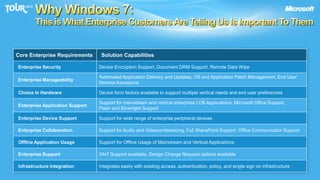
Why Windows 7: This is What Enterprise Customers Are Telling Us Is ImportantTo Them
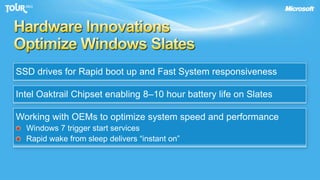
Hardware InnovationsOptimize Windows SlatesSSD drives for Rapid boot up and Fast System responsivenessIntel Oaktrail Chipset enabling 8–10 hour battery life on SlatesWorking with OEMs to optimize system speed and performanceWindows 7 trigger start servicesRapid wake from sleep delivers “instant on”
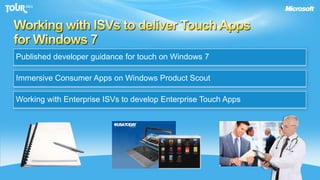
Working with ISVs to deliver Touch Appsfor Windows 7Published developer guidance for touch on Windows 7Immersive Consumer Apps on Windows Product ScoutWorking with Enterprise ISVs to develop Enterprise Touch Apps
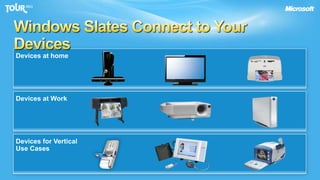
Windows Slates Connect to Your DevicesDevices at home Devices at WorkDevices for VerticalUse Cases
DemoWindows 7 Slate PCImmersive Consumer Apps: USA Today, Kindle, andMosaic AppsRich Enterprise Content Creation with Pen Support:Office and OneNote Ink SupportVideo Conferencing and Data Sharing with Microsoft LyncWindows 7 Handwriting RecognitionBroad Device Support

Consumerization

  • 1.
    Saying Yes toConsumerization
  • 2.
    Life and Workare Becoming IndistinguishableAt home…At work…And anywhere in between
  • 3.
    ChallengesHow do I…Addressthe work/life blur?Ensure anywhere productivity?Protect data and maintain compliance?Handle PC and device management?
  • 4.
    Unmanaged Devices HaveHidden CostsBusiness RisksTheftSecurityPrivacyCorporate and government regulatory complianceIntellectual property (IP) protectionIT ChallengesUnknown patched stateUnknown application vendorsUnknown application compatibilityComplexity to access corporate dataUnique management requirements for each device
  • 5.
    Consider the EssentialsCreatethe Conditions for Success.How will you control access to sensitive data?How will you manage data backup/restore?DATAHow will you deliver business applications? How will you support compliance reporting?APPSWho owns the IP on the device?Who fixes the device if it breaks?OS/HWHow will you enforce network security?NETWORK
  • 6.
    Understand Principles toEnable ConsumerizationAccess to CorporateInformation based on:Who you areRead, Read/Write, Full AccessHow much you trust the deviceUnmanaged, Managed, Partially ManagedWhere the device isCorporate networkInternetUntrusted network
  • 7.
    Evaluate Enabling TechnologiesEnablingTechnologies Can Help. VirtualizationCloudComputingEnterpriseManagementTerminal ServerComputingSupport User ChoiceManage the Essentials
  • 8.
    Using Technology toEnable ConsumerizationIsolate Devices and DataServer andDomainIsolation (IPSec)Network AccessProtection (NAP)Rights Management ServiceAccess toCorporateApplicationsUnified AccessGateway (UAG)Terminal ServerAccess Gateway (TSG)Virtual Desktop Infrastructure (VDI)Enforce PolicyPassword PolicyRemote WipeAuthorized Device123
  • 9.
  • 10.
    SCCM 2012: MobileDevice Management Through ExchangeProvide basic management for all Exchange ActiveSync (EAS) connected devicesFeatures Supported:Discovery/InventorySettings policyRemote WipeSupports on-premises Exchange 2010 and hosted Exchange
  • 11.
    Announcing: SCCM 2012.‘Light’Management supportEAS Based policy deliverySupport includes:Discovery/InventorySettings policyRemote Wipe
  • 12.
    DemoSCCM 2012 BetaDevice Management
  • 13.
  • 14.
    Servers withSensitive DataServerIsolationHRWorkstationManagedComputerManagedComputerDomain IsolationIsolate: IPSec Server and Domain IsolationDefine the logical isolation boundariesDistribute policiesand credentialsManaged computerscan communicateBlock inbound connectionsfrom untrustedEnable tiered-accessto sensitive resourcesActive DirectoryDomain ControllerCorporateNetworkResource ServerXUnmanagedXUntrusted
  • 15.
    Isolate: Network AccessProtectionPolicy Serverse.g., Patch, AV11Access requestedHealth state sent to NPS (RADIUS)NPS validates against health policyIf compliant, access grantedIf not compliant, restricted network access and remediationMicrosoft NPS32Remediation Serverse.g., Patch5Not policy compliant23RestrictedNetwork4Policy compliantDCHP, VPNSwitch/RouterCorporate Network54
  • 16.
  • 17.
    Data Isolation: RightsMgmt Server1. Author receives a client licensor certificate the“first time” they rights-protect information Active DirectorySQL Server2. Author defines a set of usage rights and rules for their file; Application creates a “Publish License”and encrypts the fileWindows Server running RMS33. Author distributes file4154. Recipient clicks file to open, the RMS-enabled application calls to the RMS server which validates the user and issues a “Use License.”235. The RMS-enabled application renders file and enforces rightsAuthor using OfficeThe Recipient
  • 18.
  • 19.
    Access to CorporateApplications3
  • 20.
    Two Ways ToProvide Access from Unmanaged DevicesData Center/Corporate NetworkInternet
  • 21.
    Forefront Unified AccessGatewayExchangeCRMSharePointIIS basedIBM, SAP, OracleMobileUAGHome/Friend/KioskRead Only AccessHTTPS / HTTPTS/RDSHTTPS (443)InternetDirect AccessNon webAuthenticationEnd-point health detectionEnterprise ReadinessEdge ReadyInformation Leakage PreventionNon-WindowsBusiness Partners/SubcontractorsRead/Write only to subset of siteson SharePointAD, ADFS, RADIUS, LDAP…Data Center/Corporate NetworkEmployees Managed MachinesFull Access only to sites defined User role
  • 22.
    RDS via RemoteDesktop GatewayRemote access to internal server resourcesInternetDMZCorp LANExternalFirewallInternalFirewallTerminal ServerHomeTerminal ServerInternetHTTPS/443HotelTerminal ServicesGateway ServerE-mail ServerBusiness Partner/Client Site
  • 23.
    Server Hosted VirtualDesktopsVirtual Desktop Infrastructure (VDI): Another way to deliver the Windows desktopTechnology from Microsoft-CitrixWindows desktop and session deliveryon-demandDescriptionPersonalized desktops hosted in datacenterIntegrated Management with SC, Application Virtualization and RDS CALDesktop Virtualization platform (hypervisor)Full-fidelity user experience over LAN and WANLightweight, universal software client Self-service 'storefront' for enterprise applicationsBetter TogetherKey ConsiderationsAccess desktop, applications, data on any device, anywhere Best user experience on LAN or WANIntegrated desktop managementITInvestments in server, management, storage, and network infrastructureUnified, centralizedmanagement of physical and virtual environmentsUser/VM DensityBusiness continuityUserFlexibility of access User Experience (personalization, graphics)Performance & Scalability is best in class (over LAN, WAN)Our AdvantageBest in class technologies combined to provide most comprehensive and most Cost Effective solutionMost scalable with Hyper-V and SessionsBetter User Experience than PCoIPSingle Management Console for physical and virtual assets
  • 24.
    Extending Virtualization toUnmanaged Devices:Citrix ReceiverSmartphonesLeverage Windows, iOS, Android, RIM deviceswith universal clientAccess your VDI Desktop or Remote PC Self-service installation and auto-updatesPCsThin and Diskless PCsTablets
  • 25.
  • 26.
  • 27.
    Using Technology toEnable ConsumerizationIsolate Devicesand DataAccess toCorporateApplicationsEnforce Policy123
  • 28.
    Microsoft Windows 7Commercial SlateStrategy and roadmap
  • 29.
    Windows Slate CommonQuestions Where is the iPad/Android competitor from Microsoft?
  • 30.
    Why not usea phone OS on a tablet?
  • 31.
    Do I needto buy all new devices?
  • 32.
    The best isyet to come… why?Building the Windows 7 Slate PCsWe’re working with…Chipset manufacturers to build a heterogeneous high performance platformOEMs to deliver slate PCs to meet enterprise end user and IT needsCustomers to understand how they will use slates in the enterpriseTaking advantage of hardware innovations to optimize Slate ExperienceWorking with developers to deliver consumer and enterprise touch apps for Windows
  • 33.
    Why Windows 7:This is What Enterprise Customers Are Telling Us Is ImportantTo Them
  • 34.
    Hardware InnovationsOptimize WindowsSlatesSSD drives for Rapid boot up and Fast System responsivenessIntel Oaktrail Chipset enabling 8–10 hour battery life on SlatesWorking with OEMs to optimize system speed and performanceWindows 7 trigger start servicesRapid wake from sleep delivers “instant on”
  • 35.
    Working with ISVsto deliver Touch Appsfor Windows 7Published developer guidance for touch on Windows 7Immersive Consumer Apps on Windows Product ScoutWorking with Enterprise ISVs to develop Enterprise Touch Apps
  • 36.
    Windows Slates Connectto Your DevicesDevices at home Devices at WorkDevices for VerticalUse Cases
  • 37.
    DemoWindows 7 SlatePCImmersive Consumer Apps: USA Today, Kindle, andMosaic AppsRich Enterprise Content Creation with Pen Support:Office and OneNote Ink SupportVideo Conferencing and Data Sharing with Microsoft LyncWindows 7 Handwriting RecognitionBroad Device Support
  • 38.
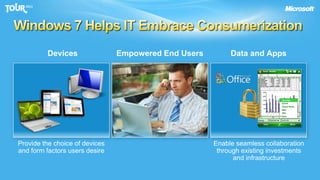
    Windows 7 HelpsIT Embrace ConsumerizationEmpowered End UsersData and AppsDevicesProvide the choice of devices and form factors users desireEnable seamless collaboration through existing investments and infrastructure
  • 39.
    © 2011 MicrosoftCorporation. All rights reserved. Microsoft, Windows, Windows Vista and other product names are or may be registered trademarks and/or trademarks in the U.S. and/or other countries.The information herein is for informational purposes only and represents the current view of Microsoft Corporation as of the date of this presentation. Because Microsoft must respond to changing market conditions, it should not be interpreted to be a commitment on the part of Microsoft, and Microsoft cannot guarantee the accuracy of any information provided after the date of this presentation. MICROSOFT MAKES NO WARRANTIES, EXPRESS, IMPLIED OR STATUTORY, AS TO THE INFORMATION IN THIS PRESENTATION.

Editor's Notes

  • #2 Key Point:We Can Help You Unleash the Potential of Consumerization.As consumers get their hands on smarter devices and applications, they are excited to bring these technologies to work and put them to good use. And they want you to support them. People are coming into work with much higher expectations of IT – they want better devices and applications, more options and freedom, and faster, uninterrupted service. These growing expectations are putting increasing pressure on IT to provide compelling solutions for their end users while maintaining a secure and well-managed environment. How can we help? Microsoft and Windows can help your business navigate these new realities of work – what many are calling the consumerization of IT. We can equip IT organizations with guidance on how to embrace and utilize consumerization responsibly, be your trusted advisor, and help you lead your business as you harness the potential of consumerization.OUTLINE OF THE PITCHSection 1:Consumerization – What is it? And why should you care? (slides 2-7)Approximate Time: 10 minSection 2: Guidance & Best Practices: Path to YES (slides 8-14)Approximate Time: 10 minSection 3: Why Microsoft? Why Windows? (slides 15-22)Approximate Time: 5 minSection 4: Specific Guidance – Windows BG (slides 23-31)Approximate Time: 20 minTotal Time: 45 min + Discussion
  • #3 Timing: 2 minutes Key Points:The ubiquitous and always-connected nature of today’s technology has made it possible to work from anywhere and to bring our personal lives into the workplace. The boundaries between work and home are blurring. Script:Technology has permeated every aspect of our lives. At home, it has become a tool for learning, for entertainment, and for social connections. At work, in particular for information workers, technology is the foundation for how we conduct business. And with constant connectivity regardless of location, it’s becoming impossible to separate the personal from the professional. At home, you might use your personal laptop to clear your work email or to put the finishing touches on a presentation and load it up to the company intranet after dinner. At work, you might arrange to meet a friend for drinks using instant messaging (IM), check out your colleague’s Facebook page, or help out with your kid’s homework by doing a little web research. In fact, according to a study that IDC recently conducted, between a third to more than a half of devices (including laptops, mobile phones, and smartphones) and web-based applications (including IM, professional social networks, and blogs) used in the workplace are used for both work and personal purposes. The days of the 8–5 workday, at least for the information worker, are essentially over. Today the lines between personal and professional have blurred, and we take both our personal and professional lives with us nearly everywhere we go. Additional Information:John Gantz, “A Consumer Revolution in the Enterprise” (sponsored by Unisys), IDC, June 2010, http://www.unisys.com/unisys/ri/report/detail.jsp?id=1120000970003910071
  • #4 Key Point: Many of companies today are experiencing consumerization in full force. Address the work/life blur?Ensure anywhere productivity?Protect data & maintain compliance?Streamline pc & device management?
  • #5 Timing: 2 minutes Key Points:There are hidden costs and risks in permitting the use of unmanaged devices to access internal resources and the corporate network. For the business, unmanaged devices present risks in terms of security, privacy, compliance, and intellectual property protection.For IT, unmanaged devices increase complexity and the management burden.  Script:There are huge potential productivity benefits with consumer technology, but this device proliferation also means that most enterprises now have numerous unmanaged devices being brought into the enterprise, trying to access the corporate network and confidential business resources. This presents some real challenges and risks:Business risks: Picture this scenario. Someone, let’s say an executive, needs to review the latest specifications for an innovative new product that’s about to launch or perhaps a highly confidential financial report. He or she is ready to leave the office for the day, and the perfect solution seems to be to put it on a slate to read later in the evening. But, worst case scenario, that slate never actually makes it home, because it gets lost in transit. Maybe it’s forgotten on the train or someone smashes the window of the executive’s car and steals it from the backseat. What do you do? Theft—and the consequent loss or exposure of sensitive information or confidential intellectual property (IP)—is a very real risk with unmanaged devices if they have no way to be encrypted, locked, and/or remotely wiped. And if that slate was a personal device, who is ultimately responsible for keeping that information secure and private? How are you preventing regulatory breaches?IT challenges: For IT, the challenges of device proliferation really come down to the added complexity of the IT environment. If a user has problems with a personal, unmanaged device being using for work purposes, he or she is likely to call the enterprise help desk for support, even if that device isn’t IT sanctioned. This raises new headaches for IT: If the device doesn’t have up-to-date patches, will it be stable? If the device has applications from an unknown or unverified vendor, how can they be sure there is no spyware? And will those applications introduce compatibility issues? How do they manage access to corporate information given these concerns? The more devices IT has to contend with, the more complicated and difficult it is to ensure the stability, performance, and security of those devices and the wider network. Regardless of what the device is, if it’s unmanaged, it poses some risks. We’re certainly not excluding Windows-based devices here. If an employee brings in a personal, unmanaged Windows-based tablet, you have no way of knowing whether it is compromised by spyware or infected with a virus that could put your other devices or your confidential business information at risk.
  • #6 Key Point: Next step is to create conditions for success by managing the essentials.DATAHow will you control access to sensitive data?How will you manage data backup/restore?APPSHow will you deliver business applications? How will you support compliance reporting?OS/HWWho owns the IP on the device?Who fixes the device if it breaks?NETWORKHow will you enforce network security?
  • #8 Key Point: Microsoft technologies such as desktop virtualization and cloud computing can help enable consumerization scenarios in a way that supports user choice and IT’s ability to manage and secure systemsMicrosoft server hosted Desktop Virtualization solutions offer the following potential benefits for users and IT:Simplify remote connectivity by enabling access to a rich desktop or web page or seamlessly integrated with a local desktopEnable flexible work scenarios such as hot-desking and work from homeDesktop environments centralized in the datacenter provide better business continuity and faster return to productivity for disaster recovery scenariosAccelerate and extend deployment of desktops and applications to a wide array of client devices, including clients on which the desktop operating system can’t run nativelyEnable rapid OS upgrades and patching by installing desktops only once in the data center and not locally on end point devicesWhen evaluating Desktop Virtualization technologies, enterprises can consider Remote Desktop Services (RDS) and Virtual Desktop Infrastructure (VDI). RDS provides session based desktops in the datacenter with higher scale and lower cost than VDI. VDI offers better user operating system isolation than RDS as well as better native application compatibility. VDI also provides the users with the ability to be admins of their own images. Cloud computing with Microsoft Windows InTuneoffers the following potential benefits for users and IT:Centrally manage the deployment of Microsoft updates and service packs to all PCsHelp protect PCs from malware threats with malware protection that can be managed from Web-based consoleReceive alerts on updates and threats to proactively identify and resolve problems with PCsResolve PC issues, regardless of location, with remote assistanceTrack hardware and software assets used in your businessCentrally manage update, firewall, and malware protection policies, even on remote machines outside corporate networkAs organizations evaluates technologies that enable them to embrace the reality of consumerization of IT, Microsoft offers a wide range of solutions to meet particular demands of users and IT.
  • #22 UAG application publishing: http://technet.microsoft.com/en-us/library/ee406221.aspxClient Health: http://blog.msedge.org.uk/
  • #24 Virtual Desktop Infrastructure (VDI): Another way to deliver the Windows desktopKey Messages:Best in class technologies combined to provide most comprehensive and most Cost Effective solution (See slide 17)Most scalable with Hyper-V and Sessions (See slide 18)Better User Experience than PCoIPSingle Management Console for physical and virtual assets (See Slide 24)Additional Resources:Telecom Italia VDI Case Study (Appendix)
  • #25 Any device, anywhere with Receiver™. Today’s digital workforce demands the flexibility to work from anywhere at any time using any device they’d like. Leveraging Citrix Receiver as a lightweight universal client, XenDesktop users can access their desktop and corporate applications from the latest tablets, smartphones, PCs, Macs, or thin client. This enables virtual workstyles, business continuity and user mobility. XenDesktop 5 includes new Citrix Receivers for all the latest tablets, smartphones, Macs and thin clients.
  • #34 Engineering and design guidance for slate PC apps -- http://code.msdn.microsoft.com/wintouchguideWindows Product Scout: http://www.microsoft.com/windows/product-scout/ ISV Engagement through ACE Framework