MVP Roadshow 2015
Enterprise Mobility Suite
Key Takeaways
Why is mobile management important?
What is EMS and why do you need it is your Enterprise?
How do we configure and get started with EMS?
© EG A/S 2
Ronni Pedersen
Microsoft MVP: Enterprise Client Management
Senior Infrastructure Architect
Founder: System Center User Group Denmark
Microsoft Certified Trainer
Microsoft TechNet Moderator
Twitter: https://twitter.com/ronnipedersen
Blog: http://www.ronnipedersen.com/
Mail: Ronni.Pedersen@eg.dk
© EG A/S 3
Kenny Buntinx
Managing Consultant
Kenny.Buntinx@kbsolutions.be
© EG A/S
https://twitter.com/KennyBuntinx
http://be.linkedin.com/KennyBuntinx
http://scug.be/blogs/sccm
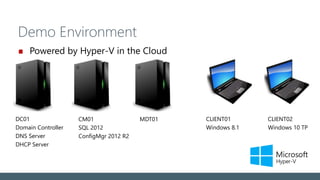
Demo Environment
Powered by Hyper-V in the Cloud
DC01
Domain Controller
DNS Server
DHCP Server
CLIENT02
Windows 10 TP
CM01
SQL 2012
ConfigMgr 2012 R2
CLIENT01
Windows 8.1
MDT01
Enterprise Mobility Suite
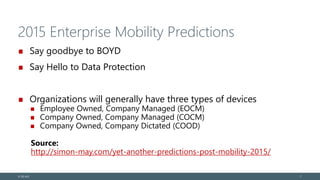
2015 Enterprise Mobility Predictions
Say goodbye to BOYD
Say Hello to Data Protection
Organizations will generally have three types of devices
Employee Owned, Company Managed (EOCM)
Company Owned, Company Managed (COCM)
Company Owned, Company Dictated (COOD)
Source:
http://simon-may.com/yet-another-predictions-post-mobility-2015/
© EG A/S 7
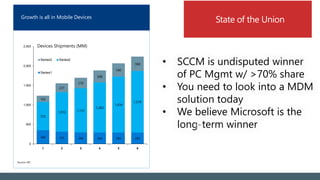
• SCCM is undisputed winner
of PC Mgmt w/ >70% share
• You need to look into a MDM
solution today
• We believe Microsoft is the
long-term winner
Growth is all in Mobile Devices
349 315 296 294 293 292
725
1,010 1,131
1,283
1,434
1,579
162
231
270
308
340
368
0
500
1,000
1,500
2,000
2,500
1 2 3 4 5 6
Series3 Series2
Series1
Devices Shipments (MM)
Source: IDC
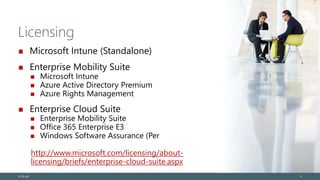
Licensing
Microsoft Intune (Standalone)
Enterprise Mobility Suite
Microsoft Intune
Azure Active Directory Premium
Azure Rights Management
Enterprise Cloud Suite
Enterprise Mobility Suite
Office 365 Enterprise E3
Windows Software Assurance (Per
http://www.microsoft.com/licensing/about-
licensing/briefs/enterprise-cloud-suite.aspx
© EG A/S 9
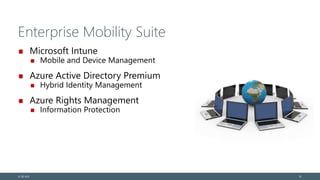
Enterprise Mobility Suite
Microsoft Intune
Mobile and Device Management
Azure Active Directory Premium
Hybrid Identity Management
Azure Rights Management
Information Protection
© EG A/S 10
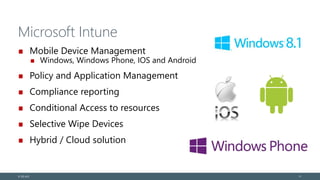
Microsoft Intune
Mobile Device Management
Windows, Windows Phone, IOS and Android
Policy and Application Management
Compliance reporting
Conditional Access to resources
Selective Wipe Devices
Hybrid / Cloud solution
© EG A/S 11
Azure Active Directory Premium
Active Directory in the cloud
Federation and identity provisioning
Centrally managed identities
Synchronization
Single User Identity (SSO)
Monitoring and protect access to cloud apps
Authentication and Security reports
Multi-Factor Authentication (MFA)
Empower end Users
Self-Service password reset
© EG A/S 12
Microsoft Rights Management
Encrypt and control
Documents
Mails
Prevent unwanted viewing/printing or access to
Corporate data
© EG A/S 13
Getting Started with Intune
Setting up the environment
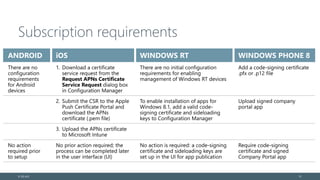
Subscription requirements
© EG A/S 15
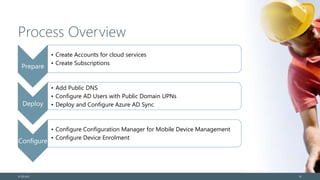
Process Overview
Prepare
• Create Accounts for cloud services
• Create Subscriptions
Deploy
• Add Public DNS
• Configure AD Users with Public Domain UPNs
• Deploy and Configure Azure AD Sync
Configure
• Configure Configuration Manager for Mobile Device Management
• Configure Device Enrolment
© EG A/S 16
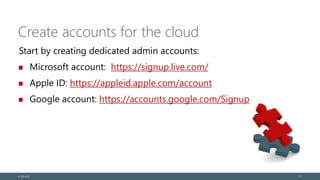
Create accounts for the cloud
Start by creating dedicated admin accounts:
Microsoft account: https://signup.live.com/
Apple ID: https://appleid.apple.com/account
Google account: https://accounts.google.com/Signup
© EG A/S 17
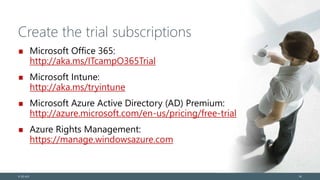
Create the trial subscriptions
Microsoft Office 365:
http://aka.ms/ITcampO365Trial
Microsoft Intune:
http://aka.ms/tryintune
Microsoft Azure Active Directory (AD) Premium:
http://azure.microsoft.com/en-us/pricing/free-trial
Azure Rights Management:
https://manage.windowsazure.com
© EG A/S 18
DEMO
Create accounts and subscriptions
Azure AD Sync and ADFS
Connect your Active Directory to the Cloud
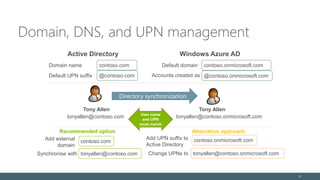
Domain, DNS, and UPN management
21
Tony Allen
tonyallen@contoso.com
Add external
domain
contoso.com
tonyallen@contoso.onmicrosoft.com
Tony Allen
tonyallen@contoso.com
tonyallen@contoso.onmicrosoft.com
Add UPN suffix to
Active Directory
contoso.onmicrosoft.com
Change UPNs toSynchronise with
Directory synchronization
Alternative approachRecommended option
User name
and UPN
must match
Active Directory Windows Azure AD
contoso.onmicrosoft.comcontoso.com Default domain
Default UPN suffix
Domain name
@contoso.com @contoso.onmicrosoft.comAccounts created as
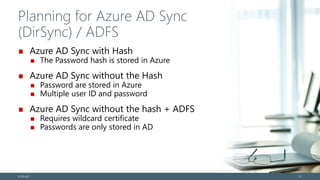
Planning for Azure AD Sync
(DirSync) / ADFS
Azure AD Sync with Hash
The Password hash is stored in Azure
Azure AD Sync without the Hash
Password are stored in Azure
Multiple user ID and password
Azure AD Sync without the hash + ADFS
Requires wildcard certificate
Passwords are only stored in AD
© EG A/S 22
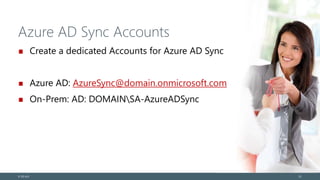
Azure AD Sync Accounts
Create a dedicated Accounts for Azure AD Sync
Azure AD: AzureSync@domain.onmicrosoft.com
On-Prem: AD: DOMAINSA-AzureADSync
© EG A/S 23
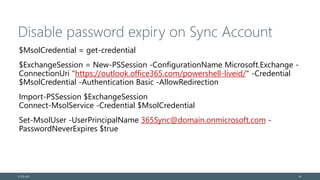
Disable password expiry on Sync Account
$MsolCredential = get-credential
$ExchangeSession = New-PSSession -ConfigurationName Microsoft.Exchange -
ConnectionUri "https://outlook.office365.com/powershell-liveid/" -Credential
$MsolCredential -Authentication Basic -AllowRedirection
Import-PSSession $ExchangeSession
Connect-MsolService -Credential $MsolCredential
Set-MsolUser -UserPrincipalName 365Sync@domain.onmicrosoft.com -
PasswordNeverExpires $true
© EG A/S 24
DEMO
Setting up Azure AD Sync
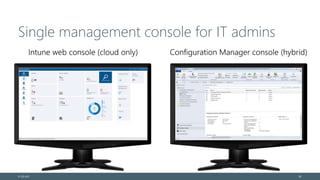
Single management console for IT admins
© EG A/S 26
Is your ConfigMgr Environment ready for UDM?
Cumulative Update 4
http://support.microsoft.com/kb/3026739
Why CU’s Matter?
http://blogs.technet.com/b/configmgrteam/archiv
e/2015/02/26/updates-for-managing-mobile-
devices-with-configuration-manager-and-
microsoft-intune.aspx
http://scug.be/sccm/2014/12/29/hybrid-scenarios-
with-system-center-configuration-manager-2012-
r2-windows-intune-adfs-wap-ndes-workplace-
join-hotfixes-you-really-need-in-your-
environment/
© EG A/S
DEMO
Configuring Microsoft Intune
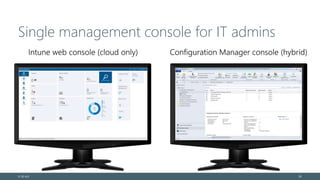
Single management console for IT admins
© EG A/S 29
Company Portal(s)
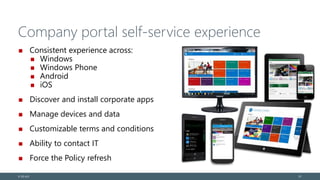
Company portal self-service experience
Consistent experience across:
Windows
Windows Phone
Android
iOS
Discover and install corporate apps
Manage devices and data
Customizable terms and conditions
Ability to contact IT
Force the Policy refresh
© EG A/S 3131
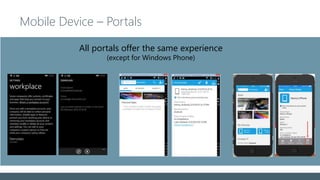
Mobile Device – Portals
All portals offer the same experience
(except for Windows Phone)
Device Enrollment
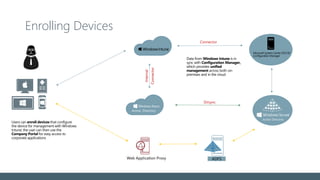
Enrolling Devices
Users can enroll devices that configure
the device for management with Windows
Intune; the user can then use the
Company Portal for easy access to
corporate applications
Data from Windows Intune is in
sync with Configuration Manager,
which provides unified
management across both on-
premises and in the cloud
Dirsync
w Pwd Sync
Connector
Internal
Connector
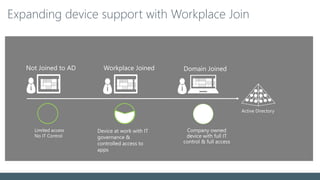
Expanding device support with Workplace Join
Limited access
No IT Control
Active Directory
Not Joined to AD Workplace Joined Domain Joined
Lost Device Protection
Devices registered via Workplace Join are registered within Active
Directory in the container :
CN=<Device ID>,CN=RegisteredDevices,DC=mydomain,DC=com.
Lost devices can be denied access by disabling or deleting the
appropriate object within AD. Access through AD FS is
immediately revoked for the workplace joined client.
From testing thus far, devices joined, left and re-registered via
Workplace Join are not currently cleaned up within the
RegisteredDevices container. Some PowerShell scripting is
currently required to enforce this.
© EG A/S
As a side note…
ADFS with Workplace join?
Windows Phone 8.1 requires GDR 2
v 8.10.14192.280
© EG A/S 37
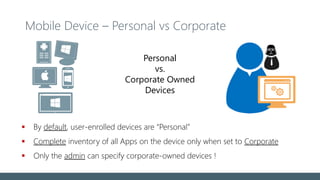
Mobile Device – Personal vs Corporate
App Management
 By default, user-enrolled devices are “Personal”
 Complete inventory of all Apps on the device only when set to Corporate
 Only the admin can specify corporate-owned devices !
Personal
vs.
Corporate Owned
Devices
Collecting IMEI from devices
Retrieve International Mobile Equipment Identity (IMEI)
Through custom MOF
Windows Phone 8.1
Full Details:
http://blogs.technet.com/b/configmgrteam/archive/2014/07/30/collecting-imei-from-
devices-enrolled-in-windows-intune-with-sc-2012-r2-configmgr.aspx
© EG A/S
DEMO
Enrollment Walkthrough / Workplace Join / Lost Devices
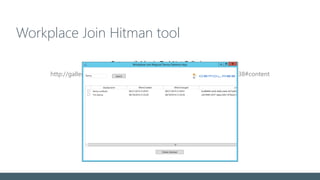
Workplace Join Hitman tool
Beta available via TechNet Galleries:
http://gallery.technet.microsoft.com/WorkPlace-Join-Hitman-8c691238#content
Settings Management
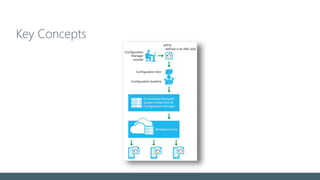
Key Concepts
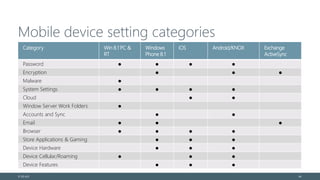
Mobile device setting categories
© EG A/S 44
Category Win 8.1 PC &
RT
Windows
Phone 8.1
iOS Android/KNOX Exchange
ActiveSync
Password ● ● ● ●
Encryption ● ● ●
Malware ●
System Settings ● ● ● ●
Cloud ● ●
Window Server Work Folders ●
Accounts and Sync ● ●
Email ● ● ●
Browser ● ● ● ●
Store Applications & Gaming ● ● ●
Device Hardware ● ● ●
Device Cellular/Roaming ● ● ●
Device Features ● ● ●
DEMO
Settings Management
Intune Extensions
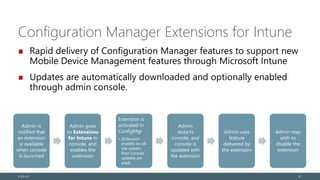
Configuration Manager Extensions for Intune
Rapid delivery of Configuration Manager features to support new
Mobile Device Management features through Microsoft Intune
Updates are automatically downloaded and optionally enabled
through admin console.
© EG A/S 47
Admin is
notified that
an extension
is available
when console
is launched
Admin goes
to Extensions
for Intune in
console, and
enables the
extension
Extension is
activated in
ConfigMgr
• (Extension
enables on all
site system,
then console
updates are
avail)
Admin
restarts
console, and
console is
updated with
the extension
Admin uses
feature
delivered by
the extension
Admin may
wish to
disable the
extension
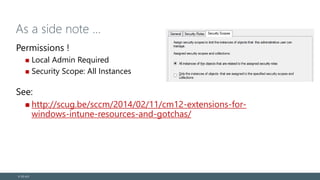
As a side note …
Permissions !
Local Admin Required
Security Scope: All Instances
See:
http://scug.be/sccm/2014/02/11/cm12-extensions-for-
windows-intune-resources-and-gotchas/
© EG A/S
Extending Settings management Through
OMA-DM
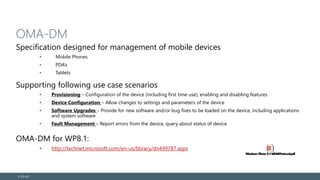
OMA-DM
Specification designed for management of mobile devices
• Mobile Phones
• PDA’s
• Tablets
Supporting following use case scenarios
• Provisioning – Configuration of the device (including first time use), enabling and disabling features
• Device Configuration – Allow changes to settings and parameters of the device
• Software Upgrades – Provide for new software and/or bug fixes to be loaded on the device, including applications
and system software
• Fault Management – Report errors from the device, query about status of device
OMA-DM for WP8.1:
• http://technet.microsoft.com/en-us/library/dn499787.aspx
© EG A/S
DEMO
Extending Settings Management
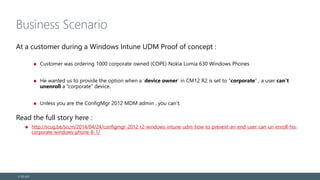
Business Scenario
At a customer during a Windows Intune UDM Proof of concept :
Customer was ordering 1000 corporate owned (COPE) Nokia Lumia 630 Windows Phones
He wanted us to provide the option when a ‘device owner’ in CM12 R2 is set to “corporate” , a user can’t
unenroll a “corporate” device.
Unless you are the ConfigMgr 2012 MDM admin , you can’t.
Read the full story here :
http://scug.be/sccm/2014/04/24/configmgr-2012-r2-windows-intune-udm-how-to-prevent-an-end-user-can-un-enroll-his-
corporate-windows-phone-8-1/
© EG A/S
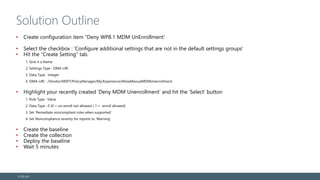
Solution Outline
• Create configuration item “Deny WP8.1 MDM UnEnrollment’
• Select the checkbox : ‘Configure additional settings that are not in the default settings groups’
• Hit the “Create Setting” tab.
1. Give it a Name
2. Settings Type : OMA-URI
3. Data Type : Integer
4. OMA-URI : ./Vendor/MSFT/PolicyManager/My/Experience/AllowManualMDMUnenrollment
• Highlight your recently created ‘Deny MDM Unenrollment’ and hit the ‘Select’ button
1. Rule Type : Value
2. Data Type : 0 (0 = un-enroll not allowed / 1 = enroll allowed)
3. Set ‘Remediate noncompliant rules when supported’
4. Set Noncompliance severity for reports to ‘Warning’
• Create the baseline
• Create the collection
• Deploy the baseline
• Wait 5 minutes
© EG A/S
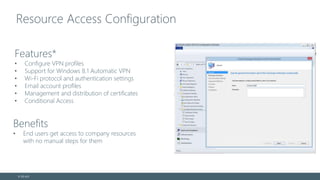
Resource Access Configuration
© EG A/S
Benefits
• End users get access to company resources
with no manual steps for them
Features*
• Configure VPN profiles
• Support for Windows 8.1 Automatic VPN
• Wi-Fi protocol and authentication settings
• Email account profiles
• Management and distribution of certificates
• Conditional Access
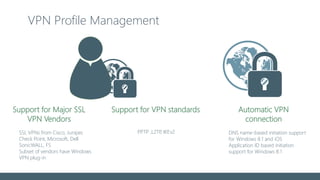
VPN Profile Management
DNS name-based initiation support
for Windows 8.1 and iOS
Application ID based initiation
support for Windows 8.1
Automatic VPN
connection
Support for VPN standards
SSL VPNs from Cisco, Juniper,
Check Point, Microsoft, Dell
SonicWALL, F5
Subset of vendors have Windows
VPN plug-in
PPTP ,L2TP, IKEv2
Support for Major SSL
VPN Vendors
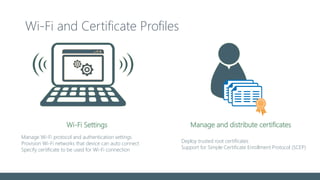
Wi-Fi and Certificate Profiles
Manage and distribute certificates
Deploy trusted root certificates
Support for Simple Certificate Enrollment Protocol (SCEP)
Manage Wi-Fi protocol and authentication settings
Provision Wi-Fi networks that device can auto connect
Specify certificate to be used for Wi-Fi connection
Wi-Fi Settings
DEMO
Resource Access Configurations
N-What ? NDES ? SCEP ??? WTH …
Certificate Profiles
Manage and distribute certificates
Deploy trusted root certificates
Support for Simple Certificate Enrollment Protocol (SCEP)
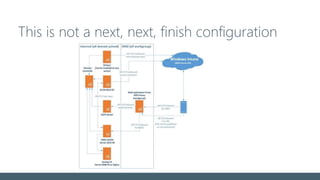
This is not a next, next, finish configuration
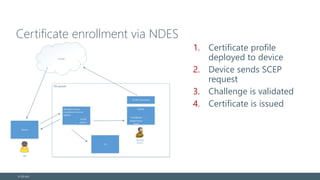
Certificate enrollment via NDES
1. Certificate profile
deployed to device
2. Device sends SCEP
request
3. Challenge is validated
4. Certificate is issued
© EG A/S
Why CU’s Matter (again)
CU4 improvements for NDES
Target to user instead of devices
> Ensures fastest delivery
Pre CU3 templates need to be recreated
> Re-targetting from device to user is not sufficient
© EG A/S
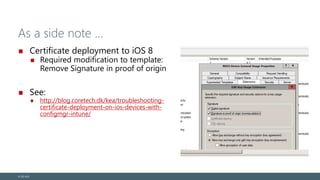
As a side note …
Certificate deployment to iOS 8
Required modification to template:
Remove Signature in proof of origin
See:
http://blog.coretech.dk/kea/troubleshooting-
certificate-deployment-on-ios-devices-with-
configmgr-intune/
© EG A/S
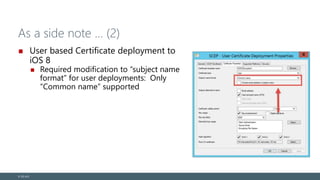
As a side note … (2)
User based Certificate deployment to
iOS 8
Required modification to “subject name
format” for user deployments: Only
“Common name” supported
© EG A/S
DEMO
Certificate deployment
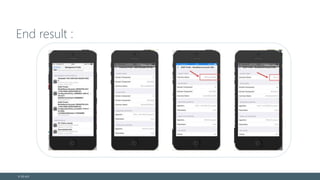
End result :
© EG A/S
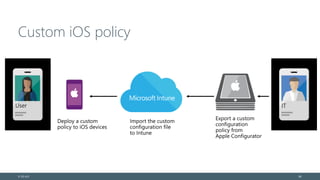
Custom iOS policy
© EG A/S 68
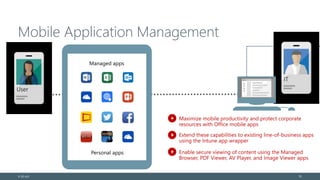
Application Management
Mobile Application Management
© EG A/S 70
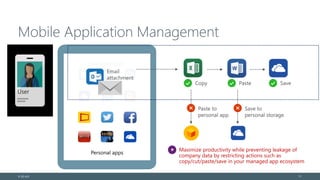
Personal apps
Mobile Application Management
© EG A/S 71
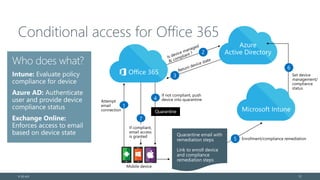
Conditional access for Office 365
© EG A/S 72
7
5
4
2
1
3
6
DEMO
Mobile Application Management
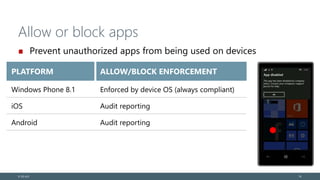
Allow or block apps
Prevent unauthorized apps from being used on devices
© EG A/S 74
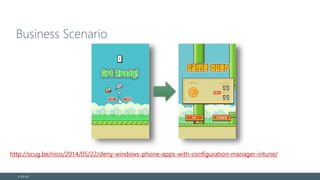
Business Scenario
© EG A/S
http://scug.be/nico/2014/05/22/deny-windows-phone-apps-with-configuration-manager-intune/
Solution Outline
• Create configuration item “Deny Windows Phone Apps”
• Select the checkbox : ‘Configure additional settings that are not in the default settings groups’
• Hit the “Create Setting” tab.
- Give it a Name
- Settings Type : OMA-URI
- Data Type : String
- OMA-URI : ./Vendor/MSFT/PolicyManager/My/ApplicationManagement/ApplicationRestrictions
- <AppPolicy Version=”1″ xmlns=”http://schemas.microsoft.com/phone/2013/policy”><Deny><App ProductId=”{2e59d843-22e4-4df1-869e-
22adadb8005b}”/></Deny></AppPolicy>
• Highlight your recently created ‘Deny Windows Phone Apps’ and hit the ‘Select’ button
- Rule Type : Value
- Data Type : 0 (0 = application not allowed / 1 = application allowed)
- Set ‘Remediate noncompliant rules when supported’
- Set Noncompliance severity for reports to ‘Warning’
• Create the baseline
• Create the collection
• Deploy the baseline
• Wait 5 minutes
© EG A/S
WorkFolders
Work Folders
Simple access to corporate data
• Enable offline access to files and folders stored on a Windows Server 2012 R2 file server
• Simple Group Policy configuration for domain-joined computers, with easy discoverability
for BYOD systems, as well
• Leverages web protocols (HTTP) for easy synchronization through firewalls
• A complement to OneDrive and OneDrive for Business
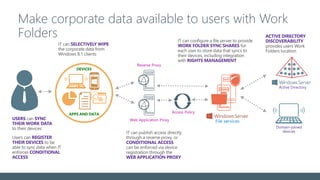
Make corporate data available to users with Work
Folders
Https://support.microsoft.com/kb/2891638
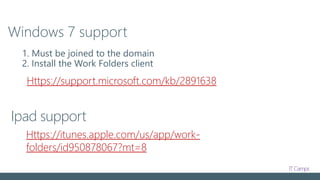
Windows 7 support
1. Must be joined to the domain
2. Install the Work Folders client
Ipad support
Https://itunes.apple.com/us/app/work-
folders/id950878067?mt=8
DEMO
Work Folders
Corporate Data Removal
Full Wipe vs. Selective Wipe
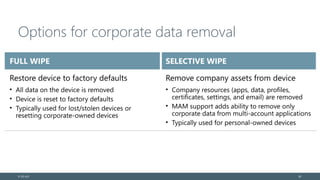
Options for corporate data removal
© EG A/S 83
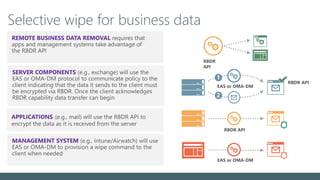
Selective wipe for business data
DEMO
Selective/Full Wipe
Questions
© EG A/S 86
© EG A/S 87

Getting started with the Enterprise Mobility Suite (EMS)

  • 1.
  • 2.
    Key Takeaways Why ismobile management important? What is EMS and why do you need it is your Enterprise? How do we configure and get started with EMS? © EG A/S 2
  • 3.
    Ronni Pedersen Microsoft MVP:Enterprise Client Management Senior Infrastructure Architect Founder: System Center User Group Denmark Microsoft Certified Trainer Microsoft TechNet Moderator Twitter: https://twitter.com/ronnipedersen Blog: http://www.ronnipedersen.com/ Mail: Ronni.Pedersen@eg.dk © EG A/S 3
  • 4.
    Kenny Buntinx Managing Consultant Kenny.Buntinx@kbsolutions.be ©EG A/S https://twitter.com/KennyBuntinx http://be.linkedin.com/KennyBuntinx http://scug.be/blogs/sccm
  • 5.
    Demo Environment Powered byHyper-V in the Cloud DC01 Domain Controller DNS Server DHCP Server CLIENT02 Windows 10 TP CM01 SQL 2012 ConfigMgr 2012 R2 CLIENT01 Windows 8.1 MDT01
  • 6.
  • 7.
    2015 Enterprise MobilityPredictions Say goodbye to BOYD Say Hello to Data Protection Organizations will generally have three types of devices Employee Owned, Company Managed (EOCM) Company Owned, Company Managed (COCM) Company Owned, Company Dictated (COOD) Source: http://simon-may.com/yet-another-predictions-post-mobility-2015/ © EG A/S 7
  • 8.
    • SCCM isundisputed winner of PC Mgmt w/ >70% share • You need to look into a MDM solution today • We believe Microsoft is the long-term winner Growth is all in Mobile Devices 349 315 296 294 293 292 725 1,010 1,131 1,283 1,434 1,579 162 231 270 308 340 368 0 500 1,000 1,500 2,000 2,500 1 2 3 4 5 6 Series3 Series2 Series1 Devices Shipments (MM) Source: IDC
  • 9.
    Licensing Microsoft Intune (Standalone) EnterpriseMobility Suite Microsoft Intune Azure Active Directory Premium Azure Rights Management Enterprise Cloud Suite Enterprise Mobility Suite Office 365 Enterprise E3 Windows Software Assurance (Per http://www.microsoft.com/licensing/about- licensing/briefs/enterprise-cloud-suite.aspx © EG A/S 9
  • 10.
    Enterprise Mobility Suite MicrosoftIntune Mobile and Device Management Azure Active Directory Premium Hybrid Identity Management Azure Rights Management Information Protection © EG A/S 10
  • 11.
    Microsoft Intune Mobile DeviceManagement Windows, Windows Phone, IOS and Android Policy and Application Management Compliance reporting Conditional Access to resources Selective Wipe Devices Hybrid / Cloud solution © EG A/S 11
  • 12.
    Azure Active DirectoryPremium Active Directory in the cloud Federation and identity provisioning Centrally managed identities Synchronization Single User Identity (SSO) Monitoring and protect access to cloud apps Authentication and Security reports Multi-Factor Authentication (MFA) Empower end Users Self-Service password reset © EG A/S 12
  • 13.
    Microsoft Rights Management Encryptand control Documents Mails Prevent unwanted viewing/printing or access to Corporate data © EG A/S 13
  • 14.
    Getting Started withIntune Setting up the environment
  • 15.
  • 16.
    Process Overview Prepare • CreateAccounts for cloud services • Create Subscriptions Deploy • Add Public DNS • Configure AD Users with Public Domain UPNs • Deploy and Configure Azure AD Sync Configure • Configure Configuration Manager for Mobile Device Management • Configure Device Enrolment © EG A/S 16
  • 17.
    Create accounts forthe cloud Start by creating dedicated admin accounts: Microsoft account: https://signup.live.com/ Apple ID: https://appleid.apple.com/account Google account: https://accounts.google.com/Signup © EG A/S 17
  • 18.
    Create the trialsubscriptions Microsoft Office 365: http://aka.ms/ITcampO365Trial Microsoft Intune: http://aka.ms/tryintune Microsoft Azure Active Directory (AD) Premium: http://azure.microsoft.com/en-us/pricing/free-trial Azure Rights Management: https://manage.windowsazure.com © EG A/S 18
  • 19.
  • 20.
    Azure AD Syncand ADFS Connect your Active Directory to the Cloud
  • 21.
    Domain, DNS, andUPN management 21 Tony Allen tonyallen@contoso.com Add external domain contoso.com tonyallen@contoso.onmicrosoft.com Tony Allen tonyallen@contoso.com tonyallen@contoso.onmicrosoft.com Add UPN suffix to Active Directory contoso.onmicrosoft.com Change UPNs toSynchronise with Directory synchronization Alternative approachRecommended option User name and UPN must match Active Directory Windows Azure AD contoso.onmicrosoft.comcontoso.com Default domain Default UPN suffix Domain name @contoso.com @contoso.onmicrosoft.comAccounts created as
  • 22.
    Planning for AzureAD Sync (DirSync) / ADFS Azure AD Sync with Hash The Password hash is stored in Azure Azure AD Sync without the Hash Password are stored in Azure Multiple user ID and password Azure AD Sync without the hash + ADFS Requires wildcard certificate Passwords are only stored in AD © EG A/S 22
  • 23.
    Azure AD SyncAccounts Create a dedicated Accounts for Azure AD Sync Azure AD: AzureSync@domain.onmicrosoft.com On-Prem: AD: DOMAINSA-AzureADSync © EG A/S 23
  • 24.
    Disable password expiryon Sync Account $MsolCredential = get-credential $ExchangeSession = New-PSSession -ConfigurationName Microsoft.Exchange - ConnectionUri "https://outlook.office365.com/powershell-liveid/" -Credential $MsolCredential -Authentication Basic -AllowRedirection Import-PSSession $ExchangeSession Connect-MsolService -Credential $MsolCredential Set-MsolUser -UserPrincipalName 365Sync@domain.onmicrosoft.com - PasswordNeverExpires $true © EG A/S 24
  • 25.
  • 26.
    Single management consolefor IT admins © EG A/S 26
  • 27.
    Is your ConfigMgrEnvironment ready for UDM? Cumulative Update 4 http://support.microsoft.com/kb/3026739 Why CU’s Matter? http://blogs.technet.com/b/configmgrteam/archiv e/2015/02/26/updates-for-managing-mobile- devices-with-configuration-manager-and- microsoft-intune.aspx http://scug.be/sccm/2014/12/29/hybrid-scenarios- with-system-center-configuration-manager-2012- r2-windows-intune-adfs-wap-ndes-workplace- join-hotfixes-you-really-need-in-your- environment/ © EG A/S
  • 28.
  • 29.
    Single management consolefor IT admins © EG A/S 29
  • 30.
  • 31.
    Company portal self-serviceexperience Consistent experience across: Windows Windows Phone Android iOS Discover and install corporate apps Manage devices and data Customizable terms and conditions Ability to contact IT Force the Policy refresh © EG A/S 3131
  • 32.
    Mobile Device –Portals All portals offer the same experience (except for Windows Phone)
  • 33.
  • 34.
    Enrolling Devices Users canenroll devices that configure the device for management with Windows Intune; the user can then use the Company Portal for easy access to corporate applications Data from Windows Intune is in sync with Configuration Manager, which provides unified management across both on- premises and in the cloud Dirsync w Pwd Sync Connector Internal Connector
  • 35.
    Expanding device supportwith Workplace Join Limited access No IT Control Active Directory Not Joined to AD Workplace Joined Domain Joined
  • 36.
    Lost Device Protection Devicesregistered via Workplace Join are registered within Active Directory in the container : CN=<Device ID>,CN=RegisteredDevices,DC=mydomain,DC=com. Lost devices can be denied access by disabling or deleting the appropriate object within AD. Access through AD FS is immediately revoked for the workplace joined client. From testing thus far, devices joined, left and re-registered via Workplace Join are not currently cleaned up within the RegisteredDevices container. Some PowerShell scripting is currently required to enforce this. © EG A/S
  • 37.
    As a sidenote… ADFS with Workplace join? Windows Phone 8.1 requires GDR 2 v 8.10.14192.280 © EG A/S 37
  • 38.
    Mobile Device –Personal vs Corporate App Management  By default, user-enrolled devices are “Personal”  Complete inventory of all Apps on the device only when set to Corporate  Only the admin can specify corporate-owned devices ! Personal vs. Corporate Owned Devices
  • 39.
    Collecting IMEI fromdevices Retrieve International Mobile Equipment Identity (IMEI) Through custom MOF Windows Phone 8.1 Full Details: http://blogs.technet.com/b/configmgrteam/archive/2014/07/30/collecting-imei-from- devices-enrolled-in-windows-intune-with-sc-2012-r2-configmgr.aspx © EG A/S
  • 40.
    DEMO Enrollment Walkthrough /Workplace Join / Lost Devices
  • 41.
    Workplace Join Hitmantool Beta available via TechNet Galleries: http://gallery.technet.microsoft.com/WorkPlace-Join-Hitman-8c691238#content
  • 42.
  • 43.
  • 44.
    Mobile device settingcategories © EG A/S 44 Category Win 8.1 PC & RT Windows Phone 8.1 iOS Android/KNOX Exchange ActiveSync Password ● ● ● ● Encryption ● ● ● Malware ● System Settings ● ● ● ● Cloud ● ● Window Server Work Folders ● Accounts and Sync ● ● Email ● ● ● Browser ● ● ● ● Store Applications & Gaming ● ● ● Device Hardware ● ● ● Device Cellular/Roaming ● ● ● Device Features ● ● ●
  • 45.
  • 46.
  • 47.
    Configuration Manager Extensionsfor Intune Rapid delivery of Configuration Manager features to support new Mobile Device Management features through Microsoft Intune Updates are automatically downloaded and optionally enabled through admin console. © EG A/S 47 Admin is notified that an extension is available when console is launched Admin goes to Extensions for Intune in console, and enables the extension Extension is activated in ConfigMgr • (Extension enables on all site system, then console updates are avail) Admin restarts console, and console is updated with the extension Admin uses feature delivered by the extension Admin may wish to disable the extension
  • 48.
    As a sidenote … Permissions ! Local Admin Required Security Scope: All Instances See: http://scug.be/sccm/2014/02/11/cm12-extensions-for- windows-intune-resources-and-gotchas/ © EG A/S
  • 49.
  • 50.
    OMA-DM Specification designed formanagement of mobile devices • Mobile Phones • PDA’s • Tablets Supporting following use case scenarios • Provisioning – Configuration of the device (including first time use), enabling and disabling features • Device Configuration – Allow changes to settings and parameters of the device • Software Upgrades – Provide for new software and/or bug fixes to be loaded on the device, including applications and system software • Fault Management – Report errors from the device, query about status of device OMA-DM for WP8.1: • http://technet.microsoft.com/en-us/library/dn499787.aspx © EG A/S
  • 51.
  • 52.
    Business Scenario At acustomer during a Windows Intune UDM Proof of concept : Customer was ordering 1000 corporate owned (COPE) Nokia Lumia 630 Windows Phones He wanted us to provide the option when a ‘device owner’ in CM12 R2 is set to “corporate” , a user can’t unenroll a “corporate” device. Unless you are the ConfigMgr 2012 MDM admin , you can’t. Read the full story here : http://scug.be/sccm/2014/04/24/configmgr-2012-r2-windows-intune-udm-how-to-prevent-an-end-user-can-un-enroll-his- corporate-windows-phone-8-1/ © EG A/S
  • 53.
    Solution Outline • Createconfiguration item “Deny WP8.1 MDM UnEnrollment’ • Select the checkbox : ‘Configure additional settings that are not in the default settings groups’ • Hit the “Create Setting” tab. 1. Give it a Name 2. Settings Type : OMA-URI 3. Data Type : Integer 4. OMA-URI : ./Vendor/MSFT/PolicyManager/My/Experience/AllowManualMDMUnenrollment • Highlight your recently created ‘Deny MDM Unenrollment’ and hit the ‘Select’ button 1. Rule Type : Value 2. Data Type : 0 (0 = un-enroll not allowed / 1 = enroll allowed) 3. Set ‘Remediate noncompliant rules when supported’ 4. Set Noncompliance severity for reports to ‘Warning’ • Create the baseline • Create the collection • Deploy the baseline • Wait 5 minutes © EG A/S
  • 54.
  • 55.
    Resource Access Configuration ©EG A/S Benefits • End users get access to company resources with no manual steps for them Features* • Configure VPN profiles • Support for Windows 8.1 Automatic VPN • Wi-Fi protocol and authentication settings • Email account profiles • Management and distribution of certificates • Conditional Access
  • 56.
    VPN Profile Management DNSname-based initiation support for Windows 8.1 and iOS Application ID based initiation support for Windows 8.1 Automatic VPN connection Support for VPN standards SSL VPNs from Cisco, Juniper, Check Point, Microsoft, Dell SonicWALL, F5 Subset of vendors have Windows VPN plug-in PPTP ,L2TP, IKEv2 Support for Major SSL VPN Vendors
  • 57.
    Wi-Fi and CertificateProfiles Manage and distribute certificates Deploy trusted root certificates Support for Simple Certificate Enrollment Protocol (SCEP) Manage Wi-Fi protocol and authentication settings Provision Wi-Fi networks that device can auto connect Specify certificate to be used for Wi-Fi connection Wi-Fi Settings
  • 58.
  • 59.
    N-What ? NDES? SCEP ??? WTH …
  • 60.
    Certificate Profiles Manage anddistribute certificates Deploy trusted root certificates Support for Simple Certificate Enrollment Protocol (SCEP)
  • 61.
    This is nota next, next, finish configuration
  • 62.
    Certificate enrollment viaNDES 1. Certificate profile deployed to device 2. Device sends SCEP request 3. Challenge is validated 4. Certificate is issued © EG A/S
  • 63.
    Why CU’s Matter(again) CU4 improvements for NDES Target to user instead of devices > Ensures fastest delivery Pre CU3 templates need to be recreated > Re-targetting from device to user is not sufficient © EG A/S
  • 64.
    As a sidenote … Certificate deployment to iOS 8 Required modification to template: Remove Signature in proof of origin See: http://blog.coretech.dk/kea/troubleshooting- certificate-deployment-on-ios-devices-with- configmgr-intune/ © EG A/S
  • 65.
    As a sidenote … (2) User based Certificate deployment to iOS 8 Required modification to “subject name format” for user deployments: Only “Common name” supported © EG A/S
  • 66.
  • 67.
  • 68.
  • 69.
  • 70.
    Mobile Application Management ©EG A/S 70 Personal apps
  • 71.
  • 72.
    Conditional access forOffice 365 © EG A/S 72 7 5 4 2 1 3 6
  • 73.
  • 74.
    Allow or blockapps Prevent unauthorized apps from being used on devices © EG A/S 74
  • 75.
    Business Scenario © EGA/S http://scug.be/nico/2014/05/22/deny-windows-phone-apps-with-configuration-manager-intune/
  • 76.
    Solution Outline • Createconfiguration item “Deny Windows Phone Apps” • Select the checkbox : ‘Configure additional settings that are not in the default settings groups’ • Hit the “Create Setting” tab. - Give it a Name - Settings Type : OMA-URI - Data Type : String - OMA-URI : ./Vendor/MSFT/PolicyManager/My/ApplicationManagement/ApplicationRestrictions - <AppPolicy Version=”1″ xmlns=”http://schemas.microsoft.com/phone/2013/policy”><Deny><App ProductId=”{2e59d843-22e4-4df1-869e- 22adadb8005b}”/></Deny></AppPolicy> • Highlight your recently created ‘Deny Windows Phone Apps’ and hit the ‘Select’ button - Rule Type : Value - Data Type : 0 (0 = application not allowed / 1 = application allowed) - Set ‘Remediate noncompliant rules when supported’ - Set Noncompliance severity for reports to ‘Warning’ • Create the baseline • Create the collection • Deploy the baseline • Wait 5 minutes © EG A/S
  • 77.
  • 78.
    Work Folders Simple accessto corporate data • Enable offline access to files and folders stored on a Windows Server 2012 R2 file server • Simple Group Policy configuration for domain-joined computers, with easy discoverability for BYOD systems, as well • Leverages web protocols (HTTP) for easy synchronization through firewalls • A complement to OneDrive and OneDrive for Business
  • 79.
    Make corporate dataavailable to users with Work Folders
  • 80.
    Https://support.microsoft.com/kb/2891638 Windows 7 support 1.Must be joined to the domain 2. Install the Work Folders client Ipad support Https://itunes.apple.com/us/app/work- folders/id950878067?mt=8
  • 81.
  • 82.
    Corporate Data Removal FullWipe vs. Selective Wipe
  • 83.
    Options for corporatedata removal © EG A/S 83
  • 84.
    Selective wipe forbusiness data
  • 85.
  • 86.
  • 87.