



Identitet
+
Mobil kontroll
+
Informasjonssikkerhet
Olav Tvedt
Sjefs Konsulent
MVP – Windows Expert-ITPRO
Twitter: @olavtwitt
Blog: http://olavtvedt.blogspot.com
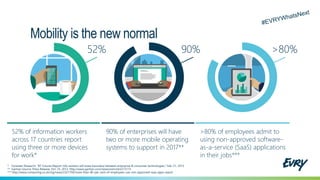
52% of information workers
across 17 countries report
using three or more devices
for work*
>80% of employees admit to
using non-approved software-
as-a-service (SaaS) applications
in their jobs***
90% of enterprises will have
two or more mobile operating
systems to support in 2017**
Mobility is the new normal
52% 90% >80%
* Forrester Research: “BT Futures Report: Info workers will erase boundary between enterprise & consumer technologies,” Feb. 21, 2013
** Gartner Source: Press Release, Oct. 25, 2012, http://www.gartner.com/newsroom/id/2213115
*** http://www.computing.co.uk/ctg/news/2321750/more-than-80-per-cent-of-employees-use-non-approved-saas-apps-report
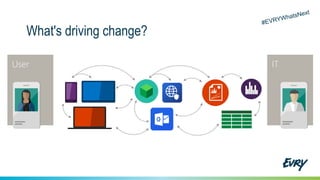
What's driving change?
User Devices Apps Data IT
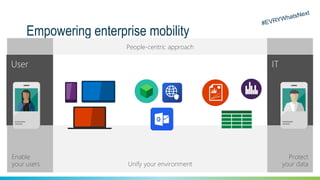
Empowering enterprise mobility
Protect
your data
Enable
your users
User IT
Unify your environment
People-centric approach
Devices Apps Data
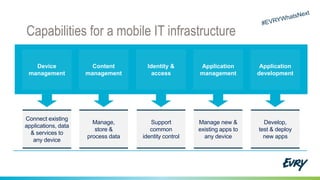
Capabilities for a mobile IT infrastructure
Device
management
Connect existing
applications, data
& services to
any device
Content
management
Manage,
store &
process data
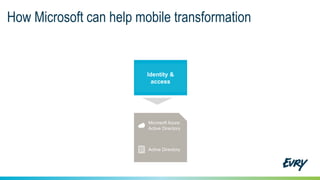
Identity &
access
Support
common
identity control
Application
management
Manage new &
existing apps to
any device
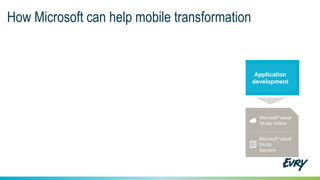
Application
development
Develop,
test & deploy
new apps
Ringo
George
Paul
John
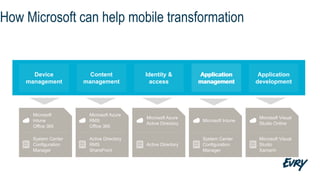
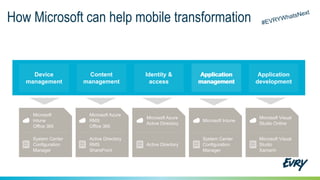
How Microsoft can help mobile transformation
Device
management
Content
management
Application
management
Application
development
Identity &
access
Application
management
Microsoft
Intune
Office 365
System Center
Configuration
Manager
Microsoft Azure
RMS
Office 365
Active Directory
RMS
SharePoint
Microsoft Azure
Active Directory
Active Directory
Microsoft Intune
System Center
Configuration
Manager
Microsoft Visual
Studio
Xamarin
Microsoft Visual
Studio Online
How Microsoft can help mobile transformation
Identity &
access
Microsoft Azure
Active Directory
Active Directory
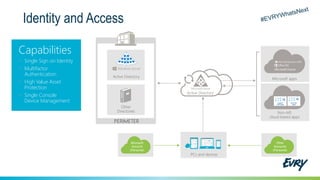
Identity and Access
Microsoft apps
Non-MS
cloud-based apps
Active Directory
Active Directory
Microsoft
Account
(Personal)
Other
Accounts
(Personal)
Capabilities
• Single Sign on Identity
• Multifactor
Authentication
• High Value Asset
Protection
• Single Console
Device Management
PERIMETER
Other
Directories
Custom
LOB apps
ISV/CSV
apps
PCs and devices
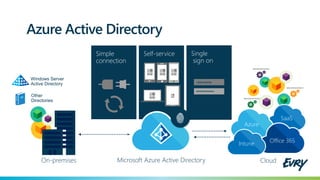
Azure Active Directory
Self-service Single
sign on
•••••••••••
Username
Simple
connection
Cloud
SaaS
Azure
Office 365Intune
Other
Directories
Windows Server
Active Directory
On-premises Microsoft Azure Active Directory
How Microsoft can help mobile transformation
Application
development
Microsoft Visual
Studio
Xamarin
Microsoft Visual
Studio Online
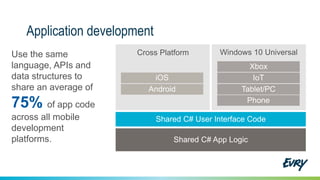
Application development
Use the same
language, APIs and
data structures to
share an average of
75% of app code
across all mobile
development
platforms.
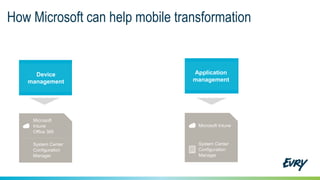
How Microsoft can help mobile transformation
Device
management
Microsoft
Intune
Office 365
System Center
Configuration
Manager
Microsoft Intune
System Center
Configuration
Manager
Application
management
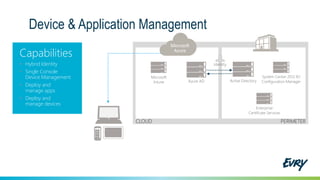
Device & Application Management
Capabilities
• Hybrid Identity
• Single Console
Device Management
• Deploy and
manage apps
• Deploy and
manage devices
Active Directory
Identity
Microsoft
Intune Azure AD
Enterprise
Certificate Services
System Center 2012 R2
Configuration Manager
CLOUD PERIMETER
Microsoft
Azure
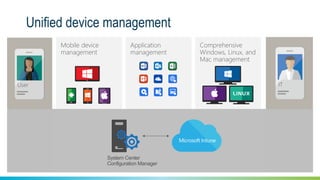
Unified device management
Application
management
Comprehensive
Windows, Linux, and
Mac management
Mobile device
management
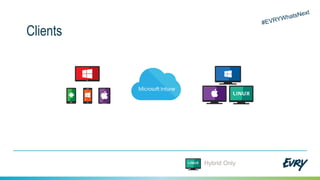
User IT
System Center
Configuration Manager
Clients
Hybrid Only
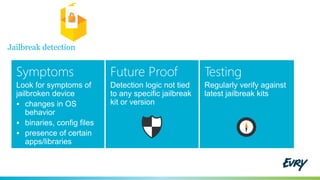
Jailbreak detection
Symptoms
Look for symptoms of
jailbroken device
 changes in OS
behavior
 binaries, config files
 presence of certain
apps/libraries
Future Proof
Detection logic not tied
to any specific jailbreak
kit or version
Testing
Regularly verify against
latest jailbreak kits
Android
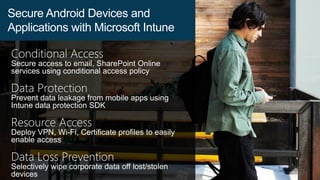
Conditional Access
Secure access to email, SharePoint Online
services using conditional access policy
Data Protection
Prevent data leakage from mobile apps using
Intune data protection SDK
Resource Access
Deploy VPN, Wi-Fi, Certificate profiles to easily
enable access
Data Loss Prevention
Selectively wipe corporate data off lost/stolen
devices
Secure Android Devices and
Applications with Microsoft Intune
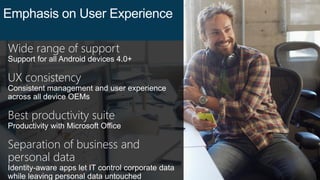
Wide range of support
Support for all Android devices 4.0+
UX consistency
Consistent management and user experience
across all device OEMs
Best productivity suite
Productivity with Microsoft Office
Separation of business and
personal data
Identity-aware apps let IT control corporate data
while leaving personal data untouched
Emphasis on User Experience
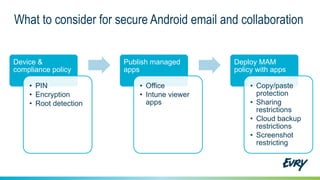
Device &
compliance policy
• PIN
• Encryption
• Root detection
Publish managed
apps
• Office
• Intune viewer
apps
Deploy MAM
policy with apps
• Copy/paste
protection
• Sharing
restrictions
• Cloud backup
restrictions
• Screenshot
restricting
What to consider for secure Android email and collaboration
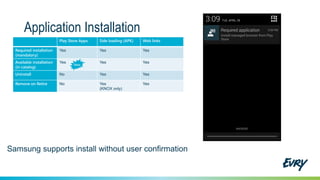
Application Installation
Play Store Apps Side loading (APK) Web links
Required installation
(mandatory)
Yes Yes Yes
Available installation
(in catalog)
Yes Yes Yes
Uninstall No Yes Yes
Remove on Retire No Yes
(KNOX only)
Yes
iOS
Kieran Gupta
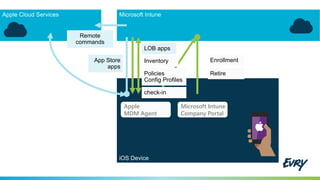
iOS Device
Apple
MDM Agent
Microsoft Intune
Company Portal
Enrollment
Policies
Config Profiles
Remote
commands
LOB apps
App Store
apps
Inventory
check-in
Retire
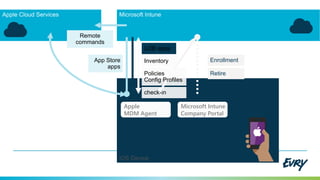
iOS Device
Apple
MDM Agent
Microsoft Intune
Company Portal
Enrollment
Remote
commands
LOB apps
App Store
apps
RetirePolicies
Config Profiles
Inventory
check-in
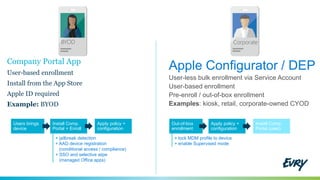
Company Portal App
User-based enrollment
Install from the App Store
Apple ID required
Example: BYOD
Apple Configurator / DEP
User-less bulk enrollment via Service Account
User-based enrollment
Pre-enroll / out-of-box enrollment
Examples: kiosk, retail, corporate-owned CYOD
CorporateBYOD
Users brings
device
Install Comp.
Portal + Enroll
Apply policy +
configuration
Out-of-box
enrollment
Apply policy +
configuration
Install Comp.
Portal (user)
+ jailbreak detection
+ AAD device registration
(conditional access / compliance)
+ SSO and selective wipe
(managed Office apps)
+ lock MDM profile to device
+ enable Supervised mode
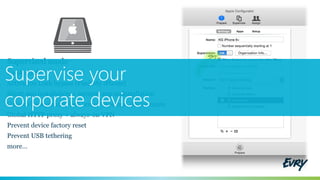
Supervised mode
Kiosk mode
Activation Lock bypass (Find My iPhone)
Silent app installation + prevent app uninstallation
Custom background, lock screen message, device name
Global HTTP proxy + always-on VPN
Prevent device factory reset
Prevent USB tethering
more…
Supervise your
corporate devices
iOS Custom Policy
Configure
Define any iOS setting
or config payload
available in
[ Config Profile Reference]
2 methods
 Apple Configurator
 Custom-written XML
Deploy
 Custom iOS Policy
 Import. mobileconfig
 Deploy to users
<key>PayloadType<key>
<string>com.apple.appaccess<string>
<key>allowCamera</key>
<false/>
…
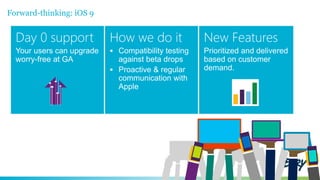
Forward-thinking: iOS 9
Day 0 support
Your users can upgrade
worry-free at GA
How we do it
 Compatibility testing
against beta drops
 Proactive & regular
communication with
Apple
New Features
Prioritized and delivered
based on customer
demand.
Mac
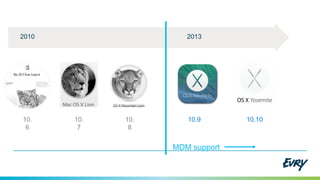
10.9 10.1010.
8
10.
7
10.
6
20132010
MDM support
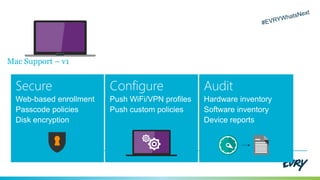
Mac Support – v1
Secure
Web-based enrollment
Passcode policies
Disk encryption
Configure
Push WiFi/VPN profiles
Push custom policies
Audit
Hardware inventory
Software inventory
Device reports
Agent
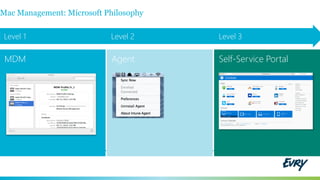
Level 1 Level 2 Level 3
Self-Service Portal
Mac Management: Microsoft Philosophy
MDM
Demo: Intune
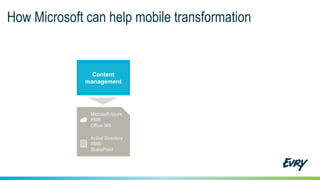
How Microsoft can help mobile transformation
Content
management
Microsoft Azure
RMS
Office 365
Active Directory
RMS
SharePoint
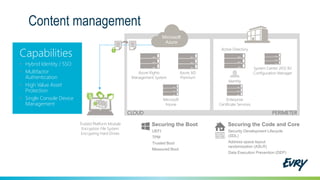
Content management
Capabilities
• Hybrid Identity / SSO
• Multifactor
Authentication
• High Value Asset
Protection
• Single Console Device
Management
Active Directory
Identity
Azure Rights
Management System
Microsoft
Intune
Trusted Platform Module
Encryption File System
Encrypting Hard Drives
Azure AD
Premium
Enterprise
Certificate Services
Securing the Boot
UEFI
TPM
Trusted Boot
Measured Boot
Securing the Code and Core
Security Development Lifecycle
(SDL)
Address space layout
randomization (ASLR)
Data Execution Prevention (DEP)
System Center 2012 R2
Configuration Manager
CLOUD PERIMETER
Microsoft
Azure
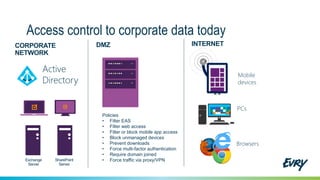
Access control to corporate data today
SharePoint
Server
Exchange
Server
CORPORATE
NETWORK
Mobile
devices
PCs
Browsers
INTERNETDMZ
Active
Directory
Policies
• Filter EAS
• Filter web access
• Filter or block mobile app access
• Block unmanaged devices
• Prevent downloads
• Force multi-factor authentication
• Require domain joined
• Force traffic via proxy/VPN
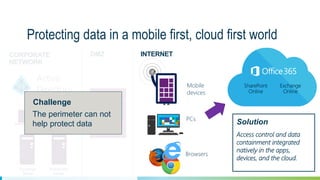
Protecting data in a mobile first, cloud first world
SharePoint
Server
Exchange
Server
CORPORATE
NETWORK
Mobile
devices
PCs
Browsers
INTERNETDMZ
Active
Directory
Solution
Access control and data
containment integrated
natively in the apps,
devices, and the cloud.
The perimeter can not
help protect data
Challenge
SharePoint
Online
Exchange
Online
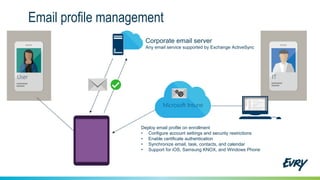
Email profile management
Corporate email server
ITUser
Deploy email profile on enrollment
• Configure account settings and security restrictions
• Enable certificate authentication
• Synchronize email, task, contacts, and calendar
• Support for iOS, Samsung KNOX, and Windows Phone
Any email service supported by Exchange ActiveSync
Microsoft Intune
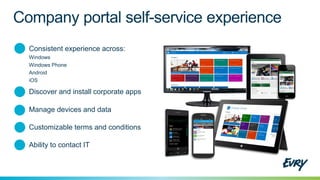
Consistent experience across:
Windows
Windows Phone
Android
iOS
Discover and install corporate apps
Manage devices and data
Ability to contact IT
Customizable terms and conditions
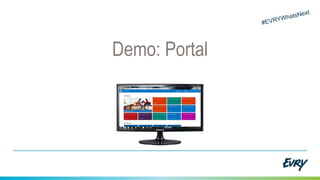
Demo: Portal
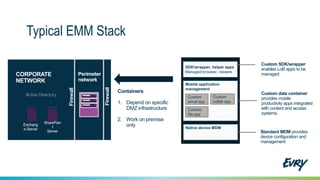
Typical EMM Stack
Native device MDM
Standard MDM provides
device configuration and
management
SDK/wrapper, helper apps
Managed browser, viewers
Custom SDK/wrapper
enables LoB apps to be
managed
Mobile application
management
Custom data container
provides mobile
productivity apps integrated
with content and access
systems.
Custom
email app
Custom
file app
Custom
collab app
Containers
1. Depend on specific
DMZ infrastructure
2. Work on premise
only
SharePoin
t
Server
Exchang
e Server
CORPORATE
NETWORK
Active Directory
Firewall
Firewall
Perimeter
network
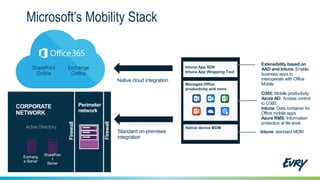
Microsoft’s Mobility Stack
Native device MDM
Intune: standard MDM
Intune App SDK
Intune App Wrapping Tool
Extensibility based on
AAD and Intune. Enable
business apps to
interoperate with Office
MobileManaged Office
productivity and more
O365: Mobile productivity
Azure AD: Access control
to O365
Intune: Data container for
Office mobile apps
Azure RMS: Information
protection at file level
Standard on-premises
integration
SharePoin
t
Server
Exchang
e Server
CORPORATE
NETWORK
Perimeter
network
Active Directory
SharePoint
Online
Exchange
Online
Native cloud integration
Firewall
Firewall
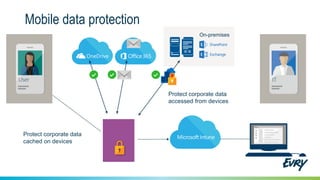
Mobile data protection
Protect corporate data
accessed from devices
On-premises
Protect corporate data
cached on devices
User IT
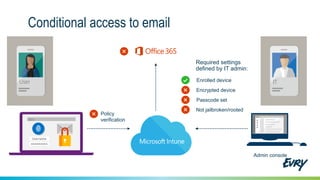
Conditional access to email
Policy
verification
•••••••••
Username
Microsoft Intune
Required settings
defined by IT admin:
Enrolled device
Encrypted device
Passcode set
Admin console
Not jailbroken/rooted
IT
ITUser
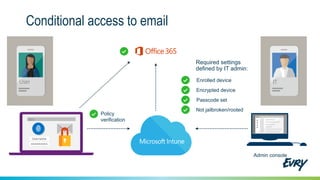
Conditional access to email
Policy
verification
•••••••••
Username
Microsoft Intune
Required settings
defined by IT admin:
Enrolled device
Encrypted device
Passcode set
Admin console
Not jailbroken/rooted
IT
ITUser
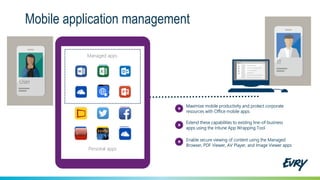
Mobile application management
Maximize mobile productivity and protect corporate
resources with Office mobile apps
Extend these capabilities to existing line-of-business
apps using the Intune App Wrapping Tool
Enable secure viewing of content using the Managed
Browser, PDF Viewer, AV Player, and Image Viewer apps
Managed apps
Personal apps
Managed apps
IT
User
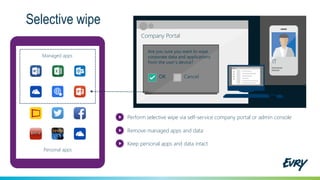
Selective wipe
Personal apps
Managed apps
Company Portal
Are you sure you want to wipe
corporate data and applications
from the user’s device?
OK Cancel
Perform selective wipe via self-service company portal or admin console
Remove managed apps and data
Keep personal apps and data intact
ITIT
Conclusion
EMS
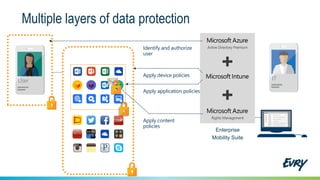
Multiple layers of data protection
ITUser
Enterprise
Mobility Suite
Identify and authorize
user
Apply device policies
Apply application policies
Apply content
policies
Active Directory Premium
Rights Management
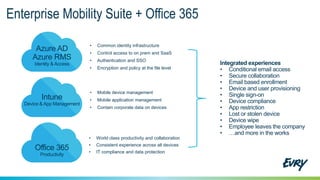
Enterprise Mobility Suite + Office 365
• Common identity infrastructure
• Control access to on prem and SaaS
• Authentication and SSO
• Encryption and policy at the file level
Azure AD
Azure RMS
Identity & Access
• World class productivity and collaboration
• Consistent experience across all devices
• IT compliance and data protection
Office 365
Productivity
Intune
Device &App Management
• Mobile device management
• Mobile application management
• Contain corporate data on devices
Integrated experiences
• Conditional email access
• Secure collaboration
• Email based enrollment
• Device and user provisioning
• Single sign-on
• Device compliance
• App restriction
• Lost or stolen device
• Device wipe
• Employee leaves the company
• …and more in the works
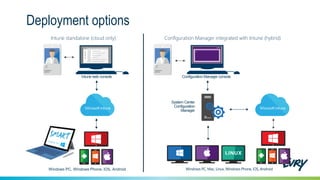
Deployment options
Windows PC, Windows Phone, iOS, Android
System Center
Configuration
Manager
Configuration Manager integrated with Intune (hybrid)Intune standalone (cloud only)
IT IT
Intune web console Configuration Manager console
Windows PC, Mac, Linux, Windows Phone, iOS, Android
How Microsoft can help mobile transformation
Device
management
Content
management
Application
management
Application
development
Identity &
access
Application
management
Microsoft
Intune
Office 365
System Center
Configuration
Manager
Microsoft Azure
RMS
Office 365
Active Directory
RMS
SharePoint
Microsoft Azure
Active Directory
Active Directory
Microsoft Intune
System Center
Configuration
Manager
Microsoft Visual
Studio
Xamarin
Microsoft Visual
Studio Online

#EVRYWhatsNext EMS Slide Deck

  • 1.
    Identitet + Mobil kontroll + Informasjonssikkerhet Olav Tvedt SjefsKonsulent MVP – Windows Expert-ITPRO Twitter: @olavtwitt Blog: http://olavtvedt.blogspot.com
  • 2.
    52% of informationworkers across 17 countries report using three or more devices for work* >80% of employees admit to using non-approved software- as-a-service (SaaS) applications in their jobs*** 90% of enterprises will have two or more mobile operating systems to support in 2017** Mobility is the new normal 52% 90% >80% * Forrester Research: “BT Futures Report: Info workers will erase boundary between enterprise & consumer technologies,” Feb. 21, 2013 ** Gartner Source: Press Release, Oct. 25, 2012, http://www.gartner.com/newsroom/id/2213115 *** http://www.computing.co.uk/ctg/news/2321750/more-than-80-per-cent-of-employees-use-non-approved-saas-apps-report
  • 3.
    What's driving change? UserDevices Apps Data IT
  • 4.
    Empowering enterprise mobility Protect yourdata Enable your users User IT Unify your environment People-centric approach Devices Apps Data
  • 5.
    Capabilities for amobile IT infrastructure Device management Connect existing applications, data & services to any device Content management Manage, store & process data Identity & access Support common identity control Application management Manage new & existing apps to any device Application development Develop, test & deploy new apps
  • 6.
  • 7.
  • 8.
  • 9.
  • 11.
    How Microsoft canhelp mobile transformation Device management Content management Application management Application development Identity & access Application management Microsoft Intune Office 365 System Center Configuration Manager Microsoft Azure RMS Office 365 Active Directory RMS SharePoint Microsoft Azure Active Directory Active Directory Microsoft Intune System Center Configuration Manager Microsoft Visual Studio Xamarin Microsoft Visual Studio Online
  • 12.
    How Microsoft canhelp mobile transformation Identity & access Microsoft Azure Active Directory Active Directory
  • 13.
    Identity and Access Microsoftapps Non-MS cloud-based apps Active Directory Active Directory Microsoft Account (Personal) Other Accounts (Personal) Capabilities • Single Sign on Identity • Multifactor Authentication • High Value Asset Protection • Single Console Device Management PERIMETER Other Directories Custom LOB apps ISV/CSV apps PCs and devices
  • 14.
    Azure Active Directory Self-serviceSingle sign on ••••••••••• Username Simple connection Cloud SaaS Azure Office 365Intune Other Directories Windows Server Active Directory On-premises Microsoft Azure Active Directory
  • 15.
    How Microsoft canhelp mobile transformation Application development Microsoft Visual Studio Xamarin Microsoft Visual Studio Online
  • 16.
    Application development Use thesame language, APIs and data structures to share an average of 75% of app code across all mobile development platforms.
  • 17.
    How Microsoft canhelp mobile transformation Device management Microsoft Intune Office 365 System Center Configuration Manager Microsoft Intune System Center Configuration Manager Application management
  • 18.
    Device & ApplicationManagement Capabilities • Hybrid Identity • Single Console Device Management • Deploy and manage apps • Deploy and manage devices Active Directory Identity Microsoft Intune Azure AD Enterprise Certificate Services System Center 2012 R2 Configuration Manager CLOUD PERIMETER Microsoft Azure
  • 19.
    Unified device management Application management Comprehensive Windows,Linux, and Mac management Mobile device management User IT System Center Configuration Manager
  • 20.
  • 21.
    Jailbreak detection Symptoms Look forsymptoms of jailbroken device  changes in OS behavior  binaries, config files  presence of certain apps/libraries Future Proof Detection logic not tied to any specific jailbreak kit or version Testing Regularly verify against latest jailbreak kits
  • 22.
  • 23.
    Conditional Access Secure accessto email, SharePoint Online services using conditional access policy Data Protection Prevent data leakage from mobile apps using Intune data protection SDK Resource Access Deploy VPN, Wi-Fi, Certificate profiles to easily enable access Data Loss Prevention Selectively wipe corporate data off lost/stolen devices Secure Android Devices and Applications with Microsoft Intune
  • 24.
    Wide range ofsupport Support for all Android devices 4.0+ UX consistency Consistent management and user experience across all device OEMs Best productivity suite Productivity with Microsoft Office Separation of business and personal data Identity-aware apps let IT control corporate data while leaving personal data untouched Emphasis on User Experience
  • 25.
    Device & compliance policy •PIN • Encryption • Root detection Publish managed apps • Office • Intune viewer apps Deploy MAM policy with apps • Copy/paste protection • Sharing restrictions • Cloud backup restrictions • Screenshot restricting What to consider for secure Android email and collaboration
  • 26.
    Application Installation Play StoreApps Side loading (APK) Web links Required installation (mandatory) Yes Yes Yes Available installation (in catalog) Yes Yes Yes Uninstall No Yes Yes Remove on Retire No Yes (KNOX only) Yes
  • 27.
  • 28.
    iOS Device Apple MDM Agent MicrosoftIntune Company Portal Enrollment Policies Config Profiles Remote commands LOB apps App Store apps Inventory check-in Retire
  • 29.
    iOS Device Apple MDM Agent MicrosoftIntune Company Portal Enrollment Remote commands LOB apps App Store apps RetirePolicies Config Profiles Inventory check-in
  • 30.
    Company Portal App User-basedenrollment Install from the App Store Apple ID required Example: BYOD Apple Configurator / DEP User-less bulk enrollment via Service Account User-based enrollment Pre-enroll / out-of-box enrollment Examples: kiosk, retail, corporate-owned CYOD CorporateBYOD Users brings device Install Comp. Portal + Enroll Apply policy + configuration Out-of-box enrollment Apply policy + configuration Install Comp. Portal (user) + jailbreak detection + AAD device registration (conditional access / compliance) + SSO and selective wipe (managed Office apps) + lock MDM profile to device + enable Supervised mode
  • 31.
    Supervised mode Kiosk mode ActivationLock bypass (Find My iPhone) Silent app installation + prevent app uninstallation Custom background, lock screen message, device name Global HTTP proxy + always-on VPN Prevent device factory reset Prevent USB tethering more… Supervise your corporate devices
  • 32.
    iOS Custom Policy Configure Defineany iOS setting or config payload available in [ Config Profile Reference] 2 methods  Apple Configurator  Custom-written XML Deploy  Custom iOS Policy  Import. mobileconfig  Deploy to users <key>PayloadType<key> <string>com.apple.appaccess<string> <key>allowCamera</key> <false/> …
  • 33.
    Forward-thinking: iOS 9 Day0 support Your users can upgrade worry-free at GA How we do it  Compatibility testing against beta drops  Proactive & regular communication with Apple New Features Prioritized and delivered based on customer demand.
  • 34.
  • 35.
  • 36.
    Mac Support –v1 Secure Web-based enrollment Passcode policies Disk encryption Configure Push WiFi/VPN profiles Push custom policies Audit Hardware inventory Software inventory Device reports
  • 37.
    Agent Level 1 Level2 Level 3 Self-Service Portal Mac Management: Microsoft Philosophy MDM
  • 38.
  • 39.
    How Microsoft canhelp mobile transformation Content management Microsoft Azure RMS Office 365 Active Directory RMS SharePoint
  • 40.
    Content management Capabilities • HybridIdentity / SSO • Multifactor Authentication • High Value Asset Protection • Single Console Device Management Active Directory Identity Azure Rights Management System Microsoft Intune Trusted Platform Module Encryption File System Encrypting Hard Drives Azure AD Premium Enterprise Certificate Services Securing the Boot UEFI TPM Trusted Boot Measured Boot Securing the Code and Core Security Development Lifecycle (SDL) Address space layout randomization (ASLR) Data Execution Prevention (DEP) System Center 2012 R2 Configuration Manager CLOUD PERIMETER Microsoft Azure
  • 41.
    Access control tocorporate data today SharePoint Server Exchange Server CORPORATE NETWORK Mobile devices PCs Browsers INTERNETDMZ Active Directory Policies • Filter EAS • Filter web access • Filter or block mobile app access • Block unmanaged devices • Prevent downloads • Force multi-factor authentication • Require domain joined • Force traffic via proxy/VPN
  • 42.
    Protecting data ina mobile first, cloud first world SharePoint Server Exchange Server CORPORATE NETWORK Mobile devices PCs Browsers INTERNETDMZ Active Directory Solution Access control and data containment integrated natively in the apps, devices, and the cloud. The perimeter can not help protect data Challenge SharePoint Online Exchange Online
  • 43.
    Email profile management Corporateemail server ITUser Deploy email profile on enrollment • Configure account settings and security restrictions • Enable certificate authentication • Synchronize email, task, contacts, and calendar • Support for iOS, Samsung KNOX, and Windows Phone Any email service supported by Exchange ActiveSync Microsoft Intune
  • 44.
    Consistent experience across: Windows WindowsPhone Android iOS Discover and install corporate apps Manage devices and data Ability to contact IT Customizable terms and conditions
  • 45.
  • 46.
    Typical EMM Stack Nativedevice MDM Standard MDM provides device configuration and management SDK/wrapper, helper apps Managed browser, viewers Custom SDK/wrapper enables LoB apps to be managed Mobile application management Custom data container provides mobile productivity apps integrated with content and access systems. Custom email app Custom file app Custom collab app Containers 1. Depend on specific DMZ infrastructure 2. Work on premise only SharePoin t Server Exchang e Server CORPORATE NETWORK Active Directory Firewall Firewall Perimeter network
  • 47.
    Microsoft’s Mobility Stack Nativedevice MDM Intune: standard MDM Intune App SDK Intune App Wrapping Tool Extensibility based on AAD and Intune. Enable business apps to interoperate with Office MobileManaged Office productivity and more O365: Mobile productivity Azure AD: Access control to O365 Intune: Data container for Office mobile apps Azure RMS: Information protection at file level Standard on-premises integration SharePoin t Server Exchang e Server CORPORATE NETWORK Perimeter network Active Directory SharePoint Online Exchange Online Native cloud integration Firewall Firewall
  • 48.
    Mobile data protection Protectcorporate data accessed from devices On-premises Protect corporate data cached on devices User IT
  • 49.
    Conditional access toemail Policy verification ••••••••• Username Microsoft Intune Required settings defined by IT admin: Enrolled device Encrypted device Passcode set Admin console Not jailbroken/rooted IT ITUser
  • 50.
    Conditional access toemail Policy verification ••••••••• Username Microsoft Intune Required settings defined by IT admin: Enrolled device Encrypted device Passcode set Admin console Not jailbroken/rooted IT ITUser
  • 51.
    Mobile application management Maximizemobile productivity and protect corporate resources with Office mobile apps Extend these capabilities to existing line-of-business apps using the Intune App Wrapping Tool Enable secure viewing of content using the Managed Browser, PDF Viewer, AV Player, and Image Viewer apps Managed apps Personal apps Managed apps IT User
  • 52.
    Selective wipe Personal apps Managedapps Company Portal Are you sure you want to wipe corporate data and applications from the user’s device? OK Cancel Perform selective wipe via self-service company portal or admin console Remove managed apps and data Keep personal apps and data intact ITIT
  • 53.
  • 54.
    Multiple layers ofdata protection ITUser Enterprise Mobility Suite Identify and authorize user Apply device policies Apply application policies Apply content policies Active Directory Premium Rights Management
  • 55.
    Enterprise Mobility Suite+ Office 365 • Common identity infrastructure • Control access to on prem and SaaS • Authentication and SSO • Encryption and policy at the file level Azure AD Azure RMS Identity & Access • World class productivity and collaboration • Consistent experience across all devices • IT compliance and data protection Office 365 Productivity Intune Device &App Management • Mobile device management • Mobile application management • Contain corporate data on devices Integrated experiences • Conditional email access • Secure collaboration • Email based enrollment • Device and user provisioning • Single sign-on • Device compliance • App restriction • Lost or stolen device • Device wipe • Employee leaves the company • …and more in the works
  • 56.
    Deployment options Windows PC,Windows Phone, iOS, Android System Center Configuration Manager Configuration Manager integrated with Intune (hybrid)Intune standalone (cloud only) IT IT Intune web console Configuration Manager console Windows PC, Mac, Linux, Windows Phone, iOS, Android
  • 59.
    How Microsoft canhelp mobile transformation Device management Content management Application management Application development Identity & access Application management Microsoft Intune Office 365 System Center Configuration Manager Microsoft Azure RMS Office 365 Active Directory RMS SharePoint Microsoft Azure Active Directory Active Directory Microsoft Intune System Center Configuration Manager Microsoft Visual Studio Xamarin Microsoft Visual Studio Online