SPSS BASIC
KIRAN SRIVASTAVA
(MAY 2015)
RESEARCH ASSISTANT
CHRIST UNIVERSITY
BENGALURU
Introduction: SPSS
• The abbreviation of SPSS stands for
Statistical Product and Service Solutions
• It is a statistical package which executes
quantitative data analysis with simple
directions
Objectives of this presentation
• About SPSS interface: data view and
variable view
• How to enter data in SPSS
• How to Enter external data into SPSS
SPSS interface- what you will learn
(Source: Hui Bian 2011) 4
• Data view
– The place to enter data
– Rows: records
– Columns: variables
• Variable view
– The place to enter variables
– Characteristics of all variables
– List of all variables
Requirements for data entry
(Source: Hui Bian 2011) 5
• Code book/scoring guide
• ID number for each case (NOT the real
identification numbers of your subjects)
• Excel or .sav file for data entry
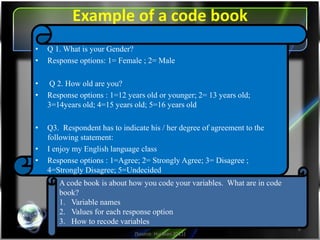
Example of a code book
(Source: Hui Bian 2011)
6
A code book is about how you code your variables. What are in code
book?
1.Variable names
2.Values for each response option
3.How to recode variables
• Q 1. What is your Gender?
• Response options: 1= Female ; 2= Male
• Q 2. How old are you?
• Response options : 1=12 years old or younger; 2= 13 years old;
3=14years old; 4=15 years old; 5=16 years old
• Q3. Respondent has to indicate his / her degree of agreement to the
following statement:
• I enjoy my English language class
• Response options : 1=Agree; 2= Strongly Agree; 3= Disagree ;
4=Strongly Disagree; 5=Undecided
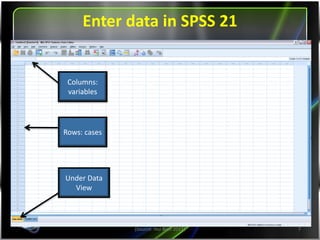
Entering data in SPSS 19.0
(Source: Hui Bian 2011) 7
Columns:
variables
Rows: cases
Under Data
View
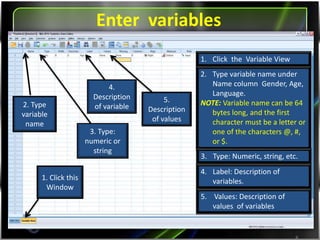
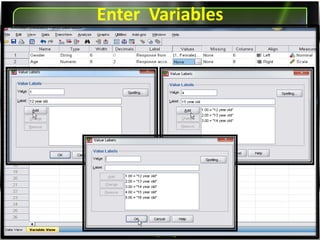
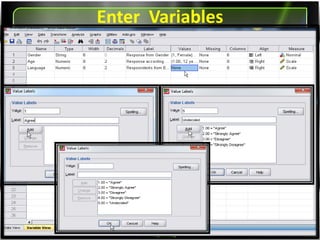
Entering variables
8
2. Type
variable
name
3. Type:
numeric or
string
4.
Description
of variable
1. Click this
Window
1. Click the Variable View
2. Type variable name under
Name column Gender, Age,
Language).
NOTE: Variable name can be 64
bytes long, and the first
character must be a letter or
one of the characters @, #,
or $.
3. Type: Numeric, string, etc.
4. Label: Description of
variables.
5.
Description
of values
5. Values: Description of
values of variables
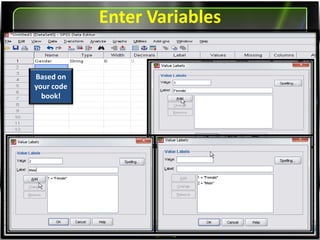
Entering Variables
Based on
your code
book!
Entering Variables
Entering Variables
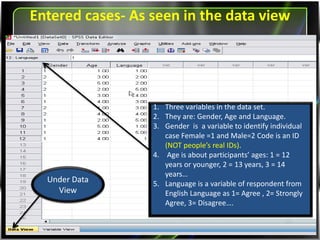
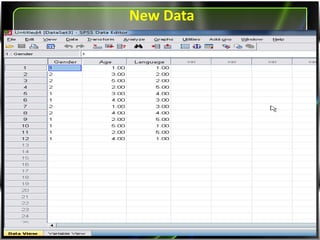
Entered cases- As seen in the data view
Under Data
View
1. Three variables in the data set.
2. They are: Gender, Age and Language.
3. Gender is a variable to identify individual
case Female =1 and Male=2 Code is an ID
(NOT people’s real IDs).
4. Age is about participants’ ages: 1 = 12 years
or younger, 2 = 13 years, 3 = 14 years…
5. Language is a variable of respondent from
English Language as 1= Agree , 2= Strongly
Agree, 3= Disagree….
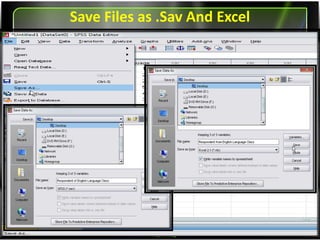
Saving Files as Sav. And Excel
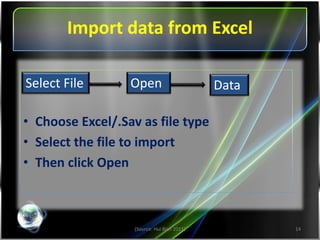
Importing data from Excel
(Source: Hui Bian 2011) 14
• Choose Excel/Sav. as file type
• Select the file to import
• Then click Open
Select File Open Data
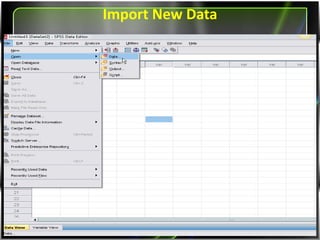
Importing New Data
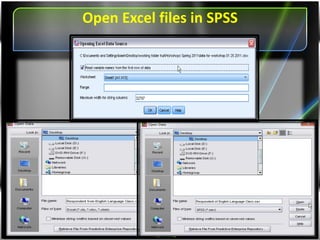
Opening Excel files in SPSS
Data
References
• Kentaka Aruga (Feb, 2008), Short Courses,
Introduction to SPSS
• Hui Bian(Spring 2011), Office for Faculty
Excellence, SPSS for Beginners

June 2015

  • 1.
    SPSS BASIC KIRAN SRIVASTAVA (MAY2015) RESEARCH ASSISTANT CHRIST UNIVERSITY BENGALURU
  • 2.
    Introduction: SPSS • Theabbreviation of SPSS stands for Statistical Product and Service Solutions • It is a statistical package which executes quantitative data analysis with simple directions
  • 3.
    Objectives of thispresentation • About SPSS interface: data view and variable view • How to enter data in SPSS • How to Enter external data into SPSS
  • 4.
    SPSS interface- whatyou will learn (Source: Hui Bian 2011) 4 • Data view – The place to enter data – Rows: records – Columns: variables • Variable view – The place to enter variables – Characteristics of all variables – List of all variables
  • 5.
    Requirements for dataentry (Source: Hui Bian 2011) 5 • Code book/scoring guide • ID number for each case (NOT the real identification numbers of your subjects) • Excel or .sav file for data entry
  • 6.
    Example of acode book (Source: Hui Bian 2011) 6 A code book is about how you code your variables. What are in code book? 1.Variable names 2.Values for each response option 3.How to recode variables • Q 1. What is your Gender? • Response options: 1= Female ; 2= Male • Q 2. How old are you? • Response options : 1=12 years old or younger; 2= 13 years old; 3=14years old; 4=15 years old; 5=16 years old • Q3. Respondent has to indicate his / her degree of agreement to the following statement: • I enjoy my English language class • Response options : 1=Agree; 2= Strongly Agree; 3= Disagree ; 4=Strongly Disagree; 5=Undecided
  • 7.
    Entering data inSPSS 19.0 (Source: Hui Bian 2011) 7 Columns: variables Rows: cases Under Data View
  • 8.
    Entering variables 8 2. Type variable name 3.Type: numeric or string 4. Description of variable 1. Click this Window 1. Click the Variable View 2. Type variable name under Name column Gender, Age, Language). NOTE: Variable name can be 64 bytes long, and the first character must be a letter or one of the characters @, #, or $. 3. Type: Numeric, string, etc. 4. Label: Description of variables. 5. Description of values 5. Values: Description of values of variables
  • 9.
  • 10.
  • 11.
  • 12.
    Entered cases- Asseen in the data view Under Data View 1. Three variables in the data set. 2. They are: Gender, Age and Language. 3. Gender is a variable to identify individual case Female =1 and Male=2 Code is an ID (NOT people’s real IDs). 4. Age is about participants’ ages: 1 = 12 years or younger, 2 = 13 years, 3 = 14 years… 5. Language is a variable of respondent from English Language as 1= Agree , 2= Strongly Agree, 3= Disagree….
  • 13.
    Saving Files asSav. And Excel
  • 14.
    Importing data fromExcel (Source: Hui Bian 2011) 14 • Choose Excel/Sav. as file type • Select the file to import • Then click Open Select File Open Data
  • 15.
  • 16.
  • 17.
  • 18.
    References • Kentaka Aruga(Feb, 2008), Short Courses, Introduction to SPSS • Hui Bian(Spring 2011), Office for Faculty Excellence, SPSS for Beginners