Human Resource
Analytics (HRA)
Lec-3
Introduction to the SPSS
Interface
Contents
• SPSS interface:
• Data view and Variable view
• How to enter data in SPSS
• How to import external data into SPSS
• How to clean and edit data
• How to get descriptive statistics
2
https://www.youtube.com/watch?v=_zFBUfZEBWQ
What is SPSS?
• Acronym of ‘ Statistical Package for Social Sciences’ or ‘Statistical
product for service solutions’
• Also called ‘PASW’ Predictive Analytics Software.
• It is asoftware used for data analysis in business research.
• Can be used for
• Processing questionnaires
• Reporting in tables and graphs
• Analyzign means, chi-square, regression
3
Basic Operations in SPSS
• Basic Steps in Data Analysis
• Variable Entry (Adding or deleting variables)
• Data Entry (adding or deleting data)
• Saving the data
• Importing data from excel file
• Checking the data entered
• Sorting the data
• Transforming the date
4
Variables
• A concept which can take on diferent quantitative values is called a
variable
• For Example
• What are variables you would consider in buying a second hand bike?
• Brand
• Type
• Age
• Condition
• Price
5
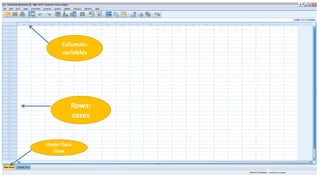
SPSS interface
•Data view
• The place to enter data
• Columns: variables
• Rows: records
•Variable view
• The place to enter variables
• List of all variables
• Characteristics of all variables
6
7
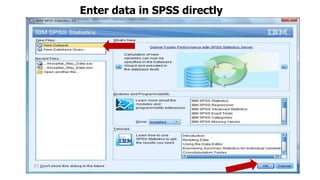
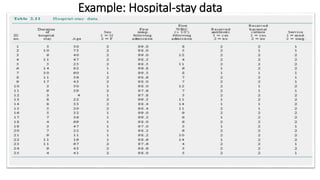
Enter data in SPSS directly
Example: Hospital-stay data
8
9
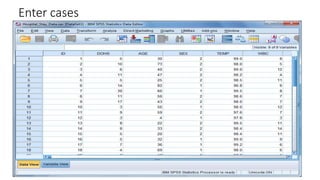
Columns:
variables
Rows:
cases
Under Data
View
Variable Names
1. 1. No Spaces
Use _ ‘underscores’ for spaces
2. Can not begin with a special character ( @ # &)
3. Can not being with a number
Must begin with a letter
4. Each Variable name must be unique
5. 64 characters or less
10
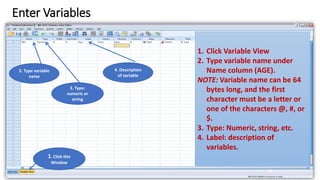
Enter Variables
11
1. Click this
Window
1. Click Variable View
2. Type variable name under
Name column (AGE).
NOTE: Variable name can be 64
bytes long, and the first
character must be a letter or
one of the characters @, #, or
$.
3. Type: Numeric, string, etc.
4. Label: description of
variables.
2. Type variable
name
3. Type:
numeric or
string
4. Description
of variable
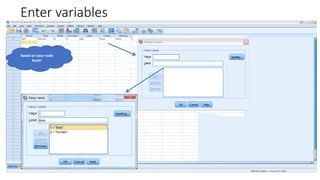
Enter variables
12
Based on your code
book!
Enter cases
13
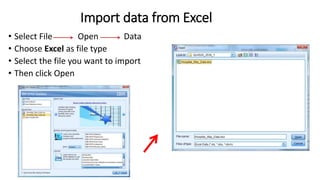
Import data from Excel
• Select File Open Data
• Choose Excel as file type
• Select the file you want to import
• Then click Open
14
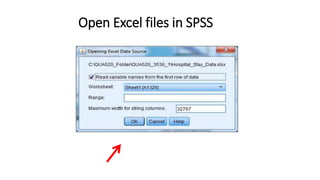
Open Excel files in SPSS
15
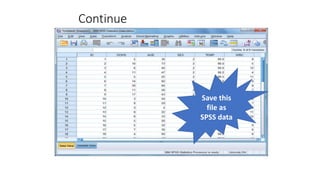
Continue
16
Save this
file as
SPSS data
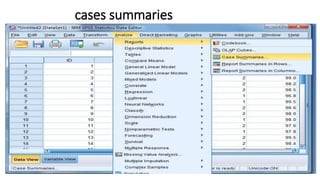
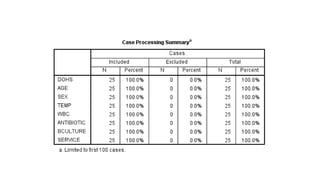
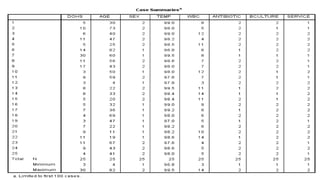
Clean data after import data files
• Run cases summaries for all variables
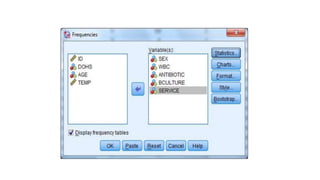
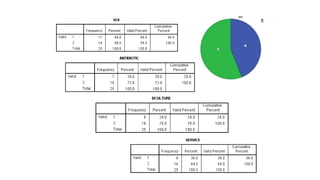
• Run frequency for qualitative variables and Descriptives
for quantitative variables
• Check outputs to see if you have variables with wrong
values.
• Check missing values and physical surveys if you use
paper surveys, and make sure they are real missing.
• Sometimes, you need to recode string variables into
numeric variables
17
cases summaries
18
19
20
Basic Statistical Analysis
•Descriptive statistics:
1. Find wrong entries
2. Have basic knowledge about the sample and
targeted variables in a study
3. Summarize data.
21
22
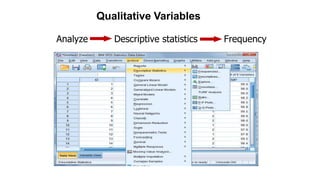
Analyze Descriptive statistics Frequency
Qualitative Variables
23
24
25
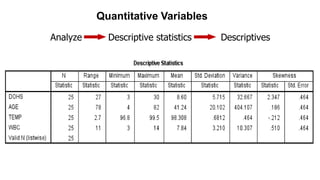
Analyze Descriptive statistics Descriptives
Quantitative Variables
26
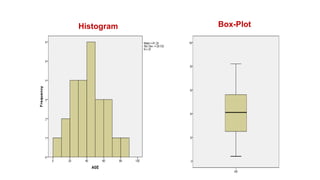
Histogram Box-Plot
AGE
27
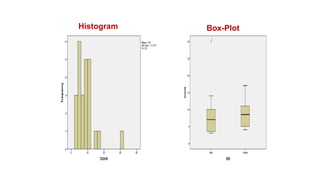
Duration of Stay
Histogram Box-Plot

Lec 3 HRA SPSS

  • 1.
  • 2.
    Contents • SPSS interface: •Data view and Variable view • How to enter data in SPSS • How to import external data into SPSS • How to clean and edit data • How to get descriptive statistics 2 https://www.youtube.com/watch?v=_zFBUfZEBWQ
  • 3.
    What is SPSS? •Acronym of ‘ Statistical Package for Social Sciences’ or ‘Statistical product for service solutions’ • Also called ‘PASW’ Predictive Analytics Software. • It is asoftware used for data analysis in business research. • Can be used for • Processing questionnaires • Reporting in tables and graphs • Analyzign means, chi-square, regression 3
  • 4.
    Basic Operations inSPSS • Basic Steps in Data Analysis • Variable Entry (Adding or deleting variables) • Data Entry (adding or deleting data) • Saving the data • Importing data from excel file • Checking the data entered • Sorting the data • Transforming the date 4
  • 5.
    Variables • A conceptwhich can take on diferent quantitative values is called a variable • For Example • What are variables you would consider in buying a second hand bike? • Brand • Type • Age • Condition • Price 5
  • 6.
    SPSS interface •Data view •The place to enter data • Columns: variables • Rows: records •Variable view • The place to enter variables • List of all variables • Characteristics of all variables 6
  • 7.
    7 Enter data inSPSS directly
  • 8.
  • 9.
  • 10.
    Variable Names 1. 1.No Spaces Use _ ‘underscores’ for spaces 2. Can not begin with a special character ( @ # &) 3. Can not being with a number Must begin with a letter 4. Each Variable name must be unique 5. 64 characters or less 10
  • 11.
    Enter Variables 11 1. Clickthis Window 1. Click Variable View 2. Type variable name under Name column (AGE). NOTE: Variable name can be 64 bytes long, and the first character must be a letter or one of the characters @, #, or $. 3. Type: Numeric, string, etc. 4. Label: description of variables. 2. Type variable name 3. Type: numeric or string 4. Description of variable
  • 12.
  • 13.
  • 14.
    Import data fromExcel • Select File Open Data • Choose Excel as file type • Select the file you want to import • Then click Open 14
  • 15.
    Open Excel filesin SPSS 15
  • 16.
  • 17.
    Clean data afterimport data files • Run cases summaries for all variables • Run frequency for qualitative variables and Descriptives for quantitative variables • Check outputs to see if you have variables with wrong values. • Check missing values and physical surveys if you use paper surveys, and make sure they are real missing. • Sometimes, you need to recode string variables into numeric variables 17
  • 18.
  • 19.
  • 20.
  • 21.
    Basic Statistical Analysis •Descriptivestatistics: 1. Find wrong entries 2. Have basic knowledge about the sample and targeted variables in a study 3. Summarize data. 21
  • 22.
    22 Analyze Descriptive statisticsFrequency Qualitative Variables
  • 23.
  • 24.
  • 25.
    25 Analyze Descriptive statisticsDescriptives Quantitative Variables
  • 26.
  • 27.