By KANG Sophanna
S/N: @kangsophanna
M/P: (855) 12 234 896
June 15, 2017
1
Statistical Package for the Social Sciences
SPSS offers a user-friendly data analysis platform.
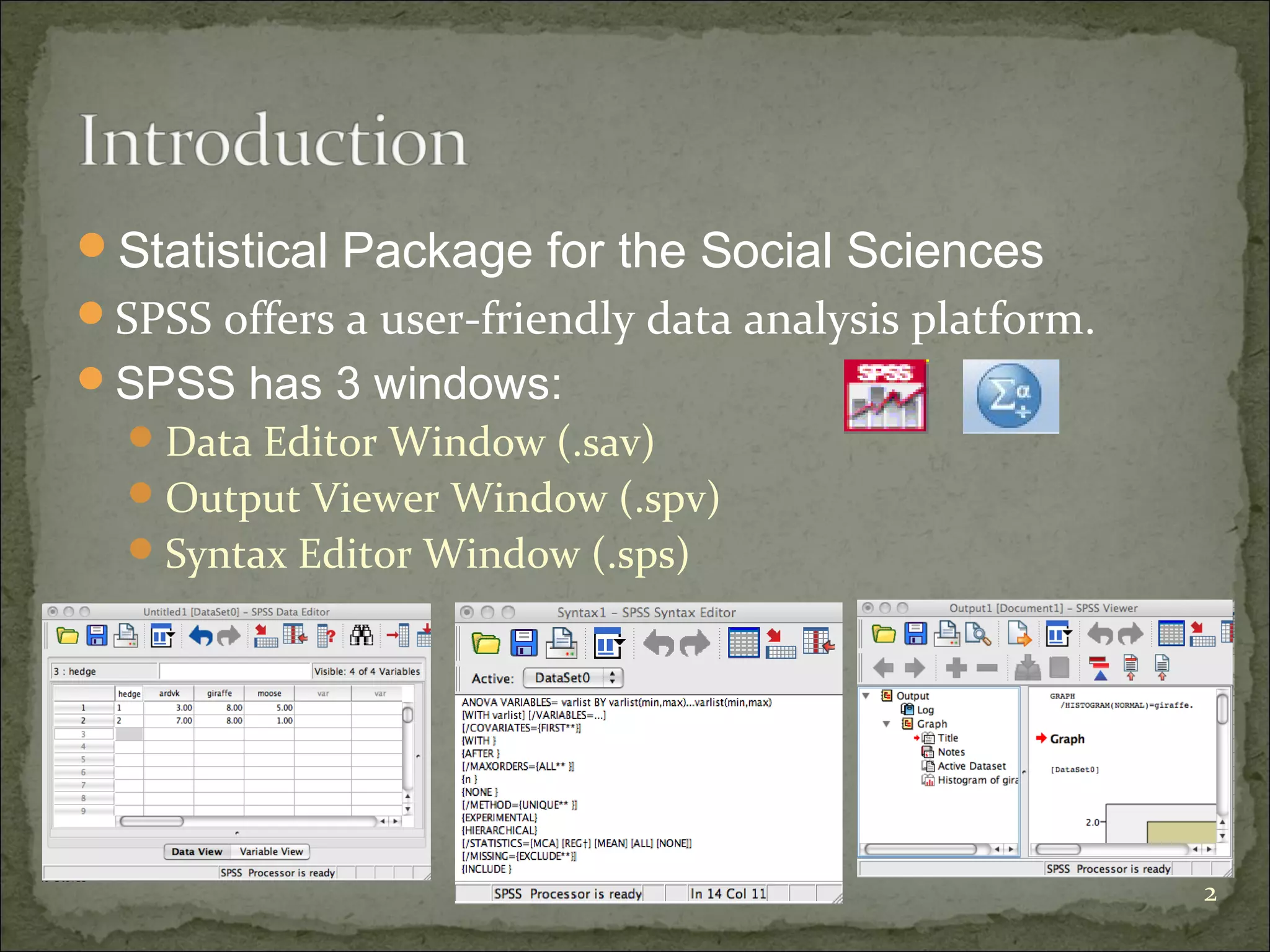
SPSS has 3 windows:
Data Editor Window (.sav)
Output Viewer Window (.spv)
Syntax Editor Window (.sps)
2
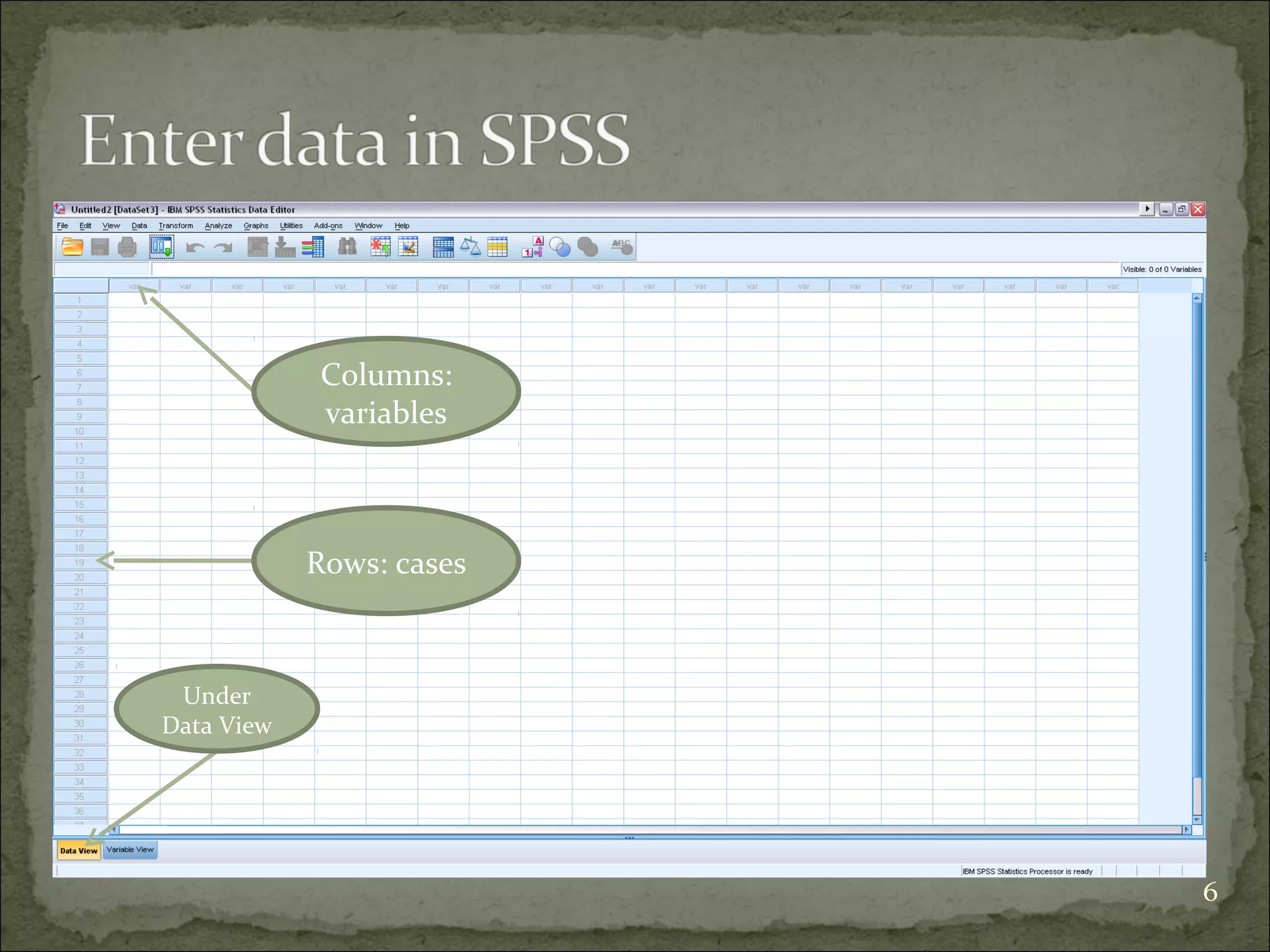
Data view
The place to enter data
Columns: variables
Rows: records
Variable view
The place to enter variables
List of all variables
Characteristics of all variables
Rows define the variables
Name, Type, Width, Decimals, Label, Missing, etc.
Scale – age, weight, income
Nominal – categories that cannot be ranked (ID number)
Ordinal – categories that can be ranked (level of satisfaction) 3
You need a code book/scoring guide
You give ID number for each case (NOT real
identification numbers of your subjects) if you use
paper survey.
If you use online survey, you need something to
identify your cases.
You also can use Excel to do data entry.
4
5
A code book is about how you code your
variables. What are in code book?
1.Variable names
2.Values for each response option
3.How to recode variables
Columns:
variables
Rows: cases
Under
Data View
6
1. Click this
Window
1. Click Variable View
2. Type variable name under
Name column (e.g. Q01).
NOTE: Variable name can be 64
bytes long, and the first
character must be a letter or
one of the characters @, #, or
$.
3. Type: Numeric, string, etc.
4. Label: description of
variables.
2. Type
variable name
3. Type:
numeric or
string
4. Description
of variable
7
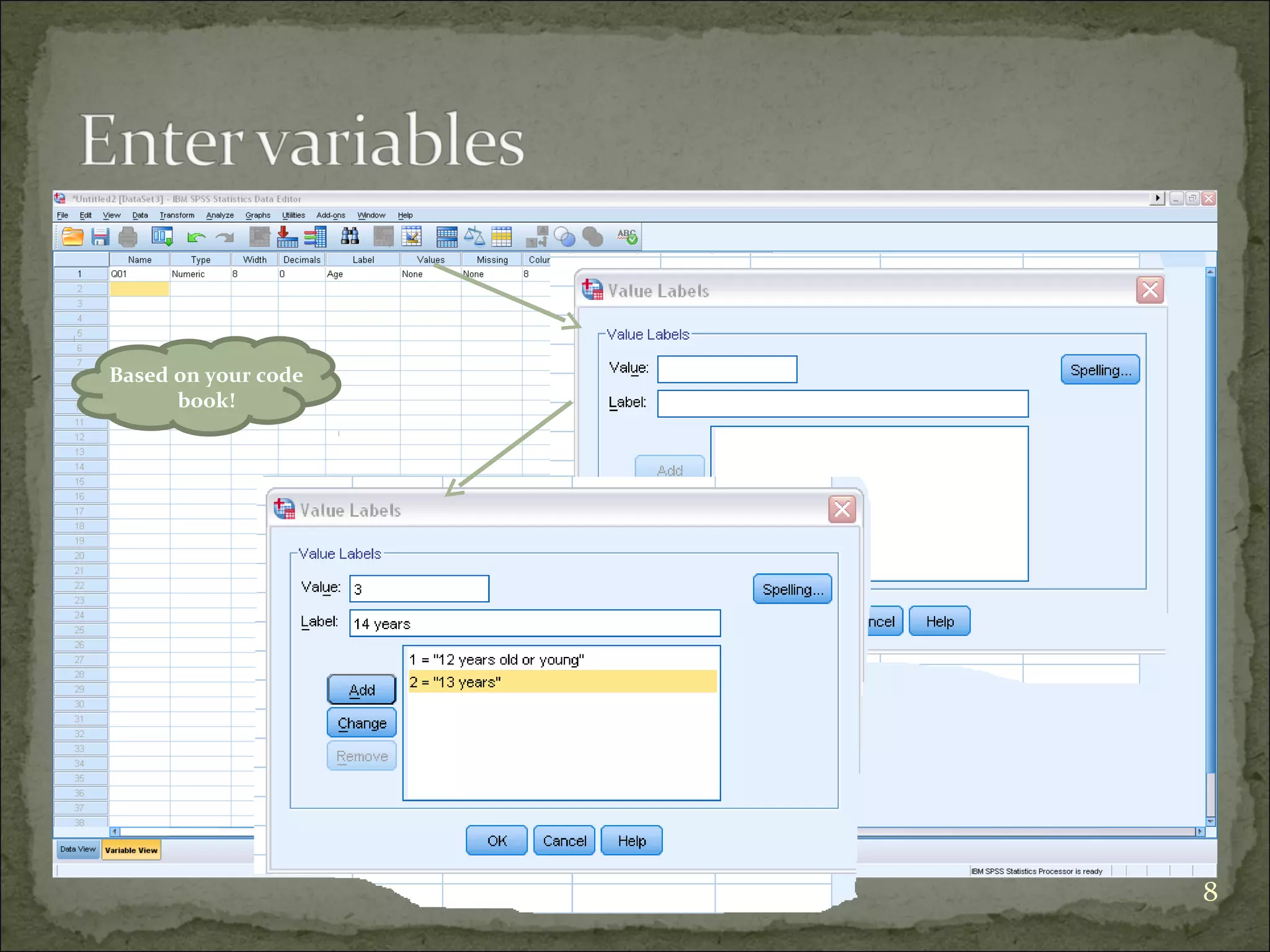
Based on your code
book!
8
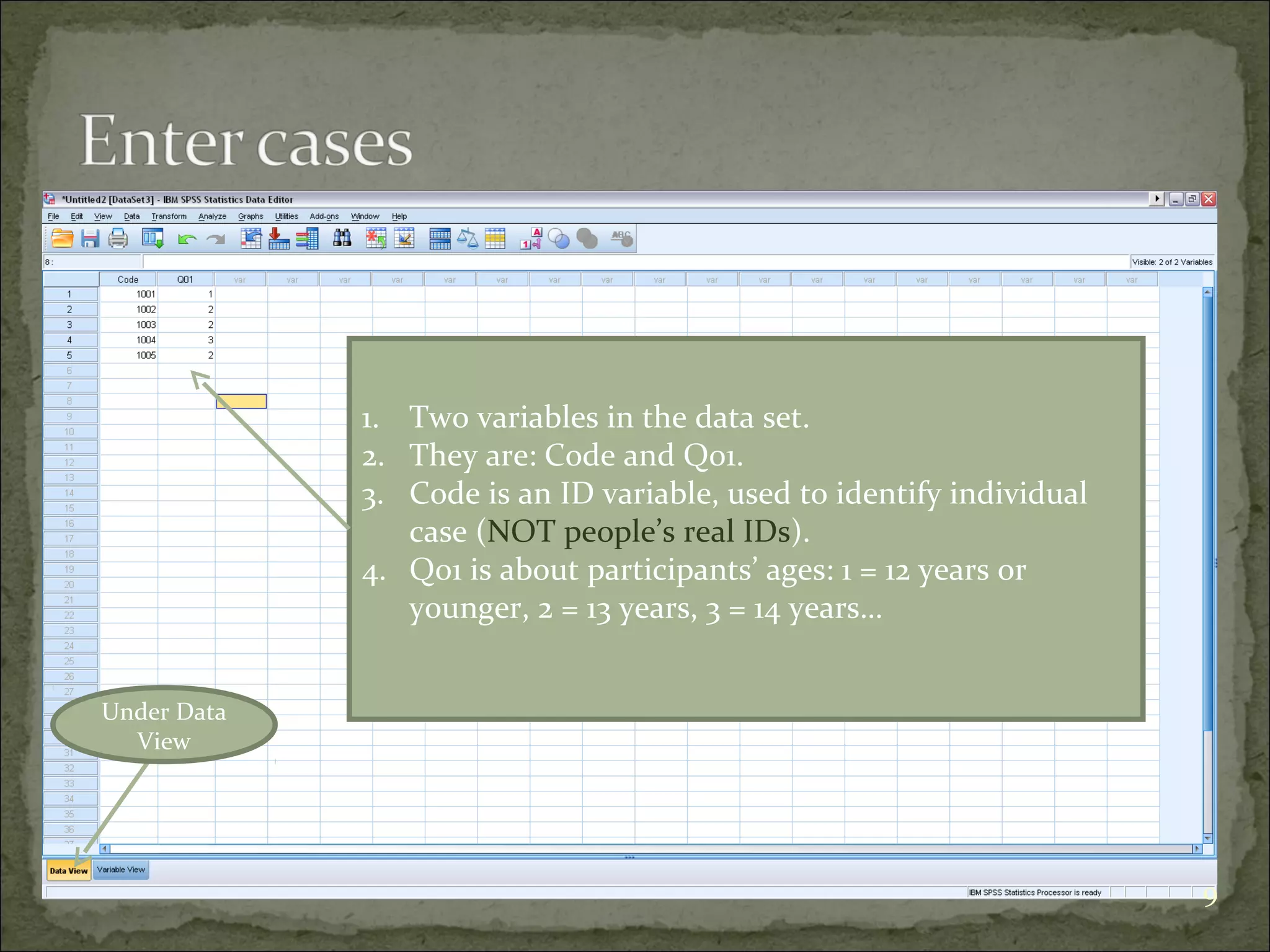
Under Data
View
1. Two variables in the data set.
2. They are: Code and Q01.
3. Code is an ID variable, used to identify individual
case (NOT people’s real IDs).
4. Q01 is about participants’ ages: 1 = 12 years or
younger, 2 = 13 years, 3 = 14 years…
9
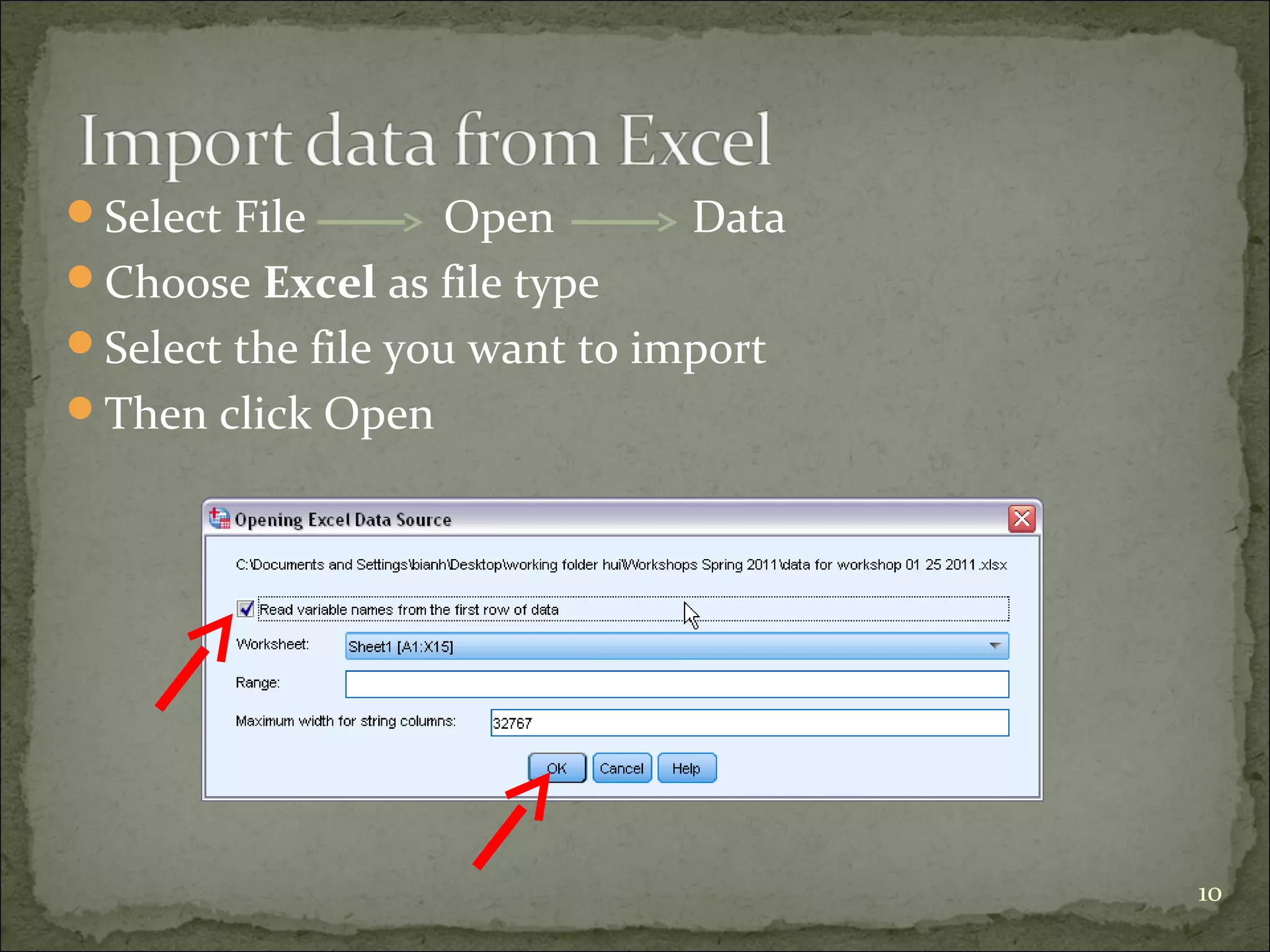
Select File Open Data
Choose Excel as file type
Select the file you want to import
Then click Open
10
11
Key in values and labels for each variable
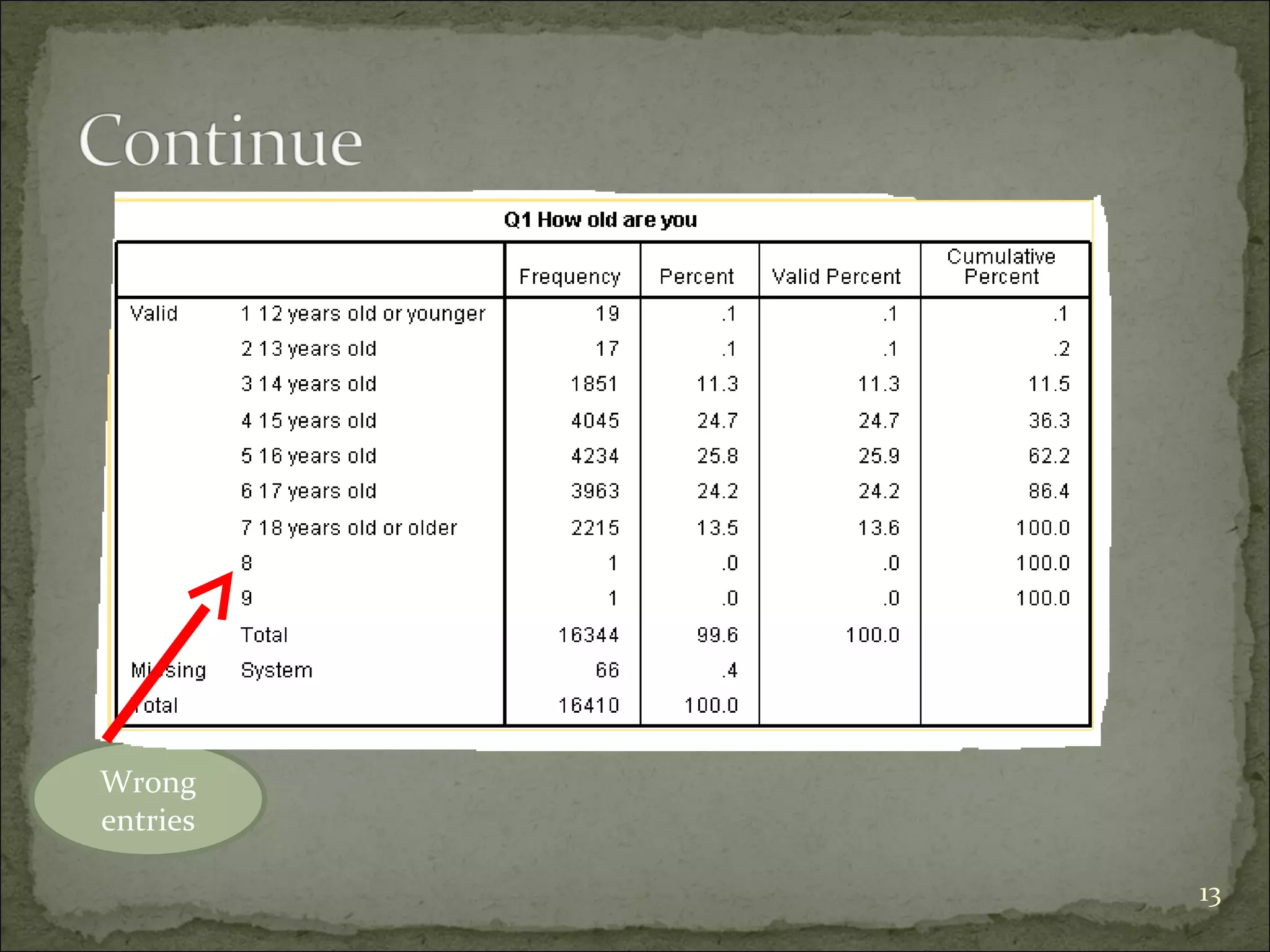
Run frequency for each variable
Check outputs to see if you have variables with wrong
values.
Check missing values and physical surveys if you use
paper surveys, and make sure they are real missing.
Sometimes, you need to recode string variables into
numeric variables
12
Wrong
entries
13
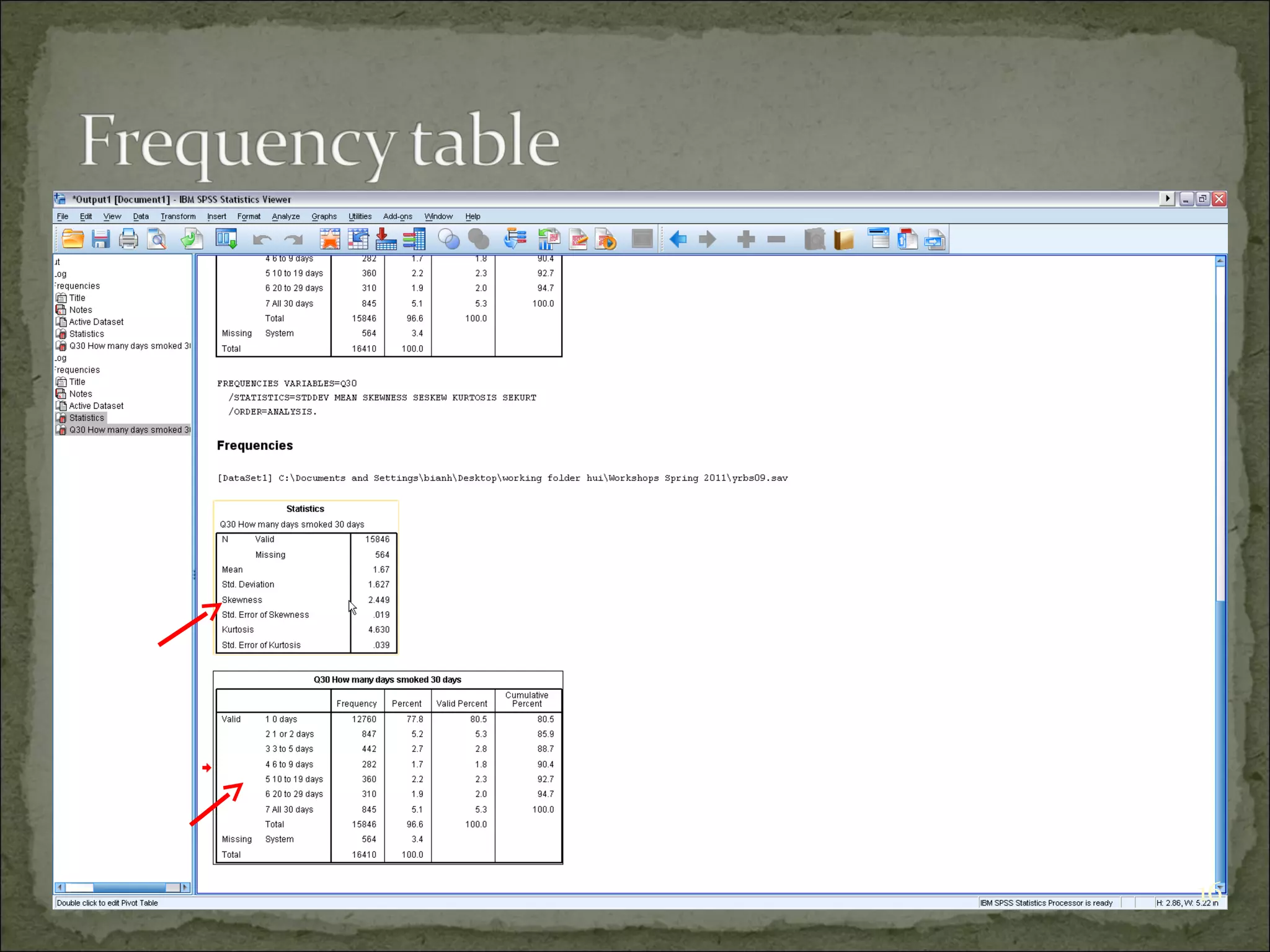
Descriptive statistics
Purposes:
1. Find wrong entries
2. Have basic knowledge about the sample and targeted
variables in a study
3. Summarize data
Analyze Descriptive statistics Frequency
14
15
16
Keep Variable Names short. Use Labels as a more
detailed description of your data
Toggle between data values and labels:
Double-click margins to move between Data and
Variable Views
Right-click in drawdown menus (e.g., transform
operations) to toggle between values/labels
Moving variables within the list in Variable View
“clearing the cursor”
Click-and-hold, move right to move a new variable to the
top of the file
Other ideas?
18

Fundamental of SPSS

  • 1.
    By KANG Sophanna S/N:@kangsophanna M/P: (855) 12 234 896 June 15, 2017 1
  • 2.
    Statistical Package forthe Social Sciences SPSS offers a user-friendly data analysis platform. SPSS has 3 windows: Data Editor Window (.sav) Output Viewer Window (.spv) Syntax Editor Window (.sps) 2
  • 3.
    Data view The placeto enter data Columns: variables Rows: records Variable view The place to enter variables List of all variables Characteristics of all variables Rows define the variables Name, Type, Width, Decimals, Label, Missing, etc. Scale – age, weight, income Nominal – categories that cannot be ranked (ID number) Ordinal – categories that can be ranked (level of satisfaction) 3
  • 4.
    You need acode book/scoring guide You give ID number for each case (NOT real identification numbers of your subjects) if you use paper survey. If you use online survey, you need something to identify your cases. You also can use Excel to do data entry. 4
  • 5.
    5 A code bookis about how you code your variables. What are in code book? 1.Variable names 2.Values for each response option 3.How to recode variables
  • 6.
  • 7.
    1. Click this Window 1.Click Variable View 2. Type variable name under Name column (e.g. Q01). NOTE: Variable name can be 64 bytes long, and the first character must be a letter or one of the characters @, #, or $. 3. Type: Numeric, string, etc. 4. Label: description of variables. 2. Type variable name 3. Type: numeric or string 4. Description of variable 7
  • 8.
    Based on yourcode book! 8
  • 9.
    Under Data View 1. Twovariables in the data set. 2. They are: Code and Q01. 3. Code is an ID variable, used to identify individual case (NOT people’s real IDs). 4. Q01 is about participants’ ages: 1 = 12 years or younger, 2 = 13 years, 3 = 14 years… 9
  • 10.
    Select File OpenData Choose Excel as file type Select the file you want to import Then click Open 10
  • 11.
  • 12.
    Key in valuesand labels for each variable Run frequency for each variable Check outputs to see if you have variables with wrong values. Check missing values and physical surveys if you use paper surveys, and make sure they are real missing. Sometimes, you need to recode string variables into numeric variables 12
  • 13.
  • 14.
    Descriptive statistics Purposes: 1. Findwrong entries 2. Have basic knowledge about the sample and targeted variables in a study 3. Summarize data Analyze Descriptive statistics Frequency 14
  • 15.
  • 16.
  • 17.
    Keep Variable Namesshort. Use Labels as a more detailed description of your data Toggle between data values and labels: Double-click margins to move between Data and Variable Views Right-click in drawdown menus (e.g., transform operations) to toggle between values/labels Moving variables within the list in Variable View “clearing the cursor” Click-and-hold, move right to move a new variable to the top of the file Other ideas?
  • 18.