STREAMS AND INPUT / OUTPUT
FILES
Presentation By: Shehrevar Davierwala
Visit: http://www.authorstream.com/shehrevard
http://www.slideshare.net/shehrevard
http://sites.google.com/sites/techwizardin
1
INTRODUCTION
 So far we have used variables and arrays for
storing data inside the programs. This approach
poses the following limitations:
 The data is lost when variable goes out of scope or when
the program terminates. That is data is stored in
temporary/mail memory is released when program
terminates.
 It is difficult to handle large volumes of data.
 We can overcome this problem by storing data on
secondary storage devices such as floppy or hard
disks.
 The data is stored in these devices using the
concept of Files and such data is often called
persistent data. 2
CompiledBy:ShehrevarDavierwla
FILE PROCESSING
 Storing and manipulating data using files
is known as file processing.
 Reading/Writing of data in a file can be
performed at the level of bytes,
characters, or fields depending on
application requirements.
 Java also provides capabilities to read and
write class objects directly. The process of
reading and writing objects is called object
serialisation. 3
CompiledBy:ShehrevarDavierwla
C INPUT/OUTPUT REVISION
FILE* fp;
fp = fopen(“In.file”, “rw”);
fscanf(fp, ……);
frpintf(fp, …..);
fread(………, fp);
fwrite(……….., fp);
4
CompiledBy:ShehrevarDavierwla
I/O AND DATA MOVEMENT
 The flow of data into a program
(input) may come from different
devices such as keyboard,
mouse, memory, disk, network,
or another program.
 The flow of data out of a
program (output) may go to the
screen, printer, memory, disk,
network, another program.
 Both input and output share a
certain common property such as
unidirectional movement of data
– a sequence of bytes and
characters and support to the
sequential access to the data.
5
STREAMS
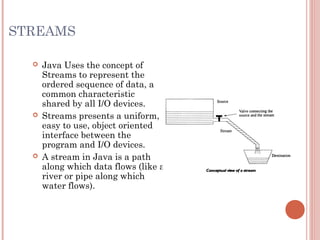
 Java Uses the concept of
Streams to represent the
ordered sequence of data, a
common characteristic
shared by all I/O devices.
 Streams presents a uniform,
easy to use, object oriented
interface between the
program and I/O devices.
 A stream in Java is a path
along which data flows (like a
river or pipe along which
water flows).
6
STREAM TYPES
7
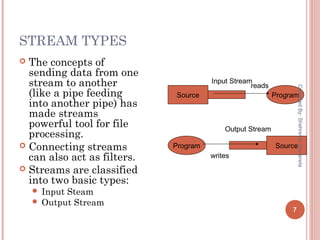
 The concepts of
sending data from one
stream to another
(like a pipe feeding
into another pipe) has
made streams
powerful tool for file
processing.
 Connecting streams
can also act as filters.
 Streams are classified
into two basic types:
 Input Steam
 Output Stream
Source Program
Input Stream
reads
SourceProgram
Output Stream
writes
CompiledBy:ShehrevarDavierwla
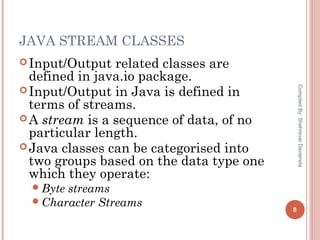
JAVA STREAM CLASSES
Input/Output related classes are
defined in java.io package.
Input/Output in Java is defined in
terms of streams.
A stream is a sequence of data, of no
particular length.
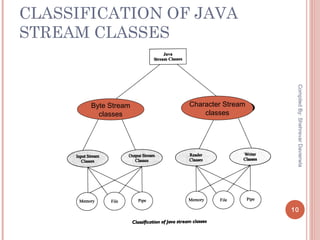
Java classes can be categorised into
two groups based on the data type one
which they operate:
Byte streams
Character Streams 8
CompiledBy:ShehrevarDavierwla
STREAMS
9
Byte Streams Character streams
Operated on 8 bit (1
byte) data.
Operates on 16-bit
(2 byte) unicode
characters.
Input streams/Output
streams
Readers/ Writers
CompiledBy:ShehrevarDavierwla
CLASSIFICATION OF JAVA
STREAM CLASSES
10
Byte Stream
classes
Character Stream
classes
CompiledBy:ShehrevarDavierwla
11
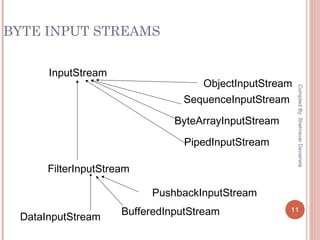
BYTE INPUT STREAMS
InputStream
ObjectInputStream
SequenceInputStream
ByteArrayInputStream
PipedInputStream
FilterInputStream
PushbackInputStream
DataInputStream
BufferedInputStream
CompiledBy:ShehrevarDavierwla
BYTE INPUT STREAMS - OPERATIONS
public abstract int read() Reads a byte and returns as a
integer 0-255
public int read(byte[] buf, int
offset, int count)
Reads and stores the bytes in buf
starting at offset. Count is the
maximum read.
public int read(byte[] buf) Same as previous offset=0 and
length=buf.length()
public long skip(long count) Skips count bytes.
public int available() Returns the number of bytes that
can be read.
public void close() Closes stream
12
BYTE INPUT STREAM - EXAMPLE
 Count total number of bytes in the file
13
import java.io.*;
class CountBytes {
public static void main(String[] args)
throws FileNotFoundException, IOException
{
FileInputStream in;
in = new FileInputStream(“InFile.txt”);
int total = 0;
while (in.read() != -1)
total++;
System.out.println(total + “ bytes”);
}
}
CompiledBy:ShehrevarDavierwla
WHAT HAPPENS IF THE FILE
DID NOT EXIST
 JVM throws exception and terminates the
program since there is no exception handler
defined.
[add@mundroo] Streams [1:165] java CountBytes
Exception in thread "main"
java.io.FileNotFoundException: FileIn.txt (No
such file or directory)
at java.io.FileInputStream.open(Native
Method)
at
java.io.FileInputStream.<init>(FileInputStream.j
ava:64)
at CountBytes.main(CountBytes.java:12) 14
CompiledBy:ShehrevarDavierwla
15
BYTE OUTPUT STREAMS
OutputStream
ObjectOutputStream
SequenceOutputStream
ByteArrayOutputStream
PipedOutputStream
FilterOutputStream
PrintStream
DataOutputStream
BufferedOutputStream
CompiledBy:ShehrevarDavierwla
BYTE OUTPUT STREAMS - OPERATIONS
public abstract void write(int b) Write b as bytes.
public void write(byte[] buf, int
offset, int count)
Write count bytes starting from
offset in buf.
public void write(byte[] buf) Same as previous offset=0 and
count = buf.length()
public void flush() Flushes the stream.
public void close() Closes stream
16
BYTE OUTPUT STREAM - EXAMPLE
 Read from standard in and write to standard out
17
import java.io.*;
class ReadWrite {
public static void main(string[] args)
throws IOException
{
int b;
while (( b = System.in.read()) != -1)
{
System.out.write(b);
}
}
CompiledBy:ShehrevarDavierwla
SUMMARY
 Streams provide uniform interface for managing
I/O operations in Java irrespective of device
types.
 Java supports classes for handling Input Steams
and Output steams via java.io package.
 Exceptions supports handling of errors and their
propagation during file operations.
18
CompiledBy:ShehrevarDavierwla

Jstreams

  • 1.
    STREAMS AND INPUT/ OUTPUT FILES Presentation By: Shehrevar Davierwala Visit: http://www.authorstream.com/shehrevard http://www.slideshare.net/shehrevard http://sites.google.com/sites/techwizardin 1
  • 2.
    INTRODUCTION  So farwe have used variables and arrays for storing data inside the programs. This approach poses the following limitations:  The data is lost when variable goes out of scope or when the program terminates. That is data is stored in temporary/mail memory is released when program terminates.  It is difficult to handle large volumes of data.  We can overcome this problem by storing data on secondary storage devices such as floppy or hard disks.  The data is stored in these devices using the concept of Files and such data is often called persistent data. 2 CompiledBy:ShehrevarDavierwla
  • 3.
    FILE PROCESSING  Storingand manipulating data using files is known as file processing.  Reading/Writing of data in a file can be performed at the level of bytes, characters, or fields depending on application requirements.  Java also provides capabilities to read and write class objects directly. The process of reading and writing objects is called object serialisation. 3 CompiledBy:ShehrevarDavierwla
  • 4.
    C INPUT/OUTPUT REVISION FILE*fp; fp = fopen(“In.file”, “rw”); fscanf(fp, ……); frpintf(fp, …..); fread(………, fp); fwrite(……….., fp); 4 CompiledBy:ShehrevarDavierwla
  • 5.
    I/O AND DATAMOVEMENT  The flow of data into a program (input) may come from different devices such as keyboard, mouse, memory, disk, network, or another program.  The flow of data out of a program (output) may go to the screen, printer, memory, disk, network, another program.  Both input and output share a certain common property such as unidirectional movement of data – a sequence of bytes and characters and support to the sequential access to the data. 5
  • 6.
    STREAMS  Java Usesthe concept of Streams to represent the ordered sequence of data, a common characteristic shared by all I/O devices.  Streams presents a uniform, easy to use, object oriented interface between the program and I/O devices.  A stream in Java is a path along which data flows (like a river or pipe along which water flows). 6
  • 7.
    STREAM TYPES 7  Theconcepts of sending data from one stream to another (like a pipe feeding into another pipe) has made streams powerful tool for file processing.  Connecting streams can also act as filters.  Streams are classified into two basic types:  Input Steam  Output Stream Source Program Input Stream reads SourceProgram Output Stream writes CompiledBy:ShehrevarDavierwla
  • 8.
    JAVA STREAM CLASSES Input/Outputrelated classes are defined in java.io package. Input/Output in Java is defined in terms of streams. A stream is a sequence of data, of no particular length. Java classes can be categorised into two groups based on the data type one which they operate: Byte streams Character Streams 8 CompiledBy:ShehrevarDavierwla
  • 9.
    STREAMS 9 Byte Streams Characterstreams Operated on 8 bit (1 byte) data. Operates on 16-bit (2 byte) unicode characters. Input streams/Output streams Readers/ Writers CompiledBy:ShehrevarDavierwla
  • 10.
    CLASSIFICATION OF JAVA STREAMCLASSES 10 Byte Stream classes Character Stream classes CompiledBy:ShehrevarDavierwla
  • 11.
  • 12.
    BYTE INPUT STREAMS- OPERATIONS public abstract int read() Reads a byte and returns as a integer 0-255 public int read(byte[] buf, int offset, int count) Reads and stores the bytes in buf starting at offset. Count is the maximum read. public int read(byte[] buf) Same as previous offset=0 and length=buf.length() public long skip(long count) Skips count bytes. public int available() Returns the number of bytes that can be read. public void close() Closes stream 12
  • 13.
    BYTE INPUT STREAM- EXAMPLE  Count total number of bytes in the file 13 import java.io.*; class CountBytes { public static void main(String[] args) throws FileNotFoundException, IOException { FileInputStream in; in = new FileInputStream(“InFile.txt”); int total = 0; while (in.read() != -1) total++; System.out.println(total + “ bytes”); } } CompiledBy:ShehrevarDavierwla
  • 14.
    WHAT HAPPENS IFTHE FILE DID NOT EXIST  JVM throws exception and terminates the program since there is no exception handler defined. [add@mundroo] Streams [1:165] java CountBytes Exception in thread "main" java.io.FileNotFoundException: FileIn.txt (No such file or directory) at java.io.FileInputStream.open(Native Method) at java.io.FileInputStream.<init>(FileInputStream.j ava:64) at CountBytes.main(CountBytes.java:12) 14 CompiledBy:ShehrevarDavierwla
  • 15.
  • 16.
    BYTE OUTPUT STREAMS- OPERATIONS public abstract void write(int b) Write b as bytes. public void write(byte[] buf, int offset, int count) Write count bytes starting from offset in buf. public void write(byte[] buf) Same as previous offset=0 and count = buf.length() public void flush() Flushes the stream. public void close() Closes stream 16
  • 17.
    BYTE OUTPUT STREAM- EXAMPLE  Read from standard in and write to standard out 17 import java.io.*; class ReadWrite { public static void main(string[] args) throws IOException { int b; while (( b = System.in.read()) != -1) { System.out.write(b); } } CompiledBy:ShehrevarDavierwla
  • 18.
    SUMMARY  Streams provideuniform interface for managing I/O operations in Java irrespective of device types.  Java supports classes for handling Input Steams and Output steams via java.io package.  Exceptions supports handling of errors and their propagation during file operations. 18 CompiledBy:ShehrevarDavierwla