Chapter 4
Streams and File I/O
1/22/2024
Java Programming
1
Introduction
 Streams: is an object that either delivers data to its destination (screen, file, etc.) or
that takes data from a source (keyboard, file, etc.)
 it acts as a buffer between the data source and destination
 To bring in information, a program opens a stream on an information source (a file,
memory, a socket) and reads the information sequentially, as shown in the following
figure.
 Similarly, a program can send information to an external destination by opening a
stream to a destination and writing the information out sequentially, as shown in the
following figure.
 Why IO stream
 In java, when we store data inside variables, they kept inside RAM (i.e. lost when
power off).
 Advantage of IO stream:
 Permanent data storage (On the disk, not on RAM)
1/22/2024
Java Programming
2
Input/output streams
 In Java, streams are the sequence of data that are read
from the source and written to the destination.
 It uses the concept of streams to make I/O operations fast.
For example, when we read a sequence of bytes from a
binary file, actually, we’re reading from an input stream.
 Similarly, when we write a sequence of bytes to a binary
file, we’re writing to an output stream.
 Java performs input and output operations in the terms of
streams.
 An input stream allow java program to read data from the
source (ex. File).
 An output stream allow java program to write data to the
destination (ex. File).
1/22/2024
Java Programming
3
Various Stream classes
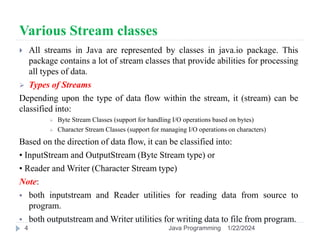
 All streams in Java are represented by classes in java.io package. This
package contains a lot of stream classes that provide abilities for processing
all types of data.
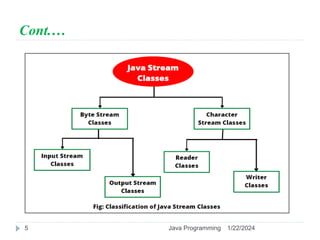
 Types of Streams
Depending upon the type of data flow within the stream, it (stream) can be
classified into:
 Byte Stream Classes (support for handling I/O operations based on bytes)
 Character Stream Classes (support for managing I/O operations on characters)
Based on the direction of data flow, it can be classified into:
• InputStream and OutputStream (Byte Stream type) or
• Reader and Writer (Character Stream type)
Note:
 both inputstream and Reader utilities for reading data from source to
program.
 both outputstream and Writer utilities for writing data to file from program.
1/22/2024
Java Programming
4
Cont.…
1/22/2024
Java Programming
5
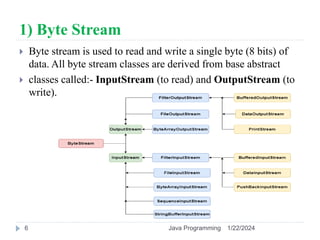
1) Byte Stream
 Byte stream is used to read and write a single byte (8 bits) of
data. All byte stream classes are derived from base abstract
 classes called:- InputStream (to read) and OutputStream (to
write).
1/22/2024
Java Programming
6
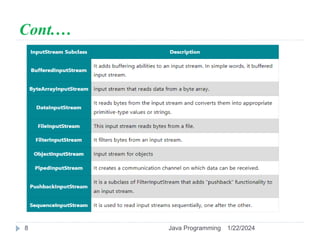
1.1 InputStream Classes
 InputStream class is an abstract class. It is the root
class for reading binary I/O data. It is the superclass of
all classes representing an input stream of bytes.
 Since InputStream class is an abstract class, we cannot
create an object of this class. We must use subclasses
of this class to create an object.
 The several subclasses of Java InputStream class can
be used for performing several input functions.
 They are listed with a brief description in the below
table:
1/22/2024
Java Programming
7
Cont.…
1/22/2024
Java Programming
8
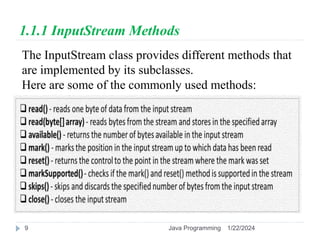
1.1.1 InputStream Methods
The InputStream class provides different methods that
are implemented by its subclasses.
Here are some of the commonly used methods:
1/22/2024
Java Programming
9
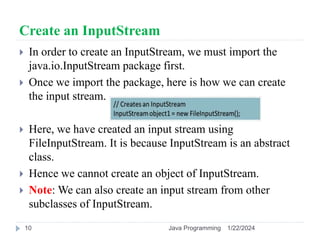
Create an InputStream
 In order to create an InputStream, we must import the
java.io.InputStream package first.
 Once we import the package, here is how we can create
the input stream.
 Here, we have created an input stream using
FileInputStream. It is because InputStream is an abstract
class.
 Hence we cannot create an object of InputStream.
 Note: We can also create an input stream from other
subclasses of InputStream.
1/22/2024
Java Programming
10
1/22/2024
Java Programming
11
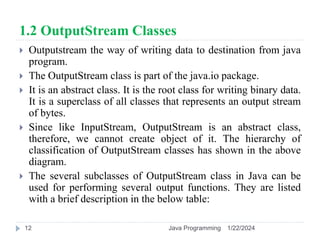
1.2 OutputStream Classes
 Outputstream the way of writing data to destination from java
program.
 The OutputStream class is part of the java.io package.
 It is an abstract class. It is the root class for writing binary data.
It is a superclass of all classes that represents an output stream
of bytes.
 Since like InputStream, OutputStream is an abstract class,
therefore, we cannot create object of it. The hierarchy of
classification of OutputStream classes has shown in the above
diagram.
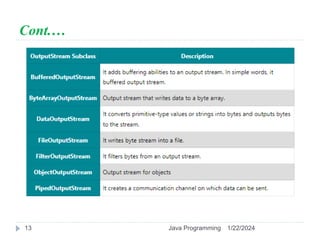
 The several subclasses of OutputStream class in Java can be
used for performing several output functions. They are listed
with a brief description in the below table:
1/22/2024
Java Programming
12
Cont.…
1/22/2024
Java Programming
13
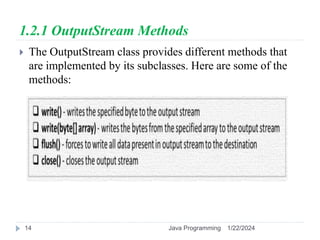
1.2.1 OutputStream Methods
 The OutputStream class provides different methods that
are implemented by its subclasses. Here are some of the
methods:
1/22/2024
Java Programming
14
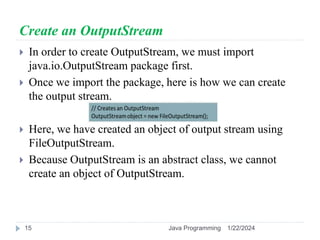
Create an OutputStream
 In order to create OutputStream, we must import
java.io.OutputStream package first.
 Once we import the package, here is how we can create
the output stream.
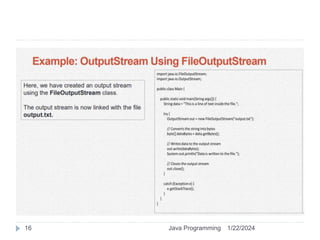
 Here, we have created an object of output stream using
FileOutputStream.
 Because OutputStream is an abstract class, we cannot
create an object of OutputStream.
1/22/2024
Java Programming
15
1/22/2024
Java Programming
16
2) Character Stream
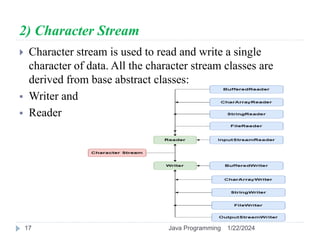
 Character stream is used to read and write a single
character of data. All the character stream classes are
derived from base abstract classes:
 Writer and
 Reader
1/22/2024
Java Programming
17
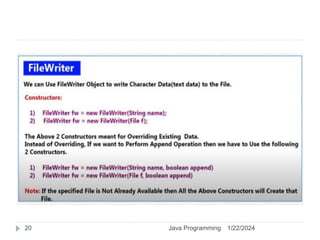
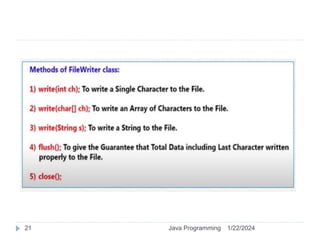
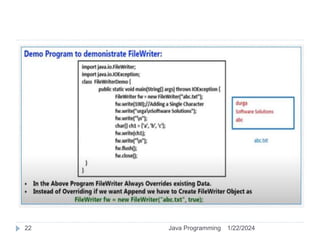
2.1 Java Writer Class
 The Writer class of the java.io package.
 It is an abstract superclass that represents a stream of
characters.
 Since Writer is an abstract class, it is not useful by itself.
 However, its subclasses can be used to write data.
 Subclasses of Writer
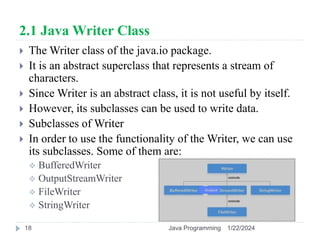
 In order to use the functionality of the Writer, we can use
its subclasses. Some of them are:
 BufferedWriter
 OutputStreamWriter
 FileWriter
 StringWriter
1/22/2024
Java Programming
18
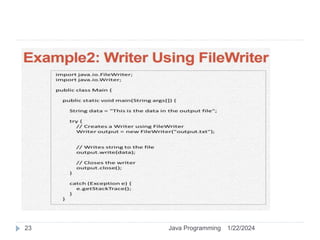
Create a Writer
 In order to create a Writer, we must import the
java.io.Writer package first.
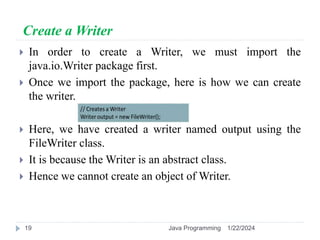
 Once we import the package, here is how we can create
the writer.
 Here, we have created a writer named output using the
FileWriter class.
 It is because the Writer is an abstract class.
 Hence we cannot create an object of Writer.
1/22/2024
Java Programming
19
1/22/2024
Java Programming
20
1/22/2024
Java Programming
21
1/22/2024
Java Programming
22
1/22/2024
Java Programming
23
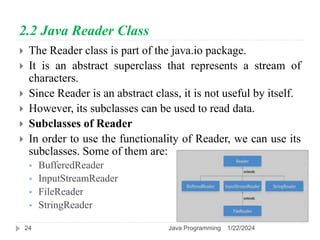
2.2 Java Reader Class
 The Reader class is part of the java.io package.
 It is an abstract superclass that represents a stream of
characters.
 Since Reader is an abstract class, it is not useful by itself.
 However, its subclasses can be used to read data.
 Subclasses of Reader
 In order to use the functionality of Reader, we can use its
subclasses. Some of them are:
 BufferedReader
 InputStreamReader
 FileReader
 StringReader
1/22/2024
Java Programming
24
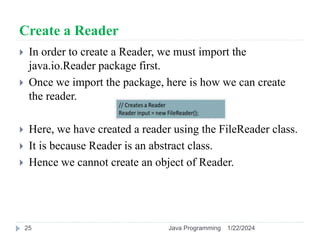
Create a Reader
 In order to create a Reader, we must import the
java.io.Reader package first.
 Once we import the package, here is how we can create
the reader.
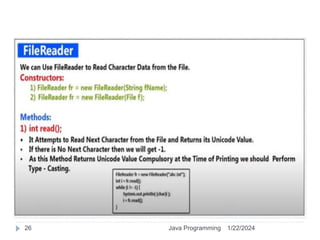
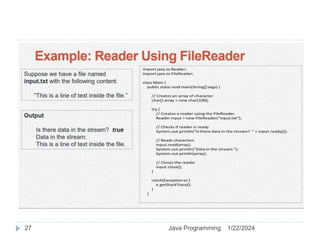
 Here, we have created a reader using the FileReader class.
 It is because Reader is an abstract class.
 Hence we cannot create an object of Reader.
1/22/2024
Java Programming
25
1/22/2024
Java Programming
26
1/22/2024
Java Programming
27
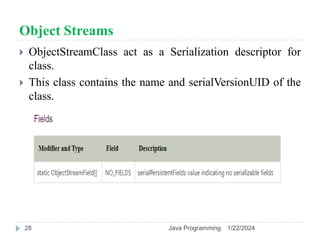
Object Streams
 ObjectStreamClass act as a Serialization descriptor for
class.
 This class contains the name and serialVersionUID of the
class.
1/22/2024
Java Programming
28
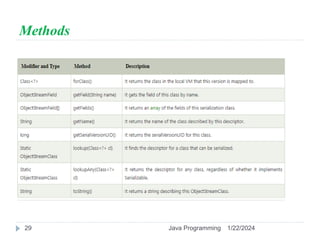
Methods
1/22/2024
Java Programming
29
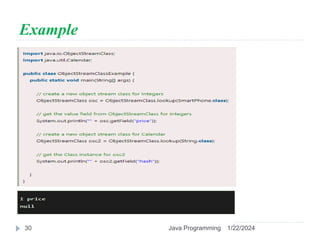
Example
1/22/2024
Java Programming
30
File management
 So far, this lesson has focused on streams, which provide a
simple model for reading and writing data.
 Streams work with a large variety of data sources and
destinations, including disk files.
 However, streams don't support all the operations that are
common with disk files.
 File is a class that helps you write platform-independent code
that examines and manipulates files and directories.
 File class is a general machine independent interface to the file
system.
 File class is not for the contents of a file, but the file object
 Directories are File Objects in java
 Random access files support non-sequential access to disk file
data.
1/22/2024
Java Programming
31
Cont.…
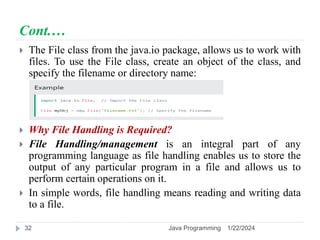
 The File class from the java.io package, allows us to work with
files. To use the File class, create an object of the class, and
specify the filename or directory name:
 Why File Handling is Required?
 File Handling/management is an integral part of any
programming language as file handling enables us to store the
output of any particular program in a file and allows us to
perform certain operations on it.
 In simple words, file handling means reading and writing data
to a file.
1/22/2024
Java Programming
32
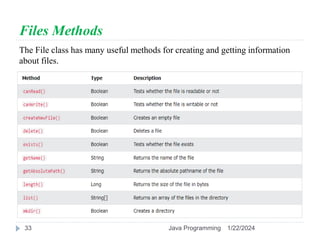
Files Methods
The File class has many useful methods for creating and getting information
about files.
1/22/2024
Java Programming
33
File operations in Java
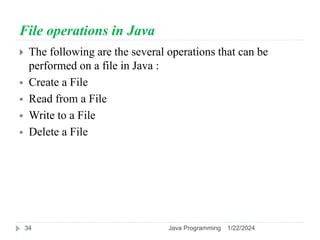
 The following are the several operations that can be
performed on a file in Java :
 Create a File
 Read from a File
 Write to a File
 Delete a File
1/22/2024
Java Programming
34
Thank you !!
1/22/2024
Java Programming
35

Java programming Chapter 4.pptx

  • 1.
    Chapter 4 Streams andFile I/O 1/22/2024 Java Programming 1
  • 2.
    Introduction  Streams: isan object that either delivers data to its destination (screen, file, etc.) or that takes data from a source (keyboard, file, etc.)  it acts as a buffer between the data source and destination  To bring in information, a program opens a stream on an information source (a file, memory, a socket) and reads the information sequentially, as shown in the following figure.  Similarly, a program can send information to an external destination by opening a stream to a destination and writing the information out sequentially, as shown in the following figure.  Why IO stream  In java, when we store data inside variables, they kept inside RAM (i.e. lost when power off).  Advantage of IO stream:  Permanent data storage (On the disk, not on RAM) 1/22/2024 Java Programming 2
  • 3.
    Input/output streams  InJava, streams are the sequence of data that are read from the source and written to the destination.  It uses the concept of streams to make I/O operations fast. For example, when we read a sequence of bytes from a binary file, actually, we’re reading from an input stream.  Similarly, when we write a sequence of bytes to a binary file, we’re writing to an output stream.  Java performs input and output operations in the terms of streams.  An input stream allow java program to read data from the source (ex. File).  An output stream allow java program to write data to the destination (ex. File). 1/22/2024 Java Programming 3
  • 4.
    Various Stream classes All streams in Java are represented by classes in java.io package. This package contains a lot of stream classes that provide abilities for processing all types of data.  Types of Streams Depending upon the type of data flow within the stream, it (stream) can be classified into:  Byte Stream Classes (support for handling I/O operations based on bytes)  Character Stream Classes (support for managing I/O operations on characters) Based on the direction of data flow, it can be classified into: • InputStream and OutputStream (Byte Stream type) or • Reader and Writer (Character Stream type) Note:  both inputstream and Reader utilities for reading data from source to program.  both outputstream and Writer utilities for writing data to file from program. 1/22/2024 Java Programming 4
  • 5.
  • 6.
    1) Byte Stream Byte stream is used to read and write a single byte (8 bits) of data. All byte stream classes are derived from base abstract  classes called:- InputStream (to read) and OutputStream (to write). 1/22/2024 Java Programming 6
  • 7.
    1.1 InputStream Classes InputStream class is an abstract class. It is the root class for reading binary I/O data. It is the superclass of all classes representing an input stream of bytes.  Since InputStream class is an abstract class, we cannot create an object of this class. We must use subclasses of this class to create an object.  The several subclasses of Java InputStream class can be used for performing several input functions.  They are listed with a brief description in the below table: 1/22/2024 Java Programming 7
  • 8.
  • 9.
    1.1.1 InputStream Methods TheInputStream class provides different methods that are implemented by its subclasses. Here are some of the commonly used methods: 1/22/2024 Java Programming 9
  • 10.
    Create an InputStream In order to create an InputStream, we must import the java.io.InputStream package first.  Once we import the package, here is how we can create the input stream.  Here, we have created an input stream using FileInputStream. It is because InputStream is an abstract class.  Hence we cannot create an object of InputStream.  Note: We can also create an input stream from other subclasses of InputStream. 1/22/2024 Java Programming 10
  • 11.
  • 12.
    1.2 OutputStream Classes Outputstream the way of writing data to destination from java program.  The OutputStream class is part of the java.io package.  It is an abstract class. It is the root class for writing binary data. It is a superclass of all classes that represents an output stream of bytes.  Since like InputStream, OutputStream is an abstract class, therefore, we cannot create object of it. The hierarchy of classification of OutputStream classes has shown in the above diagram.  The several subclasses of OutputStream class in Java can be used for performing several output functions. They are listed with a brief description in the below table: 1/22/2024 Java Programming 12
  • 13.
  • 14.
    1.2.1 OutputStream Methods The OutputStream class provides different methods that are implemented by its subclasses. Here are some of the methods: 1/22/2024 Java Programming 14
  • 15.
    Create an OutputStream In order to create OutputStream, we must import java.io.OutputStream package first.  Once we import the package, here is how we can create the output stream.  Here, we have created an object of output stream using FileOutputStream.  Because OutputStream is an abstract class, we cannot create an object of OutputStream. 1/22/2024 Java Programming 15
  • 16.
  • 17.
    2) Character Stream Character stream is used to read and write a single character of data. All the character stream classes are derived from base abstract classes:  Writer and  Reader 1/22/2024 Java Programming 17
  • 18.
    2.1 Java WriterClass  The Writer class of the java.io package.  It is an abstract superclass that represents a stream of characters.  Since Writer is an abstract class, it is not useful by itself.  However, its subclasses can be used to write data.  Subclasses of Writer  In order to use the functionality of the Writer, we can use its subclasses. Some of them are:  BufferedWriter  OutputStreamWriter  FileWriter  StringWriter 1/22/2024 Java Programming 18
  • 19.
    Create a Writer In order to create a Writer, we must import the java.io.Writer package first.  Once we import the package, here is how we can create the writer.  Here, we have created a writer named output using the FileWriter class.  It is because the Writer is an abstract class.  Hence we cannot create an object of Writer. 1/22/2024 Java Programming 19
  • 20.
  • 21.
  • 22.
  • 23.
  • 24.
    2.2 Java ReaderClass  The Reader class is part of the java.io package.  It is an abstract superclass that represents a stream of characters.  Since Reader is an abstract class, it is not useful by itself.  However, its subclasses can be used to read data.  Subclasses of Reader  In order to use the functionality of Reader, we can use its subclasses. Some of them are:  BufferedReader  InputStreamReader  FileReader  StringReader 1/22/2024 Java Programming 24
  • 25.
    Create a Reader In order to create a Reader, we must import the java.io.Reader package first.  Once we import the package, here is how we can create the reader.  Here, we have created a reader using the FileReader class.  It is because Reader is an abstract class.  Hence we cannot create an object of Reader. 1/22/2024 Java Programming 25
  • 26.
  • 27.
  • 28.
    Object Streams  ObjectStreamClassact as a Serialization descriptor for class.  This class contains the name and serialVersionUID of the class. 1/22/2024 Java Programming 28
  • 29.
  • 30.
  • 31.
    File management  Sofar, this lesson has focused on streams, which provide a simple model for reading and writing data.  Streams work with a large variety of data sources and destinations, including disk files.  However, streams don't support all the operations that are common with disk files.  File is a class that helps you write platform-independent code that examines and manipulates files and directories.  File class is a general machine independent interface to the file system.  File class is not for the contents of a file, but the file object  Directories are File Objects in java  Random access files support non-sequential access to disk file data. 1/22/2024 Java Programming 31
  • 32.
    Cont.…  The Fileclass from the java.io package, allows us to work with files. To use the File class, create an object of the class, and specify the filename or directory name:  Why File Handling is Required?  File Handling/management is an integral part of any programming language as file handling enables us to store the output of any particular program in a file and allows us to perform certain operations on it.  In simple words, file handling means reading and writing data to a file. 1/22/2024 Java Programming 32
  • 33.
    Files Methods The Fileclass has many useful methods for creating and getting information about files. 1/22/2024 Java Programming 33
  • 34.
    File operations inJava  The following are the several operations that can be performed on a file in Java :  Create a File  Read from a File  Write to a File  Delete a File 1/22/2024 Java Programming 34
  • 35.