



START
OBJECT-ORIENTED PROGRAMING
<BSCS-G-SECTION>
Presented by
 Muhammad Azeem - 310
Presented to
 Prof. Zunair Mahmood
FILE HANDLING
INTRODUCTION
 File handling in Java implies reading from and writing data to a file. The File class from the java.io
package, allows us to work with different formats of files.
 All these stream represent an input source and an output destination.
 Java provides strong but flexible support for I/O related to file
 Why we use File Handling?
File handling is an integral part of nearly all programing projects. And to store the Data for the
long time of period. And permits us to create, read, update, and delete the files, which are stored on the
local file system.
STREAMS
 Streams represents a source (which generates the data in the form of stream) and a destination (which
consumer or read data available as Stream).
 Stream supports a huge range of source and destinations including disk file, arrays other devices, other
programs etc.
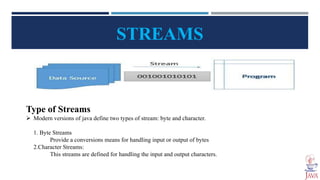
Type of Streams
 Modern versions of java define two types of stream: byte and character.
1. Byte Streams
Provide a conversions means for handling input or output of bytes
2.Character Streams:
This streams are defined for handling the input and output characters.
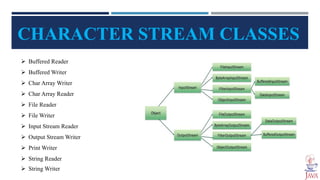
CHARACTER STREAM CLASSES
 Buffered Reader
 Buffered Writer
 Char Array Writer
 Char Array Reader
 File Reader
 File Writer
 Input Stream Reader
 Output Stream Writer
 Print Writer
 String Reader
 String Writer
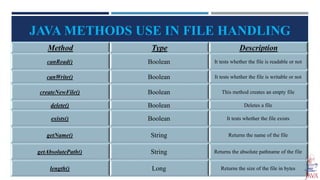
JAVA METHODS USE IN FILE HANDLING
Method Type Description
canRead() Boolean It tests whether the file is readable or not
canWrite() Boolean It tests whether the file is writable or not
createNewFile() Boolean This method creates an empty file
delete() Boolean Deletes a file
exists() Boolean It tests whether the file exists
getName() String Returns the name of the file
getAbsolutePath() String Returns the absolute pathname of the file
length() Long Returns the size of the file in bytes
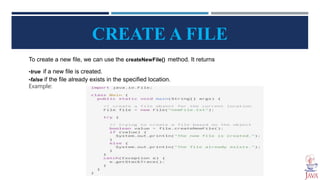
CREATE A FILE
To create a new file, we can use the createNewFile() method. It returns
•true if a new file is created.
•false if the file already exists in the specified location.
Example:
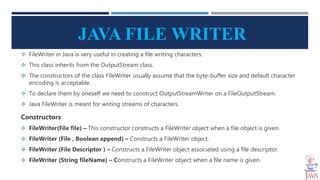
JAVA FILE WRITER
 FileWriter in Java is very useful in creating a file writing characters.
 This class inherits from the OutputStream class.
 The constructors of the class FileWriter usually assume that the byte-buffer size and default character
encoding is acceptable.
 To declare them by oneself we need to construct OutputStreamWriter on a FileOutputStream.
 Java FileWriter is meant for writing streams of characters.
Constructors
 FileWriter(File file) – This constructor constructs a FileWriter object when a file object is given.
 FileWriter (File , Boolean append) – Constructs a FileWriter object.
 FileWriter (File Descriptor ) – Constructs a FileWriter object associated using a file descriptor.
 FileWriter (String fileName) – Constructs a FileWriter object when a file name is given.
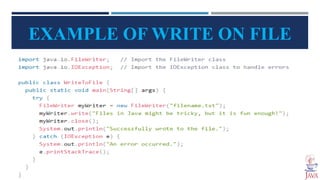
EXAMPLE OF WRITE ON FILE
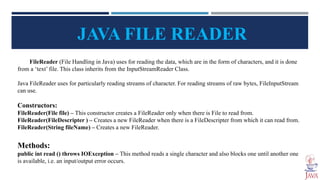
JAVA FILE READER
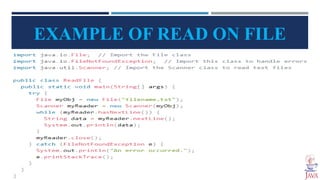
FileReader (File Handling in Java) uses for reading the data, which are in the form of characters, and it is done
from a ‘text’ file. This class inherits from the InputStreamReader Class.
Java FileReader uses for particularly reading streams of character. For reading streams of raw bytes, FileInputStream
can use.
Constructors:
FileReader(File file) – This constructor creates a FileReader only when there is File to read from.
FileReader(FileDescripter ) – Creates a new FileReader when there is a FileDescripter from which it can read from.
FileReader(String fileName) – Creates a new FileReader.
Methods:
public int read () throws IOException – This method reads a single character and also blocks one until another one
is available, i.e. an input/output error occurs.
EXAMPLE OF READ ON FILE
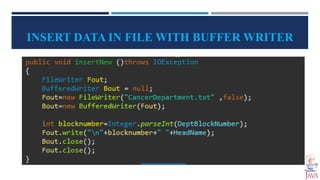
INSERT DATA IN FILE WITH BUFFER WRITER
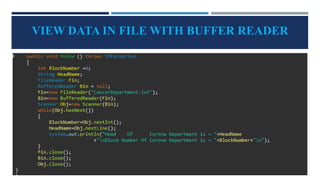
VIEW DATA IN FILE WITH BUFFER READER
SEARCHING FORM FILE
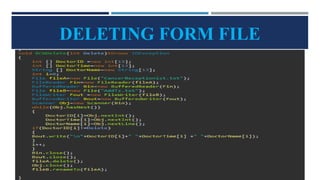
DELETING FORM FILE
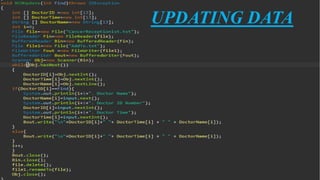
UPDATING DATA
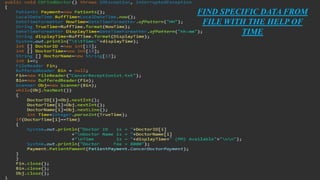
FIND SPECIFIC DATA FROM
FILE WITH THE HELP OF
TIME
File Handling in Java Oop presentation

File Handling in Java Oop presentation

  • 1.
  • 3.
    OBJECT-ORIENTED PROGRAMING <BSCS-G-SECTION> Presented by Muhammad Azeem - 310 Presented to  Prof. Zunair Mahmood FILE HANDLING
  • 4.
    INTRODUCTION  File handlingin Java implies reading from and writing data to a file. The File class from the java.io package, allows us to work with different formats of files.  All these stream represent an input source and an output destination.  Java provides strong but flexible support for I/O related to file  Why we use File Handling? File handling is an integral part of nearly all programing projects. And to store the Data for the long time of period. And permits us to create, read, update, and delete the files, which are stored on the local file system.
  • 5.
    STREAMS  Streams representsa source (which generates the data in the form of stream) and a destination (which consumer or read data available as Stream).  Stream supports a huge range of source and destinations including disk file, arrays other devices, other programs etc. Type of Streams  Modern versions of java define two types of stream: byte and character. 1. Byte Streams Provide a conversions means for handling input or output of bytes 2.Character Streams: This streams are defined for handling the input and output characters.
  • 6.
    CHARACTER STREAM CLASSES Buffered Reader  Buffered Writer  Char Array Writer  Char Array Reader  File Reader  File Writer  Input Stream Reader  Output Stream Writer  Print Writer  String Reader  String Writer
  • 7.
    JAVA METHODS USEIN FILE HANDLING Method Type Description canRead() Boolean It tests whether the file is readable or not canWrite() Boolean It tests whether the file is writable or not createNewFile() Boolean This method creates an empty file delete() Boolean Deletes a file exists() Boolean It tests whether the file exists getName() String Returns the name of the file getAbsolutePath() String Returns the absolute pathname of the file length() Long Returns the size of the file in bytes
  • 8.
    CREATE A FILE Tocreate a new file, we can use the createNewFile() method. It returns •true if a new file is created. •false if the file already exists in the specified location. Example:
  • 9.
    JAVA FILE WRITER FileWriter in Java is very useful in creating a file writing characters.  This class inherits from the OutputStream class.  The constructors of the class FileWriter usually assume that the byte-buffer size and default character encoding is acceptable.  To declare them by oneself we need to construct OutputStreamWriter on a FileOutputStream.  Java FileWriter is meant for writing streams of characters. Constructors  FileWriter(File file) – This constructor constructs a FileWriter object when a file object is given.  FileWriter (File , Boolean append) – Constructs a FileWriter object.  FileWriter (File Descriptor ) – Constructs a FileWriter object associated using a file descriptor.  FileWriter (String fileName) – Constructs a FileWriter object when a file name is given.
  • 10.
  • 11.
    JAVA FILE READER FileReader(File Handling in Java) uses for reading the data, which are in the form of characters, and it is done from a ‘text’ file. This class inherits from the InputStreamReader Class. Java FileReader uses for particularly reading streams of character. For reading streams of raw bytes, FileInputStream can use. Constructors: FileReader(File file) – This constructor creates a FileReader only when there is File to read from. FileReader(FileDescripter ) – Creates a new FileReader when there is a FileDescripter from which it can read from. FileReader(String fileName) – Creates a new FileReader. Methods: public int read () throws IOException – This method reads a single character and also blocks one until another one is available, i.e. an input/output error occurs.
  • 12.
  • 13.
    INSERT DATA INFILE WITH BUFFER WRITER
  • 14.
    VIEW DATA INFILE WITH BUFFER READER
  • 15.
  • 16.
  • 17.
  • 18.
    FIND SPECIFIC DATAFROM FILE WITH THE HELP OF TIME

Editor's Notes

  • #3 Delete this slide when you finish preparing the other slides.