I/O Streams
Objectives  •  Describe the main features of the java.io package •  Construct node and processing streams, and use them  appropriately  •  Distinguish readers and writers from streams, and select  appropriately between them •  Use the Serialization interface to encode the state of an object
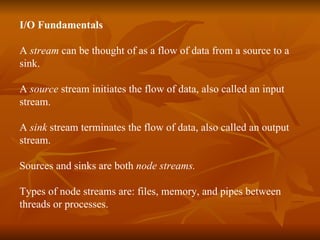
I/O Fundamentals A  stream  can be thought of as a flow of data from a source to a  sink. A  source  stream initiates the flow of data, also called an input stream. A  sink  stream terminates the flow of data, also called an output  stream. Sources and sinks are both  node streams. Types of node streams are: files, memory, and pipes between  threads or processes.
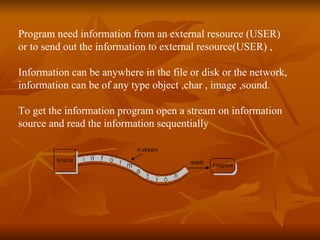
Program need information from an external resource (USER)  or to send out the information to external resource(USER) , Information can be anywhere in the file or disk or the network,  information can be of any type object ,char , image ,sound. To get the information program open a stream on information source and read the information sequentially
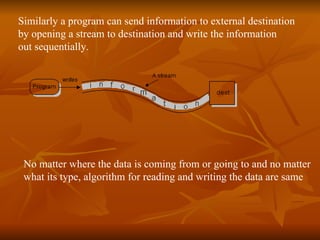
Similarly a program can send information to external destination  by opening a stream to destination and write the information  out sequentially. No matter where the data is coming from or going to and no matter what its type, algorithm for reading and writing the data are same
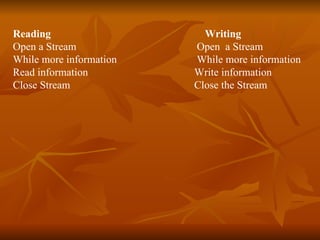
Reading Writing Open a Stream   Open  a Stream While more information  While more information Read information   Write information Close Stream   Close the Stream
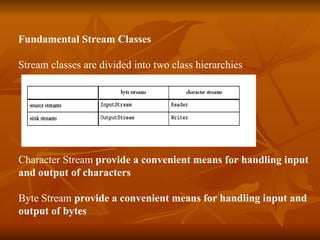
Fundamental Stream Classes Stream classes are divided into two class hierarchies  Character Stream  provide a convenient means for handling input  and output of characters   Byte Stream  provide a convenient means for handling input and output of bytes
InputStream Methods •  The three basic read methods: int read() int read(byte[] buffer) int read(byte[] buffer, int offset, int length)
OutputStream Methods •  The three basic write methods: void write(int c) void write(byte[] buffer) void write(byte[] buffer, int offset, int length)
Reader Methods •  The three basic read methods: int read() int read(char[] cbuf) int read(char[] cbuf, int offset, int length)
Writer Methods •  The  basic write methods: void write(int c) void write(char[] cbuf) void write(char[] cbuf, int offset, int length) void write(String string) void write(String string, int offset, int length)
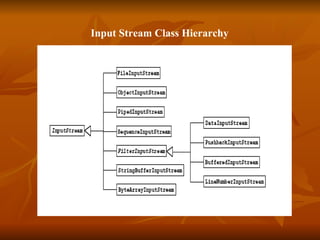
  Input Stream Class Hierarchy
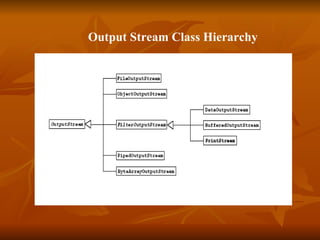
Output Stream Class Hierarchy
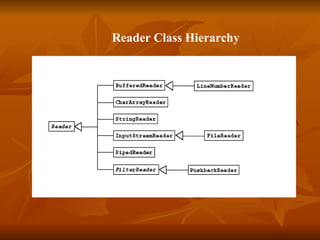
    Reader Class Hierarchy
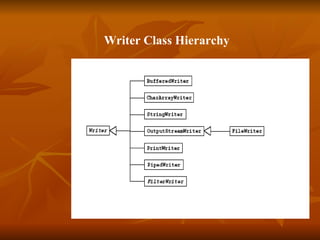
Writer Class Hierarchy
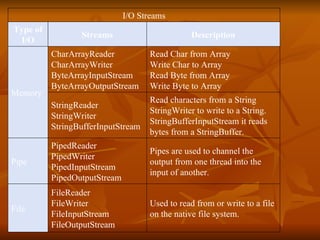
Used to read from or write to a file on the native file system.  FileReader FileWriter FileInputStream FileOutputStream File Pipes are used to channel the output from one thread into the input of another. PipedReader PipedWriter PipedInputStream PipedOutputStream Pipe Read characters from a  String   StringWriter  to write to a  String .  StringBufferInputStream  it reads bytes from a  StringBuffer . StringReader StringWriter StringBufferInputStream Read Char from Array Write Char to Array Read Byte from Array Write Byte to Array CharArrayReader CharArrayWriter ByteArrayInputStream ByteArrayOutputStream Memory Description Streams Type of I/O I/O Streams
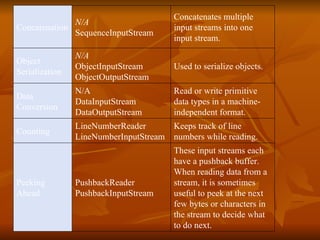
These input streams each have a pushback buffer. When reading data from a stream, it is sometimes useful to peek at the next few bytes or characters in the stream to decide what to do next. PushbackReader PushbackInputStream Peeking Ahead Keeps track of line numbers while reading. LineNumberReader LineNumberInputStream Counting Read or write primitive data types in a machine-independent format.  N/A   DataInputStream DataOutputStream Data Conversion Used to serialize objects.  N/A ObjectInputStream ObjectOutputStream Object Serialization Concatenates multiple input streams into one input stream.  N/A SequenceInputStream Concatenation
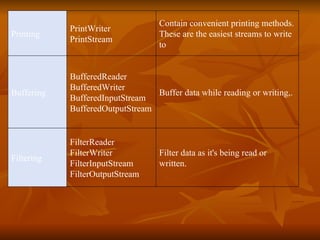
Filter data as it's being read or written.  FilterReader FilterWriter FilterInputStream FilterOutputStream Filtering Buffer data while reading or writing,. BufferedReader BufferedWriter BufferedInputStream BufferedOutputStream Buffering Contain convenient printing methods. These are the easiest streams to write to PrintWriter PrintStream Printing
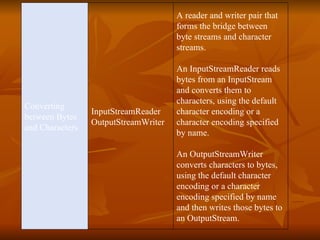
A reader and writer pair that forms the bridge between byte streams and character streams. An  InputStreamReader  reads bytes from an  InputStream  and converts them to characters, using the default character encoding or a character encoding specified by name. An  OutputStreamWriter  converts characters to bytes, using the default character encoding or a character encoding specified by name and then writes those bytes to an  OutputStream . InputStreamReader OutputStreamWriter Converting between Bytes and Characters
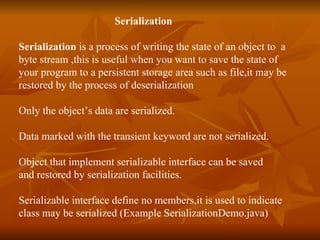
Serialization   Serialization  is a process of writing the state of an object to  a  byte stream ,this is useful when you want to save the state of  your program to a persistent storage area such as file,it may be  restored by the process of deserialization Only the object’s data are serialized. Data marked with the transient keyword are not serialized. Object that implement serializable interface can be saved  and restored by serialization facilities. Serializable interface define no members,it is used to indicate  class may be serialized (Example SerializationDemo.java)

Md121 streams

  • 1.
    I/OStreams
  • 2.
    Objectives • Describe the main features of the java.io package • Construct node and processing streams, and use them appropriately • Distinguish readers and writers from streams, and select appropriately between them • Use the Serialization interface to encode the state of an object
  • 3.
    I/O Fundamentals A stream can be thought of as a flow of data from a source to a sink. A source stream initiates the flow of data, also called an input stream. A sink stream terminates the flow of data, also called an output stream. Sources and sinks are both node streams. Types of node streams are: files, memory, and pipes between threads or processes.
  • 4.
    Program need informationfrom an external resource (USER) or to send out the information to external resource(USER) , Information can be anywhere in the file or disk or the network, information can be of any type object ,char , image ,sound. To get the information program open a stream on information source and read the information sequentially
  • 5.
    Similarly a programcan send information to external destination by opening a stream to destination and write the information out sequentially. No matter where the data is coming from or going to and no matter what its type, algorithm for reading and writing the data are same
  • 6.
    Reading Writing Opena Stream Open a Stream While more information While more information Read information Write information Close Stream Close the Stream
  • 7.
    Fundamental Stream ClassesStream classes are divided into two class hierarchies Character Stream provide a convenient means for handling input and output of characters Byte Stream provide a convenient means for handling input and output of bytes
  • 8.
    InputStream Methods • The three basic read methods: int read() int read(byte[] buffer) int read(byte[] buffer, int offset, int length)
  • 9.
    OutputStream Methods • The three basic write methods: void write(int c) void write(byte[] buffer) void write(byte[] buffer, int offset, int length)
  • 10.
    Reader Methods • The three basic read methods: int read() int read(char[] cbuf) int read(char[] cbuf, int offset, int length)
  • 11.
    Writer Methods • The basic write methods: void write(int c) void write(char[] cbuf) void write(char[] cbuf, int offset, int length) void write(String string) void write(String string, int offset, int length)
  • 12.
    InputStream Class Hierarchy
  • 13.
  • 14.
    Reader Class Hierarchy
  • 15.
  • 16.
    Used to readfrom or write to a file on the native file system. FileReader FileWriter FileInputStream FileOutputStream File Pipes are used to channel the output from one thread into the input of another. PipedReader PipedWriter PipedInputStream PipedOutputStream Pipe Read characters from a String StringWriter to write to a String . StringBufferInputStream it reads bytes from a StringBuffer . StringReader StringWriter StringBufferInputStream Read Char from Array Write Char to Array Read Byte from Array Write Byte to Array CharArrayReader CharArrayWriter ByteArrayInputStream ByteArrayOutputStream Memory Description Streams Type of I/O I/O Streams
  • 17.
    These input streamseach have a pushback buffer. When reading data from a stream, it is sometimes useful to peek at the next few bytes or characters in the stream to decide what to do next. PushbackReader PushbackInputStream Peeking Ahead Keeps track of line numbers while reading. LineNumberReader LineNumberInputStream Counting Read or write primitive data types in a machine-independent format. N/A   DataInputStream DataOutputStream Data Conversion Used to serialize objects. N/A ObjectInputStream ObjectOutputStream Object Serialization Concatenates multiple input streams into one input stream. N/A SequenceInputStream Concatenation
  • 18.
    Filter data asit's being read or written. FilterReader FilterWriter FilterInputStream FilterOutputStream Filtering Buffer data while reading or writing,. BufferedReader BufferedWriter BufferedInputStream BufferedOutputStream Buffering Contain convenient printing methods. These are the easiest streams to write to PrintWriter PrintStream Printing
  • 19.
    A reader andwriter pair that forms the bridge between byte streams and character streams. An InputStreamReader reads bytes from an InputStream and converts them to characters, using the default character encoding or a character encoding specified by name. An OutputStreamWriter converts characters to bytes, using the default character encoding or a character encoding specified by name and then writes those bytes to an OutputStream . InputStreamReader OutputStreamWriter Converting between Bytes and Characters
  • 20.
    Serialization Serialization is a process of writing the state of an object to a byte stream ,this is useful when you want to save the state of your program to a persistent storage area such as file,it may be restored by the process of deserialization Only the object’s data are serialized. Data marked with the transient keyword are not serialized. Object that implement serializable interface can be saved and restored by serialization facilities. Serializable interface define no members,it is used to indicate class may be serialized (Example SerializationDemo.java)