JOINS IN SQL
-VARSHA KUMARI
content
 Joins:
 Cartesian Product
 Natural Join
 Equi Join
 Self Join
 Inner Join
 outer Join(Left, Right, Full)
JOINS
 A JOIN combines together information from two or
more tables into one result set.
 The records from the table are fetched based on
some values that are common to each.
 It can also specifies some condition while
retrieving the data.
 Join = cross product + some condition
Cartesian product
 Before understanding JOINS in SQL we
should know about Cartesian Product.
 Also known as Cross Product.
Cartesian Product in sets(Mathematics)
 A = { 1, 2, 3} B = { a , b}
 A x B = { (1,a) , (2,a), (3,a), (1, b), (2,b) , (3,b) }
Cartesian product
 R1 R2
 R1 x R2
A B
2 E1
4 E2
5 E3
B C
E1 5
E5 7
A B B C
2 E1 E1 5
4 E2 E1 5
5 E3 E1 5
.. .. .. ..
Cartesian product
 R1 R2
 R1 x R2
A B
2 E1
4 E2
5 E3
B C
E1 5
E5 7
A B B C
2 E1 E1 5
4 E2 E1 5
5 E3 E1 5
2 E1 E5 7
4 E2 E5 7
5 E3 E5 7
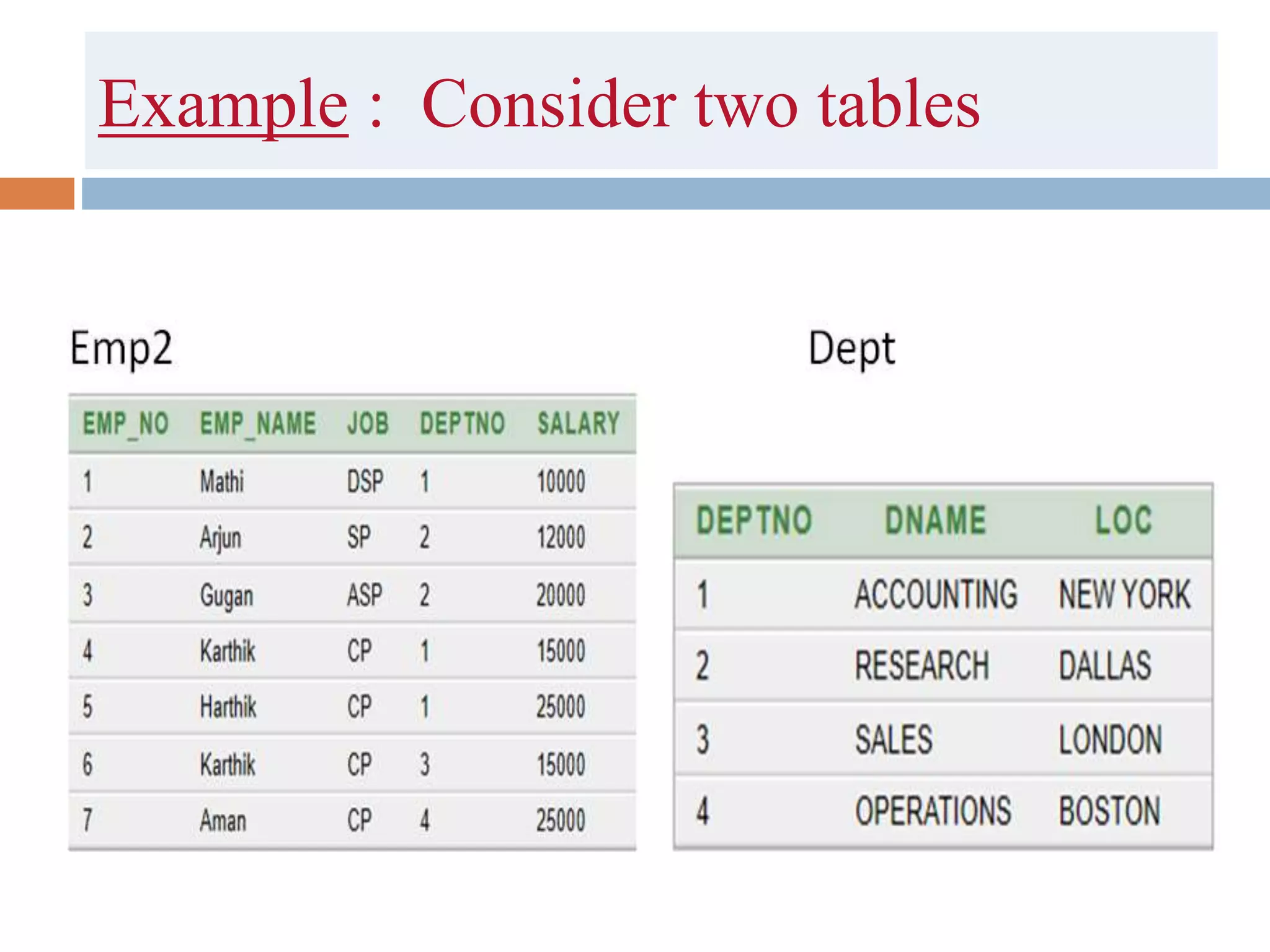
Example : Consider two tables
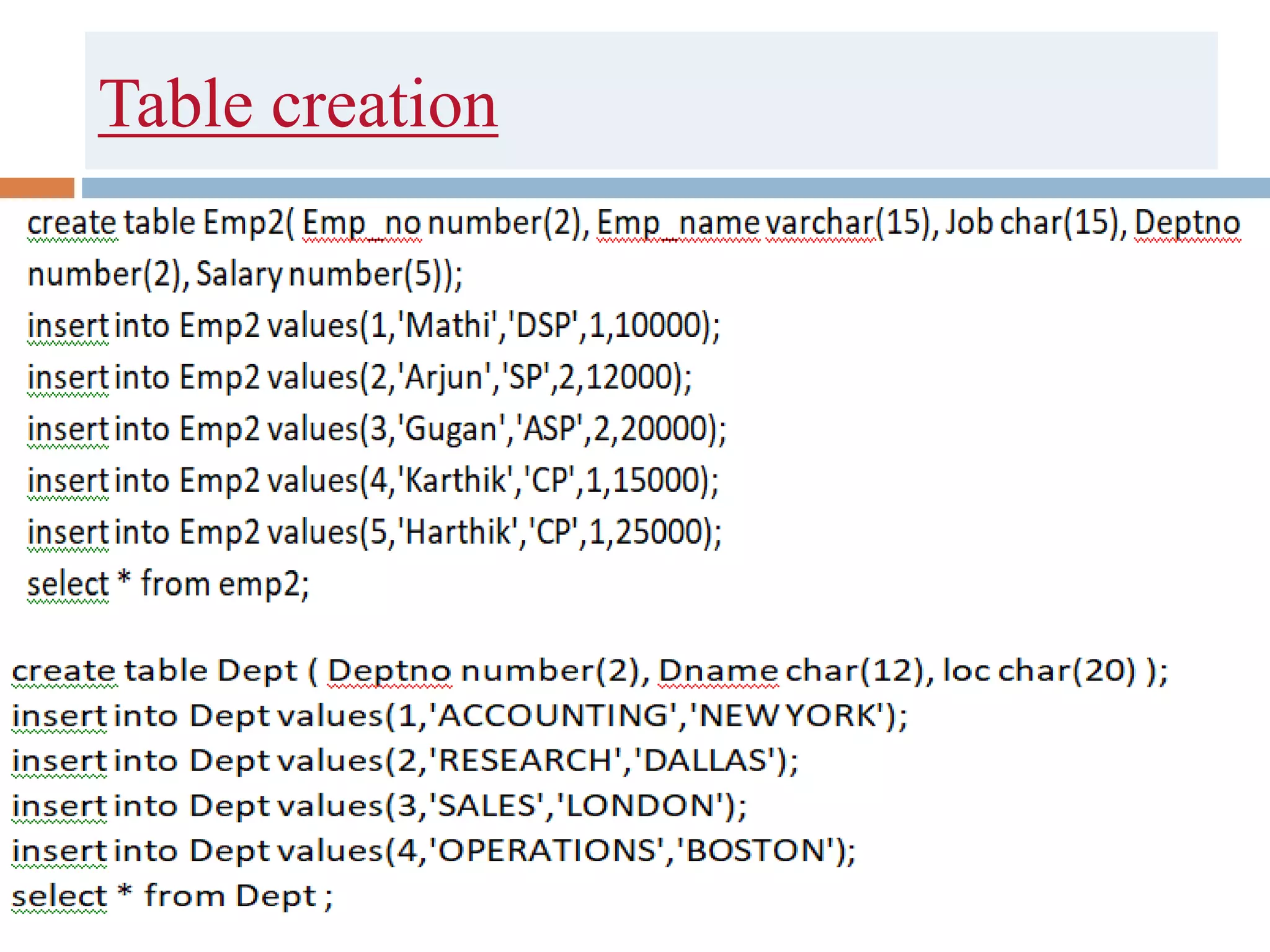
Table creation
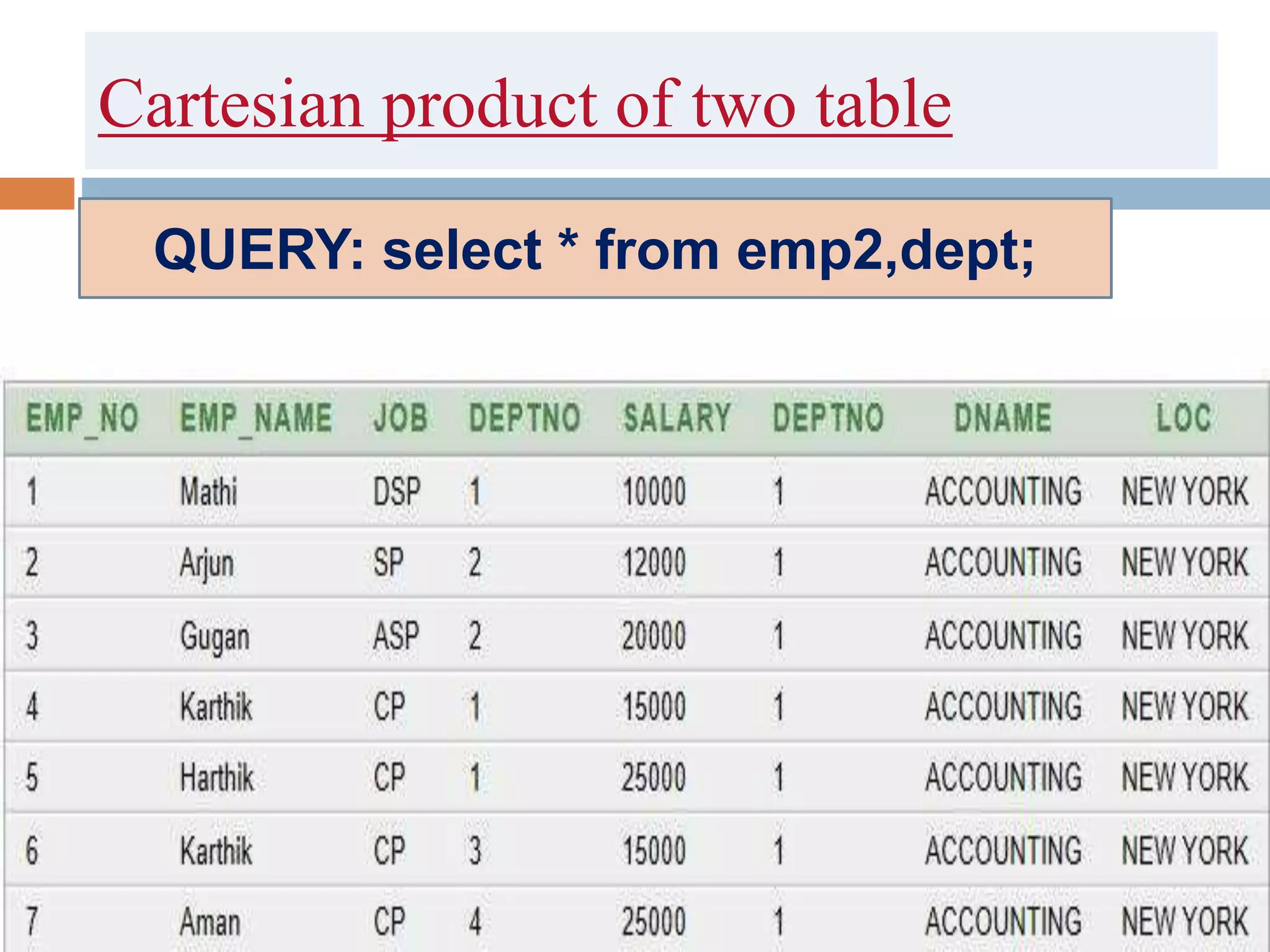
Cartesian product of two table
QUERY: select * from emp2,dept;
Cartesian Product :
 Cartesian Product is the all possible combinations
between applied table rows.
 Suppose two tables are T1 and T2
 T1 has r1 rows and c1 columns
 T2 has r2 rows and c2 columns
 Cartesian product of T1 and T2 will have:
 r1 * r2 rows and c1 + c2 columns.
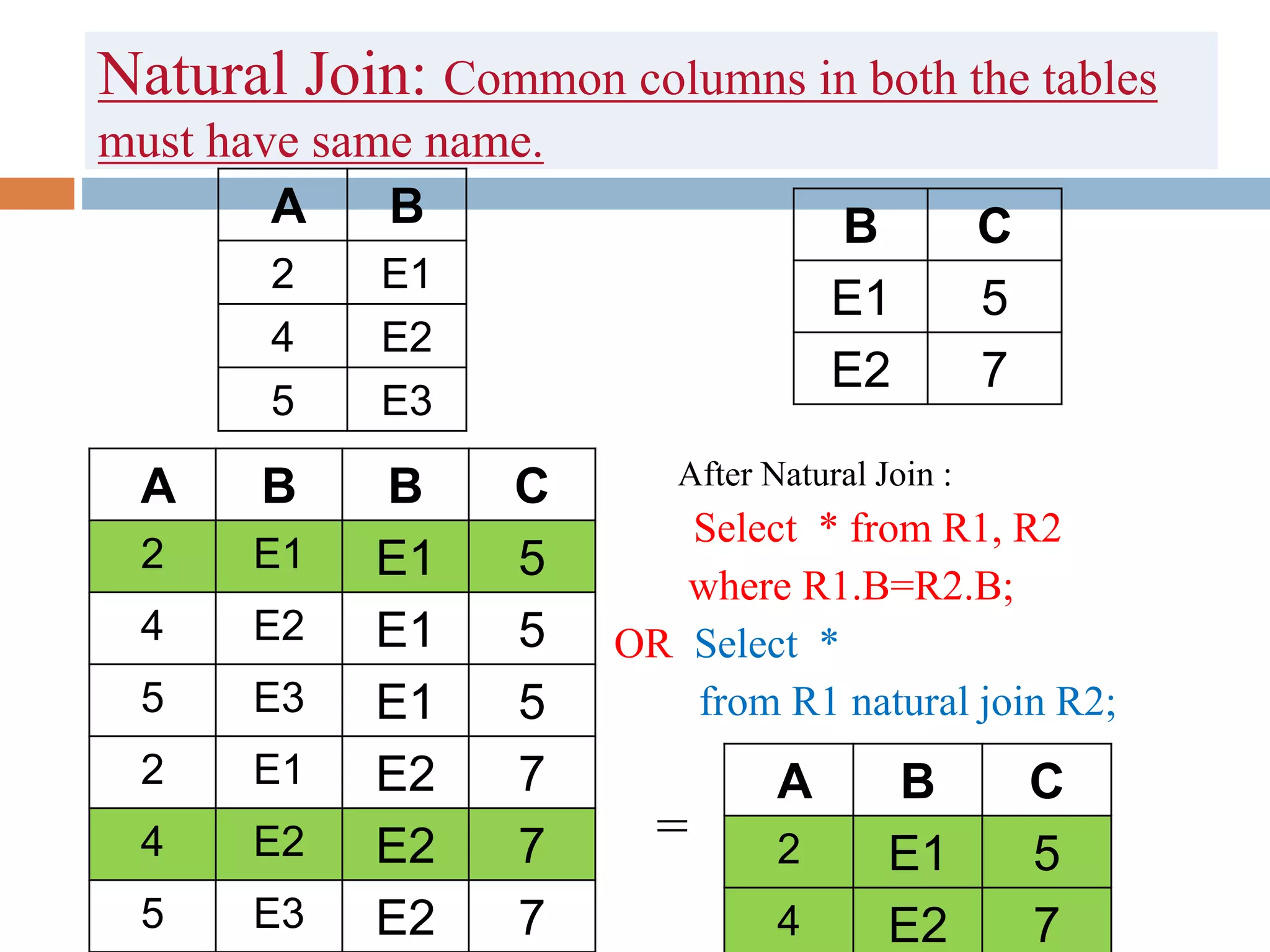
Natural Join: Common columns in both the tables
must have same name.
After Natural Join :
 Select * from R1, R2
where R1.B=R2.B;
OR Select *
from R1 natural join R2;
=
A B
2 E1
4 E2
5 E3
B C
E1 5
E2 7
A B B C
2 E1 E1 5
4 E2 E1 5
5 E3 E1 5
2 E1 E2 7
4 E2 E2 7
5 E3 E2 7
A B C
2 E1 5
4 E2 7
Natural JOIN:
Select * from Emp2 natural join Dept;
- Behaves Same as Inner Join
- In Natural Join common attribute must have
same name in both the tables
Example:
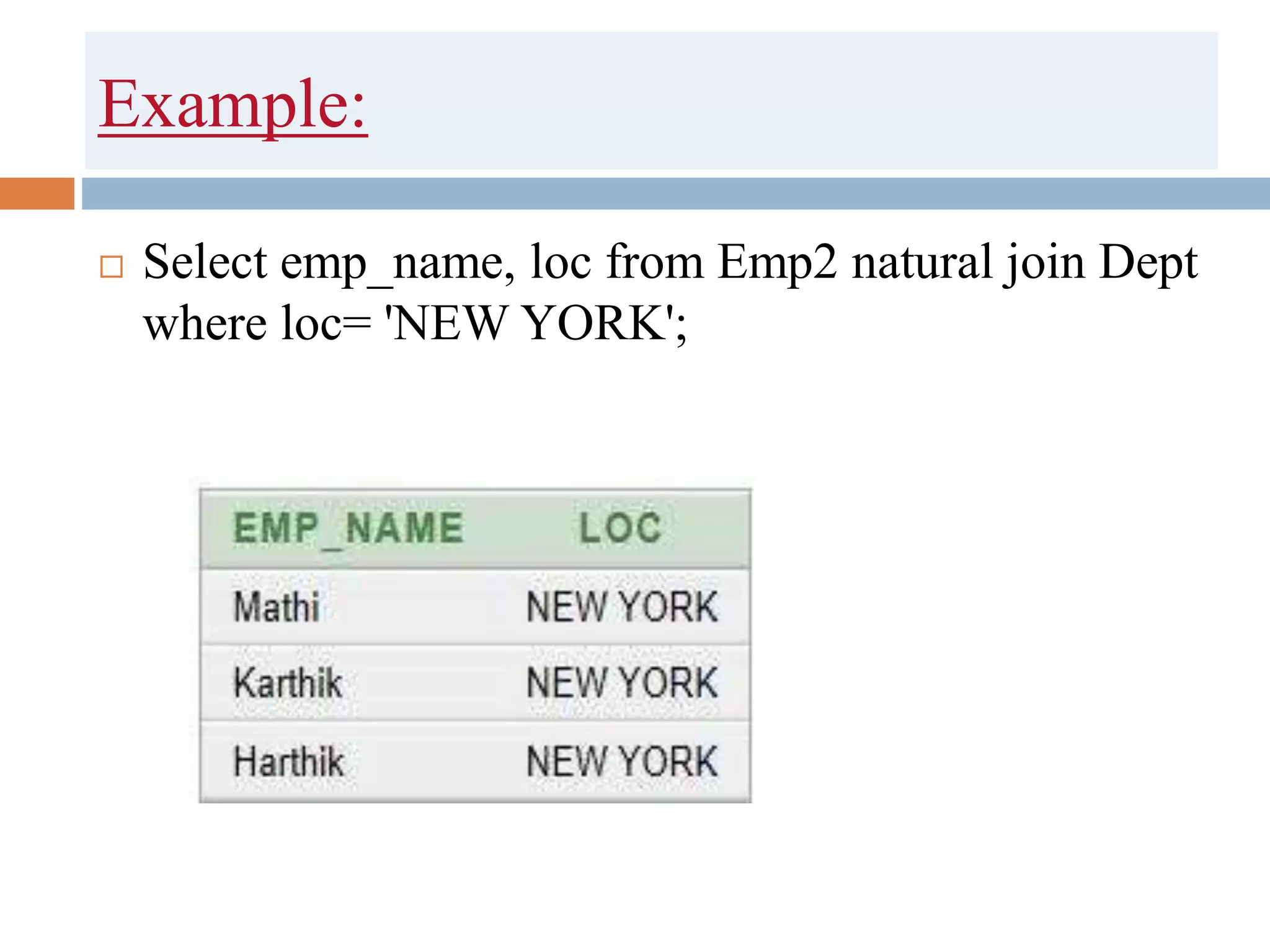
 Select emp_name, loc from Emp2 natural join Dept
where loc= 'NEW YORK';
Equi Join
 R1 R2
 After Equi Join :
 Select *from R1,R2
 where R1.B=R2.C;
 or Select *from R1 join R2
 on R1.B=R2.C;
A B
2 E1
4 E2
5 E3
C D
E1 5
E2 7
A B C D
2 E1 E1 5
4 E2 E1 5
5 E3 E1 5
2 E1 E2 7
4 E2 E2 7
5 E3 E2 7
A B C D
2 E1 E1 5
4 E2 E2 7
Equi Join:
 Same as inner join , it uses only equality
comparison.
 Query : Select * from Emp2, dept where
emp2.deptno=dept.deptno;
Self Join
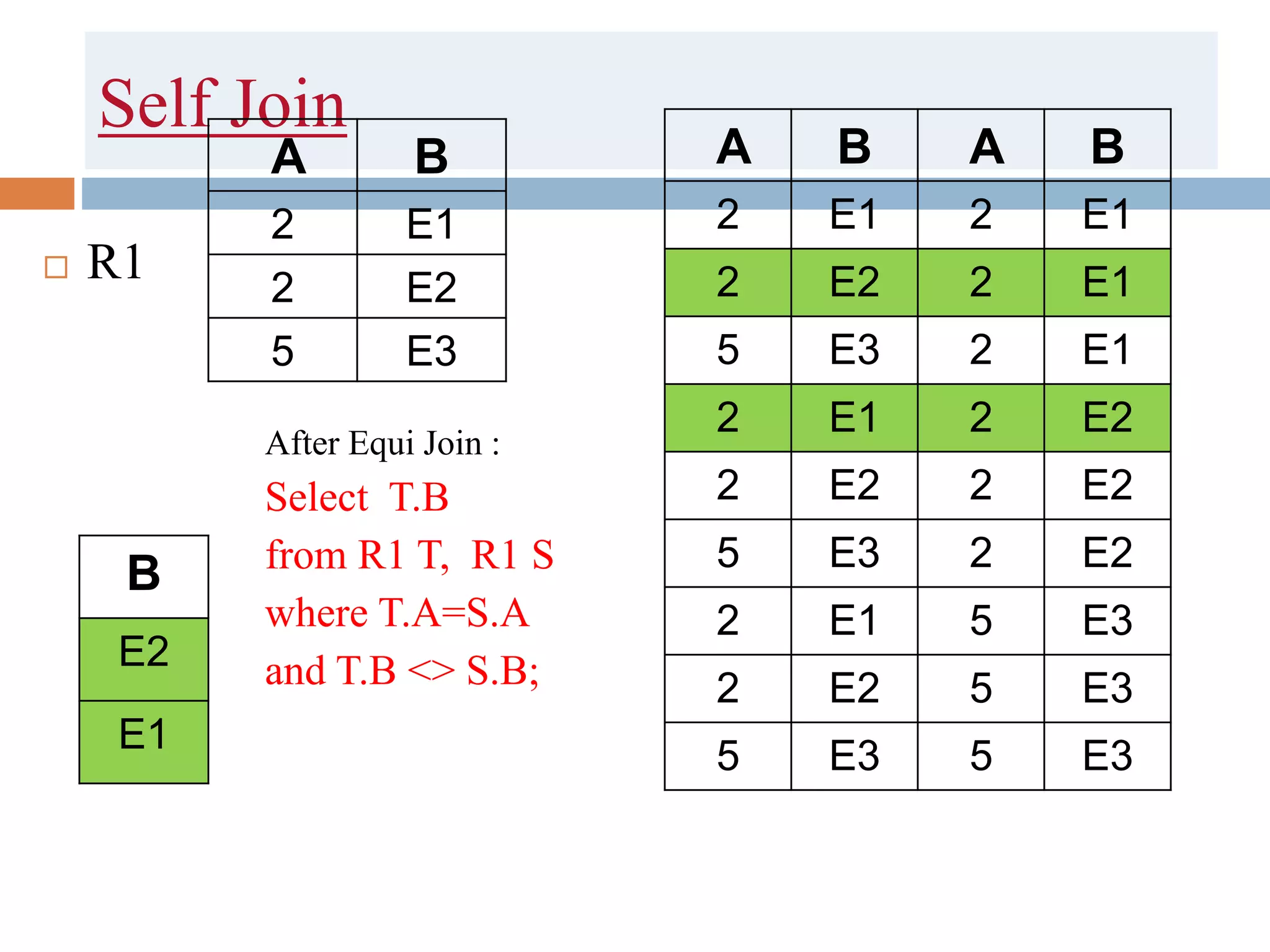
 A self Join is a type of Join which is used to join a
table to itself. In this join both the columns belongs
to the same table.
 Syntax :
 Select T1.column, T1.column from T1 A inner join T2 B on
A.column= B.column
Self Join
 R1
After Equi Join :
Select T.B
from R1 T, R1 S
where T.A=S.A
and T.B <> S.B;
A B
2 E1
2 E2
5 E3
A B A B
2 E1 2 E1
2 E2 2 E1
5 E3 2 E1
2 E1 2 E2
2 E2 2 E2
5 E3 2 E2
2 E1 5 E3
2 E2 5 E3
5 E3 5 E3
B
E2
E1
Select * from Emp2 A , Emp2 B
where A.Deptno = B.Deptno;
Inner Join
 Inner Join combines the rows retrieved from
multiple tables on the basis of common columns of
the tables.
 It takes that rows from the cartesian product table
where the join elements ( emp.deptno and
dept.deptno in the above query) matches fully
 Syntax:
 Select T1.column, T2.column from T1 inner join T2
on T1.column=T2.column
Inner Join
 R1 R2
 After Inner Join
=
A B
2 E1
4 E2
5 E3
B C
E1 5
E2 7
A B B C
2 E1 E1 5
4 E2 E1 5
5 E3 E1 5
2 E1 E2 7
4 E2 E2 7
5 E3 E2 7
A B B C
2 E1 E1 5
4 E2 E2 7
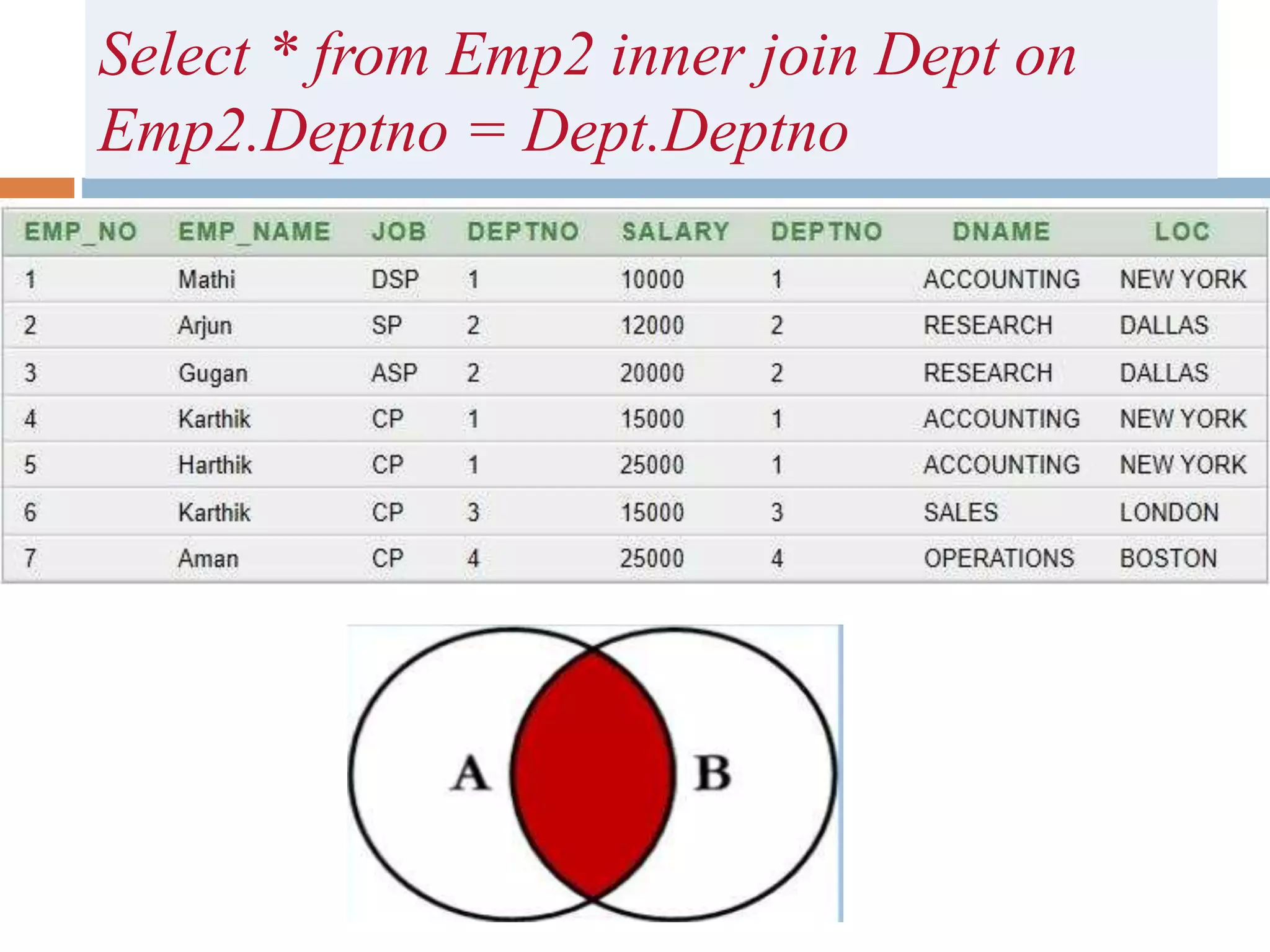
Select * from Emp2 inner join Dept on
Emp2.Deptno = Dept.Deptno
example
 Select * from Emp2 inner join Dept on
Emp2.Deptno = Dept.Deptno
where loc= 'NEW YORK';
Example:
 Select emp_name,loc from Emp2 inner join Dept
on Emp2.Deptno = Dept.Deptno where loc= 'NEW
YORK';
Left Outer Join
 Left outer Join takes that rows which are in inner
join output.
 And it also looks for the rows in the left table
which are not in the inner join output.
 The rows are added to the output with null in right
columns.
Left Join
 R1 R2
 After Left Join
=
A B
2 E1
4 E2
5 E3
B C
E1 5
E2 7
A B B C
2 E1 E1 5
4 E2 E1 5
5 E3 E1 5
2 E1 E2 7
4 E2 E2 7
5 E3 E2 7
A B B C
2 E1 E1 5
4 E2 E2 7
5 E3 NUL
L
NUL
L
Syntax:
 Select T1.column, T2.column from T1 left outer
join T2 on T1.column=T2.column
Eg. Select * from Emp2 left outer join Dept on
Emp2.Deptno = Dept.Deptno;
Right Outer Join
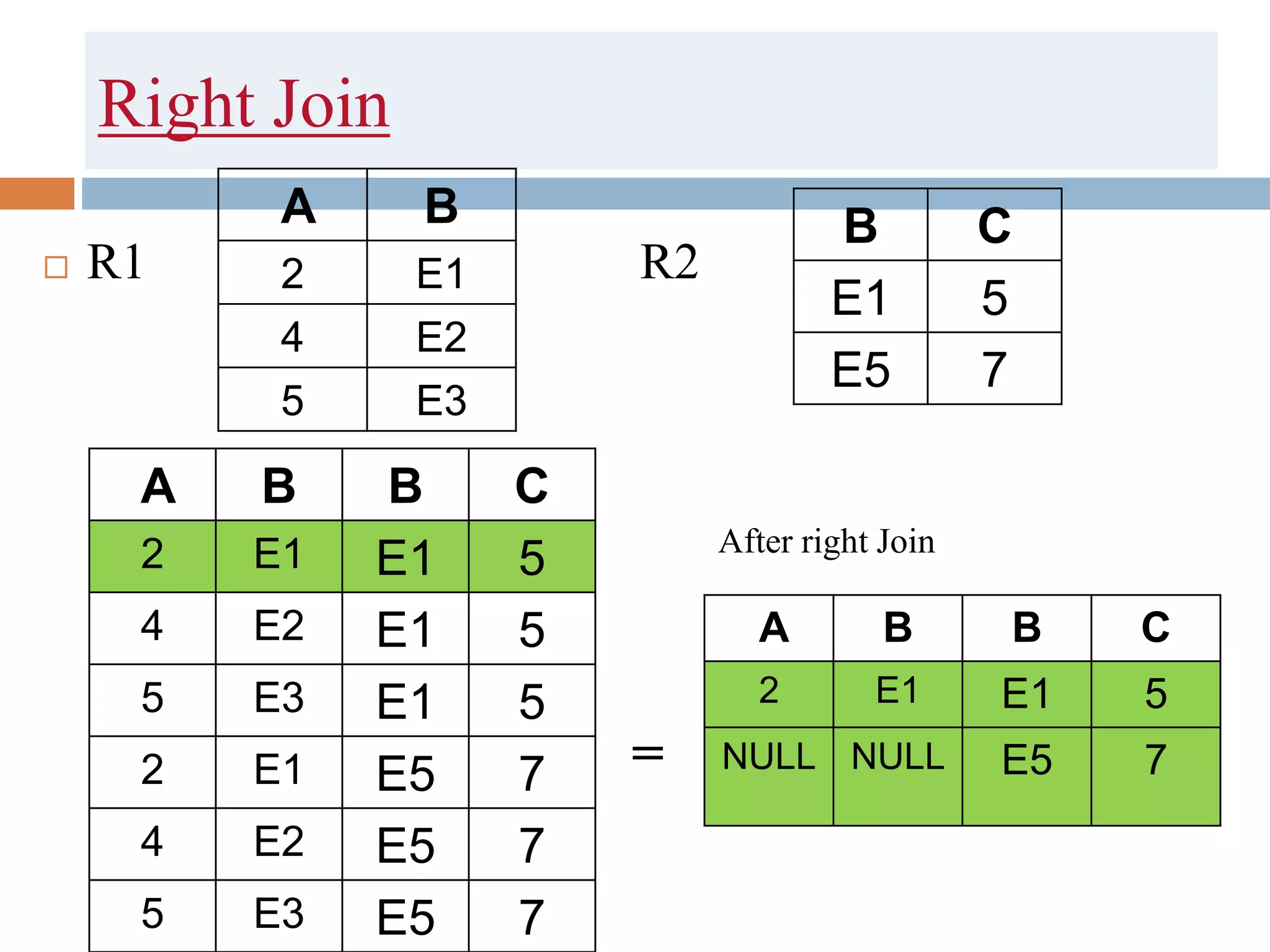
 Right outer Join takes that rows which are in inner
join output.
 And it also looks for the rows in the right table
which are not in the inner join output.
 The rows are added to the output with null in left
columns.
Right Join
 R1 R2
 After right Join
=
A B
2 E1
4 E2
5 E3
B C
E1 5
E5 7
A B B C
2 E1 E1 5
4 E2 E1 5
5 E3 E1 5
2 E1 E5 7
4 E2 E5 7
5 E3 E5 7
A B B C
2 E1 E1 5
NULL NULL E5 7
Syntax:
 Select T1.column, T2.column from T1 right outer
join T2 on T1.column=T2.column
Eg. Select * from Emp2 right outer join Dept on
Emp2.Deptno = Dept.Deptno;
Full Outer Join
 Full outer Join takes that rows which are in inner
join output.
 And it also looks for the rows in the left and also
right table which are not in the inner join output.
Full Join
 R1 R2
 After Full Join
=
A B
2 E1
4 E2
5 E3
B C
E1 5
E5 7
A B B C
2 E1 E1 5
4 E2 E1 5
5 E3 E1 5
2 E1 E5 7
4 E2 E5 7
5 E3 E5 7
A B B C
2 E1 E1 5
NULL NULL E5 7
4 E2 NULL NULL
5 E3 NULL NULL
Syntax:
 Select T1.column, T2.column from T1 full outer
join T2 on T1.column=T2.column
Eg. Select * from Emp2 full outer join Dept on
Emp2.Deptno = Dept.Deptno;
Consider two table
Student Faculty
S_id S_name course
1 Amit BCA
2 Ram Btech
3 Hardik BCA
4 Pawan BCA
5 Sumit Btech
6 Aman MCA
7 Hardik BCA
F_Id course Loc
F1 BCA AB 10
F2 Btech AB 1
F3 MTech AB1
 Cartesian product:
 Select * from Student, Faculty;
 Natural Join:
 Select * from Student natural join Faculty
 Equi join:
 Select * from student join Faculty on
Student.course=Faculty.course
 Self join:
 Select A.S_name from Student A, Student B where
A.S_id= B.S_id
 Inner Join:
 Select Student.S_name from Student inner join
Faculty on Student.course= Faculty.course where
Faculty.loc=‘AB10’
 Left Join:
 Select Student.S_name from Student left outer join
Faculty on Student.course= Faculty.course where
Faculty.loc=‘AB10’
 Right Join:
 Select Student.S_name from Student right outer join
Faculty on Student.course= Faculty.course where
Faculty.loc=‘AB10’

Joins

  • 1.
  • 2.
    content  Joins:  CartesianProduct  Natural Join  Equi Join  Self Join  Inner Join  outer Join(Left, Right, Full)
  • 3.
    JOINS  A JOINcombines together information from two or more tables into one result set.  The records from the table are fetched based on some values that are common to each.  It can also specifies some condition while retrieving the data.  Join = cross product + some condition
  • 4.
    Cartesian product  Beforeunderstanding JOINS in SQL we should know about Cartesian Product.  Also known as Cross Product.
  • 5.
    Cartesian Product insets(Mathematics)  A = { 1, 2, 3} B = { a , b}  A x B = { (1,a) , (2,a), (3,a), (1, b), (2,b) , (3,b) }
  • 6.
    Cartesian product  R1R2  R1 x R2 A B 2 E1 4 E2 5 E3 B C E1 5 E5 7 A B B C 2 E1 E1 5 4 E2 E1 5 5 E3 E1 5 .. .. .. ..
  • 7.
    Cartesian product  R1R2  R1 x R2 A B 2 E1 4 E2 5 E3 B C E1 5 E5 7 A B B C 2 E1 E1 5 4 E2 E1 5 5 E3 E1 5 2 E1 E5 7 4 E2 E5 7 5 E3 E5 7
  • 8.
  • 9.
  • 10.
    Cartesian product oftwo table QUERY: select * from emp2,dept;
  • 12.
    Cartesian Product : Cartesian Product is the all possible combinations between applied table rows.  Suppose two tables are T1 and T2  T1 has r1 rows and c1 columns  T2 has r2 rows and c2 columns  Cartesian product of T1 and T2 will have:  r1 * r2 rows and c1 + c2 columns.
  • 13.
    Natural Join: Commoncolumns in both the tables must have same name. After Natural Join :  Select * from R1, R2 where R1.B=R2.B; OR Select * from R1 natural join R2; = A B 2 E1 4 E2 5 E3 B C E1 5 E2 7 A B B C 2 E1 E1 5 4 E2 E1 5 5 E3 E1 5 2 E1 E2 7 4 E2 E2 7 5 E3 E2 7 A B C 2 E1 5 4 E2 7
  • 14.
    Natural JOIN: Select *from Emp2 natural join Dept; - Behaves Same as Inner Join - In Natural Join common attribute must have same name in both the tables
  • 15.
    Example:  Select emp_name,loc from Emp2 natural join Dept where loc= 'NEW YORK';
  • 16.
    Equi Join  R1R2  After Equi Join :  Select *from R1,R2  where R1.B=R2.C;  or Select *from R1 join R2  on R1.B=R2.C; A B 2 E1 4 E2 5 E3 C D E1 5 E2 7 A B C D 2 E1 E1 5 4 E2 E1 5 5 E3 E1 5 2 E1 E2 7 4 E2 E2 7 5 E3 E2 7 A B C D 2 E1 E1 5 4 E2 E2 7
  • 17.
    Equi Join:  Sameas inner join , it uses only equality comparison.  Query : Select * from Emp2, dept where emp2.deptno=dept.deptno;
  • 18.
    Self Join  Aself Join is a type of Join which is used to join a table to itself. In this join both the columns belongs to the same table.  Syntax :  Select T1.column, T1.column from T1 A inner join T2 B on A.column= B.column
  • 19.
    Self Join  R1 AfterEqui Join : Select T.B from R1 T, R1 S where T.A=S.A and T.B <> S.B; A B 2 E1 2 E2 5 E3 A B A B 2 E1 2 E1 2 E2 2 E1 5 E3 2 E1 2 E1 2 E2 2 E2 2 E2 5 E3 2 E2 2 E1 5 E3 2 E2 5 E3 5 E3 5 E3 B E2 E1
  • 20.
    Select * fromEmp2 A , Emp2 B where A.Deptno = B.Deptno;
  • 21.
    Inner Join  InnerJoin combines the rows retrieved from multiple tables on the basis of common columns of the tables.  It takes that rows from the cartesian product table where the join elements ( emp.deptno and dept.deptno in the above query) matches fully  Syntax:  Select T1.column, T2.column from T1 inner join T2 on T1.column=T2.column
  • 22.
    Inner Join  R1R2  After Inner Join = A B 2 E1 4 E2 5 E3 B C E1 5 E2 7 A B B C 2 E1 E1 5 4 E2 E1 5 5 E3 E1 5 2 E1 E2 7 4 E2 E2 7 5 E3 E2 7 A B B C 2 E1 E1 5 4 E2 E2 7
  • 23.
    Select * fromEmp2 inner join Dept on Emp2.Deptno = Dept.Deptno
  • 24.
    example  Select *from Emp2 inner join Dept on Emp2.Deptno = Dept.Deptno where loc= 'NEW YORK';
  • 25.
    Example:  Select emp_name,locfrom Emp2 inner join Dept on Emp2.Deptno = Dept.Deptno where loc= 'NEW YORK';
  • 26.
    Left Outer Join Left outer Join takes that rows which are in inner join output.  And it also looks for the rows in the left table which are not in the inner join output.  The rows are added to the output with null in right columns.
  • 27.
    Left Join  R1R2  After Left Join = A B 2 E1 4 E2 5 E3 B C E1 5 E2 7 A B B C 2 E1 E1 5 4 E2 E1 5 5 E3 E1 5 2 E1 E2 7 4 E2 E2 7 5 E3 E2 7 A B B C 2 E1 E1 5 4 E2 E2 7 5 E3 NUL L NUL L
  • 28.
    Syntax:  Select T1.column,T2.column from T1 left outer join T2 on T1.column=T2.column Eg. Select * from Emp2 left outer join Dept on Emp2.Deptno = Dept.Deptno;
  • 29.
    Right Outer Join Right outer Join takes that rows which are in inner join output.  And it also looks for the rows in the right table which are not in the inner join output.  The rows are added to the output with null in left columns.
  • 30.
    Right Join  R1R2  After right Join = A B 2 E1 4 E2 5 E3 B C E1 5 E5 7 A B B C 2 E1 E1 5 4 E2 E1 5 5 E3 E1 5 2 E1 E5 7 4 E2 E5 7 5 E3 E5 7 A B B C 2 E1 E1 5 NULL NULL E5 7
  • 31.
    Syntax:  Select T1.column,T2.column from T1 right outer join T2 on T1.column=T2.column Eg. Select * from Emp2 right outer join Dept on Emp2.Deptno = Dept.Deptno;
  • 32.
    Full Outer Join Full outer Join takes that rows which are in inner join output.  And it also looks for the rows in the left and also right table which are not in the inner join output.
  • 33.
    Full Join  R1R2  After Full Join = A B 2 E1 4 E2 5 E3 B C E1 5 E5 7 A B B C 2 E1 E1 5 4 E2 E1 5 5 E3 E1 5 2 E1 E5 7 4 E2 E5 7 5 E3 E5 7 A B B C 2 E1 E1 5 NULL NULL E5 7 4 E2 NULL NULL 5 E3 NULL NULL
  • 34.
    Syntax:  Select T1.column,T2.column from T1 full outer join T2 on T1.column=T2.column Eg. Select * from Emp2 full outer join Dept on Emp2.Deptno = Dept.Deptno;
  • 35.
    Consider two table StudentFaculty S_id S_name course 1 Amit BCA 2 Ram Btech 3 Hardik BCA 4 Pawan BCA 5 Sumit Btech 6 Aman MCA 7 Hardik BCA F_Id course Loc F1 BCA AB 10 F2 Btech AB 1 F3 MTech AB1
  • 36.
     Cartesian product: Select * from Student, Faculty;  Natural Join:  Select * from Student natural join Faculty  Equi join:  Select * from student join Faculty on Student.course=Faculty.course  Self join:  Select A.S_name from Student A, Student B where A.S_id= B.S_id
  • 37.
     Inner Join: Select Student.S_name from Student inner join Faculty on Student.course= Faculty.course where Faculty.loc=‘AB10’  Left Join:  Select Student.S_name from Student left outer join Faculty on Student.course= Faculty.course where Faculty.loc=‘AB10’  Right Join:  Select Student.S_name from Student right outer join Faculty on Student.course= Faculty.course where Faculty.loc=‘AB10’