MySQL INDEXES
Why we need INDEXes
 Searching for single record in a
large table. The usual method
of searching the record in the
table is to start from the
beginning record by record, till
we get the record. But it is not
feasible when table is large.
1
What is an INDEX
 Index is usually created
to enhance the
performance of retrieval
of records in huge tables.
 Primary key itself acts as
an index in a table.
2
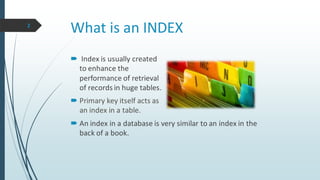
 An index in a database is very similar to an index in the
back of a book.
INDEX advantages and disadvantages
Advantages
Speed up
 SELECT queries
 WHERE clauses
Disadvantages
 Slows down transactions like INSERT/DELETE/UPDATE.
3
CREATE INDEX
 Creating an index depends on the table access frequency, the
columns(combination of columns) which are used for fetching
the records etc. Indexes involving two or more columns
should be ordered from most frequently accessed columns to
less frequently accessed columns.
 The basic syntax of a CREATE INDEX is as follows
 CREATE INDEX index_name ON table_name;
4
DROP INDEX
 Drop the indexes, if they are no more
required in the database. Unwanted
and unused indexes always lead to bad
performance of a query. An index can
be dropped using DROP command.
The basic syntax is as follows
 DROP INDEX index_name;
5
RENAME INDEX
 Index can be renamed too
 ALTER INDEX index_name RENAME TO new_index_name;
6
INDEX types
 Single-Column index is created based on only one table column. The basic
syntax is as follows
 CREATE INDEX index_name ON table_name (column_name);
 Unique indexes are used not only for performance, but also for data
integrity. A unique index does not allow any duplicate values to be inserted
into the table. The basic syntax is as follows.
 CREATE UNIQUE INDEX index_name ON table_name (column_name);
7
INDEX types
 Composite (concatenated) index is an index on two or more columns of
a table. Its basic syntax is as follows
 CREATE INDEX index_name ON table_name (column1, column2);
 Implicit indexes are the one which are indexes by default. That means
database considers them as index when the table is created. Primary key
and unique key columns are implicit indexes.
7
When should INDEXES be avoided?
The following guidelines indicate when the use of an index should be
reconsidered
Indexes should not be used on small tables.
Tables that have frequent, large batch updates or insert/delete
operations.
Indexes should not be used on columns that contain a high number of
NULL values.
Columns that are frequently manipulated should not be indexed.
8
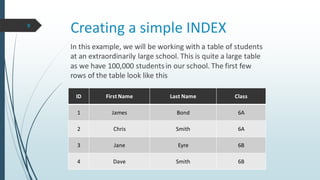
Creating a simple INDEX
ID First Name Last Name Class
1 James Bond 6A
2 Chris Smith 6A
3 Jane Eyre 6B
4 Dave Smith 6B
In this example, we will be working with a table of students
at an extraordinarily large school. This is quite a large table
as we have 100,000 studentsin our school. The first few
rows of the table look like this
9
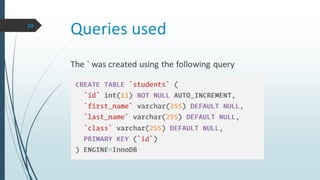
Queries used
The ` was created using the following query
10
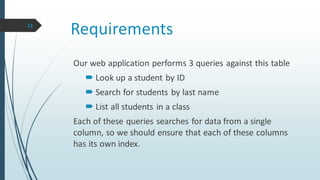
Requirements
Our web application performs 3 queries against this table
 Look up a student by ID
 Search for students by last name
 List all students in a class
Each of these queries searches for data from a single
column, so we should ensure that each of these columns
has its own index.
11
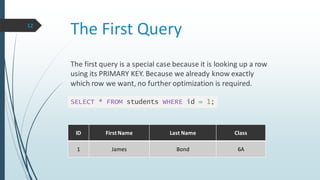
The First Query
The first query is a special case because it is looking up a row
using its PRIMARY KEY. Because we already know exactly
which row we want, no further optimization is required.
SELECT * FROM students WHERE id = 1;
12
ID First Name Last Name Class
1 James Bond 6A
The Second Query
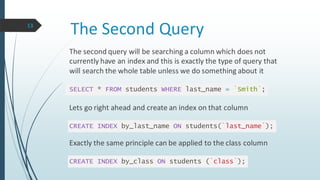
The second query will be searching a column which does not
currently have an index and this is exactly the type of query that
will search the whole table unless we do something about it
SELECT * FROM students WHERE last_name = `Smith`;
Lets go right ahead and create an index on that column
CREATE INDEX by_last_name ON students(`last_name`);
Exactly the same principle can be applied to the class column
CREATE INDEX by_class ON students (`class`);
13
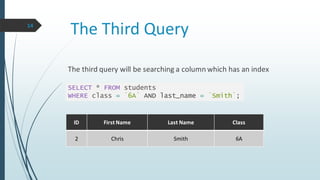
The Third Query
The third query will be searching a column which has an index
SELECT * FROM students
WHERE class = `6A` AND last_name = `Smith`;
14
ID First Name Last Name Class
2 Chris Smith 6A
Choosing Columns to Index15
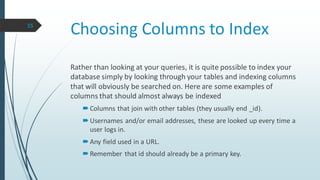
Rather than looking at your queries, it is quite possible to index your
database simply by looking through your tables and indexing columns
that will obviously be searched on. Here are some examples of
columns that should almost always be indexed
Columns that join with other tables (they usually end _id).
Usernames and/or email addresses, these are looked up every time a
user logs in.
Any field used in a URL.
Remember that id should already be a primary key.
Summary16
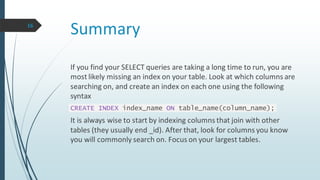
If you find your SELECT queries are taking a long time to run, you are
most likely missing an index on your table. Look at which columns are
searching on, and create an index on each one using the following
syntax
CREATE INDEX index_name ON table_name(column_name);
It is always wise to start by indexing columns that join with other
tables (they usually end _id). After that, look for columns you know
you will commonly search on. Focus on your largest tables.
Thank You!

MySQL INDEXES

  • 1.
  • 2.
    Why we needINDEXes  Searching for single record in a large table. The usual method of searching the record in the table is to start from the beginning record by record, till we get the record. But it is not feasible when table is large. 1
  • 3.
    What is anINDEX  Index is usually created to enhance the performance of retrieval of records in huge tables.  Primary key itself acts as an index in a table. 2  An index in a database is very similar to an index in the back of a book.
  • 4.
    INDEX advantages anddisadvantages Advantages Speed up  SELECT queries  WHERE clauses Disadvantages  Slows down transactions like INSERT/DELETE/UPDATE. 3
  • 5.
    CREATE INDEX  Creatingan index depends on the table access frequency, the columns(combination of columns) which are used for fetching the records etc. Indexes involving two or more columns should be ordered from most frequently accessed columns to less frequently accessed columns.  The basic syntax of a CREATE INDEX is as follows  CREATE INDEX index_name ON table_name; 4
  • 6.
    DROP INDEX  Dropthe indexes, if they are no more required in the database. Unwanted and unused indexes always lead to bad performance of a query. An index can be dropped using DROP command. The basic syntax is as follows  DROP INDEX index_name; 5
  • 7.
    RENAME INDEX  Indexcan be renamed too  ALTER INDEX index_name RENAME TO new_index_name; 6
  • 8.
    INDEX types  Single-Columnindex is created based on only one table column. The basic syntax is as follows  CREATE INDEX index_name ON table_name (column_name);  Unique indexes are used not only for performance, but also for data integrity. A unique index does not allow any duplicate values to be inserted into the table. The basic syntax is as follows.  CREATE UNIQUE INDEX index_name ON table_name (column_name); 7
  • 9.
    INDEX types  Composite(concatenated) index is an index on two or more columns of a table. Its basic syntax is as follows  CREATE INDEX index_name ON table_name (column1, column2);  Implicit indexes are the one which are indexes by default. That means database considers them as index when the table is created. Primary key and unique key columns are implicit indexes. 7
  • 10.
    When should INDEXESbe avoided? The following guidelines indicate when the use of an index should be reconsidered Indexes should not be used on small tables. Tables that have frequent, large batch updates or insert/delete operations. Indexes should not be used on columns that contain a high number of NULL values. Columns that are frequently manipulated should not be indexed. 8
  • 11.
    Creating a simpleINDEX ID First Name Last Name Class 1 James Bond 6A 2 Chris Smith 6A 3 Jane Eyre 6B 4 Dave Smith 6B In this example, we will be working with a table of students at an extraordinarily large school. This is quite a large table as we have 100,000 studentsin our school. The first few rows of the table look like this 9
  • 12.
    Queries used The `was created using the following query 10
  • 13.
    Requirements Our web applicationperforms 3 queries against this table  Look up a student by ID  Search for students by last name  List all students in a class Each of these queries searches for data from a single column, so we should ensure that each of these columns has its own index. 11
  • 14.
    The First Query Thefirst query is a special case because it is looking up a row using its PRIMARY KEY. Because we already know exactly which row we want, no further optimization is required. SELECT * FROM students WHERE id = 1; 12 ID First Name Last Name Class 1 James Bond 6A
  • 15.
    The Second Query Thesecond query will be searching a column which does not currently have an index and this is exactly the type of query that will search the whole table unless we do something about it SELECT * FROM students WHERE last_name = `Smith`; Lets go right ahead and create an index on that column CREATE INDEX by_last_name ON students(`last_name`); Exactly the same principle can be applied to the class column CREATE INDEX by_class ON students (`class`); 13
  • 16.
    The Third Query Thethird query will be searching a column which has an index SELECT * FROM students WHERE class = `6A` AND last_name = `Smith`; 14 ID First Name Last Name Class 2 Chris Smith 6A
  • 17.
    Choosing Columns toIndex15 Rather than looking at your queries, it is quite possible to index your database simply by looking through your tables and indexing columns that will obviously be searched on. Here are some examples of columns that should almost always be indexed Columns that join with other tables (they usually end _id). Usernames and/or email addresses, these are looked up every time a user logs in. Any field used in a URL. Remember that id should already be a primary key.
  • 18.
    Summary16 If you findyour SELECT queries are taking a long time to run, you are most likely missing an index on your table. Look at which columns are searching on, and create an index on each one using the following syntax CREATE INDEX index_name ON table_name(column_name); It is always wise to start by indexing columns that join with other tables (they usually end _id). After that, look for columns you know you will commonly search on. Focus on your largest tables.
  • 19.