Cascading style sheets (CSS)
-Varsha Kumari
2/2/2019 1
Introduction
What is CSS?
CSS stands for Cascading Style Sheets
Style sheet language
Describe the looks and formatting of a
document
Styles define how to display HTML elements
enable the separation of document content
from document presentation
2/2/2019 2
CSS Syntax
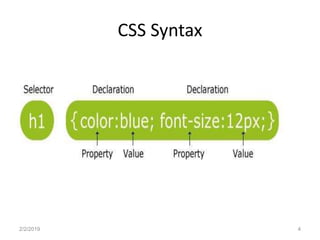
A CSS rule set consists of a selector and a
declaration block
Selector
points to the HTML element you want to style
Declaration
contains one or more declarations separated by
semicolons
includes a property name and a value, separated
by a colon
2/2/2019 3
CSS Syntax
2/2/2019 4
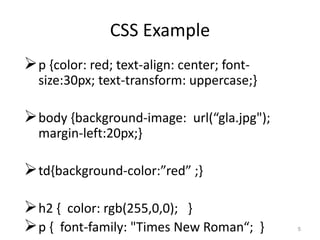
CSS Example
p {color: red; text-align: center; font-
size:30px; text-transform: uppercase;}
body {background-image: url(“gla.jpg");
margin-left:20px;}
td{background-color:”red” ;}
h2 { color: rgb(255,0,0); }
p { font-family: "Times New Roman“; } 5
• div {
border: 1px solid black;
margin: 100px 150px 100px 80px;
background-color: lightblue;
• }
2/2/2019 6
Three Ways to Insert CSS
Internal style sheet
Within the html document
External style sheet
As an external CSS file with .css extension
Inline style
In the same line where we want to apply the style
2/2/2019 7
Internal Style Sheet
Used when a single document has a unique
style
Defined in the head section of an HTML page
Defined within the <style> tag
Scope is up to the same document only
Every document has its own Internal CSS, if
required.
2/2/2019 8
abc.html
<html>
<head>
<style>
p {text-align: center; color: red;}
h1{color: red; text-transform: lowercase;}
</style>
</head>
<body>
<p>Every paragraph will be affected by the style.</p>
<h1Me too!</h1>
<p>And me!</p>
</body>
</html> Save it as “abc.html”
2/2/2019 9
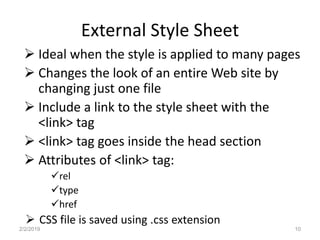
External Style Sheet
 Ideal when the style is applied to many pages
 Changes the look of an entire Web site by
changing just one file
 Include a link to the style sheet with the
<link> tag
 <link> tag goes inside the head section
 Attributes of <link> tag:
rel
type
href
 CSS file is saved using .css extension
2/2/2019 10
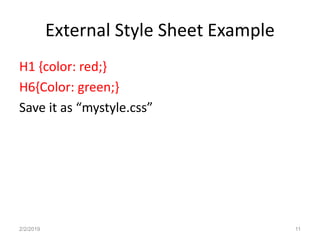
External Style Sheet Example
H1 {color: red;}
H6{Color: green;}
Save it as “mystyle.css”
2/2/2019 11
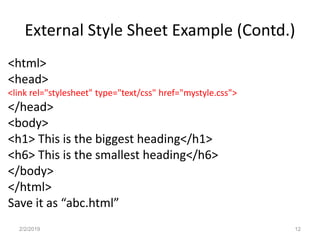
External Style Sheet Example (Contd.)
<html>
<head>
<link rel="stylesheet" type="text/css" href="mystyle.css">
</head>
<body>
<h1> This is the biggest heading</h1>
<h6> This is the smallest heading</h6>
</body>
</html>
Save it as “abc.html”
2/2/2019 12
Inline Style Sheet
adds the style attribute to the relevant tag
style attribute can contain any CSS property
<p style="color:green;margin-left:20px; text-
transform: uppercase;” >
GLA University
</p>
Will work for only the specified tag at that line
only
2/2/2019 13
Cascading order
All the styles will "cascade" into a new
"virtual" style sheet by the following rules:
Inline style (inside an HTML element) (Highest
priority)
Internal style sheet (in the head section)
External style sheet
Browser default (Lowest priority)
2/2/2019 14
2/2/2019 15

Css mod1

  • 1.
    Cascading style sheets(CSS) -Varsha Kumari 2/2/2019 1
  • 2.
    Introduction What is CSS? CSSstands for Cascading Style Sheets Style sheet language Describe the looks and formatting of a document Styles define how to display HTML elements enable the separation of document content from document presentation 2/2/2019 2
  • 3.
    CSS Syntax A CSSrule set consists of a selector and a declaration block Selector points to the HTML element you want to style Declaration contains one or more declarations separated by semicolons includes a property name and a value, separated by a colon 2/2/2019 3
  • 4.
  • 5.
    CSS Example p {color:red; text-align: center; font- size:30px; text-transform: uppercase;} body {background-image: url(“gla.jpg"); margin-left:20px;} td{background-color:”red” ;} h2 { color: rgb(255,0,0); } p { font-family: "Times New Roman“; } 5
  • 6.
    • div { border:1px solid black; margin: 100px 150px 100px 80px; background-color: lightblue; • } 2/2/2019 6
  • 7.
    Three Ways toInsert CSS Internal style sheet Within the html document External style sheet As an external CSS file with .css extension Inline style In the same line where we want to apply the style 2/2/2019 7
  • 8.
    Internal Style Sheet Usedwhen a single document has a unique style Defined in the head section of an HTML page Defined within the <style> tag Scope is up to the same document only Every document has its own Internal CSS, if required. 2/2/2019 8
  • 9.
    abc.html <html> <head> <style> p {text-align: center;color: red;} h1{color: red; text-transform: lowercase;} </style> </head> <body> <p>Every paragraph will be affected by the style.</p> <h1Me too!</h1> <p>And me!</p> </body> </html> Save it as “abc.html” 2/2/2019 9
  • 10.
    External Style Sheet Ideal when the style is applied to many pages  Changes the look of an entire Web site by changing just one file  Include a link to the style sheet with the <link> tag  <link> tag goes inside the head section  Attributes of <link> tag: rel type href  CSS file is saved using .css extension 2/2/2019 10
  • 11.
    External Style SheetExample H1 {color: red;} H6{Color: green;} Save it as “mystyle.css” 2/2/2019 11
  • 12.
    External Style SheetExample (Contd.) <html> <head> <link rel="stylesheet" type="text/css" href="mystyle.css"> </head> <body> <h1> This is the biggest heading</h1> <h6> This is the smallest heading</h6> </body> </html> Save it as “abc.html” 2/2/2019 12
  • 13.
    Inline Style Sheet addsthe style attribute to the relevant tag style attribute can contain any CSS property <p style="color:green;margin-left:20px; text- transform: uppercase;” > GLA University </p> Will work for only the specified tag at that line only 2/2/2019 13
  • 14.
    Cascading order All thestyles will "cascade" into a new "virtual" style sheet by the following rules: Inline style (inside an HTML element) (Highest priority) Internal style sheet (in the head section) External style sheet Browser default (Lowest priority) 2/2/2019 14
  • 15.