Interfaces & Packages
Interfaces
● An interface is a reference type in Java, it is similar to class,
it is a collection of abstract methods.
● A class implements an interface, thereby inheriting the
abstract methods of the interface.
● Along with abstract methods an interface may also contain
constants, default methods, static methods, and nested types.
● Method bodies exist only for default methods and static
methods.
● Writing an interface is similar to writing a class. But a class
describes the attributes and behaviours of an object. And an
interface contains behaviours that a class implements.
● Unless the class that implements the interface is abstract, all
the methods of the interface need to be defined in the class.
● An interface is similar to a class in the following ways:
– An interface can contain any number of methods.
– An interface is written in a file with a .java.java extension,
with the name of the interface matching the name of the
file.
– The byte code of an interface appears in a .class.class file.
– Interfaces appear in packages, and their corresponding
bytecode file must be in a directory structure that
matches the package name.
● However, an interface is different from a class in several
ways, including:
– You cannot instantiate an interface.
– An interface does not contain any constructors.
– All of the methods in an interface are abstract.
– An interface cannot contain instance fields. The only
fields that can appear in an interface must be declared
both static and final.
– An interface is not extended by a class; it is implemented
by a class.
– An interface can extend multiple interfaces.
●
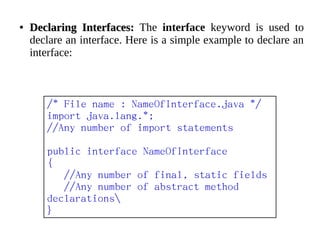
Declaring Interfaces:Declaring Interfaces: The interface keyword is used to
declare an interface. Here is a simple example to declare an
interface:
/* File name : NameOfInterface.java */
import java.lang.*;
//Any number of import statements
public interface NameOfInterface
{
//Any number of final, static fields
//Any number of abstract method
declarations
}
● Interfaces have the following properties:
– An interface is implicitly abstract. You do not need to use
the abstract keyword while declaring an interface.
– Each method in an interface is also implicitly abstract, so
the abstract keyword is not needed.
– Methods in an interface are implicitly public.
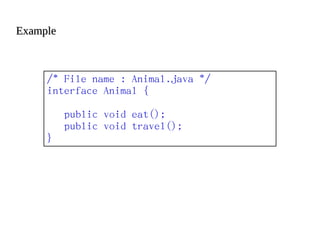
ExampleExample
/* File name : Animal.java */
interface Animal {
public void eat();
public void travel();
}
●
Implementing Interfaces:Implementing Interfaces: A class uses the implements
keyword to implement an interface. The implements
keyword appears in the class declaration following the
extends portion of the declaration.
/* File name : MammalInt.java */
public class MammalInt implements Animal{
public void eat(){
System.out.println("Mammal eats");
}
public void travel(){
System.out.println("Mammal travels");
}
public int noOfLegs(){
return 0;
}
public static void main(String args[]){
MammalInt m = new MammalInt();
m.eat();
m.travel();
}
}
● The program would produce the following result:
Mammal eats
Mammal travels
Packages
● Packages are used in Java in order to prevent naming
conflicts, to control access, to make searching/locating and
usage of classes, interfaces, enumerations and annotations
easier, etc.
● A Package can be defined as a grouping of related types
(classes, interfaces, enumerations and annotations )
providing access protection and name space management.
● Some of the existing packages in Java are::
– java.lang - bundles the fundamental classes
– java.io - classes for input , output functions are bundled
in this package
● Programmers can define their own packages to bundle
group of classes/interfaces, etc. It is a good practice to group
related classes implemented by you so that a programmer
can easily determine that the classes, interfaces,
enumerations, annotations are related.
● Since the package creates a new namespace there won't be
any name conflicts with names in other packages. Using
packages, it is easier to provide access control and it is also
easier to locate the related classes.
●
Creating a package:Creating a package:
– While creating a package, you should choose a name for
the package and include a package statement along with
that name at the top of every source file that contains the
classes, interfaces, enumerations, and annotation types
that you want to include in the package.
– The package statement should be the first line in the
source file. There can be only one package statement in
each source file, and it applies to all types in the file.
– If a package statement is not used then the class,
interfaces, enumerations, and annotation types will be
placed in the current default package.
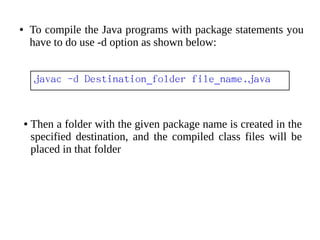
● To compile the Java programs with package statements you
have to do use -d option as shown below:
javac -d Destination_folder file_name.java
● Then a folder with the given package name is created in the
specified destination, and the compiled class files will be
placed in that folder
● Let us look at an example that creates a package called
animals. It is a good practice to use names of packages with
lower case letters to avoid any conflicts with the names of
classes, interfaces.
● Below given package example contains interface named
animals:
/* File name : Animal.java */
package animals;
interface Animal {
public void eat();
public void travel();
}
● Now, let us implement the above interface in the same
package animals:
package animals;
/* File name : MammalInt.java */
public class MammalInt implements Animal{
public void eat(){
System.out.println("Mammal eats");
}
public void travel(){
System.out.println("Mammal travels");
}
public int noOfLegs(){
return 0;
}
public static void main(String args[]){
MammalInt m = new MammalInt();
m.eat();
m.travel();
}
}
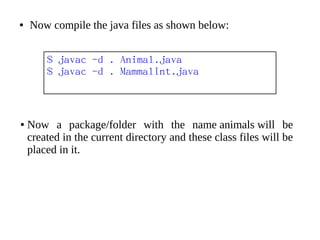
● Now compile the java files as shown below:
$ javac -d . Animal.java
$ javac -d . MammalInt.java
● Now a package/folder with the name animals will be
created in the current directory and these class files will be
placed in it.
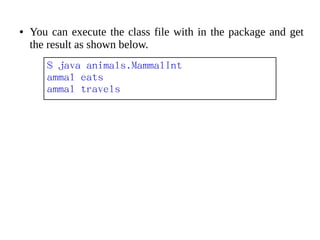
● You can execute the class file with in the package and get
the result as shown below.
$ java animals.MammalInt
ammal eats
ammal travels
Reference:Reference:
– http://www.tutorialspoint.com/java/java_interfaces.h
tm
– http://www.tutorialspoint.com/java/java_packages.h
tm
THANK YOU

Java - Interfaces & Packages

  • 1.
  • 2.
  • 3.
    ● An interfaceis a reference type in Java, it is similar to class, it is a collection of abstract methods. ● A class implements an interface, thereby inheriting the abstract methods of the interface. ● Along with abstract methods an interface may also contain constants, default methods, static methods, and nested types. ● Method bodies exist only for default methods and static methods. ● Writing an interface is similar to writing a class. But a class describes the attributes and behaviours of an object. And an interface contains behaviours that a class implements. ● Unless the class that implements the interface is abstract, all the methods of the interface need to be defined in the class.
  • 4.
    ● An interfaceis similar to a class in the following ways: – An interface can contain any number of methods. – An interface is written in a file with a .java.java extension, with the name of the interface matching the name of the file. – The byte code of an interface appears in a .class.class file. – Interfaces appear in packages, and their corresponding bytecode file must be in a directory structure that matches the package name.
  • 5.
    ● However, aninterface is different from a class in several ways, including: – You cannot instantiate an interface. – An interface does not contain any constructors. – All of the methods in an interface are abstract. – An interface cannot contain instance fields. The only fields that can appear in an interface must be declared both static and final. – An interface is not extended by a class; it is implemented by a class. – An interface can extend multiple interfaces.
  • 6.
    ● Declaring Interfaces:Declaring Interfaces:The interface keyword is used to declare an interface. Here is a simple example to declare an interface: /* File name : NameOfInterface.java */ import java.lang.*; //Any number of import statements public interface NameOfInterface { //Any number of final, static fields //Any number of abstract method declarations }
  • 7.
    ● Interfaces havethe following properties: – An interface is implicitly abstract. You do not need to use the abstract keyword while declaring an interface. – Each method in an interface is also implicitly abstract, so the abstract keyword is not needed. – Methods in an interface are implicitly public.
  • 8.
    ExampleExample /* File name: Animal.java */ interface Animal { public void eat(); public void travel(); }
  • 9.
    ● Implementing Interfaces:Implementing Interfaces:A class uses the implements keyword to implement an interface. The implements keyword appears in the class declaration following the extends portion of the declaration.
  • 10.
    /* File name: MammalInt.java */ public class MammalInt implements Animal{ public void eat(){ System.out.println("Mammal eats"); } public void travel(){ System.out.println("Mammal travels"); } public int noOfLegs(){ return 0; } public static void main(String args[]){ MammalInt m = new MammalInt(); m.eat(); m.travel(); } }
  • 11.
    ● The programwould produce the following result: Mammal eats Mammal travels
  • 12.
  • 13.
    ● Packages areused in Java in order to prevent naming conflicts, to control access, to make searching/locating and usage of classes, interfaces, enumerations and annotations easier, etc. ● A Package can be defined as a grouping of related types (classes, interfaces, enumerations and annotations ) providing access protection and name space management. ● Some of the existing packages in Java are:: – java.lang - bundles the fundamental classes – java.io - classes for input , output functions are bundled in this package
  • 14.
    ● Programmers candefine their own packages to bundle group of classes/interfaces, etc. It is a good practice to group related classes implemented by you so that a programmer can easily determine that the classes, interfaces, enumerations, annotations are related. ● Since the package creates a new namespace there won't be any name conflicts with names in other packages. Using packages, it is easier to provide access control and it is also easier to locate the related classes.
  • 15.
    ● Creating a package:Creatinga package: – While creating a package, you should choose a name for the package and include a package statement along with that name at the top of every source file that contains the classes, interfaces, enumerations, and annotation types that you want to include in the package. – The package statement should be the first line in the source file. There can be only one package statement in each source file, and it applies to all types in the file. – If a package statement is not used then the class, interfaces, enumerations, and annotation types will be placed in the current default package.
  • 16.
    ● To compilethe Java programs with package statements you have to do use -d option as shown below: javac -d Destination_folder file_name.java ● Then a folder with the given package name is created in the specified destination, and the compiled class files will be placed in that folder
  • 17.
    ● Let uslook at an example that creates a package called animals. It is a good practice to use names of packages with lower case letters to avoid any conflicts with the names of classes, interfaces. ● Below given package example contains interface named animals: /* File name : Animal.java */ package animals; interface Animal { public void eat(); public void travel(); } ● Now, let us implement the above interface in the same package animals:
  • 18.
    package animals; /* Filename : MammalInt.java */ public class MammalInt implements Animal{ public void eat(){ System.out.println("Mammal eats"); } public void travel(){ System.out.println("Mammal travels"); } public int noOfLegs(){ return 0; } public static void main(String args[]){ MammalInt m = new MammalInt(); m.eat(); m.travel(); } }
  • 19.
    ● Now compilethe java files as shown below: $ javac -d . Animal.java $ javac -d . MammalInt.java ● Now a package/folder with the name animals will be created in the current directory and these class files will be placed in it.
  • 20.
    ● You canexecute the class file with in the package and get the result as shown below. $ java animals.MammalInt ammal eats ammal travels
  • 21.
  • 22.