JAVA

PACKAGES
Packages
  Package is a container for classes
  A package is a grouping of related types
(classes and interfaces) providing access
protection and name space management.
  In simple words, packages is the way we
organize files into different directories according
to their functionality, usability as well as category
they should belong to.
Packages
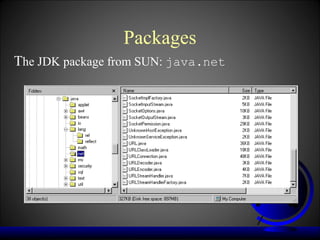
The JDK package from SUN: java.net
Why do we need Packages?
• One can easily determine that these types are related.
• One knows where to find types that can provide task-
related functions.
• The names of your types won't conflict with the type
names in other packages because the package creates a
new namespace.
• One can allow types within the package to have
unrestricted access to one another yet still restrict access
for types outside the package.
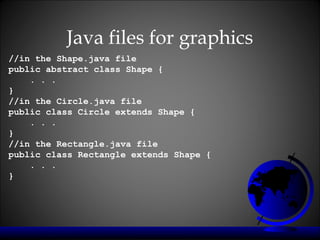
Java files for graphics
//in the Shape.java file
public abstract class Shape {
    . . .
}
//in the Circle.java file
public class Circle extends Shape {
    . . .
}
//in the Rectangle.java file
public class Rectangle extends Shape {
    . . .
}
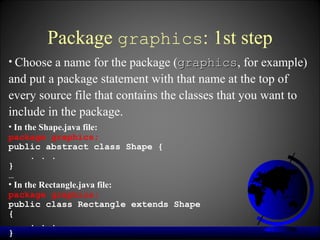
Package graphics: 1st step
• Choose a name for the package (graphics, for example)
                                 graphics
and put a package statement with that name at the top of
every source file that contains the classes that you want to
include in the package.
• In the Shape.java file:
package graphics;
public abstract class Shape {
      . . .
}
…
• In the Rectangle.java file:
package graphics;
public class Rectangle extends Shape
{
      . . .
}
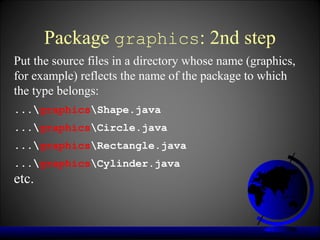
Package graphics: 2nd step
Put the source files in a directory whose name (graphics,
for example) reflects the name of the package to which
the type belongs:
...graphicsShape.java
...graphicsCircle.java
...graphicsRectangle.java
...graphicsCylinder.java
etc.
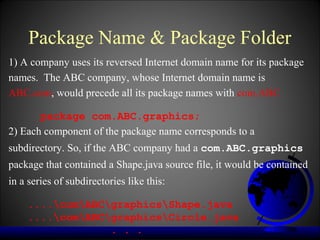
Package Name & Package Folder
1) A company uses its reversed Internet domain name for its package
names. The ABC company, whose Internet domain name is
ABC.com, would precede all its package names with com.ABC

       package com.ABC.graphics;
2) Each component of the package name corresponds to a
subdirectory. So, if the ABC company had a com.ABC.graphics
package that contained a Shape.java source file, it would be contained
in a series of subdirectories like this:

    ....comABCgraphicsShape.java
    ....comABCgraphicsCircle.java
                 . . .
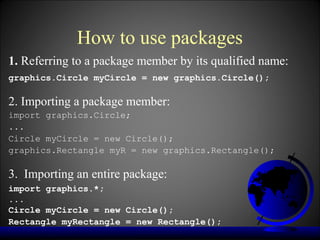
How to use packages
1. Referring to a package member by its qualified name:
graphics.Circle myCircle = new graphics.Circle();

2. Importing a package member:
import graphics.Circle;
...
Circle myCircle = new Circle();
graphics.Rectangle myR = new graphics.Rectangle();

3. Importing an entire package:
import graphics.*;
...
Circle myCircle = new Circle();
Rectangle myRectangle = new Rectangle();
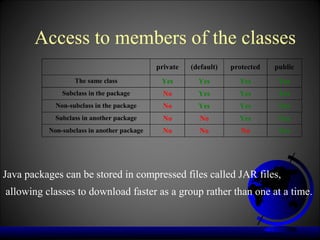
Access to members of the classes
                                            private   (default)   protected   public
                  The same class             Yes        Yes         Yes        Yes
              Subclass in the package         No        Yes         Yes        Yes
            Non-subclass in the package       No        Yes         Yes        Yes
            Subclass in another package       No        No          Yes        Yes
          Non-subclass in another package     No        No           No        Yes


Java packages can be stored in compressed files called JAR files,
allowing classes to download faster as a group rather than one at a time.
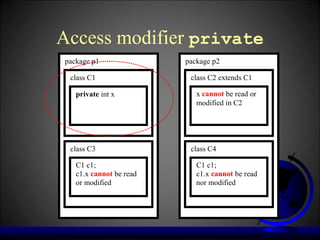
Access modifier private
package p1               package p2

 class C1                 class C2 extends C1

   private int x            x cannot be read or
                            modified in C2


 class C3                 class C4

   C1 c1;                   C1 c1;
   c1.x cannot be read      c1.x cannot be read
   or modified              nor modified
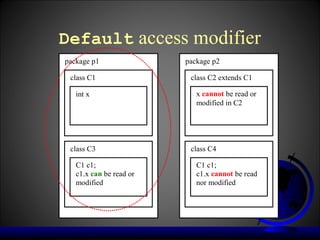
Default access modifier
package p1               package p2

 class C1                 class C2 extends C1

   int x                    x cannot be read or
                            modified in C2


 class C3                 class C4

   C1 c1;                   C1 c1;
   c1.x can be read or      c1.x cannot be read
   modified                 nor modified
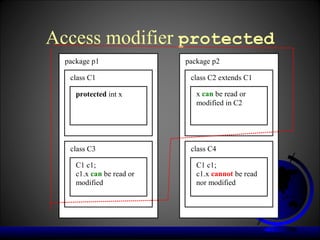
Access modifier protected
  package p1               package p2

   class C1                 class C2 extends C1

     protected int x          x can be read or
                              modified in C2


   class C3                 class C4

     C1 c1;                   C1 c1;
     c1.x can be read or      c1.x cannot be read
     modified                 nor modified
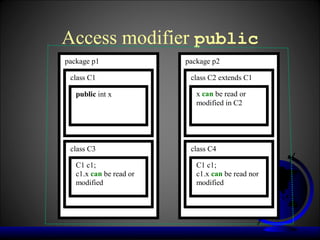
Access modifier public
package p1               package p2

 class C1                 class C2 extends C1

   public int x             x can be read or
                            modified in C2


 class C3                 class C4

   C1 c1;                   C1 c1;
   c1.x can be read or      c1.x can be read nor
   modified                 modified

Java packages

  • 1.
  • 2.
    Packages Packageis a container for classes A package is a grouping of related types (classes and interfaces) providing access protection and name space management. In simple words, packages is the way we organize files into different directories according to their functionality, usability as well as category they should belong to.
  • 3.
    Packages The JDK packagefrom SUN: java.net
  • 4.
    Why do weneed Packages? • One can easily determine that these types are related. • One knows where to find types that can provide task- related functions. • The names of your types won't conflict with the type names in other packages because the package creates a new namespace. • One can allow types within the package to have unrestricted access to one another yet still restrict access for types outside the package.
  • 5.
    Java files forgraphics //in the Shape.java file public abstract class Shape { . . . } //in the Circle.java file public class Circle extends Shape { . . . } //in the Rectangle.java file public class Rectangle extends Shape { . . . }
  • 6.
    Package graphics: 1ststep • Choose a name for the package (graphics, for example) graphics and put a package statement with that name at the top of every source file that contains the classes that you want to include in the package. • In the Shape.java file: package graphics; public abstract class Shape { . . . } … • In the Rectangle.java file: package graphics; public class Rectangle extends Shape { . . . }
  • 7.
    Package graphics: 2ndstep Put the source files in a directory whose name (graphics, for example) reflects the name of the package to which the type belongs: ...graphicsShape.java ...graphicsCircle.java ...graphicsRectangle.java ...graphicsCylinder.java etc.
  • 8.
    Package Name &Package Folder 1) A company uses its reversed Internet domain name for its package names. The ABC company, whose Internet domain name is ABC.com, would precede all its package names with com.ABC package com.ABC.graphics; 2) Each component of the package name corresponds to a subdirectory. So, if the ABC company had a com.ABC.graphics package that contained a Shape.java source file, it would be contained in a series of subdirectories like this: ....comABCgraphicsShape.java ....comABCgraphicsCircle.java . . .
  • 9.
    How to usepackages 1. Referring to a package member by its qualified name: graphics.Circle myCircle = new graphics.Circle(); 2. Importing a package member: import graphics.Circle; ... Circle myCircle = new Circle(); graphics.Rectangle myR = new graphics.Rectangle(); 3. Importing an entire package: import graphics.*; ... Circle myCircle = new Circle(); Rectangle myRectangle = new Rectangle();
  • 10.
    Access to membersof the classes private (default) protected public The same class Yes Yes Yes Yes Subclass in the package No Yes Yes Yes Non-subclass in the package No Yes Yes Yes Subclass in another package No No Yes Yes Non-subclass in another package No No No Yes Java packages can be stored in compressed files called JAR files, allowing classes to download faster as a group rather than one at a time.
  • 11.
    Access modifier private packagep1 package p2 class C1 class C2 extends C1 private int x x cannot be read or modified in C2 class C3 class C4 C1 c1; C1 c1; c1.x cannot be read c1.x cannot be read or modified nor modified
  • 12.
    Default access modifier packagep1 package p2 class C1 class C2 extends C1 int x x cannot be read or modified in C2 class C3 class C4 C1 c1; C1 c1; c1.x can be read or c1.x cannot be read modified nor modified
  • 13.
    Access modifier protected package p1 package p2 class C1 class C2 extends C1 protected int x x can be read or modified in C2 class C3 class C4 C1 c1; C1 c1; c1.x can be read or c1.x cannot be read modified nor modified
  • 14.
    Access modifier public packagep1 package p2 class C1 class C2 extends C1 public int x x can be read or modified in C2 class C3 class C4 C1 c1; C1 c1; c1.x can be read or c1.x can be read nor modified modified