

Welcome to our
presentation…………..
Group members Name ID
 Md.Ilias Bappi 131-15-2266
 Md.Kawsar Hamid 131-15-2223
 Shahabuddin Ringkon 131-15-2343
 Bristy Roy 131-15-2421
 Janntul ferdous promy 131-15-2347
Topic :-
Presentation on
Java Packages
1. Package is a container for classes.
2.A package is a grouping of related types (classes and
interfaces) providing access protection and name space
management.
3.In simple words,package is the way we organize files into
different directories according to their functionality,usability as
well as category they should belong to.
Why do we need packages?
• One can easily determine that these types are
related.
• One knows where to find types that can provide
task-related functions.
How To Create a Package
 Packages are mirrored through directory
structure.
 To create a package, First we have to create a
directory /directory structure that matches
the package hierarchy.
 Package structure should match the directory
structure also.
 To make a class belongs to a particular
package include the package statement as the
first statement of source file.
Exercise Creating Packages
mypackage
mypackageBmypackageA
ABC DEG IJK XYZ
A,B,C D,E,F A,B,C,I,J,K X,Y,Z
Package ABC and IJK have classes with same name.
A class in ABC has name mypackage.mypackageA.ABC.A
A class in IJK has name mypackage.mypackageB.IJK.A
How to use packages
1. Referring to a package member by its qualified name:
graphics.Circle myCircle = new graphics.Circle();
2. Importing a package member:
import graphics.Circle;
...
Circle myCircle = new Circle();
graphics.Rectangle myR = new graphics.Rectangle();
3. Importing an entire package:
import graphics.*;
...
Circle myCircle = new Circle();
Rectangle myRectangle = new Rectangle();
Using Packages
 If you want to use a built-in Java class, first look it up in the
Java Application Interface. (API)
 You can find the Java API documentation on the course
website page.
 http://www.tihe.org/courses/it151
This is the API entry for the Graphics class.
The package for this class is java.awt.
Using Packages (cont.)
 Once you know the package for a class, import it into
your program.
 To import all classes in a package, use the wild card
(*).
import java.awt.Graphics;
import java.awt.*;
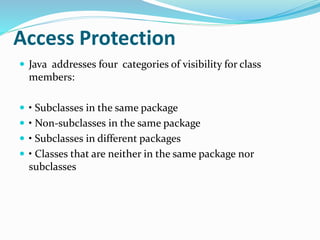
Access Protection
 Java addresses four categories of visibility for class
members:
 • Subclasses in the same package
 • Non-subclasses in the same package
 • Subclasses in different packages
 • Classes that are neither in the same package nor
subclasses
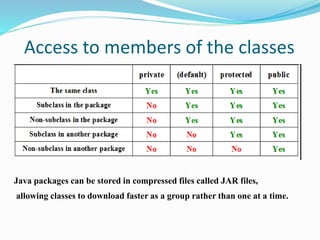
Access to members of the classes
Java packages can be stored in compressed files called JAR files,
allowing classes to download faster as a group rather than one at a time.
Defining a Package
 If you want to make your own package to be used in
other programs, define it.
 Defining packages can lead to problems compiling
your program.
 If you have multiple files in your project, make sure
they are all defined in the same package.
package myprojects.helloworld;
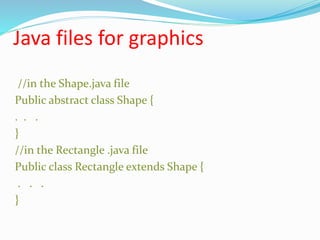
Java files for graphics
//in the Shape.java file
Public abstract class Shape {
. . .
}
//in the Rectangle .java file
Public class Rectangle extends Shape {
. . .
}
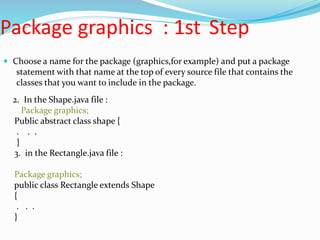
Package graphics : 1st Step
 Choose a name for the package (graphics,for example) and put a package
statement with that name at the top of every source file that contains the
classes that you want to include in the package.
2. In the Shape.java file :
Package graphics;
Public abstract class shape {
. . .
}
3. in the Rectangle.java file :
Package graphics;
public class Rectangle extends Shape
{
. . .
}
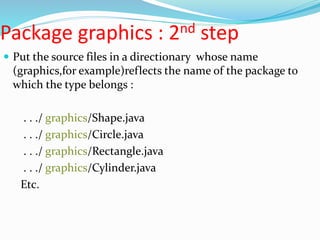
Package graphics : 2nd step
 Put the source files in a directionary whose name
(graphics,for example)reflects the name of the package to
which the type belongs :
. . ./ graphics/Shape.java
. . ./ graphics/Circle.java
. . ./ graphics/Rectangle.java
. . ./ graphics/Cylinder.java
Etc.
Package Name & Package Folder
 A company uses its reserved Internet domain name for its package
names . The ABC company , whose Internet domain name is
ABC.com , would precede all its package names withcom.ABC
 Package com.ABC.graphics;
 2.Each component of the package name corresponds to a
subdirectory.So,if the ABC company had a com.ABC.graphics
package that contained a Shape.java source file,it would be
contained in a series of subdirectories like this ;
…/com/ABC/graphics/Shape.java
…/com/ABC/graphics/Circle.java
Example package
 Suppose you write a group of classes that represent graphic
objects,such as circles,rectangles,lines & points.
 You also write an interface,Draggable that classes implement if
they can be dragged with the mouse
//in the Draggable.java file
public interface Draggable {}
//in the Graphic.java file
public abstract class Graphic{}
//in the Circle.java file
public class Circle extends Graphic implements Draggable {}
Example package
//in the Rectangle.java file
Public class Rectangle extends Graphic implements
Draggable
{}
//in the Point.java file
Public class Point extends Graphic implements Draggable {}
//in the Line.java file
Public class Line extends Graphic implements Draggable {}
Example : Placing StudentRecord
class in Schoolclasses package
Package SchoolClasses;
Public class StudentRecord {
Private String name ;
Private String address;
Private int age;
:
Importing and Using
classes from other
packages
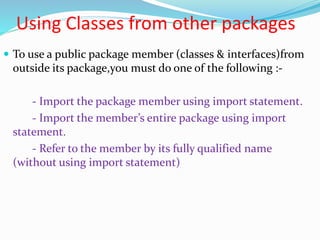
Using Classes from other packages
 To use a public package member (classes & interfaces)from
outside its package,you must do one of the following :-
- Import the package member using import statement.
- Import the member’s entire package using import
statement.
- Refer to the member by its fully qualified name
(without using import statement)
Importing packages
 To be able to use classes outside of the package you are
currently working in , you need to import the package of
those classes.
 By default, all your Java programs import the java.lang.*
package,that is why you can use classes like String & Integers
inside the program even though you haven’t imported any
packages .
 The syntax importing packages is as follows :
Import <nameofPackage>;
Example : Importing a Class or a
Package

 / / Importing a class import java.util.Date;

 / / Importing all classes in the

 / / java. Util package

 Import java . utill.*;
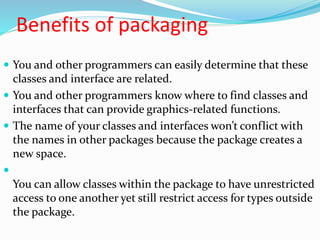
Benefits of packaging
 You and other programmers can easily determine that these
classes and interface are related.
 You and other programmers know where to find classes and
interfaces that can provide graphics-related functions.
 The name of your classes and interfaces won’t conflict with
the names in other packages because the package creates a
new space.

You can allow classes within the package to have unrestricted
access to one another yet still restrict access for types outside
the package.
ThAnKs AlL

Java packages oop

  • 1.
  • 2.
    Group members NameID  Md.Ilias Bappi 131-15-2266  Md.Kawsar Hamid 131-15-2223  Shahabuddin Ringkon 131-15-2343  Bristy Roy 131-15-2421  Janntul ferdous promy 131-15-2347
  • 3.
  • 4.
    1. Package isa container for classes. 2.A package is a grouping of related types (classes and interfaces) providing access protection and name space management. 3.In simple words,package is the way we organize files into different directories according to their functionality,usability as well as category they should belong to.
  • 5.
    Why do weneed packages? • One can easily determine that these types are related. • One knows where to find types that can provide task-related functions.
  • 6.
    How To Createa Package  Packages are mirrored through directory structure.  To create a package, First we have to create a directory /directory structure that matches the package hierarchy.  Package structure should match the directory structure also.  To make a class belongs to a particular package include the package statement as the first statement of source file.
  • 7.
    Exercise Creating Packages mypackage mypackageBmypackageA ABCDEG IJK XYZ A,B,C D,E,F A,B,C,I,J,K X,Y,Z Package ABC and IJK have classes with same name. A class in ABC has name mypackage.mypackageA.ABC.A A class in IJK has name mypackage.mypackageB.IJK.A
  • 8.
    How to usepackages 1. Referring to a package member by its qualified name: graphics.Circle myCircle = new graphics.Circle(); 2. Importing a package member: import graphics.Circle; ... Circle myCircle = new Circle(); graphics.Rectangle myR = new graphics.Rectangle(); 3. Importing an entire package: import graphics.*; ... Circle myCircle = new Circle(); Rectangle myRectangle = new Rectangle();
  • 9.
    Using Packages  Ifyou want to use a built-in Java class, first look it up in the Java Application Interface. (API)  You can find the Java API documentation on the course website page.  http://www.tihe.org/courses/it151 This is the API entry for the Graphics class. The package for this class is java.awt.
  • 10.
    Using Packages (cont.) Once you know the package for a class, import it into your program.  To import all classes in a package, use the wild card (*). import java.awt.Graphics; import java.awt.*;
  • 11.
    Access Protection  Javaaddresses four categories of visibility for class members:  • Subclasses in the same package  • Non-subclasses in the same package  • Subclasses in different packages  • Classes that are neither in the same package nor subclasses
  • 12.
    Access to membersof the classes Java packages can be stored in compressed files called JAR files, allowing classes to download faster as a group rather than one at a time.
  • 13.
    Defining a Package If you want to make your own package to be used in other programs, define it.  Defining packages can lead to problems compiling your program.  If you have multiple files in your project, make sure they are all defined in the same package. package myprojects.helloworld;
  • 14.
    Java files forgraphics //in the Shape.java file Public abstract class Shape { . . . } //in the Rectangle .java file Public class Rectangle extends Shape { . . . }
  • 15.
    Package graphics :1st Step  Choose a name for the package (graphics,for example) and put a package statement with that name at the top of every source file that contains the classes that you want to include in the package. 2. In the Shape.java file : Package graphics; Public abstract class shape { . . . } 3. in the Rectangle.java file : Package graphics; public class Rectangle extends Shape { . . . }
  • 16.
    Package graphics :2nd step  Put the source files in a directionary whose name (graphics,for example)reflects the name of the package to which the type belongs : . . ./ graphics/Shape.java . . ./ graphics/Circle.java . . ./ graphics/Rectangle.java . . ./ graphics/Cylinder.java Etc.
  • 17.
    Package Name &Package Folder  A company uses its reserved Internet domain name for its package names . The ABC company , whose Internet domain name is ABC.com , would precede all its package names withcom.ABC  Package com.ABC.graphics;  2.Each component of the package name corresponds to a subdirectory.So,if the ABC company had a com.ABC.graphics package that contained a Shape.java source file,it would be contained in a series of subdirectories like this ; …/com/ABC/graphics/Shape.java …/com/ABC/graphics/Circle.java
  • 18.
    Example package  Supposeyou write a group of classes that represent graphic objects,such as circles,rectangles,lines & points.  You also write an interface,Draggable that classes implement if they can be dragged with the mouse //in the Draggable.java file public interface Draggable {} //in the Graphic.java file public abstract class Graphic{} //in the Circle.java file public class Circle extends Graphic implements Draggable {}
  • 19.
    Example package //in theRectangle.java file Public class Rectangle extends Graphic implements Draggable {} //in the Point.java file Public class Point extends Graphic implements Draggable {} //in the Line.java file Public class Line extends Graphic implements Draggable {}
  • 20.
    Example : PlacingStudentRecord class in Schoolclasses package Package SchoolClasses; Public class StudentRecord { Private String name ; Private String address; Private int age; :
  • 21.
    Importing and Using classesfrom other packages
  • 22.
    Using Classes fromother packages  To use a public package member (classes & interfaces)from outside its package,you must do one of the following :- - Import the package member using import statement. - Import the member’s entire package using import statement. - Refer to the member by its fully qualified name (without using import statement)
  • 23.
    Importing packages  Tobe able to use classes outside of the package you are currently working in , you need to import the package of those classes.  By default, all your Java programs import the java.lang.* package,that is why you can use classes like String & Integers inside the program even though you haven’t imported any packages .  The syntax importing packages is as follows : Import <nameofPackage>;
  • 24.
    Example : Importinga Class or a Package   / / Importing a class import java.util.Date;   / / Importing all classes in the   / / java. Util package   Import java . utill.*;
  • 25.
    Benefits of packaging You and other programmers can easily determine that these classes and interface are related.  You and other programmers know where to find classes and interfaces that can provide graphics-related functions.  The name of your classes and interfaces won’t conflict with the names in other packages because the package creates a new space.  You can allow classes within the package to have unrestricted access to one another yet still restrict access for types outside the package.
  • 26.