Input Devices
Input devices
• purpose
• entering data into a computer system
• issuing instructions (commands) to a computer
• input device
• transforms data from the user into a form that a
computer system can process
• together with appropriate software (device drivers)
Types of Input Devices
• Keyboard
• Light pen
• Graphics tablet
• Joysticks
• Trackball
• Data glove
• Digitizer
• Image scammer
Keyboard
• A keyboard contains keys that allow a user to
enter data and instructions into the computer.
All computer keyboards have a typing area that
includes the letters of the alphabet, numbers,
punctuation marks, and other basic keys.
Mouse
• A mouse is the most
widely used pointing
device with a GUI
environment on
personal computers.
A mechanical mouse
has a rubber ball on
its underside to
detect movement of
the mouse. An
optical mouse uses
devices that emit
and sense light to
detect the mouse's
movement.
Advantages
• A mouse is user-friendly
for computer beginners.
• A mouse is easy and
convenient to use with a
graphical user interface.
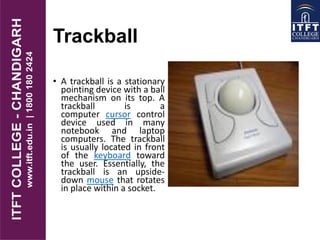
Trackball
• A trackball is a stationary
pointing device with a ball
mechanism on its top. A
trackball is a
computer cursor control
device used in many
notebook and laptop
computers. The trackball
is usually located in front
of the keyboard toward
the user. Essentially, the
trackball is an upside-
down mouse that rotates
in place within a socket.
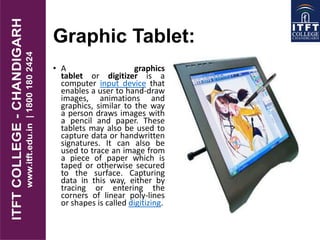
Graphic Tablet:
• A graphics
tablet or digitizer is a
computer input device that
enables a user to hand-draw
images, animations and
graphics, similar to the way
a person draws images with
a pencil and paper. These
tablets may also be used to
capture data or handwritten
signatures. It can also be
used to trace an image from
a piece of paper which is
taped or otherwise secured
to the surface. Capturing
data in this way, either by
tracing or entering the
corners of linear poly-lines
or shapes is called digitizing.
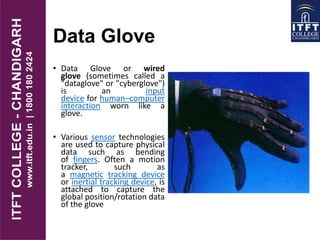
Data Glove
• Data Glove or wired
glove (sometimes called a
"dataglove" or "cyberglove")
is an input
device for human–computer
interaction worn like a
glove.
• Various sensor technologies
are used to capture physical
data such as bending
of fingers. Often a motion
tracker, such as
a magnetic tracking device
or inertial tracking device, is
attached to capture the
global position/rotation data
of the glove
Touchpad
• It is a small pressure-
and motion-sensitive
area on a portable
computer that you can
use to move the
mouse pointer. When
you move your finger
across the pad, the
mouse pointer on the
screen moves in the
same direction. A
touch pad is an
alternative to a
mouse.
Advantages of a touch
pad include
• Easy and Fast one
finger control.
• Ideal for portable
devices
Disadvantages of using
a touchpad include
• Expensive & found in
specific devices e.g.
laptops
Touch screen
• A touch screen is an input/output touch-
sensitive display. Touch screens are often used
for information kiosks located in department
stores, hotels, airports, and museums. Touch
screens are also used for ATM machines to
allow easy access of bank accounts.
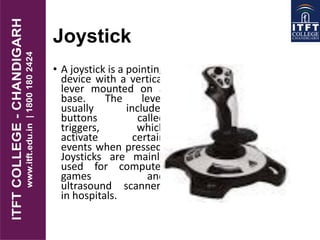
Joystick
• A joystick is a pointing
device with a vertical
lever mounted on a
base. The lever
usually includes
buttons called
triggers, which
activate certain
events when pressed.
Joysticks are mainly
used for computer
games and
ultrasound scanners
in hospitals.
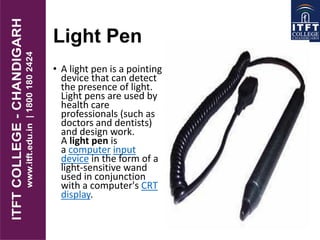
Light Pen
• A light pen is a pointing
device that can detect
the presence of light.
Light pens are used by
health care
professionals (such as
doctors and dentists)
and design work.
A light pen is
a computer input
device in the form of a
light-sensitive wand
used in conjunction
with a computer's CRT
display.
Scanner
• A scanner is a light-sensing input device that converts
printed text and graphics into a digital form that can be
further processed by the computer.
• Popular types of scanners are:
• Flatbed scanner: It works like a copy machine except that
it creates a file of the document rather than a paper copy.
• Handheld scanner: It can be manually passed over the
image to be scanned. A portable device you can use to copy
an image from paper to your computer. Hand-held scanners
are ideal for capturing small images, such as signatures and
logos. A hand-held scanner is smaller, less expensive, and
more portable than a flatbed scanner.

itft-Input devices

  • 1.
  • 2.
    Input devices • purpose •entering data into a computer system • issuing instructions (commands) to a computer • input device • transforms data from the user into a form that a computer system can process • together with appropriate software (device drivers)
  • 3.
    Types of InputDevices • Keyboard • Light pen • Graphics tablet • Joysticks • Trackball • Data glove • Digitizer • Image scammer
  • 4.
    Keyboard • A keyboardcontains keys that allow a user to enter data and instructions into the computer. All computer keyboards have a typing area that includes the letters of the alphabet, numbers, punctuation marks, and other basic keys.
  • 5.
    Mouse • A mouseis the most widely used pointing device with a GUI environment on personal computers. A mechanical mouse has a rubber ball on its underside to detect movement of the mouse. An optical mouse uses devices that emit and sense light to detect the mouse's movement. Advantages • A mouse is user-friendly for computer beginners. • A mouse is easy and convenient to use with a graphical user interface.
  • 6.
    Trackball • A trackballis a stationary pointing device with a ball mechanism on its top. A trackball is a computer cursor control device used in many notebook and laptop computers. The trackball is usually located in front of the keyboard toward the user. Essentially, the trackball is an upside- down mouse that rotates in place within a socket.
  • 7.
    Graphic Tablet: • Agraphics tablet or digitizer is a computer input device that enables a user to hand-draw images, animations and graphics, similar to the way a person draws images with a pencil and paper. These tablets may also be used to capture data or handwritten signatures. It can also be used to trace an image from a piece of paper which is taped or otherwise secured to the surface. Capturing data in this way, either by tracing or entering the corners of linear poly-lines or shapes is called digitizing.
  • 8.
    Data Glove • DataGlove or wired glove (sometimes called a "dataglove" or "cyberglove") is an input device for human–computer interaction worn like a glove. • Various sensor technologies are used to capture physical data such as bending of fingers. Often a motion tracker, such as a magnetic tracking device or inertial tracking device, is attached to capture the global position/rotation data of the glove
  • 9.
    Touchpad • It isa small pressure- and motion-sensitive area on a portable computer that you can use to move the mouse pointer. When you move your finger across the pad, the mouse pointer on the screen moves in the same direction. A touch pad is an alternative to a mouse. Advantages of a touch pad include • Easy and Fast one finger control. • Ideal for portable devices Disadvantages of using a touchpad include • Expensive & found in specific devices e.g. laptops
  • 10.
    Touch screen • Atouch screen is an input/output touch- sensitive display. Touch screens are often used for information kiosks located in department stores, hotels, airports, and museums. Touch screens are also used for ATM machines to allow easy access of bank accounts.
  • 11.
    Joystick • A joystickis a pointing device with a vertical lever mounted on a base. The lever usually includes buttons called triggers, which activate certain events when pressed. Joysticks are mainly used for computer games and ultrasound scanners in hospitals.
  • 12.
    Light Pen • Alight pen is a pointing device that can detect the presence of light. Light pens are used by health care professionals (such as doctors and dentists) and design work. A light pen is a computer input device in the form of a light-sensitive wand used in conjunction with a computer's CRT display.
  • 13.
    Scanner • A scanneris a light-sensing input device that converts printed text and graphics into a digital form that can be further processed by the computer. • Popular types of scanners are: • Flatbed scanner: It works like a copy machine except that it creates a file of the document rather than a paper copy. • Handheld scanner: It can be manually passed over the image to be scanned. A portable device you can use to copy an image from paper to your computer. Hand-held scanners are ideal for capturing small images, such as signatures and logos. A hand-held scanner is smaller, less expensive, and more portable than a flatbed scanner.