Chapter 5
Input Devices
Next
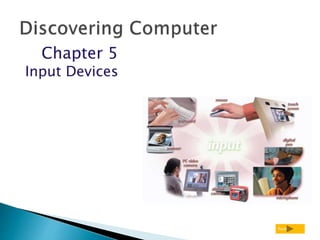
What is input?
p. 230 and 232 Fig. 5-1 Next
 Input device is
any hardware
component used
to enter data or
instructions
 Data or instructions entered into memory
of computer
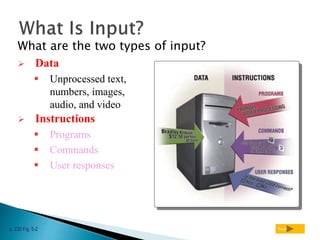
What are the two types of input?
p. 230 Fig. 5-2 Next
 Unprocessed text,
numbers, images,
audio, and video
 Instructions
 Programs
 Commands
 User responses
 Data
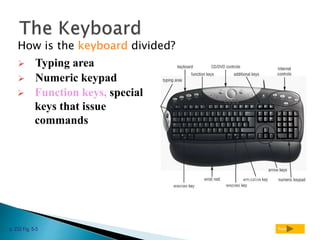
How is the keyboard divided?
p. 232 Fig. 5-3 Next
 Typing area
 Numeric keypad
 Function keys, special
keys that issue
commands
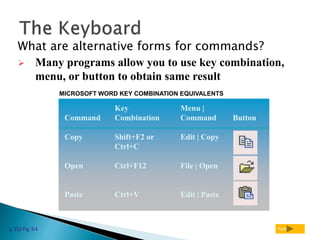
What are alternative forms for commands?
p. 233 Fig. 5-4 Next
MICROSOFT WORD KEY COMBINATION EQUIVALENTS
Key Menu |
Command Combination Command Button
Copy Shift+F2 or Edit | Copy
Ctrl+C
Open Ctrl+F12 File | Open
Paste Ctrl+V Edit | Paste
 Many programs allow you to use key combination,
menu, or button to obtain same result
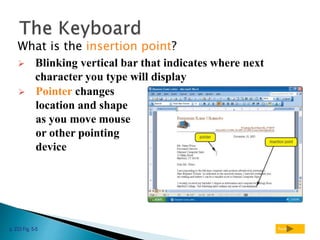
What is the insertion point?
p. 233 Fig. 5-5 Next
 Blinking vertical bar that indicates where next
character you type will display
 Pointer changes
location and shape
as you move mouse
or other pointing
device
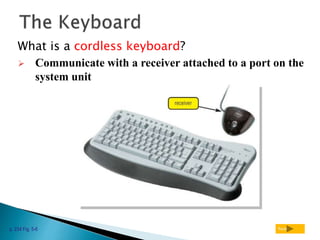
What is a cordless keyboard?
p. 234 Fig. 5-6 Next
 Communicate with a receiver attached to a port on the
system unit
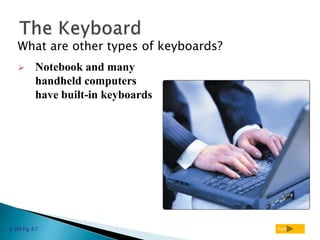
What are other types of keyboards?
p. 234 Fig. 5-7 Next
 Notebook and many
handheld computers
have built-in keyboards
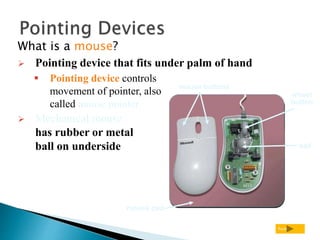
What is a mouse?
Next
 Pointing device that fits under palm of hand
 Pointing device controls
movement of pointer, also
called mouse pointer
 Mechanical mouse
has rubber or metal
ball on underside
mouse buttons
wheel
button
mouse pad
ball
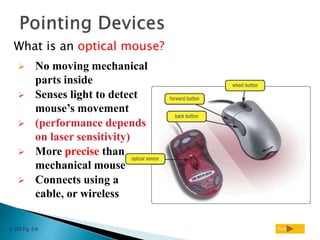
What is an optical mouse?
p. 235 Fig. 5-9 Next
 No moving mechanical
parts inside
 Senses light to detect
mouse’s movement
 (performance depends
on laser sensitivity)
 More precise than
mechanical mouse
 Connects using a
cable, or wireless
How do you use a mouse?
p. 236 Fig. 5-10 Next
Step 1. Place the mouse toward the right
of the mouse pad.
Step 2. Move the mouse diagonally toward
the left until the pointer is positioned on the
Microsoft Outlook icon.
 As you move mouse, pointer
on screen moves
Press
wheel
button
Right-
click
Double-
click
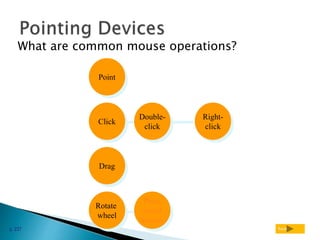
What are common mouse operations?
p. 237 Next
Point
Click
Drag
Rotate
wheel
What is a trackball?
p. 238 Fig. 5-12 Next
 Stationary pointing device
with a ball on its top
 To move pointer, rotate ball
with thumb, fingers, or palm
of hand
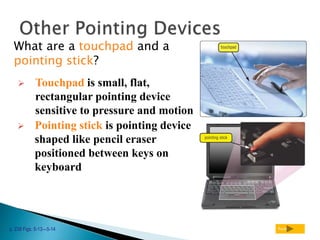
What are a touchpad and a
pointing stick?
p. 238 Figs. 5-13—5-14 Next
 Touchpad is small, flat,
rectangular pointing device
sensitive to pressure and motion
 Pointing stick is pointing device
shaped like pencil eraser
positioned between keys on
keyboard
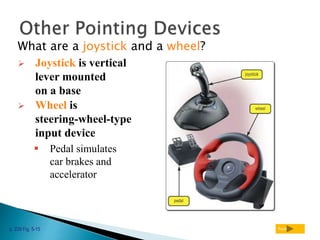
What are a joystick and a wheel?
p. 239 Fig. 5-15 Next
 Joystick is vertical
lever mounted
on a base
 Wheel is
steering-wheel-type
input device
 Pedal simulates
car brakes and
accelerator
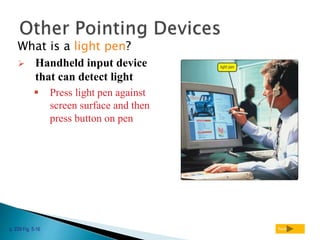
What is a light pen?
p. 239 Fig. 5-16 Next
 Handheld input device
that can detect light
 Press light pen against
screen surface and then
press button on pen
What is a touch screen?
p. 240 Fig. 5-17 Next
 Touch areas of screen with
finger
 Often used with kiosks
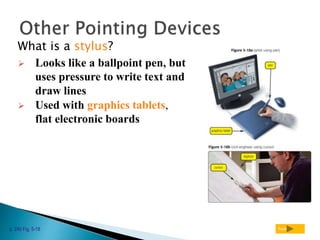
What is a stylus?
p. 240 Fig. 5-18 Next
 Looks like a ballpoint pen, but
uses pressure to write text and
draw lines
 Used with graphics tablets,
flat electronic boards
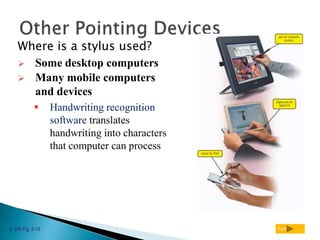
Where is a stylus used?
p. 240 Fig. 5-19 Next
 Some desktop computers
 Many mobile computers
and devices
 Handwriting recognition
software translates
handwriting into characters
that computer can process
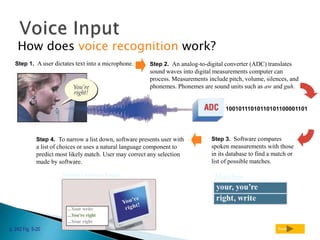
How does voice recognition work?
p. 242 Fig. 5-20 Next
Step 2. An analog-to-digital converter (ADC) translates
sound waves into digital measurements computer can
process. Measurements include pitch, volume, silences, and
phonemes. Phonemes are sound units such as aw and guh.
10010111010110101100001101
Step 3. Software compares
spoken measurements with those
in its database to find a match or
list of possible matches.
Matches
Step 4. To narrow a list down, software presents user with
a list of choices or uses a natural language component to
predict most likely match. User may correct any selection
made by software.
Natural Language Engine
Step 1. A user dictates text into a microphone.
What is a MIDI (musical instrument
digital interface)?
p. 243 Fig. 5-21 Next
 External device, such as
electronic piano keyboard, to
input music and sound effects

Itc lec 8 discovering computer..input devices

  • 1.
  • 2.
    What is input? p.230 and 232 Fig. 5-1 Next  Input device is any hardware component used to enter data or instructions  Data or instructions entered into memory of computer
  • 3.
    What are thetwo types of input? p. 230 Fig. 5-2 Next  Unprocessed text, numbers, images, audio, and video  Instructions  Programs  Commands  User responses  Data
  • 4.
    How is thekeyboard divided? p. 232 Fig. 5-3 Next  Typing area  Numeric keypad  Function keys, special keys that issue commands
  • 5.
    What are alternativeforms for commands? p. 233 Fig. 5-4 Next MICROSOFT WORD KEY COMBINATION EQUIVALENTS Key Menu | Command Combination Command Button Copy Shift+F2 or Edit | Copy Ctrl+C Open Ctrl+F12 File | Open Paste Ctrl+V Edit | Paste  Many programs allow you to use key combination, menu, or button to obtain same result
  • 6.
    What is theinsertion point? p. 233 Fig. 5-5 Next  Blinking vertical bar that indicates where next character you type will display  Pointer changes location and shape as you move mouse or other pointing device
  • 7.
    What is acordless keyboard? p. 234 Fig. 5-6 Next  Communicate with a receiver attached to a port on the system unit
  • 8.
    What are othertypes of keyboards? p. 234 Fig. 5-7 Next  Notebook and many handheld computers have built-in keyboards
  • 9.
    What is amouse? Next  Pointing device that fits under palm of hand  Pointing device controls movement of pointer, also called mouse pointer  Mechanical mouse has rubber or metal ball on underside mouse buttons wheel button mouse pad ball
  • 10.
    What is anoptical mouse? p. 235 Fig. 5-9 Next  No moving mechanical parts inside  Senses light to detect mouse’s movement  (performance depends on laser sensitivity)  More precise than mechanical mouse  Connects using a cable, or wireless
  • 12.
    How do youuse a mouse? p. 236 Fig. 5-10 Next Step 1. Place the mouse toward the right of the mouse pad. Step 2. Move the mouse diagonally toward the left until the pointer is positioned on the Microsoft Outlook icon.  As you move mouse, pointer on screen moves
  • 13.
    Press wheel button Right- click Double- click What are commonmouse operations? p. 237 Next Point Click Drag Rotate wheel
  • 14.
    What is atrackball? p. 238 Fig. 5-12 Next  Stationary pointing device with a ball on its top  To move pointer, rotate ball with thumb, fingers, or palm of hand
  • 15.
    What are atouchpad and a pointing stick? p. 238 Figs. 5-13—5-14 Next  Touchpad is small, flat, rectangular pointing device sensitive to pressure and motion  Pointing stick is pointing device shaped like pencil eraser positioned between keys on keyboard
  • 16.
    What are ajoystick and a wheel? p. 239 Fig. 5-15 Next  Joystick is vertical lever mounted on a base  Wheel is steering-wheel-type input device  Pedal simulates car brakes and accelerator
  • 17.
    What is alight pen? p. 239 Fig. 5-16 Next  Handheld input device that can detect light  Press light pen against screen surface and then press button on pen
  • 18.
    What is atouch screen? p. 240 Fig. 5-17 Next  Touch areas of screen with finger  Often used with kiosks
  • 20.
    What is astylus? p. 240 Fig. 5-18 Next  Looks like a ballpoint pen, but uses pressure to write text and draw lines  Used with graphics tablets, flat electronic boards
  • 21.
    Where is astylus used? p. 240 Fig. 5-19 Next  Some desktop computers  Many mobile computers and devices  Handwriting recognition software translates handwriting into characters that computer can process
  • 22.
    How does voicerecognition work? p. 242 Fig. 5-20 Next Step 2. An analog-to-digital converter (ADC) translates sound waves into digital measurements computer can process. Measurements include pitch, volume, silences, and phonemes. Phonemes are sound units such as aw and guh. 10010111010110101100001101 Step 3. Software compares spoken measurements with those in its database to find a match or list of possible matches. Matches Step 4. To narrow a list down, software presents user with a list of choices or uses a natural language component to predict most likely match. User may correct any selection made by software. Natural Language Engine Step 1. A user dictates text into a microphone.
  • 23.
    What is aMIDI (musical instrument digital interface)? p. 243 Fig. 5-21 Next  External device, such as electronic piano keyboard, to input music and sound effects