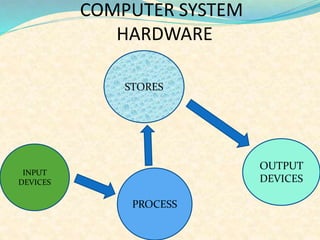

STORES
INPUT
DEVICES
PROCESS
OUTPUT
DEVICES
COMPUTER SYSTEM
HARDWARE
INPUT DEVICES
An INPUT DEVICES is any peripheral
(piece of computer hardware
equipment). Which is used to provide
data and control signals to an
information processing system with the
computer acceptable language . INPUT
DEVICES make up the hardware
interface.
DIFFERENT INPUT DEVICES
 KEYBOARD
 MOUSE
 JOYSTICK
 SCANNER
 TRACK BALL
 TOUCH SCREEN
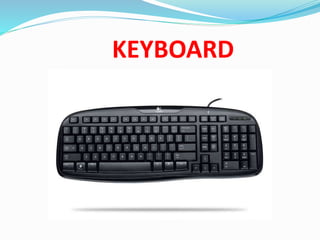
KEYBOARD
KEY BOARD
KEYBOARD- The Keyboard is a way to
input letters or numbers into different
applications of programs. A keyboard
also has special keys that helps to
operate the computer. The most
popular keyboard used today is the 101-
keys QWERTY keyboard
TYPES OF KEYS IN KEYBOARD
Alphabetic Keys
Numeric Keys
Function Keys
Navigation Keys
Extra Keys
MOUSE
MOUSE
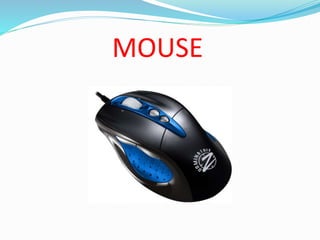
A MOUSE function as a point-and –draw
device by detecting two –dimensional
motion relative to its supporting surface. We
can use it only with GUI(Graphical User
Interface) based on operating system . E.g.
Windows.
The main goal of any mouse is to translate
the motion of your hand into signals that
the computer can use.
TYPES OF MOUSE
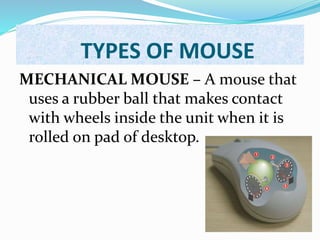
MECHANICAL MOUSE – A mouse that
uses a rubber ball that makes contact
with wheels inside the unit when it is
rolled on pad of desktop.
OPTICAL MOUSE
OPTICAL MOUSE – A mouse that uses light
to detect movement . It emits a light and
senses its reflection as it is moved . As the
user rolls the mouse on a flat surface, the
cursor on the screen also moves in the
direction of the mouse’s movements.
JOYSTICK
JOYSTICK
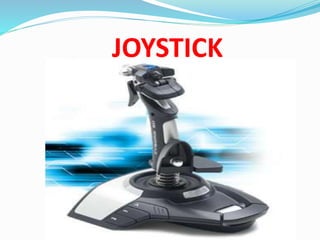
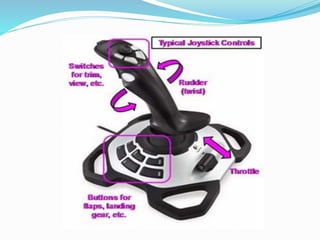
JOYSTICK- A JOYSTICK is used to move the cursor
from place to place, and allow moves in all
directions and control such as digital, glide, direct.
They input directional data like a mouse but works by
switches as the joystick is moved. It consist of a stick
that rotate on axis and reports it angle or direction to
the device it is controlling . A joystick is used mostly
for computer games.
SCANNER
SCANNER
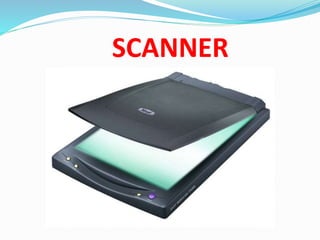
SCANNER- A SCANNER is used to copy
pictures of other things and save them as
files in the computer. A light moves slowly
over the surface of the picture of object to
be scanned. The colors of the reflected light
are detected and digitized to built up a
digital image.
TYPES OF SCANNER
Flate -Bed Scanner
Sheet-Fed Scanner
Hand –held Scanner
TRACK BALL
TRACK BALL
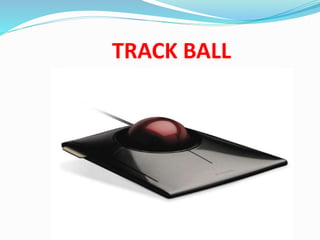
TRACK BALL- A TRACK BALL is used
the same way as a mouse but it is useful
where desk space is limited. It is like an
upside down mouse because the user
rotates the ball and the main body
parts stay still. It has buttons like a
standard mouse .
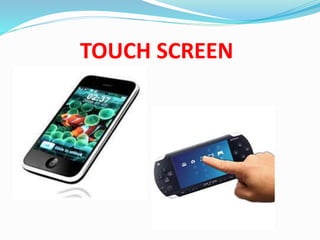
TOUCH SCREEN
TOUCH SCREEN
TOUCH SCREEN- A TOUCH SCREEN is a
computer display screen that is sensitive to human
touch, allowing a user to interact with the
computer by touching pictures or words on the
screen. Touch screen are used with the
information, computer -based training devices,
and system designed to help individuals who have
difficulty manipulating a mouse with a keyboard.
INPUT DEVICES.doc.p
INPUT DEVICES.doc.p

INPUT DEVICES.doc.p

  • 2.
  • 3.
    INPUT DEVICES An INPUTDEVICES is any peripheral (piece of computer hardware equipment). Which is used to provide data and control signals to an information processing system with the computer acceptable language . INPUT DEVICES make up the hardware interface.
  • 4.
    DIFFERENT INPUT DEVICES KEYBOARD  MOUSE  JOYSTICK  SCANNER  TRACK BALL  TOUCH SCREEN
  • 5.
  • 6.
    KEY BOARD KEYBOARD- TheKeyboard is a way to input letters or numbers into different applications of programs. A keyboard also has special keys that helps to operate the computer. The most popular keyboard used today is the 101- keys QWERTY keyboard
  • 7.
    TYPES OF KEYSIN KEYBOARD Alphabetic Keys Numeric Keys Function Keys Navigation Keys Extra Keys
  • 8.
  • 9.
    MOUSE A MOUSE functionas a point-and –draw device by detecting two –dimensional motion relative to its supporting surface. We can use it only with GUI(Graphical User Interface) based on operating system . E.g. Windows. The main goal of any mouse is to translate the motion of your hand into signals that the computer can use.
  • 10.
    TYPES OF MOUSE MECHANICALMOUSE – A mouse that uses a rubber ball that makes contact with wheels inside the unit when it is rolled on pad of desktop.
  • 11.
    OPTICAL MOUSE OPTICAL MOUSE– A mouse that uses light to detect movement . It emits a light and senses its reflection as it is moved . As the user rolls the mouse on a flat surface, the cursor on the screen also moves in the direction of the mouse’s movements.
  • 12.
  • 13.
    JOYSTICK JOYSTICK- A JOYSTICKis used to move the cursor from place to place, and allow moves in all directions and control such as digital, glide, direct. They input directional data like a mouse but works by switches as the joystick is moved. It consist of a stick that rotate on axis and reports it angle or direction to the device it is controlling . A joystick is used mostly for computer games.
  • 15.
  • 16.
    SCANNER SCANNER- A SCANNERis used to copy pictures of other things and save them as files in the computer. A light moves slowly over the surface of the picture of object to be scanned. The colors of the reflected light are detected and digitized to built up a digital image.
  • 17.
    TYPES OF SCANNER Flate-Bed Scanner Sheet-Fed Scanner Hand –held Scanner
  • 18.
  • 19.
    TRACK BALL TRACK BALL-A TRACK BALL is used the same way as a mouse but it is useful where desk space is limited. It is like an upside down mouse because the user rotates the ball and the main body parts stay still. It has buttons like a standard mouse .
  • 20.
  • 21.
    TOUCH SCREEN TOUCH SCREEN-A TOUCH SCREEN is a computer display screen that is sensitive to human touch, allowing a user to interact with the computer by touching pictures or words on the screen. Touch screen are used with the information, computer -based training devices, and system designed to help individuals who have difficulty manipulating a mouse with a keyboard.