A keyboard is used to feed data in to the
computer. It is used to type
Letters and numbers. It is the main input
device for most of the
Computers. A keyboard usually has
characters printed or engraved
On the keys.
KEYBOARD:
Types of keys:
A keyboard have many keys .the
main keys are
 Numeric keypad
 Typing keys
 Function keys
 Control key
Uses of keys:
The numeric keys are used to type the
Numbers.
The cursor key is used to place the cursor on
the screen.
 The typing keys is used to type the
Letter,symbol and special characters
 Some keys are used for the
Short cut
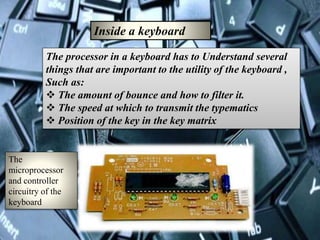
Inside a keyboard
The processor in a keyboard has to Understand several
things that are important to the utility of the keyboard ,
Such as:
 The amount of bounce and how to filter it.
 The speed at which to transmit the typematics
 Position of the key in the key matrix
The
microprocessor
and controller
circuitry of the
keyboard
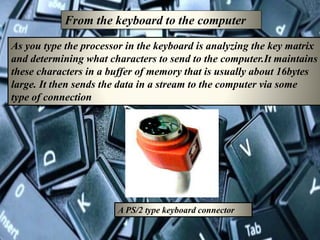
From the keyboard to the computer
As you type the processor in the keyboard is analyzing the key matrix
and determining what characters to send to the computer.It maintains
these characters in a buffer of memory that is usually about 16bytes
large. It then sends the data in a stream to the computer via some
type of connection
A PS/2 type keyboard connector
The other end of the cable connects to a port that is monitored by the computer's
keyboard controller. This is an integrated circuit (IC) whose job is to process all of the
data that comes from the keyboard and forward it to the operating system. When the
operating system is notified that there is data from the keyboard, a number of things
can happen:
It checks to see if the keyboard data is a system level command. A good example of
this is Ctrl-Alt-Delete on a Windows computer, which initiates a reboot.
The operating system then passes the keyboard data on to the current application.
The current application understands the keyboard data as an application-level
command. An example of this would be Alt - f, which opens the File menu in a
Windows application
The current application does not accept keyboard data and therefore ignores the
information.
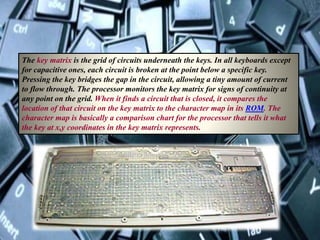
The key matrix is the grid of circuits underneath the keys. In all keyboards except
for capacitive ones, each circuit is broken at the point below a specific key.
Pressing the key bridges the gap in the circuit, allowing a tiny amount of current
to flow through. The processor monitors the key matrix for signs of continuity at
any point on the grid. When it finds a circuit that is closed, it compares the
location of that circuit on the key matrix to the character map in its ROM. The
character map is basically a comparison chart for the processor that tells it what
the key at x,y coordinates in the key matrix represents.
KEYBOARD

KEYBOARD

  • 2.
    A keyboard isused to feed data in to the computer. It is used to type Letters and numbers. It is the main input device for most of the Computers. A keyboard usually has characters printed or engraved On the keys. KEYBOARD:
  • 3.
    Types of keys: Akeyboard have many keys .the main keys are  Numeric keypad  Typing keys  Function keys  Control key
  • 4.
    Uses of keys: Thenumeric keys are used to type the Numbers. The cursor key is used to place the cursor on the screen.  The typing keys is used to type the Letter,symbol and special characters  Some keys are used for the Short cut
  • 5.
    Inside a keyboard Theprocessor in a keyboard has to Understand several things that are important to the utility of the keyboard , Such as:  The amount of bounce and how to filter it.  The speed at which to transmit the typematics  Position of the key in the key matrix The microprocessor and controller circuitry of the keyboard
  • 6.
    From the keyboardto the computer As you type the processor in the keyboard is analyzing the key matrix and determining what characters to send to the computer.It maintains these characters in a buffer of memory that is usually about 16bytes large. It then sends the data in a stream to the computer via some type of connection A PS/2 type keyboard connector
  • 8.
    The other endof the cable connects to a port that is monitored by the computer's keyboard controller. This is an integrated circuit (IC) whose job is to process all of the data that comes from the keyboard and forward it to the operating system. When the operating system is notified that there is data from the keyboard, a number of things can happen: It checks to see if the keyboard data is a system level command. A good example of this is Ctrl-Alt-Delete on a Windows computer, which initiates a reboot. The operating system then passes the keyboard data on to the current application. The current application understands the keyboard data as an application-level command. An example of this would be Alt - f, which opens the File menu in a Windows application The current application does not accept keyboard data and therefore ignores the information.
  • 9.
    The key matrixis the grid of circuits underneath the keys. In all keyboards except for capacitive ones, each circuit is broken at the point below a specific key. Pressing the key bridges the gap in the circuit, allowing a tiny amount of current to flow through. The processor monitors the key matrix for signs of continuity at any point on the grid. When it finds a circuit that is closed, it compares the location of that circuit on the key matrix to the character map in its ROM. The character map is basically a comparison chart for the processor that tells it what the key at x,y coordinates in the key matrix represents.