Information Systems,
Chapter 1
An Introduction to Information Systems
Principles and Learning Objectives
• The value of information is directly linked to how it
helps decision makers achieve the organization’s
goals
– Discuss why it is important to study and understand
information systems
– Distinguish data from information and describe the
characteristics used to evaluate the value of data
• Computers and information systems help make it
possible for organizations to improve the way they
conduct business
– Name the components of an information system and
describe several system characteristics
Principles and Learning Objectives
(continued)
• Knowing the potential impact of information
systems and having the ability to put this
knowledge to work can result in a successful
personal career and in organizations that reach
their goals
– List the components of a computer-based
information system
– Identify the basic types of business information
systems and discuss who uses them, how they are
used, and what kinds of benefits they deliver
Principles and Learning Objectives
(continued)
• System users, business managers, and
information systems professionals must work
together to build a successful information system
– Identify the major steps of the systems development
process and state the goal of each
Principles and Learning Objectives
(continued)
• Information systems must be applied thoughtfully
and carefully so that society, businesses, and
industries can gather their benefits
– Describe some of the threats that information
systems and the Internet can pose to security and
privacy
– Discuss the expanding role and benefits of
information systems in business and industry
Why Learn About Information
Systems?
• Information systems used by:
– Sales representatives
– Managers
– Financial advisors
• Information systems:
– Essential tools to help you achieve your career goals
Introduction
• Information system (IS):
– A set of interrelated components that collect,
manipulate, and disseminate data and information
and provide feedback to meet an objective
• Businesses:
– Can use information systems to increase revenues
and reduce costs
• Information:
– One of an organization’s most valuable resources
– Often confused with the term data
Data, Information, and Knowledge
• Data:
– Raw facts
• Information:
– Collection of facts organized in such a way that they
have value beyond the facts themselves
• Process:
– Set of logically related tasks
• Knowledge:
– Awareness and understanding of a set of information
Data, Information, and Knowledge
(continued)
Data, Information, and Knowledge
(continued)
Data, Information, and Knowledge
(continued)
The Characteristics of Valuable
Information
• If an organization’s information is not accurate or
complete:
– People can make poor decisions, costing thousands,
or even millions, of dollars
• Depending on the type of data you need:
– Some characteristics become more important than
others
The Characteristics of Valuable
Information (continued)
The Value of Information
• Directly linked to how it helps decision makers
achieve their organization’s goals
• Valuable information:
– Can help people and their organizations perform
tasks more efficiently and effectively
System Concepts
• System:
– Set of elements or components that interact to accomplish
goals
• Components of a system:
– Inputs
– Processing mechanisms
– Outputs
– Feedback
System Performance and Standards
• Efficiency:
– Measure of what is produced divided by what is consumed
• Effectiveness:
– Measure of the extent to which a system attains its goals
• System performance standard:
– Specific objective of the system
System Performance and Standards
(continued)
What is an Information System?
• Information system (IS) is a set of interrelated elements that:
– Collect (input)
– Manipulate (process)
– Store
– Disseminate (output) data and information
– Provide a corrective reaction (feedback mechanism) to meet an
objective
Input, Processing, Output, Feedback
• Input:
– Activity of gathering and capturing raw data
• Processing:
– Converting data into useful outputs
• Output:
– Production of useful information, usually in the form
of documents and reports
• Feedback:
– Information from the system that is used to make
changes to input or processing activities
Manual and Computerized Information
Systems
• An information system can be:
– Manual or computerized
• Example:
– Investment analysts manually draw charts and trend
lines to assist them in making investment decisions
• Computerized information systems:
– Follow stock indexes and markets and suggest when
large blocks of stocks should be purchased or sold
Computer-Based Information Systems
• Single set of hardware, software,
databases, telecommunications,
people, and procedures:
– That are configured to collect,
manipulate, store, and process
data into information
• Technology infrastructure:
– Includes all hardware, software,
databases, telecommunications,
people, and procedures
• Configured to collect,
manipulate, store, and
process data into information
Computer-Based Information Systems
(continued)
• Hardware:
– Consists of computer equipment used to perform input,
processing, and output activities
• Software:
– Consists of the computer programs that govern the operation of
the computer
• Database:
– Organized collection of facts and information, typically
consisting of two or more related data files
• Telecommunications, networks, and the Internet
– The electronic transmission of signals for communications
Computer-Based Information Systems
(continued)
• Networks
– Connect computers and equipment to enable electronic
communication
• Internet
– World’s largest computer network, consisting of thousands of
interconnected networks, all freely exchanging information
• Intranet:
– Internal network that allows people within an organization to
exchange information and work on projects
• Extranet:
– Network that allows selected outsiders, such as business
partners and customers, to access authorized resources of a
company’s intranet
Computer-Based Information Systems
(continued)
• People:
– The most important element in most computer-
based information systems
• Procedures:
– Include strategies, policies, methods, and rules for
using the CBIS
Business Information Systems
• Most common types of information systems:
– Those designed for electronic and mobile commerce,
transaction processing, management information, and decision
support
• Some organizations employ:
– Special-purpose systems, such as virtual reality, that not every
organization uses
Business Information Systems
(continued)
Electronic and Mobile Commerce
• E-commerce:
– Any business transaction executed electronically between:
• Companies (business-to-business, B2B)
• Companies and consumers (business-to-consumer, B2C)
• Consumers and other consumers (consumer-to-consumer,
C2C)
• Business and the public sector
• Consumers and the public sector
• E-commerce:
– Can enhance a company’s stock prices and market value
Electronic and Mobile Commerce
(continued)
• Mobile commerce (m-commerce):
– The use of mobile, wireless devices to place orders and
conduct business
• Electronic business (e-business):
– Uses information systems and the Internet to perform all
business-related tasks and functions
Enterprise Systems: Transaction Processing
Systems and Enterprise Resource Planning
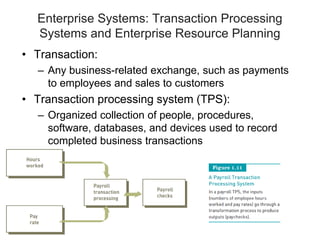
• Transaction:
– Any business-related exchange, such as payments
to employees and sales to customers
• Transaction processing system (TPS):
– Organized collection of people, procedures,
software, databases, and devices used to record
completed business transactions
Enterprise Systems: Transaction Processing
Systems and Enterprise Resource Planning
(continued)
• Enterprise resource planning:
– Set of integrated programs that:
• Manages the vital business operations for an
entire multisite, global organization
– Most systems provide integrated software to support
manufacturing and finance
• Management information system (MIS):
– Organized collection of people, procedures,
software, databases, and devices that:
• Provides routine information to managers and
decision makers
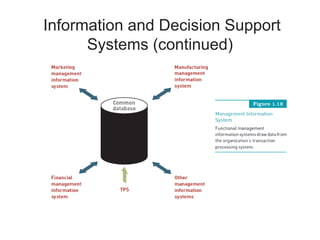
Information and Decision Support
Systems (continued)
Information and Decision Support
Systems (continued)
• Decision support system (DSS):
– Organized collection of people, procedures,
software, databases, and devices that support
problem-specific decision making
– Used when problem is complex and information
needed to determine appropriate action is difficult to
obtain
Information and Decision Support
Systems (continued)
Specialized Business Information Systems:
Knowledge Management, Artificial Intelligence,
Expert Systems, and Virtual Reality
• Knowledge management systems (KMSs):
– Organized collection of people, procedures,
software, databases, and devices to:
• Create, store, share, and use the organization’s
knowledge and experience
• Artificial intelligence (AI):
– Computer system takes on characteristics of human
intelligence
Specialized Business Information Systems
(continued)
• Expert systems:
– Give computer ability to make suggestions and function like an
expert in a particular field
• Virtual reality:
– Simulation of a real or imagined environment that can be
experienced visually in three dimensions
Systems Development
• Systems development:
– The activity of
creating or modifying
existing business
systems
• Outsourcing:
– Allows a company to
focus on what it does
best and delegate
other functions to
companies with
expertise in systems
development
Systems Investigation and Analysis
• Goal of systems investigation:
– To gain clear understanding of the problem to be solved or
opportunity to be addressed
• Systems analysis:
– Defines the problems and opportunities of the existing system
• Systems design:
– Determines how new system will work to meet business needs
defined during systems analysis
• Systems implementation:
– Acquiring various system components defined in design step,
assembling them, and putting the new system into operation
• Systems maintenance and review:
– Checks and modifies the system so that it continues to meet
changing business needs
Information Systems in Society,
Business, and Industry
• Information systems:
– Have been developed to meet the needs of all types
of organizations and people
– Speed and widespread use opens users to a variety
of threats from unethical people
Security, Privacy, and Ethical Issues in
Information Systems and the Internet
• Drawbacks of information systems:
– Personal data, including Social Security and credit
card numbers, can be lost or stolen
• To protect against threats to your privacy and data:
– Install security and control measures
• Use of information systems:
– Raises work concerns, including job loss through
increased efficiency
Computer and Information Systems
Literacy
• Computer literacy:
– Knowledge of computer systems and equipment and
the ways they function
• Information systems literacy:
– Knowledge of how data and information are used by
individuals, groups, and organizations
Information Systems in the Functional
Areas of Business
• Functional areas and operating divisions of
business:
– Finance and accounting
– Sales and marketing
– Manufacturing
– Human resource management
– Legal information systems
Information Systems in Industry
• Industries:
– Airline industry
– Investment firms
– Banks
– Transportation industry
– Publishing companies
– Healthcare maintenance organizations (HMOs)
– Retail companies
– Power management and utility companies
– Professional services
– Management consulting firms
Global Challenges in Information
Systems
• Cultural challenges
• Language challenges
• Time and distance challenges
• Infrastructure challenges
• Currency challenges
• Product and service challenges
• Technology transfer issues
• State, regional, and national laws
• Trade agreements
Summary
• Data:
– Raw facts
• System:
– Set of elements that interact to accomplish a goal
• Components of an information system:
– Input, processing, output, and feedback
• Components of a computer-based information system (CBIS) include:
– Hardware, software, databases, telecommunications and the Internet,
people, and procedures
• E-commerce involves:
– Any business transaction executed electronically between parties
such as companies (business-to-business), companies and
consumers (business-to-consumer), business and the public sector,
and consumers and the public sector
Summary (continued)
• Transaction processing system (TPS):
– Handles the large volume of business transactions that occur
daily within an organization
• Decision support system (DSS):
– Organized collection of people, procedures, software,
databases, and devices that help make problem-specific
decisions
• Systems development:
– Creating or modifying existing business systems
• Computer and information systems literacy:
– Prerequisites for numerous job opportunities, not only in the IS
field
Information Systems, Tenth Edition

Chapter 1.pdf

  • 1.
    Information Systems, Chapter 1 AnIntroduction to Information Systems
  • 2.
    Principles and LearningObjectives • The value of information is directly linked to how it helps decision makers achieve the organization’s goals – Discuss why it is important to study and understand information systems – Distinguish data from information and describe the characteristics used to evaluate the value of data • Computers and information systems help make it possible for organizations to improve the way they conduct business – Name the components of an information system and describe several system characteristics
  • 3.
    Principles and LearningObjectives (continued) • Knowing the potential impact of information systems and having the ability to put this knowledge to work can result in a successful personal career and in organizations that reach their goals – List the components of a computer-based information system – Identify the basic types of business information systems and discuss who uses them, how they are used, and what kinds of benefits they deliver
  • 4.
    Principles and LearningObjectives (continued) • System users, business managers, and information systems professionals must work together to build a successful information system – Identify the major steps of the systems development process and state the goal of each
  • 5.
    Principles and LearningObjectives (continued) • Information systems must be applied thoughtfully and carefully so that society, businesses, and industries can gather their benefits – Describe some of the threats that information systems and the Internet can pose to security and privacy – Discuss the expanding role and benefits of information systems in business and industry
  • 6.
    Why Learn AboutInformation Systems? • Information systems used by: – Sales representatives – Managers – Financial advisors • Information systems: – Essential tools to help you achieve your career goals
  • 7.
    Introduction • Information system(IS): – A set of interrelated components that collect, manipulate, and disseminate data and information and provide feedback to meet an objective • Businesses: – Can use information systems to increase revenues and reduce costs • Information: – One of an organization’s most valuable resources – Often confused with the term data
  • 8.
    Data, Information, andKnowledge • Data: – Raw facts • Information: – Collection of facts organized in such a way that they have value beyond the facts themselves • Process: – Set of logically related tasks • Knowledge: – Awareness and understanding of a set of information
  • 9.
    Data, Information, andKnowledge (continued)
  • 10.
    Data, Information, andKnowledge (continued)
  • 11.
    Data, Information, andKnowledge (continued)
  • 12.
    The Characteristics ofValuable Information • If an organization’s information is not accurate or complete: – People can make poor decisions, costing thousands, or even millions, of dollars • Depending on the type of data you need: – Some characteristics become more important than others
  • 13.
    The Characteristics ofValuable Information (continued)
  • 14.
    The Value ofInformation • Directly linked to how it helps decision makers achieve their organization’s goals • Valuable information: – Can help people and their organizations perform tasks more efficiently and effectively
  • 15.
    System Concepts • System: –Set of elements or components that interact to accomplish goals • Components of a system: – Inputs – Processing mechanisms – Outputs – Feedback
  • 16.
    System Performance andStandards • Efficiency: – Measure of what is produced divided by what is consumed • Effectiveness: – Measure of the extent to which a system attains its goals • System performance standard: – Specific objective of the system
  • 17.
    System Performance andStandards (continued)
  • 18.
    What is anInformation System? • Information system (IS) is a set of interrelated elements that: – Collect (input) – Manipulate (process) – Store – Disseminate (output) data and information – Provide a corrective reaction (feedback mechanism) to meet an objective
  • 19.
    Input, Processing, Output,Feedback • Input: – Activity of gathering and capturing raw data • Processing: – Converting data into useful outputs • Output: – Production of useful information, usually in the form of documents and reports • Feedback: – Information from the system that is used to make changes to input or processing activities
  • 20.
    Manual and ComputerizedInformation Systems • An information system can be: – Manual or computerized • Example: – Investment analysts manually draw charts and trend lines to assist them in making investment decisions • Computerized information systems: – Follow stock indexes and markets and suggest when large blocks of stocks should be purchased or sold
  • 21.
    Computer-Based Information Systems •Single set of hardware, software, databases, telecommunications, people, and procedures: – That are configured to collect, manipulate, store, and process data into information • Technology infrastructure: – Includes all hardware, software, databases, telecommunications, people, and procedures • Configured to collect, manipulate, store, and process data into information
  • 22.
    Computer-Based Information Systems (continued) •Hardware: – Consists of computer equipment used to perform input, processing, and output activities • Software: – Consists of the computer programs that govern the operation of the computer • Database: – Organized collection of facts and information, typically consisting of two or more related data files • Telecommunications, networks, and the Internet – The electronic transmission of signals for communications
  • 23.
    Computer-Based Information Systems (continued) •Networks – Connect computers and equipment to enable electronic communication • Internet – World’s largest computer network, consisting of thousands of interconnected networks, all freely exchanging information • Intranet: – Internal network that allows people within an organization to exchange information and work on projects • Extranet: – Network that allows selected outsiders, such as business partners and customers, to access authorized resources of a company’s intranet
  • 24.
    Computer-Based Information Systems (continued) •People: – The most important element in most computer- based information systems • Procedures: – Include strategies, policies, methods, and rules for using the CBIS
  • 25.
    Business Information Systems •Most common types of information systems: – Those designed for electronic and mobile commerce, transaction processing, management information, and decision support • Some organizations employ: – Special-purpose systems, such as virtual reality, that not every organization uses
  • 26.
  • 27.
    Electronic and MobileCommerce • E-commerce: – Any business transaction executed electronically between: • Companies (business-to-business, B2B) • Companies and consumers (business-to-consumer, B2C) • Consumers and other consumers (consumer-to-consumer, C2C) • Business and the public sector • Consumers and the public sector • E-commerce: – Can enhance a company’s stock prices and market value
  • 28.
    Electronic and MobileCommerce (continued) • Mobile commerce (m-commerce): – The use of mobile, wireless devices to place orders and conduct business • Electronic business (e-business): – Uses information systems and the Internet to perform all business-related tasks and functions
  • 29.
    Enterprise Systems: TransactionProcessing Systems and Enterprise Resource Planning • Transaction: – Any business-related exchange, such as payments to employees and sales to customers • Transaction processing system (TPS): – Organized collection of people, procedures, software, databases, and devices used to record completed business transactions
  • 30.
    Enterprise Systems: TransactionProcessing Systems and Enterprise Resource Planning (continued) • Enterprise resource planning: – Set of integrated programs that: • Manages the vital business operations for an entire multisite, global organization – Most systems provide integrated software to support manufacturing and finance • Management information system (MIS): – Organized collection of people, procedures, software, databases, and devices that: • Provides routine information to managers and decision makers
  • 31.
    Information and DecisionSupport Systems (continued)
  • 32.
    Information and DecisionSupport Systems (continued) • Decision support system (DSS): – Organized collection of people, procedures, software, databases, and devices that support problem-specific decision making – Used when problem is complex and information needed to determine appropriate action is difficult to obtain
  • 33.
    Information and DecisionSupport Systems (continued)
  • 34.
    Specialized Business InformationSystems: Knowledge Management, Artificial Intelligence, Expert Systems, and Virtual Reality • Knowledge management systems (KMSs): – Organized collection of people, procedures, software, databases, and devices to: • Create, store, share, and use the organization’s knowledge and experience • Artificial intelligence (AI): – Computer system takes on characteristics of human intelligence
  • 35.
    Specialized Business InformationSystems (continued) • Expert systems: – Give computer ability to make suggestions and function like an expert in a particular field • Virtual reality: – Simulation of a real or imagined environment that can be experienced visually in three dimensions
  • 36.
    Systems Development • Systemsdevelopment: – The activity of creating or modifying existing business systems • Outsourcing: – Allows a company to focus on what it does best and delegate other functions to companies with expertise in systems development
  • 37.
    Systems Investigation andAnalysis • Goal of systems investigation: – To gain clear understanding of the problem to be solved or opportunity to be addressed • Systems analysis: – Defines the problems and opportunities of the existing system • Systems design: – Determines how new system will work to meet business needs defined during systems analysis • Systems implementation: – Acquiring various system components defined in design step, assembling them, and putting the new system into operation • Systems maintenance and review: – Checks and modifies the system so that it continues to meet changing business needs
  • 38.
    Information Systems inSociety, Business, and Industry • Information systems: – Have been developed to meet the needs of all types of organizations and people – Speed and widespread use opens users to a variety of threats from unethical people
  • 39.
    Security, Privacy, andEthical Issues in Information Systems and the Internet • Drawbacks of information systems: – Personal data, including Social Security and credit card numbers, can be lost or stolen • To protect against threats to your privacy and data: – Install security and control measures • Use of information systems: – Raises work concerns, including job loss through increased efficiency
  • 40.
    Computer and InformationSystems Literacy • Computer literacy: – Knowledge of computer systems and equipment and the ways they function • Information systems literacy: – Knowledge of how data and information are used by individuals, groups, and organizations
  • 41.
    Information Systems inthe Functional Areas of Business • Functional areas and operating divisions of business: – Finance and accounting – Sales and marketing – Manufacturing – Human resource management – Legal information systems
  • 42.
    Information Systems inIndustry • Industries: – Airline industry – Investment firms – Banks – Transportation industry – Publishing companies – Healthcare maintenance organizations (HMOs) – Retail companies – Power management and utility companies – Professional services – Management consulting firms
  • 43.
    Global Challenges inInformation Systems • Cultural challenges • Language challenges • Time and distance challenges • Infrastructure challenges • Currency challenges • Product and service challenges • Technology transfer issues • State, regional, and national laws • Trade agreements
  • 44.
    Summary • Data: – Rawfacts • System: – Set of elements that interact to accomplish a goal • Components of an information system: – Input, processing, output, and feedback • Components of a computer-based information system (CBIS) include: – Hardware, software, databases, telecommunications and the Internet, people, and procedures • E-commerce involves: – Any business transaction executed electronically between parties such as companies (business-to-business), companies and consumers (business-to-consumer), business and the public sector, and consumers and the public sector
  • 45.
    Summary (continued) • Transactionprocessing system (TPS): – Handles the large volume of business transactions that occur daily within an organization • Decision support system (DSS): – Organized collection of people, procedures, software, databases, and devices that help make problem-specific decisions • Systems development: – Creating or modifying existing business systems • Computer and information systems literacy: – Prerequisites for numerous job opportunities, not only in the IS field
  • 46.