Unit 1 Business Information System 1
BUSINESS INFORMATION SYSTEM
Unit 1 Business Information System 2
CHAPTER I
Introduction to Information
Systems
3
INFORMATION TECHNOLOGY
IT is a wide-ranging term that describes the technological
transfer, storage and accessibility of information.
Thus, IT falls under the IS umbrella — it deals with the
technological components that are used in the information
systems themselves.
By definition, IT is the study, design, implementation, support
or management of computer-based information systems.
Speaking of components, IT encompasses hardware, software,
databases and networks.
The emphasis of IT is to manage technology and help users
make the most of its functionality.
Unit 1 Business Information System
Unit 1 Business Information System 4
INFORMATION SYSTEMS
An information system is a type of platform or collection of
platforms that exist to manage a set of information or a
technology product.
For instance, the hardware and software used to create,
maintain and access an electronic health record is an
information system.
The computers, hard drives and other electronic devices used
to store, keep and distribute patient records are part of the
system.
IT is a subset of IS. The fields are certainly related, but those
interested in a career in technology should research and
understand the difference in the two fields.
Unit 1 Business Information System 5
WHAT IS INFORMATION SYSTEMS?
Information systems can be defined as a set of interrelated
components (people, procedure, software,
hardware & data) that collect (or retrieve), process,
store, and distribute information.
 To support: Decision Making, Coordination, Control, Analyze
Problems, Visualize Complex Subjects, and Create New Product.
Unit 1 Business Information System 6
WHAT IS INFORMATION SYSTEMS?
Information Systems is used to convert data into
useful information.
Three (3) phases:
Input Phase: capture data and store
Process Phase: process according to rules and procedure
Output Phase: produce display on screen, printed on a
printer, save on a storage device.
Unit 1 Business Information System 7
INFORMATION SYSTEMS
Information Systems are a critical components of
any successful organization today.
Provide a high level of computer automation to
support business functions, such as
Marketing, finance, accounting, customer service,
human resource management, and operation.
Unit 1 Business Information System 8
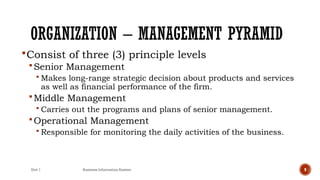
ORGANIZATION – MANAGEMENT PYRAMID
Unit 1 Business Information System 9
ORGANIZATION – MANAGEMENT PYRAMID
Consist of three (3) principle levels
Senior Management
 Makes long-range strategic decision about products and services
as well as financial performance of the firm.
Middle Management
 Carries out the programs and plans of senior management.
Operational Management
 Responsible for monitoring the daily activities of the business.
Unit 1 Business Information System 10
ORGANIZATION – MANAGEMENT PYRAMID
Each management level has different information
needs and requirements.
Example: The CEO of a company may need a report
that quickly states how a particular product is
performing in the market in different time or place.
Example: Operation Manager more interested in
detail sales report of all product for last month.
Unit 1 Business Information System 11
ORGANIZATION – BUSINESS FUNCTIONS
 As organization become larger and more complex they tend to break
functions into smaller units by assigning a group of staff to specialize
these activities.
 Major business functions:
Function Purpose
Sales & Marketing Selling the organization’s products and services
Manufacturing and
production
Producing the delivering products and services.
Finance and
accounting
Managing the organization’s financial assets and
maintaining the organization’s financial records.
Human Resources Attracting, developing, and maintaining the
organization’s labor force; maintaining employee
records.
Unit 1 Business Information System 12
FUNCTIONAL SYSTEMS
Information Systems are created to support each business
functions.
 Human Resource System
 Accounting System
 Sales & Marketing System
 Logistic System
All the Information Systems is NOT integrated or
interrelated.
 The information is not shared between the business function
WHY SHOULD WE STUDY
INFORMATION SYSTEM?
 First, you will benefit more from your organization’s IT
applications because you will understand what is “behind” those
applications .That is, what you see on your computer screen is
brought to you by your MIS department, who are operating
“behind” your screen.
 Second, you will be in a position to enhance the quality of your
organization’s IT applications with your input.
 Third, even as a new graduate, you will quickly be in a position
to recommend—and perhaps help select—the IT applications
that your organization will use.
Unit 1 Business Information System 13
Unit 1 Business Information System 14
Fourth, being an informed user will keep you abreast of
both new information technologies and rapid
developments in existing technologies. Remaining “on top
of things” will help you to anticipate the impacts that
“new and improved” technologies will have on your
organization and to make recommendations on the
adoption and use of these technologies.
Fifth, you will understand how using IT can improve your
organization’s performance and teamwork as well as your
own productivity.
Finally, if you have ideas of becoming an entrepreneur,
then being an informed user will help you use IT when
you start your own business.
Unit 1 Business Information System 15
COMPUTER BASED INFORMATION SYSTEM
Organizations refer to their management information systems
functional area by several names, including the MIS
Department, the Information Systems (IS) Department, the
Information Technology Department, and the Information
Services Department.
Regardless of the name, however, this functional area deals
with the planning for—and the development, management, and
use of—information technology tools to help people perform all
the tasks related to information processing and management.
Unit 1 Business Information System 16
A computer-based information system (CBIS) is an
information system that uses computer technology to
perform some or all of its intended tasks.
Although not all information systems are
computerized, today most are. For this reason the
term “information system” is typically used
synonymously with “computer-based information
system.”
The basic components of computer based
information systems are listed below.
The first four are called information technology
components.
Unit 1 Business Information System 17
Figure 1.3 illustrates how these four components interact to
form a CBIS.
• Hardware consists of devices such as the processor,
monitor, keyboard, and printer.
Together, these devices accept, process, and display data
and information.
• Software is a program or collection of programs that
enable the hardware to process data.
• A database is a collection of related fi les or tables
containing data.
• A network is a connecting system (wireline or wireless)
that permits different computers to
share resources.
Unit 1 Business Information System 18
Unit 1 Business Information System 19
• Procedures are the instructions for combining the above
components to process information and generate the
desired output.
• People are those individuals who use the hardware and
software, interface with it, or utilize its output.
Unit 1 Business Information System 20
Unit 1 Business Information System 21
Figure 1.4 illustrates how these components are integrated to form
the wide variety of information systems found within an
organization.
• Starting at the bottom of the figure, you see that the IT
components of hardware, software, networks (wireline and
wireless), and databases form the information technology
platform.
• IT personnel use these components to develop information
systems, oversee security and risk, and manage data. These
activities cumulatively are called information technology
services.
• The IT components plus IT services comprise the organization’s
information technology infrastructure.
• At the top of the pyramid are the various organizational
information systems.
Unit 1 Business Information System 22
1. Transaction Processing System (TPS)
• Millions (sometimes billions) of transactions occur in large organizations
every day. A transaction is any business event that generates data worthy
of being captured and stored in a database.
• Examples of transactions are a product manufactured, a service sold, a
person hired, and a payroll check generated.
• In another example, when you are checking out of Walmart, each time the
cashier swipes an item across the bar code reader is one transaction.
• A transaction processing system (TPS) supports the monitoring,
collection, storage, and processing of data from the organization’s basic
business transactions, each of which generates data.
• The TPS collects data continuously, typically in real time—that is, as soon
as the data are generated—and it provides the input data for the corporate
databases. The TPSs are critical to the success of any enterprise because
they support core operations.
Types of CBIS
23
TPS is a business tool that uses computer hardware
and software to gather, store, alter, and retrieve data
transactions. TPSs are designed to connect with
external systems to distribute and receive information
between customers, merchants, suppliers, banks, and
creditors.
Unit 1 Business Information System 24
Unit 1 Business Information System 25
2. Management Information System (MIS):
•Management Information System is designed to take relatively raw data
available through a Transaction Processing System and convert them
into a summarized and aggregated form for the manager, usually in a
report format. It reports tending to be used by middle management and
operational supervisors.
•Many different types of report are produced in MIS. Some of the reports
are a summary report, on-demand report, ad-hoc reports and an
exception report.
•Example: Sales management systems, Human resource management
system.
Unit 1 Business Information System 26
3. Knowledge Work System (KWS)
The KWS is a specialized system that expedites knowledge creation and
ensures that the business's technical skills and knowledge are correctly
applied. The Knowledge Work System aids workers in creating and
disseminating new information using graphics, communication, and
document management tools. Here are some examples of KWS:
•Computer-Aided Design Systems (CAD): CAD systems automate design
creation and revision via computers and graphics software, especially in
the manufacturing and tooling processes.
•Financial Workstations: These systems pull and combine data from many
different internal and external sources, covering research reports, market
data, and management data. Financial workstations can rapidly analyze
huge amounts of financial data and trading situations.
•Virtual Reality Systems: These systems take the CAD system to the next
level, using interactive graphics utilities to create realistic computer-
generated simulations. VR systems are typically found in scientific,
educational, and business circles.
Unit 1 Business Information System 27
4. Office Automation Systems
• Office automation systems are among the newest and most rapidly
expanding computer based information systems.
• They are being developed with the hopes and expectations that they will
increase the efficiency and productivity of office workers-typists,
secretaries, administrative assistants, staff professionals, managers
and the like.
• Many organizations have taken the First step toward automating their
offices.
• Often this step involves the use of word processing equipment to
facilitate the typing, storing, revising and printing of textual materials.
• Another development is a computer based communications system
such as electronic mail which allows people to communicate in an
electronic mode through computer terminals.
• An office automation system can be described as a multi-function,
integrated computer based system that allows many office activities to
be performed in an electronic mode.
Unit 1 Business Information System 28
5. Decision Support System (DSS):
•Decision Support System is an interactive information
system that provides information, models and data
manipulation tools to help in making the decision in a semi-
structured and unstructured situation.
•Decision Support System comprises tools and techniques to
help in gathering relevant information and analyze the
options and alternatives, the end user is more involved in
creating DSS than an MIS.
•Example: Financial planning systems, Bank loan
management systems.
Unit 1 Business Information System 29
6. Experts System:
•Experts systems include expertise in order to aid managers in
diagnosing problems or in problem-solving. These systems are
based on the principles of artificial intelligence research.
•Experts Systems is a knowledge-based information system. It uses
its knowledge about a specify are to act as an expert consultant to
users.
•Knowledgebase and software modules are the components of an
expert system. These modules perform inference on the knowledge
and offer answers to a user’s question
Unit 1 Business Information System 30
7. Executive Support System (ESS)
• The ESS is like the MIS but for executive-level decision-
making.
• The decisions involve company-wide matters, so the stakes
are higher. Consequently, they demand more insight and
judgment.
• The ESS provides greater telecommunication, better
computing capabilities, and more efficient display options
than the DSS.
• Executives use ESS to make effective decisions through
summarized internal data taken from DSS and MIS and
external sources. In addition, executive support systems help
monitor performances, track competitors, spot opportunities,
and forecast future trends.
Management Information Systems
Information technology and organizations influence one
another
Complex relationship influenced by organization’s
Structure
Business processes
Politics
Culture
Environment, and
Management decisions
Unit 1 Business
31
HOW DOES IT IMPACT ORGANIZATIONS?
Management Information Systems
Organizations and Information Systems
THE TWO-WAY
RELATIONSHIP BETWEEN
ORGANIZATIONS AND
INFORMATION
TECHNOLOGY
This complex two-way
relationship is mediated by many
factors, not the least of which are
the decisions made—or not
made—by managers. Other
factors mediating the relationship
include the organizational
culture, structure, politics,
business processes, and
environment.
Unit 1 Business
32
Management Information Systems
What is an organization?
Technical definition:
 Stable, formal social structure that takes resources from environment and
processes them to produce outputs
 A formal legal entity with internal rules and procedures, as well as a social
structure
Behavioral definition:
 A collection of rights, privileges, obligations, and responsibilities that is delicately
balanced over a period of time through conflict and conflict resolution
Unit 1 Business
33
Management Information Systems
THE TECHNICAL MICROECONOMIC DEFINITION OF THE ORGANIZATION
In the microeconomic definition of organizations, capital and labor (the primary production factors provided by
the environment) are transformed by the firm through the production process into products and services
(outputs to the environment).The products and services are consumed by the environment, which supplies
additional capital and labor as inputs in the feedback loop.
Unit 1 Business
34
Management Information Systems
THE BEHAVIORALVIEW OF ORGANIZATIONS
The behavioral view of organizations emphasizes group relationships, values, and structures.
Unit 1 Business
35
Management Information Systems
Economic impacts
 IT changes relative costs of capital and the costs of information
 Information systems technology is a factor of production, like capital and
labor
 IT affects the cost and quality of information and changes economics of
information
 Information technology helps firms contract in size because it can reduce
transaction costs (the cost of participating in markets)
 Outsourcing
How Information Systems Impact Organizations and Business Firms
Unit 1 Business
36
Management Information Systems
Transaction cost theory
Firms seek to economize on transaction costs (the costs of
participating in markets)
Vertical integration, hiring more employees, buying suppliers and
distributors
IT lowers market transaction costs for a firm, making it worthwhile
for firms to transact with other firms rather than grow the number
of employees
How Information Systems Impact Organizations and Business Firms
Unit 1 Business
37
Management Information Systems
How Information Systems Impact Organizations and Business Firms
THE TRANSACTION COST THEORY OF THE IMPACT OF INFORMATION
TECHNOLOGY ON THE ORGANIZATION
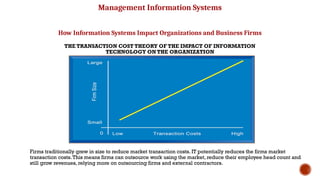
Firms traditionally grew in size to reduce market transaction costs. IT potentially reduces the firms market
transaction costs.This means firms can outsource work using the market, reduce their employee head count and
still grow revenues, relying more on outsourcing firms and external contractors.
Unit 1 Business
38
Management Information Systems
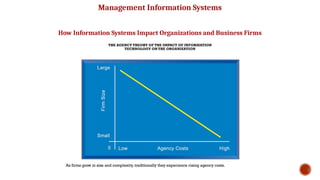
Agency theory:
Firm is nexus of contracts among self-interested parties requiring
supervision
Firms experience agency costs (the cost of managing and supervising)
which rise as firm grows
IT can reduce agency costs, making it possible for firms to grow
without adding to the costs of supervising, and without adding
employees
How Information Systems Impact Organizations and Business Firms
Unit 1 Business
39
Management Information Systems
How Information Systems Impact Organizations and Business Firms
THE AGENCY THEORY OF THE IMPACT OF INFORMATION
TECHNOLOGY ON THE ORGANIZATION
As firms grow in size and complexity, traditionally they experience rising agency costs.
Unit 1 Business
40
Management Information Systems
Organizational and behavioral impacts
IT flattens organizations
Decision making pushed to lower levels
Fewer managers needed (IT enables faster decision making and
increases span of control)
Postindustrial organizations
Organizations flatten because in postindustrial societies, authority
increasingly relies on knowledge and competence rather than formal
positions
How Information Systems Impact Organizations and Business Firms
Unit 1 Business
41
Management Information Systems
How Information Systems Impact Organizations and Business Firms
FLATTENING
ORGANIZATIONS
Information systems can
reduce the number of levels in
an organization by providing
managers with information to
supervise larger numbers of
workers and by giving lower-
level employees more
decision-making authority.
Unit 1 Business
42
Management Information Systems
Organizational resistance to change
Information systems become bound up in organizational politics
because they influence access to a key resource – information
Information systems potentially change an organization’s structure,
culture, politics, and work
Most common reason for failure of large projects is due to
organizational and political resistance to change
How Information Systems Impact Organizations and Business Firms
Unit 1 Business
43
Management Information Systems
How Information Systems Impact Organizations and Business Firms
ORGANIZATIONAL RESISTANCE
AND THE MUTUALLY
ADJUSTING RELATIONSHIP
BETWEEN TECHNOLOGY AND
THE ORGANIZATION
Implementing information systems
has consequences for task
arrangements, structures, and people.
According to this model, to
implement change, all four
components must be changed
simultaneously.
Unit 1 Business
44
Management Information Systems
The Internet and organizations
The Internet increases the accessibility, storage, and distribution of
information and knowledge for organizations
The Internet can greatly lower transaction and agency costs
Example: Large firm delivers internal manuals to employees via a
corporate Web site, saving millions of dollars in distribution costs
How Information Systems Impact Organizations and Business Firms
Unit 1 Business
45
Management Information Systems
Central organizational factors to consider when planning a new system:
 Environment
 Structure
 Hierarchy, specialization, routines, business processes
 Culture and politics
 Type of organization and style of leadership
 Main interest groups affected by system; attitudes of end users
 Tasks, decisions, and business processes the system will assist
How Information Systems Impact Organizations and Business Firms
Unit 1 Business
46
Unit 1 Business Information System 47
Will IT Eliminate Jobs?
• One major concern of every employee, part-time or full-time, is job
security.
• Relentless cost cutting measures in modern organizations often lead to
large-scale layoffs.
• Put simply, organizations are responding to today’s highly competitive
environment by doing more with less.
• Regardless of your position, then, you consistently will have to add value to
your organization and to make certain that your superiors are aware of
this value.
• Many companies have responded to difficult economic times, increased
global competition, demands for customization, and increased consumer
sophistication by increasing their investments in IT.
• In fact, as computers continue to advance in terms of intelligence and
capabilities, the competitive advantage of replacing people with machines
is increasing rapidly.
• At the same time, however, IT creates entirely new categories of jobs, such
as electronic medical record keeping and nanotechnology.
Unit 1 Business Information System 48
Importance of Information Systems to
Society
1. IT Affects Our Quality of Life
• IT has significant implications for our quality of life. The workplace can
be expanded from the traditional 9-to-5 job at a central location to 24
hours a day at any location.
• IT can provide employees with flexibility that can significantly improve
the quality of leisure time, even if it doesn’t increase the total amount of
leisure time.
2. Facilitating Communication:
• Information systems enable efficient communication and collaboration
among individuals, organizations, and communities.
• Through email, messaging platforms, social media, and other
communication tools, people can exchange ideas, share information, and
coordinate activities across geographical boundaries, fostering
connectivity and global interaction.
Unit 1 Business Information System 49
3. Improvements in Healthcare
• IT has brought about major improvements in healthcare delivery.
Medical personnel use IT to make better and faster diagnoses and to
monitor critically ill patients more accurately.
• IT also has streamlined the process of researching and developing new
drugs. Expert systems now help doctors diagnose diseases, and
machine vision is enhancing the work of radiologists.
• Surgeons use virtual reality to plan complex surgeries. They also
employ surgical robots to perform long-distance surgery.
• Finally, doctors discuss complex medical cases via videoconferencing.
• New computer simulations recreate the sense of touch, allowing
doctors-in-training to perform virtual procedures without risking harm
to an actual patient.
Unit 1 Business Information System 50
4. Government Services:
• Information systems are critical for delivering public services and
promoting good governance.
• E-government initiatives streamline administrative processes, reduce
bureaucratic inefficiencies, and improve service delivery to citizens.
• Online portals, digital forms, and electronic voting systems enhance
access to government information and participation in democratic
processes, fostering transparency, accountability, and civic engagement.
5. Decision-Making:
• Information systems provide valuable data and insights that support
decision-making at all levels of society.
• From personal decisions about what products to buy to strategic decisions
made by businesses and governments, data-driven insights help
individuals and organizations make more informed choices.
• Business intelligence tools, data analytics platforms, and predictive
modeling techniques enable stakeholders to anticipate trends, identify
opportunities, and mitigate risks.
Unit 1 Business Inf
51
BIS-BBA 5th
Sem
Assignment-1
1. Define information system and information technology.
2. Explain system with its components.
3. Why should we study IS?
4. Why are information systems so essential in business today?
5. “Information systems are so essential for running and managing a
business today”. Explain.
6. How information system changing the management process?
7. Explain CBIS with its types.
8. Explain impact of IT on organization.
9. Explain importance of IS to Society.

introduction to information technology Chapter I.pptx

  • 1.
    Unit 1 BusinessInformation System 1 BUSINESS INFORMATION SYSTEM
  • 2.
    Unit 1 BusinessInformation System 2 CHAPTER I Introduction to Information Systems
  • 3.
    3 INFORMATION TECHNOLOGY IT isa wide-ranging term that describes the technological transfer, storage and accessibility of information. Thus, IT falls under the IS umbrella — it deals with the technological components that are used in the information systems themselves. By definition, IT is the study, design, implementation, support or management of computer-based information systems. Speaking of components, IT encompasses hardware, software, databases and networks. The emphasis of IT is to manage technology and help users make the most of its functionality. Unit 1 Business Information System
  • 4.
    Unit 1 BusinessInformation System 4 INFORMATION SYSTEMS An information system is a type of platform or collection of platforms that exist to manage a set of information or a technology product. For instance, the hardware and software used to create, maintain and access an electronic health record is an information system. The computers, hard drives and other electronic devices used to store, keep and distribute patient records are part of the system. IT is a subset of IS. The fields are certainly related, but those interested in a career in technology should research and understand the difference in the two fields.
  • 5.
    Unit 1 BusinessInformation System 5 WHAT IS INFORMATION SYSTEMS? Information systems can be defined as a set of interrelated components (people, procedure, software, hardware & data) that collect (or retrieve), process, store, and distribute information.  To support: Decision Making, Coordination, Control, Analyze Problems, Visualize Complex Subjects, and Create New Product.
  • 6.
    Unit 1 BusinessInformation System 6 WHAT IS INFORMATION SYSTEMS? Information Systems is used to convert data into useful information. Three (3) phases: Input Phase: capture data and store Process Phase: process according to rules and procedure Output Phase: produce display on screen, printed on a printer, save on a storage device.
  • 7.
    Unit 1 BusinessInformation System 7 INFORMATION SYSTEMS Information Systems are a critical components of any successful organization today. Provide a high level of computer automation to support business functions, such as Marketing, finance, accounting, customer service, human resource management, and operation.
  • 8.
    Unit 1 BusinessInformation System 8 ORGANIZATION – MANAGEMENT PYRAMID
  • 9.
    Unit 1 BusinessInformation System 9 ORGANIZATION – MANAGEMENT PYRAMID Consist of three (3) principle levels Senior Management  Makes long-range strategic decision about products and services as well as financial performance of the firm. Middle Management  Carries out the programs and plans of senior management. Operational Management  Responsible for monitoring the daily activities of the business.
  • 10.
    Unit 1 BusinessInformation System 10 ORGANIZATION – MANAGEMENT PYRAMID Each management level has different information needs and requirements. Example: The CEO of a company may need a report that quickly states how a particular product is performing in the market in different time or place. Example: Operation Manager more interested in detail sales report of all product for last month.
  • 11.
    Unit 1 BusinessInformation System 11 ORGANIZATION – BUSINESS FUNCTIONS  As organization become larger and more complex they tend to break functions into smaller units by assigning a group of staff to specialize these activities.  Major business functions: Function Purpose Sales & Marketing Selling the organization’s products and services Manufacturing and production Producing the delivering products and services. Finance and accounting Managing the organization’s financial assets and maintaining the organization’s financial records. Human Resources Attracting, developing, and maintaining the organization’s labor force; maintaining employee records.
  • 12.
    Unit 1 BusinessInformation System 12 FUNCTIONAL SYSTEMS Information Systems are created to support each business functions.  Human Resource System  Accounting System  Sales & Marketing System  Logistic System All the Information Systems is NOT integrated or interrelated.  The information is not shared between the business function
  • 13.
    WHY SHOULD WESTUDY INFORMATION SYSTEM?  First, you will benefit more from your organization’s IT applications because you will understand what is “behind” those applications .That is, what you see on your computer screen is brought to you by your MIS department, who are operating “behind” your screen.  Second, you will be in a position to enhance the quality of your organization’s IT applications with your input.  Third, even as a new graduate, you will quickly be in a position to recommend—and perhaps help select—the IT applications that your organization will use. Unit 1 Business Information System 13
  • 14.
    Unit 1 BusinessInformation System 14 Fourth, being an informed user will keep you abreast of both new information technologies and rapid developments in existing technologies. Remaining “on top of things” will help you to anticipate the impacts that “new and improved” technologies will have on your organization and to make recommendations on the adoption and use of these technologies. Fifth, you will understand how using IT can improve your organization’s performance and teamwork as well as your own productivity. Finally, if you have ideas of becoming an entrepreneur, then being an informed user will help you use IT when you start your own business.
  • 15.
    Unit 1 BusinessInformation System 15 COMPUTER BASED INFORMATION SYSTEM Organizations refer to their management information systems functional area by several names, including the MIS Department, the Information Systems (IS) Department, the Information Technology Department, and the Information Services Department. Regardless of the name, however, this functional area deals with the planning for—and the development, management, and use of—information technology tools to help people perform all the tasks related to information processing and management.
  • 16.
    Unit 1 BusinessInformation System 16 A computer-based information system (CBIS) is an information system that uses computer technology to perform some or all of its intended tasks. Although not all information systems are computerized, today most are. For this reason the term “information system” is typically used synonymously with “computer-based information system.” The basic components of computer based information systems are listed below. The first four are called information technology components.
  • 17.
    Unit 1 BusinessInformation System 17 Figure 1.3 illustrates how these four components interact to form a CBIS. • Hardware consists of devices such as the processor, monitor, keyboard, and printer. Together, these devices accept, process, and display data and information. • Software is a program or collection of programs that enable the hardware to process data. • A database is a collection of related fi les or tables containing data. • A network is a connecting system (wireline or wireless) that permits different computers to share resources.
  • 18.
    Unit 1 BusinessInformation System 18
  • 19.
    Unit 1 BusinessInformation System 19 • Procedures are the instructions for combining the above components to process information and generate the desired output. • People are those individuals who use the hardware and software, interface with it, or utilize its output.
  • 20.
    Unit 1 BusinessInformation System 20
  • 21.
    Unit 1 BusinessInformation System 21 Figure 1.4 illustrates how these components are integrated to form the wide variety of information systems found within an organization. • Starting at the bottom of the figure, you see that the IT components of hardware, software, networks (wireline and wireless), and databases form the information technology platform. • IT personnel use these components to develop information systems, oversee security and risk, and manage data. These activities cumulatively are called information technology services. • The IT components plus IT services comprise the organization’s information technology infrastructure. • At the top of the pyramid are the various organizational information systems.
  • 22.
    Unit 1 BusinessInformation System 22 1. Transaction Processing System (TPS) • Millions (sometimes billions) of transactions occur in large organizations every day. A transaction is any business event that generates data worthy of being captured and stored in a database. • Examples of transactions are a product manufactured, a service sold, a person hired, and a payroll check generated. • In another example, when you are checking out of Walmart, each time the cashier swipes an item across the bar code reader is one transaction. • A transaction processing system (TPS) supports the monitoring, collection, storage, and processing of data from the organization’s basic business transactions, each of which generates data. • The TPS collects data continuously, typically in real time—that is, as soon as the data are generated—and it provides the input data for the corporate databases. The TPSs are critical to the success of any enterprise because they support core operations. Types of CBIS
  • 23.
    23 TPS is abusiness tool that uses computer hardware and software to gather, store, alter, and retrieve data transactions. TPSs are designed to connect with external systems to distribute and receive information between customers, merchants, suppliers, banks, and creditors.
  • 24.
    Unit 1 BusinessInformation System 24
  • 25.
    Unit 1 BusinessInformation System 25 2. Management Information System (MIS): •Management Information System is designed to take relatively raw data available through a Transaction Processing System and convert them into a summarized and aggregated form for the manager, usually in a report format. It reports tending to be used by middle management and operational supervisors. •Many different types of report are produced in MIS. Some of the reports are a summary report, on-demand report, ad-hoc reports and an exception report. •Example: Sales management systems, Human resource management system.
  • 26.
    Unit 1 BusinessInformation System 26 3. Knowledge Work System (KWS) The KWS is a specialized system that expedites knowledge creation and ensures that the business's technical skills and knowledge are correctly applied. The Knowledge Work System aids workers in creating and disseminating new information using graphics, communication, and document management tools. Here are some examples of KWS: •Computer-Aided Design Systems (CAD): CAD systems automate design creation and revision via computers and graphics software, especially in the manufacturing and tooling processes. •Financial Workstations: These systems pull and combine data from many different internal and external sources, covering research reports, market data, and management data. Financial workstations can rapidly analyze huge amounts of financial data and trading situations. •Virtual Reality Systems: These systems take the CAD system to the next level, using interactive graphics utilities to create realistic computer- generated simulations. VR systems are typically found in scientific, educational, and business circles.
  • 27.
    Unit 1 BusinessInformation System 27 4. Office Automation Systems • Office automation systems are among the newest and most rapidly expanding computer based information systems. • They are being developed with the hopes and expectations that they will increase the efficiency and productivity of office workers-typists, secretaries, administrative assistants, staff professionals, managers and the like. • Many organizations have taken the First step toward automating their offices. • Often this step involves the use of word processing equipment to facilitate the typing, storing, revising and printing of textual materials. • Another development is a computer based communications system such as electronic mail which allows people to communicate in an electronic mode through computer terminals. • An office automation system can be described as a multi-function, integrated computer based system that allows many office activities to be performed in an electronic mode.
  • 28.
    Unit 1 BusinessInformation System 28 5. Decision Support System (DSS): •Decision Support System is an interactive information system that provides information, models and data manipulation tools to help in making the decision in a semi- structured and unstructured situation. •Decision Support System comprises tools and techniques to help in gathering relevant information and analyze the options and alternatives, the end user is more involved in creating DSS than an MIS. •Example: Financial planning systems, Bank loan management systems.
  • 29.
    Unit 1 BusinessInformation System 29 6. Experts System: •Experts systems include expertise in order to aid managers in diagnosing problems or in problem-solving. These systems are based on the principles of artificial intelligence research. •Experts Systems is a knowledge-based information system. It uses its knowledge about a specify are to act as an expert consultant to users. •Knowledgebase and software modules are the components of an expert system. These modules perform inference on the knowledge and offer answers to a user’s question
  • 30.
    Unit 1 BusinessInformation System 30 7. Executive Support System (ESS) • The ESS is like the MIS but for executive-level decision- making. • The decisions involve company-wide matters, so the stakes are higher. Consequently, they demand more insight and judgment. • The ESS provides greater telecommunication, better computing capabilities, and more efficient display options than the DSS. • Executives use ESS to make effective decisions through summarized internal data taken from DSS and MIS and external sources. In addition, executive support systems help monitor performances, track competitors, spot opportunities, and forecast future trends.
  • 31.
    Management Information Systems Informationtechnology and organizations influence one another Complex relationship influenced by organization’s Structure Business processes Politics Culture Environment, and Management decisions Unit 1 Business 31 HOW DOES IT IMPACT ORGANIZATIONS?
  • 32.
    Management Information Systems Organizationsand Information Systems THE TWO-WAY RELATIONSHIP BETWEEN ORGANIZATIONS AND INFORMATION TECHNOLOGY This complex two-way relationship is mediated by many factors, not the least of which are the decisions made—or not made—by managers. Other factors mediating the relationship include the organizational culture, structure, politics, business processes, and environment. Unit 1 Business 32
  • 33.
    Management Information Systems Whatis an organization? Technical definition:  Stable, formal social structure that takes resources from environment and processes them to produce outputs  A formal legal entity with internal rules and procedures, as well as a social structure Behavioral definition:  A collection of rights, privileges, obligations, and responsibilities that is delicately balanced over a period of time through conflict and conflict resolution Unit 1 Business 33
  • 34.
    Management Information Systems THETECHNICAL MICROECONOMIC DEFINITION OF THE ORGANIZATION In the microeconomic definition of organizations, capital and labor (the primary production factors provided by the environment) are transformed by the firm through the production process into products and services (outputs to the environment).The products and services are consumed by the environment, which supplies additional capital and labor as inputs in the feedback loop. Unit 1 Business 34
  • 35.
    Management Information Systems THEBEHAVIORALVIEW OF ORGANIZATIONS The behavioral view of organizations emphasizes group relationships, values, and structures. Unit 1 Business 35
  • 36.
    Management Information Systems Economicimpacts  IT changes relative costs of capital and the costs of information  Information systems technology is a factor of production, like capital and labor  IT affects the cost and quality of information and changes economics of information  Information technology helps firms contract in size because it can reduce transaction costs (the cost of participating in markets)  Outsourcing How Information Systems Impact Organizations and Business Firms Unit 1 Business 36
  • 37.
    Management Information Systems Transactioncost theory Firms seek to economize on transaction costs (the costs of participating in markets) Vertical integration, hiring more employees, buying suppliers and distributors IT lowers market transaction costs for a firm, making it worthwhile for firms to transact with other firms rather than grow the number of employees How Information Systems Impact Organizations and Business Firms Unit 1 Business 37
  • 38.
    Management Information Systems HowInformation Systems Impact Organizations and Business Firms THE TRANSACTION COST THEORY OF THE IMPACT OF INFORMATION TECHNOLOGY ON THE ORGANIZATION Firms traditionally grew in size to reduce market transaction costs. IT potentially reduces the firms market transaction costs.This means firms can outsource work using the market, reduce their employee head count and still grow revenues, relying more on outsourcing firms and external contractors. Unit 1 Business 38
  • 39.
    Management Information Systems Agencytheory: Firm is nexus of contracts among self-interested parties requiring supervision Firms experience agency costs (the cost of managing and supervising) which rise as firm grows IT can reduce agency costs, making it possible for firms to grow without adding to the costs of supervising, and without adding employees How Information Systems Impact Organizations and Business Firms Unit 1 Business 39
  • 40.
    Management Information Systems HowInformation Systems Impact Organizations and Business Firms THE AGENCY THEORY OF THE IMPACT OF INFORMATION TECHNOLOGY ON THE ORGANIZATION As firms grow in size and complexity, traditionally they experience rising agency costs. Unit 1 Business 40
  • 41.
    Management Information Systems Organizationaland behavioral impacts IT flattens organizations Decision making pushed to lower levels Fewer managers needed (IT enables faster decision making and increases span of control) Postindustrial organizations Organizations flatten because in postindustrial societies, authority increasingly relies on knowledge and competence rather than formal positions How Information Systems Impact Organizations and Business Firms Unit 1 Business 41
  • 42.
    Management Information Systems HowInformation Systems Impact Organizations and Business Firms FLATTENING ORGANIZATIONS Information systems can reduce the number of levels in an organization by providing managers with information to supervise larger numbers of workers and by giving lower- level employees more decision-making authority. Unit 1 Business 42
  • 43.
    Management Information Systems Organizationalresistance to change Information systems become bound up in organizational politics because they influence access to a key resource – information Information systems potentially change an organization’s structure, culture, politics, and work Most common reason for failure of large projects is due to organizational and political resistance to change How Information Systems Impact Organizations and Business Firms Unit 1 Business 43
  • 44.
    Management Information Systems HowInformation Systems Impact Organizations and Business Firms ORGANIZATIONAL RESISTANCE AND THE MUTUALLY ADJUSTING RELATIONSHIP BETWEEN TECHNOLOGY AND THE ORGANIZATION Implementing information systems has consequences for task arrangements, structures, and people. According to this model, to implement change, all four components must be changed simultaneously. Unit 1 Business 44
  • 45.
    Management Information Systems TheInternet and organizations The Internet increases the accessibility, storage, and distribution of information and knowledge for organizations The Internet can greatly lower transaction and agency costs Example: Large firm delivers internal manuals to employees via a corporate Web site, saving millions of dollars in distribution costs How Information Systems Impact Organizations and Business Firms Unit 1 Business 45
  • 46.
    Management Information Systems Centralorganizational factors to consider when planning a new system:  Environment  Structure  Hierarchy, specialization, routines, business processes  Culture and politics  Type of organization and style of leadership  Main interest groups affected by system; attitudes of end users  Tasks, decisions, and business processes the system will assist How Information Systems Impact Organizations and Business Firms Unit 1 Business 46
  • 47.
    Unit 1 BusinessInformation System 47 Will IT Eliminate Jobs? • One major concern of every employee, part-time or full-time, is job security. • Relentless cost cutting measures in modern organizations often lead to large-scale layoffs. • Put simply, organizations are responding to today’s highly competitive environment by doing more with less. • Regardless of your position, then, you consistently will have to add value to your organization and to make certain that your superiors are aware of this value. • Many companies have responded to difficult economic times, increased global competition, demands for customization, and increased consumer sophistication by increasing their investments in IT. • In fact, as computers continue to advance in terms of intelligence and capabilities, the competitive advantage of replacing people with machines is increasing rapidly. • At the same time, however, IT creates entirely new categories of jobs, such as electronic medical record keeping and nanotechnology.
  • 48.
    Unit 1 BusinessInformation System 48 Importance of Information Systems to Society 1. IT Affects Our Quality of Life • IT has significant implications for our quality of life. The workplace can be expanded from the traditional 9-to-5 job at a central location to 24 hours a day at any location. • IT can provide employees with flexibility that can significantly improve the quality of leisure time, even if it doesn’t increase the total amount of leisure time. 2. Facilitating Communication: • Information systems enable efficient communication and collaboration among individuals, organizations, and communities. • Through email, messaging platforms, social media, and other communication tools, people can exchange ideas, share information, and coordinate activities across geographical boundaries, fostering connectivity and global interaction.
  • 49.
    Unit 1 BusinessInformation System 49 3. Improvements in Healthcare • IT has brought about major improvements in healthcare delivery. Medical personnel use IT to make better and faster diagnoses and to monitor critically ill patients more accurately. • IT also has streamlined the process of researching and developing new drugs. Expert systems now help doctors diagnose diseases, and machine vision is enhancing the work of radiologists. • Surgeons use virtual reality to plan complex surgeries. They also employ surgical robots to perform long-distance surgery. • Finally, doctors discuss complex medical cases via videoconferencing. • New computer simulations recreate the sense of touch, allowing doctors-in-training to perform virtual procedures without risking harm to an actual patient.
  • 50.
    Unit 1 BusinessInformation System 50 4. Government Services: • Information systems are critical for delivering public services and promoting good governance. • E-government initiatives streamline administrative processes, reduce bureaucratic inefficiencies, and improve service delivery to citizens. • Online portals, digital forms, and electronic voting systems enhance access to government information and participation in democratic processes, fostering transparency, accountability, and civic engagement. 5. Decision-Making: • Information systems provide valuable data and insights that support decision-making at all levels of society. • From personal decisions about what products to buy to strategic decisions made by businesses and governments, data-driven insights help individuals and organizations make more informed choices. • Business intelligence tools, data analytics platforms, and predictive modeling techniques enable stakeholders to anticipate trends, identify opportunities, and mitigate risks.
  • 51.
    Unit 1 BusinessInf 51 BIS-BBA 5th Sem Assignment-1 1. Define information system and information technology. 2. Explain system with its components. 3. Why should we study IS? 4. Why are information systems so essential in business today? 5. “Information systems are so essential for running and managing a business today”. Explain. 6. How information system changing the management process? 7. Explain CBIS with its types. 8. Explain impact of IT on organization. 9. Explain importance of IS to Society.

Editor's Notes

  • #31 This concept was briefly discussed in Chapter 1. Figure 1-2 and 1-3 as well as the figure on the next slide, 3-1, display this interdependent relationship graphically.
  • #32 Ask students to explain how each factor might affect the relationship between organizations and information technology. Emphasize to students that the relationship between these two and its effects on the future of a business are difficult to predict. For example, very few people could have predicted the prominence of e-mail and instant messaging in business communication 15 years ago.
  • #33 Which of the two definitions do students find more accurate and why? It is important to consider both definitions rather than exclusively use one at the expense of the other. The two definitions are complementary.
  • #34 Ask students what are the inputs from the environment? What do organizations output (goods and services). In this view, the organization or business firm is rather easily changed, and malleable. The organization is a collection of parts, like a machine, that can be re-arranged as needed. There are no humans in this model, or if there are, they are assumed to be relatively simple.
  • #35 In this view, the business firm is a little more difficult to change rapidly or on command because it is a very complex machine populated with human beings. Firms operate with an existing hierarchy, job definitions, business rules, legeal contracts, procedures and processes. Efficient organizations become very good at these elements of business. Changing these elements takes more time.
  • #36 IT figures to replace the function of more middle managers as time passes, as well as reduce the need for other forms of capital (buildings, machinery). Ensure that students understand what is meant by ‘economics of information’ and why outsourcing is a possibility due to IT.
  • #37 Explain that using the market can be expensive. If you depend on the market, rather than hiring employees, you will need to search for talent, research the quality of providers and workers, write contracts for work to be performed, monitor the work, and so forth. When participation in markets is expensive, firms would rather hire employees to accomplish their work. But the Internet makes it less expensive to use the marketplace. With the Internet, firms find it more cost effective to use the marketplace and contract for work in a market, rather than hire employees. Ask your students why the Internet can make participating in markets less expensive than before.
  • #38 As the costs of participating in markets rises (transaction costs), firms hire more employees to do the work in-house. IT lowers transaction costs. This can result in firms shrinking in size (reduced employment), but still maintaining or even increasing revenues.
  • #39 By characterizing employees as independent agents requiring constant supervision, agency theory underscores a key reason that costs increase as firms grow in size and scope – the need to expend more effort managing their employees.
  • #40 Agency costs rise as firms take on more employees. IT enables firms to economize on managers through better coordination and communication. This allows firms to grow revenues while maintaining the same size. Figures 3-6 and 3-7 are driving home the point that information technology has a direct effect on the underlying cost structure of the firm. IT enables small companies to act like big companies, and enables large companies to shrink in headcount while expanding revenues. The reason is that IT makes managers, and the management function, much more efficient. Ask students if they can think of any examples of this technology impact.
  • #41 Ask students to explain what is meant by authority relying on knowledge and competence rather than formal positions. Why might this ‘flatten’ the organization? The idea here is that with sufficient IT, competent workers will be able to accomplish more on their own than they would under a more hierarchical arrangement.
  • #42 Ask students to explain some of the benefits of the flattened organization as opposed to the more complicated hierarchy in the top of the diagram. Information travels through fewer levels to its intended recipients; there are fewer managers, so agency costs are smaller, and firms can act faster (less decision delay).
  • #43 Explain what is meant by changes in culture and politics of the firm. For example, workers may resist changes that disrupt their routines. Also explain to students that as important as technical understanding of information systems may be for potential managers, it is equally important to understand the people and organizational structures and customs affected by information systems.
  • #44 The diamond shape in the figure represents the mutual relationship between the concepts shown. You could emphasize that implementing a new system might be like changing the diamond into a square, thus requiring some degree of change on the part of all four participants in the relationship.
  • #45 The Internet should also have a flattening effect on many organizations. Can students describe any businesses that have become more efficient and flat thanks to successful incorporation of the Internet in their operations? Some older students may remember the “bad old days” when seven or more levels of management needed to decide even simple issues in a typical firm.
  • #46 Ask students to consider the results of an information system implemented without properly considering each of the above factors. For example, an information system designed without an understanding of the company’s culture and politics is likely to be unpopular, perhaps forcing employees to drastically deviate from their previous routines.