NETWORKS, TELECOMMUNICATIONS, AND MOBILE TECHNOLOGY Business Driven Information Systems 2e
NETWORK BASICS Telecommunication system  -   enables the transmission of data over public or private networks Network  -   a communications, data exchange, and resource-sharing system created by linking two or more computers, and by establishing standards, or protocols, so that they can work together
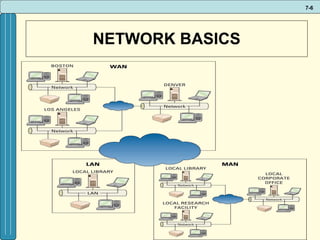
NETWORK BASICS Three types of networks include LAN, WAN, MAN: Local area network (LAN)  - A computer network that uses cables or wireless signals to link two or more computers within a geographically limited area, generally one building or a group of buildings Wide area network (WAN )- A computer network that provides data communication services for business in geographically dispersed areas (such as across a country or around the world). The Internet is a WAN that spans the world.
NETWORK BASICS Metropolitan area network (MAN)  - a computer network that provides connectivity in a geographic area or region larger than that covered by a local area network, but smaller than the area covered by a wide area network, usually spanning a city May be used to link community services such as police, fire, hospitals, EMS, traffic control, broadcast systems, etc.
NETWORK BASICS
NETWORK BASICS Networks are differentiated by the following: Architecture: peer-to-peer, client/server Network Operating System Packet switching Routers Topology: bus, star, ring, hybrid, wireless Protocols: Ethernet, Transmission Control Protocol/Internet Protocol (TCP/IP) Media:  Wired: coaxial, twisted-pair, fiber-optic Wireless: microwave, satellite, Wi-Fi, infra-red, etc.
ARCHITECTURE Two primary types of architectures Peer-to-peer (P2P) network  Client/server network
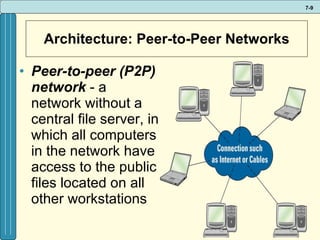
Architecture: Peer-to-Peer Networks Peer-to-peer (P2P) network  - a network without a central file server, in which all computers in the network have access to the public files located on all other workstations
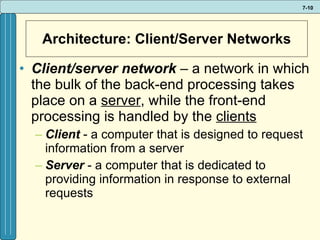
Architecture: Client/Server Networks Client/server network  –   a network in which the bulk of the back-end processing takes place on a  server , while the front-end processing is handled by the  clients Client   - a computer that is designed to request information from a server Server  - a computer that is dedicated to providing information in response to external requests
Network Operating System Network operating system (NOS)  -  the operating system that runs a network, steering information between computers and managing security and users  Coordinates: User accounts Accessing information Security Resource sharing Examples: Novell NetWare; Microsoft Windows Server; Converging Technologies LANtastic
Packet-switching Packet-switching  -   occurs when the sending computer divides a message into a number of efficiently sized units called packets, each of which contains the address of the destination computer Allows millions of users to send  large and small chunks   of data  across the Internet  concurrently  Based on the concept of  turn taking ;  packets  from each user are  alternated  in the shared network
Routers Router  -  an intelligent connecting device (HW) that examines each packet of data it receives and then decides which way to send (route) it onward toward its destination
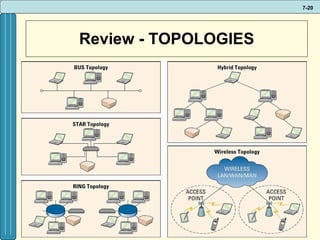
TOPOLOGY Network topology -  refers to the geometric arrangement of the actual physical organization of the computers and other network devices) in a network Star Bus Ring Hybrid Wireless
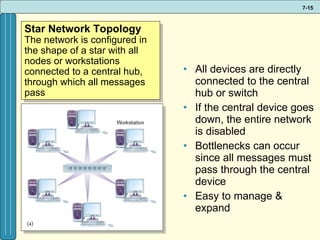
All devices are directly connected to the central hub or switch If the central device goes down, the entire network is disabled Bottlenecks can occur since all messages must pass through the central device Easy to manage & expand Star Network Topology The network is configured in the shape of a star with all nodes or workstations connected to a central hub, through which all messages pass
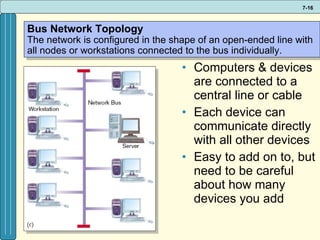
Computers & devices are connected to a central line or cable Each device can communicate directly with all other devices Easy to add on to, but need to be careful about how many devices you add Bus Network Topology The network is configured in the shape of an open-ended line with all nodes or workstations connected to the bus individually.
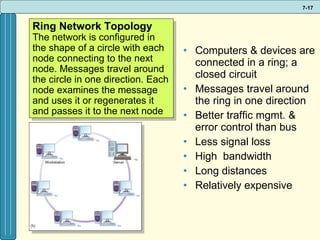
Computers & devices are connected in a ring; a closed circuit Messages travel around the ring in one direction Better traffic mgmt. & error control than bus Less signal loss High  bandwidth Long distances Relatively expensive Ring Network Topology The network is configured in the shape of a circle with each node connecting to the next node. Messages travel around the circle in one direction. Each node examines the message and uses it or regenerates it and passes it to the next node
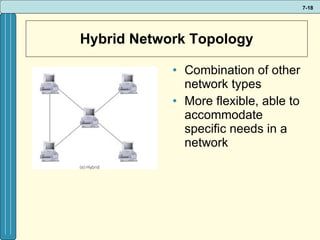
Hybrid Network Topology Combination of other network types More flexible, able to accommodate specific needs in a network
Wireless Networks Devices are connected by a receiver/transmitter to a special network interface card (NIC) that transmits signals  wirelessly  between a computer and a server, all within an acceptable transmission range
Review - TOPOLOGIES
PROTOCOLS Interoperability  - the capability of two or more computer systems to share data and resources, even though they are made by different manufacturers Protocol –  a standard that specifies the format of data as well as the rules to be followed during transmission – controls communication across a network
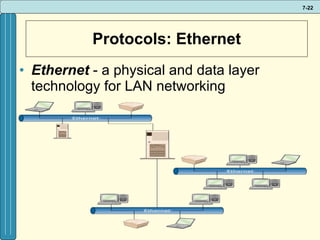
Protocols: Ethernet Ethernet  - a physical and data layer technology for LAN networking
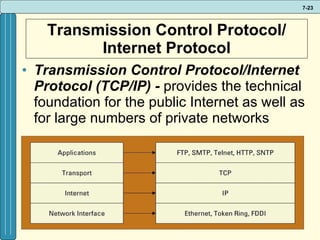
Transmission Control Protocol/ Internet Protocol Transmission Control Protocol/Internet Protocol (TCP/IP) -  provides the technical foundation for the public Internet as well as for large numbers of private networks
Transmission Control Protocol/ Internet Protocol TCP – Transmission Control Protocol Breaks information into small chunks called data packets Manages the transfer of the packets from computer to computer Reassembles data packets back into the message at the destination IP – Internet Protocol Controls how data packets are formed Addresses each packet with the source and destination address
Transmission Control Protocol/ Internet Protocol TCP/IP applications File transfer protocol (FTP) Simple mail transfer protocol (SMTP) Telnet Hypertext transfer protocol (HTTP) Simple network management Protocol (SNMP)
MEDIA Network transmission media  -   refers to the various types of media used to carry the signal between computers Wired media (guided, cabled) Wireless media (unguided, broadcast)
Characteristics of Transmission Media Speed  – measured in bps (bits per second) Bandwidth : the communications capacity of a communications channel; the range of frequencies available in the channel; the difference between the highest and the lowest frequencies that can be transmitted on a single medium Broadband  - refers to high-speed Internet connections transmitting data at speeds greater than 200 kilobytes per second (Kbps)
Characteristics of Transmission Media Attenuation –  this results when the power of an electrical signal weakens as it is sent over increasing distance Electro Magnetic Interference (EMI) –  interference commonly caused by fluorescent lights, weather, or other electronic signals that affect the distance a signal can travel as well as its quality
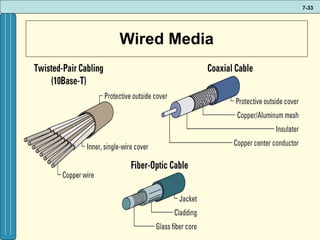
Wired Media Wired Media –  physical transmission media manufactured so that signals will be confined to a narrow path and will behave predictably Three commonly used types include: Twisted-pair wiring Coaxial cable Fiber Optic (or optical fiber)
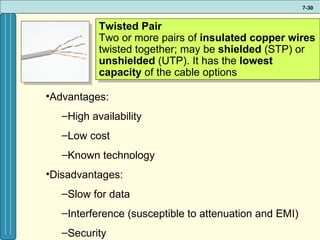
Twisted Pair Two or more pairs of  insulated copper wires  twisted together; may be  shielded  (STP) or  unshielded  (UTP). It has the  lowest capacity  of the cable options Advantages: High availability Low cost  Known technology Disadvantages: Slow for data Interference (susceptible to attenuation and EMI) Security
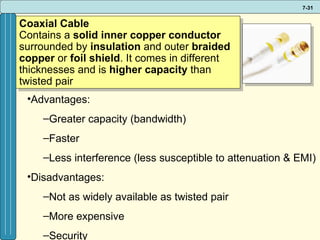
Coaxial Cable Contains a  solid inner copper conductor  surrounded by  insulation  and outer  braided copper  or  foil shield . It comes in different thicknesses and is  higher capacity  than twisted pair Advantages: Greater capacity (bandwidth) Faster Less interference (less susceptible to attenuation & EMI) Disadvantages: Not as widely available as twisted pair More expensive Security
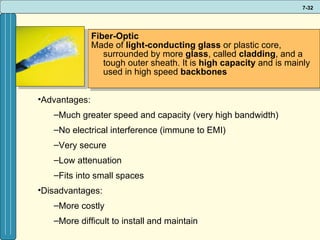
Fiber-Optic Made of  light-conducting glass  or plastic core, surrounded by more  glass , called  cladding , and a tough outer sheath. It is  high capacity  and is mainly used in high speed  backbones Advantages: Much greater speed and capacity (very high bandwidth) No electrical interference (immune to EMI) Very secure  Low attenuation Fits into small spaces Disadvantages: More costly More difficult to install and maintain
Wired Media
Wireless Media Wireless media  - natural parts of the Earth’s environment that can be used as paths to carry electrical signals; no physical transmission media Infrared light High frequency radio RFID Bluetooth Pagers Cellular  Wi-Fi & WiMax Microwave/satellite transmission
Infrared light Uses  high-frequency light waves  to transmit  data  on an unobstructed path between  nodes  – computers or other devices such as a printer – on a network up to 24.4 meters (i.e. most electronic remotes use this infrared light) are  susceptible  to  attenuation ,  EMI ,  eavesdropping ,  high-intensity light , and  smoke
Hi Frequency Radio A fast transmission medium for distances up to 40 kilometers, depending on obstructions. Attenuation is very low within the prescribed distance, but is susceptible to EMI and eavesdropping.  Applications of this technology include RFID Bluetooth Pagers Cellular phones Wi-Fi/Wi-Max
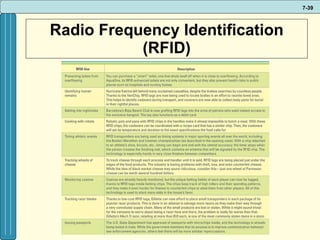
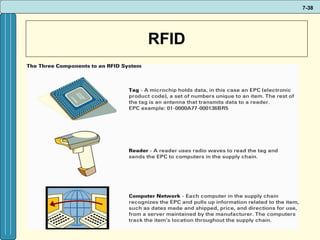
RFID - Radio Frequency Identification Radio frequency identification (RFID)  - uses active or passive tags in the form of chips or smart labels that can store unique identifiers and relay this information to electronic readers RFID tag  - contains a microchip and an antenna, and typically work by transmitting a serial number via radio waves to an electronic reader, which confirms the identity of a person or object bearing the tag
RFID
Radio Frequency Identification (RFID)
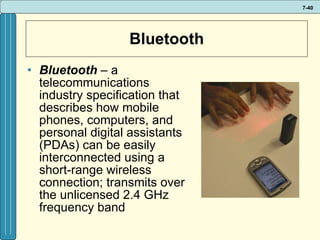
Bluetooth Bluetooth  – a telecommunications industry specification that describes how mobile phones, computers, and personal digital assistants (PDAs) can be easily interconnected using a short-range wireless connection; transmits over the unlicensed 2.4 GHz frequency band
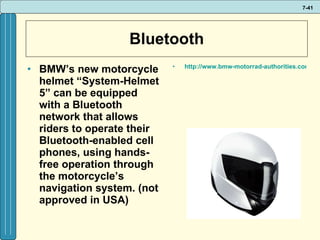
Bluetooth BMW’s new motorcycle helmet “System-Helmet 5” can be equipped with a Bluetooth network that allows riders to operate their Bluetooth-enabled cell phones, using hands-free operation through the motorcycle’s navigation system. (not approved in USA) http://www.bmw-motorrad-authorities.com/authorities/en/index_frameset.html?content=http://www.bmw-motorrad-authorities.com/authorities/en/equipment/riderspoint/products/systemhelmet_5.html
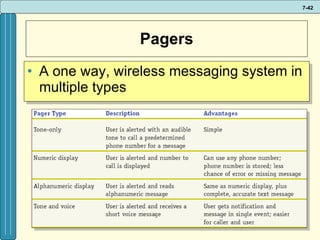
Pagers A one way, wireless messaging system in multiple types
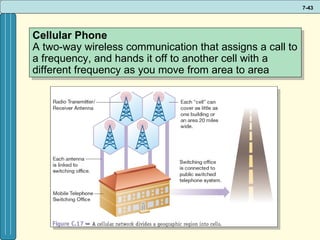
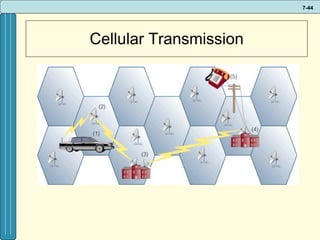
Cellular Phone A two-way wireless communication that assigns a call to a frequency, and hands it off to another cell with a different frequency as you move from area to area
Cellular Transmission
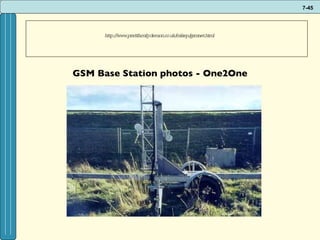
http://www.prattfamily.demon.co.uk/mikep/gsmnet.html  GSM Base Station photos - One2One                                                                                                                                                                                               
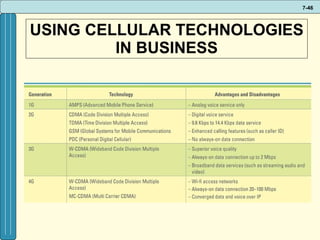
USING CELLULAR TECHNOLOGIES IN BUSINESS
USING CELLULAR TECHNOLOGIES IN BUSINESS The latest trends in cell phones reflect a convergence of voice, video and data communications Personal digital assistants (PDA) are small, handheld computers capable of entirely digital communications transmission Smartphone  - combines the functions of a cellular phone and a PDA in a single device
WIRELESS FIDELITY (Wi-Fi) Wi-Fi (Wireless fidelity)  – based on the IEEE  standard called 802.11, this technology enables multiple computers to share Internet access, files, and peripheral devices within ranges of 150’ – 300’ A, B, G, Super G, N, Xtreme N The main problem with Wi-Fi access is that hot spots are relatively small, so coverage is limited
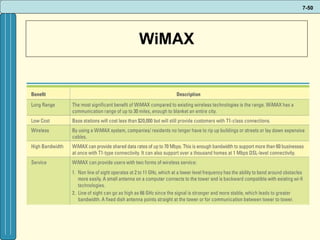
WIRELESS FIDELITY (WiMAX) WiMAX  (Worldwide Interoperability for Microwave Access) – based on the 802.16 standard, enables wireless networks to extend as far as 30 – 50 miles A WiMAX system consists of two parts: A WiMAX tower  - A single WiMAX tower can provide coverage to a very large area - as big as 3,000 square miles A WiMAX receiver  - The receiver and antenna could be built into a laptop the way Wi-Fi access is today
WiMAX
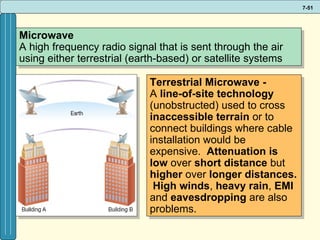
Microwave A high frequency radio signal that is sent through the air using either terrestrial (earth-based) or satellite systems Terrestrial Microwave - A  line-of-site   technology  (unobstructed) used to cross  inaccessible terrain  or to connect buildings where cable installation would be expensive.  Attenuation is low  over  short distance  but  higher  over  longer distances.   High winds ,  heavy rain ,  EMI  and  eavesdropping  are also problems.
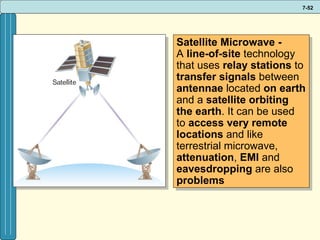
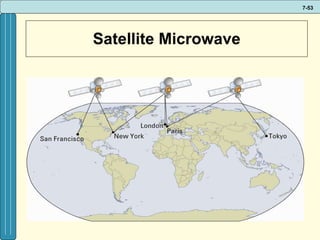
Satellite Microwave - A  line-of-site  technology that uses  relay stations  to  transfer signals  between  antennae  located  on earth  and a  satellite orbiting the earth . It can be used to  access   very remote locations  and like terrestrial microwave,  attenuation ,  EMI  and  eavesdropping  are also  problems
Satellite Microwave
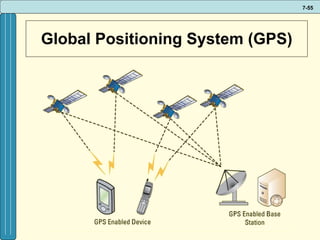
USING SATELLITE TECHNOLOGIES IN BUSINESS Global positioning system (GPS)  – a "constellation" of 24 well-spaced satellites that orbit the Earth and make it possible for people with ground receivers to pinpoint their geographic location by determining current latitude, longitude, speed, and direction of movement Market for GPS services is at $5 billion with expectations for the demand to double over the next five years Location accuracy is anywhere from 10 to 100 meters
Global Positioning System (GPS)
USING SATELLITE TECHNOLOGIES IN BUSINESS Geographic Information System (GIS)  - is designed to work with information that can be shown on a map Most location based applications use a GIS combined with database and GPS technology
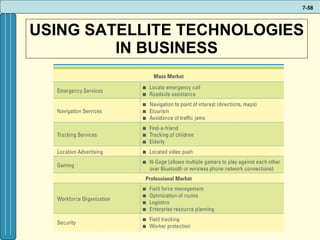
USING SATELLITE TECHNOLOGIES IN BUSINESS Location-based services (LBS) -  are wireless mobile content services which provide location-specific information to mobile users moving from location to location Common Location Based Services based on GIS/GPS technology: Finding what is nearby Routing information Information alerts Mapping densities Mapping quantities
USING SATELLITE TECHNOLOGIES IN BUSINESS
GPS Shoes http://www.youtube.com/watch?v=n5wMza29JwI
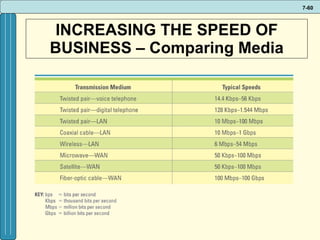
INCREASING THE SPEED OF BUSINESS – Comparing Media
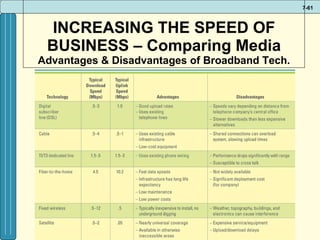
INCREASING THE SPEED OF BUSINESS – Comparing Media Advantages & Disadvantages of Broadband Tech.
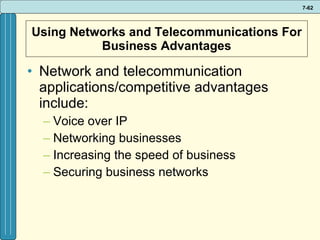
Using Networks and Telecommunications For Business Advantages Network and telecommunication applications/competitive advantages include: Voice over IP Networking businesses Increasing the speed of business Securing business networks
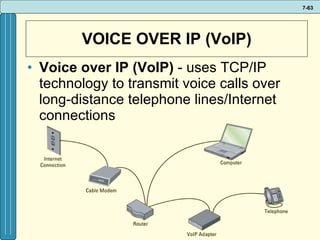
VOICE OVER IP (VoIP) Voice over IP (VoIP)   -   uses TCP/IP technology to transmit voice calls over long-distance telephone lines/Internet connections
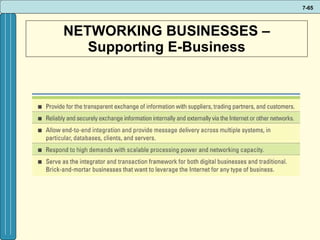
NETWORKING BUSINESSES – Supporting E-Business Industry-leading companies have developed Internet-based products and services to handle many aspects of customer and supplier interactions Customers now expect seamless retailing between online and in-store
NETWORKING BUSINESSES – Supporting E-Business
SECURING BUSINESS NETWORKS Network security is important – networks are a tempting target for mischief and fraud Organizations are concerned about… Authentication, Authorization, Access to and protection of data
SECURING BUSINESS NETWORKS Virtual private network (VPN)  -  a way to use the public telecommunication infrastructure (e.g., Internet) to provide secure access to an organization’s network  Valued-added network (VAN)  -   a private network, provided by a third party, for exchanging information through a high capacity connection
BUSINESS DRIVERS FOR A MOBILE WORKFORCE Companies worldwide are going wireless to increase productivity, speed delivery to market, and reduce operating costs Wireless transmissions rely on radio waves, microwaves, and satellites to send data across high frequency radio ranges that later connect to wired media
BUSINESS DRIVERS FOR A MOBILE WORKFORCE The terms  mobile  and  wireless  are often used synonymously, but actually denote two different technologies Mobile  means the technology can travel with the user, but it is not necessarily in real-time Wireless  refers to any type of electrical or electronic operation that is accomplished without the use of a “hard wired” connection
BUSINESS DRIVERS FOR WIRELESS TECHNOLOGIES Drivers of wireless technology growth include: Universal access to information and applications  User convenience, timeliness, and ability to conduct business/communicate 24x7 The automation of business processes Sheer number of U.S. wireless device users
BUSINESS DRIVERS FOR WIRELESS TECHNOLOGIES Wireless devices changing business include: Wireless local area networks (wLAN) Cellular phones and pagers Cordless computer peripherals Satellite radio and television WiFi and WiMAX  Security sensors Global Positioning Systems (GPS)
MOBILE WORKFORCE TRENDS Social networking gets mobilized Mobile TV Multi-function devices become cheaper and more versatile Location-based services Mobile advertising Wireless providers move into home entertainment Wireless security moves to the forefront Enterprise mobility

It infrastructure

  • 1.
  • 2.
    NETWORKS, TELECOMMUNICATIONS, ANDMOBILE TECHNOLOGY Business Driven Information Systems 2e
  • 3.
    NETWORK BASICS Telecommunicationsystem - enables the transmission of data over public or private networks Network - a communications, data exchange, and resource-sharing system created by linking two or more computers, and by establishing standards, or protocols, so that they can work together
  • 4.
    NETWORK BASICS Threetypes of networks include LAN, WAN, MAN: Local area network (LAN) - A computer network that uses cables or wireless signals to link two or more computers within a geographically limited area, generally one building or a group of buildings Wide area network (WAN )- A computer network that provides data communication services for business in geographically dispersed areas (such as across a country or around the world). The Internet is a WAN that spans the world.
  • 5.
    NETWORK BASICS Metropolitanarea network (MAN) - a computer network that provides connectivity in a geographic area or region larger than that covered by a local area network, but smaller than the area covered by a wide area network, usually spanning a city May be used to link community services such as police, fire, hospitals, EMS, traffic control, broadcast systems, etc.
  • 6.
  • 7.
    NETWORK BASICS Networksare differentiated by the following: Architecture: peer-to-peer, client/server Network Operating System Packet switching Routers Topology: bus, star, ring, hybrid, wireless Protocols: Ethernet, Transmission Control Protocol/Internet Protocol (TCP/IP) Media: Wired: coaxial, twisted-pair, fiber-optic Wireless: microwave, satellite, Wi-Fi, infra-red, etc.
  • 8.
    ARCHITECTURE Two primarytypes of architectures Peer-to-peer (P2P) network Client/server network
  • 9.
    Architecture: Peer-to-Peer NetworksPeer-to-peer (P2P) network - a network without a central file server, in which all computers in the network have access to the public files located on all other workstations
  • 10.
    Architecture: Client/Server NetworksClient/server network – a network in which the bulk of the back-end processing takes place on a server , while the front-end processing is handled by the clients Client - a computer that is designed to request information from a server Server - a computer that is dedicated to providing information in response to external requests
  • 11.
    Network Operating SystemNetwork operating system (NOS) - the operating system that runs a network, steering information between computers and managing security and users Coordinates: User accounts Accessing information Security Resource sharing Examples: Novell NetWare; Microsoft Windows Server; Converging Technologies LANtastic
  • 12.
    Packet-switching Packet-switching - occurs when the sending computer divides a message into a number of efficiently sized units called packets, each of which contains the address of the destination computer Allows millions of users to send large and small chunks of data across the Internet concurrently Based on the concept of turn taking ; packets from each user are alternated in the shared network
  • 13.
    Routers Router - an intelligent connecting device (HW) that examines each packet of data it receives and then decides which way to send (route) it onward toward its destination
  • 14.
    TOPOLOGY Network topology- refers to the geometric arrangement of the actual physical organization of the computers and other network devices) in a network Star Bus Ring Hybrid Wireless
  • 15.
    All devices aredirectly connected to the central hub or switch If the central device goes down, the entire network is disabled Bottlenecks can occur since all messages must pass through the central device Easy to manage & expand Star Network Topology The network is configured in the shape of a star with all nodes or workstations connected to a central hub, through which all messages pass
  • 16.
    Computers & devicesare connected to a central line or cable Each device can communicate directly with all other devices Easy to add on to, but need to be careful about how many devices you add Bus Network Topology The network is configured in the shape of an open-ended line with all nodes or workstations connected to the bus individually.
  • 17.
    Computers & devicesare connected in a ring; a closed circuit Messages travel around the ring in one direction Better traffic mgmt. & error control than bus Less signal loss High bandwidth Long distances Relatively expensive Ring Network Topology The network is configured in the shape of a circle with each node connecting to the next node. Messages travel around the circle in one direction. Each node examines the message and uses it or regenerates it and passes it to the next node
  • 18.
    Hybrid Network TopologyCombination of other network types More flexible, able to accommodate specific needs in a network
  • 19.
    Wireless Networks Devicesare connected by a receiver/transmitter to a special network interface card (NIC) that transmits signals wirelessly between a computer and a server, all within an acceptable transmission range
  • 20.
  • 21.
    PROTOCOLS Interoperability - the capability of two or more computer systems to share data and resources, even though they are made by different manufacturers Protocol – a standard that specifies the format of data as well as the rules to be followed during transmission – controls communication across a network
  • 22.
    Protocols: Ethernet Ethernet - a physical and data layer technology for LAN networking
  • 23.
    Transmission Control Protocol/Internet Protocol Transmission Control Protocol/Internet Protocol (TCP/IP) - provides the technical foundation for the public Internet as well as for large numbers of private networks
  • 24.
    Transmission Control Protocol/Internet Protocol TCP – Transmission Control Protocol Breaks information into small chunks called data packets Manages the transfer of the packets from computer to computer Reassembles data packets back into the message at the destination IP – Internet Protocol Controls how data packets are formed Addresses each packet with the source and destination address
  • 25.
    Transmission Control Protocol/Internet Protocol TCP/IP applications File transfer protocol (FTP) Simple mail transfer protocol (SMTP) Telnet Hypertext transfer protocol (HTTP) Simple network management Protocol (SNMP)
  • 26.
    MEDIA Network transmissionmedia - refers to the various types of media used to carry the signal between computers Wired media (guided, cabled) Wireless media (unguided, broadcast)
  • 27.
    Characteristics of TransmissionMedia Speed – measured in bps (bits per second) Bandwidth : the communications capacity of a communications channel; the range of frequencies available in the channel; the difference between the highest and the lowest frequencies that can be transmitted on a single medium Broadband - refers to high-speed Internet connections transmitting data at speeds greater than 200 kilobytes per second (Kbps)
  • 28.
    Characteristics of TransmissionMedia Attenuation – this results when the power of an electrical signal weakens as it is sent over increasing distance Electro Magnetic Interference (EMI) – interference commonly caused by fluorescent lights, weather, or other electronic signals that affect the distance a signal can travel as well as its quality
  • 29.
    Wired Media WiredMedia – physical transmission media manufactured so that signals will be confined to a narrow path and will behave predictably Three commonly used types include: Twisted-pair wiring Coaxial cable Fiber Optic (or optical fiber)
  • 30.
    Twisted Pair Twoor more pairs of insulated copper wires twisted together; may be shielded (STP) or unshielded (UTP). It has the lowest capacity of the cable options Advantages: High availability Low cost Known technology Disadvantages: Slow for data Interference (susceptible to attenuation and EMI) Security
  • 31.
    Coaxial Cable Containsa solid inner copper conductor surrounded by insulation and outer braided copper or foil shield . It comes in different thicknesses and is higher capacity than twisted pair Advantages: Greater capacity (bandwidth) Faster Less interference (less susceptible to attenuation & EMI) Disadvantages: Not as widely available as twisted pair More expensive Security
  • 32.
    Fiber-Optic Made of light-conducting glass or plastic core, surrounded by more glass , called cladding , and a tough outer sheath. It is high capacity and is mainly used in high speed backbones Advantages: Much greater speed and capacity (very high bandwidth) No electrical interference (immune to EMI) Very secure Low attenuation Fits into small spaces Disadvantages: More costly More difficult to install and maintain
  • 33.
  • 34.
    Wireless Media Wirelessmedia - natural parts of the Earth’s environment that can be used as paths to carry electrical signals; no physical transmission media Infrared light High frequency radio RFID Bluetooth Pagers Cellular Wi-Fi & WiMax Microwave/satellite transmission
  • 35.
    Infrared light Uses high-frequency light waves to transmit data on an unobstructed path between nodes – computers or other devices such as a printer – on a network up to 24.4 meters (i.e. most electronic remotes use this infrared light) are susceptible to attenuation , EMI , eavesdropping , high-intensity light , and smoke
  • 36.
    Hi Frequency RadioA fast transmission medium for distances up to 40 kilometers, depending on obstructions. Attenuation is very low within the prescribed distance, but is susceptible to EMI and eavesdropping. Applications of this technology include RFID Bluetooth Pagers Cellular phones Wi-Fi/Wi-Max
  • 37.
    RFID - RadioFrequency Identification Radio frequency identification (RFID) - uses active or passive tags in the form of chips or smart labels that can store unique identifiers and relay this information to electronic readers RFID tag - contains a microchip and an antenna, and typically work by transmitting a serial number via radio waves to an electronic reader, which confirms the identity of a person or object bearing the tag
  • 38.
  • 39.
  • 40.
    Bluetooth Bluetooth – a telecommunications industry specification that describes how mobile phones, computers, and personal digital assistants (PDAs) can be easily interconnected using a short-range wireless connection; transmits over the unlicensed 2.4 GHz frequency band
  • 41.
    Bluetooth BMW’s newmotorcycle helmet “System-Helmet 5” can be equipped with a Bluetooth network that allows riders to operate their Bluetooth-enabled cell phones, using hands-free operation through the motorcycle’s navigation system. (not approved in USA) http://www.bmw-motorrad-authorities.com/authorities/en/index_frameset.html?content=http://www.bmw-motorrad-authorities.com/authorities/en/equipment/riderspoint/products/systemhelmet_5.html
  • 42.
    Pagers A oneway, wireless messaging system in multiple types
  • 43.
    Cellular Phone Atwo-way wireless communication that assigns a call to a frequency, and hands it off to another cell with a different frequency as you move from area to area
  • 44.
  • 45.
    http://www.prattfamily.demon.co.uk/mikep/gsmnet.html GSMBase Station photos - One2One                                                                                                                                                                                             
  • 46.
  • 47.
    USING CELLULAR TECHNOLOGIESIN BUSINESS The latest trends in cell phones reflect a convergence of voice, video and data communications Personal digital assistants (PDA) are small, handheld computers capable of entirely digital communications transmission Smartphone - combines the functions of a cellular phone and a PDA in a single device
  • 48.
    WIRELESS FIDELITY (Wi-Fi)Wi-Fi (Wireless fidelity) – based on the IEEE standard called 802.11, this technology enables multiple computers to share Internet access, files, and peripheral devices within ranges of 150’ – 300’ A, B, G, Super G, N, Xtreme N The main problem with Wi-Fi access is that hot spots are relatively small, so coverage is limited
  • 49.
    WIRELESS FIDELITY (WiMAX)WiMAX (Worldwide Interoperability for Microwave Access) – based on the 802.16 standard, enables wireless networks to extend as far as 30 – 50 miles A WiMAX system consists of two parts: A WiMAX tower - A single WiMAX tower can provide coverage to a very large area - as big as 3,000 square miles A WiMAX receiver - The receiver and antenna could be built into a laptop the way Wi-Fi access is today
  • 50.
  • 51.
    Microwave A highfrequency radio signal that is sent through the air using either terrestrial (earth-based) or satellite systems Terrestrial Microwave - A line-of-site technology (unobstructed) used to cross inaccessible terrain or to connect buildings where cable installation would be expensive. Attenuation is low over short distance but higher over longer distances. High winds , heavy rain , EMI and eavesdropping are also problems.
  • 52.
    Satellite Microwave -A line-of-site technology that uses relay stations to transfer signals between antennae located on earth and a satellite orbiting the earth . It can be used to access very remote locations and like terrestrial microwave, attenuation , EMI and eavesdropping are also problems
  • 53.
  • 54.
    USING SATELLITE TECHNOLOGIESIN BUSINESS Global positioning system (GPS) – a "constellation" of 24 well-spaced satellites that orbit the Earth and make it possible for people with ground receivers to pinpoint their geographic location by determining current latitude, longitude, speed, and direction of movement Market for GPS services is at $5 billion with expectations for the demand to double over the next five years Location accuracy is anywhere from 10 to 100 meters
  • 55.
  • 56.
    USING SATELLITE TECHNOLOGIESIN BUSINESS Geographic Information System (GIS) - is designed to work with information that can be shown on a map Most location based applications use a GIS combined with database and GPS technology
  • 57.
    USING SATELLITE TECHNOLOGIESIN BUSINESS Location-based services (LBS) - are wireless mobile content services which provide location-specific information to mobile users moving from location to location Common Location Based Services based on GIS/GPS technology: Finding what is nearby Routing information Information alerts Mapping densities Mapping quantities
  • 58.
  • 59.
  • 60.
    INCREASING THE SPEEDOF BUSINESS – Comparing Media
  • 61.
    INCREASING THE SPEEDOF BUSINESS – Comparing Media Advantages & Disadvantages of Broadband Tech.
  • 62.
    Using Networks andTelecommunications For Business Advantages Network and telecommunication applications/competitive advantages include: Voice over IP Networking businesses Increasing the speed of business Securing business networks
  • 63.
    VOICE OVER IP(VoIP) Voice over IP (VoIP) - uses TCP/IP technology to transmit voice calls over long-distance telephone lines/Internet connections
  • 64.
    NETWORKING BUSINESSES –Supporting E-Business Industry-leading companies have developed Internet-based products and services to handle many aspects of customer and supplier interactions Customers now expect seamless retailing between online and in-store
  • 65.
    NETWORKING BUSINESSES –Supporting E-Business
  • 66.
    SECURING BUSINESS NETWORKSNetwork security is important – networks are a tempting target for mischief and fraud Organizations are concerned about… Authentication, Authorization, Access to and protection of data
  • 67.
    SECURING BUSINESS NETWORKSVirtual private network (VPN) - a way to use the public telecommunication infrastructure (e.g., Internet) to provide secure access to an organization’s network Valued-added network (VAN) - a private network, provided by a third party, for exchanging information through a high capacity connection
  • 68.
    BUSINESS DRIVERS FORA MOBILE WORKFORCE Companies worldwide are going wireless to increase productivity, speed delivery to market, and reduce operating costs Wireless transmissions rely on radio waves, microwaves, and satellites to send data across high frequency radio ranges that later connect to wired media
  • 69.
    BUSINESS DRIVERS FORA MOBILE WORKFORCE The terms mobile and wireless are often used synonymously, but actually denote two different technologies Mobile means the technology can travel with the user, but it is not necessarily in real-time Wireless refers to any type of electrical or electronic operation that is accomplished without the use of a “hard wired” connection
  • 70.
    BUSINESS DRIVERS FORWIRELESS TECHNOLOGIES Drivers of wireless technology growth include: Universal access to information and applications User convenience, timeliness, and ability to conduct business/communicate 24x7 The automation of business processes Sheer number of U.S. wireless device users
  • 71.
    BUSINESS DRIVERS FORWIRELESS TECHNOLOGIES Wireless devices changing business include: Wireless local area networks (wLAN) Cellular phones and pagers Cordless computer peripherals Satellite radio and television WiFi and WiMAX Security sensors Global Positioning Systems (GPS)
  • 72.
    MOBILE WORKFORCE TRENDSSocial networking gets mobilized Mobile TV Multi-function devices become cheaper and more versatile Location-based services Mobile advertising Wireless providers move into home entertainment Wireless security moves to the forefront Enterprise mobility