DATA
COMMUNICATION
RESEARCH
By: BSCpE - V
TOPIC - I
COMPUTER NETWORK
MODELS
by: Majane Padua
LAYERED TASKS
•We use the concept of layers in our daily
life. As an example, let us consider two
friends who communicate through postal
mail. The process of sending a letter to a
friend would be complex if there were no
services available from the post office.
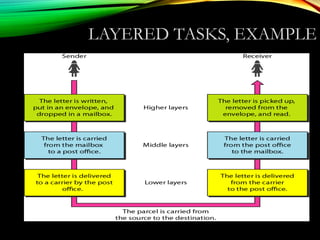
LAYERED TASKS, EXAMPLELAYERED TASKS, EXAMPLE
THE
OSI MODEL
THE OSI MODEL
 Established in 1947, the International Standards
Organization (ISO) is a multinational body dedicated to
worldwide agreement on international standards. An ISO
standard that covers all aspects of network
communications is the Open Systems Interconnection
(OSI) model. It was first introduced in the late 1970s.
 Note:
◦ ISO is the organization.
◦ OSI is the model.
HISTORY
• Rapid growth of computer networks caused
compatibility problems
• ISO recognized the problem and released the OSI
model in 1984
• OSI stands for Open Systems Interconnection and
consists of 7 Layers
• The use of layers is designed to reduce complexity and
make standardization easier
7 LAYERS IN THE
OSI MODEL
7 LAYERS OF THE OSI
MODEL
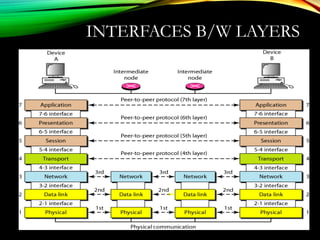
INTERFACES B/W LAYERS
2.12
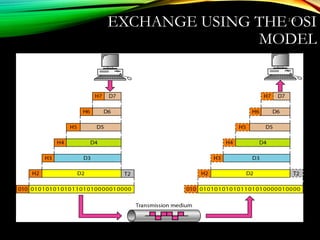
EXCHANGE USING THE OSI
MODEL
7 LAYERS OF THE OSI
MODEL
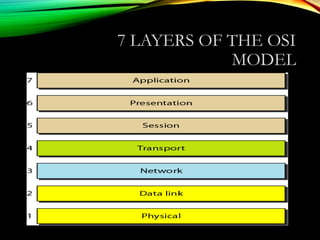
Layer Responsible For:
7.) Application Provides Services to User Apps
6.) Presentation Data Representation
5.) Session Communication Between Hosts
4.) Transport Flow Ctrl, Error Detection/Correction
3.) Network End to End Delivery, Logical Addr
2.) Data Link Media Access Ctrl, Physical Addr
1.) Physical Medium, Interfaces, Puts Bits on Med.
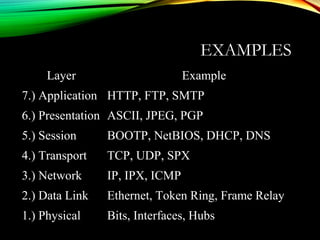
EXAMPLES
Layer Example
7.) Application HTTP, FTP, SMTP
6.) Presentation ASCII, JPEG, PGP
5.) Session BOOTP, NetBIOS, DHCP, DNS
4.) Transport TCP, UDP, SPX
3.) Network IP, IPX, ICMP
2.) Data Link Ethernet, Token Ring, Frame Relay
1.) Physical Bits, Interfaces, Hubs
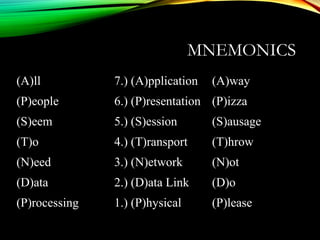
MNEMONICS
(A)ll 7.) (A)pplication (A)way
(P)eople 6.) (P)resentation (P)izza
(S)eem 5.) (S)ession (S)ausage
(T)o 4.) (T)ransport (T)hrow
(N)eed 3.) (N)etwork (N)ot
(D)ata 2.) (D)ata Link (D)o
(P)rocessing 1.) (P)hysical (P)lease
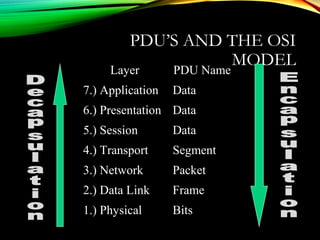
PDU’S AND THE OSI
MODEL
Layer PDU Name
7.) Application Data
6.) Presentation Data
5.) Session Data
4.) Transport Segment
3.) Network Packet
2.) Data Link Frame
1.) Physical Bits
INTERNET
MODEL
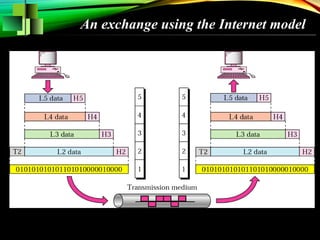
Internet Model
Peer-to-Peer Processes
Functions of Layers
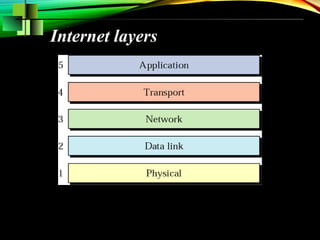
Internet layers
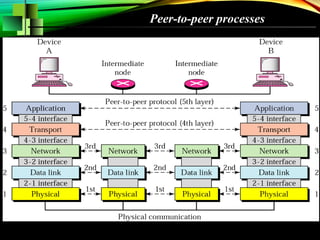
Peer-to-peer processes
An exchange using the Internet model
TOPIC - II
22
COMPUTER NETWORK
SECURITY
By: Majane Padua
23
A BRIEF HISTORY OF THE
WORLD
INFORMATION SECURITY
• The information systems are known to be vulnerable
to many threats like cyber crime, hacking and terrorism
• Regardless of whether the information has been stolen
by the attacker or not, the security breaches and virus
attacks result in adverse publicity to the organization.
•Thus issues like protection and security of the
information systems have become greater concern.
INFORMATION SECURITY
• Information &Network penetration do occur
- from outsiders & insiders in spite of
having various security measures such as
Anti-virus, Firewalls, Routers
• There are two ways to attack computers
- Gain physical access to machines &
conduct physical attack
- Attack by use of malicious software;
Malware
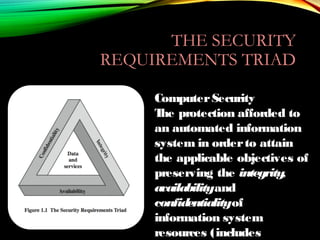
THE SECURITY
REQUIREMENTS TRIAD
ComputerSecurity
The protection afforded to
an automated information
system in orderto attain
the applicable objectives of
preserving the integrity,
availabilityand
confidentialityof
information system
resources (includes
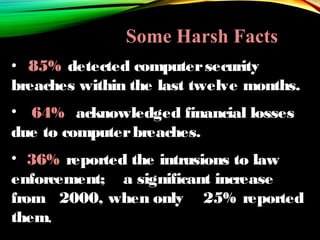
• 85% detected computersecurity
breaches within the last twelve months.
• 64% acknowledged financial losses
due to computerbreaches.
• 36% reported the intrusions to law
enforcement; a significant increase
from 2000, when only 25% reported
them.
Some Harsh Facts
SECURITY
REQUIREMENTS
• Confidentiality
–Preserving authorized restrictionson
information access and disclosure, including
meansfor protecting personal privacy and
proprietary information.
• Integrity
–Guarding against information modifications or
destruction, including ensuring information
non-repudiation and authenticity.
• Availability
–Ensuring timely and reliableaccessto and use
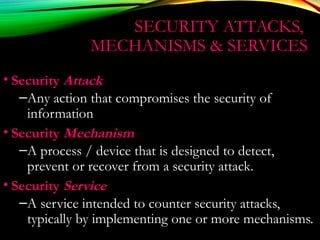
SECURITY ATTACKS,
MECHANISMS & SERVICES
• Security Attack
–Any action that compromises the security of
information
• Security Mechanism
–A process / device that is designed to detect,
prevent or recover from a security attack.
• Security Service
–A service intended to counter security attacks,
typically by implementing one or more mechanisms.
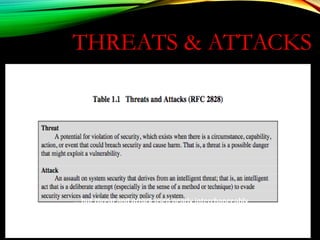
THREATS & ATTACKS
… but threat and attack used nearly interchangeably
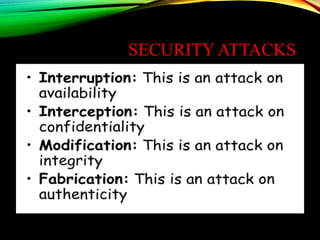
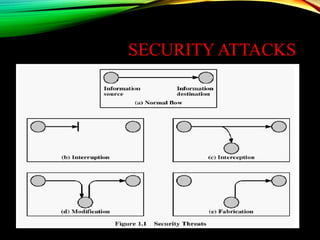
SECURITY ATTACKS
SECURITY ATTACKS
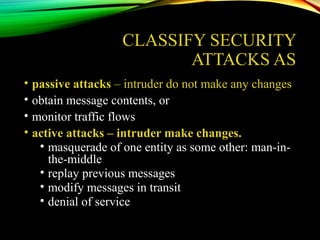
CLASSIFY SECURITY
ATTACKS AS
• passive attacks – intruder do not make any changes
• obtain message contents, or
• monitor traffic flows
• active attacks – intruder make changes.
• masquerade of one entity as some other: man-in-
the-middle
• replay previous messages
• modify messages in transit
• denial of service
SECURITY OBJECTIVES
Confidentiality (Secrecy):
Prevent/Detect/Deter improper disclosure of information
Integrity:
Prevent/Detect/Deter improper modification of information
Availability:
Prevent/Detect/Deter improper denial of access to services provided by the
system
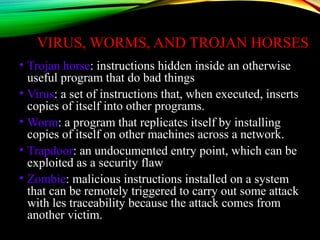
VIRUS, WORMS, AND TROJAN HORSES
• Trojan horse: instructions hidden inside an otherwise
useful program that do bad things
• Virus: a set of instructions that, when executed, inserts
copies of itself into other programs.
• Worm: a program that replicates itself by installing
copies of itself on other machines across a network.
• Trapdoor: an undocumented entry point, which can be
exploited as a security flaw
• Zombie: malicious instructions installed on a system
that can be remotely triggered to carry out some attack
with les traceability because the attack comes from
another victim.
CRYPTOGRAPHY
BY: MAJANE PADUA
WHAT IS CRYPTOGRAPHY
• Cryptography
• In a narrow sense
• Mangling information into apparent unintelligibility
• Allowing a secret method of un-mangling
• In a broader sense
• Mathematical techniques related to information security
• About secure communication in the presence of
adversaries
• Cryptanalysis
• The study of methods for obtaining the meaning of
encrypted information without accessing the secret
information
• Cryptology
• Cryptography + cryptanalysis
TYPES OF CRYPTOGRAPHY
•Symmetric Cryptography
•Asymmetric Cryptography
SYMMETRIC
CRYPTOGRAPHY
It used single function called
SECRET KEY or PRIVATE
KEY
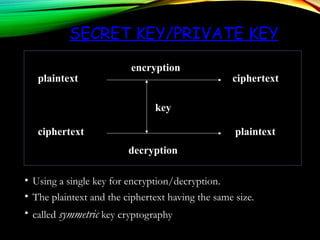
SECRET KEY/PRIVATE KEY
• Using a single key for encryption/decryption.
• The plaintext and the ciphertext having the same size.
• called symmetric key cryptography
plaintext
ciphertext plaintext
ciphertext
decryption
encryption
key
ASYMMETRIC
CRYPTOGRAPHY
•It used two keys for
encryption/ decryption
•Called the public key and the
private key
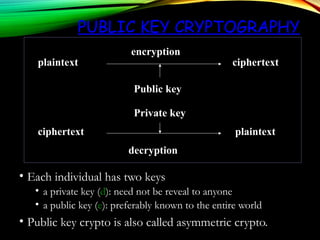
PUBLIC KEY CRYPTOGRAPHY
• Each individual has two keys
• a private key (d): need not be reveal to anyone
• a public key (e): preferably known to the entire world
• Public key crypto is also called asymmetric crypto.
plaintext
ciphertext plaintext
ciphertext
decryption
encryption
Private key
Public key
PRIVATE-KEY
CRYPTOGRAPHY
• traditional private/secret/single key cryptography
uses one key
• shared by both sender and receiver
• if this key is disclosed communications are
compromised
• also is symmetric, parties are equal
• hence does not protect sender from receiver forging a
message & claiming is sent by sender
TOPIC - III
PHYSICAL
LAYER
LAYER 1: THE PHYSICAL
LAYER
• Defines physical medium and interfaces
• Determines how bits are represented
• Controls transmission rate & bit
synchronization
• Controls transmission mode: simplex, half-
duplex, & full duplex
• PDU: Bits
• Devices: hubs, cables, connectors, etc…
The physical layer is
responsible for transmitting
individual bits from one
node to the next.
Note:Note:
OUTLINE
•Circuits
• Configuration, Data Flow, Communication Media
•Digital Transmission of Digital Data
• Coding, Transmission Modes,
•Analog Transmission of Digital Data
• Modulation, Voice Circuit Capacity,
•Digital Transmission of Analog Data
• Pulse Amplitude Modulation, Voice Data Transmittion, Instant Messenger
Transmitting Voice Data
•Analog/Digital Modems
•Multiplexing
• FDM, TDM, STDM, WDM, Inverse Multiplexing, DSL
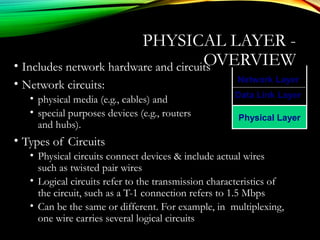
PHYSICAL LAYER -
OVERVIEW• Includes network hardware and circuits
• Network circuits:
• physical media (e.g., cables) and
• special purposes devices (e.g., routers
and hubs).
• Types of Circuits
• Physical circuits connect devices & include actual wires
such as twisted pair wires
• Logical circuits refer to the transmission characteristics of
the circuit, such as a T-1 connection refers to 1.5 Mbps
• Can be the same or different. For example, in multiplexing,
one wire carries several logical circuits
Physical Layer
Network Layer
Data Link Layer
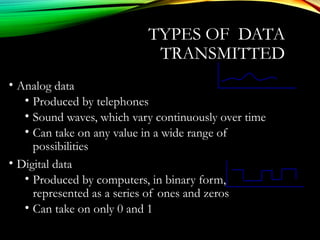
TYPES OF DATA
TRANSMITTED
• Analog data
• Produced by telephones
• Sound waves, which vary continuously over time
• Can take on any value in a wide range of
possibilities
• Digital data
• Produced by computers, in binary form,
represented as a series of ones and zeros
• Can take on only 0 and 1
TYPES OF TRANSMISSION
• Analog transmissions
• Analog data transmitted in analog form (vary continuously)
• Examples of analog data being sent using analog
transmissions are broadcast TV and radio
• Digital transmissions
• Made of square waves with a clear beginning and ending
• Computer networks send digital data using digital
transmissions.
• Data converted between analog and digital formats
• Modem (modulator/demodulator): used when digital data is
sent as an analog transmission
• Codec (coder/decoder): used when analog data is sent as a
digital transmission
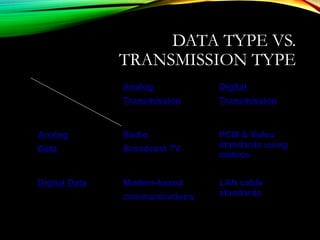
DATA TYPE VS.
TRANSMISSION TYPE
Analog
Transmission
Digital
Transmission
Analog
Data
Radio,
Broadcast TV
PCM & Video
standards using
codecs
Digital Data Modem-based
communications
LAN cable
standards
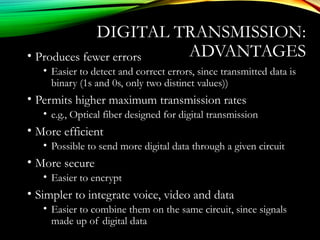
DIGITAL TRANSMISSION:
ADVANTAGES• Produces fewer errors
• Easier to detect and correct errors, since transmitted data is
binary (1s and 0s, only two distinct values))
• Permits higher maximum transmission rates
• e.g., Optical fiber designed for digital transmission
• More efficient
• Possible to send more digital data through a given circuit
• More secure
• Easier to encrypt
• Simpler to integrate voice, video and data
• Easier to combine them on the same circuit, since signals
made up of digital data
CIRCUIT
CONFIGURATION
• Basic physical layout of the circuit
• Configuration types:
• Point-to-Point Configuration
• Goes from one point to another
• Sometimes called “dedicated circuits”
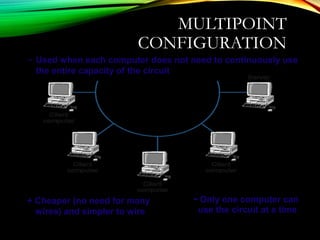
• Multipoint Configuration
• Many computer connected on the same circuit
• Sometimes called “shared circuit”
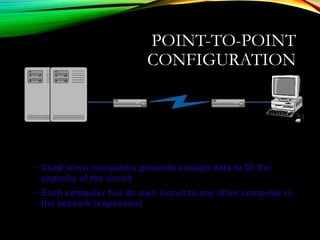
POINT-TO-POINT
CONFIGURATION
– Used when computers generate enough data to fill the
capacity of the circuit
– Each computer has its own circuit to any other computer in
the network (expensive)
MULTIPOINT
CONFIGURATION
+ Cheaper (no need for many
wires) and simpler to wire
- Only one computer can
use the circuit at a time
– Used when each computer does not need to continuously use
the entire capacity of the circuit
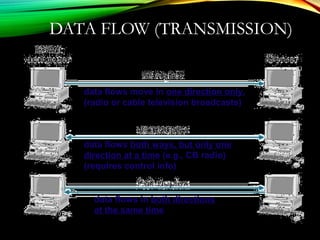
DATA FLOW (TRANSMISSION)
data flows move in one direction only,
(radio or cable television broadcasts)
data flows both ways, but only one
direction at a time (e.g., CB radio)
(requires control info)
data flows in both directions
at the same time
SELECTION OF DATA
FLOW METHOD
• Main factor: Application
• If data required to flow in one direction only
• Simplex Method
• e.g., From a remote sensor to a host computer
• If data required to flow in both directions
• Terminal-to-host communication (send and wait type
communications)
• Half-Duplex Method
• Client-server; host-to-host communication (peer-to-
peer communications)
• Full Duplex Method
• Half-duplex or Full Duplex
• Capacity may be a factor too
• Full-duplex uses half of the capacity for each
direction
COMMUNICATIONS
MEDIA• Physical matter that carries transmission
• Guided media:
• Transmission flows along a physical guide
(Media guides the signal))
• Twisted pair wiring, coaxial cable and optical
fiber cable
• Wireless media (aka, radiated media)
• No wave guide, the transmission just flows
through the air (or space)
• Radio (microwave, satellite) and infrared
communications
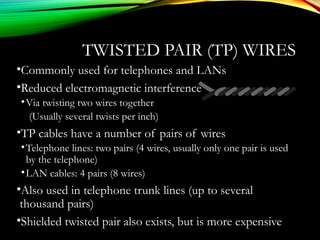
TWISTED PAIR (TP) WIRES
•Commonly used for telephones and LANs
•Reduced electromagnetic interference
•Via twisting two wires together
(Usually several twists per inch)
•TP cables have a number of pairs of wires
•Telephone lines: two pairs (4 wires, usually only one pair is used
by the telephone)
•LAN cables: 4 pairs (8 wires)
•Also used in telephone trunk lines (up to several
thousand pairs)
•Shielded twisted pair also exists, but is more expensive
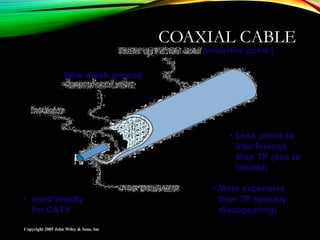
COAXIAL CABLE
Copyright 2005 John Wiley & Sons, Inc
Wire mesh ground
(protective jacket )
• More expensive
than TP (quickly
disappearing)
• used mostly
for CATV
• Less prone to
interference
than TP (due to
(shield)
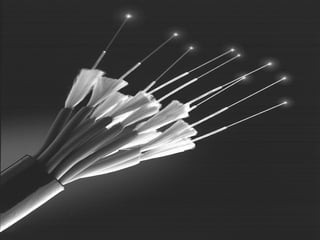
FIBER OPTIC CABLE
• Light created by an LED (light-emitting diode) or laser is sent
down a thin glass or plastic fiber
• Has extremely high capacity, ideal for broadband
• Works better under harsh environments
• Not fragile, nor brittle; Nit heavy nor bulky
• More resistant to corrosion, fire, etc.,
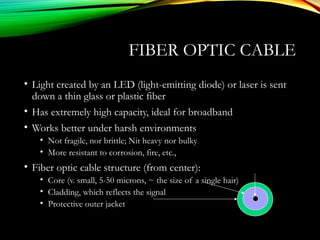
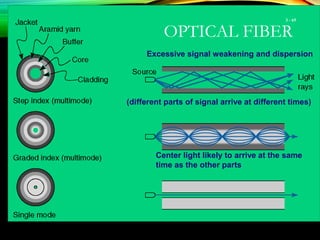
• Fiber optic cable structure (from center):
• Core (v. small, 5-50 microns, ~ the size of a single hair)
• Cladding, which reflects the signal
• Protective outer jacket
TYPES OF OPTICAL FIBER
•Multimode (about 50 micron core)
•Earliest fiber-optic systems
•Signal spreads out over short distances (up to ~500m)
•Inexpensive
•Graded index multimode
•Reduces the spreading problem by changing the refractive
properties of the fiber to refocus the signal
•Can be used over distances of up to about 1000 meters
•Single mode (about 5 micron core)
•Transmits a single direct beam through the cable
•Signal can be sent over many miles without spreading
•Expensive (requires lasers; difficult to manufacture)
OPTICAL FIBER
3 - 65
(different parts of signal arrive at different times)
Excessive signal weakening and dispersion
Center light likely to arrive at the same
time as the other parts
Copyright 2005 John Wiley & Sons, Inc
3 - 66
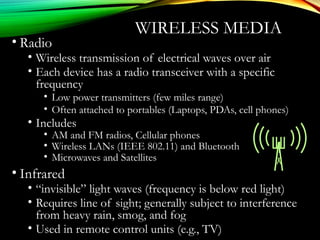
WIRELESS MEDIA
• Radio
• Wireless transmission of electrical waves over air
• Each device has a radio transceiver with a specific
frequency
• Low power transmitters (few miles range)
• Often attached to portables (Laptops, PDAs, cell phones)
• Includes
• AM and FM radios, Cellular phones
• Wireless LANs (IEEE 802.11) and Bluetooth
• Microwaves and Satellites
• Infrared
• “invisible” light waves (frequency is below red light)
• Requires line of sight; generally subject to interference
from heavy rain, smog, and fog
• Used in remote control units (e.g., TV)
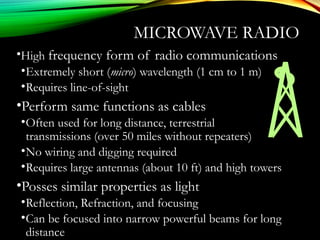
MICROWAVE RADIO
•High frequency form of radio communications
•Extremely short (micro) wavelength (1 cm to 1 m)
•Requires line-of-sight
•Perform same functions as cables
•Often used for long distance, terrestrial
transmissions (over 50 miles without repeaters)
•No wiring and digging required
•Requires large antennas (about 10 ft) and high towers
•Posses similar properties as light
•Reflection, Refraction, and focusing
•Can be focused into narrow powerful beams for long
distance
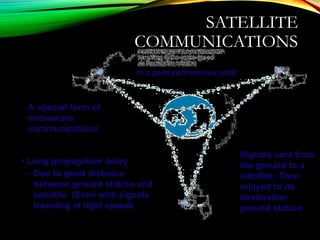
SATELLITE
COMMUNICATIONS
A special form of
microwave
communications
in a geosynchronous orbit
Signals sent from
the ground to a
satellite; Then
relayed to its
destination
ground station
• Long propagation delay
– Due to great distance
between ground station and
satellite (Even with signals
traveling at light speed)
FACTORS USED IN MEDIA
SELECTION
•Type of network
• LAN, WAN, or Backbone
•Cost
• Always changing; depends on the distance
•Transmission distance
• Short: up to 300 m; medium: up to 500 m
•Security
• Wireless media is less secure
•Error rates
• Wireless media has the highest error rate (interference)
•Transmission speeds
• Constantly improving; Fiber has the highest
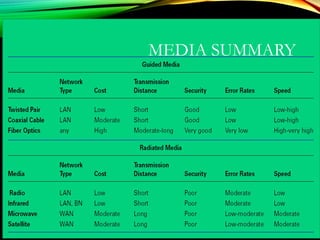
MEDIA SUMMARY
DIGITAL TRANSMISSION OF
DIGITAL DATA
•Computers produce binary data
•Standards needed to ensure both sender and receiver
understands this data
•Coding: language that computers use to represent letters,
numbers, and symbols in a message
•Signaling (aka, encoding): language that computers use to
represent bits (0 or 1) in electrical voltage
•Bits in a message can be send in
•A single wire one after another (Serial transmission)
•Multiple wires simultaneously (Parallel transmission)
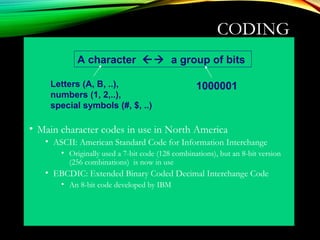
CODING
• Main character codes in use in North America
• ASCII: American Standard Code for Information Interchange
• Originally used a 7-bit code (128 combinations), but an 8-bit version
(256 combinations) is now in use
• EBCDIC: Extended Binary Coded Decimal Interchange Code
• An 8-bit code developed by IBM
A character  a group of bits
Letters (A, B, ..),
numbers (1, 2,..),
special symbols (#, $, ..)
1000001
TRANSMISSION MODES
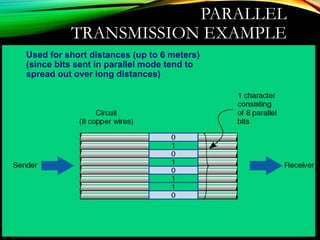
• Parallel mode
• Uses several wires, each wire sending one bit at the
same time as the others
• A parallel printer cable sends 8 bits together
• Computer’s processor and motherboard also use
parallel busses (8 bits, 16 bits, 32 bits) to move data
around
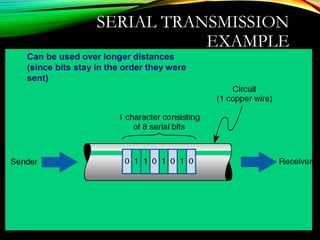
• Serial Mode
• Sends bit by bit over a single wire
• Serial mode is slower than parallel mode
PARALLEL
TRANSMISSION EXAMPLE
Used for short distances (up to 6 meters)
(since bits sent in parallel mode tend to
spread out over long distances)
SERIAL TRANSMISSION
EXAMPLE
Can be used over longer distances
(since bits stay in the order they were
sent)
SIGNALING OF BITS
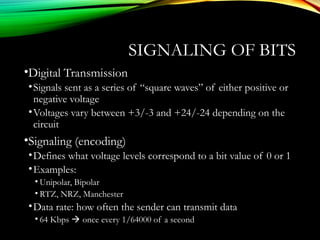
•Digital Transmission
•Signals sent as a series of “square waves” of either positive or
negative voltage
•Voltages vary between +3/-3 and +24/-24 depending on the
circuit
•Signaling (encoding)
•Defines what voltage levels correspond to a bit value of 0 or 1
•Examples:
• Unipolar, Bipolar
• RTZ, NRZ, Manchester
•Data rate: how often the sender can transmit data
• 64 Kbps  once every 1/64000 of a second
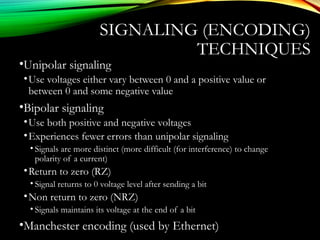
SIGNALING (ENCODING)
TECHNIQUES
•Unipolar signaling
•Use voltages either vary between 0 and a positive value or
between 0 and some negative value
•Bipolar signaling
•Use both positive and negative voltages
•Experiences fewer errors than unipolar signaling
• Signals are more distinct (more difficult (for interference) to change
polarity of a current)
•Return to zero (RZ)
• Signal returns to 0 voltage level after sending a bit
•Non return to zero (NRZ)
• Signals maintains its voltage at the end of a bit
•Manchester encoding (used by Ethernet)
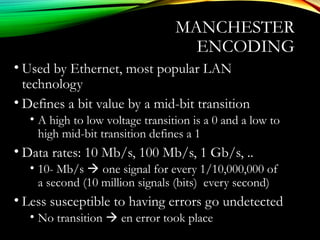
MANCHESTER
ENCODING
• Used by Ethernet, most popular LAN
technology
• Defines a bit value by a mid-bit transition
• A high to low voltage transition is a 0 and a low to
high mid-bit transition defines a 1
• Data rates: 10 Mb/s, 100 Mb/s, 1 Gb/s, ..
• 10- Mb/s  one signal for every 1/10,000,000 of
a second (10 million signals (bits) every second)
• Less susceptible to having errors go undetected
• No transition  en error took place
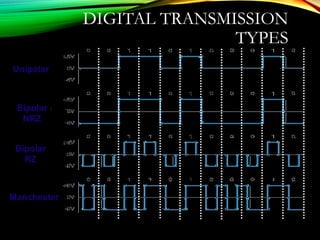
DIGITAL TRANSMISSION
TYPES
Unipolar
Bipolar
NRZ
Bipolar
RZ
Manchester
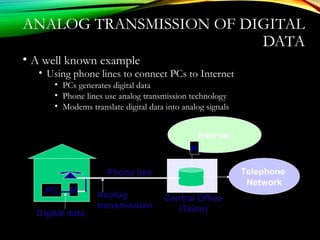
ANALOG TRANSMISSION OF DIGITAL
DATA
• A well known example
• Using phone lines to connect PCs to Internet
• PCs generates digital data
• Phone lines use analog transmission technology
• Modems translate digital data into analog signals
Phone line
Central Office
(Telco)
Analog
transmission
PC M
Telephone
Network
Internet
Digital data
M
TELEPHONE NETWORK
•Originally designed for human speech (analog
communications) only
•POTS (Plain Old Telephone Service)
•Enables voice communications between two telephones
•Human voice (sound waves) converted to electrical signals by
the sending telephone
•Signals travel through POTS and converted back to sound
waves
•Sending digital data over POTS
•Use modems to convert digital data to an analog format
• One modem used by sender to produce analog data
• Another modem used by receiver to regenerate digital data
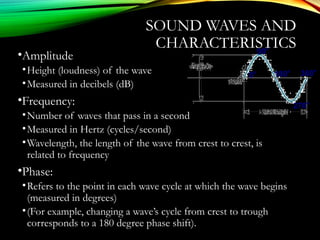
SOUND WAVES AND
CHARACTERISTICS
•Amplitude
•Height (loudness) of the wave
•Measured in decibels (dB)
•Frequency:
•Number of waves that pass in a second
•Measured in Hertz (cycles/second)
•Wavelength, the length of the wave from crest to crest, is
related to frequency
•Phase:
•Refers to the point in each wave cycle at which the wave begins
(measured in degrees)
•(For example, changing a wave’s cycle from crest to trough
corresponds to a 180 degree phase shift).
0
o
90o
360
o
180
o
270
o
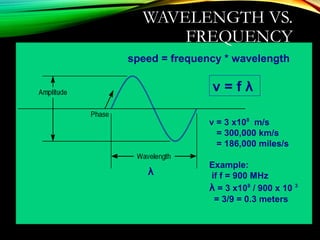
WAVELENGTH VS.
FREQUENCY
λ
v = f λ
v = 3 x10⁸
m/s
= 300,000 km/s
= 186,000 miles/s
Example:
if f = 900 MHz
λ = 3 x10⁸
/ 900 x 10 3
= 3/9 = 0.3 meters
speed = frequency * wavelength
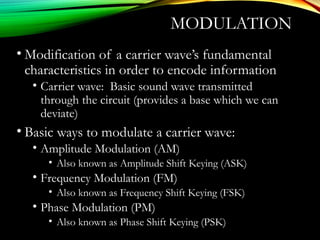
MODULATION
• Μodification of a carrier wave’s fundamental
characteristics in order to encode information
• Carrier wave: Basic sound wave transmitted
through the circuit (provides a base which we can
deviate)
• Βasic ways to modulate a carrier wave:
• Amplitude Modulation (AM)
• Also known as Amplitude Shift Keying (ASK)
• Frequency Modulation (FM)
• Also known as Frequency Shift Keying (FSK)
• Phase Modulation (PM)
• Also known as Phase Shift Keying (PSK)
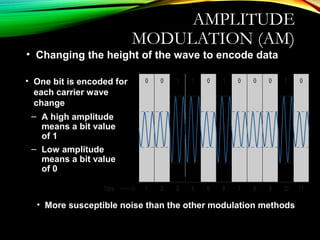
AMPLITUDE
MODULATION (AM)
• Changing the height of the wave to encode data
• One bit is encoded for
each carrier wave
change
– A high amplitude
means a bit value
of 1
– Low amplitude
means a bit value
of 0
• More susceptible noise than the other modulation methods
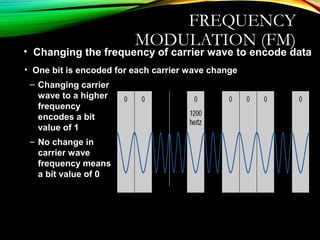
FREQUENCY
MODULATION (FM)
• Changing the frequency of carrier wave to encode data
• One bit is encoded for each carrier wave change
– Changing carrier
wave to a higher
frequency
encodes a bit
value of 1
– No change in
carrier wave
frequency means
a bit value of 0
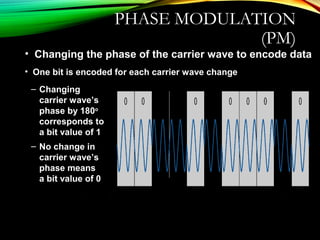
PHASE MODULATION
(PM)
• Changing the phase of the carrier wave to encode data
• One bit is encoded for each carrier wave change
– Changing
carrier wave’s
phase by 180o
corresponds to
a bit value of 1
– No change in
carrier wave’s
phase means
a bit value of 0
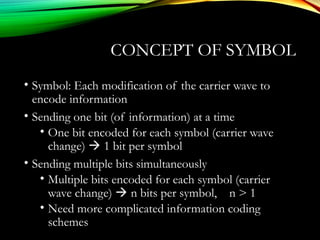
CONCEPT OF SYMBOL
• Symbol: Each modification of the carrier wave to
encode information
• Sending one bit (of information) at a time
• One bit encoded for each symbol (carrier wave
change)  1 bit per symbol
• Sending multiple bits simultaneously
• Multiple bits encoded for each symbol (carrier
wave change)  n bits per symbol, n > 1
• Need more complicated information coding
schemes
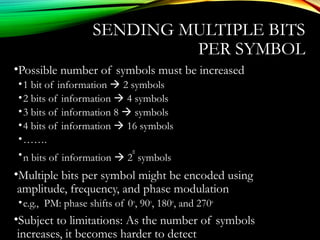
SENDING MULTIPLE BITS
PER SYMBOL
•Possible number of symbols must be increased
•1 bit of information  2 symbols
•2 bits of information  4 symbols
•3 bits of information 8  symbols
•4 bits of information  16 symbols
•…….
•n bits of information  2
n
symbols
•Multiple bits per symbol might be encoded using
amplitude, frequency, and phase modulation
•e.g., PM: phase shifts of 0o
, 90o
, 180o
, and 270o
•Subject to limitations: As the number of symbols
increases, it becomes harder to detect
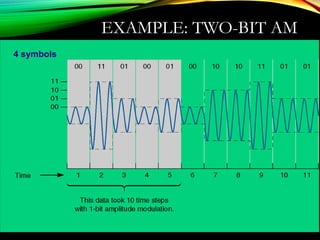
EXAMPLE: TWO-BIT AM
4 symbols
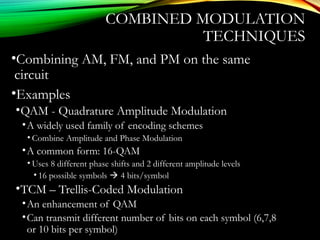
COMBINED MODULATION
TECHNIQUES
•Combining AM, FM, and PM on the same
circuit
•Examples
•QAM - Quadrature Amplitude Modulation
•A widely used family of encoding schemes
• Combine Amplitude and Phase Modulation
•A common form: 16-QAM
• Uses 8 different phase shifts and 2 different amplitude levels
• 16 possible symbols  4 bits/symbol
•TCM – Trellis-Coded Modulation
•An enhancement of QAM
•Can transmit different number of bits on each symbol (6,7,8
or 10 bits per symbol)
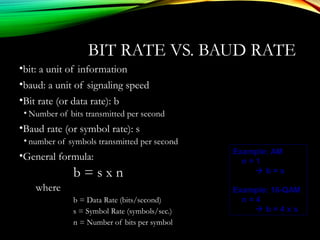
BIT RATE VS. BAUD RATE
•bit: a unit of information
•baud: a unit of signaling speed
•Bit rate (or data rate): b
• Number of bits transmitted per second
•Baud rate (or symbol rate): s
• number of symbols transmitted per second
•General formula:
b = s x n
where
b = Data Rate (bits/second)
s = Symbol Rate (symbols/sec.)
n = Number of bits per symbol
Example: AM
n = 1
 b = s
Example: 16-QAM
n = 4
 b = 4 x s
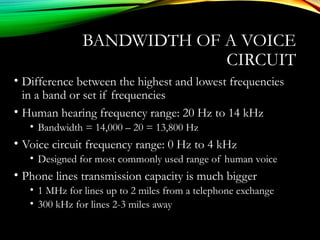
BANDWIDTH OF A VOICE
CIRCUIT
• Difference between the highest and lowest frequencies
in a band or set if frequencies
• Human hearing frequency range: 20 Hz to 14 kHz
• Bandwidth = 14,000 – 20 = 13,800 Hz
• Voice circuit frequency range: 0 Hz to 4 kHz
• Designed for most commonly used range of human voice
• Phone lines transmission capacity is much bigger
• 1 MHz for lines up to 2 miles from a telephone exchange
• 300 kHz for lines 2-3 miles away
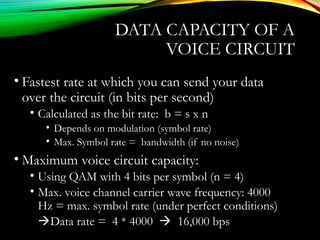
DATA CAPACITY OF A
VOICE CIRCUIT
• Fastest rate at which you can send your data
over the circuit (in bits per second)
• Calculated as the bit rate: b = s x n
• Depends on modulation (symbol rate)
• Max. Symbol rate = bandwidth (if no noise)
• Maximum voice circuit capacity:
• Using QAM with 4 bits per symbol (n = 4)
• Max. voice channel carrier wave frequency: 4000
Hz = max. symbol rate (under perfect conditions)
Data rate = 4 * 4000  16,000 bps
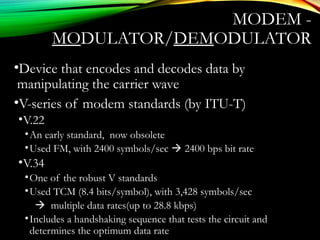
MODEM -
MODULATOR/DEMODULATOR
•Device that encodes and decodes data by
manipulating the carrier wave
•V-series of modem standards (by ITU-T)
•V.22
•An early standard, now obsolete
•Used FM, with 2400 symbols/sec  2400 bps bit rate
•V.34
•One of the robust V standards
•Used TCM (8.4 bits/symbol), with 3,428 symbols/sec
 multiple data rates(up to 28.8 kbps)
•Includes a handshaking sequence that tests the circuit and
determines the optimum data rate
V.32/34 MODEM TYPES
DATA COMPRESSION IN
MODEMS
• Used to increase the throughput rate of data by
encoding redundant data strings
• Example: Lempel-Ziv encoding
• Used in V.44
• Creates (while transmitting) a dictionary of two-, three-,
and four-character combinations in a message
• Anytime one of these patterns is detected, its index in
dictionary is sent (instead of actual data)
• Average reduction: 6:1 (depends on the text)
• Provides 6 times more data sent per second
DIGITAL TRANSMISSION OF ANALOG
DATA
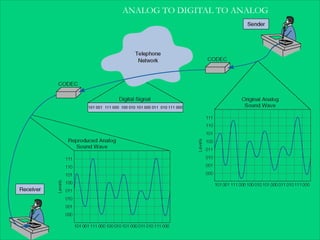
• Analog voice data sent over digital network using
digital transmission
• Requires a pair of special devices called Codec -
Coder/decoder
• A device that converts an analog voice signal into
digital form
• Also converts it back to analog data at the receiving end
• Used by the phone system
ANALOG TO DIGITAL TO ANALOG
TRANSLATING FROM
ANALOG TO DIGITAL
• Must be translated into a series of bits before transmission of a
digital circuit
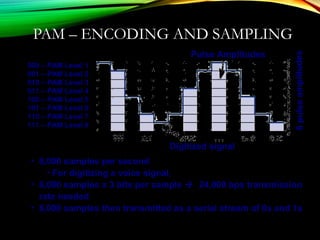
• Done by a technique called Pulse Amplitude Modulation (PAM)
involving 3 steps:
• Measuring the signal
• Encoding the signal as a binary data sample
• Taking samples of the signal
• Creates a rough (digitized) approximation of original signal
• Quantizing error: difference between the original signal and
approximated signal
PAM – MEASURING
SIGNAL
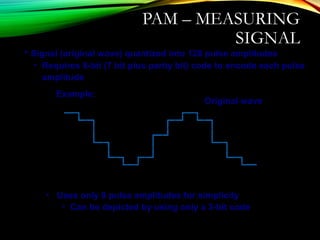
• Uses only 8 pulse amplitudes for simplicity
• Can be depicted by using only a 3-bit code
Original wave
• Signal (original wave) quantized into 128 pulse amplitudes
• Requires 8-bit (7 bit plus parity bit) code to encode each pulse
amplitude
Example:
PAM – ENCODING AND SAMPLING
Pulse Amplitudes
8pulseamplitudes
000 – PAM Level 1
001 – PAM Level 2
010 – PAM Level 3
011 – PAM Level 4
100 – PAM Level 5
101 – PAM Level 6
110 – PAM Level 7
111 – PAM Level 8
Digitized signal
• 8,000 samples per second
• For digitizing a voice signal,
• 8,000 samples x 3 bits per sample  24,000 bps transmission
rate needed
• 8,000 samples then transmitted as a serial stream of 0s and 1s
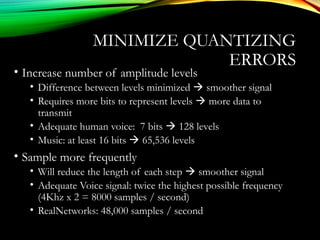
MINIMIZE QUANTIZING
ERRORS
• Increase number of amplitude levels
• Difference between levels minimized  smoother signal
• Requires more bits to represent levels  more data to
transmit
• Adequate human voice: 7 bits  128 levels
• Music: at least 16 bits  65,536 levels
• Sample more frequently
• Will reduce the length of each step  smoother signal
• Adequate Voice signal: twice the highest possible frequency
(4Khz x 2 = 8000 samples / second)
• RealNetworks: 48,000 samples / second
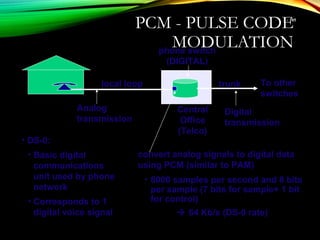
PCM - PULSE CODE
MODULATION
3 - 105
local loop
phone switch
(DIGITAL)
Central
Office
(Telco)
Analog
transmission
To other
switches
trunk
Digital
transmission
convert analog signals to digital data
using PCM (similar to PAM)
• 8000 samples per second and 8 bits
per sample (7 bits for sample+ 1 bit
for control)
 64 Kb/s (DS-0 rate)
• DS-0:
• Basic digital
communications
unit used by phone
network
• Corresponds to 1
digital voice signal
ADPCM
•Adaptive Differential Pulse Code Modulation
•Encodes the differences between samples
•The change between 8-bit value of the last time interval and
the current one
•Requires only 4 bits since the change is small
 Only 4 bits/sample (instead of 8 bits/sample),
•Requires 4 x 8000 = 32 Kbps (half of PCM)
•Makes it possible to for IM to send voice signals as digital
signals using modems (which has <56 Kbps)
•Can also use lower sampling rates, at 8, 16 kbps
•Lower quality voice signals.
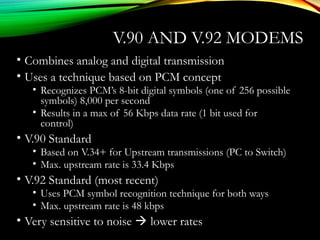
V.90 AND V.92 MODEMS
• Combines analog and digital transmission
• Uses a technique based on PCM concept
• Recognizes PCM’s 8-bit digital symbols (one of 256 possible
symbols) 8,000 per second
• Results in a max of 56 Kbps data rate (1 bit used for
control)
• V.90 Standard
• Based on V.34+ for Upstream transmissions (PC to Switch)
• Max. upstream rate is 33.4 Kbps
• V.92 Standard (most recent)
• Uses PCM symbol recognition technique for both ways
• Max. upstream rate is 48 kbps
• Very sensitive to noise  lower rates
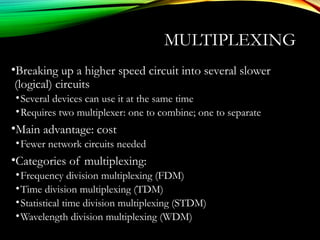
MULTIPLEXING
•Breaking up a higher speed circuit into several slower
(logical) circuits
•Several devices can use it at the same time
•Requires two multiplexer: one to combine; one to separate
•Main advantage: cost
•Fewer network circuits needed
•Categories of multiplexing:
•Frequency division multiplexing (FDM)
•Time division multiplexing (TDM)
•Statistical time division multiplexing (STDM)
•Wavelength division multiplexing (WDM)
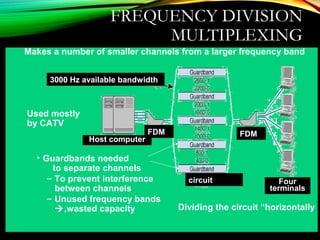
FREQUENCY DIVISION
MULTIPLEXING
Dividing the circuit “horizontally
Makes a number of smaller channels from a larger frequency band
• Guardbands needed
to separate channels
– To prevent interference
between channels
– Unused frequency bands
,wasted capacity
Used mostly
by CATV
3000 Hz available bandwidth
circuit
FDMFDM
Four
terminals
Host computer
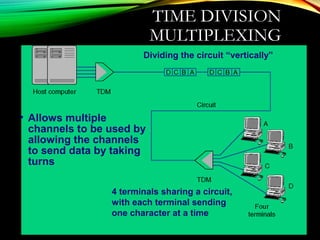
TIME DIVISION
MULTIPLEXING
Dividing the circuit “vertically”
• Allows multiple
channels to be used by
allowing the channels
to send data by taking
turns
4 terminals sharing a circuit,
with each terminal sending
one character at a time
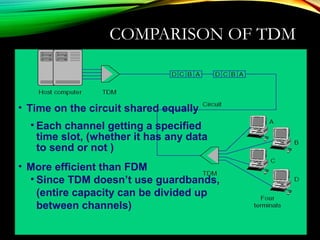
COMPARISON OF TDM
• Time on the circuit shared equally
• Each channel getting a specified
time slot, (whether it has any data
to send or not )
• More efficient than FDM
• Since TDM doesn’t use guardbands,
(entire capacity can be divided up
between channels)
STATISTICAL TDM (STDM)
• Designed to make use of the idle time slots
• (In TDM, when terminals are not using the multiplexed
circuit, timeslots for those terminals are idle.)
• Uses non-dedicated time slots
• Time slots used as needed by the different terminals
• Complexities of STDM
• Additional addressing information needed
• Since source of a data sample is not identified by the time slot it
occupies
• Potential response time delays (when all terminals try to use
the multiplexed circuit intensively)
• Requires memory to store data (in case more data come in than its
outgoing circuit capacity can handle)
WAVELENGTH DIVISION
MULTIPLEXING
• Transmitting data at many different frequencies
• Lasers or LEDs used to transmit on optical fibers
• Previously single frequency on single fiber (typical
transmission rate being around 622 Mbps)
• Now multi frequencies on single fiber  n x 622+ Mbps
• Dense WDM (DWDM)
• Over a hundred channels per fiber
• Each transmitting at a rate of 10 Gbps
• Aggregate data rates in the low terabit range (Tbps)
• Future versions of DWDM
• Both per channel data rates and total number of channels
continue to rise
• Possibility of petabit (Pbps) aggregate rates
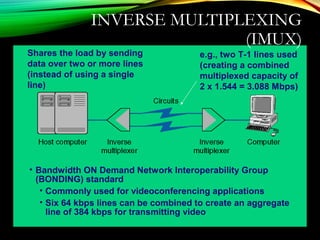
INVERSE MULTIPLEXING
(IMUX)
Shares the load by sending
data over two or more lines
(instead of using a single
line)
e.g., two T-1 lines used
(creating a combined
multiplexed capacity of
2 x 1.544 = 3.088 Mbps)
• Bandwidth ON Demand Network Interoperability Group
(BONDING) standard
• Commonly used for videoconferencing applications
• Six 64 kbps lines can be combined to create an aggregate
line of 384 kbps for transmitting video
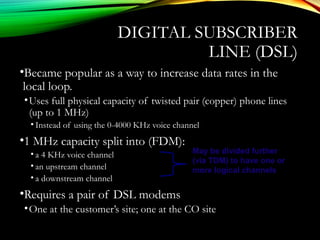
DIGITAL SUBSCRIBER
LINE (DSL)
•Became popular as a way to increase data rates in the
local loop.
•Uses full physical capacity of twisted pair (copper) phone lines
(up to 1 MHz)
• Instead of using the 0-4000 KHz voice channel
•1 MHz capacity split into (FDM):
• a 4 KHz voice channel
• an upstream channel
• a downstream channel
•Requires a pair of DSL modems
•One at the customer’s site; one at the CO site
May be divided further
(via TDM) to have one or
more logical channels
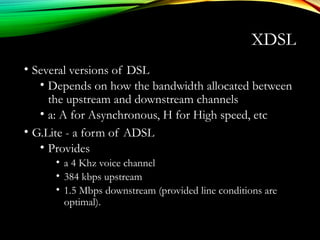
XDSL
• Several versions of DSL
• Depends on how the bandwidth allocated between
the upstream and downstream channels
• a: A for Asynchronous, H for High speed, etc
• G.Lite - a form of ADSL
• Provides
• a 4 Khz voice channel
• 384 kbps upstream
• 1.5 Mbps downstream (provided line conditions are
optimal).
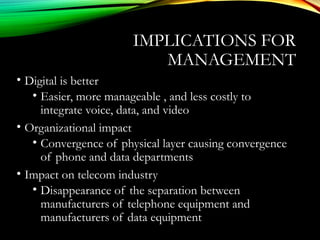
IMPLICATIONS FOR
MANAGEMENT
• Digital is better
• Easier, more manageable , and less costly to
integrate voice, data, and video
• Organizational impact
• Convergence of physical layer causing convergence
of phone and data departments
• Impact on telecom industry
• Disappearance of the separation between
manufacturers of telephone equipment and
manufacturers of data equipment
DATA LINK
LAYER
By: Nhiel Stephen Arroz
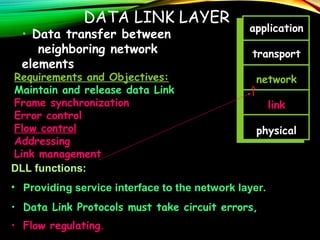
119DATA LINK LAYER
application
transport
network
link
physical
Requirements and Objectives:
Maintain and release data Link
Frame synchronization
Error control
Flow control
Addressing
Link management
DLL functions:
• Providing service interface to the network layer.
• Data Link Protocols must take circuit errors,
• Flow regulating.
• Data transfer between
neighboring network
elements
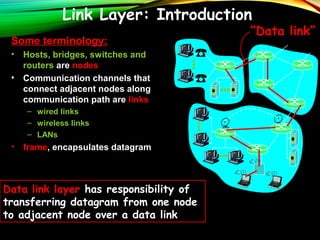
Link Layer: Introduction
Some terminology:
• Hosts, bridges, switches and
routers are nodes
• Communication channels that
connect adjacent nodes along
communication path are links
– wired links
– wireless links
– LANs
• frame, encapsulates datagram
“Data link”
Data link layer has responsibility of
transferring datagram from one node
to adjacent node over a data link
ERROR DETECTION
AND CORRECTION
• Types of Errors
• Detection
• Correction
Basic conceptsBasic concepts
 Networks must be able to transfer data from one
device to another with complete accuracy.
 Data can be corrupted during transmission.
 For reliable communication, errors must be detected
and corrected.
 Error detection and correction are implemented either at
the data link layer or the transport layer of the OSI
model.
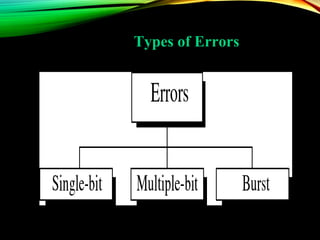
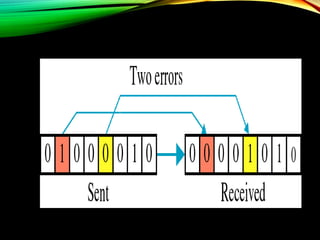
Types of Errors
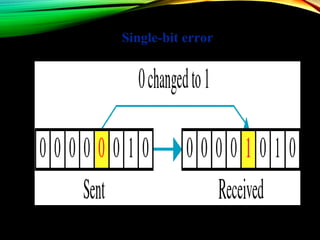
Single-bit error
Single bit errors are the least likely type of
errors in serial data transmission because the
noise must have a very short duration which
is very rare. However this kind of errors can
happen in parallel transmission.
Example:Example:
If data is sent at 1Mbps then each bit lasts
only 1/1,000,000 sec. or 1 μs.
For a single-bit error to occur, the noise
must have a duration of only 1 μs, which is
very rare.
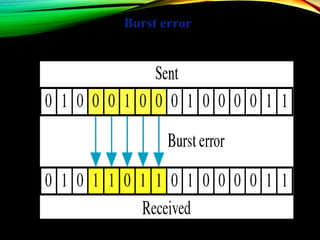
Burst error
The term burst errorburst error means that two or
more bits in the data unit have changed from
1 to 0 or from 0 to 1.
Burst errors does not necessarily mean
that the errors occur in consecutive bits,
the length of the burst is measured from the
first corrupted bit to the last corrupted bit.
Some bits in between may not have been
corrupted.
Burst error is most likely to happen in serial
transmission since the duration of noise is normally
longer than the duration of a bit.
The number of bits affected depends on the data rate
and duration of noise.
Example:Example:
If data is sent at rate = 1Kbps then a noise of 1/100 sec
can affect 10 bits.(1/100*1000)
If same data is sent at rate = 1Mbps then a noise of
1/100 sec can affect 10,000 bits.(1/100*106
)
ERROR DETECTIONERROR DETECTION
Error detection means to decide whether the received data
is correct or not without having a copy of the original
message.
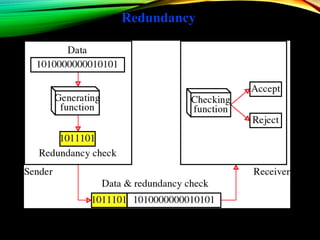
Error detection uses the concept of redundancy, which
means adding extra bits for detecting errors at the
destination.
Redundancy
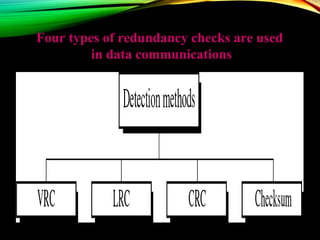
Four types of redundancy checks are usedFour types of redundancy checks are used
in data communicationsin data communications
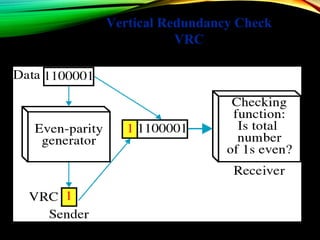
Vertical Redundancy Check
VRC
PERFORMANCEPERFORMANCE
It can detect single bit error
It can detect burst errors only if the total
number of errors is odd.
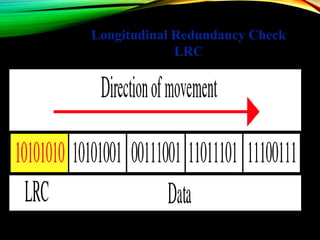
Longitudinal Redundancy Check
LRC
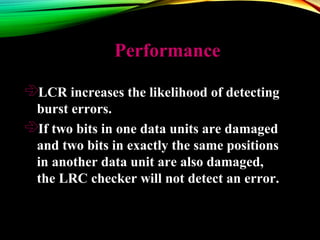
PerformancePerformance
LCR increases the likelihood of detecting
burst errors.
If two bits in one data units are damaged
and two bits in exactly the same positions
in another data unit are also damaged,
the LRC checker will not detect an error.
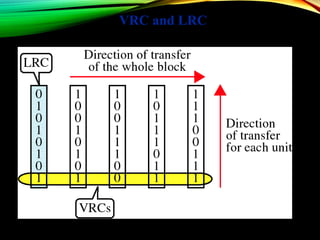
VRC and LRC
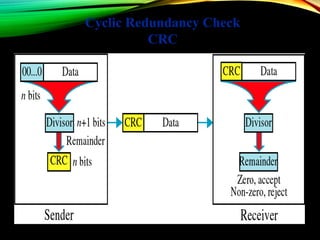
Cyclic Redundancy Check
CRC
CYCLIC REDUNDANCY CHECKCYCLIC REDUNDANCY CHECK
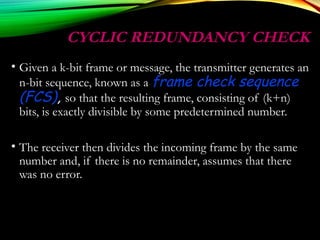
• Given a k-bit frame or message, the transmitter generates an
n-bit sequence, known as a frame check sequence
(FCS), so that the resulting frame, consisting of (k+n)
bits, is exactly divisible by some predetermined number.
• The receiver then divides the incoming frame by the same
number and, if there is no remainder, assumes that there
was no error.
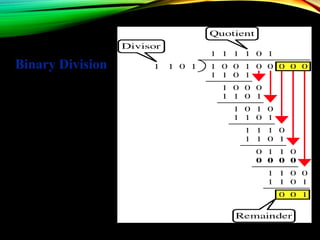
Binary Division
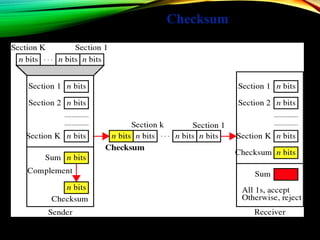
Checksum
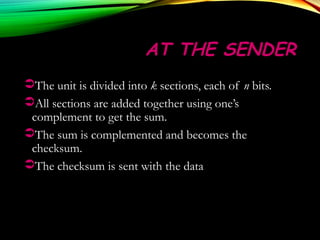
AT THE SENDERAT THE SENDER
The unit is divided into k sections, each of n bits.
All sections are added together using one’s
complement to get the sum.
The sum is complemented and becomes the
checksum.
The checksum is sent with the data
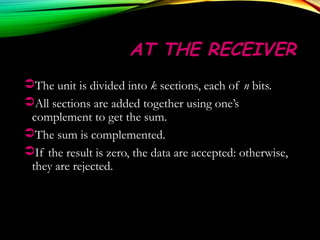
AT THE RECEIVERAT THE RECEIVER
The unit is divided into k sections, each of n bits.
All sections are added together using one’s
complement to get the sum.
The sum is complemented.
If the result is zero, the data are accepted: otherwise,
they are rejected.
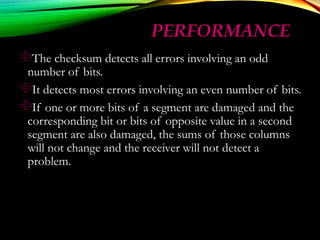
PERFORMANCEPERFORMANCE
The checksum detects all errors involving an odd
number of bits.
It detects most errors involving an even number of bits.
If one or more bits of a segment are damaged and the
corresponding bit or bits of opposite value in a second
segment are also damaged, the sums of those columns
will not change and the receiver will not detect a
problem.
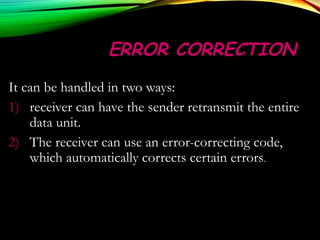
ERROR CORRECTIONERROR CORRECTION
It can be handled in two ways:
1) receiver can have the sender retransmit the entire
data unit.
2) The receiver can use an error-correcting code,
which automatically corrects certain errors.
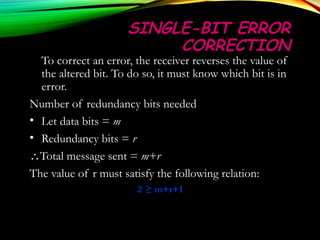
SINGLE-BIT ERRORSINGLE-BIT ERROR
CORRECTIONCORRECTION
To correct an error, the receiver reverses the value of
the altered bit. To do so, it must know which bit is in
error.
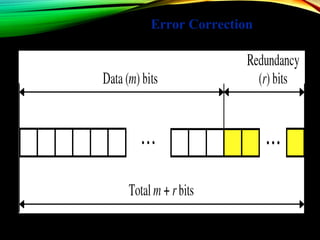
Number of redundancy bits needed
• Let data bits = m
• Redundancy bits = r
∴Total message sent = m+r
The value of r must satisfy the following relation:
22rr
≥ m+r+1≥ m+r+1
Error Correction
Data Link Control
and
Protocols
Data Link Control
The two main functions of the data link layer are:
1. DATA LINK CONTROL (deals with the design
and procedures for communication between two
adjacent nodes: node-to-node communication).
2. MEDIA ACCESS CONTROL (deals how share
the link).
 Data link control functions include framing,
flow and error control, and software
implemented protocols that provide smooth
and reliable transmission of frames between
nodes.
 To implement data link control, we need
protocols.
PROTOCOL :- is a set of rules that need to be
implemented in software and run by the two
nodes involved in data exchange at the data
link layer.
FRAMING
The data link layer needs to pack bits into frames ,
so that each frame is distinguishable from another.
Our postal system practices a type of framing . The
simple act of inserting a letter into an envelope
separates one piece of information from another ; the
envelope serves as the delimiter
DATA LINK CONTROL FUNCTIONS:
FRAMING in the data link layer separates
a message from one source to a
destination, or from other messages to
other destinations, by adding a sender
address and a destination address.
The destination address defines where the
packet is to go; the sender address helps
the recipient acknowledge the receipt.
o Fixed-Size Framing Frames - can be of fixed
or variable size. In fixed-size framing, there is
no need for defining the boundaries of the
frames; the size itself can be used as a
delimiter.
An example of this type of framing is the ATM wide-area
network, which uses frames of fixed size called cells. ATM:
Asynchronous Transfer Mode( connection oriented, high-
speed network technology that is used in both LAN and WAN
over optical fiber and operates upto gigabit speed.
o Variable-Size Framing
We concerns with variable-size framing,
prevalent in local area networks. In
variable-size framing, we need a way to
define the end of the frame and the
beginning of the next. Two approaches
were used for this purpose:
• a character-oriented approach and
• a bitoriented approach.
o Character - Oriented Protocols
In a character-oriented protocol, data to be
carried are 8bit characters from a coding
system such as ASCII . The header, which
normally carries the source and destination
addresses and other control information, and
the trailer, which carries error detection or
error correction redundant bits, are also
multiples of 8 bits.
o Bit - Oriented Protocols
In a bit-oriented protocol, the data section
of a frame is a sequence of bits to be interpreted
by the upper layer as text, graphic, audio, video,
and so on. However, in addition to headers (and
possible trailers), we still need a delimiter to
separate one frame from the other.
Most protocols use a special 8-bit pattern
flag 01111110 as the delimiter to define the
beginning and the end of the frame
THE NETWORK
LAYER
By: Nhiel Stephen Arroz
NETWORK LAYER
• Concerned with getting packets from source to
destination.
• The network layer must know the topology of the
subnet and choose appropriate paths through it.
• When source and destination are in different networks,
the network layer (IP) must deal with these
differences.
* Key issue: what service does the network layer provide to the
transport layer (connection-oriented or connectionless).
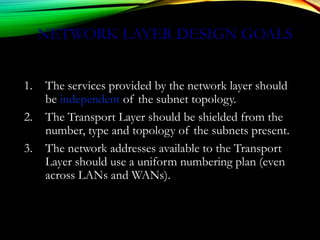
NETWORK LAYER DESIGN GOALS
1. The services provided by the network layer should
be independent of the subnet topology.
2. The Transport Layer should be shielded from the
number, type and topology of the subnets present.
3. The network addresses available to the Transport
Layer should use a uniform numbering plan (even
across LANs and WANs).
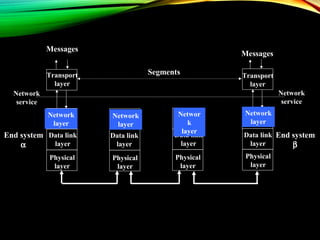
Physical
layer
Data link
layer
Physical
layer
Data link
layer
End system
α
Network
layer
Physical
layer
Data link
layer
Physical
layer
Data link
layer
Transport
layer
Transport
layer
Messages
Messages
Segments
End system
β
Network
service
Network
service
Network
layer
Networ
k
layer
Network
layer
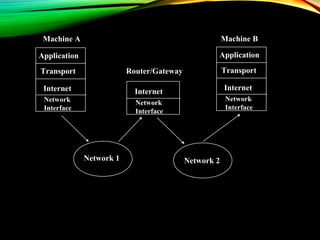
Application
Transport
Internet
Network
Interface
Application
Transport
InternetInternet
Network 1 Network 2
Machine A Machine B
Router/Gateway
Network
Interface
Network
Interface
R
R
R
R
S
SS
s
ss
s
ss
s
ss
s
R
s
R
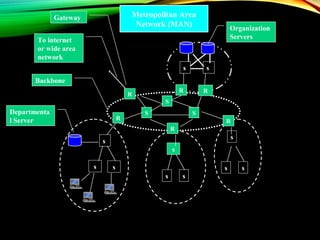
Backbone
To internet
or wide area
network
Organization
Servers
Gateway
Departmenta
l Server
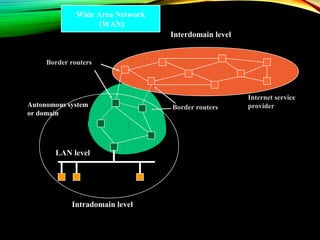
Metropolitan Area
Network (MAN)
Interdomain level
Intradomain level
LAN level
Autonomous system
or domain
Border routers
Border routers
Internet service
provider
Wide Area Network
(WAN)
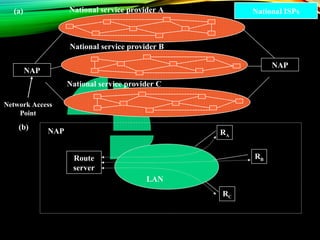
RA
RB
RC
Route
server
NAP
National service provider A
National service provider B
National service provider C
LAN
NAP
NAP
(a)
(b)
National ISPs
Network Access
Point
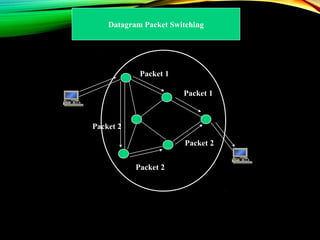
Packet 2
Packet 1
Packet 1
Packet 2
Packet 2
Datagram Packet Switching
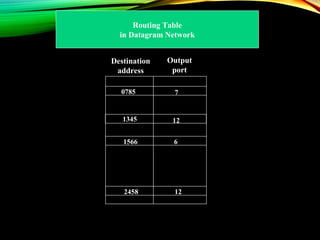
Destination
address
Output
port
1345 12
2458
70785
6
12
1566
Routing Table
in Datagram Network
Packet
Packet
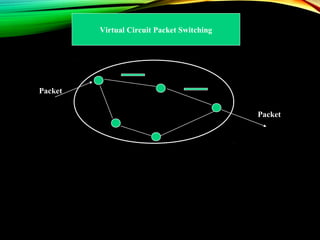
Virtual Circuit Packet Switching
Identifier Output
port
15 15
58
13
13
7
27
12
Next
identifier
44
23
16
34
Entry for packets
with identifier 15
Leon-Garcia & Widjaja: Communication Networks
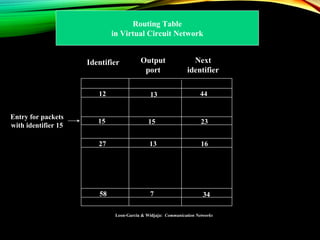
Routing Table
in Virtual Circuit Network
ROUTING
Routing algorithm:: that part of the Network Layer
responsible for deciding on which output line to
transmit an incoming packet.
Remember: For virtual circuit subnets the
routing decision is made ONLY at set up.
Algorithm properties:: correctness, simplicity,
robustness, stability, fairness, optimality, and
scalability.
ROUTING
CLASSIFICATION
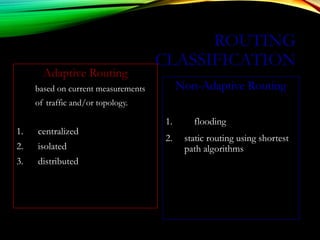
Adaptive Routing
based on current measurements
of traffic and/or topology.
1. centralized
2. isolated
3. distributed
Non-Adaptive Routing
1. flooding
2. static routing using shortest
path algorithms
SHORTEST PATH ROUTING
1. Bellman-Ford Algorithm [Distance Vector]
2. Dijkstra’s Algorithm [Link State]
What does it mean to be the shortest (or optimal)
route?
a. Minimize mean packet delay
b. Maximize the network throughput
c. Mininize the number of hops along the path
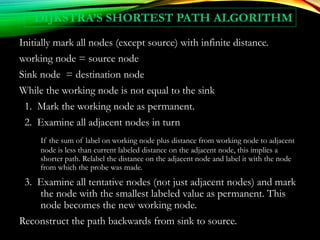
DIJKSTRA’S SHORTEST PATH ALGORITHM
Initially mark all nodes (except source) with infinite distance.
working node = source node
Sink node = destination node
While the working node is not equal to the sink
1. Mark the working node as permanent.
2. Examine all adjacent nodes in turn
If the sum of label on working node plus distance from working node to adjacent
node is less than current labeled distance on the adjacent node, this implies a
shorter path. Relabel the distance on the adjacent node and label it with the node
from which the probe was made.
3. Examine all tentative nodes (not just adjacent nodes) and mark
the node with the smallest labeled value as permanent. This
node becomes the new working node.
Reconstruct the path backwards from sink to source.
INTERNETWORK ROUTING
[HALSALL]
Adaptive Routing
Centralized Distributed
Intradomain routing Interdomain routing
Distance Vector routing Link State routing
[IGP] [EGP]
[BGP,IDRP]
[OSPF,IS-IS,PNNI][RIP]
[RCC]
Interior
Gateway Protocols
Exterior
Gateway Protocols
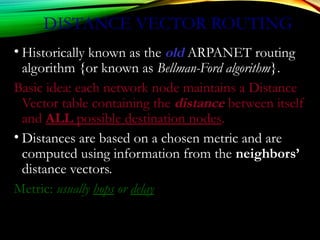
DISTANCE VECTOR ROUTING
• Historically known as the old ARPANET routing
algorithm {or known as Bellman-Ford algorithm}.
Basic idea: each network node maintains a Distance
Vector table containing the distance between itself
and ALL possible destination nodes.
• Distances are based on a chosen metric and are
computed using information from the neighbors’
distance vectors.
Metric: usually hops or delay
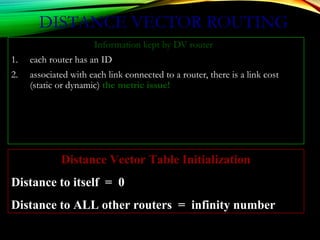
DISTANCE VECTOR ROUTING
Information kept by DV router
1. each router has an ID
2. associated with each link connected to a router, there is a link cost
(static or dynamic) the metric issue!
Distance Vector Table Initialization
Distance to itself = 0
Distance to ALL other routers = infinity number
DISTANCE VECTOR ALGORITHM
[PERLMAN]
1. Router transmits its distance vector to each of its
neighbors.
2. Each router receives and saves the most recently
received distance vector from each of its neighbors.
3. A router recalculates its distance vector when:
a. It receives a distance vector from a neighbor containing
different information than before.
b. It discovers that a link to a neighbor has gone down (i.e., a
topology change).
The DV calculation is based on minimizing the cost to
each destination.
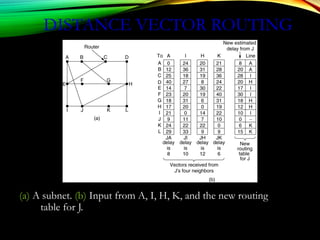
DISTANCE VECTOR ROUTING
(a) A subnet. (b) Input from A, I, H, K, and the new routing
table for J.
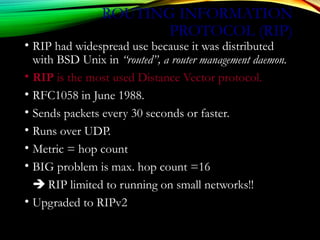
ROUTING INFORMATION
PROTOCOL (RIP)
• RIP had widespread use because it was distributed
with BSD Unix in “routed”, a router management daemon.
• RIP is the most used Distance Vector protocol.
• RFC1058 in June 1988.
• Sends packets every 30 seconds or faster.
• Runs over UDP.
• Metric = hop count
• BIG problem is max. hop count =16
 RIP limited to running on small networks!!
• Upgraded to RIPv2
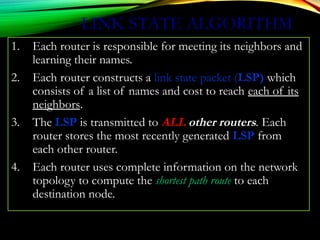
LINK STATE ALGORITHM
1. Each router is responsible for meeting its neighbors and
learning their names.
2. Each router constructs a link state packet (LSP) which
consists of a list of names and cost to reach each of its
neighbors.
3. The LSP is transmitted to ALL other routers. Each
router stores the most recently generated LSP from
each other router.
4. Each router uses complete information on the network
topology to compute the shortest path route to each
destination node.
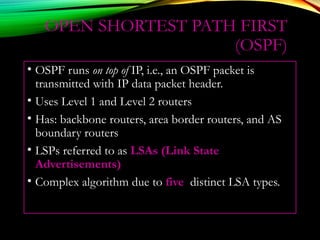
OPEN SHORTEST PATH FIRST
(OSPF)
• OSPF runs on top of IP, i.e., an OSPF packet is
transmitted with IP data packet header.
• Uses Level 1 and Level 2 routers
• Has: backbone routers, area border routers, and AS
boundary routers
• LSPs referred to as LSAs (Link State
Advertisements)
• Complex algorithm due to five distinct LSA types.
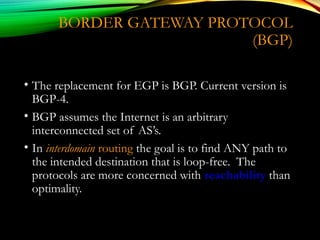
BORDER GATEWAY PROTOCOL
(BGP)
• The replacement for EGP is BGP. Current version is
BGP-4.
• BGP assumes the Internet is an arbitrary
interconnected set of AS’s.
• In interdomain routing the goal is to find ANY path to
the intended destination that is loop-free. The
protocols are more concerned with reachability than
optimality.
THE
TRANSPORT
LAYERBy: Jimmy Maagad
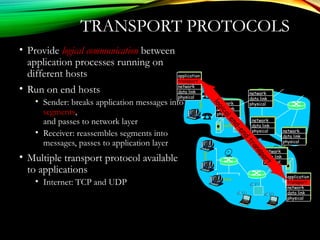
TRANSPORT PROTOCOLS
• Provide logical communication between
application processes running on
different hosts
• Run on end hosts
• Sender: breaks application messages into
segments,
and passes to network layer
• Receiver: reassembles segments into
messages, passes to application layer
• Multiple transport protocol available
to applications
• Internet: TCP and UDP
application
transport
network
data link
physical
application
transport
network
data link
physical
network
data link
physical
network
data link
physical
network
data link
physical
network
data link
physicalnetwork
data link
physical
logicalend-end
transport
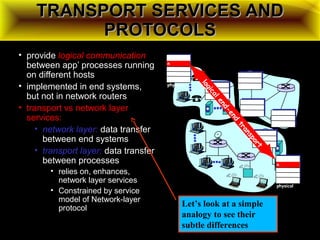
TRANSPORT SERVICES ANDTRANSPORT SERVICES AND
PROTOCOLSPROTOCOLS
• provide logical communication
between app’ processes running
on different hosts
• implemented in end systems,
but not in network routers
• transport vs network layer
services:
• network layer: data transfer
between end systems
• transport layer: data transfer
between processes
• relies on, enhances,
network layer services
• Constrained by service
model of Network-layer
protocol
applicatio
n
transport
network
data link
physical
applicatio
n
transport
network
data link
physical
network
data link
physical
network
data link
physical
network
data link
physical
network
data link
physicalnetwork
data link
physical
logicalend-end
transport
Let’s look at a simple
analogy to see their
subtle differences
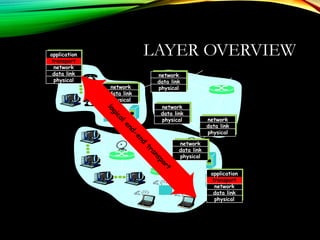
LAYER OVERVIEWapplication
transport
network
data link
physical
application
transport
network
data link
physical
network
data link
physical
network
data link
physical
network
data link
physical
network
data link
physicalnetwork
data link
physical
logicalend-end
transport
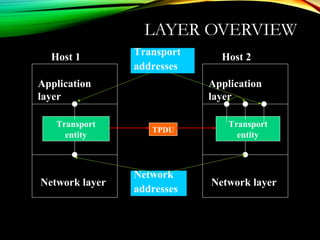
LAYER OVERVIEW
Host 1
Network layer
Application
layer
Transport
entity
Host 2
Network layer
Application
layer
Transport
entity
TPDU
Transport
addresses
Network
addresses
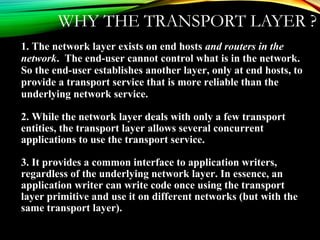
WHY THE TRANSPORT LAYER ?
1. The network layer exists on end hosts and routers in the
network. The end-user cannot control what is in the network.
So the end-user establishes another layer, only at end hosts, to
provide a transport service that is more reliable than the
underlying network service.
2. While the network layer deals with only a few transport
entities, the transport layer allows several concurrent
applications to use the transport service.
3. It provides a common interface to application writers,
regardless of the underlying network layer. In essence, an
application writer can write code once using the transport
layer primitive and use it on different networks (but with the
same transport layer).
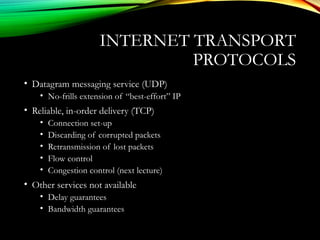
INTERNET TRANSPORT
PROTOCOLS
• Datagram messaging service (UDP)
• No-frills extension of “best-effort” IP
• Reliable, in-order delivery (TCP)
• Connection set-up
• Discarding of corrupted packets
• Retransmission of lost packets
• Flow control
• Congestion control (next lecture)
• Other services not available
• Delay guarantees
• Bandwidth guarantees
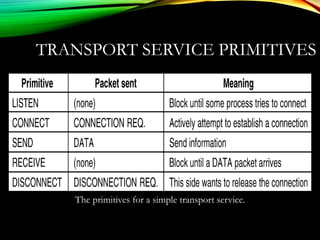
TRANSPORT SERVICE PRIMITIVES
The primitives for a simple transport service.
TRANSPORT SERVICE PRIMITIVES (2)
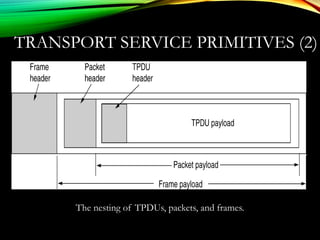
The nesting of TPDUs, packets, and frames.
TRANSPORT SERVICE PRIMITIVES (3)
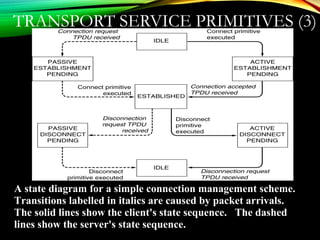
A state diagram for a simple connection management scheme.
Transitions labelled in italics are caused by packet arrivals.
The solid lines show the client's state sequence. The dashed
lines show the server's state sequence.
BERKELEY SOCKETS
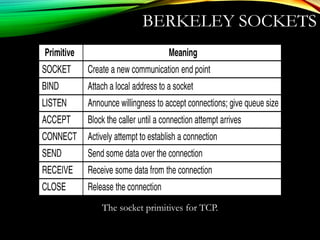
The socket primitives for TCP.
BERKELEY SERVICE
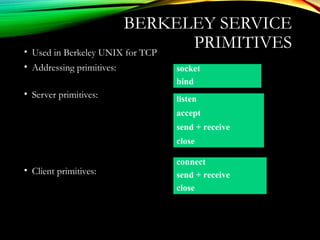
PRIMITIVES• Used in Berkeley UNIX for TCP
• Addressing primitives:
• Server primitives:
• Client primitives:
socket
bind
listen
accept
send + receive
close
connect
send + receive
close
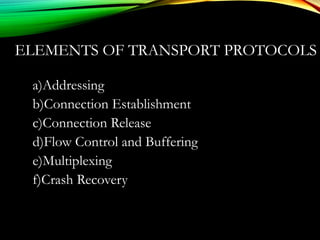
ELEMENTS OF TRANSPORT PROTOCOLS
a)Addressing
b)Connection Establishment
c)Connection Release
d)Flow Control and Buffering
e)Multiplexing
f)Crash Recovery
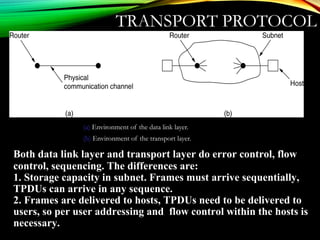
TRANSPORT PROTOCOL
(a) Environment of the data link layer.
(b) Environment of the transport layer.
Both data link layer and transport layer do error control, flow
control, sequencing. The differences are:
1. Storage capacity in subnet. Frames must arrive sequentially,
TPDUs can arrive in any sequence.
2. Frames are delivered to hosts, TPDUs need to be delivered to
users, so per user addressing and flow control within the hosts is
necessary.
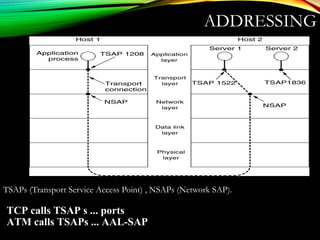
ADDRESSING
TSAPs (Transport Service Access Point) , NSAPs (Network SAP).
TCP calls TSAP s ... ports
ATM calls TSAPs ... AAL-SAP
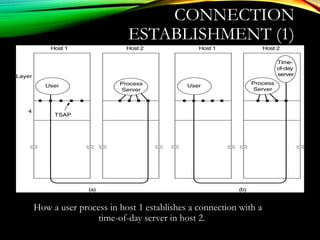
CONNECTION
ESTABLISHMENT (1)
How a user process in host 1 establishes a connection with a
time-of-day server in host 2.
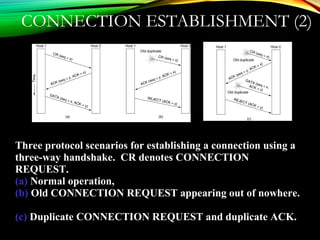
CONNECTION ESTABLISHMENT (2)
Three protocol scenarios for establishing a connection using a
three-way handshake. CR denotes CONNECTION
REQUEST.
(a) Normal operation,
(b) Old CONNECTION REQUEST appearing out of nowhere.
(c) Duplicate CONNECTION REQUEST and duplicate ACK.
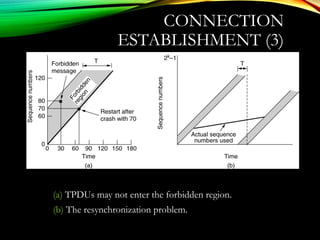
CONNECTION
ESTABLISHMENT (3)
(a) TPDUs may not enter the forbidden region.
(b) The resynchronization problem.
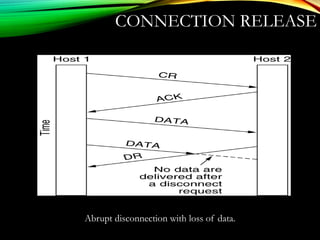
CONNECTION RELEASE
Abrupt disconnection with loss of data.
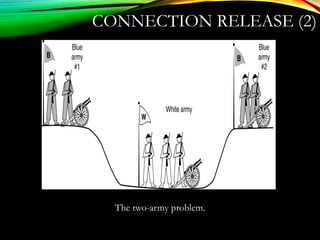
CONNECTION RELEASE (2)
The two-army problem.
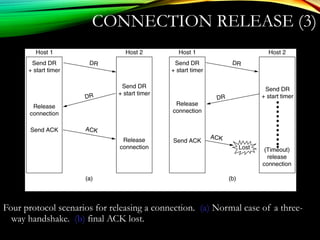
CONNECTION RELEASE (3)
Four protocol scenarios for releasing a connection. (a) Normal case of a three-
way handshake. (b) final ACK lost.
6-14, a, b
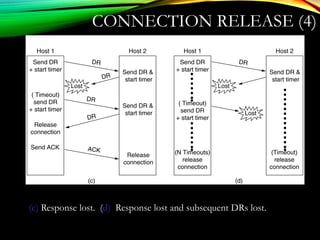
CONNECTION RELEASE (4)
(c) Response lost. (d) Response lost and subsequent DRs lost.
6-14, c,d
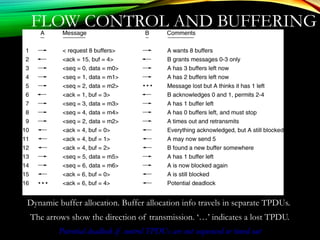
FLOW CONTROL AND BUFFERING
Dynamic buffer allocation. Buffer allocation info travels in separate TPDUs.
The arrows show the direction of transmission. ‘…’ indicates a lost TPDU.
Potential deadlock if control TPDUs are not sequenced or timed out
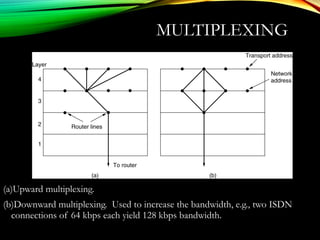
MULTIPLEXING
(a)Upward multiplexing.
(b)Downward multiplexing. Used to increase the bandwidth, e.g., two ISDN
connections of 64 kbps each yield 128 kbps bandwidth.
SIMPLE TRANSPORT
PROTOCOL
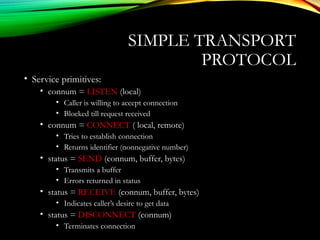
• Service primitives:
• connum = LISTEN (local)
• Caller is willing to accept connection
• Blocked till request received
• connum = CONNECT ( local, remote)
• Tries to establish connection
• Returns identifier (nonnegative number)
• status = SEND (connum, buffer, bytes)
• Transmits a buffer
• Errors returned in status
• status = RECEIVE (connum, buffer, bytes)
• Indicates caller’s desire to get data
• status = DISCONNECT (connum)
• Terminates connection
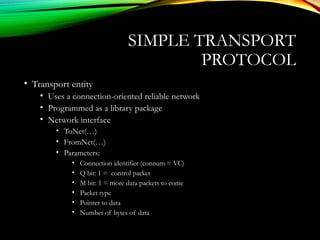
• Transport entity
• Uses a connection-oriented reliable network
• Programmed as a library package
• Network interface
• ToNet(…)
• FromNet(…)
• Parameters:
• Connection identifier (connum = VC)
• Q bit: 1 = control packet
• M bit: 1 = more data packets to come
• Packet type
• Pointer to data
• Number of bytes of data
SIMPLE TRANSPORT
PROTOCOL
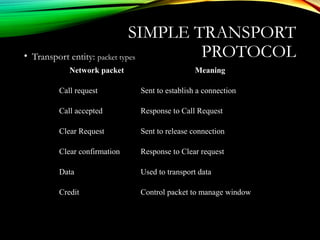
• Transport entity: packet types
SIMPLE TRANSPORT
PROTOCOL
Network packet Meaning
Call request Sent to establish a connection
Call accepted Response to Call Request
Clear Request Sent to release connection
Clear confirmation Response to Clear request
Data Used to transport data
Credit Control packet to manage window
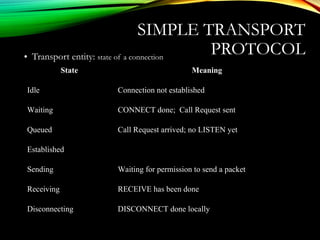
• Transport entity: state of a connection
SIMPLE TRANSPORT
PROTOCOL
State Meaning
Idle Connection not established
Waiting CONNECT done; Call Request sent
Queued Call Request arrived; no LISTEN yet
Established
Sending Waiting for permission to send a packet
Receiving RECEIVE has been done
Disconnecting DISCONNECT done locally
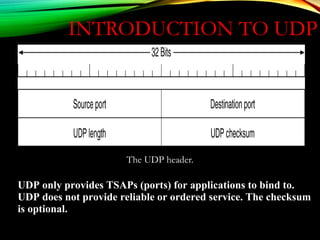
INTRODUCTION TO UDP
The UDP header.
UDP only provides TSAPs (ports) for applications to bind to.
UDP does not provide reliable or ordered service. The checksum
is optional.
UDPUDP: USER DATAGRAM PROTOCOL: USER DATAGRAM PROTOCOL
[RFC 768][RFC 768]
• “no frills,” “bare bones”
Internet transport protocol
• “best effort” service, UDP
segments may be:
• lost
• delivered out of order to
app
• connectionless:
• no handshaking between
UDP sender, receiver
• each UDP segment
handled independently of
others
Why is there a UDP?
• no connection establishment
(which can add delay)
• simple: no connection state at
sender, receiver
• small segment header
• no congestion control: UDP
can blast away as fast as
desired
Additional functionalities are implemented by the application
TCP – 20 bytes, UDP – 8 bytes
UDP: MOREUDP: MORE
• often used for streaming
multimedia apps
• loss tolerant
• rate sensitive
• other UDP uses (why?):
• DNS
• SNMP
• reliable transfer over UDP:
add reliability at application
layer
• application-specific error
recover!
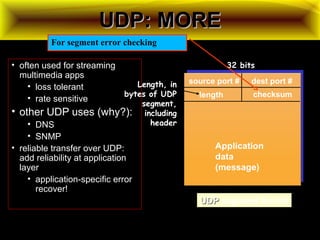
source port # dest port #
32 bits
Application
data
(message)
UDPUDP segment format
length checksum
Length, in
bytes of UDP
segment,
including
header
For segment error checking
UDP CHECKSUMUDP CHECKSUM
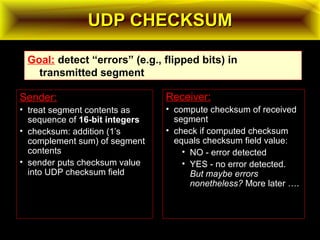
Sender:
• treat segment contents as
sequence of 16-bit integers16-bit integers
• checksum: addition (1’s
complement sum) of segment
contents
• sender puts checksum value
into UDP checksum field
Receiver:
• compute checksum of received
segment
• check if computed checksum
equals checksum field value:
• NO - error detected
• YES - no error detected.
But maybe errors
nonetheless? More later ….
Goal: detect “errors” (e.g., flipped bits) in
transmitted segment
UDP CHECKSUM EXAMPLE:UDP CHECKSUM EXAMPLE:
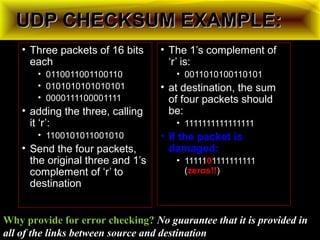
• Three packets of 16 bits
each
• 0110011001100110
• 0101010101010101
• 0000111100001111
• adding the three, calling
it ‘r’:
• 1100101011001010
• Send the four packets,
the original three and 1’s
complement of ‘r’ to
destination
• The 1’s complement of
‘r’ is:
• 0011010100110101
• at destination, the sum
of four packets should
be:
• 1111111111111111
• If the packet is
damaged:
• 11111001111111111
(zeros!!zeros!!)
Why provide for error checking? No guarantee that it is provided in
all of the links between source and destination
WHY WOULD ANYONE
USE UDP?
• Finer control over what data is sent and when
• As soon as an application process writes into the socket
• … UDP will package the data and send the packet
• No delay for connection establishment
• UDP just blasts away without any formal preliminaries
• … which avoids introducing any unnecessary delays
• No connection state
• No allocation of buffers, parameters, sequence #s, etc.
• … making it easier to handle many active clients at once
• Small packet header overhead
• UDP header is only eight-bytes long
POPULAR APPLICATIONS
THAT USE UDP
• Multimedia streaming
• Retransmitting lost/corrupted packets is not worthwhile
• By the time the packet is retransmitted, it’s too late
• E.g., telephone calls, video conferencing, gaming
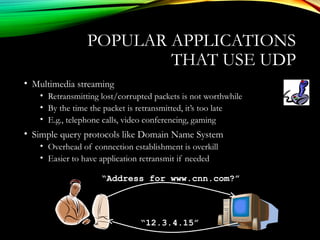
• Simple query protocols like Domain Name System
• Overhead of connection establishment is overkill
• Easier to have application retransmit if needed
“Address for www.cnn.com?”
“12.3.4.15”
TRANSMISSION CONTROL
PROTOCOL (TCP)
• Connection oriented
• Explicit set-up and tear-down of TCP session
• Stream-of-bytes service
• Sends and receives a stream of bytes, not messages
• Reliable, in-order delivery
• Checksums to detect corrupted data
• Acknowledgments & retransmissions for reliable delivery
• Sequence numbers to detect losses and reorder data
• Flow control
• Prevent overflow of the receiver’s buffer space
• Congestion control
• Adapt to network congestion for the greater good
THE INTERNET TRANSPORT PROTOCOLS:
TCP
a)Introduction to TCP
b)The TCP Service Model
c)The TCP Protocol
d)The TCP Segment Header
e)TCP Connection Establishment
f)TCP Connection Release
g)TCP Connection Management Modeling
h)TCP Transmission Policy
i)TCP Congestion Control
j)TCP Timer Management
k)Wireless TCP and UDP
l)Transactional TCP
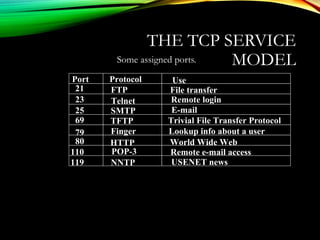
THE TCP SERVICE
MODELSome assigned ports.
Port Protocol Use
21 FTP File transfer
23 Telnet Remote login
25 SMTP E-mail
69 TFTP Trivial File Transfer Protocol
79 Finger Lookup info about a user
80 HTTP World Wide Web
110 POP-3 Remote e-mail access
119 NNTP USENET news
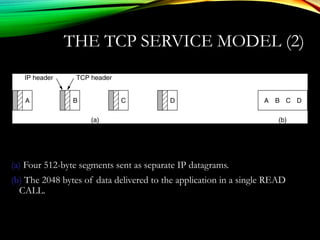
THE TCP SERVICE MODEL (2)
(a) Four 512-byte segments sent as separate IP datagrams.
(b) The 2048 bytes of data delivered to the application in a single READ
CALL.
TCP SERVICE MODEL (3)
All TCP connections are full-duplex and point-to-point.
TCP provides a byte stream. i.e it does not preserve message
boundaries
At sender TCP may immediately send or buffer data at its
discretion.
Sender can use a PUSH flag to instruct TCP not to buffer the
send.
Sender can use URGENT flag to have TCP send data
immediately and have the receiver TCP signal the receiver
application that there is data to be read.
SOME TCP FEATURES
Every byte has its own 32 bit sequence number.
Sending and receiving entities exchange data in segments
Each segment is the 20 byte header and data (total up to 64K)
TCP may aggregate multiple writes into one segment or split
one write into several segments.
A segment size if the smaller of either 64K or the MTU of the
network layer (MTU of Ethernet is about 1500 bytes)
A segment must fit in a single IP payload.
SOME TCP FEATURES
TCP uses the sliding window protocol as its base.
Sender sends segment, starts timer waits for ack. It no ack then
retransmit. Receiver acks in separate segment or “piggyback”
on data segment.
TCP must deal with reordred segments.
A lot of algorithms have been developed to make TCP efficient
under diverse network conditions. We will look at a few of
them.
THE
APPLICATION
LAYER
By: Jimmy Maagad
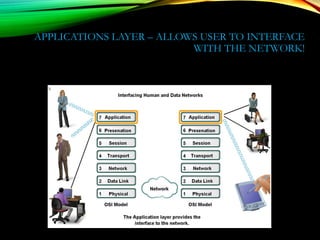
APPLICATIONS LAYER – ALLOWS USER TO INTERFACE
WITH THE NETWORK!
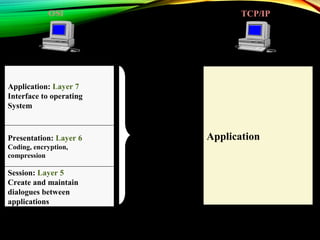
Session: Layer 5
Create and maintain
dialogues between
applications
Presentation: Layer 6
Coding, encryption,
compression
Application: Layer 7
Interface to operating
System
Application
OSI TCP/IP
N
I
C
LOCAL NETWORK
INTERNET
TRANSPORT
APPLICATION
Establish, send, close
session, Authenticators,
Master / Slave
Virtual Terminal Session,
Compression & Encryption
Transfer to Application
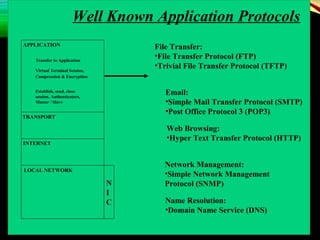
Well Known Application Protocols
File Transfer:
•File Transfer Protocol (FTP)
•Trivial File Transfer Protocol (TFTP)
Email:
•Simple Mail Transfer Protocol (SMTP)
•Post Office Protocol 3 (POP3)
Web Browsing:
•Hyper Text Transfer Protocol (HTTP)
Network Management:
•Simple Network Management
Protocol (SNMP)
Name Resolution:
•Domain Name Service (DNS)
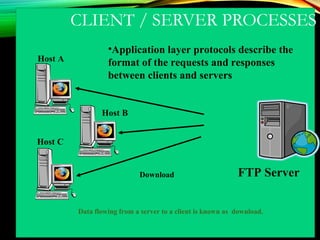
CLIENT / SERVER PROCESSES
FTP Server
Host A
Host B
Host C
Download
Data flowing from a server to a client is known as download.
•Application layer protocols describe the
format of the requests and responses
between clients and servers
• In a client/server network, the server runs a service, or process,
sometimes called a server daemon , typically running in the
background.
• Daemons are described as "listening" for a request from a client,
because they are programmed to respond whenever the server
receives a request for the service provided by the daemon.
• When a daemon "hears" a request from a client, it exchanges
appropriate messages with the client, as required by its protocol,
and proceeds to send the requested data to the client in the
proper format.
Client / Server Processes
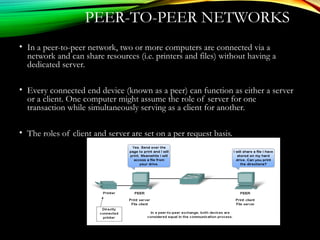
PEER-TO-PEER NETWORKS
• In a peer-to-peer network, two or more computers are connected via a
network and can share resources (i.e. printers and files) without having a
dedicated server.
• Every connected end device (known as a peer) can function as either a server
or a client. One computer might assume the role of server for one
transaction while simultaneously serving as a client for another.
• The roles of client and server are set on a per request basis.
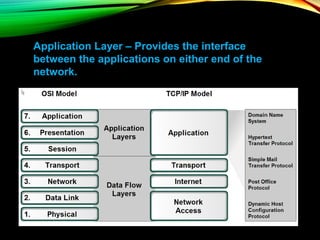
Application Layer – Provides the interface
between the applications on either end of the
network.
PROTOCOLS AND NETWORKS
PROTOCOLS
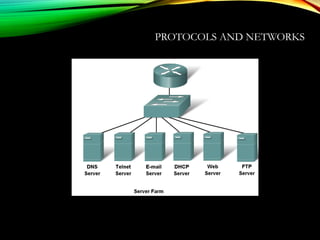
• DNS – Matches domain names with IP addresses
• HTTP – Used to transfer data between clients/servers using a web browser
• SMTP & POP3 – used to send email messages from clients to servers over
the internet
• FTP – allows the download/upload of files between a client/server
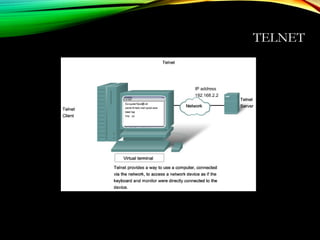
• Telnet – allows users to login to a host from a remote location and take
control as if they were sitting at the machine (virtual connection)
• DHCP – assigns IP addresses, subnet masks, default gateways, DNS
servers, etcs. To users as they login the network
APPLICATION LAYER SOFTWARE
• 2 types
• Applications – Provide the human (user) interface. Relies on lower
layers to complete the communication process.
•
• Services – establish an interface to the network where protocols provide
the rules and formats that govern how data is treated..
HOW DATA REQUESTS
OCCUR & ARE FILLED
• Client/server model
• Advantages:
• Centralized administration
• Security is easier to enforce
• Application layer services and protocols
• Peer-to-peer networking and applications
CLIENT/SERVER MODEL
• Client –
• device requesting information (initiates the data exchange)
• Can also UPLOAD data to the servers
• Server – device responding to the request
• How does it handle multiple request from multiple users and keep everything in
order?
• Relies on support from the lower layer functions to distinguish between
services and conversations.
• Server relies on a service called a server daemon – runs in the background
and ‘listens’ for requests for that service. It can then exchange messages as
appropriate & send requested data.
• Examples:
• E-mail Client on an employee computer issues a request to the e-mail server for
any unread e-mail. The server responds by sending the e-mail to the client.
• Conversations can originate with either party.
PEER-TO-PEER (P2P) NETWORK
MODEL
• Two or more computers are connected and are able to share resources
without having a dedicated server
• Every end device can function as a client or server on a ‘per request’
basis
• Resources are decentralized (information can be located anywhere)
• Difficult to enforce security and policies
• User accounts and access rights have to be set individually on each
peer device
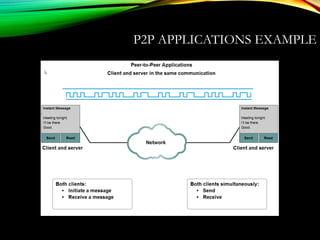
P2P APPLICATIONS
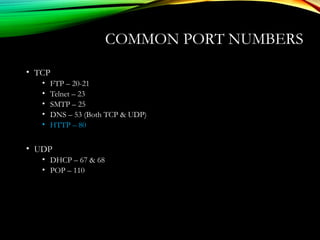
• Running applications in hybrid mode allows for a centralized
directory of files even though the files themselves may be on
multiple machines
• Unlike P2P networks, a device can act as both the client and server
within the same communication
• Each device must provide a user interface and run a background
service.
• Can be used on P2P networks, client/server networks and across the
internet.
P2P APPLICATIONS EXAMPLE
COMMON PORT NUMBERS
• TCP
• FTP – 20-21
• Telnet – 23
• SMTP – 25
• DNS – 53 (Both TCP & UDP)
• HTTP – 80
• UDP
• DHCP – 67 & 68
• POP – 110
DNS SERVICES
• DNS resolver – supports name resolution for other network
applications and services that need it.
• Devices are usually given 1 or more DNS Server addresses they can use
for name resolution.
• Uses different types of resource records to actually resolve the
name/IP address issues
DSN SERVICES AND PROTOCOL
DNS Servers resolve names to IP addresses. It would be
difficult to remember the IP address of every website we
like to visit, but we can remember names.
THANK YOU DNS SERVER!
WWW SERVICE AND
HTTP• Steps:
• 1) URL is typed in the address bar.
2) Browser checks with DNS server to convert it to an IP address
3) Connects to the server requested
4) Using HTTP or HTTPS protocol requirements, the browser sends a
GET request to the server to ask for the desired html document
(usually index.html)
5) The server sends the HTML code for the web page to the browser.
6) The browser interprets the HTML code and formats the page to fit the
browser window.
7) See the next slide for an example.
WWW SERVICE AND HTTP
HTTP/HTTPS
are some of the
MOST used
application
protocols!
E-MAIL SERVICES AND SMTP/POP
PROTOCOLS• E-mail is the most popular network service.
• E-mail client (when people compose e-mail) is called Mail User Agent
(MUA)
• MUA allows messages to be sent/retrieved to and from your mailbox
• Requires several applications and services
• POP or POP3 – deliver email from server to client (incoming messages)
• SMTP – handles outbound messages from clients
E-MAIL SERVICES AND SMTP/POP
PROTOCOLS• What do servers require?
1) Must be running SMTP!
2) Also operates
1) Mail Transfer Agent (MTA) – used to forward email
1) Receives email from the clients MUA
2) Uses SMTP to route email between SERVERS!
3) Passes email to the MDA for final delivery
2) Mail Delivery Agent (MDA) – receives messages from MUA or from the
MTA on another server
3) For two e-mail servers to talk – MUST run SMTP and MTA in order
to transfer mail between the 2 servers!
4) Some clients run Lotus Notes, Groupwise, or MS Exchange. They
have their own proprietary protocol for handling e-mail.
E-MAIL SERVICES AND SMTP/POP PROTOCOLS
FTP• Commonly used application layer protocol
• Allows for the transfer of files between clients/servers.
• Requires 2 connections to the server
1) Commands – uses TCP port 21
2) Actual data – uses TCP port 20
DHCP
• Dynamic Host Configuration Protocol – enables devices to obtain IP
addresses, subnet masks, gateways, DNS server information, etc. from a
DHCP server.
• An IP address that is not being used is assigned from a range of available
addresses
• Not permanently assigned – only leased for a specific period of time (usually
24 hours – 7 days)
• If the host logs off or the power is lost, the IP address they were using is
returned to the pool to be re-assigned to another host when needed.
• This is how you are able to use Wi-Fi at various places in the world!
• Don’t use DHCP for devices such as servers, printers, routers, switches, etc.
These should be statically assigned.
• This will be covered in greater detail in CCNA 4.
TELNET
• Developed in the early 1970’s – among the oldest of the application layer
protocols and services in the TCP/IP protocol suite.
• Allows users to emulate text-based terminal devices over the network using
software.
• A connection is known as a ‘virtual terminal (vty)’ session.
• Can be run from the command prompt on a PC.
• You can use the device as if you were sitting there with all the rights and priorities
that you username will offer you.
• Disadvantages: Doesn’t support encryption like SSH. All data is transferred as
plain text. It can be easily intercepted and understood.
• If security is a concern, you should use Secure Shell (SSH) protocol. Provides for
remote logins with stronger authentication than telnet.
• Network Professionals should always use SSH whenever possible.
TELNET
FILE SHARING SERVICES AND SMB
PROTOCOL• Server Message Block
• SMB has become a mainstay of Microsoft networking, even more so since
the introduction of Windows 2000 software.
• Allows servers to share their resources with clients
• Linux and Unix also share with Microsoft networks using a version of SMB
called SAMBA.
• Apple also supports sharing resources using an SMB protocol
• What can SMB do?
• Start, authenticate, and terminate sessions
• Control file and printer access
• Allow applications to send/receive messages to/from another device
FILE SHARING SERVICES AND SMB
GNUTELLA PROTOCOL
People can
make files on
their hard
disks
available to
other users to
download.
Relies heavily
on HTTP
services.
Client applications that use Gnutella are BearShare,
LimeWire, Morpheus, WinMX, Gnucleus, etc.
Network Services
255
• The World Wide Web (WWW) is a repository of information stored
on web pages, linked together from points all over the world.
• Web pages are written in a language called Hypertext Mark-Up Language
(HTML), and stored on web servers.
• To retrieve an HTML web page, a client/server protocol called Hyper
Text Transfer Protocol (HTTP) is used.
• HTML web pages are displayed on a users PC by web browser software
clients.
256
WWW AND HTTP
WEB BROWSING PROCESSES
Web ServerClient
HTML
WWW Page
Web Browser HTTP Request
HTML
WWW Page
1. Web browser uses HTTP to
request a particular web-page
from a web server.
2. Web server responds, using
HTTP to send the HTML web
page page to the web browser.
3. The web browser formats the
web page for display on the client
PC.
HYPER TEXT MARK-UP
LANGUAGE (HTML)
•Language used for creating web pages.
•Mark-up language formats a web page independently from the
process that created it – provides a standard way for web
browsers to interpret web pages.
•Uses only ASCII characters for both the main web page text and
the formatting instructions.
HYPER TEXT TRANSFER PROTOCOL
(HTTP)
•HTTP is used mainly to access data on the WWW.
•Functions like a combination of FTP and SMTP.
•Used to transfer files using TCP and well-known port 80 – there is
no control connection required.
•Web browser utilises an HTTP client, while a web server runs an
HTTP server.
•The HTML data transferred by HTTP is not readable by the user
– it has to be interpreted by a web-browser.
LOCAL NETWORK
INTERNET
TRANSPORT
(80)
Client – Web Browser WWW Server
Data
HTTP Client HTTP Server
Request
Response
Request
Response
Web Page Transfer Phases:
1. Connection Establishment –
Client makes connection to TCP
port 80 on the web server. Server
commences the connection phase.
2. HTTP Transfer – Server
transfers HTML web page using
HTTP
3. Connection Termination – After
web page is transferred
successfully, the client terminates
the connection.
HTML
Web Page
• The navigation of web pages is achieved using locators called
Uniform Resource Locators (URLs).
• These allow a user to access sites without using IP addresses.
• The URL is a standard for specifying any kind of information
on the Internet, and defines four things: protocol, host computer,
port and path.
UNIFORM RESOURCE LOCATER
(URL)
Method Host
://
•Method – the protocol used to retrieve data (usually HTTP)
•Host – alias of the web server where the data is located.
Normally prefixed with ‘WWW’ signifying a web server.
•Port – Transport layer port that the web server is using – not a mandatory
field, as port 80 is used by default.
•Path – the location of the data on the web server – the ‘/’ indicates
directories and subdirectories.
: Port
/ Path
Uniform Resource Locater (URL)
URLs are presented in a standard format:
Simple Name Resolution
Phill
192.168.1.100
Lisa
192.168.1.101
Bazil
192.168.1.102
Host Table:
•Phill - 192.168.1.100
•Lisa - 192.168.1.101
•Bazil - 192.168.1.102
Host Table:
•Phill - 192.168.1.100
•Lisa - 192.168.1.101
•Bazil - 192.168.1.102
Host Table:
•Phill - 192.168.1.100
•Lisa - 192.168.1.101
•Bazil - 192.168.1.102
Switch
Name Resolution can be
achieved using a host table,
mapping all the host names
in a network to their
respective IP addresses
All host tables need to be
changed every time a new
PC is added to the
network- this can be time
consuming on a large
network
Bazil = 192.168.1.103
What is IP Address
of Bazil?
Name Resolution Using DNS
Phill
192.168.1.100
Lisa
192.168.1.101
Bazil
192.168.1.102
Switch
•A single DNS server holds
the host table.
•Client DNS services request
host/IP address mappings
from the server.
Host Table:
•Phill - 192.168.1.100
•Lisa - 192.168.1.101
•Bazil - 192.168.1.102
DNS Server
192.168.1.103
DNS Server:
192.168.1.103
DNS Server:
192.168.1.103
DNS Server:
192.168.1.103
DNS Client DNS Client DNS Client
DATA COMMUNICATION PPT

DATA COMMUNICATION PPT

  • 1.
  • 2.
  • 3.
  • 4.
    LAYERED TASKS •We usethe concept of layers in our daily life. As an example, let us consider two friends who communicate through postal mail. The process of sending a letter to a friend would be complex if there were no services available from the post office.
  • 5.
  • 6.
  • 7.
    THE OSI MODEL Established in 1947, the International Standards Organization (ISO) is a multinational body dedicated to worldwide agreement on international standards. An ISO standard that covers all aspects of network communications is the Open Systems Interconnection (OSI) model. It was first introduced in the late 1970s.  Note: ◦ ISO is the organization. ◦ OSI is the model.
  • 8.
    HISTORY • Rapid growthof computer networks caused compatibility problems • ISO recognized the problem and released the OSI model in 1984 • OSI stands for Open Systems Interconnection and consists of 7 Layers • The use of layers is designed to reduce complexity and make standardization easier
  • 9.
    7 LAYERS INTHE OSI MODEL
  • 10.
    7 LAYERS OFTHE OSI MODEL
  • 11.
  • 12.
  • 13.
    7 LAYERS OFTHE OSI MODEL Layer Responsible For: 7.) Application Provides Services to User Apps 6.) Presentation Data Representation 5.) Session Communication Between Hosts 4.) Transport Flow Ctrl, Error Detection/Correction 3.) Network End to End Delivery, Logical Addr 2.) Data Link Media Access Ctrl, Physical Addr 1.) Physical Medium, Interfaces, Puts Bits on Med.
  • 14.
    EXAMPLES Layer Example 7.) ApplicationHTTP, FTP, SMTP 6.) Presentation ASCII, JPEG, PGP 5.) Session BOOTP, NetBIOS, DHCP, DNS 4.) Transport TCP, UDP, SPX 3.) Network IP, IPX, ICMP 2.) Data Link Ethernet, Token Ring, Frame Relay 1.) Physical Bits, Interfaces, Hubs
  • 15.
    MNEMONICS (A)ll 7.) (A)pplication(A)way (P)eople 6.) (P)resentation (P)izza (S)eem 5.) (S)ession (S)ausage (T)o 4.) (T)ransport (T)hrow (N)eed 3.) (N)etwork (N)ot (D)ata 2.) (D)ata Link (D)o (P)rocessing 1.) (P)hysical (P)lease
  • 16.
    PDU’S AND THEOSI MODEL Layer PDU Name 7.) Application Data 6.) Presentation Data 5.) Session Data 4.) Transport Segment 3.) Network Packet 2.) Data Link Frame 1.) Physical Bits
  • 17.
  • 18.
  • 19.
  • 20.
  • 21.
    An exchange usingthe Internet model
  • 22.
  • 23.
  • 24.
    A BRIEF HISTORYOF THE WORLD
  • 25.
    INFORMATION SECURITY • Theinformation systems are known to be vulnerable to many threats like cyber crime, hacking and terrorism • Regardless of whether the information has been stolen by the attacker or not, the security breaches and virus attacks result in adverse publicity to the organization. •Thus issues like protection and security of the information systems have become greater concern.
  • 26.
    INFORMATION SECURITY • Information&Network penetration do occur - from outsiders & insiders in spite of having various security measures such as Anti-virus, Firewalls, Routers • There are two ways to attack computers - Gain physical access to machines & conduct physical attack - Attack by use of malicious software; Malware
  • 27.
    THE SECURITY REQUIREMENTS TRIAD ComputerSecurity Theprotection afforded to an automated information system in orderto attain the applicable objectives of preserving the integrity, availabilityand confidentialityof information system resources (includes
  • 28.
    • 85% detectedcomputersecurity breaches within the last twelve months. • 64% acknowledged financial losses due to computerbreaches. • 36% reported the intrusions to law enforcement; a significant increase from 2000, when only 25% reported them. Some Harsh Facts
  • 29.
    SECURITY REQUIREMENTS • Confidentiality –Preserving authorizedrestrictionson information access and disclosure, including meansfor protecting personal privacy and proprietary information. • Integrity –Guarding against information modifications or destruction, including ensuring information non-repudiation and authenticity. • Availability –Ensuring timely and reliableaccessto and use
  • 30.
    SECURITY ATTACKS, MECHANISMS &SERVICES • Security Attack –Any action that compromises the security of information • Security Mechanism –A process / device that is designed to detect, prevent or recover from a security attack. • Security Service –A service intended to counter security attacks, typically by implementing one or more mechanisms.
  • 31.
    THREATS & ATTACKS …but threat and attack used nearly interchangeably
  • 32.
  • 33.
  • 34.
    CLASSIFY SECURITY ATTACKS AS •passive attacks – intruder do not make any changes • obtain message contents, or • monitor traffic flows • active attacks – intruder make changes. • masquerade of one entity as some other: man-in- the-middle • replay previous messages • modify messages in transit • denial of service
  • 35.
    SECURITY OBJECTIVES Confidentiality (Secrecy): Prevent/Detect/Deterimproper disclosure of information Integrity: Prevent/Detect/Deter improper modification of information Availability: Prevent/Detect/Deter improper denial of access to services provided by the system
  • 36.
    VIRUS, WORMS, ANDTROJAN HORSES • Trojan horse: instructions hidden inside an otherwise useful program that do bad things • Virus: a set of instructions that, when executed, inserts copies of itself into other programs. • Worm: a program that replicates itself by installing copies of itself on other machines across a network. • Trapdoor: an undocumented entry point, which can be exploited as a security flaw • Zombie: malicious instructions installed on a system that can be remotely triggered to carry out some attack with les traceability because the attack comes from another victim.
  • 37.
  • 38.
    WHAT IS CRYPTOGRAPHY •Cryptography • In a narrow sense • Mangling information into apparent unintelligibility • Allowing a secret method of un-mangling • In a broader sense • Mathematical techniques related to information security • About secure communication in the presence of adversaries • Cryptanalysis • The study of methods for obtaining the meaning of encrypted information without accessing the secret information • Cryptology • Cryptography + cryptanalysis
  • 39.
    TYPES OF CRYPTOGRAPHY •SymmetricCryptography •Asymmetric Cryptography
  • 40.
    SYMMETRIC CRYPTOGRAPHY It used singlefunction called SECRET KEY or PRIVATE KEY
  • 41.
    SECRET KEY/PRIVATE KEY •Using a single key for encryption/decryption. • The plaintext and the ciphertext having the same size. • called symmetric key cryptography plaintext ciphertext plaintext ciphertext decryption encryption key
  • 42.
    ASYMMETRIC CRYPTOGRAPHY •It used twokeys for encryption/ decryption •Called the public key and the private key
  • 43.
    PUBLIC KEY CRYPTOGRAPHY •Each individual has two keys • a private key (d): need not be reveal to anyone • a public key (e): preferably known to the entire world • Public key crypto is also called asymmetric crypto. plaintext ciphertext plaintext ciphertext decryption encryption Private key Public key
  • 44.
    PRIVATE-KEY CRYPTOGRAPHY • traditional private/secret/singlekey cryptography uses one key • shared by both sender and receiver • if this key is disclosed communications are compromised • also is symmetric, parties are equal • hence does not protect sender from receiver forging a message & claiming is sent by sender
  • 45.
  • 46.
  • 47.
    LAYER 1: THEPHYSICAL LAYER • Defines physical medium and interfaces • Determines how bits are represented • Controls transmission rate & bit synchronization • Controls transmission mode: simplex, half- duplex, & full duplex • PDU: Bits • Devices: hubs, cables, connectors, etc…
  • 48.
    The physical layeris responsible for transmitting individual bits from one node to the next. Note:Note:
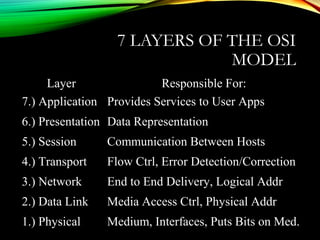
  • 49.
    OUTLINE •Circuits • Configuration, DataFlow, Communication Media •Digital Transmission of Digital Data • Coding, Transmission Modes, •Analog Transmission of Digital Data • Modulation, Voice Circuit Capacity, •Digital Transmission of Analog Data • Pulse Amplitude Modulation, Voice Data Transmittion, Instant Messenger Transmitting Voice Data •Analog/Digital Modems •Multiplexing • FDM, TDM, STDM, WDM, Inverse Multiplexing, DSL
  • 50.
    PHYSICAL LAYER - OVERVIEW•Includes network hardware and circuits • Network circuits: • physical media (e.g., cables) and • special purposes devices (e.g., routers and hubs). • Types of Circuits • Physical circuits connect devices & include actual wires such as twisted pair wires • Logical circuits refer to the transmission characteristics of the circuit, such as a T-1 connection refers to 1.5 Mbps • Can be the same or different. For example, in multiplexing, one wire carries several logical circuits Physical Layer Network Layer Data Link Layer
  • 51.
    TYPES OF DATA TRANSMITTED •Analog data • Produced by telephones • Sound waves, which vary continuously over time • Can take on any value in a wide range of possibilities • Digital data • Produced by computers, in binary form, represented as a series of ones and zeros • Can take on only 0 and 1
  • 52.
    TYPES OF TRANSMISSION •Analog transmissions • Analog data transmitted in analog form (vary continuously) • Examples of analog data being sent using analog transmissions are broadcast TV and radio • Digital transmissions • Made of square waves with a clear beginning and ending • Computer networks send digital data using digital transmissions. • Data converted between analog and digital formats • Modem (modulator/demodulator): used when digital data is sent as an analog transmission • Codec (coder/decoder): used when analog data is sent as a digital transmission
  • 53.
    DATA TYPE VS. TRANSMISSIONTYPE Analog Transmission Digital Transmission Analog Data Radio, Broadcast TV PCM & Video standards using codecs Digital Data Modem-based communications LAN cable standards
  • 54.
    DIGITAL TRANSMISSION: ADVANTAGES• Producesfewer errors • Easier to detect and correct errors, since transmitted data is binary (1s and 0s, only two distinct values)) • Permits higher maximum transmission rates • e.g., Optical fiber designed for digital transmission • More efficient • Possible to send more digital data through a given circuit • More secure • Easier to encrypt • Simpler to integrate voice, video and data • Easier to combine them on the same circuit, since signals made up of digital data
  • 55.
    CIRCUIT CONFIGURATION • Basic physicallayout of the circuit • Configuration types: • Point-to-Point Configuration • Goes from one point to another • Sometimes called “dedicated circuits” • Multipoint Configuration • Many computer connected on the same circuit • Sometimes called “shared circuit”
  • 56.
    POINT-TO-POINT CONFIGURATION – Used whencomputers generate enough data to fill the capacity of the circuit – Each computer has its own circuit to any other computer in the network (expensive)
  • 57.
    MULTIPOINT CONFIGURATION + Cheaper (noneed for many wires) and simpler to wire - Only one computer can use the circuit at a time – Used when each computer does not need to continuously use the entire capacity of the circuit
  • 58.
    DATA FLOW (TRANSMISSION) dataflows move in one direction only, (radio or cable television broadcasts) data flows both ways, but only one direction at a time (e.g., CB radio) (requires control info) data flows in both directions at the same time
  • 59.
    SELECTION OF DATA FLOWMETHOD • Main factor: Application • If data required to flow in one direction only • Simplex Method • e.g., From a remote sensor to a host computer • If data required to flow in both directions • Terminal-to-host communication (send and wait type communications) • Half-Duplex Method • Client-server; host-to-host communication (peer-to- peer communications) • Full Duplex Method • Half-duplex or Full Duplex • Capacity may be a factor too • Full-duplex uses half of the capacity for each direction
  • 60.
    COMMUNICATIONS MEDIA• Physical matterthat carries transmission • Guided media: • Transmission flows along a physical guide (Media guides the signal)) • Twisted pair wiring, coaxial cable and optical fiber cable • Wireless media (aka, radiated media) • No wave guide, the transmission just flows through the air (or space) • Radio (microwave, satellite) and infrared communications
  • 61.
    TWISTED PAIR (TP)WIRES •Commonly used for telephones and LANs •Reduced electromagnetic interference •Via twisting two wires together (Usually several twists per inch) •TP cables have a number of pairs of wires •Telephone lines: two pairs (4 wires, usually only one pair is used by the telephone) •LAN cables: 4 pairs (8 wires) •Also used in telephone trunk lines (up to several thousand pairs) •Shielded twisted pair also exists, but is more expensive
  • 62.
    COAXIAL CABLE Copyright 2005John Wiley & Sons, Inc Wire mesh ground (protective jacket ) • More expensive than TP (quickly disappearing) • used mostly for CATV • Less prone to interference than TP (due to (shield)
  • 63.
    FIBER OPTIC CABLE •Light created by an LED (light-emitting diode) or laser is sent down a thin glass or plastic fiber • Has extremely high capacity, ideal for broadband • Works better under harsh environments • Not fragile, nor brittle; Nit heavy nor bulky • More resistant to corrosion, fire, etc., • Fiber optic cable structure (from center): • Core (v. small, 5-50 microns, ~ the size of a single hair) • Cladding, which reflects the signal • Protective outer jacket
  • 64.
    TYPES OF OPTICALFIBER •Multimode (about 50 micron core) •Earliest fiber-optic systems •Signal spreads out over short distances (up to ~500m) •Inexpensive •Graded index multimode •Reduces the spreading problem by changing the refractive properties of the fiber to refocus the signal •Can be used over distances of up to about 1000 meters •Single mode (about 5 micron core) •Transmits a single direct beam through the cable •Signal can be sent over many miles without spreading •Expensive (requires lasers; difficult to manufacture)
  • 65.
    OPTICAL FIBER 3 -65 (different parts of signal arrive at different times) Excessive signal weakening and dispersion Center light likely to arrive at the same time as the other parts
  • 66.
    Copyright 2005 JohnWiley & Sons, Inc 3 - 66
  • 67.
    WIRELESS MEDIA • Radio •Wireless transmission of electrical waves over air • Each device has a radio transceiver with a specific frequency • Low power transmitters (few miles range) • Often attached to portables (Laptops, PDAs, cell phones) • Includes • AM and FM radios, Cellular phones • Wireless LANs (IEEE 802.11) and Bluetooth • Microwaves and Satellites • Infrared • “invisible” light waves (frequency is below red light) • Requires line of sight; generally subject to interference from heavy rain, smog, and fog • Used in remote control units (e.g., TV)
  • 68.
    MICROWAVE RADIO •High frequencyform of radio communications •Extremely short (micro) wavelength (1 cm to 1 m) •Requires line-of-sight •Perform same functions as cables •Often used for long distance, terrestrial transmissions (over 50 miles without repeaters) •No wiring and digging required •Requires large antennas (about 10 ft) and high towers •Posses similar properties as light •Reflection, Refraction, and focusing •Can be focused into narrow powerful beams for long distance
  • 69.
    SATELLITE COMMUNICATIONS A special formof microwave communications in a geosynchronous orbit Signals sent from the ground to a satellite; Then relayed to its destination ground station • Long propagation delay – Due to great distance between ground station and satellite (Even with signals traveling at light speed)
  • 70.
    FACTORS USED INMEDIA SELECTION •Type of network • LAN, WAN, or Backbone •Cost • Always changing; depends on the distance •Transmission distance • Short: up to 300 m; medium: up to 500 m •Security • Wireless media is less secure •Error rates • Wireless media has the highest error rate (interference) •Transmission speeds • Constantly improving; Fiber has the highest
  • 71.
  • 72.
    DIGITAL TRANSMISSION OF DIGITALDATA •Computers produce binary data •Standards needed to ensure both sender and receiver understands this data •Coding: language that computers use to represent letters, numbers, and symbols in a message •Signaling (aka, encoding): language that computers use to represent bits (0 or 1) in electrical voltage •Bits in a message can be send in •A single wire one after another (Serial transmission) •Multiple wires simultaneously (Parallel transmission)
  • 73.
    CODING • Main charactercodes in use in North America • ASCII: American Standard Code for Information Interchange • Originally used a 7-bit code (128 combinations), but an 8-bit version (256 combinations) is now in use • EBCDIC: Extended Binary Coded Decimal Interchange Code • An 8-bit code developed by IBM A character  a group of bits Letters (A, B, ..), numbers (1, 2,..), special symbols (#, $, ..) 1000001
  • 74.
    TRANSMISSION MODES • Parallelmode • Uses several wires, each wire sending one bit at the same time as the others • A parallel printer cable sends 8 bits together • Computer’s processor and motherboard also use parallel busses (8 bits, 16 bits, 32 bits) to move data around • Serial Mode • Sends bit by bit over a single wire • Serial mode is slower than parallel mode
  • 75.
    PARALLEL TRANSMISSION EXAMPLE Used forshort distances (up to 6 meters) (since bits sent in parallel mode tend to spread out over long distances)
  • 76.
    SERIAL TRANSMISSION EXAMPLE Can beused over longer distances (since bits stay in the order they were sent)
  • 77.
    SIGNALING OF BITS •DigitalTransmission •Signals sent as a series of “square waves” of either positive or negative voltage •Voltages vary between +3/-3 and +24/-24 depending on the circuit •Signaling (encoding) •Defines what voltage levels correspond to a bit value of 0 or 1 •Examples: • Unipolar, Bipolar • RTZ, NRZ, Manchester •Data rate: how often the sender can transmit data • 64 Kbps  once every 1/64000 of a second
  • 78.
    SIGNALING (ENCODING) TECHNIQUES •Unipolar signaling •Usevoltages either vary between 0 and a positive value or between 0 and some negative value •Bipolar signaling •Use both positive and negative voltages •Experiences fewer errors than unipolar signaling • Signals are more distinct (more difficult (for interference) to change polarity of a current) •Return to zero (RZ) • Signal returns to 0 voltage level after sending a bit •Non return to zero (NRZ) • Signals maintains its voltage at the end of a bit •Manchester encoding (used by Ethernet)
  • 79.
    MANCHESTER ENCODING • Used byEthernet, most popular LAN technology • Defines a bit value by a mid-bit transition • A high to low voltage transition is a 0 and a low to high mid-bit transition defines a 1 • Data rates: 10 Mb/s, 100 Mb/s, 1 Gb/s, .. • 10- Mb/s  one signal for every 1/10,000,000 of a second (10 million signals (bits) every second) • Less susceptible to having errors go undetected • No transition  en error took place
  • 80.
  • 81.
    ANALOG TRANSMISSION OFDIGITAL DATA • A well known example • Using phone lines to connect PCs to Internet • PCs generates digital data • Phone lines use analog transmission technology • Modems translate digital data into analog signals Phone line Central Office (Telco) Analog transmission PC M Telephone Network Internet Digital data M
  • 82.
    TELEPHONE NETWORK •Originally designedfor human speech (analog communications) only •POTS (Plain Old Telephone Service) •Enables voice communications between two telephones •Human voice (sound waves) converted to electrical signals by the sending telephone •Signals travel through POTS and converted back to sound waves •Sending digital data over POTS •Use modems to convert digital data to an analog format • One modem used by sender to produce analog data • Another modem used by receiver to regenerate digital data
  • 83.
    SOUND WAVES AND CHARACTERISTICS •Amplitude •Height(loudness) of the wave •Measured in decibels (dB) •Frequency: •Number of waves that pass in a second •Measured in Hertz (cycles/second) •Wavelength, the length of the wave from crest to crest, is related to frequency •Phase: •Refers to the point in each wave cycle at which the wave begins (measured in degrees) •(For example, changing a wave’s cycle from crest to trough corresponds to a 180 degree phase shift). 0 o 90o 360 o 180 o 270 o
  • 84.
    WAVELENGTH VS. FREQUENCY λ v =f λ v = 3 x10⁸ m/s = 300,000 km/s = 186,000 miles/s Example: if f = 900 MHz λ = 3 x10⁸ / 900 x 10 3 = 3/9 = 0.3 meters speed = frequency * wavelength
  • 85.
    MODULATION • Μodification ofa carrier wave’s fundamental characteristics in order to encode information • Carrier wave: Basic sound wave transmitted through the circuit (provides a base which we can deviate) • Βasic ways to modulate a carrier wave: • Amplitude Modulation (AM) • Also known as Amplitude Shift Keying (ASK) • Frequency Modulation (FM) • Also known as Frequency Shift Keying (FSK) • Phase Modulation (PM) • Also known as Phase Shift Keying (PSK)
  • 86.
    AMPLITUDE MODULATION (AM) • Changingthe height of the wave to encode data • One bit is encoded for each carrier wave change – A high amplitude means a bit value of 1 – Low amplitude means a bit value of 0 • More susceptible noise than the other modulation methods
  • 87.
    FREQUENCY MODULATION (FM) • Changingthe frequency of carrier wave to encode data • One bit is encoded for each carrier wave change – Changing carrier wave to a higher frequency encodes a bit value of 1 – No change in carrier wave frequency means a bit value of 0
  • 88.
    PHASE MODULATION (PM) • Changingthe phase of the carrier wave to encode data • One bit is encoded for each carrier wave change – Changing carrier wave’s phase by 180o corresponds to a bit value of 1 – No change in carrier wave’s phase means a bit value of 0
  • 89.
    CONCEPT OF SYMBOL •Symbol: Each modification of the carrier wave to encode information • Sending one bit (of information) at a time • One bit encoded for each symbol (carrier wave change)  1 bit per symbol • Sending multiple bits simultaneously • Multiple bits encoded for each symbol (carrier wave change)  n bits per symbol, n > 1 • Need more complicated information coding schemes
  • 90.
    SENDING MULTIPLE BITS PERSYMBOL •Possible number of symbols must be increased •1 bit of information  2 symbols •2 bits of information  4 symbols •3 bits of information 8  symbols •4 bits of information  16 symbols •……. •n bits of information  2 n symbols •Multiple bits per symbol might be encoded using amplitude, frequency, and phase modulation •e.g., PM: phase shifts of 0o , 90o , 180o , and 270o •Subject to limitations: As the number of symbols increases, it becomes harder to detect
  • 91.
  • 92.
    COMBINED MODULATION TECHNIQUES •Combining AM,FM, and PM on the same circuit •Examples •QAM - Quadrature Amplitude Modulation •A widely used family of encoding schemes • Combine Amplitude and Phase Modulation •A common form: 16-QAM • Uses 8 different phase shifts and 2 different amplitude levels • 16 possible symbols  4 bits/symbol •TCM – Trellis-Coded Modulation •An enhancement of QAM •Can transmit different number of bits on each symbol (6,7,8 or 10 bits per symbol)
  • 93.
    BIT RATE VS.BAUD RATE •bit: a unit of information •baud: a unit of signaling speed •Bit rate (or data rate): b • Number of bits transmitted per second •Baud rate (or symbol rate): s • number of symbols transmitted per second •General formula: b = s x n where b = Data Rate (bits/second) s = Symbol Rate (symbols/sec.) n = Number of bits per symbol Example: AM n = 1  b = s Example: 16-QAM n = 4  b = 4 x s
  • 94.
    BANDWIDTH OF AVOICE CIRCUIT • Difference between the highest and lowest frequencies in a band or set if frequencies • Human hearing frequency range: 20 Hz to 14 kHz • Bandwidth = 14,000 – 20 = 13,800 Hz • Voice circuit frequency range: 0 Hz to 4 kHz • Designed for most commonly used range of human voice • Phone lines transmission capacity is much bigger • 1 MHz for lines up to 2 miles from a telephone exchange • 300 kHz for lines 2-3 miles away
  • 95.
    DATA CAPACITY OFA VOICE CIRCUIT • Fastest rate at which you can send your data over the circuit (in bits per second) • Calculated as the bit rate: b = s x n • Depends on modulation (symbol rate) • Max. Symbol rate = bandwidth (if no noise) • Maximum voice circuit capacity: • Using QAM with 4 bits per symbol (n = 4) • Max. voice channel carrier wave frequency: 4000 Hz = max. symbol rate (under perfect conditions) Data rate = 4 * 4000  16,000 bps
  • 96.
    MODEM - MODULATOR/DEMODULATOR •Device thatencodes and decodes data by manipulating the carrier wave •V-series of modem standards (by ITU-T) •V.22 •An early standard, now obsolete •Used FM, with 2400 symbols/sec  2400 bps bit rate •V.34 •One of the robust V standards •Used TCM (8.4 bits/symbol), with 3,428 symbols/sec  multiple data rates(up to 28.8 kbps) •Includes a handshaking sequence that tests the circuit and determines the optimum data rate
  • 97.
  • 98.
    DATA COMPRESSION IN MODEMS •Used to increase the throughput rate of data by encoding redundant data strings • Example: Lempel-Ziv encoding • Used in V.44 • Creates (while transmitting) a dictionary of two-, three-, and four-character combinations in a message • Anytime one of these patterns is detected, its index in dictionary is sent (instead of actual data) • Average reduction: 6:1 (depends on the text) • Provides 6 times more data sent per second
  • 99.
    DIGITAL TRANSMISSION OFANALOG DATA • Analog voice data sent over digital network using digital transmission • Requires a pair of special devices called Codec - Coder/decoder • A device that converts an analog voice signal into digital form • Also converts it back to analog data at the receiving end • Used by the phone system
  • 100.
  • 101.
    TRANSLATING FROM ANALOG TODIGITAL • Must be translated into a series of bits before transmission of a digital circuit • Done by a technique called Pulse Amplitude Modulation (PAM) involving 3 steps: • Measuring the signal • Encoding the signal as a binary data sample • Taking samples of the signal • Creates a rough (digitized) approximation of original signal • Quantizing error: difference between the original signal and approximated signal
  • 102.
    PAM – MEASURING SIGNAL •Uses only 8 pulse amplitudes for simplicity • Can be depicted by using only a 3-bit code Original wave • Signal (original wave) quantized into 128 pulse amplitudes • Requires 8-bit (7 bit plus parity bit) code to encode each pulse amplitude Example:
  • 103.
    PAM – ENCODINGAND SAMPLING Pulse Amplitudes 8pulseamplitudes 000 – PAM Level 1 001 – PAM Level 2 010 – PAM Level 3 011 – PAM Level 4 100 – PAM Level 5 101 – PAM Level 6 110 – PAM Level 7 111 – PAM Level 8 Digitized signal • 8,000 samples per second • For digitizing a voice signal, • 8,000 samples x 3 bits per sample  24,000 bps transmission rate needed • 8,000 samples then transmitted as a serial stream of 0s and 1s
  • 104.
    MINIMIZE QUANTIZING ERRORS • Increasenumber of amplitude levels • Difference between levels minimized  smoother signal • Requires more bits to represent levels  more data to transmit • Adequate human voice: 7 bits  128 levels • Music: at least 16 bits  65,536 levels • Sample more frequently • Will reduce the length of each step  smoother signal • Adequate Voice signal: twice the highest possible frequency (4Khz x 2 = 8000 samples / second) • RealNetworks: 48,000 samples / second
  • 105.
    PCM - PULSECODE MODULATION 3 - 105 local loop phone switch (DIGITAL) Central Office (Telco) Analog transmission To other switches trunk Digital transmission convert analog signals to digital data using PCM (similar to PAM) • 8000 samples per second and 8 bits per sample (7 bits for sample+ 1 bit for control)  64 Kb/s (DS-0 rate) • DS-0: • Basic digital communications unit used by phone network • Corresponds to 1 digital voice signal
  • 106.
    ADPCM •Adaptive Differential PulseCode Modulation •Encodes the differences between samples •The change between 8-bit value of the last time interval and the current one •Requires only 4 bits since the change is small  Only 4 bits/sample (instead of 8 bits/sample), •Requires 4 x 8000 = 32 Kbps (half of PCM) •Makes it possible to for IM to send voice signals as digital signals using modems (which has <56 Kbps) •Can also use lower sampling rates, at 8, 16 kbps •Lower quality voice signals.
  • 107.
    V.90 AND V.92MODEMS • Combines analog and digital transmission • Uses a technique based on PCM concept • Recognizes PCM’s 8-bit digital symbols (one of 256 possible symbols) 8,000 per second • Results in a max of 56 Kbps data rate (1 bit used for control) • V.90 Standard • Based on V.34+ for Upstream transmissions (PC to Switch) • Max. upstream rate is 33.4 Kbps • V.92 Standard (most recent) • Uses PCM symbol recognition technique for both ways • Max. upstream rate is 48 kbps • Very sensitive to noise  lower rates
  • 108.
    MULTIPLEXING •Breaking up ahigher speed circuit into several slower (logical) circuits •Several devices can use it at the same time •Requires two multiplexer: one to combine; one to separate •Main advantage: cost •Fewer network circuits needed •Categories of multiplexing: •Frequency division multiplexing (FDM) •Time division multiplexing (TDM) •Statistical time division multiplexing (STDM) •Wavelength division multiplexing (WDM)
  • 109.
    FREQUENCY DIVISION MULTIPLEXING Dividing thecircuit “horizontally Makes a number of smaller channels from a larger frequency band • Guardbands needed to separate channels – To prevent interference between channels – Unused frequency bands ,wasted capacity Used mostly by CATV 3000 Hz available bandwidth circuit FDMFDM Four terminals Host computer
  • 110.
    TIME DIVISION MULTIPLEXING Dividing thecircuit “vertically” • Allows multiple channels to be used by allowing the channels to send data by taking turns 4 terminals sharing a circuit, with each terminal sending one character at a time
  • 111.
    COMPARISON OF TDM •Time on the circuit shared equally • Each channel getting a specified time slot, (whether it has any data to send or not ) • More efficient than FDM • Since TDM doesn’t use guardbands, (entire capacity can be divided up between channels)
  • 112.
    STATISTICAL TDM (STDM) •Designed to make use of the idle time slots • (In TDM, when terminals are not using the multiplexed circuit, timeslots for those terminals are idle.) • Uses non-dedicated time slots • Time slots used as needed by the different terminals • Complexities of STDM • Additional addressing information needed • Since source of a data sample is not identified by the time slot it occupies • Potential response time delays (when all terminals try to use the multiplexed circuit intensively) • Requires memory to store data (in case more data come in than its outgoing circuit capacity can handle)
  • 113.
    WAVELENGTH DIVISION MULTIPLEXING • Transmittingdata at many different frequencies • Lasers or LEDs used to transmit on optical fibers • Previously single frequency on single fiber (typical transmission rate being around 622 Mbps) • Now multi frequencies on single fiber  n x 622+ Mbps • Dense WDM (DWDM) • Over a hundred channels per fiber • Each transmitting at a rate of 10 Gbps • Aggregate data rates in the low terabit range (Tbps) • Future versions of DWDM • Both per channel data rates and total number of channels continue to rise • Possibility of petabit (Pbps) aggregate rates
  • 114.
    INVERSE MULTIPLEXING (IMUX) Shares theload by sending data over two or more lines (instead of using a single line) e.g., two T-1 lines used (creating a combined multiplexed capacity of 2 x 1.544 = 3.088 Mbps) • Bandwidth ON Demand Network Interoperability Group (BONDING) standard • Commonly used for videoconferencing applications • Six 64 kbps lines can be combined to create an aggregate line of 384 kbps for transmitting video
  • 115.
    DIGITAL SUBSCRIBER LINE (DSL) •Becamepopular as a way to increase data rates in the local loop. •Uses full physical capacity of twisted pair (copper) phone lines (up to 1 MHz) • Instead of using the 0-4000 KHz voice channel •1 MHz capacity split into (FDM): • a 4 KHz voice channel • an upstream channel • a downstream channel •Requires a pair of DSL modems •One at the customer’s site; one at the CO site May be divided further (via TDM) to have one or more logical channels
  • 116.
    XDSL • Several versionsof DSL • Depends on how the bandwidth allocated between the upstream and downstream channels • a: A for Asynchronous, H for High speed, etc • G.Lite - a form of ADSL • Provides • a 4 Khz voice channel • 384 kbps upstream • 1.5 Mbps downstream (provided line conditions are optimal).
  • 117.
    IMPLICATIONS FOR MANAGEMENT • Digitalis better • Easier, more manageable , and less costly to integrate voice, data, and video • Organizational impact • Convergence of physical layer causing convergence of phone and data departments • Impact on telecom industry • Disappearance of the separation between manufacturers of telephone equipment and manufacturers of data equipment
  • 118.
  • 119.
    119DATA LINK LAYER application transport network link physical Requirementsand Objectives: Maintain and release data Link Frame synchronization Error control Flow control Addressing Link management DLL functions: • Providing service interface to the network layer. • Data Link Protocols must take circuit errors, • Flow regulating. • Data transfer between neighboring network elements
  • 120.
    Link Layer: Introduction Someterminology: • Hosts, bridges, switches and routers are nodes • Communication channels that connect adjacent nodes along communication path are links – wired links – wireless links – LANs • frame, encapsulates datagram “Data link” Data link layer has responsibility of transferring datagram from one node to adjacent node over a data link
  • 121.
    ERROR DETECTION AND CORRECTION •Types of Errors • Detection • Correction
  • 122.
    Basic conceptsBasic concepts Networks must be able to transfer data from one device to another with complete accuracy.  Data can be corrupted during transmission.  For reliable communication, errors must be detected and corrected.  Error detection and correction are implemented either at the data link layer or the transport layer of the OSI model.
  • 123.
  • 124.
  • 125.
    Single bit errorsare the least likely type of errors in serial data transmission because the noise must have a very short duration which is very rare. However this kind of errors can happen in parallel transmission. Example:Example: If data is sent at 1Mbps then each bit lasts only 1/1,000,000 sec. or 1 μs. For a single-bit error to occur, the noise must have a duration of only 1 μs, which is very rare.
  • 126.
  • 128.
    The term bursterrorburst error means that two or more bits in the data unit have changed from 1 to 0 or from 0 to 1. Burst errors does not necessarily mean that the errors occur in consecutive bits, the length of the burst is measured from the first corrupted bit to the last corrupted bit. Some bits in between may not have been corrupted.
  • 129.
    Burst error ismost likely to happen in serial transmission since the duration of noise is normally longer than the duration of a bit. The number of bits affected depends on the data rate and duration of noise. Example:Example: If data is sent at rate = 1Kbps then a noise of 1/100 sec can affect 10 bits.(1/100*1000) If same data is sent at rate = 1Mbps then a noise of 1/100 sec can affect 10,000 bits.(1/100*106 )
  • 130.
    ERROR DETECTIONERROR DETECTION Errordetection means to decide whether the received data is correct or not without having a copy of the original message. Error detection uses the concept of redundancy, which means adding extra bits for detecting errors at the destination.
  • 131.
  • 132.
    Four types ofredundancy checks are usedFour types of redundancy checks are used in data communicationsin data communications
  • 133.
  • 134.
    PERFORMANCEPERFORMANCE It can detectsingle bit error It can detect burst errors only if the total number of errors is odd.
  • 135.
  • 136.
    PerformancePerformance LCR increases thelikelihood of detecting burst errors. If two bits in one data units are damaged and two bits in exactly the same positions in another data unit are also damaged, the LRC checker will not detect an error.
  • 137.
  • 138.
  • 139.
    CYCLIC REDUNDANCY CHECKCYCLICREDUNDANCY CHECK • Given a k-bit frame or message, the transmitter generates an n-bit sequence, known as a frame check sequence (FCS), so that the resulting frame, consisting of (k+n) bits, is exactly divisible by some predetermined number. • The receiver then divides the incoming frame by the same number and, if there is no remainder, assumes that there was no error.
  • 140.
  • 141.
  • 142.
    AT THE SENDERATTHE SENDER The unit is divided into k sections, each of n bits. All sections are added together using one’s complement to get the sum. The sum is complemented and becomes the checksum. The checksum is sent with the data
  • 143.
    AT THE RECEIVERATTHE RECEIVER The unit is divided into k sections, each of n bits. All sections are added together using one’s complement to get the sum. The sum is complemented. If the result is zero, the data are accepted: otherwise, they are rejected.
  • 144.
    PERFORMANCEPERFORMANCE The checksum detectsall errors involving an odd number of bits. It detects most errors involving an even number of bits. If one or more bits of a segment are damaged and the corresponding bit or bits of opposite value in a second segment are also damaged, the sums of those columns will not change and the receiver will not detect a problem.
  • 145.
    ERROR CORRECTIONERROR CORRECTION Itcan be handled in two ways: 1) receiver can have the sender retransmit the entire data unit. 2) The receiver can use an error-correcting code, which automatically corrects certain errors.
  • 146.
    SINGLE-BIT ERRORSINGLE-BIT ERROR CORRECTIONCORRECTION Tocorrect an error, the receiver reverses the value of the altered bit. To do so, it must know which bit is in error. Number of redundancy bits needed • Let data bits = m • Redundancy bits = r ∴Total message sent = m+r The value of r must satisfy the following relation: 22rr ≥ m+r+1≥ m+r+1
  • 147.
  • 148.
  • 149.
    Data Link Control Thetwo main functions of the data link layer are: 1. DATA LINK CONTROL (deals with the design and procedures for communication between two adjacent nodes: node-to-node communication). 2. MEDIA ACCESS CONTROL (deals how share the link).
  • 150.
     Data linkcontrol functions include framing, flow and error control, and software implemented protocols that provide smooth and reliable transmission of frames between nodes.  To implement data link control, we need protocols. PROTOCOL :- is a set of rules that need to be implemented in software and run by the two nodes involved in data exchange at the data link layer.
  • 151.
    FRAMING The data linklayer needs to pack bits into frames , so that each frame is distinguishable from another. Our postal system practices a type of framing . The simple act of inserting a letter into an envelope separates one piece of information from another ; the envelope serves as the delimiter DATA LINK CONTROL FUNCTIONS:
  • 152.
    FRAMING in thedata link layer separates a message from one source to a destination, or from other messages to other destinations, by adding a sender address and a destination address. The destination address defines where the packet is to go; the sender address helps the recipient acknowledge the receipt.
  • 153.
    o Fixed-Size FramingFrames - can be of fixed or variable size. In fixed-size framing, there is no need for defining the boundaries of the frames; the size itself can be used as a delimiter. An example of this type of framing is the ATM wide-area network, which uses frames of fixed size called cells. ATM: Asynchronous Transfer Mode( connection oriented, high- speed network technology that is used in both LAN and WAN over optical fiber and operates upto gigabit speed.
  • 154.
    o Variable-Size Framing Weconcerns with variable-size framing, prevalent in local area networks. In variable-size framing, we need a way to define the end of the frame and the beginning of the next. Two approaches were used for this purpose: • a character-oriented approach and • a bitoriented approach.
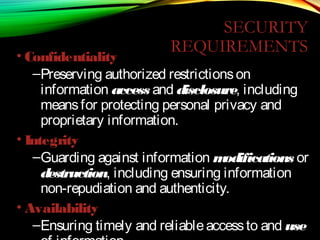
  • 155.
    o Character -Oriented Protocols In a character-oriented protocol, data to be carried are 8bit characters from a coding system such as ASCII . The header, which normally carries the source and destination addresses and other control information, and the trailer, which carries error detection or error correction redundant bits, are also multiples of 8 bits.
  • 156.
    o Bit -Oriented Protocols In a bit-oriented protocol, the data section of a frame is a sequence of bits to be interpreted by the upper layer as text, graphic, audio, video, and so on. However, in addition to headers (and possible trailers), we still need a delimiter to separate one frame from the other. Most protocols use a special 8-bit pattern flag 01111110 as the delimiter to define the beginning and the end of the frame
  • 157.
  • 158.
    NETWORK LAYER • Concernedwith getting packets from source to destination. • The network layer must know the topology of the subnet and choose appropriate paths through it. • When source and destination are in different networks, the network layer (IP) must deal with these differences. * Key issue: what service does the network layer provide to the transport layer (connection-oriented or connectionless).
  • 159.
    NETWORK LAYER DESIGNGOALS 1. The services provided by the network layer should be independent of the subnet topology. 2. The Transport Layer should be shielded from the number, type and topology of the subnets present. 3. The network addresses available to the Transport Layer should use a uniform numbering plan (even across LANs and WANs).
  • 160.
    Physical layer Data link layer Physical layer Data link layer Endsystem α Network layer Physical layer Data link layer Physical layer Data link layer Transport layer Transport layer Messages Messages Segments End system β Network service Network service Network layer Networ k layer Network layer
  • 161.
    Application Transport Internet Network Interface Application Transport InternetInternet Network 1 Network2 Machine A Machine B Router/Gateway Network Interface Network Interface
  • 162.
    R R R R S SS s ss s ss s ss s R s R Backbone To internet or widearea network Organization Servers Gateway Departmenta l Server Metropolitan Area Network (MAN)
  • 163.
    Interdomain level Intradomain level LANlevel Autonomous system or domain Border routers Border routers Internet service provider Wide Area Network (WAN)
  • 164.
    RA RB RC Route server NAP National service providerA National service provider B National service provider C LAN NAP NAP (a) (b) National ISPs Network Access Point
  • 165.
    Packet 2 Packet 1 Packet1 Packet 2 Packet 2 Datagram Packet Switching
  • 166.
  • 167.
  • 168.
    Identifier Output port 15 15 58 13 13 7 27 12 Next identifier 44 23 16 34 Entryfor packets with identifier 15 Leon-Garcia & Widjaja: Communication Networks Routing Table in Virtual Circuit Network
  • 169.
    ROUTING Routing algorithm:: thatpart of the Network Layer responsible for deciding on which output line to transmit an incoming packet. Remember: For virtual circuit subnets the routing decision is made ONLY at set up. Algorithm properties:: correctness, simplicity, robustness, stability, fairness, optimality, and scalability.
  • 170.
    ROUTING CLASSIFICATION Adaptive Routing based oncurrent measurements of traffic and/or topology. 1. centralized 2. isolated 3. distributed Non-Adaptive Routing 1. flooding 2. static routing using shortest path algorithms
  • 171.
    SHORTEST PATH ROUTING 1.Bellman-Ford Algorithm [Distance Vector] 2. Dijkstra’s Algorithm [Link State] What does it mean to be the shortest (or optimal) route? a. Minimize mean packet delay b. Maximize the network throughput c. Mininize the number of hops along the path
  • 172.
    DIJKSTRA’S SHORTEST PATHALGORITHM Initially mark all nodes (except source) with infinite distance. working node = source node Sink node = destination node While the working node is not equal to the sink 1. Mark the working node as permanent. 2. Examine all adjacent nodes in turn If the sum of label on working node plus distance from working node to adjacent node is less than current labeled distance on the adjacent node, this implies a shorter path. Relabel the distance on the adjacent node and label it with the node from which the probe was made. 3. Examine all tentative nodes (not just adjacent nodes) and mark the node with the smallest labeled value as permanent. This node becomes the new working node. Reconstruct the path backwards from sink to source.
  • 173.
    INTERNETWORK ROUTING [HALSALL] Adaptive Routing CentralizedDistributed Intradomain routing Interdomain routing Distance Vector routing Link State routing [IGP] [EGP] [BGP,IDRP] [OSPF,IS-IS,PNNI][RIP] [RCC] Interior Gateway Protocols Exterior Gateway Protocols
  • 174.
    DISTANCE VECTOR ROUTING •Historically known as the old ARPANET routing algorithm {or known as Bellman-Ford algorithm}. Basic idea: each network node maintains a Distance Vector table containing the distance between itself and ALL possible destination nodes. • Distances are based on a chosen metric and are computed using information from the neighbors’ distance vectors. Metric: usually hops or delay
  • 175.
    DISTANCE VECTOR ROUTING Informationkept by DV router 1. each router has an ID 2. associated with each link connected to a router, there is a link cost (static or dynamic) the metric issue! Distance Vector Table Initialization Distance to itself = 0 Distance to ALL other routers = infinity number
  • 176.
    DISTANCE VECTOR ALGORITHM [PERLMAN] 1.Router transmits its distance vector to each of its neighbors. 2. Each router receives and saves the most recently received distance vector from each of its neighbors. 3. A router recalculates its distance vector when: a. It receives a distance vector from a neighbor containing different information than before. b. It discovers that a link to a neighbor has gone down (i.e., a topology change). The DV calculation is based on minimizing the cost to each destination.
  • 177.
    DISTANCE VECTOR ROUTING (a)A subnet. (b) Input from A, I, H, K, and the new routing table for J.
  • 178.
    ROUTING INFORMATION PROTOCOL (RIP) •RIP had widespread use because it was distributed with BSD Unix in “routed”, a router management daemon. • RIP is the most used Distance Vector protocol. • RFC1058 in June 1988. • Sends packets every 30 seconds or faster. • Runs over UDP. • Metric = hop count • BIG problem is max. hop count =16  RIP limited to running on small networks!! • Upgraded to RIPv2
  • 179.
    LINK STATE ALGORITHM 1.Each router is responsible for meeting its neighbors and learning their names. 2. Each router constructs a link state packet (LSP) which consists of a list of names and cost to reach each of its neighbors. 3. The LSP is transmitted to ALL other routers. Each router stores the most recently generated LSP from each other router. 4. Each router uses complete information on the network topology to compute the shortest path route to each destination node.
  • 180.
    OPEN SHORTEST PATHFIRST (OSPF) • OSPF runs on top of IP, i.e., an OSPF packet is transmitted with IP data packet header. • Uses Level 1 and Level 2 routers • Has: backbone routers, area border routers, and AS boundary routers • LSPs referred to as LSAs (Link State Advertisements) • Complex algorithm due to five distinct LSA types.
  • 181.
    BORDER GATEWAY PROTOCOL (BGP) •The replacement for EGP is BGP. Current version is BGP-4. • BGP assumes the Internet is an arbitrary interconnected set of AS’s. • In interdomain routing the goal is to find ANY path to the intended destination that is loop-free. The protocols are more concerned with reachability than optimality.
  • 182.
  • 183.
    TRANSPORT PROTOCOLS • Providelogical communication between application processes running on different hosts • Run on end hosts • Sender: breaks application messages into segments, and passes to network layer • Receiver: reassembles segments into messages, passes to application layer • Multiple transport protocol available to applications • Internet: TCP and UDP application transport network data link physical application transport network data link physical network data link physical network data link physical network data link physical network data link physicalnetwork data link physical logicalend-end transport
  • 184.
    TRANSPORT SERVICES ANDTRANSPORTSERVICES AND PROTOCOLSPROTOCOLS • provide logical communication between app’ processes running on different hosts • implemented in end systems, but not in network routers • transport vs network layer services: • network layer: data transfer between end systems • transport layer: data transfer between processes • relies on, enhances, network layer services • Constrained by service model of Network-layer protocol applicatio n transport network data link physical applicatio n transport network data link physical network data link physical network data link physical network data link physical network data link physicalnetwork data link physical logicalend-end transport Let’s look at a simple analogy to see their subtle differences
  • 185.
    LAYER OVERVIEWapplication transport network data link physical application transport network datalink physical network data link physical network data link physical network data link physical network data link physicalnetwork data link physical logicalend-end transport
  • 186.
    LAYER OVERVIEW Host 1 Networklayer Application layer Transport entity Host 2 Network layer Application layer Transport entity TPDU Transport addresses Network addresses
  • 187.
    WHY THE TRANSPORTLAYER ? 1. The network layer exists on end hosts and routers in the network. The end-user cannot control what is in the network. So the end-user establishes another layer, only at end hosts, to provide a transport service that is more reliable than the underlying network service. 2. While the network layer deals with only a few transport entities, the transport layer allows several concurrent applications to use the transport service. 3. It provides a common interface to application writers, regardless of the underlying network layer. In essence, an application writer can write code once using the transport layer primitive and use it on different networks (but with the same transport layer).
  • 188.
    INTERNET TRANSPORT PROTOCOLS • Datagrammessaging service (UDP) • No-frills extension of “best-effort” IP • Reliable, in-order delivery (TCP) • Connection set-up • Discarding of corrupted packets • Retransmission of lost packets • Flow control • Congestion control (next lecture) • Other services not available • Delay guarantees • Bandwidth guarantees
  • 189.
    TRANSPORT SERVICE PRIMITIVES Theprimitives for a simple transport service.
  • 190.
    TRANSPORT SERVICE PRIMITIVES(2) The nesting of TPDUs, packets, and frames.
  • 191.
    TRANSPORT SERVICE PRIMITIVES(3) A state diagram for a simple connection management scheme. Transitions labelled in italics are caused by packet arrivals. The solid lines show the client's state sequence. The dashed lines show the server's state sequence.
  • 192.
    BERKELEY SOCKETS The socketprimitives for TCP.
  • 193.
    BERKELEY SERVICE PRIMITIVES• Usedin Berkeley UNIX for TCP • Addressing primitives: • Server primitives: • Client primitives: socket bind listen accept send + receive close connect send + receive close
  • 194.
    ELEMENTS OF TRANSPORTPROTOCOLS a)Addressing b)Connection Establishment c)Connection Release d)Flow Control and Buffering e)Multiplexing f)Crash Recovery
  • 195.
    TRANSPORT PROTOCOL (a) Environmentof the data link layer. (b) Environment of the transport layer. Both data link layer and transport layer do error control, flow control, sequencing. The differences are: 1. Storage capacity in subnet. Frames must arrive sequentially, TPDUs can arrive in any sequence. 2. Frames are delivered to hosts, TPDUs need to be delivered to users, so per user addressing and flow control within the hosts is necessary.
  • 196.
    ADDRESSING TSAPs (Transport ServiceAccess Point) , NSAPs (Network SAP). TCP calls TSAP s ... ports ATM calls TSAPs ... AAL-SAP
  • 197.
    CONNECTION ESTABLISHMENT (1) How auser process in host 1 establishes a connection with a time-of-day server in host 2.
  • 198.
    CONNECTION ESTABLISHMENT (2) Threeprotocol scenarios for establishing a connection using a three-way handshake. CR denotes CONNECTION REQUEST. (a) Normal operation, (b) Old CONNECTION REQUEST appearing out of nowhere. (c) Duplicate CONNECTION REQUEST and duplicate ACK.
  • 199.
    CONNECTION ESTABLISHMENT (3) (a) TPDUsmay not enter the forbidden region. (b) The resynchronization problem.
  • 200.
  • 201.
    CONNECTION RELEASE (2) Thetwo-army problem.
  • 202.
    CONNECTION RELEASE (3) Fourprotocol scenarios for releasing a connection. (a) Normal case of a three- way handshake. (b) final ACK lost. 6-14, a, b
  • 203.
    CONNECTION RELEASE (4) (c)Response lost. (d) Response lost and subsequent DRs lost. 6-14, c,d
  • 204.
    FLOW CONTROL ANDBUFFERING Dynamic buffer allocation. Buffer allocation info travels in separate TPDUs. The arrows show the direction of transmission. ‘…’ indicates a lost TPDU. Potential deadlock if control TPDUs are not sequenced or timed out
  • 205.
    MULTIPLEXING (a)Upward multiplexing. (b)Downward multiplexing.Used to increase the bandwidth, e.g., two ISDN connections of 64 kbps each yield 128 kbps bandwidth.
  • 206.
    SIMPLE TRANSPORT PROTOCOL • Serviceprimitives: • connum = LISTEN (local) • Caller is willing to accept connection • Blocked till request received • connum = CONNECT ( local, remote) • Tries to establish connection • Returns identifier (nonnegative number) • status = SEND (connum, buffer, bytes) • Transmits a buffer • Errors returned in status • status = RECEIVE (connum, buffer, bytes) • Indicates caller’s desire to get data • status = DISCONNECT (connum) • Terminates connection
  • 207.
    • Transport entity •Uses a connection-oriented reliable network • Programmed as a library package • Network interface • ToNet(…) • FromNet(…) • Parameters: • Connection identifier (connum = VC) • Q bit: 1 = control packet • M bit: 1 = more data packets to come • Packet type • Pointer to data • Number of bytes of data SIMPLE TRANSPORT PROTOCOL
  • 208.
    • Transport entity:packet types SIMPLE TRANSPORT PROTOCOL Network packet Meaning Call request Sent to establish a connection Call accepted Response to Call Request Clear Request Sent to release connection Clear confirmation Response to Clear request Data Used to transport data Credit Control packet to manage window
  • 209.
    • Transport entity:state of a connection SIMPLE TRANSPORT PROTOCOL State Meaning Idle Connection not established Waiting CONNECT done; Call Request sent Queued Call Request arrived; no LISTEN yet Established Sending Waiting for permission to send a packet Receiving RECEIVE has been done Disconnecting DISCONNECT done locally
  • 210.
    INTRODUCTION TO UDP TheUDP header. UDP only provides TSAPs (ports) for applications to bind to. UDP does not provide reliable or ordered service. The checksum is optional.
  • 211.
    UDPUDP: USER DATAGRAMPROTOCOL: USER DATAGRAM PROTOCOL [RFC 768][RFC 768] • “no frills,” “bare bones” Internet transport protocol • “best effort” service, UDP segments may be: • lost • delivered out of order to app • connectionless: • no handshaking between UDP sender, receiver • each UDP segment handled independently of others Why is there a UDP? • no connection establishment (which can add delay) • simple: no connection state at sender, receiver • small segment header • no congestion control: UDP can blast away as fast as desired Additional functionalities are implemented by the application TCP – 20 bytes, UDP – 8 bytes
  • 212.
    UDP: MOREUDP: MORE •often used for streaming multimedia apps • loss tolerant • rate sensitive • other UDP uses (why?): • DNS • SNMP • reliable transfer over UDP: add reliability at application layer • application-specific error recover! source port # dest port # 32 bits Application data (message) UDPUDP segment format length checksum Length, in bytes of UDP segment, including header For segment error checking
  • 213.
    UDP CHECKSUMUDP CHECKSUM Sender: •treat segment contents as sequence of 16-bit integers16-bit integers • checksum: addition (1’s complement sum) of segment contents • sender puts checksum value into UDP checksum field Receiver: • compute checksum of received segment • check if computed checksum equals checksum field value: • NO - error detected • YES - no error detected. But maybe errors nonetheless? More later …. Goal: detect “errors” (e.g., flipped bits) in transmitted segment
  • 214.
    UDP CHECKSUM EXAMPLE:UDPCHECKSUM EXAMPLE: • Three packets of 16 bits each • 0110011001100110 • 0101010101010101 • 0000111100001111 • adding the three, calling it ‘r’: • 1100101011001010 • Send the four packets, the original three and 1’s complement of ‘r’ to destination • The 1’s complement of ‘r’ is: • 0011010100110101 • at destination, the sum of four packets should be: • 1111111111111111 • If the packet is damaged: • 11111001111111111 (zeros!!zeros!!) Why provide for error checking? No guarantee that it is provided in all of the links between source and destination
  • 215.
    WHY WOULD ANYONE USEUDP? • Finer control over what data is sent and when • As soon as an application process writes into the socket • … UDP will package the data and send the packet • No delay for connection establishment • UDP just blasts away without any formal preliminaries • … which avoids introducing any unnecessary delays • No connection state • No allocation of buffers, parameters, sequence #s, etc. • … making it easier to handle many active clients at once • Small packet header overhead • UDP header is only eight-bytes long
  • 216.
    POPULAR APPLICATIONS THAT USEUDP • Multimedia streaming • Retransmitting lost/corrupted packets is not worthwhile • By the time the packet is retransmitted, it’s too late • E.g., telephone calls, video conferencing, gaming • Simple query protocols like Domain Name System • Overhead of connection establishment is overkill • Easier to have application retransmit if needed “Address for www.cnn.com?” “12.3.4.15”
  • 217.
    TRANSMISSION CONTROL PROTOCOL (TCP) •Connection oriented • Explicit set-up and tear-down of TCP session • Stream-of-bytes service • Sends and receives a stream of bytes, not messages • Reliable, in-order delivery • Checksums to detect corrupted data • Acknowledgments & retransmissions for reliable delivery • Sequence numbers to detect losses and reorder data • Flow control • Prevent overflow of the receiver’s buffer space • Congestion control • Adapt to network congestion for the greater good
  • 218.
    THE INTERNET TRANSPORTPROTOCOLS: TCP a)Introduction to TCP b)The TCP Service Model c)The TCP Protocol d)The TCP Segment Header e)TCP Connection Establishment f)TCP Connection Release g)TCP Connection Management Modeling h)TCP Transmission Policy i)TCP Congestion Control j)TCP Timer Management k)Wireless TCP and UDP l)Transactional TCP
  • 219.
    THE TCP SERVICE MODELSomeassigned ports. Port Protocol Use 21 FTP File transfer 23 Telnet Remote login 25 SMTP E-mail 69 TFTP Trivial File Transfer Protocol 79 Finger Lookup info about a user 80 HTTP World Wide Web 110 POP-3 Remote e-mail access 119 NNTP USENET news
  • 220.
    THE TCP SERVICEMODEL (2) (a) Four 512-byte segments sent as separate IP datagrams. (b) The 2048 bytes of data delivered to the application in a single READ CALL.
  • 221.
    TCP SERVICE MODEL(3) All TCP connections are full-duplex and point-to-point. TCP provides a byte stream. i.e it does not preserve message boundaries At sender TCP may immediately send or buffer data at its discretion. Sender can use a PUSH flag to instruct TCP not to buffer the send. Sender can use URGENT flag to have TCP send data immediately and have the receiver TCP signal the receiver application that there is data to be read.
  • 222.
    SOME TCP FEATURES Everybyte has its own 32 bit sequence number. Sending and receiving entities exchange data in segments Each segment is the 20 byte header and data (total up to 64K) TCP may aggregate multiple writes into one segment or split one write into several segments. A segment size if the smaller of either 64K or the MTU of the network layer (MTU of Ethernet is about 1500 bytes) A segment must fit in a single IP payload.
  • 223.
    SOME TCP FEATURES TCPuses the sliding window protocol as its base. Sender sends segment, starts timer waits for ack. It no ack then retransmit. Receiver acks in separate segment or “piggyback” on data segment. TCP must deal with reordred segments. A lot of algorithms have been developed to make TCP efficient under diverse network conditions. We will look at a few of them.
  • 224.
  • 225.
    APPLICATIONS LAYER –ALLOWS USER TO INTERFACE WITH THE NETWORK!
  • 226.
    Session: Layer 5 Createand maintain dialogues between applications Presentation: Layer 6 Coding, encryption, compression Application: Layer 7 Interface to operating System Application OSI TCP/IP
  • 227.
    N I C LOCAL NETWORK INTERNET TRANSPORT APPLICATION Establish, send,close session, Authenticators, Master / Slave Virtual Terminal Session, Compression & Encryption Transfer to Application Well Known Application Protocols File Transfer: •File Transfer Protocol (FTP) •Trivial File Transfer Protocol (TFTP) Email: •Simple Mail Transfer Protocol (SMTP) •Post Office Protocol 3 (POP3) Web Browsing: •Hyper Text Transfer Protocol (HTTP) Network Management: •Simple Network Management Protocol (SNMP) Name Resolution: •Domain Name Service (DNS)
  • 228.
    CLIENT / SERVERPROCESSES FTP Server Host A Host B Host C Download Data flowing from a server to a client is known as download. •Application layer protocols describe the format of the requests and responses between clients and servers
  • 229.
    • In aclient/server network, the server runs a service, or process, sometimes called a server daemon , typically running in the background. • Daemons are described as "listening" for a request from a client, because they are programmed to respond whenever the server receives a request for the service provided by the daemon. • When a daemon "hears" a request from a client, it exchanges appropriate messages with the client, as required by its protocol, and proceeds to send the requested data to the client in the proper format. Client / Server Processes
  • 230.
    PEER-TO-PEER NETWORKS • Ina peer-to-peer network, two or more computers are connected via a network and can share resources (i.e. printers and files) without having a dedicated server. • Every connected end device (known as a peer) can function as either a server or a client. One computer might assume the role of server for one transaction while simultaneously serving as a client for another. • The roles of client and server are set on a per request basis.
  • 231.
    Application Layer –Provides the interface between the applications on either end of the network.
  • 232.
  • 233.
    PROTOCOLS • DNS –Matches domain names with IP addresses • HTTP – Used to transfer data between clients/servers using a web browser • SMTP & POP3 – used to send email messages from clients to servers over the internet • FTP – allows the download/upload of files between a client/server • Telnet – allows users to login to a host from a remote location and take control as if they were sitting at the machine (virtual connection) • DHCP – assigns IP addresses, subnet masks, default gateways, DNS servers, etcs. To users as they login the network
  • 234.
    APPLICATION LAYER SOFTWARE •2 types • Applications – Provide the human (user) interface. Relies on lower layers to complete the communication process. • • Services – establish an interface to the network where protocols provide the rules and formats that govern how data is treated..
  • 235.
    HOW DATA REQUESTS OCCUR& ARE FILLED • Client/server model • Advantages: • Centralized administration • Security is easier to enforce • Application layer services and protocols • Peer-to-peer networking and applications
  • 236.
    CLIENT/SERVER MODEL • Client– • device requesting information (initiates the data exchange) • Can also UPLOAD data to the servers • Server – device responding to the request • How does it handle multiple request from multiple users and keep everything in order? • Relies on support from the lower layer functions to distinguish between services and conversations. • Server relies on a service called a server daemon – runs in the background and ‘listens’ for requests for that service. It can then exchange messages as appropriate & send requested data. • Examples: • E-mail Client on an employee computer issues a request to the e-mail server for any unread e-mail. The server responds by sending the e-mail to the client. • Conversations can originate with either party.
  • 237.
    PEER-TO-PEER (P2P) NETWORK MODEL •Two or more computers are connected and are able to share resources without having a dedicated server • Every end device can function as a client or server on a ‘per request’ basis • Resources are decentralized (information can be located anywhere) • Difficult to enforce security and policies • User accounts and access rights have to be set individually on each peer device
  • 238.
    P2P APPLICATIONS • Runningapplications in hybrid mode allows for a centralized directory of files even though the files themselves may be on multiple machines • Unlike P2P networks, a device can act as both the client and server within the same communication • Each device must provide a user interface and run a background service. • Can be used on P2P networks, client/server networks and across the internet.
  • 239.
  • 240.
    COMMON PORT NUMBERS •TCP • FTP – 20-21 • Telnet – 23 • SMTP – 25 • DNS – 53 (Both TCP & UDP) • HTTP – 80 • UDP • DHCP – 67 & 68 • POP – 110
  • 241.
    DNS SERVICES • DNSresolver – supports name resolution for other network applications and services that need it. • Devices are usually given 1 or more DNS Server addresses they can use for name resolution. • Uses different types of resource records to actually resolve the name/IP address issues
  • 242.
    DSN SERVICES ANDPROTOCOL DNS Servers resolve names to IP addresses. It would be difficult to remember the IP address of every website we like to visit, but we can remember names. THANK YOU DNS SERVER!
  • 243.
    WWW SERVICE AND HTTP•Steps: • 1) URL is typed in the address bar. 2) Browser checks with DNS server to convert it to an IP address 3) Connects to the server requested 4) Using HTTP or HTTPS protocol requirements, the browser sends a GET request to the server to ask for the desired html document (usually index.html) 5) The server sends the HTML code for the web page to the browser. 6) The browser interprets the HTML code and formats the page to fit the browser window. 7) See the next slide for an example.
  • 244.
    WWW SERVICE ANDHTTP HTTP/HTTPS are some of the MOST used application protocols!
  • 245.
    E-MAIL SERVICES ANDSMTP/POP PROTOCOLS• E-mail is the most popular network service. • E-mail client (when people compose e-mail) is called Mail User Agent (MUA) • MUA allows messages to be sent/retrieved to and from your mailbox • Requires several applications and services • POP or POP3 – deliver email from server to client (incoming messages) • SMTP – handles outbound messages from clients
  • 246.
    E-MAIL SERVICES ANDSMTP/POP PROTOCOLS• What do servers require? 1) Must be running SMTP! 2) Also operates 1) Mail Transfer Agent (MTA) – used to forward email 1) Receives email from the clients MUA 2) Uses SMTP to route email between SERVERS! 3) Passes email to the MDA for final delivery 2) Mail Delivery Agent (MDA) – receives messages from MUA or from the MTA on another server 3) For two e-mail servers to talk – MUST run SMTP and MTA in order to transfer mail between the 2 servers! 4) Some clients run Lotus Notes, Groupwise, or MS Exchange. They have their own proprietary protocol for handling e-mail.
  • 247.
    E-MAIL SERVICES ANDSMTP/POP PROTOCOLS
  • 248.
    FTP• Commonly usedapplication layer protocol • Allows for the transfer of files between clients/servers. • Requires 2 connections to the server 1) Commands – uses TCP port 21 2) Actual data – uses TCP port 20
  • 249.
    DHCP • Dynamic HostConfiguration Protocol – enables devices to obtain IP addresses, subnet masks, gateways, DNS server information, etc. from a DHCP server. • An IP address that is not being used is assigned from a range of available addresses • Not permanently assigned – only leased for a specific period of time (usually 24 hours – 7 days) • If the host logs off or the power is lost, the IP address they were using is returned to the pool to be re-assigned to another host when needed. • This is how you are able to use Wi-Fi at various places in the world! • Don’t use DHCP for devices such as servers, printers, routers, switches, etc. These should be statically assigned. • This will be covered in greater detail in CCNA 4.
  • 250.
    TELNET • Developed inthe early 1970’s – among the oldest of the application layer protocols and services in the TCP/IP protocol suite. • Allows users to emulate text-based terminal devices over the network using software. • A connection is known as a ‘virtual terminal (vty)’ session. • Can be run from the command prompt on a PC. • You can use the device as if you were sitting there with all the rights and priorities that you username will offer you. • Disadvantages: Doesn’t support encryption like SSH. All data is transferred as plain text. It can be easily intercepted and understood. • If security is a concern, you should use Secure Shell (SSH) protocol. Provides for remote logins with stronger authentication than telnet. • Network Professionals should always use SSH whenever possible.
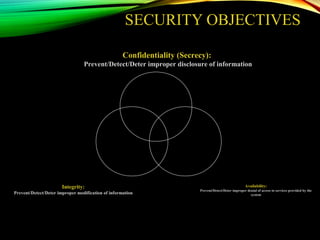

  • 251.
  • 252.
    FILE SHARING SERVICESAND SMB PROTOCOL• Server Message Block • SMB has become a mainstay of Microsoft networking, even more so since the introduction of Windows 2000 software. • Allows servers to share their resources with clients • Linux and Unix also share with Microsoft networks using a version of SMB called SAMBA. • Apple also supports sharing resources using an SMB protocol • What can SMB do? • Start, authenticate, and terminate sessions • Control file and printer access • Allow applications to send/receive messages to/from another device
  • 253.
  • 254.
    GNUTELLA PROTOCOL People can makefiles on their hard disks available to other users to download. Relies heavily on HTTP services. Client applications that use Gnutella are BearShare, LimeWire, Morpheus, WinMX, Gnucleus, etc.
  • 255.
  • 256.
    • The WorldWide Web (WWW) is a repository of information stored on web pages, linked together from points all over the world. • Web pages are written in a language called Hypertext Mark-Up Language (HTML), and stored on web servers. • To retrieve an HTML web page, a client/server protocol called Hyper Text Transfer Protocol (HTTP) is used. • HTML web pages are displayed on a users PC by web browser software clients. 256 WWW AND HTTP
  • 257.
    WEB BROWSING PROCESSES WebServerClient HTML WWW Page Web Browser HTTP Request HTML WWW Page 1. Web browser uses HTTP to request a particular web-page from a web server. 2. Web server responds, using HTTP to send the HTML web page page to the web browser. 3. The web browser formats the web page for display on the client PC.
  • 258.
    HYPER TEXT MARK-UP LANGUAGE(HTML) •Language used for creating web pages. •Mark-up language formats a web page independently from the process that created it – provides a standard way for web browsers to interpret web pages. •Uses only ASCII characters for both the main web page text and the formatting instructions.
  • 259.
    HYPER TEXT TRANSFERPROTOCOL (HTTP) •HTTP is used mainly to access data on the WWW. •Functions like a combination of FTP and SMTP. •Used to transfer files using TCP and well-known port 80 – there is no control connection required. •Web browser utilises an HTTP client, while a web server runs an HTTP server. •The HTML data transferred by HTTP is not readable by the user – it has to be interpreted by a web-browser.
  • 260.
    LOCAL NETWORK INTERNET TRANSPORT (80) Client –Web Browser WWW Server Data HTTP Client HTTP Server Request Response Request Response Web Page Transfer Phases: 1. Connection Establishment – Client makes connection to TCP port 80 on the web server. Server commences the connection phase. 2. HTTP Transfer – Server transfers HTML web page using HTTP 3. Connection Termination – After web page is transferred successfully, the client terminates the connection. HTML Web Page
  • 261.
    • The navigationof web pages is achieved using locators called Uniform Resource Locators (URLs). • These allow a user to access sites without using IP addresses. • The URL is a standard for specifying any kind of information on the Internet, and defines four things: protocol, host computer, port and path. UNIFORM RESOURCE LOCATER (URL)
  • 262.
    Method Host :// •Method –the protocol used to retrieve data (usually HTTP) •Host – alias of the web server where the data is located. Normally prefixed with ‘WWW’ signifying a web server. •Port – Transport layer port that the web server is using – not a mandatory field, as port 80 is used by default. •Path – the location of the data on the web server – the ‘/’ indicates directories and subdirectories. : Port / Path Uniform Resource Locater (URL) URLs are presented in a standard format:
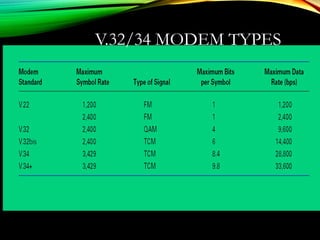
  • 263.
    Simple Name Resolution Phill 192.168.1.100 Lisa 192.168.1.101 Bazil 192.168.1.102 HostTable: •Phill - 192.168.1.100 •Lisa - 192.168.1.101 •Bazil - 192.168.1.102 Host Table: •Phill - 192.168.1.100 •Lisa - 192.168.1.101 •Bazil - 192.168.1.102 Host Table: •Phill - 192.168.1.100 •Lisa - 192.168.1.101 •Bazil - 192.168.1.102 Switch Name Resolution can be achieved using a host table, mapping all the host names in a network to their respective IP addresses All host tables need to be changed every time a new PC is added to the network- this can be time consuming on a large network
  • 264.
    Bazil = 192.168.1.103 Whatis IP Address of Bazil? Name Resolution Using DNS Phill 192.168.1.100 Lisa 192.168.1.101 Bazil 192.168.1.102 Switch •A single DNS server holds the host table. •Client DNS services request host/IP address mappings from the server. Host Table: •Phill - 192.168.1.100 •Lisa - 192.168.1.101 •Bazil - 192.168.1.102 DNS Server 192.168.1.103 DNS Server: 192.168.1.103 DNS Server: 192.168.1.103 DNS Server: 192.168.1.103 DNS Client DNS Client DNS Client

Editor's Notes

  • #38 Lecture slides by Lawrie Brown for “Cryptography and Network Security”, 4/e, by William Stallings, Chapter 9 – “Public Key Cryptography and RSA”.
  • #45 So far all the cryptosystems discussed, from earliest history to modern times, have been private/secret/single key (symmetric) systems. All classical, and modern block and stream ciphers are of this form, and still rely on the fundamental building blocks of substitution and permutation (transposition).
  • #131 Make sense of message. Make sense of message.
  • #213 SNMP – simple network management protocol
  • #227 Although the TCP/IP protocol suite was developed prior to the definition of the OSI model, the functionality of the TCP/IP application layer protocols fit roughly into the framework of the top three layers of the OSI model: Application, Presentation and Session layers. Most TCP/IP application layer protocols were developed before the emergence of personal computers, graphical user interfaces and multimedia objects. As a result, these protocols implement very little of the functionality that is specified in the OSI model Presentation and Session layers.
  • #228 The most widely-known TCP/IP Application layer protocols are those that provide for the exchange of user information. These protocols specify the format and control information necessary for many of the common Internet communication functions. Among these TCP/IP protocols are: File Transfer protocols – allow the sharing of files between PCs using different operating systems. Email – SMTP transmits mail, POP3 receives it. Web browsing – HTTP transfers web pages written in HTML. Network Management - remote monitoring of network devices. DNS – resolution of URLs to IP addresses. The protocols in the TCP/IP suite are generally defined by Requests for Comments (RFCs). The Internet Engineering Task Force maintains the RFCs as the standards for the TCP/IP suite.
  • #229 In the client/server model, the device requesting the information is called a client and the device responding to the request is called a server. Client and server processes are considered to be in the Application layer. The client begins the exchange by requesting data from the server, which responds by sending one or more streams of data to the client. Application layer protocols describe the format of the requests and responses between clients and servers. In addition to the actual data transfer, this exchange may also require control information, such as user authentication and the identification of a data file to be transferred.
  • #230 In a general networking context, any device that responds to requests from client applications is functioning as a server. A server is usually a computer that contains information to be shared with many client systems. For example, web pages, documents, databases, pictures, video, and audio files can all be stored on a server and delivered to requesting clients. In other cases, such as a network printer, the print server delivers the client print requests to the specified printer. Additionally, servers typically have multiple clients requesting information at the same time. For example, a WWW server may have many clients requesting connections to it. These individual client requests must be handled simultaneously and separately for the network to succeed. The Application layer processes and services rely on support from lower layer functions to successfully manage the multiple conversations.
  • #231 Unlike the client/server model, which uses dedicated servers, peer-to-peer networks decentralize the resources on a network. Instead of locating information to be shared on dedicated servers, information can be located anywhere on any connected device. Most of the current operating systems support file and print sharing without requiring additional server software. Because peer-to-peer networks usually do not use centralized user accounts, permissions, or monitors, it is difficult to enforce security and access policies in networks containing more than just a few computers. User accounts and access rights must be set individually on each peer device.
  • #259 ‘Mark-up’ is a term borrowed from the publishing industry, where an editor marks a new manuscript indicating the formatting required by the printers. HTML uses ASII to represent all the data and mark-ups presented on a web page- hence why HTTP is designed to transfer ASCII characters.
  • #260 The Hypertext Transfer Protocol (HTTP), one of the protocols in the TCP/IP suite, was originally developed to publish and retrieve HTML pages and is now used for distributed, collaborative information systems. HTTP is used across the WWW for data transfer and is one of the most used application protocols. HTTP specifies a request/response protocol. When a client, typically a web browser, sends a request message to a server, the HTTP protocol defines the message types the client uses to request the web page and also the message types the server uses to respond. The three common message types are GET, POST, and PUT.
  • #261 HTTP specifies a request/response protocol. When a client, typically a web browser, sends a request message to a server, the HTTP protocol defines the message types the client uses to request the web page and also the message types the server uses to respond. The three common message types are GET, POST, and PUT. HTTP is not a secure protocol. The POST messages upload information to the server in plain text that can be intercepted and read. Similarly, the server responses, typically HTML pages, are also unencrypted. For secure communication across the Internet, the Secure HTTP (HTTPS) protocol is used for accessing or posting web server information. HTTPS can use authentication and encryption to secure data as it travels between the client and server. HTTPS specifies additional rules for passing data between the Application layer and the Transport Layer.
  • #263 On the Internet domain names, such as www.cisco.com , are much easier for people to remember than 198.132.219.25, which is the actual numeric address for this server. Also, if Cisco decides to change the numeric address, it is transparent to the user, since the domain name will remain www.cisco.com . The new address will simply be linked to the existing domain name and connectivity is maintained. Accessing a web site, so HTTP is used. RFC 1738 lists all the methods that can be used within an URL (FTP, telnet, etc). The novatech server using the default web name ‘WWW’. The company has also registered the name novatech within the UK, and they are a commercial organisation. Overall control of domain names is maintained by the Internet Assigned Numbering Authority (IANA) The web page is located within the /novatech file on the web server.
  • #264 IP addresses are not easy to remember, so having to remember where services are located on a network, based on IP addresses would be frustrating. Hostnames were devised early in the development of TCP/IP – a host is assigned an easily-remembered alphanumeric name. When a user requests a access to a network location based on a hostname, the host refers to a host-table, which contains mappings for all the hostname – IP address pairs. This has to be configured individually on each host in the network – time consuming in a large network.
  • #265 In data networks, devices are labeled with numeric IP addresses, so that they can participate in sending and receiving messages over the network. However, most people have a hard time remembering this numeric address. Hence, domain names were created to convert the numeric address into a simple, recognizable name. The DNS protocol defines an automated service that matches resource names with the required numeric network address. It includes the format for queries, responses, and data formats. DNS protocol communications use a single format called a message. This message format is used for all types of client queries and server responses, error messages, and the transfer of resource record information between servers. DNS servers provide name resolution services for the network. If a host encounters an unknown hostname, it sends a request to the DNS server, asking for the IP address required. If the DNS server has the address, it sends it back to the requesting computer. Much easier to maintain a single DNS server host file.