INTERNATIONAL RESEARCH JOURNAL OF ENGINEERING AND TECHNOLOGY (IRJET) E-ISSN: 2395-0056
VOLUME: 05 ISSUE: 12 | DEC 2018 WWW.IRJET.NET P-ISSN: 2395-0072
© 2018, IRJET | Impact Factor value: 7.211 | ISO 9001:2008 Certified Journal | Page 106
Elevator Control System Using Finite Automata
Isha Ashish Bahendwar1, Ankita Manish Singh2, Prof. S.G. Mundada3
1,2Dept. of Computer Science Engineering, Ramdeobaba College of Engineering and Management, Nagpur, India
3Assistant Professor, Dept. of Computer Science Engineering, Ramdeobaba College of Engineering and
Management, Nagpur, India
-------------------------------------------------------------------------***------------------------------------------------------------------------
Abstract: The basic conception behind the given problem
definition is that the functioning of the electronic elevators
can be controlled and operated by the users through an
android application. Different operations like travelling to
upper floors or lower floors from the current floor of the user
can be handled by considering the floors as states of finite
automaton. Every floor in this design will be considered as a
final state because any of them can be destination of the
elevator user. This paper comprises the history of elevators,
their working, the proposed idea of application and its
functioning. It focuses on the connectivity of the lift and
users through mobile phones in a very secured and user-
friendly manner.
Key Words: Automata, States, Transitions.
1. INTRODUCTION
An Elevator is a machine which is used by people
for fast and comfortable transport of goods or themselves
from different levels or floors in any multistoried building.
Elevators are generally powered by electric motors that
either drive traction cables or counterweight systems like
a hoist, or pump hydraulic fluid to raise a cylindrical piston
like a jack.
All the regular visitors of that building would have
their personal accounts with all their details and the
default floor the work on or live on. Any stranger would
not be allowed to use the lift until and unless he/she has an
id and password. New accounts can be created for recently
joined employees or uses by the authorized person. In the
similar manner, accounts of old employees can be
removed. During account creation, the user would be
asked for the floor of his/her regular use. Whenever
someone wants to use the elevator, he/she would be asked
for password on the application and if valid password is
entered, the application would ask him/her whether he
wants to go to his regular floor or some other floor.
According to the option he chooses, the lift proceeds
further. If it is his/her regular floor, it takes him there. But,
if he goes for the second option, the application would
offer him the list of input options. He/she can choose the
input options from:
1. Manually enter the destination floor number.
2. Through buttons.
3. Through arrow keys.
The user can choose its mode of input from the
drawer in the left side of the home page. In this way, this
application maintains security for elevators and provides
amenity.
In this android application, SQLite database is used
to store the uses account information (an in-built database
supported by android). Diverse operations can be
performed related to the accounts of the users whenever
the need arises, like,
1. Editing profiles.
2. Adding details.
Only authorized people perform the following operations:
1. Adding accounts for new employees
2. Deleting accounts of old employees
2. EVOLUTION OF ELEVATOR
Vertical lifts have been used to build the pyramids
in Egypt. Archimedes was the person who invented the
first reference elevator in 312. From some literacy source,
elevators were developed as cable on a hemp rope and
powered by hand or by through animals. This type of
elevator was first installed in the Sinai Monastery of Egypt.
In the 17th century, elevators were placed in the building of
England and France. After that in 1793, Lvan Kuliben
created an elevator with the screw lifting mechanism for
the winter place of Saint Petersburg. After that, in 1816, an
elevator was established in the main building of Sub-
Moscow village called Arkhamgelskoye. Most of them ran
hydraulically. [2][3] The very first hydraulic elevators used
a plunger below the car to raise or lower the elevator. A
used to pump applied water pressure to a plunger, or steel
column, inside a vertical cylinder. In the year 1852, Elisha
Otis was the person who introduced the safety elevator,
which prevented the fall of the cab, in case the cable broke.
In 1857 March 23rd, the first Otis passenger elevator was
installed in New York City. The very first electric elevator
was built by Werner von Siemens in 1880. [8]
J.W. Meaker patented a method which permitted
elevator doors to open and close safely in 1874. In 1882,
when hydraulic power was a well-established technology,
a company later named the London Hydraulic Power
Company was formed. In 1929, Clarence Conrad Crispen,
with Inclinator Company of America, created the first
residential elevators. [7]
INTERNATIONAL RESEARCH JOURNAL OF ENGINEERING AND TECHNOLOGY (IRJET) E-ISSN: 2395-0056
VOLUME: 05 ISSUE: 12 | DEC 2018 WWW.IRJET.NET P-ISSN: 2395-0072
© 2018, IRJET | Impact Factor value: 7.211 | ISO 9001:2008 Certified Journal | Page 107
3. DESIGN
Before electronic elevators were invented and
came into commercial market, ropes were used for the
functioning of the elevators. The elevators are the machine
that have platform which are pulled or pushed to change
its level with the help of mechanical means. A modern-day
elevator consists of a cab (also called a "Cage" or "Car")
mounted on a platform within an enclosed space called a
shaft or sometimes a "hoist way". Earlier, elevator drive
mechanisms were powered by steam and water hydraulic
pistons or by hand.
In this way, in the coming years elevators have
developed a lot. Much advancement are done in elevators
and infact digitally operable elevators have been
developed and more and more advancements are being
done for elevators to become more efficient and user
friendly.
3.1. Elevator algorithm
The elevator algorithm, is a simple algorithm by
which a single elevator can decide where to stop, is
summarized as follows:
In computer operating systems, the elevator algorithm
has found an application as an algorithm for
scheduling hard disk requests. Modern elevators use more
complex heuristic algorithms to decide which request to
service next.
1. The current floor of elevator is stored as current.
2. When user selects a floor, where he wants to
reach, then that floor’s position is stored as
new_pos.
3. Then that value is compared with current value in
order to determine the direction of the elevator
(up or down).
4. Then the new_pos is incremented/decremented
accordingly and that position is stored as current
and the process goes on.
3.2. Principle
1. As soon as the application is opened, it launches
itself and asks the use to login with his account
name and password. If the user is new and wants
to create a new account, he can contact an
authorized person, who can us the security
password and create new account with all the
required details.
2. The application welcomes you with a message and
asks if you want to follow the regular routine and
reach its usual floor which is his work place or
residence.
3. If the destination floor is different than the usual
destination, the user can choose any mode of input
from the drawer i.e., input from keyboard or
buttons.
4. Using any mode of input user can enter his
destination and travel to that floor using this
application and logout after reaching.
5. Users can edit its profile and change password
whenever he wants to.
4. TECHNOLOGIES USED
4.1. Android
Android is a Linux based operating system for
mobile devices such as tablets, televisions and
smartphones. Android is developed by Andy Rubin in
October, 2013 in California, United States of America.
After that, Google acquired android incorporation in
2005. The main people, who developed android were
Andy Rubin, Rich Miner, Chris White and Nick Sears.
It is an open source operating system which is
freely available on many devices and cell phones. It is
currently the most widely used operating system. The
devices which work on android operating system are
mostly available at affordable prices. People find
working with android operating system easy and
efficient i.e. it is handy and much user friendly.
Android softwares are developed using Android
Studio, Eclipse, etc.
4.2. Android Studio
Android Studio is the Integrated Development
Environment (IDE) for Android application development,
based on IntelliJ IDEA. In Android studio, the front end i.e.
the UI is developed using xml files whereas the backend is
developed using java files. It also has an inbuilt package
named SQLiteOpenHelper to develop the database. We just
have to extend the class inorder to perform database
operations. Android studio offers many inbuilt services.
They are:
1. An efficient gradle building system.
2. A user-friendly environment for coders to develop
android apps for developing handheld devices,
wearables, TVs, etc.
3. Instant Run option so that compilation and
running of projects would be faster.
4. Facilities to import templates and GitHub codes
which provides a great help for the programmers.
5. Perfect testing tools and easily updating facilities.
6. Now, in the newer versions of android studio, it
has inbuilt facilities to connect with firebase which
provides an online database.
7. Building light weight applications to serve day to
day needs of users.
8. It also provides support for connection to various
hardware using Bluetooth or wireless fidelity.
INTERNATIONAL RESEARCH JOURNAL OF ENGINEERING AND TECHNOLOGY (IRJET) E-ISSN: 2395-0056
VOLUME: 05 ISSUE: 12 | DEC 2018 WWW.IRJET.NET P-ISSN: 2395-0072
© 2018, IRJET | Impact Factor value: 7.211 | ISO 9001:2008 Certified Journal | Page 108
4.3. Extensible markup language (XML)
In Android Studio's platform, we can quickly build
layouts by dragging widgets into a visual design editor
instead of writing the layout XML. Extensible Mark-up
Language (XML) is a mark-up language. The design goals of
XML are simplicity, generality and usability across the
Internet. It is used to design the front end of the
android applications.
It provides various attributes to the layouts
and widgets in order to give a simple and elegant
view to the application.
5.FINITE AUTOMATA
A finite automaton is a simple machine used to
recognize patterns within input taken from some character
set (or alphabet). The job of finite automata is to accept or
reject an input depending on whether the entered input is
in the pattern defined by the finite automata. Some of the
recent applications of finite automata are software
engineering, parallel programming and VLSI designs. [1][5]
An elevator controller system is one of the applications
of finite automata. It consists of a mechanism that does not
remember the previous trajectory but, remembers only the
current floor. The direction of motion can be upward if the
current floor is not the top floor and the requested floor is
above it whereas, the direction of motion would be
downward if the current floor is not the ground floor and
the requested floor is below it. Therefore, at any instance
of time, an elevator in use can be defined by following
mathematical terms:
1. States: finite set of states to present the possible
requested floors from the current position.
2. Inputs: finite set of input depending upon the number
of floors the building has.
3. Outputs: finite set of output depending upon the
user’s request.
We can represent finite automata graphically, with
nodes for state and arcs for transitions.
The elevator controller is going to control the
operations and working of the elevator as per the need of
the user. Thus, the corresponding state diagram is for
designing of the finite automata for the working of elevator
controller. (Note that the given state diagram has been
drawn according to the Mealy Machine). In reference with
the elevator working, the finite automata is useful in such a
way that every destination floor can be reached from the
current floor only by going through all the floors that come
in its way. This operator will be work using buttons and
the controller will work according to the following state
diagram [2][4].
The following finite automaton consists of:
1. A finite set S of 5 states.
2. A special start states.
3. Set of final or accepting state.
4. A set of transitions from one state to another
labelled with characters that is the operation like,
up or down. [6]
Fig. 1: Finite Automata
6. APPLICATIONS
 Operators/controller of elevators-This application
provides an interface to the user to select the
destination floor from the current floor which
he/she wants to reach and updates the current
counter value accordingly.
 Used for offices where only authorized people can
use the elevators- As this application provides
security, only those users can use the lift who have
an account in this application.
 Used for security purpose and convenience of the
users- As only those users can login whose
account exists in this application, this app is
secured. And this app automatically takes the user
to its destination floor, in this way it provides
convenience to the users.
The secured elevator app is a basic android
application and it implements the idea of lift. Its
connection with automata is discussed above. This
app works in following manner:
As it is a secured elevator, it can be used by only
specific people who have the right to access it. There’s
an authority password for that purpose, the person
who knows the authority password can only create
his/her account in this lift. For using this lift, it is must
to have an account.
After account creation, the user can login by their
username and password and have two options in
front of them:
(i) They can follow their daily routine
(ii) They can go to some other floor today.
7. IMPLEMENTATION
7.1. Basic Idea
INTERNATIONAL RESEARCH JOURNAL OF ENGINEERING AND TECHNOLOGY (IRJET) E-ISSN: 2395-0056
VOLUME: 05 ISSUE: 12 | DEC 2018 WWW.IRJET.NET P-ISSN: 2395-0072
© 2018, IRJET | Impact Factor value: 7.211 | ISO 9001:2008 Certified Journal | Page 109
If they choose the first option, they would reach to the
desired floor which they step on daily.
Where as if they choose second option they would be
brought to a page where they have options to edit
their account, delete their account, and view their
account.
There is a navigation drawer which asks them which
type of user input they want to provide.
In this UI, there are 6 buttons numbered 0-5. The
button which user presses denotes the floor which
they want to go and there is a textview which displays
the floor number. A loop goes on from current floor till
the expected floor.
In this UI, there is a textview and a button. User enters
the floor no. which he/she expects to go and then
presses the go button. A loop goes on from the current
floor to the floor entered in the textview and then it is
displayed that you reached x floor.
In this UI, there are two arrow keys up and down, and
a text view displaying the counter if the up-arrow
button is pressed the number in the textview is
incremented by one, if down arrow is pressed, the
value in the texview is decremented by one. If the
users desired floor number is entered in the text view
the user will have to press ‘go’ button then again, a
loop continues till the target floor and the it is
displayed that you reached x floor.
8.
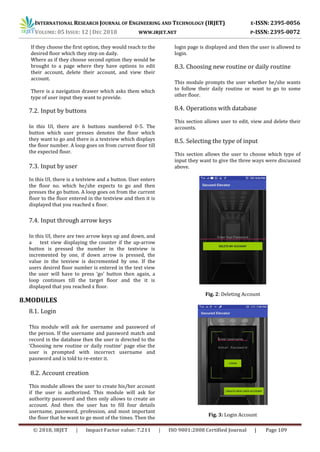
This module will ask for username and password of
the person. If the username and password match and
record in the database then the user is directed to the
‘Choosing new routine or daily routine’ page else the
user is prompted with incorrect username and
password and is told to re-enter it.
This module allows the user to create his/her account
if the user is authorized. This module will ask for
authority password and then only allows to create an
account. And then the user has to fill four details
username, password, profession, and most important
the floor that he want to go most of the times. Then the
login page is displayed and then the user is allowed to
login.
This module prompts the user whether he/she wants
to follow their daily routine or want to go to some
other floor.
This section allows user to edit, view and delete their
accounts.
This section allows the user to choose which type of
input they want to give the three ways were discussed
above.
Fig. 2: Deleting Account
Fig. 3: Login Account
7.2. Input by buttons
7.3. Input by user
7.4. Input through arrow keys
MODULES
8.1. Login
8.2. Account creation
8.3. Choosing new routine or daily routine
8.4. Operations with database
8.5. Selecting the type of input
INTERNATIONAL RESEARCH JOURNAL OF ENGINEERING AND TECHNOLOGY (IRJET) E-ISSN: 2395-0056
VOLUME: 05 ISSUE: 12 | DEC 2018 WWW.IRJET.NET P-ISSN: 2395-0072
© 2018, IRJET | Impact Factor value: 7.211 | ISO 9001:2008 Certified Journal | Page 110
Fig. 4: Input Using Arrow Keys
Fig. 5: Operations With Account
Fig. 6: Home Page
Fig. 7: Message Display
9. CONCLUSIONS
 An elevator controller operator using finite automata
can be created by using platform independent
programming languages such as java.
 The users can be served with convenience, efficiency
and security by using the facility of user accounts.
 Hence in this way, Finite automata can be used to
control elevators and system having different states.
 Thus, this application provides different convenient
modes to operate the elevator and also provides
secured access to the elevator.
REFERENCES
[1] An introduction to formal languages and automata by
Peter Linz.
[2] Lustig, A. "Lift Simulation Program", Elevator World,
March, 1986, pp. 74-79.
[3] Hummet, G.T.; T.D. Moser; B.A. Bowell. "Real Time
Simulation of Elevators", Winter Simulation
Conference, Miami Beach, Dec 4-6, 1978, pp. 393-402.
[4] Barney, G.C., "Lift Simulation Using PC's", Proceedings
of ELEVCON'88, IAEE, Karlsruhe, W. Germ.,
June, 1988, pp. 22-29.
[5] John E. Hopcroft, Jeffery D. Ullman, “Introduction to
Automata Theory, Languages, and Computation”.
[6] “Introduction to Theory of Computation” by Michael
Sipser
[7] http://www.eastersealstech.com/2014/07/16/evolu
tion-elevators/
[8] http://www.livescience.com/57282-elevator-
history.html

IRJET- Elevator Control System using Finite Automata

  • 1.
    INTERNATIONAL RESEARCH JOURNALOF ENGINEERING AND TECHNOLOGY (IRJET) E-ISSN: 2395-0056 VOLUME: 05 ISSUE: 12 | DEC 2018 WWW.IRJET.NET P-ISSN: 2395-0072 © 2018, IRJET | Impact Factor value: 7.211 | ISO 9001:2008 Certified Journal | Page 106 Elevator Control System Using Finite Automata Isha Ashish Bahendwar1, Ankita Manish Singh2, Prof. S.G. Mundada3 1,2Dept. of Computer Science Engineering, Ramdeobaba College of Engineering and Management, Nagpur, India 3Assistant Professor, Dept. of Computer Science Engineering, Ramdeobaba College of Engineering and Management, Nagpur, India -------------------------------------------------------------------------***------------------------------------------------------------------------ Abstract: The basic conception behind the given problem definition is that the functioning of the electronic elevators can be controlled and operated by the users through an android application. Different operations like travelling to upper floors or lower floors from the current floor of the user can be handled by considering the floors as states of finite automaton. Every floor in this design will be considered as a final state because any of them can be destination of the elevator user. This paper comprises the history of elevators, their working, the proposed idea of application and its functioning. It focuses on the connectivity of the lift and users through mobile phones in a very secured and user- friendly manner. Key Words: Automata, States, Transitions. 1. INTRODUCTION An Elevator is a machine which is used by people for fast and comfortable transport of goods or themselves from different levels or floors in any multistoried building. Elevators are generally powered by electric motors that either drive traction cables or counterweight systems like a hoist, or pump hydraulic fluid to raise a cylindrical piston like a jack. All the regular visitors of that building would have their personal accounts with all their details and the default floor the work on or live on. Any stranger would not be allowed to use the lift until and unless he/she has an id and password. New accounts can be created for recently joined employees or uses by the authorized person. In the similar manner, accounts of old employees can be removed. During account creation, the user would be asked for the floor of his/her regular use. Whenever someone wants to use the elevator, he/she would be asked for password on the application and if valid password is entered, the application would ask him/her whether he wants to go to his regular floor or some other floor. According to the option he chooses, the lift proceeds further. If it is his/her regular floor, it takes him there. But, if he goes for the second option, the application would offer him the list of input options. He/she can choose the input options from: 1. Manually enter the destination floor number. 2. Through buttons. 3. Through arrow keys. The user can choose its mode of input from the drawer in the left side of the home page. In this way, this application maintains security for elevators and provides amenity. In this android application, SQLite database is used to store the uses account information (an in-built database supported by android). Diverse operations can be performed related to the accounts of the users whenever the need arises, like, 1. Editing profiles. 2. Adding details. Only authorized people perform the following operations: 1. Adding accounts for new employees 2. Deleting accounts of old employees 2. EVOLUTION OF ELEVATOR Vertical lifts have been used to build the pyramids in Egypt. Archimedes was the person who invented the first reference elevator in 312. From some literacy source, elevators were developed as cable on a hemp rope and powered by hand or by through animals. This type of elevator was first installed in the Sinai Monastery of Egypt. In the 17th century, elevators were placed in the building of England and France. After that in 1793, Lvan Kuliben created an elevator with the screw lifting mechanism for the winter place of Saint Petersburg. After that, in 1816, an elevator was established in the main building of Sub- Moscow village called Arkhamgelskoye. Most of them ran hydraulically. [2][3] The very first hydraulic elevators used a plunger below the car to raise or lower the elevator. A used to pump applied water pressure to a plunger, or steel column, inside a vertical cylinder. In the year 1852, Elisha Otis was the person who introduced the safety elevator, which prevented the fall of the cab, in case the cable broke. In 1857 March 23rd, the first Otis passenger elevator was installed in New York City. The very first electric elevator was built by Werner von Siemens in 1880. [8] J.W. Meaker patented a method which permitted elevator doors to open and close safely in 1874. In 1882, when hydraulic power was a well-established technology, a company later named the London Hydraulic Power Company was formed. In 1929, Clarence Conrad Crispen, with Inclinator Company of America, created the first residential elevators. [7]
  • 2.
    INTERNATIONAL RESEARCH JOURNALOF ENGINEERING AND TECHNOLOGY (IRJET) E-ISSN: 2395-0056 VOLUME: 05 ISSUE: 12 | DEC 2018 WWW.IRJET.NET P-ISSN: 2395-0072 © 2018, IRJET | Impact Factor value: 7.211 | ISO 9001:2008 Certified Journal | Page 107 3. DESIGN Before electronic elevators were invented and came into commercial market, ropes were used for the functioning of the elevators. The elevators are the machine that have platform which are pulled or pushed to change its level with the help of mechanical means. A modern-day elevator consists of a cab (also called a "Cage" or "Car") mounted on a platform within an enclosed space called a shaft or sometimes a "hoist way". Earlier, elevator drive mechanisms were powered by steam and water hydraulic pistons or by hand. In this way, in the coming years elevators have developed a lot. Much advancement are done in elevators and infact digitally operable elevators have been developed and more and more advancements are being done for elevators to become more efficient and user friendly. 3.1. Elevator algorithm The elevator algorithm, is a simple algorithm by which a single elevator can decide where to stop, is summarized as follows: In computer operating systems, the elevator algorithm has found an application as an algorithm for scheduling hard disk requests. Modern elevators use more complex heuristic algorithms to decide which request to service next. 1. The current floor of elevator is stored as current. 2. When user selects a floor, where he wants to reach, then that floor’s position is stored as new_pos. 3. Then that value is compared with current value in order to determine the direction of the elevator (up or down). 4. Then the new_pos is incremented/decremented accordingly and that position is stored as current and the process goes on. 3.2. Principle 1. As soon as the application is opened, it launches itself and asks the use to login with his account name and password. If the user is new and wants to create a new account, he can contact an authorized person, who can us the security password and create new account with all the required details. 2. The application welcomes you with a message and asks if you want to follow the regular routine and reach its usual floor which is his work place or residence. 3. If the destination floor is different than the usual destination, the user can choose any mode of input from the drawer i.e., input from keyboard or buttons. 4. Using any mode of input user can enter his destination and travel to that floor using this application and logout after reaching. 5. Users can edit its profile and change password whenever he wants to. 4. TECHNOLOGIES USED 4.1. Android Android is a Linux based operating system for mobile devices such as tablets, televisions and smartphones. Android is developed by Andy Rubin in October, 2013 in California, United States of America. After that, Google acquired android incorporation in 2005. The main people, who developed android were Andy Rubin, Rich Miner, Chris White and Nick Sears. It is an open source operating system which is freely available on many devices and cell phones. It is currently the most widely used operating system. The devices which work on android operating system are mostly available at affordable prices. People find working with android operating system easy and efficient i.e. it is handy and much user friendly. Android softwares are developed using Android Studio, Eclipse, etc. 4.2. Android Studio Android Studio is the Integrated Development Environment (IDE) for Android application development, based on IntelliJ IDEA. In Android studio, the front end i.e. the UI is developed using xml files whereas the backend is developed using java files. It also has an inbuilt package named SQLiteOpenHelper to develop the database. We just have to extend the class inorder to perform database operations. Android studio offers many inbuilt services. They are: 1. An efficient gradle building system. 2. A user-friendly environment for coders to develop android apps for developing handheld devices, wearables, TVs, etc. 3. Instant Run option so that compilation and running of projects would be faster. 4. Facilities to import templates and GitHub codes which provides a great help for the programmers. 5. Perfect testing tools and easily updating facilities. 6. Now, in the newer versions of android studio, it has inbuilt facilities to connect with firebase which provides an online database. 7. Building light weight applications to serve day to day needs of users. 8. It also provides support for connection to various hardware using Bluetooth or wireless fidelity.
  • 3.
    INTERNATIONAL RESEARCH JOURNALOF ENGINEERING AND TECHNOLOGY (IRJET) E-ISSN: 2395-0056 VOLUME: 05 ISSUE: 12 | DEC 2018 WWW.IRJET.NET P-ISSN: 2395-0072 © 2018, IRJET | Impact Factor value: 7.211 | ISO 9001:2008 Certified Journal | Page 108 4.3. Extensible markup language (XML) In Android Studio's platform, we can quickly build layouts by dragging widgets into a visual design editor instead of writing the layout XML. Extensible Mark-up Language (XML) is a mark-up language. The design goals of XML are simplicity, generality and usability across the Internet. It is used to design the front end of the android applications. It provides various attributes to the layouts and widgets in order to give a simple and elegant view to the application. 5.FINITE AUTOMATA A finite automaton is a simple machine used to recognize patterns within input taken from some character set (or alphabet). The job of finite automata is to accept or reject an input depending on whether the entered input is in the pattern defined by the finite automata. Some of the recent applications of finite automata are software engineering, parallel programming and VLSI designs. [1][5] An elevator controller system is one of the applications of finite automata. It consists of a mechanism that does not remember the previous trajectory but, remembers only the current floor. The direction of motion can be upward if the current floor is not the top floor and the requested floor is above it whereas, the direction of motion would be downward if the current floor is not the ground floor and the requested floor is below it. Therefore, at any instance of time, an elevator in use can be defined by following mathematical terms: 1. States: finite set of states to present the possible requested floors from the current position. 2. Inputs: finite set of input depending upon the number of floors the building has. 3. Outputs: finite set of output depending upon the user’s request. We can represent finite automata graphically, with nodes for state and arcs for transitions. The elevator controller is going to control the operations and working of the elevator as per the need of the user. Thus, the corresponding state diagram is for designing of the finite automata for the working of elevator controller. (Note that the given state diagram has been drawn according to the Mealy Machine). In reference with the elevator working, the finite automata is useful in such a way that every destination floor can be reached from the current floor only by going through all the floors that come in its way. This operator will be work using buttons and the controller will work according to the following state diagram [2][4]. The following finite automaton consists of: 1. A finite set S of 5 states. 2. A special start states. 3. Set of final or accepting state. 4. A set of transitions from one state to another labelled with characters that is the operation like, up or down. [6] Fig. 1: Finite Automata 6. APPLICATIONS  Operators/controller of elevators-This application provides an interface to the user to select the destination floor from the current floor which he/she wants to reach and updates the current counter value accordingly.  Used for offices where only authorized people can use the elevators- As this application provides security, only those users can use the lift who have an account in this application.  Used for security purpose and convenience of the users- As only those users can login whose account exists in this application, this app is secured. And this app automatically takes the user to its destination floor, in this way it provides convenience to the users. The secured elevator app is a basic android application and it implements the idea of lift. Its connection with automata is discussed above. This app works in following manner: As it is a secured elevator, it can be used by only specific people who have the right to access it. There’s an authority password for that purpose, the person who knows the authority password can only create his/her account in this lift. For using this lift, it is must to have an account. After account creation, the user can login by their username and password and have two options in front of them: (i) They can follow their daily routine (ii) They can go to some other floor today. 7. IMPLEMENTATION 7.1. Basic Idea
  • 4.
    INTERNATIONAL RESEARCH JOURNALOF ENGINEERING AND TECHNOLOGY (IRJET) E-ISSN: 2395-0056 VOLUME: 05 ISSUE: 12 | DEC 2018 WWW.IRJET.NET P-ISSN: 2395-0072 © 2018, IRJET | Impact Factor value: 7.211 | ISO 9001:2008 Certified Journal | Page 109 If they choose the first option, they would reach to the desired floor which they step on daily. Where as if they choose second option they would be brought to a page where they have options to edit their account, delete their account, and view their account. There is a navigation drawer which asks them which type of user input they want to provide. In this UI, there are 6 buttons numbered 0-5. The button which user presses denotes the floor which they want to go and there is a textview which displays the floor number. A loop goes on from current floor till the expected floor. In this UI, there is a textview and a button. User enters the floor no. which he/she expects to go and then presses the go button. A loop goes on from the current floor to the floor entered in the textview and then it is displayed that you reached x floor. In this UI, there are two arrow keys up and down, and a text view displaying the counter if the up-arrow button is pressed the number in the textview is incremented by one, if down arrow is pressed, the value in the texview is decremented by one. If the users desired floor number is entered in the text view the user will have to press ‘go’ button then again, a loop continues till the target floor and the it is displayed that you reached x floor. 8. This module will ask for username and password of the person. If the username and password match and record in the database then the user is directed to the ‘Choosing new routine or daily routine’ page else the user is prompted with incorrect username and password and is told to re-enter it. This module allows the user to create his/her account if the user is authorized. This module will ask for authority password and then only allows to create an account. And then the user has to fill four details username, password, profession, and most important the floor that he want to go most of the times. Then the login page is displayed and then the user is allowed to login. This module prompts the user whether he/she wants to follow their daily routine or want to go to some other floor. This section allows user to edit, view and delete their accounts. This section allows the user to choose which type of input they want to give the three ways were discussed above. Fig. 2: Deleting Account Fig. 3: Login Account 7.2. Input by buttons 7.3. Input by user 7.4. Input through arrow keys MODULES 8.1. Login 8.2. Account creation 8.3. Choosing new routine or daily routine 8.4. Operations with database 8.5. Selecting the type of input
  • 5.
    INTERNATIONAL RESEARCH JOURNALOF ENGINEERING AND TECHNOLOGY (IRJET) E-ISSN: 2395-0056 VOLUME: 05 ISSUE: 12 | DEC 2018 WWW.IRJET.NET P-ISSN: 2395-0072 © 2018, IRJET | Impact Factor value: 7.211 | ISO 9001:2008 Certified Journal | Page 110 Fig. 4: Input Using Arrow Keys Fig. 5: Operations With Account Fig. 6: Home Page Fig. 7: Message Display 9. CONCLUSIONS  An elevator controller operator using finite automata can be created by using platform independent programming languages such as java.  The users can be served with convenience, efficiency and security by using the facility of user accounts.  Hence in this way, Finite automata can be used to control elevators and system having different states.  Thus, this application provides different convenient modes to operate the elevator and also provides secured access to the elevator. REFERENCES [1] An introduction to formal languages and automata by Peter Linz. [2] Lustig, A. "Lift Simulation Program", Elevator World, March, 1986, pp. 74-79. [3] Hummet, G.T.; T.D. Moser; B.A. Bowell. "Real Time Simulation of Elevators", Winter Simulation Conference, Miami Beach, Dec 4-6, 1978, pp. 393-402. [4] Barney, G.C., "Lift Simulation Using PC's", Proceedings of ELEVCON'88, IAEE, Karlsruhe, W. Germ., June, 1988, pp. 22-29. [5] John E. Hopcroft, Jeffery D. Ullman, “Introduction to Automata Theory, Languages, and Computation”. [6] “Introduction to Theory of Computation” by Michael Sipser [7] http://www.eastersealstech.com/2014/07/16/evolu tion-elevators/ [8] http://www.livescience.com/57282-elevator- history.html