Ayes Chinmay
Internet
&
Web Technology
(Introduction)
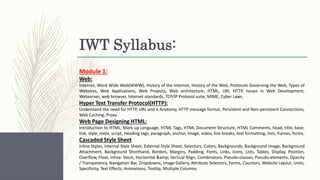
IWT Syllabus:
Module 1:
Web:
Internet, Word Wide Web(WWW), History of the Internet, History of the Web, Protocols Governing the Web, Types of
Websites, Web Applications, Web Projects, Web architecture, HTML, URI, HTTP, Issues in Web Development,
Webserver, web browser, Internet standards, TCP/IP Protocol suite, MIME, Cyber Laws.
Hyper Text Transfer Protocol(HTTP):
Understand the need for HTTP, URL and it Anatomy, HTTP message format, Persistent and Non-persistent Connections,
Web Caching, Proxy
Web Page Designing HTML:
Introduction to HTML, Mark up Language, HTML Tags, HTML Document Structure, HTML Comments, head, title, base,
link, style, meta, script, Heading tags, paragraph, anchor, image, video, line breaks, text formatting, lists, frames, forms.
Cascaded Style Sheet
Inline Styles, Internal Style Sheet, External Style Sheet, Selectors, Colors, Backgrounds, Background Image, Background
Attachment, Background Shorthand, Borders, Margins, Padding, Fonts, Links, Icons, Lists, Tables, Display, Position,
Overflow, Float, inline- block, Horizontal & Vertical Align, Combinators, Pseudo-classes, Pseudo-elements, Opacity
/ Transparency, Navigation Bar, Dropdowns, Image Gallery, Attribute Selectors, Forms, Counters, Website Layout, Units,
Specificity, Text Effects, Animations, Tooltip, Multiple Columns.
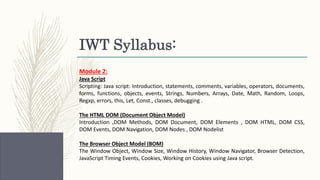
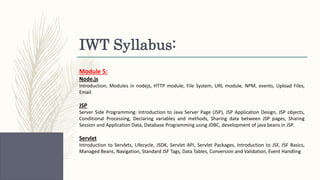
IWT Syllabus:
Module 2:
Java Script
Scripting: Java script: Introduction, statements, comments, variables, operators, documents,
forms, functions, objects, events, Strings, Numbers, Arrays, Date, Math, Random, Loops,
Regxp, errors, this, Let, Const., classes, debugging .
The HTML DOM (Document Object Model)
Introduction ,DOM Methods, DOM Document, DOM Elements , DOM HTML, DOM CSS,
DOM Events, DOM Navigation, DOM Nodes , DOM Nodelist
The Browser Object Model (BOM)
The Window Object, Window Size, Window History, Window Navigator, Browser Detection,
JavaScript Timing Events, Cookies, Working on Cookies using Java script.
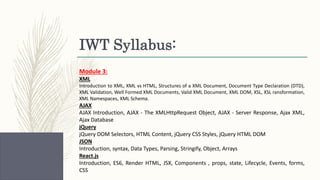
IWT Syllabus:
Module 3:
XML
Introduction to XML, XML vs HTML, Structures of a XML Document, Document Type Declaration (DTD),
XML Validation, Well Formed XML Documents, Valid XML Document, XML DOM, XSL, XSL ransformation,
XML Namespaces, XML Schema.
AJAX
AJAX Introduction, AJAX - The XMLHttpRequest Object, AJAX - Server Response, Ajax XML,
Ajax Database
jQuery
jQuery DOM Selectors, HTML Content, jQuery CSS Styles, jQuery HTML DOM
JSON
Introduction, syntax, Data Types, Parsing, Stringify, Object, Arrays
React.js
Introduction, ES6, Render HTML, JSX, Components , props, state, Lifecycle, Events, forms,
CSS
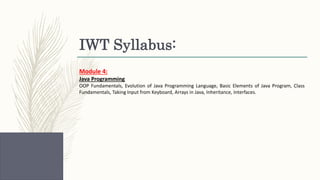
IWT Syllabus:
Module 4:
Java Programming
OOP Fundamentals, Evolution of Java Programming Language, Basic Elements of Java Program, Class
Fundamentals, Taking Input from Keyboard, Arrays in Java, Inheritance, Interfaces.
IWT Syllabus:
Module 5:
Node.js
Introduction, Modules in nodejs, HTTP module, File System, URL module, NPM, events, Upload Files,
Email.
JSP
Server Side Programming: Introduction to Java Server Page (JSP), JSP Application Design, JSP objects,
Conditional Processing, Declaring variables and methods, Sharing data between JSP pages, Sharing
Session and Application Data, Database Programming using JDBC, development of java beans in JSP.
Servlet
Introduction to Servlets, Lifecycle, JSDK, Servlet API, Servlet Packages, Introduction to JSF, JSF Basics,
Managed Beans, Navigation, Standard JSF Tags, Data Tables, Conversion and Validation, Event Handling
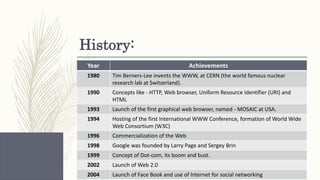
History:
Year Achievements
1980 Tim Berners-Lee invents the WWW, at CERN (the world famous nuclear
research lab at Switzerland).
1990 Concepts like - HTTP, Web browser, Uniform Resource Identifier (URI) and
HTML
1993 Launch of the first graphical web browser, named - MOSAIC at USA.
1994 Hosting of the first International WWW Conference, formation of World Wide
Web Consortium (W3C)
1996 Commercialization of the Web
1998 Google was founded by Larry Page and Sergey Brin
1999 Concept of Dot-com, its boom and bust.
2002 Launch of Web 2.0
2004 Launch of Face Book and use of Internet for social networking
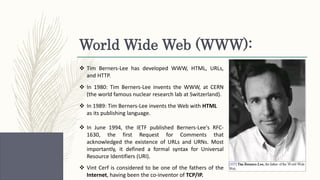
World Wide Web (WWW):
 Tim Berners-Lee has developed WWW, HTML, URLs,
and HTTP.
 In 1980: Tim Berners-Lee invents the WWW, at CERN
(the world famous nuclear research lab at Switzerland).
 In 1989: Tim Berners-Lee invents the Web with HTML
as its publishing language.
 In June 1994, the IETF published Berners-Lee's RFC-
1630, the first Request for Comments that
acknowledged the existence of URLs and URNs. Most
importantly, it defined a formal syntax for Universal
Resource Identifiers (URI).
 Vint Cerf is considered to be one of the fathers of the
Internet, having been the co-inventor of TCP/IP.
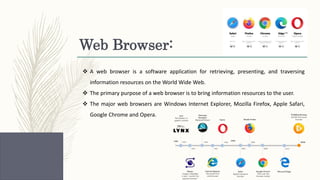
Web Browser:
 A web browser is a software application for retrieving, presenting, and traversing
information resources on the World Wide Web.
 The primary purpose of a web browser is to bring information resources to the user.
 The major web browsers are Windows Internet Explorer, Mozilla Firefox, Apple Safari,
Google Chrome and Opera.
Web Server:
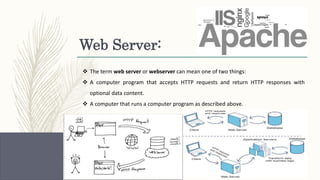
 The term web server or webserver can mean one of two things:
 A computer program that accepts HTTP requests and return HTTP responses with
optional data content.
 A computer that runs a computer program as described above.
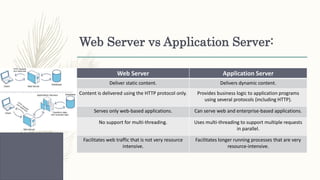
Web Server vs Application Server:
Web Server Application Server
Deliver static content. Delivers dynamic content.
Content is delivered using the HTTP protocol only. Provides business logic to application programs
using several protocols (including HTTP).
Serves only web-based applications. Can serve web and enterprise-based applications.
No support for multi-threading. Uses multi-threading to support multiple requests
in parallel.
Facilitates web traffic that is not very resource
intensive.
Facilitates longer running processes that are very
resource-intensive​.
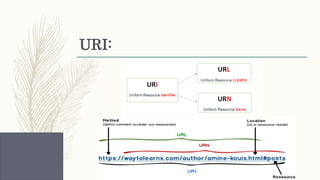
URI:
HTTP:
 HTTP is an application-level protocol for distributed, collaborative, hypermedia
information systems.
 HTTP is a request/response standard of a client and a server.
 Typically, an HTTP client initiates a request.
 Resources to be accessed by HTTP are identified using Uniform Resource
Identifiers (URIs).
 Port Id is 80.
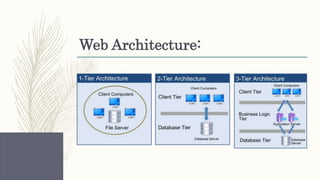
Web Architecture:
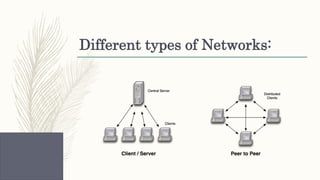
Different types of Networks:
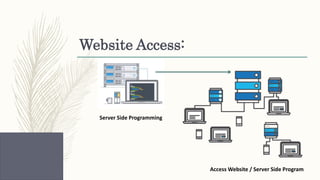
Website Access:
Server Side Programming
Access Website / Server Side Program
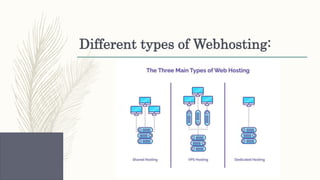
Different types of Webhosting:
Proxy Server:
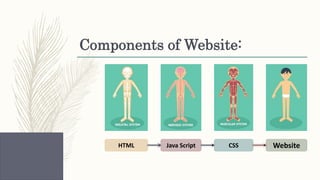
Components of Website:
HTML WebsiteCSSJava Script
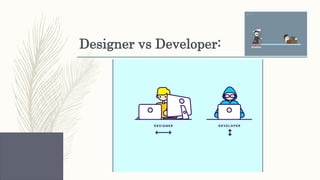
Designer vs Developer:
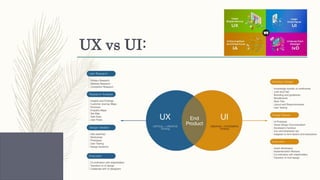
UX vs UI:
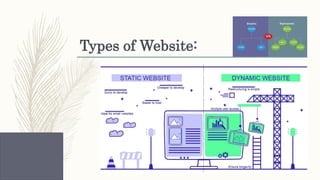
Types of Website:
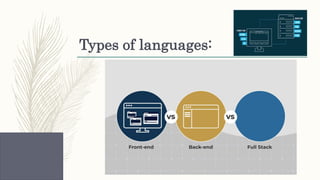
Types of languages:
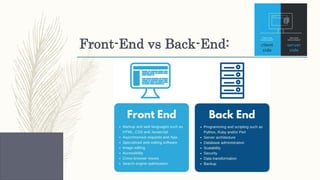
Front-End vs Back-End:
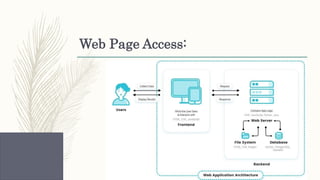
Web Page Access:
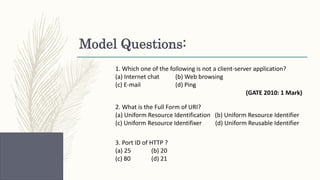
Model Questions:
1. Which one of the following is not a client-server application?
(a) Internet chat (b) Web browsing
(c) E-mail (d) Ping
(GATE 2010: 1 Mark)
2. What is the Full Form of URI?
(a) Uniform Resource Identification (b) Uniform Resource Identifier
(c) Uniform Resource Identifixer (d) Uniform Reusable Identifier
3. Port ID of HTTP ?
(a) 25 (b) 20
(c) 80 (d) 21
Next Class:
HTTP and HTML

Internet and Web Technology (CLASS-1) [Introduction]

  • 1.
  • 2.
    IWT Syllabus: Module 1: Web: Internet,Word Wide Web(WWW), History of the Internet, History of the Web, Protocols Governing the Web, Types of Websites, Web Applications, Web Projects, Web architecture, HTML, URI, HTTP, Issues in Web Development, Webserver, web browser, Internet standards, TCP/IP Protocol suite, MIME, Cyber Laws. Hyper Text Transfer Protocol(HTTP): Understand the need for HTTP, URL and it Anatomy, HTTP message format, Persistent and Non-persistent Connections, Web Caching, Proxy Web Page Designing HTML: Introduction to HTML, Mark up Language, HTML Tags, HTML Document Structure, HTML Comments, head, title, base, link, style, meta, script, Heading tags, paragraph, anchor, image, video, line breaks, text formatting, lists, frames, forms. Cascaded Style Sheet Inline Styles, Internal Style Sheet, External Style Sheet, Selectors, Colors, Backgrounds, Background Image, Background Attachment, Background Shorthand, Borders, Margins, Padding, Fonts, Links, Icons, Lists, Tables, Display, Position, Overflow, Float, inline- block, Horizontal & Vertical Align, Combinators, Pseudo-classes, Pseudo-elements, Opacity / Transparency, Navigation Bar, Dropdowns, Image Gallery, Attribute Selectors, Forms, Counters, Website Layout, Units, Specificity, Text Effects, Animations, Tooltip, Multiple Columns.
  • 3.
    IWT Syllabus: Module 2: JavaScript Scripting: Java script: Introduction, statements, comments, variables, operators, documents, forms, functions, objects, events, Strings, Numbers, Arrays, Date, Math, Random, Loops, Regxp, errors, this, Let, Const., classes, debugging . The HTML DOM (Document Object Model) Introduction ,DOM Methods, DOM Document, DOM Elements , DOM HTML, DOM CSS, DOM Events, DOM Navigation, DOM Nodes , DOM Nodelist The Browser Object Model (BOM) The Window Object, Window Size, Window History, Window Navigator, Browser Detection, JavaScript Timing Events, Cookies, Working on Cookies using Java script.
  • 4.
    IWT Syllabus: Module 3: XML Introductionto XML, XML vs HTML, Structures of a XML Document, Document Type Declaration (DTD), XML Validation, Well Formed XML Documents, Valid XML Document, XML DOM, XSL, XSL ransformation, XML Namespaces, XML Schema. AJAX AJAX Introduction, AJAX - The XMLHttpRequest Object, AJAX - Server Response, Ajax XML, Ajax Database jQuery jQuery DOM Selectors, HTML Content, jQuery CSS Styles, jQuery HTML DOM JSON Introduction, syntax, Data Types, Parsing, Stringify, Object, Arrays React.js Introduction, ES6, Render HTML, JSX, Components , props, state, Lifecycle, Events, forms, CSS
  • 5.
    IWT Syllabus: Module 4: JavaProgramming OOP Fundamentals, Evolution of Java Programming Language, Basic Elements of Java Program, Class Fundamentals, Taking Input from Keyboard, Arrays in Java, Inheritance, Interfaces.
  • 6.
    IWT Syllabus: Module 5: Node.js Introduction,Modules in nodejs, HTTP module, File System, URL module, NPM, events, Upload Files, Email. JSP Server Side Programming: Introduction to Java Server Page (JSP), JSP Application Design, JSP objects, Conditional Processing, Declaring variables and methods, Sharing data between JSP pages, Sharing Session and Application Data, Database Programming using JDBC, development of java beans in JSP. Servlet Introduction to Servlets, Lifecycle, JSDK, Servlet API, Servlet Packages, Introduction to JSF, JSF Basics, Managed Beans, Navigation, Standard JSF Tags, Data Tables, Conversion and Validation, Event Handling
  • 7.
    History: Year Achievements 1980 TimBerners-Lee invents the WWW, at CERN (the world famous nuclear research lab at Switzerland). 1990 Concepts like - HTTP, Web browser, Uniform Resource Identifier (URI) and HTML 1993 Launch of the first graphical web browser, named - MOSAIC at USA. 1994 Hosting of the first International WWW Conference, formation of World Wide Web Consortium (W3C) 1996 Commercialization of the Web 1998 Google was founded by Larry Page and Sergey Brin 1999 Concept of Dot-com, its boom and bust. 2002 Launch of Web 2.0 2004 Launch of Face Book and use of Internet for social networking
  • 8.
    World Wide Web(WWW):  Tim Berners-Lee has developed WWW, HTML, URLs, and HTTP.  In 1980: Tim Berners-Lee invents the WWW, at CERN (the world famous nuclear research lab at Switzerland).  In 1989: Tim Berners-Lee invents the Web with HTML as its publishing language.  In June 1994, the IETF published Berners-Lee's RFC- 1630, the first Request for Comments that acknowledged the existence of URLs and URNs. Most importantly, it defined a formal syntax for Universal Resource Identifiers (URI).  Vint Cerf is considered to be one of the fathers of the Internet, having been the co-inventor of TCP/IP.
  • 9.
    Web Browser:  Aweb browser is a software application for retrieving, presenting, and traversing information resources on the World Wide Web.  The primary purpose of a web browser is to bring information resources to the user.  The major web browsers are Windows Internet Explorer, Mozilla Firefox, Apple Safari, Google Chrome and Opera.
  • 10.
    Web Server:  Theterm web server or webserver can mean one of two things:  A computer program that accepts HTTP requests and return HTTP responses with optional data content.  A computer that runs a computer program as described above.
  • 11.
    Web Server vsApplication Server: Web Server Application Server Deliver static content. Delivers dynamic content. Content is delivered using the HTTP protocol only. Provides business logic to application programs using several protocols (including HTTP). Serves only web-based applications. Can serve web and enterprise-based applications. No support for multi-threading. Uses multi-threading to support multiple requests in parallel. Facilitates web traffic that is not very resource intensive. Facilitates longer running processes that are very resource-intensive​.
  • 12.
  • 13.
    HTTP:  HTTP isan application-level protocol for distributed, collaborative, hypermedia information systems.  HTTP is a request/response standard of a client and a server.  Typically, an HTTP client initiates a request.  Resources to be accessed by HTTP are identified using Uniform Resource Identifiers (URIs).  Port Id is 80.
  • 14.
  • 15.
  • 16.
    Website Access: Server SideProgramming Access Website / Server Side Program
  • 17.
    Different types ofWebhosting:
  • 18.
  • 19.
    Components of Website: HTMLWebsiteCSSJava Script
  • 20.
  • 21.
  • 22.
  • 23.
  • 24.
  • 25.
  • 26.
    Model Questions: 1. Whichone of the following is not a client-server application? (a) Internet chat (b) Web browsing (c) E-mail (d) Ping (GATE 2010: 1 Mark) 2. What is the Full Form of URI? (a) Uniform Resource Identification (b) Uniform Resource Identifier (c) Uniform Resource Identifixer (d) Uniform Reusable Identifier 3. Port ID of HTTP ? (a) 25 (b) 20 (c) 80 (d) 21
  • 27.