HTTP

    Web Technologies
piero.fraternali@polimi.it
HTTP
• HyperText Transfer Protocol
• Application level protocol for the exchange of
  hypertext document
• Standardizes
   – Resource names (URL)
   – requests
   – responses
• Versions: HTTP/0.9, 1.0, 1.1
• Ref: Tim Berners Lee, Request for Comment
  1945, HTTP/1.0
   – http://www.w3.org/Protocols/rfc1945/rfc1945
HTTP as a client server system
• Client
   – An application program that establishes connections for the purpose
     of sending requests.
• Server
   – An application program that accepts connections in order to service
     requests by sending back responses
• User agent
   – The client which initiates a request. These are often
     browsers, editors, spiders (web-traversing robots), or other end user
     tools
• Origin server
   – The server on which a given resource resides or is to be created
• Resource
   – A network data object or service which can be identified by a URI
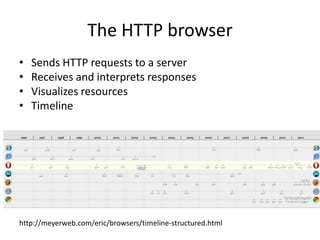
The HTTP browser
•   Sends HTTP requests to a server
•   Receives and interprets responses
•   Visualizes resources
•   Timeline


http://meyerweb.com/eric/browsers/timeline-structured.html
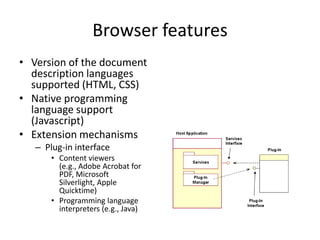
Browser features
• Version of the document
  description languages
  supported (HTML, CSS)
• Native programming
  language support
  (Javascript)
• Extension mechanisms
   – Plug-in interface
       • Content viewers
         (e.g., Adobe Acrobat for
         PDF, Microsoft
         Silverlight, Apple
         Quicktime)
       • Programming language
         interpreters (e.g., Java)
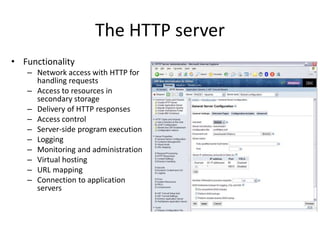
The HTTP server
• Functionality
   – Network access with HTTP for
     handling requests
   – Access to resources in
     secondary storage
   – Delivery of HTTP responses
   – Access control
   – Server-side program execution
   – Logging
   – Monitoring and administration
   – Virtual hosting
   – URL mapping
   – Connection to application
     servers
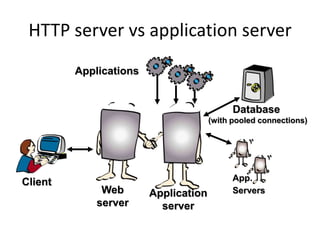
HTTP server vs application server
         Applications


                                            Database
                                      (with pooled connections)


Client                                      App.
              Web       Application         Servers
             server       server
Example
HTTP limitations
• HTTP is stateless
  – Every HTTP request-response cycle is independent
  – No data are preserved between two connections
    of the same client or of different clients
  – HTTP is thus sessionless
  – HTTP 1.0 also closes the TCP connection between
    the client and the server host at each roundtrip
    (fixed in HTTP 1.1)
Application server features
• The application server can be stateful (e.g. a residential
  process)
• It can preserve the user’s session across multiple
  request-response cycles
• Can preserve session data
• Can handle shared resources (e.g, pool of database
  connections)
• Can be optimized (multi-threading, multi-
  processing, multi-host distribution)
• Can be multi-protocol (e.g., Corba IIOP, COM/DCOM)
HTTP Proxy
• An intermediary
  program which acts as
  both a server and a
  client for the purpose
  of making requests on
  behalf of other clients.
• Main usage:
   – Access control
     (inbound, outbound)
   – Resource caching
HTTP Gateway
• A server which acts as an
  intermediary for some
  other server. Unlike a
  proxy, a gateway receives
  requests as if it were the
  origin server for the
  requested resource; the
  requesting client may not
  be aware that it is
  communicating with a
  gateway.
• Usage
   – protocol translators for access
     to resources stored on non-
     HTTP systems.
Uniform Resource Locator (URL)
• Structured string
    – http_URL = "http:" "//" host [ ":" port ] [ abs_path ]
    – http://www.elet.polimi.it:8080/people/fraterna.html
• Protocol: http, but also ftp, file
• Host address:
    – symbolic: www.elet.polimi.it
    – numeric (IP): 131.175.21.1
• Can include port number (e.g. :8080)
• Path: directory sequence
• Resource name: file id
    – If resource is an html file, can include an internal fragment address
      (e.g. fraterna.html#curriculum)
• More on the URL when introducing dynamic Web resources
HTTP request
• full-request :- request-line
                    *(general-header |
                      request-header |
                      entity-header)
                CRLF [entity-body]

• request-line :- method SP URL SP version CRLF

• method :- GET | POST | HEAD | others..

• Example of request-line:
  GET /pub/papers/pap101.html HTTP/1.0
HTTP Response
• full-response :- status-line
                            *(general-header |
                               request-header |
                               entity-header)
                           CRLF [entity-body]
• status-line :- version SP status SP message
              CRLF
• status: Codici di stato:
  1XX (informative), 2XX (success),
  3XX (redirection), 4XX(client error),
  5XX (server error)
• Example: HTTP 404 - File not found
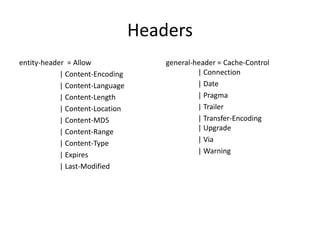
Headers
entity-header = Allow                general-header = Cache-Control
            | Content-Encoding                | Connection
            | Content-Language                | Date
            | Content-Length                  | Pragma
            | Content-Location                | Trailer
            | Content-MD5                     | Transfer-Encoding
            | Content-Range                   | Upgrade
            | Content-Type                    | Via
            | Expires                         | Warning
            | Last-Modified
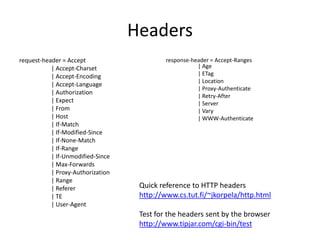
Headers
request-header = Accept                     response-header = Accept-Ranges
           | Accept-Charset                            | Age
           | Accept-Encoding                           | ETag
                                                       | Location
           | Accept-Language
                                                       | Proxy-Authenticate
           | Authorization
                                                       | Retry-After
           | Expect                                    | Server
           | From                                      | Vary
           | Host                                      | WWW-Authenticate
           | If-Match
           | If-Modified-Since
           | If-None-Match
           | If-Range
           | If-Unmodified-Since
           | Max-Forwards
           | Proxy-Authorization
           | Range
           | Referer                Quick reference to HTTP headers
           | TE                     http://www.cs.tut.fi/~jkorpela/http.html
           | User-Agent
                                    Test for the headers sent by the browser
                                    http://www.tipjar.com/cgi-bin/test
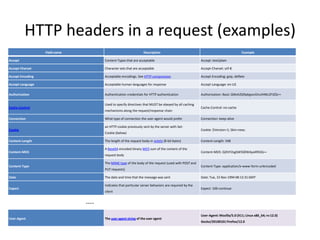
HTTP headers in a request (examples)
                  Field name                                     Description                                                       Example

Accept                                Content-Types that are acceptable                                Accept: text/plain

Accept-Charset                        Character sets that are acceptable                               Accept-Charset: utf-8

Accept-Encoding                       Acceptable encodings. See HTTP compression.                      Accept-Encoding: gzip, deflate

Accept-Language                       Acceptable human languages for response                          Accept-Language: en-US

Authorization                         Authentication credentials for HTTP authentication               Authorization: Basic QWxhZGRpbjpvcGVuIHNlc2FtZQ==

                                      Used to specify directives that MUST be obeyed by all caching
Cache-Control                                                                                          Cache-Control: no-cache
                                      mechanisms along the request/response chain

Connection                            What type of connection the user-agent would prefer              Connection: keep-alive

                                      an HTTP cookie previously sent by the server with Set-
Cookie                                                                                                 Cookie: $Version=1; Skin=new;
                                      Cookie (below)

Content-Length                        The length of the request body in octets (8-bit bytes)           Content-Length: 348

                                      A Base64-encoded binary MD5 sum of the content of the
Content-MD5                                                                                            Content-MD5: Q2hlY2sgSW50ZWdyaXR5IQ==
                                      request body

                                      The MIME type of the body of the request (used with POST and
Content-Type                                                                                           Content-Type: application/x-www-form-urlencoded
                                      PUT requests)

Date                                  The date and time that the message was sent                      Date: Tue, 15 Nov 1994 08:12:31 GMT

                                      Indicates that particular server behaviors are required by the
Expect                                                                                                 Expect: 100-continue
                                      client


                               ....
                                                                                                       User-Agent: Mozilla/5.0 (X11; Linux x86_64; rv:12.0)
User-Agent                            The user agent string of the user agent
                                                                                                       Gecko/20100101 Firefox/12.0
HTTP headers in a response
                              (examples)
                   Field name                              Description                                                       Example

Accept-Ranges                   What partial content range types this server supports             Accept-Ranges: bytes

Age                             The age the object has been in a proxy cache in seconds           Age: 12

                                Tells all caching mechanisms from server to client whether they
Cache-Control                                                                                     Cache-Control: max-age=3600
                                may cache this object. It is measured in seconds

Connection                      Options that are desired for the connection[21]                   Connection: close

Content-Encoding                The type of encoding used on the data. See HTTP compression.      Content-Encoding: gzip

Content-Language                The language the content is in                                    Content-Language: da

Content-Length                  The length of the response body in octets (8-bit bytes)           Content-Length: 348

Content-Location                An alternate location for the returned data                       Content-Location: /index.htm

                                A Base64-encoded binary MD5 sum of the content of the
Content-MD5                                                                                       Content-MD5: Q2hlY2sgSW50ZWdyaXR5IQ==
                                response

Content-Range                   Where in a full body message this partial message belongs         Content-Range: bytes 21010-47021/47022

Content-Type                    The MIME type of this content                                     Content-Type: text/html; charset=utf-8

Date                            The date and time that the message was sent                       Date: Tue, 15 Nov 1994 08:12:31 GMT

Expires                         Gives the date/time after which the response is considered stale Expires: Thu, 01 Dec 1994 16:00:00 GMT

                                The last modified date for the requested object, in RFC
Last-Modified                                                                                     Last-Modified: Tue, 15 Nov 1994 12:45:26 GMT
                                2822 format
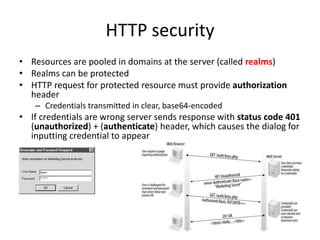
HTTP security
• Resources are pooled in domains at the server (called realms)
• Realms can be protected
• HTTP request for protected resource must provide authorization
  header
   – Credentials transmitted in clear, base64-encoded
• If credentials are wrong server sends response with status code 401
  (unauthorized) + (authenticate) header, which causes the dialog for
  inputting credential to appear
HTTP 1.1
• Calendar
  – Jan 1997: HTTP/1.1 becomes Proposed Standard (RFC
    2068)
  – June 1999 Improvements and updates under RFC 2616 in
  – Main innovations
     •   Tunnels
     •   Chunked encoding
     •   Multi-request connections
     •   Content negotiation
     •   Advanced cache management
     •   New methods
         (OPTIONS, PUT, DELETE, TRACE, CONNECT, extension-method)
Tunnels
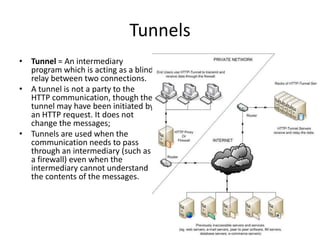
• Tunnel = An intermediary
  program which is acting as a blind
  relay between two connections.
• A tunnel is not a party to the
  HTTP communication, though the
  tunnel may have been initiated by
  an HTTP request. It does not
  change the messages;
• Tunnels are used when the
  communication needs to pass
  through an intermediary (such as
  a firewall) even when the
  intermediary cannot understand
  the contents of the messages.
Chuncked transfer encoding
Behavior                                        Benefits
•   A data transfer mechanism in which          • Allows a server to maintain
    data is sent in blocks called "chunks“
•   It uses the Transfer-Encoding header in       an HTTP persistent
    place of the Content-Length                   connection for dynamically
    header, the sender does not need to
    know the length of the content before         generated content
    it starts transmitting a response to the
    receiver. (useful for dynamically-          • Allows the sender to send
    generated content).                           header fields after the
•   Size is sent before the chunk so that the
    receiver can tell when it has finished        message body, in cases
    receiving data for that chunk.                where values cannot be
•   Data transfer is terminated by a final
    chunk of length zero.                         known until the content has
                                                  been produced (e.g., digital
                                                  signature)
Persistent connection
Behavior                                            Benefits
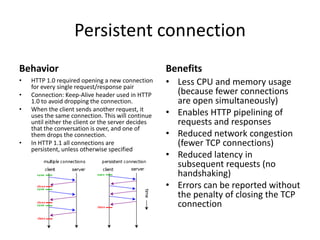
•   HTTP 1.0 required opening a new connection
    for every single request/response pair
                                                    • Less CPU and memory usage
•   Connection: Keep-Alive header used in HTTP        (because fewer connections
    1.0 to avoid dropping the connection.             are open simultaneously)
•   When the client sends another request, it
    uses the same connection. This will continue    • Enables HTTP pipelining of
    until either the client or the server decides     requests and responses
    that the conversation is over, and one of
    them drops the connection.                      • Reduced network congestion
•   In HTTP 1.1 all connections are                   (fewer TCP connections)
    persistent, unless otherwise specified
                                                    • Reduced latency in
                                                      subsequent requests (no
                                                      handshaking)
                                                    • Errors can be reported without
                                                      the penalty of closing the TCP
                                                      connection
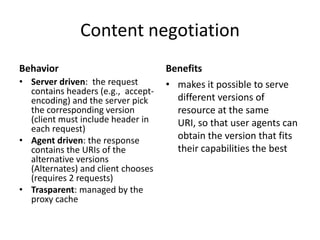
Content negotiation
Behavior                            Benefits
• Server driven: the request        • makes it possible to serve
  contains headers (e.g., accept-
  encoding) and the server pick       different versions of
  the corresponding version           resource at the same
  (client must include header in      URI, so that user agents can
  each request)
• Agent driven: the response          obtain the version that fits
  contains the URIs of the            their capabilities the best
  alternative versions
  (Alternates) and client chooses
  (requires 2 requests)
• Trasparent: managed by the
  proxy cache
Cache management
• Goal: minimaze network traffic and bandwidth
  usage
• Mechanism: storing a duplicate of the resource in
  a location closer to the client and serving that in
  response to a request
• Semantic transparency:
   – the client must be unaware of the cache
   – Warning must be given to the client if the duplicate
     may be disaligned wrt to the original resource
Cache operations
• Expiration
   – The server can declare the validity in time of a resource
     (Cache-Control and Expires header)
   – Requires computing the age of a resource (in the Age
     header) in presence of time zones and
     differences, multiple responses
• Validation
   – The cache can control the validity of the expired
     copy, (e.g., based on Date and Last-Modified time, or on
     explicit entity tags, i.e., version control numbers)
   – Requires conditional requests and validation headers
   – May produce the Warning general-header, when the
     response contains a possibly stale entity
References
• HTTP1.0: Tim Berners Lee, Request for Comment
  1945, HTTP1.0
• HTTP1.1: Internet Draft <draft-ietf-http-v11-spec-rev-06>
  (November 18, 1998)
  http://www.w3.org/Protocols/History.html#HTTP11
• HTTP Status codes:
  http://www.w3.org/Protocols/rfc2616/rfc2616-sec10.html
• HTTP Intro: http://jmarshall.com/easy/http/
• Web info: http://www.webopedia.com

Web technologies: HTTP

  • 1.
    HTTP Web Technologies piero.fraternali@polimi.it
  • 2.
    HTTP • HyperText TransferProtocol • Application level protocol for the exchange of hypertext document • Standardizes – Resource names (URL) – requests – responses • Versions: HTTP/0.9, 1.0, 1.1 • Ref: Tim Berners Lee, Request for Comment 1945, HTTP/1.0 – http://www.w3.org/Protocols/rfc1945/rfc1945
  • 3.
    HTTP as aclient server system • Client – An application program that establishes connections for the purpose of sending requests. • Server – An application program that accepts connections in order to service requests by sending back responses • User agent – The client which initiates a request. These are often browsers, editors, spiders (web-traversing robots), or other end user tools • Origin server – The server on which a given resource resides or is to be created • Resource – A network data object or service which can be identified by a URI
  • 4.
    The HTTP browser • Sends HTTP requests to a server • Receives and interprets responses • Visualizes resources • Timeline http://meyerweb.com/eric/browsers/timeline-structured.html
  • 5.
    Browser features • Versionof the document description languages supported (HTML, CSS) • Native programming language support (Javascript) • Extension mechanisms – Plug-in interface • Content viewers (e.g., Adobe Acrobat for PDF, Microsoft Silverlight, Apple Quicktime) • Programming language interpreters (e.g., Java)
  • 6.
    The HTTP server •Functionality – Network access with HTTP for handling requests – Access to resources in secondary storage – Delivery of HTTP responses – Access control – Server-side program execution – Logging – Monitoring and administration – Virtual hosting – URL mapping – Connection to application servers
  • 7.
    HTTP server vsapplication server Applications Database (with pooled connections) Client App. Web Application Servers server server
  • 8.
  • 9.
    HTTP limitations • HTTPis stateless – Every HTTP request-response cycle is independent – No data are preserved between two connections of the same client or of different clients – HTTP is thus sessionless – HTTP 1.0 also closes the TCP connection between the client and the server host at each roundtrip (fixed in HTTP 1.1)
  • 10.
    Application server features •The application server can be stateful (e.g. a residential process) • It can preserve the user’s session across multiple request-response cycles • Can preserve session data • Can handle shared resources (e.g, pool of database connections) • Can be optimized (multi-threading, multi- processing, multi-host distribution) • Can be multi-protocol (e.g., Corba IIOP, COM/DCOM)
  • 11.
    HTTP Proxy • Anintermediary program which acts as both a server and a client for the purpose of making requests on behalf of other clients. • Main usage: – Access control (inbound, outbound) – Resource caching
  • 12.
    HTTP Gateway • Aserver which acts as an intermediary for some other server. Unlike a proxy, a gateway receives requests as if it were the origin server for the requested resource; the requesting client may not be aware that it is communicating with a gateway. • Usage – protocol translators for access to resources stored on non- HTTP systems.
  • 13.
    Uniform Resource Locator(URL) • Structured string – http_URL = "http:" "//" host [ ":" port ] [ abs_path ] – http://www.elet.polimi.it:8080/people/fraterna.html • Protocol: http, but also ftp, file • Host address: – symbolic: www.elet.polimi.it – numeric (IP): 131.175.21.1 • Can include port number (e.g. :8080) • Path: directory sequence • Resource name: file id – If resource is an html file, can include an internal fragment address (e.g. fraterna.html#curriculum) • More on the URL when introducing dynamic Web resources
  • 14.
    HTTP request • full-request:- request-line *(general-header | request-header | entity-header) CRLF [entity-body] • request-line :- method SP URL SP version CRLF • method :- GET | POST | HEAD | others.. • Example of request-line: GET /pub/papers/pap101.html HTTP/1.0
  • 15.
    HTTP Response • full-response:- status-line *(general-header | request-header | entity-header) CRLF [entity-body] • status-line :- version SP status SP message CRLF • status: Codici di stato: 1XX (informative), 2XX (success), 3XX (redirection), 4XX(client error), 5XX (server error) • Example: HTTP 404 - File not found
  • 16.
    Headers entity-header = Allow general-header = Cache-Control | Content-Encoding | Connection | Content-Language | Date | Content-Length | Pragma | Content-Location | Trailer | Content-MD5 | Transfer-Encoding | Content-Range | Upgrade | Content-Type | Via | Expires | Warning | Last-Modified
  • 17.
    Headers request-header = Accept response-header = Accept-Ranges | Accept-Charset | Age | Accept-Encoding | ETag | Location | Accept-Language | Proxy-Authenticate | Authorization | Retry-After | Expect | Server | From | Vary | Host | WWW-Authenticate | If-Match | If-Modified-Since | If-None-Match | If-Range | If-Unmodified-Since | Max-Forwards | Proxy-Authorization | Range | Referer Quick reference to HTTP headers | TE http://www.cs.tut.fi/~jkorpela/http.html | User-Agent Test for the headers sent by the browser http://www.tipjar.com/cgi-bin/test
  • 18.
    HTTP headers ina request (examples) Field name Description Example Accept Content-Types that are acceptable Accept: text/plain Accept-Charset Character sets that are acceptable Accept-Charset: utf-8 Accept-Encoding Acceptable encodings. See HTTP compression. Accept-Encoding: gzip, deflate Accept-Language Acceptable human languages for response Accept-Language: en-US Authorization Authentication credentials for HTTP authentication Authorization: Basic QWxhZGRpbjpvcGVuIHNlc2FtZQ== Used to specify directives that MUST be obeyed by all caching Cache-Control Cache-Control: no-cache mechanisms along the request/response chain Connection What type of connection the user-agent would prefer Connection: keep-alive an HTTP cookie previously sent by the server with Set- Cookie Cookie: $Version=1; Skin=new; Cookie (below) Content-Length The length of the request body in octets (8-bit bytes) Content-Length: 348 A Base64-encoded binary MD5 sum of the content of the Content-MD5 Content-MD5: Q2hlY2sgSW50ZWdyaXR5IQ== request body The MIME type of the body of the request (used with POST and Content-Type Content-Type: application/x-www-form-urlencoded PUT requests) Date The date and time that the message was sent Date: Tue, 15 Nov 1994 08:12:31 GMT Indicates that particular server behaviors are required by the Expect Expect: 100-continue client .... User-Agent: Mozilla/5.0 (X11; Linux x86_64; rv:12.0) User-Agent The user agent string of the user agent Gecko/20100101 Firefox/12.0
  • 19.
    HTTP headers ina response (examples) Field name Description Example Accept-Ranges What partial content range types this server supports Accept-Ranges: bytes Age The age the object has been in a proxy cache in seconds Age: 12 Tells all caching mechanisms from server to client whether they Cache-Control Cache-Control: max-age=3600 may cache this object. It is measured in seconds Connection Options that are desired for the connection[21] Connection: close Content-Encoding The type of encoding used on the data. See HTTP compression. Content-Encoding: gzip Content-Language The language the content is in Content-Language: da Content-Length The length of the response body in octets (8-bit bytes) Content-Length: 348 Content-Location An alternate location for the returned data Content-Location: /index.htm A Base64-encoded binary MD5 sum of the content of the Content-MD5 Content-MD5: Q2hlY2sgSW50ZWdyaXR5IQ== response Content-Range Where in a full body message this partial message belongs Content-Range: bytes 21010-47021/47022 Content-Type The MIME type of this content Content-Type: text/html; charset=utf-8 Date The date and time that the message was sent Date: Tue, 15 Nov 1994 08:12:31 GMT Expires Gives the date/time after which the response is considered stale Expires: Thu, 01 Dec 1994 16:00:00 GMT The last modified date for the requested object, in RFC Last-Modified Last-Modified: Tue, 15 Nov 1994 12:45:26 GMT 2822 format
  • 20.
    HTTP security • Resourcesare pooled in domains at the server (called realms) • Realms can be protected • HTTP request for protected resource must provide authorization header – Credentials transmitted in clear, base64-encoded • If credentials are wrong server sends response with status code 401 (unauthorized) + (authenticate) header, which causes the dialog for inputting credential to appear
  • 21.
    HTTP 1.1 • Calendar – Jan 1997: HTTP/1.1 becomes Proposed Standard (RFC 2068) – June 1999 Improvements and updates under RFC 2616 in – Main innovations • Tunnels • Chunked encoding • Multi-request connections • Content negotiation • Advanced cache management • New methods (OPTIONS, PUT, DELETE, TRACE, CONNECT, extension-method)
  • 22.
    Tunnels • Tunnel =An intermediary program which is acting as a blind relay between two connections. • A tunnel is not a party to the HTTP communication, though the tunnel may have been initiated by an HTTP request. It does not change the messages; • Tunnels are used when the communication needs to pass through an intermediary (such as a firewall) even when the intermediary cannot understand the contents of the messages.
  • 23.
    Chuncked transfer encoding Behavior Benefits • A data transfer mechanism in which • Allows a server to maintain data is sent in blocks called "chunks“ • It uses the Transfer-Encoding header in an HTTP persistent place of the Content-Length connection for dynamically header, the sender does not need to know the length of the content before generated content it starts transmitting a response to the receiver. (useful for dynamically- • Allows the sender to send generated content). header fields after the • Size is sent before the chunk so that the receiver can tell when it has finished message body, in cases receiving data for that chunk. where values cannot be • Data transfer is terminated by a final chunk of length zero. known until the content has been produced (e.g., digital signature)
  • 24.
    Persistent connection Behavior Benefits • HTTP 1.0 required opening a new connection for every single request/response pair • Less CPU and memory usage • Connection: Keep-Alive header used in HTTP (because fewer connections 1.0 to avoid dropping the connection. are open simultaneously) • When the client sends another request, it uses the same connection. This will continue • Enables HTTP pipelining of until either the client or the server decides requests and responses that the conversation is over, and one of them drops the connection. • Reduced network congestion • In HTTP 1.1 all connections are (fewer TCP connections) persistent, unless otherwise specified • Reduced latency in subsequent requests (no handshaking) • Errors can be reported without the penalty of closing the TCP connection
  • 25.
    Content negotiation Behavior Benefits • Server driven: the request • makes it possible to serve contains headers (e.g., accept- encoding) and the server pick different versions of the corresponding version resource at the same (client must include header in URI, so that user agents can each request) • Agent driven: the response obtain the version that fits contains the URIs of the their capabilities the best alternative versions (Alternates) and client chooses (requires 2 requests) • Trasparent: managed by the proxy cache
  • 26.
    Cache management • Goal:minimaze network traffic and bandwidth usage • Mechanism: storing a duplicate of the resource in a location closer to the client and serving that in response to a request • Semantic transparency: – the client must be unaware of the cache – Warning must be given to the client if the duplicate may be disaligned wrt to the original resource
  • 27.
    Cache operations • Expiration – The server can declare the validity in time of a resource (Cache-Control and Expires header) – Requires computing the age of a resource (in the Age header) in presence of time zones and differences, multiple responses • Validation – The cache can control the validity of the expired copy, (e.g., based on Date and Last-Modified time, or on explicit entity tags, i.e., version control numbers) – Requires conditional requests and validation headers – May produce the Warning general-header, when the response contains a possibly stale entity
  • 28.
    References • HTTP1.0: TimBerners Lee, Request for Comment 1945, HTTP1.0 • HTTP1.1: Internet Draft <draft-ietf-http-v11-spec-rev-06> (November 18, 1998) http://www.w3.org/Protocols/History.html#HTTP11 • HTTP Status codes: http://www.w3.org/Protocols/rfc2616/rfc2616-sec10.html • HTTP Intro: http://jmarshall.com/easy/http/ • Web info: http://www.webopedia.com