Subject : Microcontrollers and
Embedded Systems
VTU
Course Code: 21CS43
Presented By:
Course Outcomes (Course Skill Set)
At the end of the course, the student will be able to:
• CO 1. Explain C-Compilers and optimization.
• CO 2. Describe the ARM microcontroller's architectural
features and program module.
• CO 3. Apply the knowledge gained from programming
on ARM to different applications.
• CO 4. Program the basic hardware components and
their application selection method.
• CO 5. Demonstrate the need for a real-time operating
system for embedded system applications.
Module-1
• Microprocessors versus Microcontrollers, ARM
Embedded Systems: The RISC design philosophy,
The ARM Design Philosophy, Embedded System
Hardware, Embedded System Software.
• ARM Processor Fundamentals: Registers, Current
Program Status Register, Pipeline, Exceptions,
Interrupts, and the Vector Table, Core Extensions.
Module-2
• Introduction to the ARM Instruction Set: Data
Processing Instructions , Branch Instructions,
Software Interrupt Instructions, Program
Status Register Instructions, Coprocessor
Instructions, Loading Constants
• C Compilers and Optimization :Basic C Data
Types, C Looping Structures, Register
Allocation, Function Calls, Pointer Aliasing.
Module-3
• C Compilers and Optimization :Structure
Arrangement, Bit-fields, Unaligned Data and
Endianness, Division, Floating Point, Inline
Functions and Inline Assembly, Portability Issues.
• ARM programming using Assembly language:
Writing Assembly code, Profiling and cycle
counting, instruction scheduling, Register
Allocation, Conditional Execution, Looping
Constructs.
Module-4
• Embedded System Components: Embedded Vs
General computing system, History of embedded
systems, Classification of Embedded systems, Major
applications areas of embedded systems, purpose of
embedded systems.
• Core of an Embedded System including all types of
processor/controller, Memory, Sensors, Actuators, LED,
7 segment LED display, stepper motor, Keyboard, Push
button switch, Communication Interface (onboard and
external types), Embedded firmware, Other system
components.
Module-5
• RTOS and IDE for Embedded System Design: Operating
System basics, Types of operating systems, Task, process
and threads (Only POSIX Threads with an example
program), Thread preemption, Multiprocessing and
Multitasking, Task Communication (without any program),
Task synchronization issues – Racing and Deadlock, Concept
of Binary and counting semaphores (Mutex example
without any program), How to choose an RTOS, Integration
and testing of Embedded hardware and firmware,
Embedded system Development Environment – Block
diagram (excluding Keil), Disassembler/decompiler,
simulator, emulator and debugging techniques, target
hardware debugging, boundary scan.
Suggested Learning Resources:
Textbooks
• Andrew N Sloss, Dominic Symes and Chris Wright, ARM system
developers guide, Elsevier, Morgan Kaufman publishers, 2008.
• Shibu K V, “Introduction to Embedded Systems”, Tata McGraw Hill
Education, Private Limited, 2nd Edition.
Reference Books
• Raghunandan. G.H, Microcontroller (ARM) and Embedded
System, Cengage learning Publication,2019
• The Insider’s Guide to the ARM7 Based Microcontrollers, Hitex
Ltd.,1st edition, 2005.
• Steve Furber, ARM System-on-Chip Architecture, Second Edition,
Pearson, 2015.
• Raj Kamal, Embedded System, Tata McGraw-Hill Publishers, 2nd
Edition, 2008.
What is Microcontroller
• Microcontroller is a device that captures the
input, processes it and generates output
based on the information captured. It is also
called MC or MCU (Microcontroller Unit)
which is a compact digital processor on Metal-
Oxide-Semiconductor Chip. Microcontrollers
are also called as “special purpose
computers”. They are dedicated to execute
specific task that is programmed and stored
in ROM.
Applications of Microcontroller
• The devices which are incorporated with Touch-Sensing capabilities are
designed using Microcontrollers like Portable Electronic Devices which
include Smart Phones, Gaming Devices and Media Players, etc.
• Microcontrollers are used in remote controls, toys, medical devices and
other Embedded Systems.
• They provide Automobile Solutions like controlling Anti-Lock Brake system
and managing engine control system.
• Microcontrollers are used in Radar Speed Gun to detect the speed of an
object.
• They are widely used in Consumer Products like Ovens, Refrigerator,
Washing Machines, Air Conditioners and Vacuum Cleaners etc.
• Microcontrollers are used in Computers to control I/O functions.
• They are also used to store information for Database Management
System.
Advantages of Microcontroller
• They consume less power.
• They are economical.
• Microcontrollers are smaller in size compared to
Microprocessors.
• It has low Clock Speed.
• Use of Microcontrollers has reduced PCB size to a
great extent.
• Microcontrollers are capable of handling Boolean
functions.
• They are reliable and operate faster.
MODULE 1
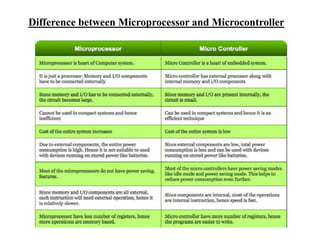
Difference between Microprocessor and Microcontroller
Difference between RISC and CISC
• RISC - Reduced Instruction Set Computer
• CISC - Complex Instruction Set Computer
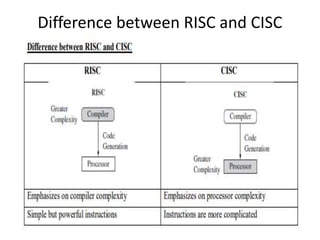
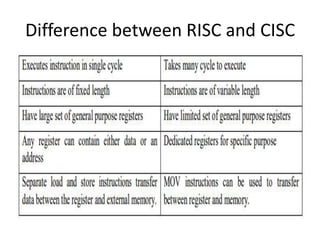
Difference between RISC and CISC
THE RISC DESIGN PHILOSOPHY
RISC design philosophy is
• Aimed at simple but powerful instructions
that execute within a single cycle at a high
clock speed.
• Concentrates on reducing the complexity of
instructions performed by the hardware.
• Provides greater flexibility and intelligence in
software rather than hardware.
The RISC philosophy is implemented
with four major design rules
1. Instructions: RISC has a reduced number of
instruction classes. These classes provide
simple operations so that each is executed in a
single cycle. Each instruction is of fixed length
to allow the pipeline to fetch future instructions
before decoding the current instruction.
2. Pipeline: The processing of instructions is
broken down into smaller units that can be
executed in parallel by pipelines.
Continued…RISC philosophy
major design rules
3. Register: RISC machines have a large
general-purpose register set. Any register can
contain either data or an address.
4. Load-store architecture: The processor
operates on the data held in registers. Separate
load and store instructions transfer data between
the register bank and external memory.
ARM - Advanced RISC Machine
• ARM processors are a family of central processing
units (CPUs) based on RISC architecture.
• Due to their features like - low costs, minimal
power consumption, and lower heat generation
than their competitors,
• ARM processors are desirable for light, portable,
battery-powered devices.
• ARM is used in smartphones, laptops and tablet
computers, and other embedded systems,
desktops and servers, supercomputer.
THE ARM DESIGN PHILOSOPHY
• The ARM processor has been specially designed
to be small in size to reduce power consumption
and extend battery operation- essentially for
application such as mobile phones and personal
digital assistants.
• High code density is major requirement since
embedded systems have limited memory due to
cost and physical size restrictions. High code
density is useful for applications that have limited
on-board memory, such as mobile phones.
• Embedded systems are price sensitive and use
low cost memory devices.
Continued… ARM DESIGN PHILOSOPHY
• Another requirement is to reduce the area of the
die taken up by the embedded processor. For a
single-chip solution, the smaller the area used by
the embedded processor, the more available
space for specialized peripherals.
• ARM has incorporated hardware debug
technology within the processor so that software
engineers can view what is happening while the
processor executing code.
Instruction Set For Embedded Systems
• Variable cycle execution for certain instructions—Not
every ARM instruction executes in a single cycle. For
example, load-store-multiple instructions vary in the
number of execution cycles depending upon the
number of registers being transferred.
• Inline barrel shifter leading to more complex
instructions—The inline barrel shifter is a hardware
component that preprocesses one of the input
registers before it is used by an instruction. This
expands the capability of many instructions to improve
core performance and code density.
Contd… Instruction Set For Embedded Systems
• Thumb 16-bit instruction set —ARM enhanced the processor
core by adding a second 16-bit instruction set called Thumb
that permits the ARM core to execute either 16- or 32-bit
instructions.
• Conditional execution— An instruction is only executed when
a specific condition has been satisfied. This feature improves
performance and code density by reducing branch
instructions.
• Enhanced instructions—The enhanced digital signal processor
(DSP) instructions were added to the standard ARM
instruction set to support fast 16×16-bit multiplier operations.
EMBEDDED SYSTEM HARDWARE
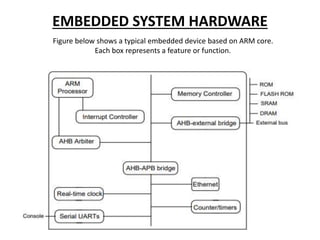
Figure below shows a typical embedded device based on ARM core.
Each box represents a feature or function.
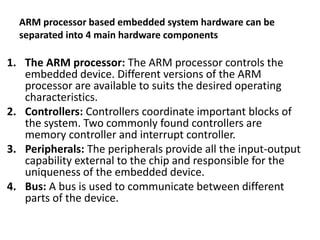
ARM processor based embedded system hardware can be
separated into 4 main hardware components
1. The ARM processor: The ARM processor controls the
embedded device. Different versions of the ARM
processor are available to suits the desired operating
characteristics.
2. Controllers: Controllers coordinate important blocks of
the system. Two commonly found controllers are
memory controller and interrupt controller.
3. Peripherals: The peripherals provide all the input-output
capability external to the chip and responsible for the
uniqueness of the embedded device.
4. Bus: A bus is used to communicate between different
parts of the device.
ARM Bus Technology
• Embedded devices use an on-chip bus that is
internal to the chip and that allows different
peripheral devices to be interconnected with an
ARM core.
• There are two different classes of devices
attached to the bus.
1. The ARM processor core is a bus master -
a logical device capable of initiating a data
transfer with another device across the same
bus.
2. Peripherals tend to be bus slaves - logical
devices capable only of responding to a transfer
request from a bus master device.
AMBA Bus Protocol
• The Advanced Microcontroller Bus Architecture
(AMBA) was introduced in 1996 and has been widely
adopted as the on-chip bus architecture used for ARM
processors.
• The first AMBA buses introduced were the
• ARM System Bus (ASB) and the
• ARM Peripheral Bus (APB).
• Later ARM introduced another bus design, called the
ARM High Performance Bus (AHB).
• AHB provides higher data throughput than ASB
because it is based on a centralized multiplexed bus
scheme rather than the ASB bidirectional bus design.
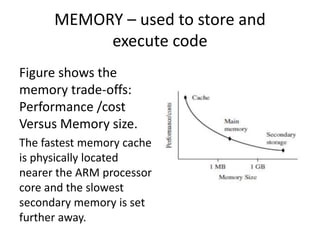
MEMORY – used to store and
execute code
Figure shows the
memory trade-offs:
Performance /cost
Versus Memory size.
The fastest memory cache
is physically located
nearer the ARM processor
core and the slowest
secondary memory is set
further away.
PERIPHERALS
• Embedded systems that interact with the outside
world need some form of peripheral device.
• Controllers are specialized peripherals that
implement higher levels of functionality within
the embedded system.
• Memory controller: Memory controllers connect
different types of memory to the processor bus.
• Interrupt controller: An interrupt controller
provides a programmable governing policy that
allows software to determine which peripheral or
device can interrupt the processor at any specific
time.
AMBA bus protocol
1. The Advanced Microcontroller Bus Architecture
(AMBA) was introduced in 1996 and has been widely
adopted as the on-chip bus architecture used for
ARM processors.
2. The first AMBA buses introduced were the ARM
System Bus (ASB) and the ARM Peripheral Bus (APB).
3. Later ARM introduced another bus design, called the
ARM High Performance Bus (AHB).
4. Using AMBA, peripheral designers can reuse the same
design on multiple projects. Because there are a large
number of peripherals developed with an AMBA
interface.
5. A peripheral can simply be bolted onto the on-chip bus
without having to redesign an interface for different processor
architecture.
6. This plug-and-play interface for hardware developers improves
availability and time to market.
7. AHB provides higher data throughput than ASB because it is
based on a centralized multiplexed bus scheme rather than the
ASB bidirectional bus design.
8. This change allows the AHB bus to run at higher clock speeds
and to be the first ARM bus to support widths of 64 and 128
bits.
9. ARM has introduced two variations on the AHB bus: Multi-
layer AHB and AHB-Lite.
10. In contrast to the original AHB, which allows a single bus
master to be active on the bus at any time, the Multi-layer AHB
bus allows multiple active bus masters.
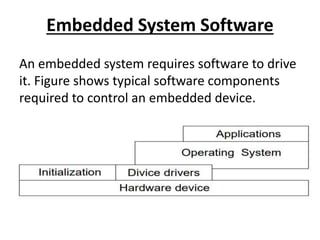
Embedded System Software
An embedded system requires software to drive
it. Figure shows typical software components
required to control an embedded device.
Initialization (BOOT) code
• Initialization code (or boot code) takes the
processor from the reset state to a state
where the operating system can run.
• First code executed on the board and is
specific to a particular target or group of
targets.
• Handles a number of administrative tasks
prior to handling control over to an operating
system.
We can group these different tasks
into three phases:
• Initial hardware configuration involves setting up
the target platform so it can boot an image.
• Diagnostics: The primary purpose of diagnostic
code is fault identification and isolation.
• Booting: involves loading an image and handling
control over the image. Loading an image
involves copying an entire program including
code and data into RAM.
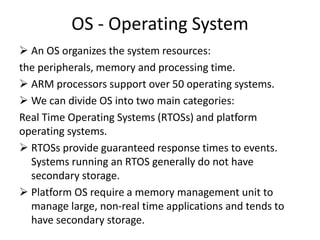
OS - Operating System
 An OS organizes the system resources:
the peripherals, memory and processing time.
 ARM processors support over 50 operating systems.
 We can divide OS into two main categories:
Real Time Operating Systems (RTOSs) and platform
operating systems.
 RTOSs provide guaranteed response times to events.
Systems running an RTOS generally do not have
secondary storage.
 Platform OS require a memory management unit to
manage large, non-real time applications and tends to
have secondary storage.
The device drivers & Applications
Device drivers provides a consistent software interface to the
peripherals on the hardware device.
Applications:
• Finally, an application performs one of the tasks required for a
device. For example, a mobile phone might have diary
application.
• There may be multiple applications running on the same
device, controlled by the operating systems.
• An embedded system can have one active application or
several applications running simultaneously.
• The software components can run from ROM or RAM. ROM
code that is fixed on the device is called firmware, for example
the initialization code.
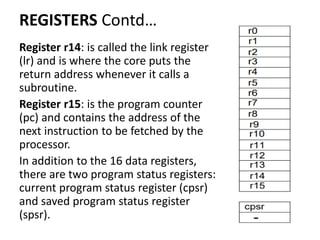
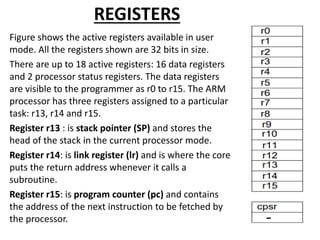
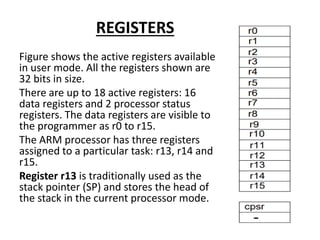
REGISTERS
Figure shows the active registers available
in user mode. All the registers shown are
32 bits in size.
There are up to 18 active registers: 16
data registers and 2 processor status
registers. The data registers are visible to
the programmer as r0 to r15.
The ARM processor has three registers
assigned to a particular task: r13, r14 and
r15.
Register r13 is traditionally used as the
stack pointer (SP) and stores the head of
the stack in the current processor mode.
REGISTERS Contd…
Register r14: is called the link register
(lr) and is where the core puts the
return address whenever it calls a
subroutine.
Register r15: is the program counter
(pc) and contains the address of the
next instruction to be fetched by the
processor.
In addition to the 16 data registers,
there are two program status registers:
current program status register (cpsr)
and saved program status register
(spsr).
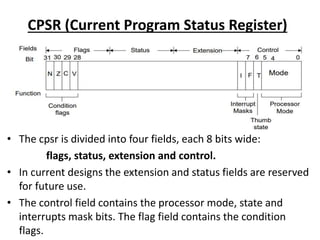
CPSR (Current Program Status Register)
• The cpsr is divided into four fields, each 8 bits wide:
flags, status, extension and control.
• In current designs the extension and status fields are reserved
for future use.
• The control field contains the processor mode, state and
interrupts mask bits. The flag field contains the condition
flags.
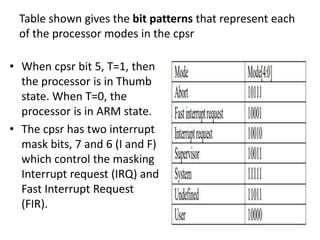
Table shown gives the bit patterns that represent each
of the processor modes in the cpsr
• When cpsr bit 5, T=1, then
the processor is in Thumb
state. When T=0, the
processor is in ARM state.
• The cpsr has two interrupt
mask bits, 7 and 6 (I and F)
which control the masking
Interrupt request (IRQ) and
Fast Interrupt Request
(FIR).
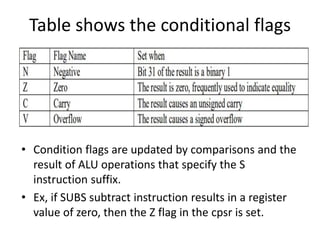
Table shows the conditional flags
• Condition flags are updated by comparisons and the
result of ALU operations that specify the S
instruction suffix.
• Ex, if SUBS subtract instruction results in a register
value of zero, then the Z flag in the cpsr is set.
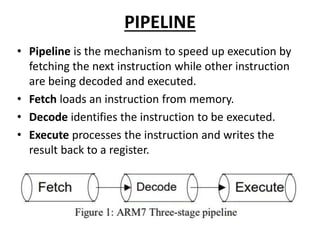
PIPELINE
• Pipeline is the mechanism to speed up execution by
fetching the next instruction while other instruction
are being decoded and executed.
• Fetch loads an instruction from memory.
• Decode identifies the instruction to be executed.
• Execute processes the instruction and writes the
result back to a register.
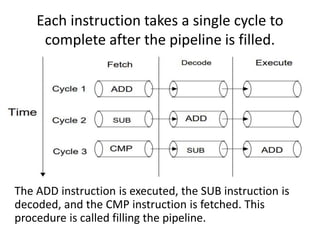
Each instruction takes a single cycle to
complete after the pipeline is filled.
The ADD instruction is executed, the SUB instruction is
decoded, and the CMP instruction is fetched. This
procedure is called filling the pipeline.
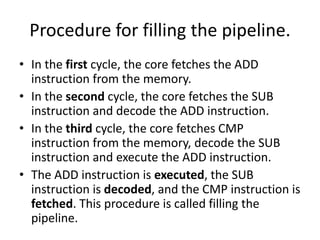
Procedure for filling the pipeline.
• In the first cycle, the core fetches the ADD
instruction from the memory.
• In the second cycle, the core fetches the SUB
instruction and decode the ADD instruction.
• In the third cycle, the core fetches CMP
instruction from the memory, decode the SUB
instruction and execute the ADD instruction.
• The ADD instruction is executed, the SUB
instruction is decoded, and the CMP instruction is
fetched. This procedure is called filling the
pipeline.
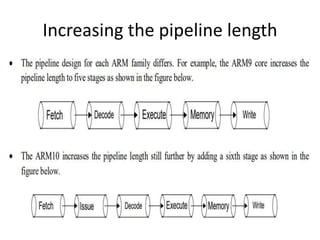
Increasing the pipeline length
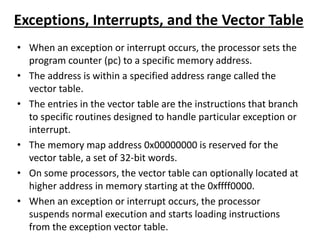
Exceptions, Interrupts, and the Vector Table
• When an exception or interrupt occurs, the processor sets the
program counter (pc) to a specific memory address.
• The address is within a specified address range called the
vector table.
• The entries in the vector table are the instructions that branch
to specific routines designed to handle particular exception or
interrupt.
• The memory map address 0x00000000 is reserved for the
vector table, a set of 32-bit words.
• On some processors, the vector table can optionally located at
higher address in memory starting at the 0xffff0000.
• When an exception or interrupt occurs, the processor
suspends normal execution and starts loading instructions
from the exception vector table.
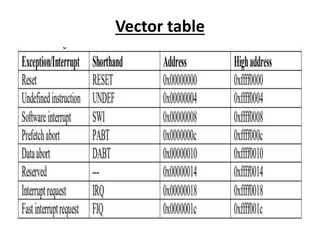
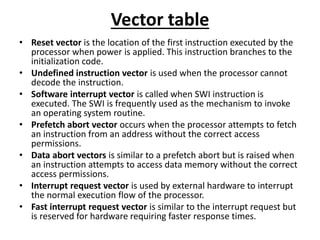
Vector table
Vector table
• Reset vector is the location of the first instruction executed by the
processor when power is applied. This instruction branches to the
initialization code.
• Undefined instruction vector is used when the processor cannot
decode the instruction.
• Software interrupt vector is called when SWI instruction is
executed. The SWI is frequently used as the mechanism to invoke
an operating system routine.
• Prefetch abort vector occurs when the processor attempts to fetch
an instruction from an address without the correct access
permissions.
• Data abort vectors is similar to a prefetch abort but is raised when
an instruction attempts to access data memory without the correct
access permissions.
• Interrupt request vector is used by external hardware to interrupt
the normal execution flow of the processor.
• Fast interrupt request vector is similar to the interrupt request but
is reserved for hardware requiring faster response times.
Core Extensions
• There are 3 core extensions wrap around ARM
processor:
• Cache and tightly coupled memory,
• Memory management and the
• Coprocessors.
Cache and tightly coupled memory: The cache is a
block of fast memory placed between main
memory and the core. With a cache the processor
core can run for the majority of the time without
having to wait for data from slow external memory.
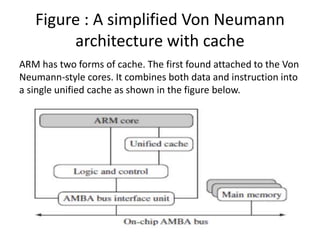
Figure : A simplified Von Neumann
architecture with cache
ARM has two forms of cache. The first found attached to the Von
Neumann-style cores. It combines both data and instruction into
a single unified cache as shown in the figure below.
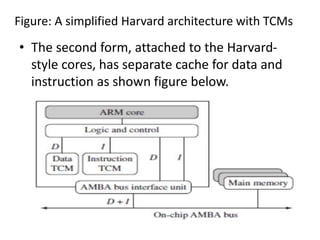
Figure: A simplified Harvard architecture with TCMs
• The second form, attached to the Harvard-
style cores, has separate cache for data and
instruction as shown figure below.
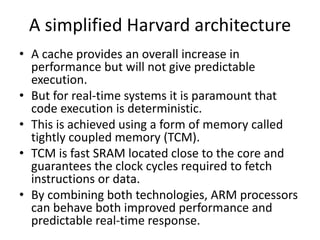
A simplified Harvard architecture
• A cache provides an overall increase in
performance but will not give predictable
execution.
• But for real-time systems it is paramount that
code execution is deterministic.
• This is achieved using a form of memory called
tightly coupled memory (TCM).
• TCM is fast SRAM located close to the core and
guarantees the clock cycles required to fetch
instructions or data.
• By combining both technologies, ARM processors
can behave both improved performance and
predictable real-time response.
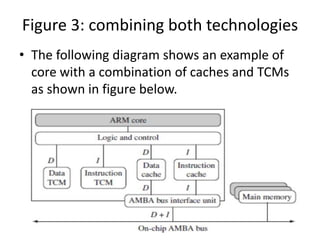
Figure 3: combining both technologies
• The following diagram shows an example of
core with a combination of caches and TCMs
as shown in figure below.
Memory management
ARM cores have 3 different types of memory management
hardware-
Non-protected memory is fixed and provides very little
flexibility. It normally used for small, simple embedded
systems that require no protection from rogue applications.
Memory protection unit (MPU) employs a simple system
that uses a limited number of memory regions. These
regions are controlled with a set of special coprocessor
registers, and each region is defined with specific access
permission but don’t have a complex memory map.
Management unit (MMU)are the most comprehensive
memory management hardware available on the ARM. The
MMU uses a set of translation tables to provide fine-grained
control over memory.
Coprocessors
• A coprocessor extends the processing features of a core by extending
the instruction set or by providing configuration registers.
• More than one coprocessor can be added to the ARM core via the
coprocessor interface.
• The coprocessor can be accessed through a group of dedicated ARM
instructions that provide a load-store type interface.
• The coprocessor can also extend the instruction set by providing a
specialized instructions that can be added to standard ARM instruction
set to process vector floating-point (VFP) operations.
• These new instructions are processed in the decode stage of the ARM
pipeline. If the decode stage sees a coprocessor instruction, then it
offers it to the relevant coprocessor.
• But, if the coprocessor is not present or doesn’t recognize the
instruction, then the ARM takes an undefined instruction exception.
Module 2 - FUNCTION CALLS
• The ARM Procedure Call Standard (APCS) defines how
to pass function arguments and return values in ARM
registers.
• The more recent ARM-Thumb Procedure Call Standard
(ATPCS) covers ARM and Thumb interworking as well.
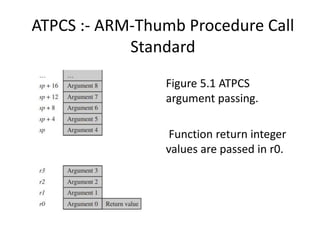
• The first four integer arguments are passed in the first
four ARM registers: r0, r1, r2, and r3.
• Subsequent integer arguments are placed on the full
descending stack, ascending in memory as in Figure
5.1. Function return integer values are passed in r0.
FUNCTION CALLS Continued…
• This description covers only integer or pointer
arguments.
• Two-word arguments such as long long or
double are passed in a pair of consecutive
argument registers and returned in r0, r1.
ATPCS :- ARM-Thumb Procedure Call
Standard
Figure 5.1 ATPCS
argument passing.
Function return integer
values are passed in r0.
Continued…
• The first point to note about the procedure call
standard is the four-register rule.
• Functions with four or fewer arguments are far
more efficient to call than functions with five or
more arguments.
• For functions with four or fewer arguments, the
compiler can pass all the arguments in registers.
• For functions with more arguments, both the
caller and callee must access the stack for some
arguments.
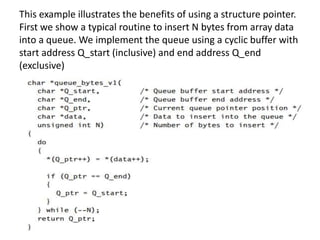
This example illustrates the benefits of using a structure pointer.
First we show a typical routine to insert N bytes from array data
into a queue. We implement the queue using a cyclic buffer with
start address Q_start (inclusive) and end address Q_end
(exclusive)
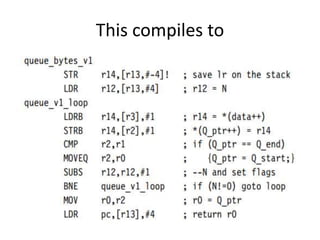
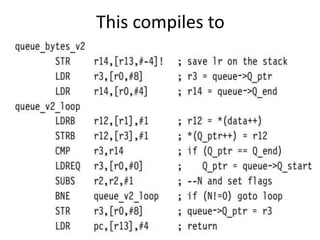
This compiles to
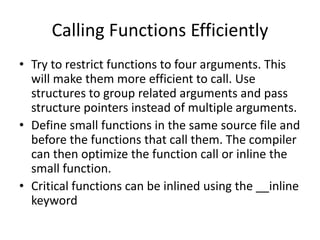
Calling Functions Efficiently
• Try to restrict functions to four arguments. This
will make them more efficient to call. Use
structures to group related arguments and pass
structure pointers instead of multiple arguments.
• Define small functions in the same source file and
before the functions that call them. The compiler
can then optimize the function call or inline the
small function.
• Critical functions can be inlined using the __inline
keyword
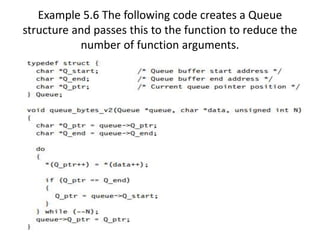
Example 5.6 The following code creates a Queue
structure and passes this to the function to reduce the
number of function arguments.
This compiles to
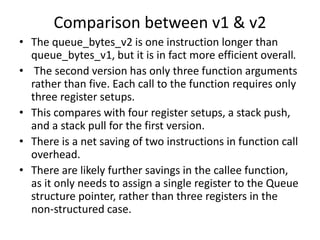
Comparison between v1 & v2
• The queue_bytes_v2 is one instruction longer than
queue_bytes_v1, but it is in fact more efficient overall.
• The second version has only three function arguments
rather than five. Each call to the function requires only
three register setups.
• This compares with four register setups, a stack push,
and a stack pull for the first version.
• There is a net saving of two instructions in function call
overhead.
• There are likely further savings in the callee function,
as it only needs to assign a single register to the Queue
structure pointer, rather than three registers in the
non-structured case.
• There are other ways of reducing function call
overhead if your function is very small and
corrupts few registers (uses few local variables).
• Put the C function in the same C file as the
functions that will call it.
• The C compiler then knows the code generated
for the callee function and can make
optimizations in the caller function.
• The caller function need not preserve registers
that it can see the callee doesn’t corrupt.
Therefore the caller function need not save all
the ATPCS corruptible registers.
• The caller function need not preserve registers that it
can see the callee doesn’t corrupt. Therefore the
caller function need not save all the ATPCS
corruptible registers.
• If the callee function is very small, then the compiler
can inline the code in the caller function. This
removes the function call overhead completely.
• The compiler will only inline small functions. You can
ask the compiler to inline a function using the
__inline keyword, although this keyword is only a
hint and the compiler may ignore it.
• In-lining large functions can lead to big increases in
code size without much performance improvement.
Pointer Aliasing
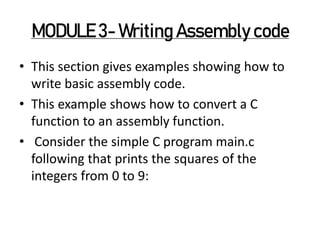
MODULE 3- Writing Assembly code
• This section gives examples showing how to
write basic assembly code.
• This example shows how to convert a C
function to an assembly function.
• Consider the simple C program main.c
following that prints the squares of the
integers from 0 to 9:
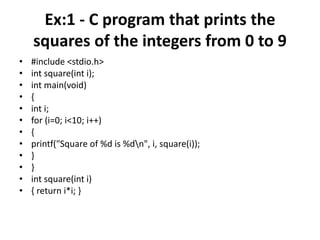
Ex:1 - C program that prints the
squares of the integers from 0 to 9
• #include <stdio.h>
• int square(int i);
• int main(void)
• {
• int i;
• for (i=0; i<10; i++)
• {
• printf("Square of %d is %dn", i, square(i));
• }
• }
• int square(int i)
• { return i*i; }
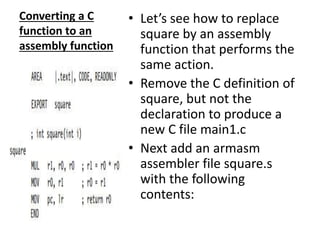
Converting a C
function to an
assembly function
• Let’s see how to replace
square by an assembly
function that performs the
same action.
• Remove the C definition of
square, but not the
declaration to produce a
new C file main1.c
• Next add an armasm
assembler file square.s
with the following
contents:
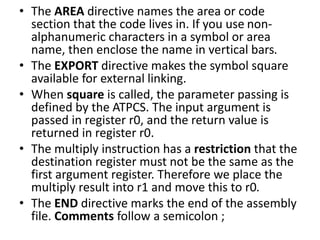
• The AREA directive names the area or code
section that the code lives in. If you use non-
alphanumeric characters in a symbol or area
name, then enclose the name in vertical bars.
• The EXPORT directive makes the symbol square
available for external linking.
• When square is called, the parameter passing is
defined by the ATPCS. The input argument is
passed in register r0, and the return value is
returned in register r0.
• The multiply instruction has a restriction that the
destination register must not be the same as the
first argument register. Therefore we place the
multiply result into r1 and move this to r0.
• The END directive marks the end of the assembly
file. Comments follow a semicolon ;
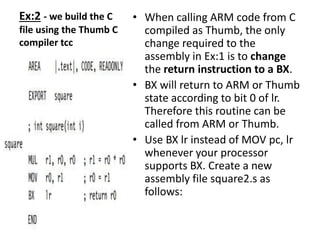
Ex:2 - we build the C
file using the Thumb C
compiler tcc
• When calling ARM code from C
compiled as Thumb, the only
change required to the
assembly in Ex:1 is to change
the return instruction to a BX.
• BX will return to ARM or Thumb
state according to bit 0 of lr.
Therefore this routine can be
called from ARM or Thumb.
• Use BX lr instead of MOV pc, lr
whenever your processor
supports BX. Create a new
assembly file square2.s as
follows:
PROFILING AND CYCLE COUNTING
• A profiler is a tool that measures the
proportion of time or processing cycles spent
in each subroutine.
• Identifies the most critical routines.
• A cycle counter measures the number of
cycles taken by a specific routine.
• The ARM simulator used by the ADS1.1
debugger is called the ARMulator and
provides profiling and cycle counting features.
INSTRUCTION SCHEDULING
• The time taken to execute instructions
depends on the implementation pipeline.
• Instructions that are conditional on the value
of the ARM condition codes in the cpsr take
one cycle if the condition is not met.
• If the condition is met, then the following
rules apply:
• ALU operations such as addition, subtraction, and
logical operations take one cycle. This includes a
shift by an immediate value. If you use a register-
specified shift, then add one cycle. If the
instruction writes to the pc, then add two cycles.
• Load instructions that load N 32-bit words of
memory such as LDR (LoaD Register) and LDM
(Load Multiple registers) take N cycles to issue,
but the result of the last word loaded is not
available on the following cycle. The updated load
address is available on the next cycle.
• Branch instructions take three cycles.
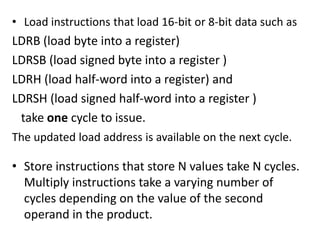
• Load instructions that load 16-bit or 8-bit data such as
LDRB (load byte into a register)
LDRSB (load signed byte into a register )
LDRH (load half-word into a register) and
LDRSH (load signed half-word into a register )
take one cycle to issue.
The updated load address is available on the next cycle.
• Store instructions that store N values take N cycles.
Multiply instructions take a varying number of
cycles depending on the value of the second
operand in the product.
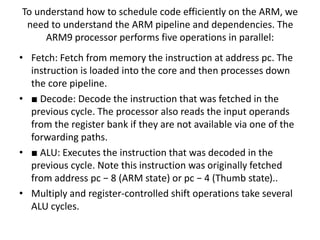
To understand how to schedule code efficiently on the ARM, we
need to understand the ARM pipeline and dependencies. The
ARM9 processor performs five operations in parallel:
• Fetch: Fetch from memory the instruction at address pc. The
instruction is loaded into the core and then processes down
the core pipeline.
• ■ Decode: Decode the instruction that was fetched in the
previous cycle. The processor also reads the input operands
from the register bank if they are not available via one of the
forwarding paths.
• ■ ALU: Executes the instruction that was decoded in the
previous cycle. Note this instruction was originally fetched
from address pc − 8 (ARM state) or pc − 4 (Thumb state)..
• Multiply and register-controlled shift operations take several
ALU cycles.
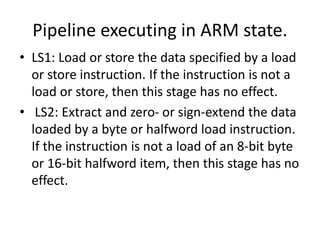
Pipeline executing in ARM state.
• LS1: Load or store the data specified by a load
or store instruction. If the instruction is not a
load or store, then this stage has no effect.
• LS2: Extract and zero- or sign-extend the data
loaded by a byte or halfword load instruction.
If the instruction is not a load of an 8-bit byte
or 16-bit halfword item, then this stage has no
effect.
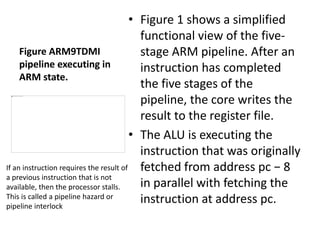
Figure ARM9TDMI
pipeline executing in
ARM state.
• Figure 1 shows a simplified
functional view of the five-
stage ARM pipeline. After an
instruction has completed
the five stages of the
pipeline, the core writes the
result to the register file.
• The ALU is executing the
instruction that was originally
fetched from address pc − 8
in parallel with fetching the
instruction at address pc.
If an instruction requires the result of
a previous instruction that is not
available, then the processor stalls.
This is called a pipeline hazard or
pipeline interlock
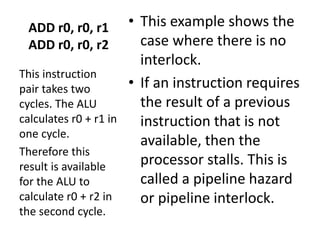
ADD r0, r0, r1
ADD r0, r0, r2
• This example shows the
case where there is no
interlock.
• If an instruction requires
the result of a previous
instruction that is not
available, then the
processor stalls. This is
called a pipeline hazard
or pipeline interlock.
This instruction
pair takes two
cycles. The ALU
calculates r0 + r1 in
one cycle.
Therefore this
result is available
for the ALU to
calculate r0 + r2 in
the second cycle.
LDR r1, [r2, #4]
ADD r0, r0, r1
• This instruction pair takes three
cycles. The ALU calculates the
address r2 + 4 in the first cycle
while decoding the ADD
instruction in parallel.
• However, the ADD cannot
proceed on the second cycle
because the load instruction has
not yet loaded the value of r1.
• Therefore the pipeline stalls for
one cycle while the load
instruction completes the LS1
stage. Now that r1 is ready, the
processor executes the ADD in
the ALU on the third cycle.
This example
shows a one-
cycle interlock
caused by load
use.
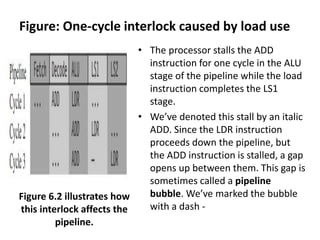
Figure: One-cycle interlock caused by load use
• The processor stalls the ADD
instruction for one cycle in the ALU
stage of the pipeline while the load
instruction completes the LS1
stage.
• We’ve denoted this stall by an italic
ADD. Since the LDR instruction
proceeds down the pipeline, but
the ADD instruction is stalled, a gap
opens up between them. This gap is
sometimes called a pipeline
bubble. We’ve marked the bubble
with a dash -
Figure 6.2 illustrates how
this interlock affects the
pipeline.
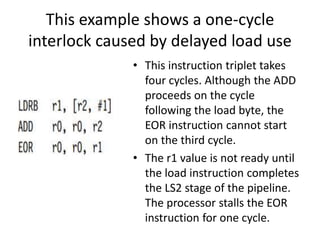
This example shows a one-cycle
interlock caused by delayed load use
• This instruction triplet takes
four cycles. Although the ADD
proceeds on the cycle
following the load byte, the
EOR instruction cannot start
on the third cycle.
• The r1 value is not ready until
the load instruction completes
the LS2 stage of the pipeline.
The processor stalls the EOR
instruction for one cycle.
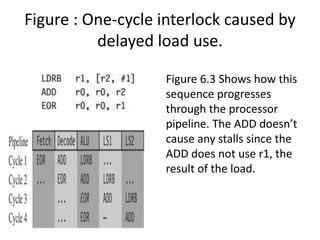
Figure : One-cycle interlock caused by
delayed load use.
Figure 6.3 Shows how this
sequence progresses
through the processor
pipeline. The ADD doesn’t
cause any stalls since the
ADD does not use r1, the
result of the load.
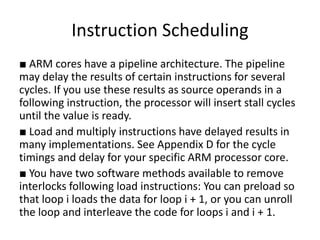
Instruction Scheduling
■ ARM cores have a pipeline architecture. The pipeline
may delay the results of certain instructions for several
cycles. If you use these results as source operands in a
following instruction, the processor will insert stall cycles
until the value is ready.
■ Load and multiply instructions have delayed results in
many implementations. See Appendix D for the cycle
timings and delay for your specific ARM processor core.
■ You have two software methods available to remove
interlocks following load instructions: You can preload so
that loop i loads the data for loop i + 1, or you can unroll
the loop and interleave the code for loops i and i + 1.
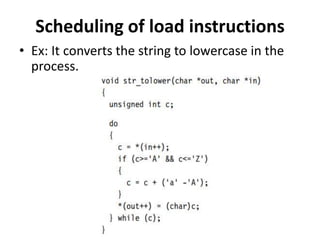
Scheduling of load instructions
• Ex: It converts the string to lowercase in the
process.
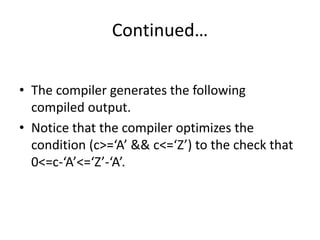
Continued…
• The compiler generates the following
compiled output.
• Notice that the compiler optimizes the
condition (c>=‘A’ && c<=‘Z’) to the check that
0<=c-‘A’<=‘Z’-‘A’.
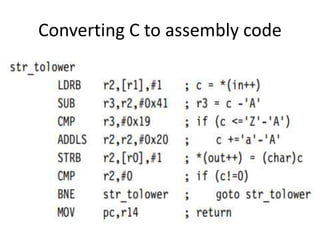
Converting C to assembly code
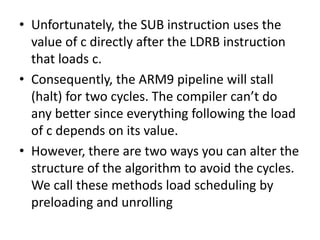
• Unfortunately, the SUB instruction uses the
value of c directly after the LDRB instruction
that loads c.
• Consequently, the ARM9 pipeline will stall
(halt) for two cycles. The compiler can’t do
any better since everything following the load
of c depends on its value.
• However, there are two ways you can alter the
structure of the algorithm to avoid the cycles.
We call these methods load scheduling by
preloading and unrolling
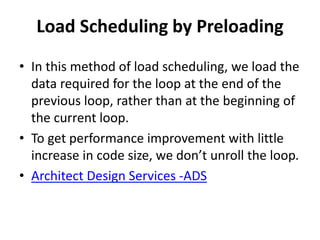
Load Scheduling by Preloading
• In this method of load scheduling, we load the
data required for the loop at the end of the
previous loop, rather than at the beginning of
the current loop.
• To get performance improvement with little
increase in code size, we don’t unroll the loop.
• Architect Design Services -ADS
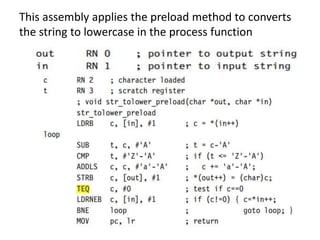
This assembly applies the preload method to converts
the string to lowercase in the process function
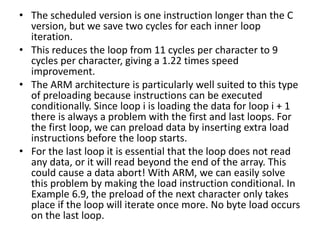
• The scheduled version is one instruction longer than the C
version, but we save two cycles for each inner loop
iteration.
• This reduces the loop from 11 cycles per character to 9
cycles per character, giving a 1.22 times speed
improvement.
• The ARM architecture is particularly well suited to this type
of preloading because instructions can be executed
conditionally. Since loop i is loading the data for loop i + 1
there is always a problem with the first and last loops. For
the first loop, we can preload data by inserting extra load
instructions before the loop starts.
• For the last loop it is essential that the loop does not read
any data, or it will read beyond the end of the array. This
could cause a data abort! With ARM, we can easily solve
this problem by making the load instruction conditional. In
Example 6.9, the preload of the next character only takes
place if the loop will iterate once more. No byte load occurs
on the last loop.
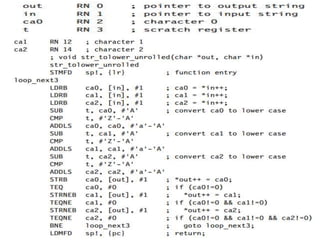
Load Scheduling by Unrolling
• This method of load scheduling works by
unrolling and then interleaving the body of the
loop. For example, we can perform loop
iterations i, i + 1, i + 2 interleaved.
• When the result of an operation from loop i is not
ready, we can perform an operation from loop i +
1 that avoids waiting for the loop i result.
• The assembly applies load scheduling by unrolling
to the str_tolower function.
• This loop is the most efficient implementation
we’ve looked at so far. The implementation
requires 7 cycles per character. This gives a 1.57
times speed increase over the original
str_tolower.
• The routine is more than double the code size of
the original implementation. We have assumed
that you can read up to two characters beyond
the end of the input string, which may not be
true if the string is right at the end of available
RAM, where reading off the end will cause a data
abort
• Should use this form of scheduling by unrolling
for time-critical parts of an application where you
know the data size is large.
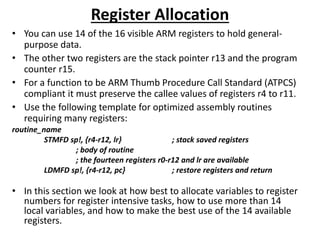
Register Allocation
• You can use 14 of the 16 visible ARM registers
to hold general-purpose data. The other two
registers are the stack pointer r13 and the
program counter r15.
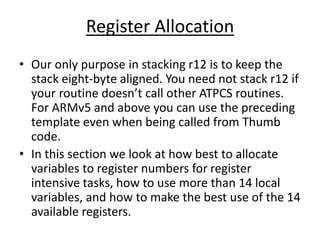
• Use the following template for optimized
assembly routines requiring many registers:
Register Allocation
• Our only purpose in stacking r12 is to keep the
stack eight-byte aligned. You need not stack r12 if
your routine doesn’t call other ATPCS routines.
For ARMv5 and above you can use the preceding
template even when being called from Thumb
code.
• In this section we look at how best to allocate
variables to register numbers for register
intensive tasks, how to use more than 14 local
variables, and how to make the best use of the 14
available registers.
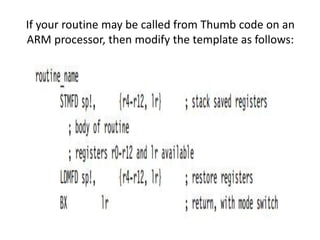
If your routine may be called from Thumb code on an
ARM processor, then modify the template as follows:
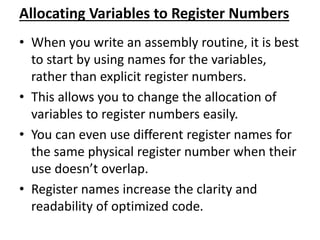
Allocating Variables to Register Numbers
• When you write an assembly routine, it is best
to start by using names for the variables,
rather than explicit register numbers. This
allows you to change the allocation of
variables to register numbers easily.
• You can even use different register names for
the same physical register number when their
use doesn’t overlap. Register names increase
the clarity and readability of optimized code.
• Argument registers. The ATPCS convention defines that
the first four arguments to a function are placed in
registers r0 to r3. Further arguments are placed on the
stack. The return value must be placed in r0.
• Registers used in a load or store multiple. Load and
store multiple instructions LDM and STM operate on a
list of registers in order of ascending register number. If
r0 and r1 appear in the register list, then the processor
will always load or store r0 using a lower address than
r1 and so on.
• Load and store double word. The LDRD and STRD
instructions introduced in ARMv5E operate on a pair of
registers with sequential register numbers, Rd and Rd +
1. Furthermore, Rd must be an even register number.
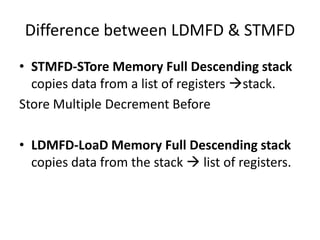
Difference between LDMFD & STMFD
• STMFD-STore Memory Full Descending stack
copies data from a list of registers stack.
Store Multiple Decrement Before
• LDMFD-LoaD Memory Full Descending stack
copies data from the stack  list of registers.
REGISTERS
Figure shows the active registers available in user
mode. All the registers shown are 32 bits in size.
There are up to 18 active registers: 16 data registers
and 2 processor status registers. The data registers
are visible to the programmer as r0 to r15. The ARM
processor has three registers assigned to a particular
task: r13, r14 and r15.
Register r13 : is stack pointer (SP) and stores the
head of the stack in the current processor mode.
Register r14: is link register (lr) and is where the core
puts the return address whenever it calls a
subroutine.
Register r15: is program counter (pc) and contains
the address of the next instruction to be fetched by
the processor.
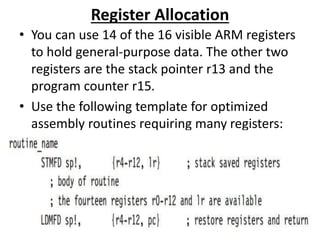
Register Allocation
• You can use 14 of the 16 visible ARM registers to hold general-
purpose data.
• The other two registers are the stack pointer r13 and the program
counter r15.
• For a function to be ARM Thumb Procedure Call Standard (ATPCS)
compliant it must preserve the callee values of registers r4 to r11.
• Use the following template for optimized assembly routines
requiring many registers:
routine_name
STMFD sp!, {r4-r12, lr} ; stack saved registers
; body of routine
; the fourteen registers r0-r12 and lr are available
LDMFD sp!, {r4-r12, pc} ; restore registers and return
• In this section we look at how best to allocate variables to register
numbers for register intensive tasks, how to use more than 14
local variables, and how to make the best use of the 14 available
registers.
Allocating Variables to Register Numbers
• When you write an assembly routine, it is best
to start by using names for the variables,
rather than explicit register numbers.
• This allows you to change the allocation of
variables to register numbers easily.
• You can even use different register names for
the same physical register number when their
use doesn’t overlap.
• Register names increase the clarity and
readability of optimized code.
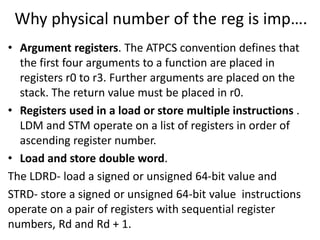
Why physical number of the reg is imp….
• Argument registers. The ATPCS convention defines that
the first four arguments to a function are placed in
registers r0 to r3. Further arguments are placed on the
stack. The return value must be placed in r0.
• Registers used in a load or store multiple instructions .
LDM and STM operate on a list of registers in order of
ascending register number.
• Load and store double word.
The LDRD- load a signed or unsigned 64-bit value and
STRD- store a signed or unsigned 64-bit value instructions
operate on a pair of registers with sequential register
numbers, Rd and Rd + 1.
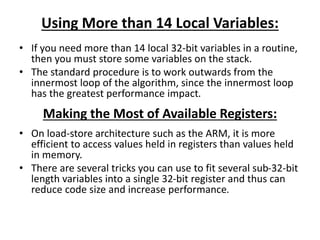
Using More than 14 Local Variables:
• If you need more than 14 local 32-bit variables in a routine,
then you must store some variables on the stack.
• The standard procedure is to work outwards from the
innermost loop of the algorithm, since the innermost loop
has the greatest performance impact.
Making the Most of Available Registers:
• On load-store architecture such as the ARM, it is more
efficient to access values held in registers than values held
in memory.
• There are several tricks you can use to fit several sub-32-bit
length variables into a single 32-bit register and thus can
reduce code size and increase performance.
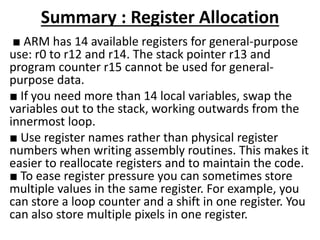
Summary : Register Allocation
■ ARM has 14 available registers for general-purpose
use: r0 to r12 and r14. The stack pointer r13 and
program counter r15 cannot be used for general-
purpose data.
■ If you need more than 14 local variables, swap the
variables out to the stack, working outwards from the
innermost loop.
■ Use register names rather than physical register
numbers when writing assembly routines. This makes it
easier to reallocate registers and to maintain the code.
■ To ease register pressure you can sometimes store
multiple values in the same register. For example, you
can store a loop counter and a shift in one register. You
can also store multiple pixels in one register.
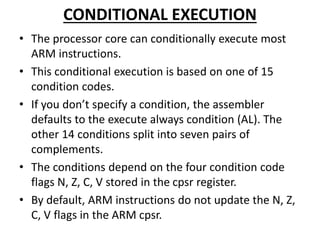
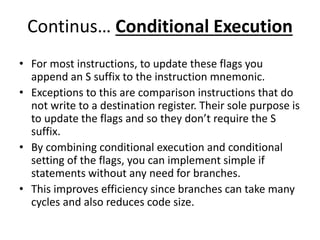
CONDITIONAL EXECUTION
• The processor core can conditionally execute most
ARM instructions.
• This conditional execution is based on one of 15
condition codes.
• If you don’t specify a condition, the assembler
defaults to the execute always condition (AL). The
other 14 conditions split into seven pairs of
complements.
• The conditions depend on the four condition code
flags N, Z, C, V stored in the cpsr register.
• By default, ARM instructions do not update the N, Z,
C, V flags in the ARM cpsr.
Continus… Conditional Execution
• For most instructions, to update these flags you
append an S suffix to the instruction mnemonic.
• Exceptions to this are comparison instructions that do
not write to a destination register. Their sole purpose is
to update the flags and so they don’t require the S
suffix.
• By combining conditional execution and conditional
setting of the flags, you can implement simple if
statements without any need for branches.
• This improves efficiency since branches can take many
cycles and also reduces code size.
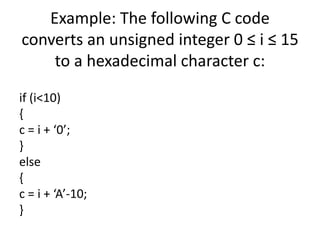
Example: The following C code
converts an unsigned integer 0 ≤ i ≤ 15
to a hexadecimal character c:
if (i<10)
{
c = i + ‘0’;
}
else
{
c = i + ‘A’-10;
}
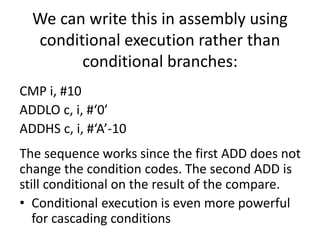
We can write this in assembly using
conditional execution rather than
conditional branches:
CMP i, #10
ADDLO c, i, #‘0’
ADDHS c, i, #‘A’-10
The sequence works since the first ADD does not
change the condition codes. The second ADD is
still conditional on the result of the compare.
• Conditional execution is even more powerful
for cascading conditions
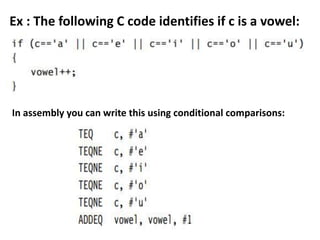
Ex : The following C code identifies if c is a vowel:
In assembly you can write this using conditional comparisons:
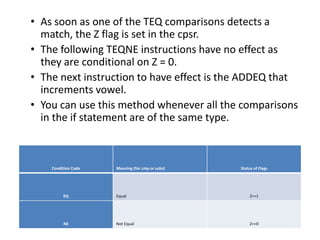
• As soon as one of the TEQ comparisons detects a
match, the Z flag is set in the cpsr.
• The following TEQNE instructions have no effect as
they are conditional on Z = 0.
• The next instruction to have effect is the ADDEQ that
increments vowel.
• You can use this method whenever all the comparisons
in the if statement are of the same type.
Condition Code Meaning (for cmp or subs) Status of Flags
EQ Equal Z==1
NE Not Equal Z==0
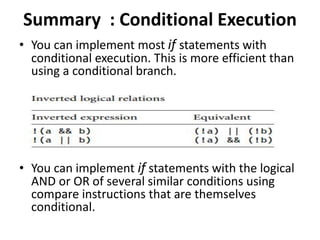
Summary : Conditional Execution
• You can implement most if statements with
conditional execution. This is more efficient than
using a conditional branch.
• You can implement if statements with the logical
AND or OR of several similar conditions using
compare instructions that are themselves
conditional.
Looping Constructs
• This section looks at the most efficient ways to
code for and while loops on the ARM.
We start by looking at
• Loops with a fixed number of iterations and
• Loops with a variable number of iterations.
• Finally we look at loop unrolling.
Loops with a Fixed Number of Iterations
• The key point is that the loop counter should
count down to zero rather than counting up to
some arbitrary limit.
• Then the comparison with zero is free since
the result is stored in the condition flags.
• Since we are no longer using i as an array
index, there is no problem in counting down
rather than up.
Loops Using a Variable Number of Iterations
• Notice that the compiler checks that N is non-
zero on entry to the function.
• Often this check is unnecessary since you
know that the array won’t be empty.
• In this case a do-while loop gives better
performance and code density than a for loop.
Writing Loops Efficiently
• Use loops that count down to zero. Then the
compiler does not need to allocate a register to
hold the termination value, and the comparison
with zero is free.
• Use unsigned loop counters by default and the
continuation condition i!=0 rather than i>0. This
will ensure that the loop overhead is only two
instructions.
• Use do-while loops rather than for loops when
you know the loop will iterate at least once. This
saves the compiler checking to see if the loop
count is zero.
Continued… Writing Loops Efficiently
• Unroll important loops to reduce the loop
overhead. Do not over-unroll. If the loop
overhead is small as a proportion of the total,
then unrolling will increase code size and hurt the
performance of the cache.
• Try to arrange that the number of elements in
arrays are multiples of four or eight. You can then
unroll loops easily by two, four, or eight times
without worrying about the leftover array
elements
Loop unrolling
• Loop unrolling is a loop transformation
technique that helps to optimize the
execution time of a program.
• We basically remove or reduce iterations.
Loop unrolling increases the program’s speed
by eliminating loop control instruction and
loop test instructions.
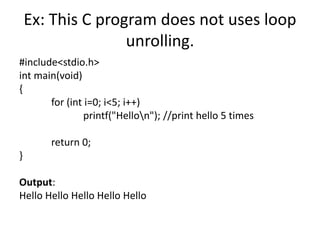
Ex: This C program does not uses loop
unrolling.
#include<stdio.h>
int main(void)
{
for (int i=0; i<5; i++)
printf("Hellon"); //print hello 5 times
return 0;
}
Output:
Hello Hello Hello Hello Hello
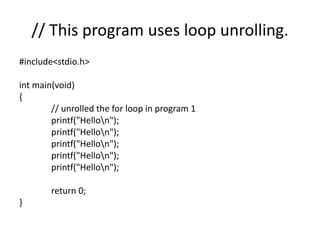
// This program uses loop unrolling.
#include<stdio.h>
int main(void)
{
// unrolled the for loop in program 1
printf("Hellon");
printf("Hellon");
printf("Hellon");
printf("Hellon");
printf("Hellon");
return 0;
}
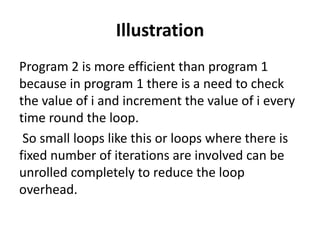
Illustration
Program 2 is more efficient than program 1
because in program 1 there is a need to check
the value of i and increment the value of i every
time round the loop.
So small loops like this or loops where there is
fixed number of iterations are involved can be
unrolled completely to reduce the loop
overhead.
Advantages:
• increases program efficiency.
• Reduces loop overhead.
• If statements in loop are not dependent on
each other, they can be executed in parallel.
Disadvantages:
• Increased program code size, which can be
undesirable.
• Possible increased usage of register in a single iteration
to store temporary variables which may reduce
performance.
• Apart from very small and simple codes, unrolled loops
that contain branches are even slower than recursions.
Each loop iteration costs two instructions in addition to
the body of the loop: a subtract to decrement the loop
count and a conditional branch
Loop Unrolling
• We call these instructions the loop overhead. On
ARM7 or ARM9 processors the subtract takes one
cycle and the branch three cycles, giving an
overhead of four cycles per loop.
• You can save some of these cycles by unrolling a
loop—repeating the loop body several times, and
reducing the number of loop iterations by the
same proportion. For example, let’s unroll our
packet checksum example four times.
How to reduce Loop Overhead
• We have reduced the loop overhead from 4N
cycles to (4N)/4=N cycles. On the ARM7, this
accelerates the loop from 8 cycles per
accumulate to 20/4 = 5 cycles per accumulate,
nearly doubling the speed! For the ARM9,
which has a faster load instruction, the benefit
is even higher.
There are two questions you need to
ask when unrolling a loop :-
1. How many times should I unroll the loop?
Only unroll loops that are important for the
overall performance of the application.
Otherwise unrolling will increase the code size
with little performance benefit.
Unrolling may even reduce performance by
evicting more important code from the cache.
2. What if the number of loop iterations is not a
multiple of the unroll amount?
For example, what if N is not a multiple of four?
• Try to arrange it so that array sizes are
multiples of your unroll amount. If this isn’t
possible, then you must add extra code to take
care of the leftover cases.
• This increases the code size a little but keeps
the performance high.
STRUCTURE ARRANGEMENT
■ Lay structures out in order of increasing element
size. Start the structure with the smallest elements
and finish with the largest.
■ Avoid very large structures. Instead use a
hierarchy of smaller structures.
■ For portability, manually add padding (that would
appear implicitly) into API structures so that the
layout of the structure does not depend on the
compiler.
■ Beware of using enum types in API structures.
The size of an enum type is compiler dependent.
STRUCTURE ARRANGEMENT
• How you arrange a commonly used structure
can greatly affect its performance and code
density.
• There are 2 issues concerning structures on
the ARM:-
1. Alignment of the structure entries and
2. The overall size of the structure.
Module 4
Core of the embedded system:-
1. General Purpose and Domain Specific
Processors
i. Microprocessors
ii. Microcontrollers
iii. Digital Signal Processors
2. Application Specific Integrated Circuits (ASICs)
3. Programmable Logic Devices (PLDs)
4. Commercial off-the-shelf Components (COTS)
Programmable Logic Devices (PLDs)
• Logic devices can be classified into two broad
categories—fixed and programmable.

MES PPT.pptx

  • 1.
    Subject : Microcontrollersand Embedded Systems VTU Course Code: 21CS43 Presented By:
  • 2.
    Course Outcomes (CourseSkill Set) At the end of the course, the student will be able to: • CO 1. Explain C-Compilers and optimization. • CO 2. Describe the ARM microcontroller's architectural features and program module. • CO 3. Apply the knowledge gained from programming on ARM to different applications. • CO 4. Program the basic hardware components and their application selection method. • CO 5. Demonstrate the need for a real-time operating system for embedded system applications.
  • 3.
    Module-1 • Microprocessors versusMicrocontrollers, ARM Embedded Systems: The RISC design philosophy, The ARM Design Philosophy, Embedded System Hardware, Embedded System Software. • ARM Processor Fundamentals: Registers, Current Program Status Register, Pipeline, Exceptions, Interrupts, and the Vector Table, Core Extensions.
  • 4.
    Module-2 • Introduction tothe ARM Instruction Set: Data Processing Instructions , Branch Instructions, Software Interrupt Instructions, Program Status Register Instructions, Coprocessor Instructions, Loading Constants • C Compilers and Optimization :Basic C Data Types, C Looping Structures, Register Allocation, Function Calls, Pointer Aliasing.
  • 5.
    Module-3 • C Compilersand Optimization :Structure Arrangement, Bit-fields, Unaligned Data and Endianness, Division, Floating Point, Inline Functions and Inline Assembly, Portability Issues. • ARM programming using Assembly language: Writing Assembly code, Profiling and cycle counting, instruction scheduling, Register Allocation, Conditional Execution, Looping Constructs.
  • 6.
    Module-4 • Embedded SystemComponents: Embedded Vs General computing system, History of embedded systems, Classification of Embedded systems, Major applications areas of embedded systems, purpose of embedded systems. • Core of an Embedded System including all types of processor/controller, Memory, Sensors, Actuators, LED, 7 segment LED display, stepper motor, Keyboard, Push button switch, Communication Interface (onboard and external types), Embedded firmware, Other system components.
  • 7.
    Module-5 • RTOS andIDE for Embedded System Design: Operating System basics, Types of operating systems, Task, process and threads (Only POSIX Threads with an example program), Thread preemption, Multiprocessing and Multitasking, Task Communication (without any program), Task synchronization issues – Racing and Deadlock, Concept of Binary and counting semaphores (Mutex example without any program), How to choose an RTOS, Integration and testing of Embedded hardware and firmware, Embedded system Development Environment – Block diagram (excluding Keil), Disassembler/decompiler, simulator, emulator and debugging techniques, target hardware debugging, boundary scan.
  • 8.
    Suggested Learning Resources: Textbooks •Andrew N Sloss, Dominic Symes and Chris Wright, ARM system developers guide, Elsevier, Morgan Kaufman publishers, 2008. • Shibu K V, “Introduction to Embedded Systems”, Tata McGraw Hill Education, Private Limited, 2nd Edition. Reference Books • Raghunandan. G.H, Microcontroller (ARM) and Embedded System, Cengage learning Publication,2019 • The Insider’s Guide to the ARM7 Based Microcontrollers, Hitex Ltd.,1st edition, 2005. • Steve Furber, ARM System-on-Chip Architecture, Second Edition, Pearson, 2015. • Raj Kamal, Embedded System, Tata McGraw-Hill Publishers, 2nd Edition, 2008.
  • 9.
    What is Microcontroller •Microcontroller is a device that captures the input, processes it and generates output based on the information captured. It is also called MC or MCU (Microcontroller Unit) which is a compact digital processor on Metal- Oxide-Semiconductor Chip. Microcontrollers are also called as “special purpose computers”. They are dedicated to execute specific task that is programmed and stored in ROM.
  • 10.
    Applications of Microcontroller •The devices which are incorporated with Touch-Sensing capabilities are designed using Microcontrollers like Portable Electronic Devices which include Smart Phones, Gaming Devices and Media Players, etc. • Microcontrollers are used in remote controls, toys, medical devices and other Embedded Systems. • They provide Automobile Solutions like controlling Anti-Lock Brake system and managing engine control system. • Microcontrollers are used in Radar Speed Gun to detect the speed of an object. • They are widely used in Consumer Products like Ovens, Refrigerator, Washing Machines, Air Conditioners and Vacuum Cleaners etc. • Microcontrollers are used in Computers to control I/O functions. • They are also used to store information for Database Management System.
  • 11.
    Advantages of Microcontroller •They consume less power. • They are economical. • Microcontrollers are smaller in size compared to Microprocessors. • It has low Clock Speed. • Use of Microcontrollers has reduced PCB size to a great extent. • Microcontrollers are capable of handling Boolean functions. • They are reliable and operate faster.
  • 12.
  • 13.
  • 14.
    Difference between RISCand CISC • RISC - Reduced Instruction Set Computer • CISC - Complex Instruction Set Computer
  • 15.
  • 16.
  • 17.
    THE RISC DESIGNPHILOSOPHY RISC design philosophy is • Aimed at simple but powerful instructions that execute within a single cycle at a high clock speed. • Concentrates on reducing the complexity of instructions performed by the hardware. • Provides greater flexibility and intelligence in software rather than hardware.
  • 18.
    The RISC philosophyis implemented with four major design rules 1. Instructions: RISC has a reduced number of instruction classes. These classes provide simple operations so that each is executed in a single cycle. Each instruction is of fixed length to allow the pipeline to fetch future instructions before decoding the current instruction. 2. Pipeline: The processing of instructions is broken down into smaller units that can be executed in parallel by pipelines.
  • 19.
    Continued…RISC philosophy major designrules 3. Register: RISC machines have a large general-purpose register set. Any register can contain either data or an address. 4. Load-store architecture: The processor operates on the data held in registers. Separate load and store instructions transfer data between the register bank and external memory.
  • 20.
    ARM - AdvancedRISC Machine • ARM processors are a family of central processing units (CPUs) based on RISC architecture. • Due to their features like - low costs, minimal power consumption, and lower heat generation than their competitors, • ARM processors are desirable for light, portable, battery-powered devices. • ARM is used in smartphones, laptops and tablet computers, and other embedded systems, desktops and servers, supercomputer.
  • 21.
    THE ARM DESIGNPHILOSOPHY • The ARM processor has been specially designed to be small in size to reduce power consumption and extend battery operation- essentially for application such as mobile phones and personal digital assistants. • High code density is major requirement since embedded systems have limited memory due to cost and physical size restrictions. High code density is useful for applications that have limited on-board memory, such as mobile phones. • Embedded systems are price sensitive and use low cost memory devices.
  • 22.
    Continued… ARM DESIGNPHILOSOPHY • Another requirement is to reduce the area of the die taken up by the embedded processor. For a single-chip solution, the smaller the area used by the embedded processor, the more available space for specialized peripherals. • ARM has incorporated hardware debug technology within the processor so that software engineers can view what is happening while the processor executing code.
  • 23.
    Instruction Set ForEmbedded Systems • Variable cycle execution for certain instructions—Not every ARM instruction executes in a single cycle. For example, load-store-multiple instructions vary in the number of execution cycles depending upon the number of registers being transferred. • Inline barrel shifter leading to more complex instructions—The inline barrel shifter is a hardware component that preprocesses one of the input registers before it is used by an instruction. This expands the capability of many instructions to improve core performance and code density.
  • 24.
    Contd… Instruction SetFor Embedded Systems • Thumb 16-bit instruction set —ARM enhanced the processor core by adding a second 16-bit instruction set called Thumb that permits the ARM core to execute either 16- or 32-bit instructions. • Conditional execution— An instruction is only executed when a specific condition has been satisfied. This feature improves performance and code density by reducing branch instructions. • Enhanced instructions—The enhanced digital signal processor (DSP) instructions were added to the standard ARM instruction set to support fast 16×16-bit multiplier operations.
  • 25.
    EMBEDDED SYSTEM HARDWARE Figurebelow shows a typical embedded device based on ARM core. Each box represents a feature or function.
  • 26.
    ARM processor basedembedded system hardware can be separated into 4 main hardware components 1. The ARM processor: The ARM processor controls the embedded device. Different versions of the ARM processor are available to suits the desired operating characteristics. 2. Controllers: Controllers coordinate important blocks of the system. Two commonly found controllers are memory controller and interrupt controller. 3. Peripherals: The peripherals provide all the input-output capability external to the chip and responsible for the uniqueness of the embedded device. 4. Bus: A bus is used to communicate between different parts of the device.
  • 27.
    ARM Bus Technology •Embedded devices use an on-chip bus that is internal to the chip and that allows different peripheral devices to be interconnected with an ARM core. • There are two different classes of devices attached to the bus. 1. The ARM processor core is a bus master - a logical device capable of initiating a data transfer with another device across the same bus. 2. Peripherals tend to be bus slaves - logical devices capable only of responding to a transfer request from a bus master device.
  • 28.
    AMBA Bus Protocol •The Advanced Microcontroller Bus Architecture (AMBA) was introduced in 1996 and has been widely adopted as the on-chip bus architecture used for ARM processors. • The first AMBA buses introduced were the • ARM System Bus (ASB) and the • ARM Peripheral Bus (APB). • Later ARM introduced another bus design, called the ARM High Performance Bus (AHB). • AHB provides higher data throughput than ASB because it is based on a centralized multiplexed bus scheme rather than the ASB bidirectional bus design.
  • 29.
    MEMORY – usedto store and execute code Figure shows the memory trade-offs: Performance /cost Versus Memory size. The fastest memory cache is physically located nearer the ARM processor core and the slowest secondary memory is set further away.
  • 30.
    PERIPHERALS • Embedded systemsthat interact with the outside world need some form of peripheral device. • Controllers are specialized peripherals that implement higher levels of functionality within the embedded system. • Memory controller: Memory controllers connect different types of memory to the processor bus. • Interrupt controller: An interrupt controller provides a programmable governing policy that allows software to determine which peripheral or device can interrupt the processor at any specific time.
  • 31.
    AMBA bus protocol 1.The Advanced Microcontroller Bus Architecture (AMBA) was introduced in 1996 and has been widely adopted as the on-chip bus architecture used for ARM processors. 2. The first AMBA buses introduced were the ARM System Bus (ASB) and the ARM Peripheral Bus (APB). 3. Later ARM introduced another bus design, called the ARM High Performance Bus (AHB). 4. Using AMBA, peripheral designers can reuse the same design on multiple projects. Because there are a large number of peripherals developed with an AMBA interface.
  • 32.
    5. A peripheralcan simply be bolted onto the on-chip bus without having to redesign an interface for different processor architecture. 6. This plug-and-play interface for hardware developers improves availability and time to market. 7. AHB provides higher data throughput than ASB because it is based on a centralized multiplexed bus scheme rather than the ASB bidirectional bus design. 8. This change allows the AHB bus to run at higher clock speeds and to be the first ARM bus to support widths of 64 and 128 bits. 9. ARM has introduced two variations on the AHB bus: Multi- layer AHB and AHB-Lite. 10. In contrast to the original AHB, which allows a single bus master to be active on the bus at any time, the Multi-layer AHB bus allows multiple active bus masters.
  • 33.
    Embedded System Software Anembedded system requires software to drive it. Figure shows typical software components required to control an embedded device.
  • 34.
    Initialization (BOOT) code •Initialization code (or boot code) takes the processor from the reset state to a state where the operating system can run. • First code executed on the board and is specific to a particular target or group of targets. • Handles a number of administrative tasks prior to handling control over to an operating system.
  • 35.
    We can groupthese different tasks into three phases: • Initial hardware configuration involves setting up the target platform so it can boot an image. • Diagnostics: The primary purpose of diagnostic code is fault identification and isolation. • Booting: involves loading an image and handling control over the image. Loading an image involves copying an entire program including code and data into RAM.
  • 36.
    OS - OperatingSystem  An OS organizes the system resources: the peripherals, memory and processing time.  ARM processors support over 50 operating systems.  We can divide OS into two main categories: Real Time Operating Systems (RTOSs) and platform operating systems.  RTOSs provide guaranteed response times to events. Systems running an RTOS generally do not have secondary storage.  Platform OS require a memory management unit to manage large, non-real time applications and tends to have secondary storage.
  • 37.
    The device drivers& Applications Device drivers provides a consistent software interface to the peripherals on the hardware device. Applications: • Finally, an application performs one of the tasks required for a device. For example, a mobile phone might have diary application. • There may be multiple applications running on the same device, controlled by the operating systems. • An embedded system can have one active application or several applications running simultaneously. • The software components can run from ROM or RAM. ROM code that is fixed on the device is called firmware, for example the initialization code.
  • 38.
    REGISTERS Figure shows theactive registers available in user mode. All the registers shown are 32 bits in size. There are up to 18 active registers: 16 data registers and 2 processor status registers. The data registers are visible to the programmer as r0 to r15. The ARM processor has three registers assigned to a particular task: r13, r14 and r15. Register r13 is traditionally used as the stack pointer (SP) and stores the head of the stack in the current processor mode.
  • 39.
    REGISTERS Contd… Register r14:is called the link register (lr) and is where the core puts the return address whenever it calls a subroutine. Register r15: is the program counter (pc) and contains the address of the next instruction to be fetched by the processor. In addition to the 16 data registers, there are two program status registers: current program status register (cpsr) and saved program status register (spsr).
  • 40.
    CPSR (Current ProgramStatus Register) • The cpsr is divided into four fields, each 8 bits wide: flags, status, extension and control. • In current designs the extension and status fields are reserved for future use. • The control field contains the processor mode, state and interrupts mask bits. The flag field contains the condition flags.
  • 41.
    Table shown givesthe bit patterns that represent each of the processor modes in the cpsr • When cpsr bit 5, T=1, then the processor is in Thumb state. When T=0, the processor is in ARM state. • The cpsr has two interrupt mask bits, 7 and 6 (I and F) which control the masking Interrupt request (IRQ) and Fast Interrupt Request (FIR).
  • 42.
    Table shows theconditional flags • Condition flags are updated by comparisons and the result of ALU operations that specify the S instruction suffix. • Ex, if SUBS subtract instruction results in a register value of zero, then the Z flag in the cpsr is set.
  • 43.
    PIPELINE • Pipeline isthe mechanism to speed up execution by fetching the next instruction while other instruction are being decoded and executed. • Fetch loads an instruction from memory. • Decode identifies the instruction to be executed. • Execute processes the instruction and writes the result back to a register.
  • 44.
    Each instruction takesa single cycle to complete after the pipeline is filled. The ADD instruction is executed, the SUB instruction is decoded, and the CMP instruction is fetched. This procedure is called filling the pipeline.
  • 45.
    Procedure for fillingthe pipeline. • In the first cycle, the core fetches the ADD instruction from the memory. • In the second cycle, the core fetches the SUB instruction and decode the ADD instruction. • In the third cycle, the core fetches CMP instruction from the memory, decode the SUB instruction and execute the ADD instruction. • The ADD instruction is executed, the SUB instruction is decoded, and the CMP instruction is fetched. This procedure is called filling the pipeline.
  • 46.
  • 47.
    Exceptions, Interrupts, andthe Vector Table • When an exception or interrupt occurs, the processor sets the program counter (pc) to a specific memory address. • The address is within a specified address range called the vector table. • The entries in the vector table are the instructions that branch to specific routines designed to handle particular exception or interrupt. • The memory map address 0x00000000 is reserved for the vector table, a set of 32-bit words. • On some processors, the vector table can optionally located at higher address in memory starting at the 0xffff0000. • When an exception or interrupt occurs, the processor suspends normal execution and starts loading instructions from the exception vector table.
  • 48.
  • 49.
    Vector table • Resetvector is the location of the first instruction executed by the processor when power is applied. This instruction branches to the initialization code. • Undefined instruction vector is used when the processor cannot decode the instruction. • Software interrupt vector is called when SWI instruction is executed. The SWI is frequently used as the mechanism to invoke an operating system routine. • Prefetch abort vector occurs when the processor attempts to fetch an instruction from an address without the correct access permissions. • Data abort vectors is similar to a prefetch abort but is raised when an instruction attempts to access data memory without the correct access permissions. • Interrupt request vector is used by external hardware to interrupt the normal execution flow of the processor. • Fast interrupt request vector is similar to the interrupt request but is reserved for hardware requiring faster response times.
  • 50.
    Core Extensions • Thereare 3 core extensions wrap around ARM processor: • Cache and tightly coupled memory, • Memory management and the • Coprocessors. Cache and tightly coupled memory: The cache is a block of fast memory placed between main memory and the core. With a cache the processor core can run for the majority of the time without having to wait for data from slow external memory.
  • 51.
    Figure : Asimplified Von Neumann architecture with cache ARM has two forms of cache. The first found attached to the Von Neumann-style cores. It combines both data and instruction into a single unified cache as shown in the figure below.
  • 52.
    Figure: A simplifiedHarvard architecture with TCMs • The second form, attached to the Harvard- style cores, has separate cache for data and instruction as shown figure below.
  • 53.
    A simplified Harvardarchitecture • A cache provides an overall increase in performance but will not give predictable execution. • But for real-time systems it is paramount that code execution is deterministic. • This is achieved using a form of memory called tightly coupled memory (TCM). • TCM is fast SRAM located close to the core and guarantees the clock cycles required to fetch instructions or data. • By combining both technologies, ARM processors can behave both improved performance and predictable real-time response.
  • 54.
    Figure 3: combiningboth technologies • The following diagram shows an example of core with a combination of caches and TCMs as shown in figure below.
  • 55.
    Memory management ARM coreshave 3 different types of memory management hardware- Non-protected memory is fixed and provides very little flexibility. It normally used for small, simple embedded systems that require no protection from rogue applications. Memory protection unit (MPU) employs a simple system that uses a limited number of memory regions. These regions are controlled with a set of special coprocessor registers, and each region is defined with specific access permission but don’t have a complex memory map. Management unit (MMU)are the most comprehensive memory management hardware available on the ARM. The MMU uses a set of translation tables to provide fine-grained control over memory.
  • 56.
    Coprocessors • A coprocessorextends the processing features of a core by extending the instruction set or by providing configuration registers. • More than one coprocessor can be added to the ARM core via the coprocessor interface. • The coprocessor can be accessed through a group of dedicated ARM instructions that provide a load-store type interface. • The coprocessor can also extend the instruction set by providing a specialized instructions that can be added to standard ARM instruction set to process vector floating-point (VFP) operations. • These new instructions are processed in the decode stage of the ARM pipeline. If the decode stage sees a coprocessor instruction, then it offers it to the relevant coprocessor. • But, if the coprocessor is not present or doesn’t recognize the instruction, then the ARM takes an undefined instruction exception.
  • 57.
    Module 2 -FUNCTION CALLS • The ARM Procedure Call Standard (APCS) defines how to pass function arguments and return values in ARM registers. • The more recent ARM-Thumb Procedure Call Standard (ATPCS) covers ARM and Thumb interworking as well. • The first four integer arguments are passed in the first four ARM registers: r0, r1, r2, and r3. • Subsequent integer arguments are placed on the full descending stack, ascending in memory as in Figure 5.1. Function return integer values are passed in r0.
  • 58.
    FUNCTION CALLS Continued… •This description covers only integer or pointer arguments. • Two-word arguments such as long long or double are passed in a pair of consecutive argument registers and returned in r0, r1.
  • 59.
    ATPCS :- ARM-ThumbProcedure Call Standard Figure 5.1 ATPCS argument passing. Function return integer values are passed in r0.
  • 60.
    Continued… • The firstpoint to note about the procedure call standard is the four-register rule. • Functions with four or fewer arguments are far more efficient to call than functions with five or more arguments. • For functions with four or fewer arguments, the compiler can pass all the arguments in registers. • For functions with more arguments, both the caller and callee must access the stack for some arguments.
  • 61.
    This example illustratesthe benefits of using a structure pointer. First we show a typical routine to insert N bytes from array data into a queue. We implement the queue using a cyclic buffer with start address Q_start (inclusive) and end address Q_end (exclusive)
  • 62.
  • 63.
    Calling Functions Efficiently •Try to restrict functions to four arguments. This will make them more efficient to call. Use structures to group related arguments and pass structure pointers instead of multiple arguments. • Define small functions in the same source file and before the functions that call them. The compiler can then optimize the function call or inline the small function. • Critical functions can be inlined using the __inline keyword
  • 64.
    Example 5.6 Thefollowing code creates a Queue structure and passes this to the function to reduce the number of function arguments.
  • 65.
  • 66.
    Comparison between v1& v2 • The queue_bytes_v2 is one instruction longer than queue_bytes_v1, but it is in fact more efficient overall. • The second version has only three function arguments rather than five. Each call to the function requires only three register setups. • This compares with four register setups, a stack push, and a stack pull for the first version. • There is a net saving of two instructions in function call overhead. • There are likely further savings in the callee function, as it only needs to assign a single register to the Queue structure pointer, rather than three registers in the non-structured case.
  • 67.
    • There areother ways of reducing function call overhead if your function is very small and corrupts few registers (uses few local variables). • Put the C function in the same C file as the functions that will call it. • The C compiler then knows the code generated for the callee function and can make optimizations in the caller function. • The caller function need not preserve registers that it can see the callee doesn’t corrupt. Therefore the caller function need not save all the ATPCS corruptible registers.
  • 68.
    • The callerfunction need not preserve registers that it can see the callee doesn’t corrupt. Therefore the caller function need not save all the ATPCS corruptible registers. • If the callee function is very small, then the compiler can inline the code in the caller function. This removes the function call overhead completely. • The compiler will only inline small functions. You can ask the compiler to inline a function using the __inline keyword, although this keyword is only a hint and the compiler may ignore it. • In-lining large functions can lead to big increases in code size without much performance improvement.
  • 69.
  • 70.
    MODULE 3- WritingAssembly code • This section gives examples showing how to write basic assembly code. • This example shows how to convert a C function to an assembly function. • Consider the simple C program main.c following that prints the squares of the integers from 0 to 9:
  • 71.
    Ex:1 - Cprogram that prints the squares of the integers from 0 to 9 • #include <stdio.h> • int square(int i); • int main(void) • { • int i; • for (i=0; i<10; i++) • { • printf("Square of %d is %dn", i, square(i)); • } • } • int square(int i) • { return i*i; }
  • 72.
    Converting a C functionto an assembly function • Let’s see how to replace square by an assembly function that performs the same action. • Remove the C definition of square, but not the declaration to produce a new C file main1.c • Next add an armasm assembler file square.s with the following contents:
  • 73.
    • The AREAdirective names the area or code section that the code lives in. If you use non- alphanumeric characters in a symbol or area name, then enclose the name in vertical bars. • The EXPORT directive makes the symbol square available for external linking. • When square is called, the parameter passing is defined by the ATPCS. The input argument is passed in register r0, and the return value is returned in register r0. • The multiply instruction has a restriction that the destination register must not be the same as the first argument register. Therefore we place the multiply result into r1 and move this to r0. • The END directive marks the end of the assembly file. Comments follow a semicolon ;
  • 74.
    Ex:2 - webuild the C file using the Thumb C compiler tcc • When calling ARM code from C compiled as Thumb, the only change required to the assembly in Ex:1 is to change the return instruction to a BX. • BX will return to ARM or Thumb state according to bit 0 of lr. Therefore this routine can be called from ARM or Thumb. • Use BX lr instead of MOV pc, lr whenever your processor supports BX. Create a new assembly file square2.s as follows:
  • 75.
    PROFILING AND CYCLECOUNTING • A profiler is a tool that measures the proportion of time or processing cycles spent in each subroutine. • Identifies the most critical routines. • A cycle counter measures the number of cycles taken by a specific routine. • The ARM simulator used by the ADS1.1 debugger is called the ARMulator and provides profiling and cycle counting features.
  • 76.
    INSTRUCTION SCHEDULING • Thetime taken to execute instructions depends on the implementation pipeline. • Instructions that are conditional on the value of the ARM condition codes in the cpsr take one cycle if the condition is not met. • If the condition is met, then the following rules apply:
  • 77.
    • ALU operationssuch as addition, subtraction, and logical operations take one cycle. This includes a shift by an immediate value. If you use a register- specified shift, then add one cycle. If the instruction writes to the pc, then add two cycles. • Load instructions that load N 32-bit words of memory such as LDR (LoaD Register) and LDM (Load Multiple registers) take N cycles to issue, but the result of the last word loaded is not available on the following cycle. The updated load address is available on the next cycle. • Branch instructions take three cycles.
  • 78.
    • Load instructionsthat load 16-bit or 8-bit data such as LDRB (load byte into a register) LDRSB (load signed byte into a register ) LDRH (load half-word into a register) and LDRSH (load signed half-word into a register ) take one cycle to issue. The updated load address is available on the next cycle. • Store instructions that store N values take N cycles. Multiply instructions take a varying number of cycles depending on the value of the second operand in the product.
  • 79.
    To understand howto schedule code efficiently on the ARM, we need to understand the ARM pipeline and dependencies. The ARM9 processor performs five operations in parallel: • Fetch: Fetch from memory the instruction at address pc. The instruction is loaded into the core and then processes down the core pipeline. • ■ Decode: Decode the instruction that was fetched in the previous cycle. The processor also reads the input operands from the register bank if they are not available via one of the forwarding paths. • ■ ALU: Executes the instruction that was decoded in the previous cycle. Note this instruction was originally fetched from address pc − 8 (ARM state) or pc − 4 (Thumb state).. • Multiply and register-controlled shift operations take several ALU cycles.
  • 80.
    Pipeline executing inARM state. • LS1: Load or store the data specified by a load or store instruction. If the instruction is not a load or store, then this stage has no effect. • LS2: Extract and zero- or sign-extend the data loaded by a byte or halfword load instruction. If the instruction is not a load of an 8-bit byte or 16-bit halfword item, then this stage has no effect.
  • 81.
    Figure ARM9TDMI pipeline executingin ARM state. • Figure 1 shows a simplified functional view of the five- stage ARM pipeline. After an instruction has completed the five stages of the pipeline, the core writes the result to the register file. • The ALU is executing the instruction that was originally fetched from address pc − 8 in parallel with fetching the instruction at address pc. If an instruction requires the result of a previous instruction that is not available, then the processor stalls. This is called a pipeline hazard or pipeline interlock
  • 82.
    ADD r0, r0,r1 ADD r0, r0, r2 • This example shows the case where there is no interlock. • If an instruction requires the result of a previous instruction that is not available, then the processor stalls. This is called a pipeline hazard or pipeline interlock. This instruction pair takes two cycles. The ALU calculates r0 + r1 in one cycle. Therefore this result is available for the ALU to calculate r0 + r2 in the second cycle.
  • 83.
    LDR r1, [r2,#4] ADD r0, r0, r1 • This instruction pair takes three cycles. The ALU calculates the address r2 + 4 in the first cycle while decoding the ADD instruction in parallel. • However, the ADD cannot proceed on the second cycle because the load instruction has not yet loaded the value of r1. • Therefore the pipeline stalls for one cycle while the load instruction completes the LS1 stage. Now that r1 is ready, the processor executes the ADD in the ALU on the third cycle. This example shows a one- cycle interlock caused by load use.
  • 84.
    Figure: One-cycle interlockcaused by load use • The processor stalls the ADD instruction for one cycle in the ALU stage of the pipeline while the load instruction completes the LS1 stage. • We’ve denoted this stall by an italic ADD. Since the LDR instruction proceeds down the pipeline, but the ADD instruction is stalled, a gap opens up between them. This gap is sometimes called a pipeline bubble. We’ve marked the bubble with a dash - Figure 6.2 illustrates how this interlock affects the pipeline.
  • 85.
    This example showsa one-cycle interlock caused by delayed load use • This instruction triplet takes four cycles. Although the ADD proceeds on the cycle following the load byte, the EOR instruction cannot start on the third cycle. • The r1 value is not ready until the load instruction completes the LS2 stage of the pipeline. The processor stalls the EOR instruction for one cycle.
  • 86.
    Figure : One-cycleinterlock caused by delayed load use. Figure 6.3 Shows how this sequence progresses through the processor pipeline. The ADD doesn’t cause any stalls since the ADD does not use r1, the result of the load.
  • 87.
    Instruction Scheduling ■ ARMcores have a pipeline architecture. The pipeline may delay the results of certain instructions for several cycles. If you use these results as source operands in a following instruction, the processor will insert stall cycles until the value is ready. ■ Load and multiply instructions have delayed results in many implementations. See Appendix D for the cycle timings and delay for your specific ARM processor core. ■ You have two software methods available to remove interlocks following load instructions: You can preload so that loop i loads the data for loop i + 1, or you can unroll the loop and interleave the code for loops i and i + 1.
  • 88.
    Scheduling of loadinstructions • Ex: It converts the string to lowercase in the process.
  • 89.
    Continued… • The compilergenerates the following compiled output. • Notice that the compiler optimizes the condition (c>=‘A’ && c<=‘Z’) to the check that 0<=c-‘A’<=‘Z’-‘A’.
  • 90.
    Converting C toassembly code
  • 91.
    • Unfortunately, theSUB instruction uses the value of c directly after the LDRB instruction that loads c. • Consequently, the ARM9 pipeline will stall (halt) for two cycles. The compiler can’t do any better since everything following the load of c depends on its value. • However, there are two ways you can alter the structure of the algorithm to avoid the cycles. We call these methods load scheduling by preloading and unrolling
  • 92.
    Load Scheduling byPreloading • In this method of load scheduling, we load the data required for the loop at the end of the previous loop, rather than at the beginning of the current loop. • To get performance improvement with little increase in code size, we don’t unroll the loop. • Architect Design Services -ADS
  • 93.
    This assembly appliesthe preload method to converts the string to lowercase in the process function
  • 94.
    • The scheduledversion is one instruction longer than the C version, but we save two cycles for each inner loop iteration. • This reduces the loop from 11 cycles per character to 9 cycles per character, giving a 1.22 times speed improvement. • The ARM architecture is particularly well suited to this type of preloading because instructions can be executed conditionally. Since loop i is loading the data for loop i + 1 there is always a problem with the first and last loops. For the first loop, we can preload data by inserting extra load instructions before the loop starts. • For the last loop it is essential that the loop does not read any data, or it will read beyond the end of the array. This could cause a data abort! With ARM, we can easily solve this problem by making the load instruction conditional. In Example 6.9, the preload of the next character only takes place if the loop will iterate once more. No byte load occurs on the last loop.
  • 95.
    Load Scheduling byUnrolling • This method of load scheduling works by unrolling and then interleaving the body of the loop. For example, we can perform loop iterations i, i + 1, i + 2 interleaved. • When the result of an operation from loop i is not ready, we can perform an operation from loop i + 1 that avoids waiting for the loop i result. • The assembly applies load scheduling by unrolling to the str_tolower function.
  • 97.
    • This loopis the most efficient implementation we’ve looked at so far. The implementation requires 7 cycles per character. This gives a 1.57 times speed increase over the original str_tolower. • The routine is more than double the code size of the original implementation. We have assumed that you can read up to two characters beyond the end of the input string, which may not be true if the string is right at the end of available RAM, where reading off the end will cause a data abort • Should use this form of scheduling by unrolling for time-critical parts of an application where you know the data size is large.
  • 98.
    Register Allocation • Youcan use 14 of the 16 visible ARM registers to hold general-purpose data. The other two registers are the stack pointer r13 and the program counter r15. • Use the following template for optimized assembly routines requiring many registers:
  • 99.
    Register Allocation • Ouronly purpose in stacking r12 is to keep the stack eight-byte aligned. You need not stack r12 if your routine doesn’t call other ATPCS routines. For ARMv5 and above you can use the preceding template even when being called from Thumb code. • In this section we look at how best to allocate variables to register numbers for register intensive tasks, how to use more than 14 local variables, and how to make the best use of the 14 available registers.
  • 100.
    If your routinemay be called from Thumb code on an ARM processor, then modify the template as follows:
  • 101.
    Allocating Variables toRegister Numbers • When you write an assembly routine, it is best to start by using names for the variables, rather than explicit register numbers. This allows you to change the allocation of variables to register numbers easily. • You can even use different register names for the same physical register number when their use doesn’t overlap. Register names increase the clarity and readability of optimized code.
  • 102.
    • Argument registers.The ATPCS convention defines that the first four arguments to a function are placed in registers r0 to r3. Further arguments are placed on the stack. The return value must be placed in r0. • Registers used in a load or store multiple. Load and store multiple instructions LDM and STM operate on a list of registers in order of ascending register number. If r0 and r1 appear in the register list, then the processor will always load or store r0 using a lower address than r1 and so on. • Load and store double word. The LDRD and STRD instructions introduced in ARMv5E operate on a pair of registers with sequential register numbers, Rd and Rd + 1. Furthermore, Rd must be an even register number.
  • 103.
    Difference between LDMFD& STMFD • STMFD-STore Memory Full Descending stack copies data from a list of registers stack. Store Multiple Decrement Before • LDMFD-LoaD Memory Full Descending stack copies data from the stack  list of registers.
  • 104.
    REGISTERS Figure shows theactive registers available in user mode. All the registers shown are 32 bits in size. There are up to 18 active registers: 16 data registers and 2 processor status registers. The data registers are visible to the programmer as r0 to r15. The ARM processor has three registers assigned to a particular task: r13, r14 and r15. Register r13 : is stack pointer (SP) and stores the head of the stack in the current processor mode. Register r14: is link register (lr) and is where the core puts the return address whenever it calls a subroutine. Register r15: is program counter (pc) and contains the address of the next instruction to be fetched by the processor.
  • 105.
    Register Allocation • Youcan use 14 of the 16 visible ARM registers to hold general- purpose data. • The other two registers are the stack pointer r13 and the program counter r15. • For a function to be ARM Thumb Procedure Call Standard (ATPCS) compliant it must preserve the callee values of registers r4 to r11. • Use the following template for optimized assembly routines requiring many registers: routine_name STMFD sp!, {r4-r12, lr} ; stack saved registers ; body of routine ; the fourteen registers r0-r12 and lr are available LDMFD sp!, {r4-r12, pc} ; restore registers and return • In this section we look at how best to allocate variables to register numbers for register intensive tasks, how to use more than 14 local variables, and how to make the best use of the 14 available registers.
  • 106.
    Allocating Variables toRegister Numbers • When you write an assembly routine, it is best to start by using names for the variables, rather than explicit register numbers. • This allows you to change the allocation of variables to register numbers easily. • You can even use different register names for the same physical register number when their use doesn’t overlap. • Register names increase the clarity and readability of optimized code.
  • 107.
    Why physical numberof the reg is imp…. • Argument registers. The ATPCS convention defines that the first four arguments to a function are placed in registers r0 to r3. Further arguments are placed on the stack. The return value must be placed in r0. • Registers used in a load or store multiple instructions . LDM and STM operate on a list of registers in order of ascending register number. • Load and store double word. The LDRD- load a signed or unsigned 64-bit value and STRD- store a signed or unsigned 64-bit value instructions operate on a pair of registers with sequential register numbers, Rd and Rd + 1.
  • 108.
    Using More than14 Local Variables: • If you need more than 14 local 32-bit variables in a routine, then you must store some variables on the stack. • The standard procedure is to work outwards from the innermost loop of the algorithm, since the innermost loop has the greatest performance impact. Making the Most of Available Registers: • On load-store architecture such as the ARM, it is more efficient to access values held in registers than values held in memory. • There are several tricks you can use to fit several sub-32-bit length variables into a single 32-bit register and thus can reduce code size and increase performance.
  • 109.
    Summary : RegisterAllocation ■ ARM has 14 available registers for general-purpose use: r0 to r12 and r14. The stack pointer r13 and program counter r15 cannot be used for general- purpose data. ■ If you need more than 14 local variables, swap the variables out to the stack, working outwards from the innermost loop. ■ Use register names rather than physical register numbers when writing assembly routines. This makes it easier to reallocate registers and to maintain the code. ■ To ease register pressure you can sometimes store multiple values in the same register. For example, you can store a loop counter and a shift in one register. You can also store multiple pixels in one register.
  • 110.
    CONDITIONAL EXECUTION • Theprocessor core can conditionally execute most ARM instructions. • This conditional execution is based on one of 15 condition codes. • If you don’t specify a condition, the assembler defaults to the execute always condition (AL). The other 14 conditions split into seven pairs of complements. • The conditions depend on the four condition code flags N, Z, C, V stored in the cpsr register. • By default, ARM instructions do not update the N, Z, C, V flags in the ARM cpsr.
  • 111.
    Continus… Conditional Execution •For most instructions, to update these flags you append an S suffix to the instruction mnemonic. • Exceptions to this are comparison instructions that do not write to a destination register. Their sole purpose is to update the flags and so they don’t require the S suffix. • By combining conditional execution and conditional setting of the flags, you can implement simple if statements without any need for branches. • This improves efficiency since branches can take many cycles and also reduces code size.
  • 112.
    Example: The followingC code converts an unsigned integer 0 ≤ i ≤ 15 to a hexadecimal character c: if (i<10) { c = i + ‘0’; } else { c = i + ‘A’-10; }
  • 113.
    We can writethis in assembly using conditional execution rather than conditional branches: CMP i, #10 ADDLO c, i, #‘0’ ADDHS c, i, #‘A’-10 The sequence works since the first ADD does not change the condition codes. The second ADD is still conditional on the result of the compare. • Conditional execution is even more powerful for cascading conditions
  • 114.
    Ex : Thefollowing C code identifies if c is a vowel: In assembly you can write this using conditional comparisons:
  • 115.
    • As soonas one of the TEQ comparisons detects a match, the Z flag is set in the cpsr. • The following TEQNE instructions have no effect as they are conditional on Z = 0. • The next instruction to have effect is the ADDEQ that increments vowel. • You can use this method whenever all the comparisons in the if statement are of the same type. Condition Code Meaning (for cmp or subs) Status of Flags EQ Equal Z==1 NE Not Equal Z==0
  • 116.
    Summary : ConditionalExecution • You can implement most if statements with conditional execution. This is more efficient than using a conditional branch. • You can implement if statements with the logical AND or OR of several similar conditions using compare instructions that are themselves conditional.
  • 117.
    Looping Constructs • Thissection looks at the most efficient ways to code for and while loops on the ARM. We start by looking at • Loops with a fixed number of iterations and • Loops with a variable number of iterations. • Finally we look at loop unrolling.
  • 118.
    Loops with aFixed Number of Iterations • The key point is that the loop counter should count down to zero rather than counting up to some arbitrary limit. • Then the comparison with zero is free since the result is stored in the condition flags. • Since we are no longer using i as an array index, there is no problem in counting down rather than up.
  • 119.
    Loops Using aVariable Number of Iterations • Notice that the compiler checks that N is non- zero on entry to the function. • Often this check is unnecessary since you know that the array won’t be empty. • In this case a do-while loop gives better performance and code density than a for loop.
  • 120.
    Writing Loops Efficiently •Use loops that count down to zero. Then the compiler does not need to allocate a register to hold the termination value, and the comparison with zero is free. • Use unsigned loop counters by default and the continuation condition i!=0 rather than i>0. This will ensure that the loop overhead is only two instructions. • Use do-while loops rather than for loops when you know the loop will iterate at least once. This saves the compiler checking to see if the loop count is zero.
  • 121.
    Continued… Writing LoopsEfficiently • Unroll important loops to reduce the loop overhead. Do not over-unroll. If the loop overhead is small as a proportion of the total, then unrolling will increase code size and hurt the performance of the cache. • Try to arrange that the number of elements in arrays are multiples of four or eight. You can then unroll loops easily by two, four, or eight times without worrying about the leftover array elements
  • 122.
    Loop unrolling • Loopunrolling is a loop transformation technique that helps to optimize the execution time of a program. • We basically remove or reduce iterations. Loop unrolling increases the program’s speed by eliminating loop control instruction and loop test instructions.
  • 123.
    Ex: This Cprogram does not uses loop unrolling. #include<stdio.h> int main(void) { for (int i=0; i<5; i++) printf("Hellon"); //print hello 5 times return 0; } Output: Hello Hello Hello Hello Hello
  • 124.
    // This programuses loop unrolling. #include<stdio.h> int main(void) { // unrolled the for loop in program 1 printf("Hellon"); printf("Hellon"); printf("Hellon"); printf("Hellon"); printf("Hellon"); return 0; }
  • 125.
    Illustration Program 2 ismore efficient than program 1 because in program 1 there is a need to check the value of i and increment the value of i every time round the loop. So small loops like this or loops where there is fixed number of iterations are involved can be unrolled completely to reduce the loop overhead.
  • 126.
    Advantages: • increases programefficiency. • Reduces loop overhead. • If statements in loop are not dependent on each other, they can be executed in parallel.
  • 127.
    Disadvantages: • Increased programcode size, which can be undesirable. • Possible increased usage of register in a single iteration to store temporary variables which may reduce performance. • Apart from very small and simple codes, unrolled loops that contain branches are even slower than recursions. Each loop iteration costs two instructions in addition to the body of the loop: a subtract to decrement the loop count and a conditional branch
  • 128.
    Loop Unrolling • Wecall these instructions the loop overhead. On ARM7 or ARM9 processors the subtract takes one cycle and the branch three cycles, giving an overhead of four cycles per loop. • You can save some of these cycles by unrolling a loop—repeating the loop body several times, and reducing the number of loop iterations by the same proportion. For example, let’s unroll our packet checksum example four times.
  • 129.
    How to reduceLoop Overhead • We have reduced the loop overhead from 4N cycles to (4N)/4=N cycles. On the ARM7, this accelerates the loop from 8 cycles per accumulate to 20/4 = 5 cycles per accumulate, nearly doubling the speed! For the ARM9, which has a faster load instruction, the benefit is even higher.
  • 130.
    There are twoquestions you need to ask when unrolling a loop :- 1. How many times should I unroll the loop? Only unroll loops that are important for the overall performance of the application. Otherwise unrolling will increase the code size with little performance benefit. Unrolling may even reduce performance by evicting more important code from the cache.
  • 131.
    2. What ifthe number of loop iterations is not a multiple of the unroll amount? For example, what if N is not a multiple of four? • Try to arrange it so that array sizes are multiples of your unroll amount. If this isn’t possible, then you must add extra code to take care of the leftover cases. • This increases the code size a little but keeps the performance high.
  • 132.
    STRUCTURE ARRANGEMENT ■ Laystructures out in order of increasing element size. Start the structure with the smallest elements and finish with the largest. ■ Avoid very large structures. Instead use a hierarchy of smaller structures. ■ For portability, manually add padding (that would appear implicitly) into API structures so that the layout of the structure does not depend on the compiler. ■ Beware of using enum types in API structures. The size of an enum type is compiler dependent.
  • 133.
    STRUCTURE ARRANGEMENT • Howyou arrange a commonly used structure can greatly affect its performance and code density. • There are 2 issues concerning structures on the ARM:- 1. Alignment of the structure entries and 2. The overall size of the structure.
  • 134.
    Module 4 Core ofthe embedded system:- 1. General Purpose and Domain Specific Processors i. Microprocessors ii. Microcontrollers iii. Digital Signal Processors 2. Application Specific Integrated Circuits (ASICs) 3. Programmable Logic Devices (PLDs) 4. Commercial off-the-shelf Components (COTS)
  • 135.
    Programmable Logic Devices(PLDs) • Logic devices can be classified into two broad categories—fixed and programmable.