Introduction to Docker
and OCI
March 2021
Romain Schlick
@r_schlick
Summary
 Virtual machines VS containers
 Containers
 What is Docker ?
 LXC vs Docker
 Docker basic concepts
 The Open Container Initiative (OCI)
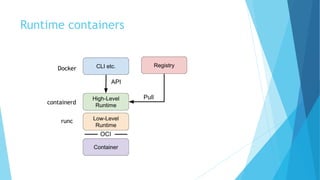
 Runtime containers
 OCI Containers images
 Write a Docker File
 Build an image with Docker
 Docker Compose
 Images Registry
 Docker Engine
 Run a container with Docker
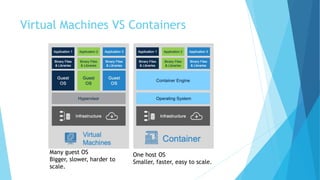
Virtual Machines VS Containers
One host OS
Smaller, faster, easy to scale.
Many guest OS
Bigger, slower, harder to
scale.
Containers
 See containers like an app in an isolated box
 Resources managed: size, cpu, memory, file system, network, etc.
 Standard based on LXC (Linux Container) and Windows Container
 Kernel namespaces (ipc, uts, mount, pid, network, user) : what you can see
 Apparmor, SELinux (security)
 Cgroups: limits what you can use and isolates resource usage
 chroots
 Solve problem « it’s work on my computer ! »
 Enables automatization, CI/CD, Scaling
 Cost optimization
 Microservices approach
What is Docker ?
 Version 1.0 in 2014
 Goal: Friendly and easy use of LXC containers
 Tools for developers to build containers
 Tools for operators to run containers
 Define new standard of image containers, image distribution, containers
runtime
 Container != Docker
 Docker Engine = Client/Server architecture
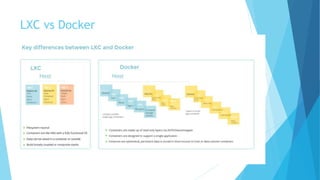
LXC vs Docker
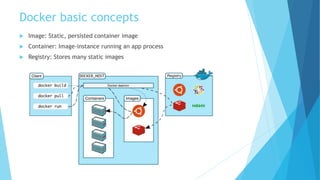
Docker basic concepts
 Image: Static, persisted container image
 Container: Image-instance running an app process
 Registry: Stores many static images
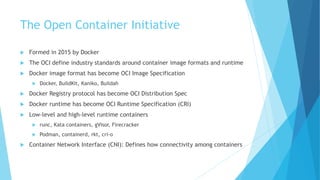
The Open Container Initiative
 Formed in 2015 by Docker
 The OCI define industry standards around container image formats and runtime
 Docker image format has become OCI Image Specification
 Docker, BuildKit, Kaniko, Buildah
 Docker Registry protocol has become OCI Distribution Spec
 Docker runtime has become OCI Runtime Specification (CRI)
 Low-level and high-level runtime containers
 runc, Kata containers, gVisor, Firecracker
 Podman, containerd, rkt, cri-o
 Container Network Interface (CNI): Defines how connectivity among containers
Runtime containers
Docker
runc
containerd
OCI Containers Images
 A container image is a static representation of the app and its configuration
 To run the app, an image is instantiated to create a container
 To build container images with Docker: write a Dockerfile
 Container images are versioned
 OCI images are layers assembly (see them like pieces of file system)
 Layers are mounted together by an union filesystem (overlayFS)
 Layers are immutables (copy-on-write)
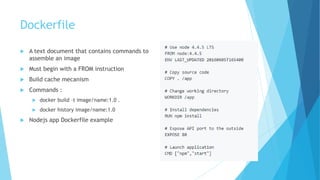
Dockerfile
 A text document that contains commands to
assemble an image
 Must begin with a FROM instruction
 Build cache mecanism
 Commands :
 docker build –t image/name:1.0 .
 docker history image/name:1.0
 Nodejs app Dockerfile example
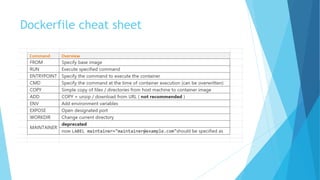
Dockerfile cheat sheet
 Docker use a cache system with a hash for each step
 Each hash identify the file system of an intermediate container
 docker history to see each layers of the image
Docker build image
Docker history
Docker build
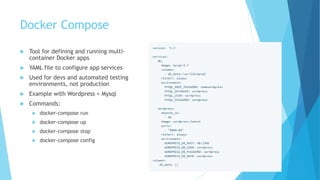
Docker Compose
 Tool for defining and running multi-
container Docker apps
 YAML file to configure app services
 Used for devs and automated testing
environments, not production
 Example with Wordpress + Mysql
 Commands:
 docker-compose run
 docker-compose up
 docker-compose stop
 docker-compose config
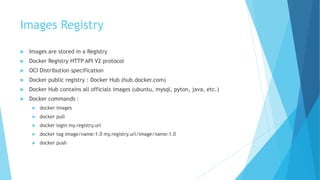
Images Registry
 Images are stored in a Registry
 Docker Registry HTTP API V2 protocol
 OCI Distribution specification
 Docker public registry : Docker Hub (hub.docker.com)
 Docker Hub contains all officials images (ubuntu, mysql, pyton, java, etc.)
 Docker commands :
 docker images
 docker pull
 docker login my.registry.url
 docker tag image/name:1.0 my.registry.url/image/name:1.0
 docker push
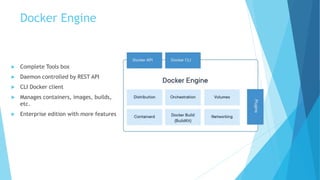
Docker Engine
 Complete Tools box
 Daemon controlled by REST API
 CLI Docker client
 Manages containers, images, builds,
etc.
 Enterprise edition with more features
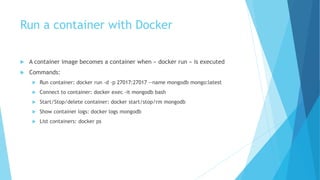
Run a container with Docker
 A container image becomes a container when « docker run » is executed
 Commands:
 Run container: docker run -d -p 27017:27017 --name mongodb mongo:latest
 Connect to container: docker exec -it mongodb bash
 Start/Stop/delete container: docker start/stop/rm mongodb
 Show container logs: docker logs mongodb
 List containers: docker ps
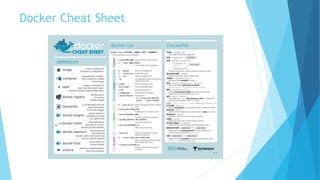
Docker Cheat Sheet

Introduction to docker and oci

  • 1.
    Introduction to Docker andOCI March 2021 Romain Schlick @r_schlick
  • 2.
    Summary  Virtual machinesVS containers  Containers  What is Docker ?  LXC vs Docker  Docker basic concepts  The Open Container Initiative (OCI)  Runtime containers  OCI Containers images  Write a Docker File  Build an image with Docker  Docker Compose  Images Registry  Docker Engine  Run a container with Docker
  • 3.
    Virtual Machines VSContainers One host OS Smaller, faster, easy to scale. Many guest OS Bigger, slower, harder to scale.
  • 4.
    Containers  See containerslike an app in an isolated box  Resources managed: size, cpu, memory, file system, network, etc.  Standard based on LXC (Linux Container) and Windows Container  Kernel namespaces (ipc, uts, mount, pid, network, user) : what you can see  Apparmor, SELinux (security)  Cgroups: limits what you can use and isolates resource usage  chroots  Solve problem « it’s work on my computer ! »  Enables automatization, CI/CD, Scaling  Cost optimization  Microservices approach
  • 5.
    What is Docker?  Version 1.0 in 2014  Goal: Friendly and easy use of LXC containers  Tools for developers to build containers  Tools for operators to run containers  Define new standard of image containers, image distribution, containers runtime  Container != Docker  Docker Engine = Client/Server architecture
  • 6.
  • 7.
    Docker basic concepts Image: Static, persisted container image  Container: Image-instance running an app process  Registry: Stores many static images
  • 8.
    The Open ContainerInitiative  Formed in 2015 by Docker  The OCI define industry standards around container image formats and runtime  Docker image format has become OCI Image Specification  Docker, BuildKit, Kaniko, Buildah  Docker Registry protocol has become OCI Distribution Spec  Docker runtime has become OCI Runtime Specification (CRI)  Low-level and high-level runtime containers  runc, Kata containers, gVisor, Firecracker  Podman, containerd, rkt, cri-o  Container Network Interface (CNI): Defines how connectivity among containers
  • 9.
  • 10.
    OCI Containers Images A container image is a static representation of the app and its configuration  To run the app, an image is instantiated to create a container  To build container images with Docker: write a Dockerfile  Container images are versioned  OCI images are layers assembly (see them like pieces of file system)  Layers are mounted together by an union filesystem (overlayFS)  Layers are immutables (copy-on-write)
  • 11.
    Dockerfile  A textdocument that contains commands to assemble an image  Must begin with a FROM instruction  Build cache mecanism  Commands :  docker build –t image/name:1.0 .  docker history image/name:1.0  Nodejs app Dockerfile example
  • 12.
  • 13.
     Docker usea cache system with a hash for each step  Each hash identify the file system of an intermediate container  docker history to see each layers of the image Docker build image Docker history Docker build
  • 14.
    Docker Compose  Toolfor defining and running multi- container Docker apps  YAML file to configure app services  Used for devs and automated testing environments, not production  Example with Wordpress + Mysql  Commands:  docker-compose run  docker-compose up  docker-compose stop  docker-compose config
  • 15.
    Images Registry  Imagesare stored in a Registry  Docker Registry HTTP API V2 protocol  OCI Distribution specification  Docker public registry : Docker Hub (hub.docker.com)  Docker Hub contains all officials images (ubuntu, mysql, pyton, java, etc.)  Docker commands :  docker images  docker pull  docker login my.registry.url  docker tag image/name:1.0 my.registry.url/image/name:1.0  docker push
  • 16.
    Docker Engine  CompleteTools box  Daemon controlled by REST API  CLI Docker client  Manages containers, images, builds, etc.  Enterprise edition with more features
  • 17.
    Run a containerwith Docker  A container image becomes a container when « docker run » is executed  Commands:  Run container: docker run -d -p 27017:27017 --name mongodb mongo:latest  Connect to container: docker exec -it mongodb bash  Start/Stop/delete container: docker start/stop/rm mongodb  Show container logs: docker logs mongodb  List containers: docker ps
  • 18.

Editor's Notes

  • #4 VMs : VMs help reduce expenses. Instead of running an application on a single server, a virtual machine enables utilizing one physical resource to do the job of many. Containers: Containers help reduce expenses as well and they are remarkably lightweight and fast to launch.  Because of their small size, you can quickly scale in and out of containers