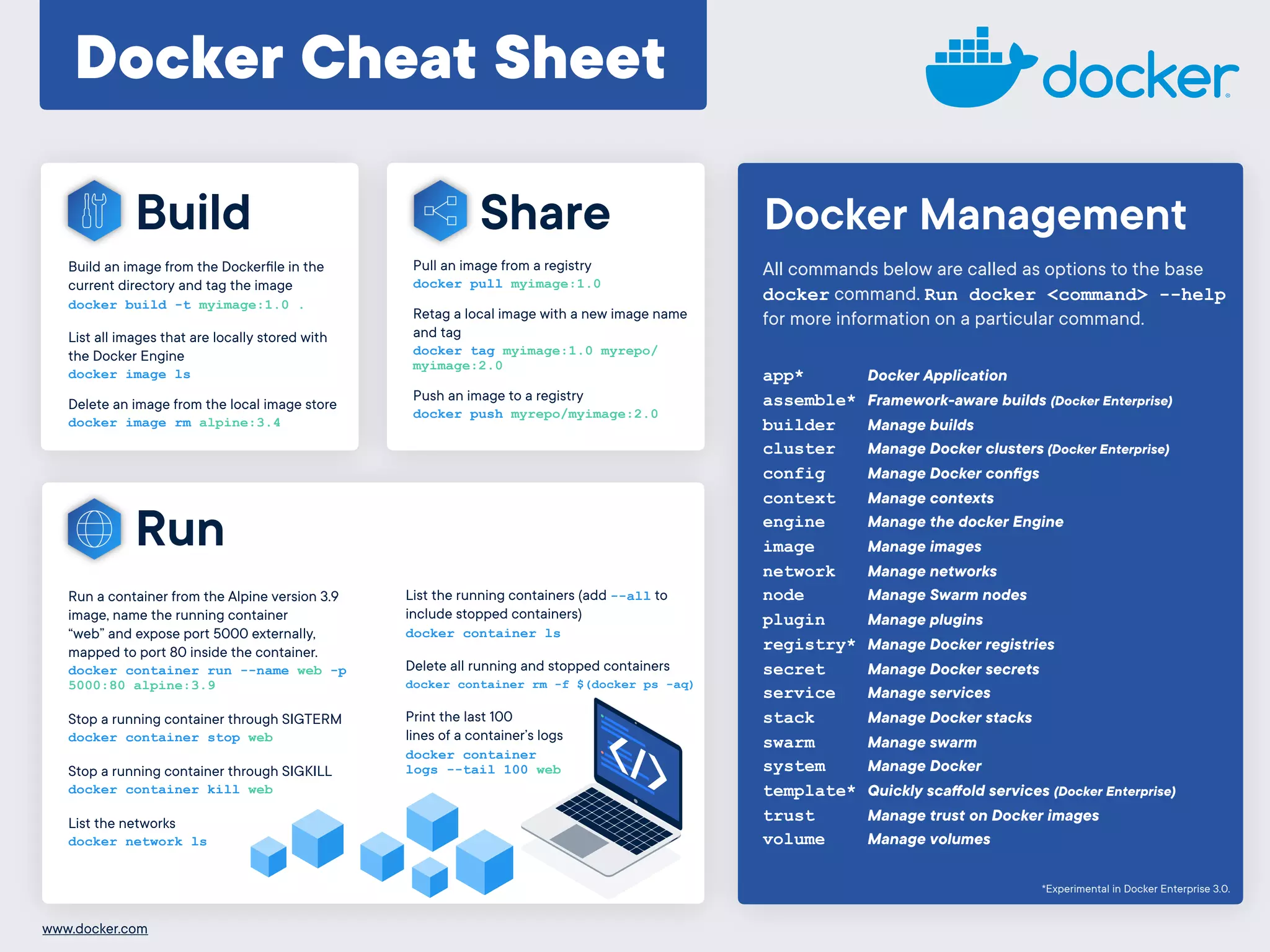
Docker Cheat Sheet
Build
Build an image from the Dockerfile in the
current directory and tag the image

docker build -t myimage:1.0 .
List all images that are locally stored with
the Docker Engine

docker image ls
Delete an image from the local image store

docker image rm alpine:3.4
Share
Run a container from the Alpine version 3.9
image, name the running container
“web” and expose port 5000 externally,
mapped to port 80 inside the container.
docker container run --name web -p
5000:80 alpine:3.9
Stop a running container through SIGTERM
docker container stop web
Stop a running container through SIGKILL
docker container kill web
List the networks
docker network ls
Run
List the running containers (add --all to
include stopped containers)
docker container ls
Delete all running and stopped containers
docker container rm -f $(docker ps -aq)
Print the last 100
lines of a container’s logs
docker container
logs --tail 100 web
app* Docker Application
assemble* Framework-aware builds (Docker Enterprise)
builder Manage builds
cluster Manage Docker clusters (Docker Enterprise)
config Manage Docker configs
context Manage contexts
engine Manage the docker Engine
image Manage images
network Manage networks
node Manage Swarm nodes
plugin Manage plugins
registry* Manage Docker registries
secret Manage Docker secrets
service Manage services
stack Manage Docker stacks
swarm Manage swarm
system Manage Docker
template* Quickly scaffold services (Docker Enterprise)
trust Manage trust on Docker images
volume Manage volumes
All commands below are called as options to the base
docker command. Run docker <command> --help
for more information on a particular command.
Docker Management
*Experimental in Docker Enterprise 3.0.
Pull an image from a registry
docker pull myimage:1.0
Retag a local image with a new image name
and tag
docker tag myimage:1.0 myrepo/
myimage:2.0
Push an image to a registry
docker push myrepo/myimage:2.0
www.docker.com

Docker cheat-sheet

  • 1.
    Docker Cheat Sheet Build Buildan image from the Dockerfile in the current directory and tag the image
 docker build -t myimage:1.0 . List all images that are locally stored with the Docker Engine
 docker image ls Delete an image from the local image store
 docker image rm alpine:3.4 Share Run a container from the Alpine version 3.9 image, name the running container “web” and expose port 5000 externally, mapped to port 80 inside the container. docker container run --name web -p 5000:80 alpine:3.9 Stop a running container through SIGTERM docker container stop web Stop a running container through SIGKILL docker container kill web List the networks docker network ls Run List the running containers (add --all to include stopped containers) docker container ls Delete all running and stopped containers docker container rm -f $(docker ps -aq) Print the last 100 lines of a container’s logs docker container logs --tail 100 web app* Docker Application assemble* Framework-aware builds (Docker Enterprise) builder Manage builds cluster Manage Docker clusters (Docker Enterprise) config Manage Docker configs context Manage contexts engine Manage the docker Engine image Manage images network Manage networks node Manage Swarm nodes plugin Manage plugins registry* Manage Docker registries secret Manage Docker secrets service Manage services stack Manage Docker stacks swarm Manage swarm system Manage Docker template* Quickly scaffold services (Docker Enterprise) trust Manage trust on Docker images volume Manage volumes All commands below are called as options to the base docker command. Run docker <command> --help for more information on a particular command. Docker Management *Experimental in Docker Enterprise 3.0. Pull an image from a registry docker pull myimage:1.0 Retag a local image with a new image name and tag docker tag myimage:1.0 myrepo/ myimage:2.0 Push an image to a registry docker push myrepo/myimage:2.0 www.docker.com