Docker
 Docker is an open source containerization platform.
 Docker enables developers to package applications into containers—standardized executable
components that combine application source code with all the operating system (OS) libraries and
dependencies required to run the code in any environment.
 While developers can create containers without Docker, Docker makes it easier, simpler, and safer
to build, deploy, and manage containers. It’s essentially a toolkit that enables developers to build,
deploy, run, update, and stop containers using simple commands and work-saving automation.
 Docker also refers to Docker, Inc., the company that sells the commercial version of Docker, and to
the Docker open source project, to which Docker Inc. and many other organizations and
individuals contribute.
What is Docker?
What is a Container?
 Containers are made possible by operating system (OS)
process isolation and virtualization, which enable multiple
application components to share the resources of a single
instance of an OS kernel in much the same way that
machine virtualization enables multiple virtual machines
(VMs) to share the resources of a single hardware server.
Why use Docker?
Docker is so popular today that ‘Docker’ and ‘containers’ are used
interchangeably, but the first container-related technologies were
available for years even decades before Docker was released to the
public in 2013. Most notably, in 2008, LXC (for LinuX Containers) was
implemented in the Linux kernel, fully enabling virtualization for a
single instance of Linux.
Lorem ipsum
Lorem ipsum
Lorem ipsum
Lorem ipsum
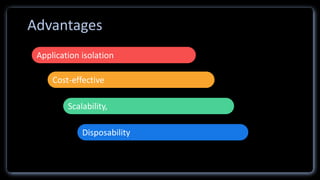
Application isolation
Cost-effective
Scalability,
Disposability
Advantages
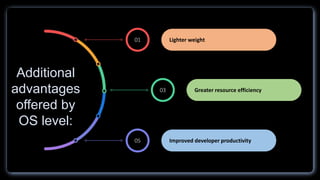
01
03
05
Lighter weight
Greater resource efficiency
Improved developer productivity
Additional
advantages
offered by
OS level:
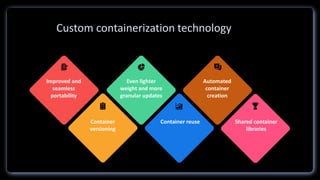
Improved and
seamless
portability
Even lighter
weight and more
granular updates
Automated
container
creation
Container
versioning
Container reuse Shared container
libraries
Custom containerization technology
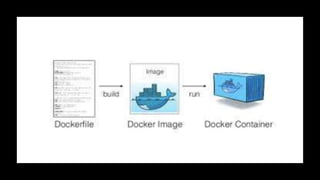
Every Docker container starts with a simple text file containing instructions
for how to build the Docker container image.
DockerFile automates the process of Docker image creation. It’s essentially
a list of commands that Docker Engine will run in order to assemble the
image.
DockerFile
 It contain executable application source code as well as all the tools, libraries, and dependencies that the
application code needs to run as a container.
 When you run the Docker image, it becomes one instance (or multiple instances) of the container.
 It’s possible to build a Docker image from scratch, but most developers pull them down from common repositories.
 Multiple Docker images can be created from a single base image, and they’ll share the commonalities of their
stack.
 Docker images are made up of layers, and each layer corresponds to a version of the image.
 Whenever a developer makes changes to the image, a new top layer is created, and this top layer replaces the
previous top layer as the current version of the image. Previous layers are saved for rollbacks or to be re-used in
other projects.
 Each time a container is created from a Docker image, yet another new layer called the container layer is created.
 Changes made to the container ,such as the addition or deletion of files are saved to the container layer only and
exist only while the container is running.
 This iterative image-creation process enables increased overall efficiency since multiple live container instances
can run from just a single base image, and when they do so, they leverage a common stack.
DockerImage
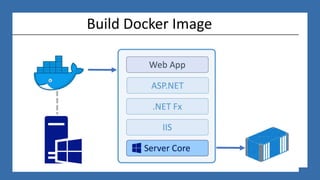
Build Docker Image
Docker containers are the live, running instances of Docker images.
 While Docker images are read-only files, containers are live,
ephemeral, executable content.
Users can interact with them, and administrators can adjust their
settings and conditions.
DockerContainer
Thank you
K.K.L.Malsha

Docker presentation

  • 1.
  • 2.
     Docker isan open source containerization platform.  Docker enables developers to package applications into containers—standardized executable components that combine application source code with all the operating system (OS) libraries and dependencies required to run the code in any environment.  While developers can create containers without Docker, Docker makes it easier, simpler, and safer to build, deploy, and manage containers. It’s essentially a toolkit that enables developers to build, deploy, run, update, and stop containers using simple commands and work-saving automation.  Docker also refers to Docker, Inc., the company that sells the commercial version of Docker, and to the Docker open source project, to which Docker Inc. and many other organizations and individuals contribute. What is Docker?
  • 3.
    What is aContainer?  Containers are made possible by operating system (OS) process isolation and virtualization, which enable multiple application components to share the resources of a single instance of an OS kernel in much the same way that machine virtualization enables multiple virtual machines (VMs) to share the resources of a single hardware server.
  • 4.
    Why use Docker? Dockeris so popular today that ‘Docker’ and ‘containers’ are used interchangeably, but the first container-related technologies were available for years even decades before Docker was released to the public in 2013. Most notably, in 2008, LXC (for LinuX Containers) was implemented in the Linux kernel, fully enabling virtualization for a single instance of Linux.
  • 6.
    Lorem ipsum Lorem ipsum Loremipsum Lorem ipsum Application isolation Cost-effective Scalability, Disposability Advantages
  • 7.
    01 03 05 Lighter weight Greater resourceefficiency Improved developer productivity Additional advantages offered by OS level:
  • 8.
    Improved and seamless portability Even lighter weightand more granular updates Automated container creation Container versioning Container reuse Shared container libraries Custom containerization technology
  • 10.
    Every Docker containerstarts with a simple text file containing instructions for how to build the Docker container image. DockerFile automates the process of Docker image creation. It’s essentially a list of commands that Docker Engine will run in order to assemble the image. DockerFile
  • 11.
     It containexecutable application source code as well as all the tools, libraries, and dependencies that the application code needs to run as a container.  When you run the Docker image, it becomes one instance (or multiple instances) of the container.  It’s possible to build a Docker image from scratch, but most developers pull them down from common repositories.  Multiple Docker images can be created from a single base image, and they’ll share the commonalities of their stack.  Docker images are made up of layers, and each layer corresponds to a version of the image.  Whenever a developer makes changes to the image, a new top layer is created, and this top layer replaces the previous top layer as the current version of the image. Previous layers are saved for rollbacks or to be re-used in other projects.  Each time a container is created from a Docker image, yet another new layer called the container layer is created.  Changes made to the container ,such as the addition or deletion of files are saved to the container layer only and exist only while the container is running.  This iterative image-creation process enables increased overall efficiency since multiple live container instances can run from just a single base image, and when they do so, they leverage a common stack. DockerImage
  • 12.
  • 13.
    Docker containers arethe live, running instances of Docker images.  While Docker images are read-only files, containers are live, ephemeral, executable content. Users can interact with them, and administrators can adjust their settings and conditions. DockerContainer
  • 14.