Docker basics
Requirements
Install and configure operating systems
TCP/IP
CLI semi expert
CLI editors (nano, vim, …)
Virtual machines environments
Software
Application
Services
Architecture
Traditional servers (bare metal)


Virtual machines


Containers
Traditional servers (bare metal)
Architecture
Traditional servers (bare metal)


Pros Cons
Raw resources use Slow deployment time
Isolation Expensive
Wasted resources
Difficult to scale
Difficult to migrate
Complex configuration
Architecture
Virtual machines


Architecture
Virtual machines


Pros Cons
Good use of resources Resource allocation
Easy to scale Vendor lockin
Easy to backup and migrate Complex configuration
Cost efficiency
Flexibility
Architecture
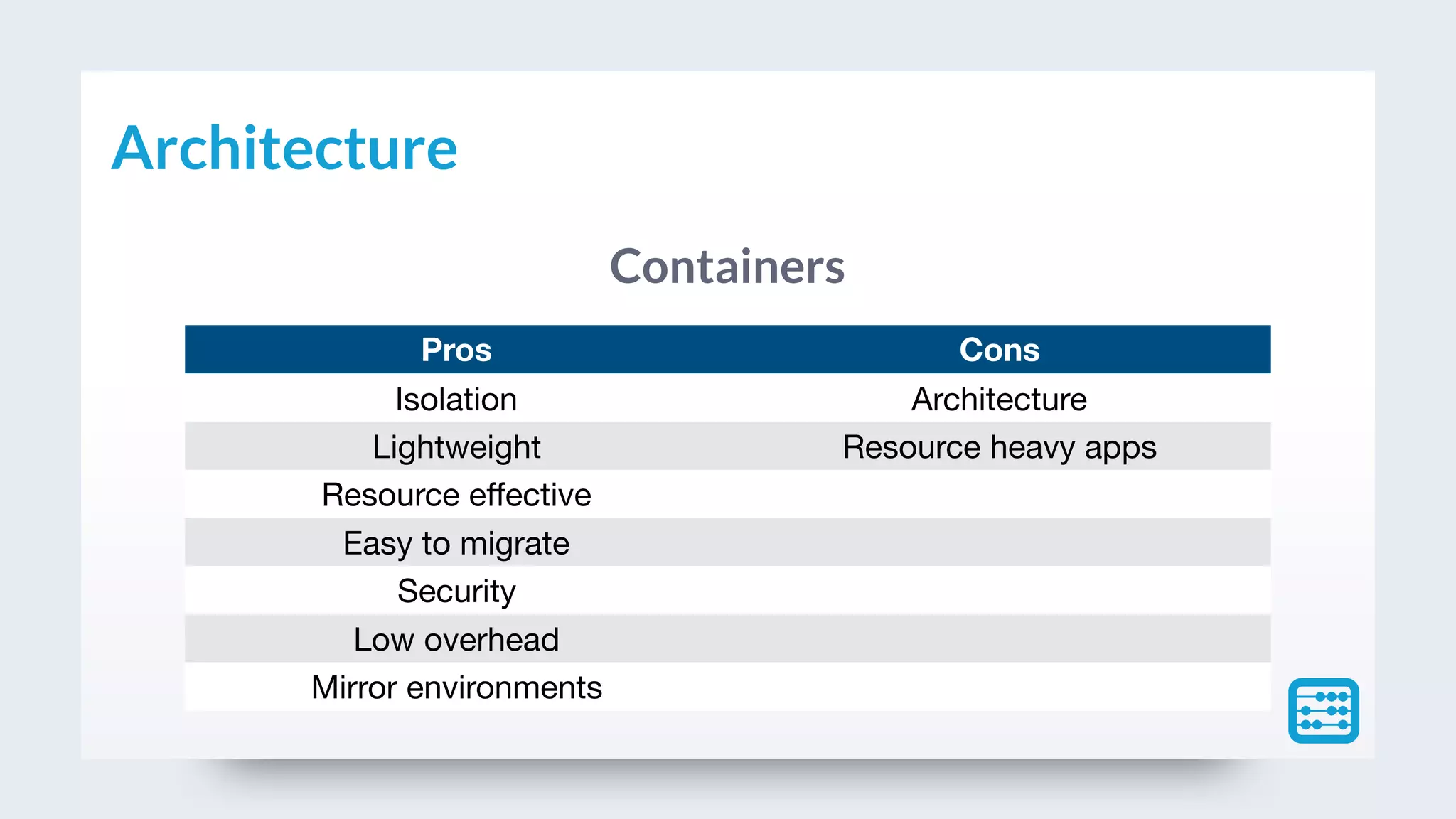
Containers
Architecture
Containers


Pros Cons
Isolation Architecture
Lightweight Resource heavy apps
Resource effective
Easy to migrate
Security
Low overhead
Mirror environments
Architecture
A container is a standard unit of software
that packages up code and all its
dependencies so the application runs
quickly and reliably from one computing
environment to another.
What is a container?
Container Engine
Volumes
Ports
Networks
Hosts
Links
What is a container? (own resources)
Docker is a tool designed to make
it easier to create, deploy, and run
applications by using containers.
What is docker?
Containers options
LXD
Basic concepts
Docker can build images automatically by reading the
instructions from a Dockerfile. A Dockerfile is a text
document that contains all the commands a user could
call on the command line to assemble an image. Using
docker build users can create an automated build that
executes several command-line instructions in
succession.
Dockerfile
FROM ubuntu:15.04
COPY . /app
RUN make /app
CMD python /app/app.py
Dockerfile
A Docker image is built up from a series
of layers. Each layer represents an
instruction in the image’s Dockerfile.
Each layer except the very last one is
read-only.
Docker layers
Docker layers
A Docker image is a file, comprised of multiple
layers, used to execute code in a Docker
container. An image is essentially built from the
instructions for a complete and executable
version of an application, which relies on the
host OS kernel.
Docker image
Docker architecture
A container is launched by running an image. An image is an
executable package that includes everything needed to run an
application the code, a runtime, libraries, environment variables, and
configuration files.
A container is a runtime instance of an image what the image becomes
in memory when executed (that is, an image with state, or a user
process). You can see a list of your running containers with the
command, docker ps, just as you would in Linux.
Docker image vs. container
The Registry is a stateless, highly
scalable server side application that
stores and lets you distribute Docker
images. The Registry is open-source,
under the permissive Apache license.
Docker registry
Docker Hub is a cloud-based registry service which allows you
to link to code repositories, build your images and test them,
stores manually pushed images, and links to Docker Cloud so
you can deploy images to your hosts. It provides a centralized
resource for container image discovery, distribution and
change management, user and team collaboration, and
workflow automation throughout the development pipeline.
Docker hub
In case you want to store your own
images you can have a private
registry.
Private registries
A container is a standard unit of software
that packages up code and all its
dependencies so the application runs
quickly and reliably from one computing
environment to another.
Container
Environment
Application
Services
Image types
Local environment
Virtual Box
Your computer
Linux Debian
Docker images
Image Version Type
hello-world latest Application
golang 1.11.1-alpine Application
gcc latest Application
java 7 Application
mysql 5.6 Service
phpmyadmin/phpmyadmin latest Service
mongo latest Service
thinkcube/phpmoadmin latest Service
nginx stable-alpine Service
php 7.2.2-fpm-alpine Service
wordpress 4.9.8-php7.2-apache Service
CLI commands
Docker
docker —version Show docker version
docker info Display system information
docker rmi {image name} Delete specific image
docker —help Show help
Docker images
Command Description Example
docker images List all images
docker images image name List all images with a name
docker pull image name:[tag] Pull image from repository docker pull hello-world
docker history image name Show history of an image docker history hello-world
docker rmi image name Delete specific image docker rmi hello-world
Docker containers
docker container ls Show containers
docker ps Show containers
Run containers
docker run [OPTIONS] IMAGE[:TAG|
@DIGEST] [COMMAND] [ARG…]
docker run hello-world
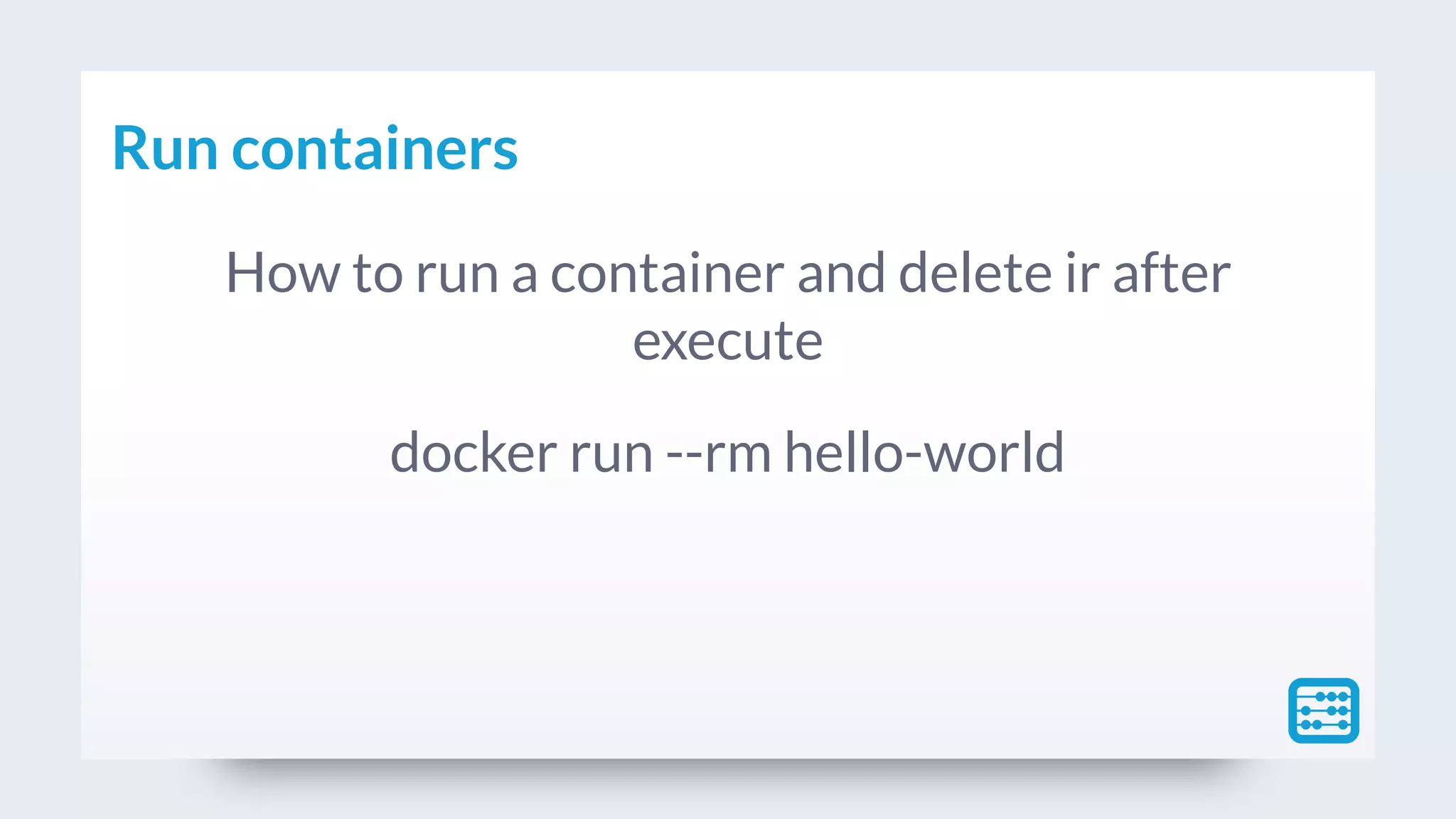
Run containers
How to run a container and delete ir after
execute
docker run --rm hello-world
Run containers
If an image doesn’t exists
docker run automatically
trigger docker fetch and
download the image.
Docker containers
docker stop container Stop container
docker rm container Delete container
Docker containers - volumes
Volumes are the preferred
mechanism for persisting data
generated by and used by
Docker containers.
Docker containers - volumes
docker run 
--rm 
-v /home/docker/src/gcc:/src 
gcc 
gcc /src/hello-world.c -o /src/hello-world
Workshop TCP/IP ports
Image Port
phpmyadmin/phpmyadmin 8081
thinkcube/phpmoadmin 8082
nginx 8083
wordpress 8084
+ /Paybook
Infrastructure Manager
Claudio Montoya
Thanks!
www.paybook.com

Docker basics

  • 1.
  • 2.
    Requirements Install and configureoperating systems TCP/IP CLI semi expert CLI editors (nano, vim, …) Virtual machines environments
  • 3.
  • 4.
    Architecture Traditional servers (baremetal) 
 Virtual machines 
 Containers
  • 5.
    Traditional servers (baremetal) Architecture
  • 6.
    Traditional servers (baremetal)
 
 Pros Cons Raw resources use Slow deployment time Isolation Expensive Wasted resources Difficult to scale Difficult to migrate Complex configuration Architecture
  • 7.
  • 8.
    Virtual machines
 
 Pros Cons Gooduse of resources Resource allocation Easy to scale Vendor lockin Easy to backup and migrate Complex configuration Cost efficiency Flexibility Architecture
  • 9.
  • 10.
    Containers
 
 Pros Cons Isolation Architecture LightweightResource heavy apps Resource effective Easy to migrate Security Low overhead Mirror environments Architecture
  • 11.
    A container isa standard unit of software that packages up code and all its dependencies so the application runs quickly and reliably from one computing environment to another. What is a container?
  • 12.
    What is acontainer? Container Engine
  • 13.
  • 14.
    Docker is a tool designedto make it easier to create, deploy, and run applications by using containers. What is docker?
  • 15.
  • 16.
  • 17.
    Docker can buildimages automatically by reading the instructions from a Dockerfile. A Dockerfile is a text document that contains all the commands a user could call on the command line to assemble an image. Using docker build users can create an automated build that executes several command-line instructions in succession. Dockerfile
  • 18.
    FROM ubuntu:15.04 COPY ./app RUN make /app CMD python /app/app.py Dockerfile
  • 19.
    A Docker imageis built up from a series of layers. Each layer represents an instruction in the image’s Dockerfile. Each layer except the very last one is read-only. Docker layers
  • 20.
  • 21.
    A Docker imageis a file, comprised of multiple layers, used to execute code in a Docker container. An image is essentially built from the instructions for a complete and executable version of an application, which relies on the host OS kernel. Docker image
  • 22.
  • 23.
    A container islaunched by running an image. An image is an executable package that includes everything needed to run an application the code, a runtime, libraries, environment variables, and configuration files. A container is a runtime instance of an image what the image becomes in memory when executed (that is, an image with state, or a user process). You can see a list of your running containers with the command, docker ps, just as you would in Linux. Docker image vs. container
  • 24.
    The Registry isa stateless, highly scalable server side application that stores and lets you distribute Docker images. The Registry is open-source, under the permissive Apache license. Docker registry
  • 25.
    Docker Hub isa cloud-based registry service which allows you to link to code repositories, build your images and test them, stores manually pushed images, and links to Docker Cloud so you can deploy images to your hosts. It provides a centralized resource for container image discovery, distribution and change management, user and team collaboration, and workflow automation throughout the development pipeline. Docker hub
  • 26.
    In case youwant to store your own images you can have a private registry. Private registries
  • 27.
    A container isa standard unit of software that packages up code and all its dependencies so the application runs quickly and reliably from one computing environment to another. Container
  • 28.
  • 29.
  • 30.
  • 31.
    Docker images Image VersionType hello-world latest Application golang 1.11.1-alpine Application gcc latest Application java 7 Application mysql 5.6 Service phpmyadmin/phpmyadmin latest Service mongo latest Service thinkcube/phpmoadmin latest Service nginx stable-alpine Service php 7.2.2-fpm-alpine Service wordpress 4.9.8-php7.2-apache Service
  • 32.
  • 33.
    Docker docker —version Showdocker version docker info Display system information docker rmi {image name} Delete specific image docker —help Show help
  • 34.
    Docker images Command DescriptionExample docker images List all images docker images image name List all images with a name docker pull image name:[tag] Pull image from repository docker pull hello-world docker history image name Show history of an image docker history hello-world docker rmi image name Delete specific image docker rmi hello-world
  • 35.
    Docker containers docker containerls Show containers docker ps Show containers
  • 36.
    Run containers docker run[OPTIONS] IMAGE[:TAG| @DIGEST] [COMMAND] [ARG…] docker run hello-world
  • 37.
    Run containers How torun a container and delete ir after execute docker run --rm hello-world
  • 38.
    Run containers If animage doesn’t exists docker run automatically trigger docker fetch and download the image.
  • 39.
    Docker containers docker stopcontainer Stop container docker rm container Delete container
  • 40.
    Docker containers -volumes Volumes are the preferred mechanism for persisting data generated by and used by Docker containers.
  • 41.
    Docker containers -volumes docker run --rm -v /home/docker/src/gcc:/src gcc gcc /src/hello-world.c -o /src/hello-world
  • 42.
    Workshop TCP/IP ports ImagePort phpmyadmin/phpmyadmin 8081 thinkcube/phpmoadmin 8082 nginx 8083 wordpress 8084
  • 43.
    + /Paybook Infrastructure Manager ClaudioMontoya Thanks! www.paybook.com