Introduction to
Databases
NCAD Library Guide
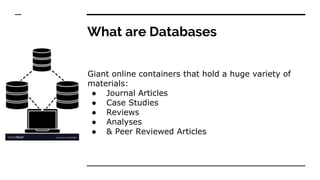
What are Databases
Giant online containers that hold a huge variety of
materials:
● Journal Articles
● Case Studies
● Reviews
● Analyses
● & Peer Reviewed Articles
Types of Databases
● Open access refers to the practice of making peer-
reviewed scholarly research and literature freely
available online to anyone interested in reading it.
https://doaj.org/
● Closed access refers to articles or journals which
appear in non-open access databases are only visible
to people at institutions which have a licence for this
specific content / resource https://www.jstor.org/
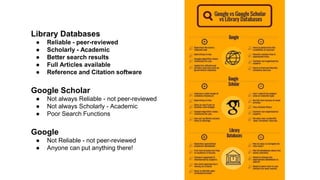
Library Databases
● Reliable - peer-reviewed
● Scholarly - Academic
● Better search results
● Full Articles available
● Reference and Citation software
Google Scholar
● Not always Reliable - not peer-reviewed
● Not always Scholarly - Academic
● Poor Search Functions
Google
● Not Reliable - not peer-reviewed
● Anyone can put anything there!
NCAD Library Databases
There are 8
Databases on the
library website
Website: https://capitadiscovery.co.uk/ncad/home
Databases: https://capitadiscovery.co.uk/ncad/
Primary and secondary sources
● Art & Architecture Source
● JSTOR
● Taylor & Francis Online
● Berg Fashion Library
● Material Connexion (Materials Database)
● Artstor (Image Library)
Tertiary sources
● ARTbibliographies Modern
● Design & Applied Arts Index
● Full Text Finder
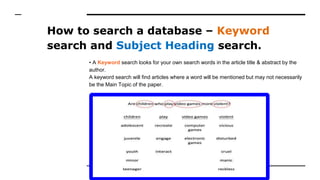
How to search a database – Keyword
search and Subject Heading search.
• A Keyword search looks for your own search words in the article title & abstract by the
author.
A keyword search will find articles where a word will be mentioned but may not necessarily
be the Main Topic of the paper.
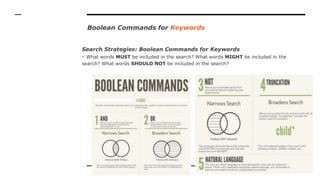
Boolean Commands for Keywords
Search Strategies: Boolean Commands for Keywords
- What words MUST be included in the search? What words MIGHT be included in the
search? What words SHOULD NOT be included in the search?
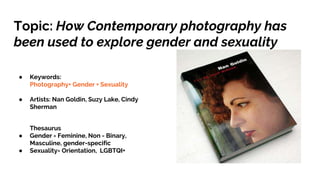
Topic: How Contemporary photography has
been used to explore gender and sexuality
● Keywords:
Photography+ Gender + Sexuality
● Artists: Nan Goldin, Suzy Lake, Cindy
Sherman
Thesaurus
● Gender = Feminine, Non - Binary,
Masculine, gender-specific
● Sexuality= Orientation, LGBTQI+
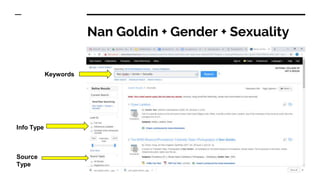
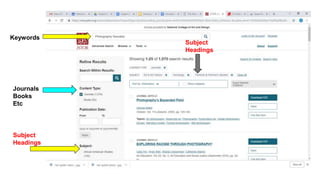
Nan Goldin + Gender + Sexuality
Keywords
Info Type
Source
Type
Search by Subject Heading
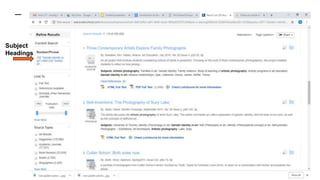
• A Subject Heading search uses terms from a thesaurus of Subject Headings in the
database and will find articles where the search terms are the main topic of the paper.
Subject Headings are added to each record by database staff who determine the main
topic of the paper.
Each database has a thesaurus: click on the database thesaurus and type in your keyword
and you will get a list of relevant Subject Headings
Examples: “Gender role in Art”
“Identity in Art”
“Gender stereotypes in art”
Subject
Headings
Subject
Headings
Keywords
Journals
Books
Etc
Subject
Headings
Exercise: 5 mins
http://www.open.ac.uk/libraryservices/beingdigita
l/objects/101/index.htm
Good luck!
If you need any help or advice contact
Maeve or Tom at the Library in NCAD
Maeve McElligott
mcelligottm@staff.ncad.ie
Tom Maher
mahert@staff.ncad.ie

Introduction to Databases

  • 1.
  • 2.
    What are Databases Giantonline containers that hold a huge variety of materials: ● Journal Articles ● Case Studies ● Reviews ● Analyses ● & Peer Reviewed Articles
  • 3.
    Types of Databases ●Open access refers to the practice of making peer- reviewed scholarly research and literature freely available online to anyone interested in reading it. https://doaj.org/ ● Closed access refers to articles or journals which appear in non-open access databases are only visible to people at institutions which have a licence for this specific content / resource https://www.jstor.org/
  • 4.
    Library Databases ● Reliable- peer-reviewed ● Scholarly - Academic ● Better search results ● Full Articles available ● Reference and Citation software Google Scholar ● Not always Reliable - not peer-reviewed ● Not always Scholarly - Academic ● Poor Search Functions Google ● Not Reliable - not peer-reviewed ● Anyone can put anything there!
  • 5.
    NCAD Library Databases Thereare 8 Databases on the library website Website: https://capitadiscovery.co.uk/ncad/home
  • 6.
    Databases: https://capitadiscovery.co.uk/ncad/ Primary andsecondary sources ● Art & Architecture Source ● JSTOR ● Taylor & Francis Online ● Berg Fashion Library ● Material Connexion (Materials Database) ● Artstor (Image Library) Tertiary sources ● ARTbibliographies Modern ● Design & Applied Arts Index ● Full Text Finder
  • 7.
    How to searcha database – Keyword search and Subject Heading search. • A Keyword search looks for your own search words in the article title & abstract by the author. A keyword search will find articles where a word will be mentioned but may not necessarily be the Main Topic of the paper.
  • 8.
    Boolean Commands forKeywords Search Strategies: Boolean Commands for Keywords - What words MUST be included in the search? What words MIGHT be included in the search? What words SHOULD NOT be included in the search?
  • 9.
    Topic: How Contemporaryphotography has been used to explore gender and sexuality ● Keywords: Photography+ Gender + Sexuality ● Artists: Nan Goldin, Suzy Lake, Cindy Sherman Thesaurus ● Gender = Feminine, Non - Binary, Masculine, gender-specific ● Sexuality= Orientation, LGBTQI+
  • 10.
    Nan Goldin +Gender + Sexuality Keywords Info Type Source Type
  • 11.
    Search by SubjectHeading • A Subject Heading search uses terms from a thesaurus of Subject Headings in the database and will find articles where the search terms are the main topic of the paper. Subject Headings are added to each record by database staff who determine the main topic of the paper. Each database has a thesaurus: click on the database thesaurus and type in your keyword and you will get a list of relevant Subject Headings Examples: “Gender role in Art” “Identity in Art” “Gender stereotypes in art”
  • 12.
  • 13.
  • 14.
  • 15.
    Good luck! If youneed any help or advice contact Maeve or Tom at the Library in NCAD Maeve McElligott mcelligottm@staff.ncad.ie Tom Maher mahert@staff.ncad.ie