Applet in JAVA
Submitted By,
M.Jancypriya,
Asst. Prof., Dept of CA
Bon Secours college for Women,
Thanjavur.
Java Applet Basics
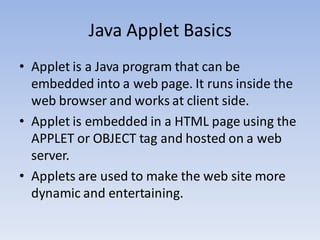
• Applet is a Java program that can be
embedded into a web page. It runs inside the
web browser and works at client side.
• Applet is embedded in a HTML page using the
APPLET or OBJECT tag and hosted on a web
server.
• Applets are used to make the web site more
dynamic and entertaining.
Important points
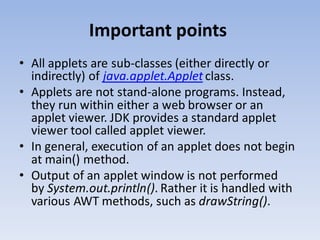
• All applets are sub-classes (either directly or
indirectly) of java.applet.Applet class.
• Applets are not stand-alone programs. Instead,
they run within either a web browser or an
applet viewer. JDK provides a standard applet
viewer tool called applet viewer.
• In general, execution of an applet does not begin
at main() method.
• Output of an applet window is not performed
by System.out.println(). Rather it is handled with
various AWT methods, such as drawString().
Life cycle of an applet
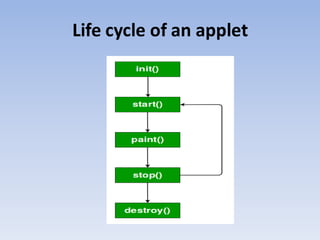
• init( ) : The init( ) method is the first method to be called. This is where
you should initialize variables. This method is called only once during the
run time of your applet.
• start( ) : The start( ) method is called after init( ). It is also called to restart
an applet after it has been stopped. Note that init( ) is called once i.e.
when the first time an applet is loaded whereas start( ) is called each time
an applet’s HTML document is displayed onscreen. So, if a user leaves a
web page and comes back, the applet resumes execution at start( ).
• paint( ) : The paint( ) method is called each time an AWT-based applet’s
output must be redrawn. This situation can occur for several reasons. For
example, the window in which the applet is running maybe overwritten
by another window and then uncovered. Or the applet window may be
minimized and then restored.paint( ) is also called when the applet begins
execution. Whatever the cause, whenever the applet must redraw its
output, paint( ) is called.
Life cycle of an applet
• stop( ) : The stop( ) method is called when a web
browser leaves the HTML document containing the
applet—when it goes to another page, for example.
When stop( ) is called, the applet is probably running.
You should use stop( ) to suspend threads that don’t
need to run when the applet is not visible. You can
restart them when start( ) is called if the user returns
to the page.
• destroy( ) : The destroy( ) method is called when the
environment determines that your applet needs to be
removed completely from memory. At this point, you
should free up any resources the applet may be using.
The stop( ) method is always called before destroy( ).
AWT
• Java AWT (Abstract Window Toolkit) is an API to
develop GUI or window-based applications in
java.
• Java AWT components are platform-dependent
i.e. components are displayed according to the
view of operating system. AWT is heavyweight i.e.
its components are using the resources of OS.
• The java.awt package provides classes for AWT
API such as TextField, Label, TextArea,
RadioButton, CheckBox, Choice, List etc.
AWT HIERARCHY
AWT HIERARCHY
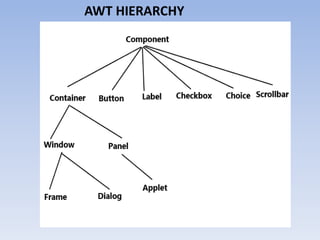
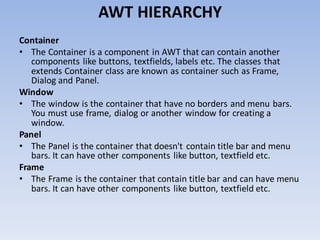
Container
• The Container is a component in AWT that can contain another
components like buttons, textfields, labels etc. The classes that
extends Container class are known as container such as Frame,
Dialog and Panel.
Window
• The window is the container that have no borders and menu bars.
You must use frame, dialog or another window for creating a
window.
Panel
• The Panel is the container that doesn't contain title bar and menu
bars. It can have other components like button, textfield etc.
Frame
• The Frame is the container that contain title bar and can have menu
bars. It can have other components like button, textfield etc.
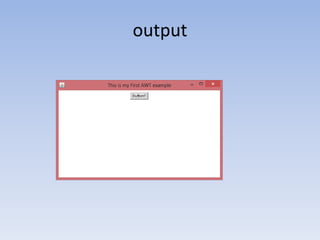
Creating Frame by extending Frame class
import java.awt.*;
/* We have extended the Frame class here, * thus our class "SimpleExample"
would behave * like a Frame */
public class SimpleExample extends Frame
{ SimpleExample(){
Button b=new Button("Button!!"); // setting button position on screen
b.setBounds(50,50,50,50); //adding button into frame
add(b); //Setting Frame width and height
setSize(500,300); //Setting the title of Frame
setTitle("This is myFirst AWT example"); //Setting the layout for the
Frame
setLayout(new FlowLayout());
/* By default frame is not visible so * we are setting the visibility to
true * to make it visible. */
setVisible(true);
}
public static void main(String args[]){
// Creating the instance of Frame
SimpleExample fr=new SimpleExample();
} }
output
Creating Frame by creating instance of Frame class
import java.awt.*;
public class Example2
{ Example2()
{
//Creating Frame
Frame fr=new Frame();
Label lb = new Label("UserId: "); //Creating a label
fr.add(lb); //adding label to the frame
TextField t = new TextField(); //Creating Text Field
fr.add(t); //adding text field to the frame
fr.setSize(500, 300); //setting frame size
fr.setLayout(new FlowLayout()); //Setting the layout for the Frame
fr.setVisible(true);
}
public static void main(String args[])
{ Example2 ex = new Example2();
} }
Java Exceptions
• When executing Java code, different errors
can occur: coding errors made by the
programmer, errors due to wrong input, or
other unforeseeable things.
• When an error occurs, Java will normally stop
and generate an error message. The technical
term for this is: Java will throw
an exception (throw an error).
Java try and catch
• The try statement allows you to define a block
of code to be tested for errors while it is being
executed.
• The catch statement allows you to define a
block of code to be executed, if an error
occurs in the try block.
• The try and catch keywords come in pairs
Syntax
• try {
// Block of code to try
}
catch(Exception e) {
// Block of code to handle errors
}
Example
public class MyClass {
public static void main(String[ ] args) {
try {
int[] myNumbers = {1, 2, 3};
System.out.println(myNumbers[10]);
} catch (Exception e) {
System.out.println("Something went wrong.");
}
}
}

Applet in java

  • 1.
    Applet in JAVA SubmittedBy, M.Jancypriya, Asst. Prof., Dept of CA Bon Secours college for Women, Thanjavur.
  • 2.
    Java Applet Basics •Applet is a Java program that can be embedded into a web page. It runs inside the web browser and works at client side. • Applet is embedded in a HTML page using the APPLET or OBJECT tag and hosted on a web server. • Applets are used to make the web site more dynamic and entertaining.
  • 3.
    Important points • Allapplets are sub-classes (either directly or indirectly) of java.applet.Applet class. • Applets are not stand-alone programs. Instead, they run within either a web browser or an applet viewer. JDK provides a standard applet viewer tool called applet viewer. • In general, execution of an applet does not begin at main() method. • Output of an applet window is not performed by System.out.println(). Rather it is handled with various AWT methods, such as drawString().
  • 4.
    Life cycle ofan applet
  • 5.
    Life cycle ofan applet • init( ) : The init( ) method is the first method to be called. This is where you should initialize variables. This method is called only once during the run time of your applet. • start( ) : The start( ) method is called after init( ). It is also called to restart an applet after it has been stopped. Note that init( ) is called once i.e. when the first time an applet is loaded whereas start( ) is called each time an applet’s HTML document is displayed onscreen. So, if a user leaves a web page and comes back, the applet resumes execution at start( ). • paint( ) : The paint( ) method is called each time an AWT-based applet’s output must be redrawn. This situation can occur for several reasons. For example, the window in which the applet is running maybe overwritten by another window and then uncovered. Or the applet window may be minimized and then restored.paint( ) is also called when the applet begins execution. Whatever the cause, whenever the applet must redraw its output, paint( ) is called.
  • 6.
    Life cycle ofan applet • stop( ) : The stop( ) method is called when a web browser leaves the HTML document containing the applet—when it goes to another page, for example. When stop( ) is called, the applet is probably running. You should use stop( ) to suspend threads that don’t need to run when the applet is not visible. You can restart them when start( ) is called if the user returns to the page. • destroy( ) : The destroy( ) method is called when the environment determines that your applet needs to be removed completely from memory. At this point, you should free up any resources the applet may be using. The stop( ) method is always called before destroy( ).
  • 7.
    AWT • Java AWT(Abstract Window Toolkit) is an API to develop GUI or window-based applications in java. • Java AWT components are platform-dependent i.e. components are displayed according to the view of operating system. AWT is heavyweight i.e. its components are using the resources of OS. • The java.awt package provides classes for AWT API such as TextField, Label, TextArea, RadioButton, CheckBox, Choice, List etc.
  • 8.
  • 9.
    AWT HIERARCHY Container • TheContainer is a component in AWT that can contain another components like buttons, textfields, labels etc. The classes that extends Container class are known as container such as Frame, Dialog and Panel. Window • The window is the container that have no borders and menu bars. You must use frame, dialog or another window for creating a window. Panel • The Panel is the container that doesn't contain title bar and menu bars. It can have other components like button, textfield etc. Frame • The Frame is the container that contain title bar and can have menu bars. It can have other components like button, textfield etc.
  • 10.
    Creating Frame byextending Frame class import java.awt.*; /* We have extended the Frame class here, * thus our class "SimpleExample" would behave * like a Frame */ public class SimpleExample extends Frame { SimpleExample(){ Button b=new Button("Button!!"); // setting button position on screen b.setBounds(50,50,50,50); //adding button into frame add(b); //Setting Frame width and height setSize(500,300); //Setting the title of Frame setTitle("This is myFirst AWT example"); //Setting the layout for the Frame setLayout(new FlowLayout()); /* By default frame is not visible so * we are setting the visibility to true * to make it visible. */ setVisible(true); } public static void main(String args[]){ // Creating the instance of Frame SimpleExample fr=new SimpleExample(); } }
  • 11.
  • 12.
    Creating Frame bycreating instance of Frame class import java.awt.*; public class Example2 { Example2() { //Creating Frame Frame fr=new Frame(); Label lb = new Label("UserId: "); //Creating a label fr.add(lb); //adding label to the frame TextField t = new TextField(); //Creating Text Field fr.add(t); //adding text field to the frame fr.setSize(500, 300); //setting frame size fr.setLayout(new FlowLayout()); //Setting the layout for the Frame fr.setVisible(true); } public static void main(String args[]) { Example2 ex = new Example2(); } }
  • 13.
    Java Exceptions • Whenexecuting Java code, different errors can occur: coding errors made by the programmer, errors due to wrong input, or other unforeseeable things. • When an error occurs, Java will normally stop and generate an error message. The technical term for this is: Java will throw an exception (throw an error).
  • 14.
    Java try andcatch • The try statement allows you to define a block of code to be tested for errors while it is being executed. • The catch statement allows you to define a block of code to be executed, if an error occurs in the try block. • The try and catch keywords come in pairs
  • 15.
    Syntax • try { //Block of code to try } catch(Exception e) { // Block of code to handle errors }
  • 16.
    Example public class MyClass{ public static void main(String[ ] args) { try { int[] myNumbers = {1, 2, 3}; System.out.println(myNumbers[10]); } catch (Exception e) { System.out.println("Something went wrong."); } } }