Android development
       (in a nutshell)
●


                 ●
                     Guillem Mayol
                       ●
                           Aleix Solé


                     EETAC - DXAT
Overview
●
    What is Android
●
    Android Development
         ●
             App Fundamentals
         ●
             Framework API
         ●
             Framework API: Activities
         ●
             Framework API: Tasks
         ●
             Framework API: Services
         ●
             Framework API: Content Providers
         ●
             Framework API: Broadcast Receivers
         ●
             Framework API: AndroidManifest.xml
●
    A simple example
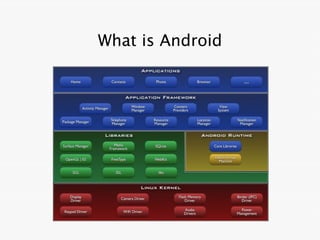
What is Android
●
    „Android is a software stack for mobile
    devices that includes an operating
    system, middleware and key
    applications.“
●
    Based on the Linux Kernel, open source
    libraries, an open source VM to abstract
    the phone features (Dalvik) and the
    programmable app framework
●
    All code is Apache v2 licensed
What is Android
Android Development
               App Fundamentals


●
    Apps are written in Java. → .apk files
●
    Each App has their Linux user ID. →
    permissions
●
    Each process has its own VM → isolation
●
    An App has only access to necessary
    components. → Security & Sharing
Android Development
                       Framework API
●
    An App can be composed by the next
    components:
       ●
           Activities : Single screen with user interface.
           Ex: Mail App → Its composed by several activities
             (List of mails, new message, …)
       ●
           Services : A component that runs in the backgroud.
           Ex: Listening music while the device is locked.
       ●
           Content Providers : Manages a shared set of App
             data.
           Ex: User's contact info. → ContactsContract.Data
       ●
           Broadcast Receivers : Allow to share
             announcements
Android Development
                         Framework API : Activities
●
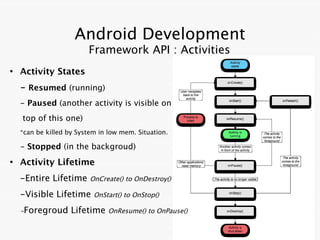
    Activity States
    - Resumed (running)
    - Paused (another activity is visible on
    top of this one)
    *can be killed by System in low mem. Situation.

    - Stopped (in the backgroud)
●
    Activity Lifetime
    -Entire Lifetime      OnCreate() to OnDestroy()

    -Visible Lifetime      OnStart() to OnStop()

    -Foregroud      Lifetime    OnResume() to OnPause()
Android Development
                 Framework API : Tasks
●
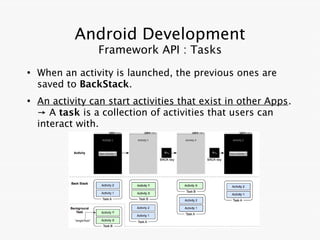
    When an activity is launched, the previous ones are
    saved to BackStack.
●
    An activity can start activities that exist in other Apps.
    → A task is a collection of activities that users can
    interact with.
Android Development
                     Framework API : Services
●
    A Service is an App component running in the background and
    doesn't provide a user interface.
●
    A service can take two forms:
    - Started [startService()]: Indepently of
    father App (can run indefinitely).
    Usually a single operation. (Upload file)
    - Bound [bindService()]: Depends of
    father App.
    Usually offers Client-server interface.
●
    A service can work both ways with:
    onStartComand() & onBind()
Android Development
     Framework API: Contents Providers

●
    A Content Provider is an App component that
    stores and retrieves data and makes it accessible
    to all App.
●
    The data can be stored using Android's file
    storage or SQLite databases.
●
    Each Content Provider exposes a public URI.
    Ex: android.provider.Contacts.Phones.CONTENT_URI

●
    If you want to make own data public, you can:
      1. Create your own content provider.
      2. Add the data to an existing provider.
Android Development
         Framework API: Broadcast Receivers

●
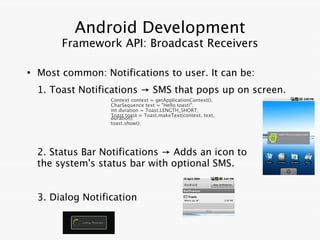
    Most common: Notifications to user. It can be:
    1. Toast Notifications → SMS that pops up on screen.
                    Context context = getApplicationContext();
                    CharSequence text = "Hello toast!";
                    int duration = Toast.LENGTH_SHORT;
                    Toast toast = Toast.makeText(context, text,
                    duration);
                    toast.show();


    2. Status Bar Notifications → Adds an icon to
    the system's status bar with optional SMS.


    3. Dialog Notification
Android Development
        Framework API: AndroidManifest.xml File
●
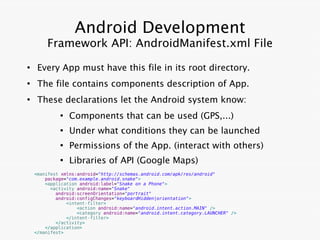
     Every App must have this file in its root directory.
●
     The file contains components description of App.
●
     These declarations let the Android system know:
             ●
                 Components that can be used (GPS,...)
             ●
                 Under what conditions they can be launched
             ●
                 Permissions of the App. (interact with others)
             ●
                 Libraries of API (Google Maps)
    <manifest xmlns:android="http://schemas.android.com/apk/res/android"
        package="com.example.android.snake">
        <application android:label="Snake on a Phone">
          <activity android:name="Snake"
            android:screenOrientation="portrait"
            android:configChanges="keyboardHidden|orientation">
                <intent-filter>
                    <action android:name="android.intent.action.MAIN" />
                    <category android:name="android.intent.category.LAUNCHER" />
                </intent-filter>
            </activity>
        </application>
    </manifest>
Android Development
                   Framework API
●
    SDK publicly available
       ●
           http://developer.android.com/sdk/
Android development
●
    After downloading the SDK tools, we also
    need the toolchain for debugging and
    loading code to targets, and the specific
    API for each Android release
       ●
           On linux (after extracting the SDK)
               ●
                   run tools/android
               ●
                   Install Platform-tools, SDK platform for
                     the desired Android version, code
                     samples and documentation
Android development
●
    Eclipse has a plugin specifically designed
    for Android development
       ●
           Eclipse-ADT
       ●
           http://developer.android.com
                  /sdk/eclipse-adt.html
       ●
           Repo a https://dl-ssl.google.com/android/eclipse/
●
    Since Android itself is open source, an
    NDK also exists for native development
       ●
           Development at the VM-level, outside
            the Java API, using C and C++
A simple example
1) Create a new virtual device target,
running some Android version
2) Create a new test project in Eclipse
from one of the SDK samples
3) Run it!
   ●
       It will automatically be loaded on the
         Virtual Device or on the plugged in
         physical device
   ●
       Device must run the Android version the
        sample code is developed for!
END
Do you have any questions?

Android Development in a Nutshell

  • 1.
    Android development (in a nutshell) ● ● Guillem Mayol ● Aleix Solé EETAC - DXAT
  • 2.
    Overview ● What is Android ● Android Development ● App Fundamentals ● Framework API ● Framework API: Activities ● Framework API: Tasks ● Framework API: Services ● Framework API: Content Providers ● Framework API: Broadcast Receivers ● Framework API: AndroidManifest.xml ● A simple example
  • 3.
    What is Android ● „Android is a software stack for mobile devices that includes an operating system, middleware and key applications.“ ● Based on the Linux Kernel, open source libraries, an open source VM to abstract the phone features (Dalvik) and the programmable app framework ● All code is Apache v2 licensed
  • 4.
  • 5.
    Android Development App Fundamentals ● Apps are written in Java. → .apk files ● Each App has their Linux user ID. → permissions ● Each process has its own VM → isolation ● An App has only access to necessary components. → Security & Sharing
  • 6.
    Android Development Framework API ● An App can be composed by the next components: ● Activities : Single screen with user interface. Ex: Mail App → Its composed by several activities (List of mails, new message, …) ● Services : A component that runs in the backgroud. Ex: Listening music while the device is locked. ● Content Providers : Manages a shared set of App data. Ex: User's contact info. → ContactsContract.Data ● Broadcast Receivers : Allow to share announcements
  • 7.
    Android Development Framework API : Activities ● Activity States - Resumed (running) - Paused (another activity is visible on top of this one) *can be killed by System in low mem. Situation. - Stopped (in the backgroud) ● Activity Lifetime -Entire Lifetime OnCreate() to OnDestroy() -Visible Lifetime OnStart() to OnStop() -Foregroud Lifetime OnResume() to OnPause()
  • 8.
    Android Development Framework API : Tasks ● When an activity is launched, the previous ones are saved to BackStack. ● An activity can start activities that exist in other Apps. → A task is a collection of activities that users can interact with.
  • 9.
    Android Development Framework API : Services ● A Service is an App component running in the background and doesn't provide a user interface. ● A service can take two forms: - Started [startService()]: Indepently of father App (can run indefinitely). Usually a single operation. (Upload file) - Bound [bindService()]: Depends of father App. Usually offers Client-server interface. ● A service can work both ways with: onStartComand() & onBind()
  • 10.
    Android Development Framework API: Contents Providers ● A Content Provider is an App component that stores and retrieves data and makes it accessible to all App. ● The data can be stored using Android's file storage or SQLite databases. ● Each Content Provider exposes a public URI. Ex: android.provider.Contacts.Phones.CONTENT_URI ● If you want to make own data public, you can: 1. Create your own content provider. 2. Add the data to an existing provider.
  • 11.
    Android Development Framework API: Broadcast Receivers ● Most common: Notifications to user. It can be: 1. Toast Notifications → SMS that pops up on screen. Context context = getApplicationContext(); CharSequence text = "Hello toast!"; int duration = Toast.LENGTH_SHORT; Toast toast = Toast.makeText(context, text, duration); toast.show(); 2. Status Bar Notifications → Adds an icon to the system's status bar with optional SMS. 3. Dialog Notification
  • 12.
    Android Development Framework API: AndroidManifest.xml File ● Every App must have this file in its root directory. ● The file contains components description of App. ● These declarations let the Android system know: ● Components that can be used (GPS,...) ● Under what conditions they can be launched ● Permissions of the App. (interact with others) ● Libraries of API (Google Maps) <manifest xmlns:android="http://schemas.android.com/apk/res/android" package="com.example.android.snake"> <application android:label="Snake on a Phone"> <activity android:name="Snake" android:screenOrientation="portrait" android:configChanges="keyboardHidden|orientation"> <intent-filter> <action android:name="android.intent.action.MAIN" /> <category android:name="android.intent.category.LAUNCHER" /> </intent-filter> </activity> </application> </manifest>
  • 13.
    Android Development Framework API ● SDK publicly available ● http://developer.android.com/sdk/
  • 14.
    Android development ● After downloading the SDK tools, we also need the toolchain for debugging and loading code to targets, and the specific API for each Android release ● On linux (after extracting the SDK) ● run tools/android ● Install Platform-tools, SDK platform for the desired Android version, code samples and documentation
  • 15.
    Android development ● Eclipse has a plugin specifically designed for Android development ● Eclipse-ADT ● http://developer.android.com /sdk/eclipse-adt.html ● Repo a https://dl-ssl.google.com/android/eclipse/ ● Since Android itself is open source, an NDK also exists for native development ● Development at the VM-level, outside the Java API, using C and C++
  • 16.
    A simple example 1)Create a new virtual device target, running some Android version 2) Create a new test project in Eclipse from one of the SDK samples 3) Run it! ● It will automatically be loaded on the Virtual Device or on the plugged in physical device ● Device must run the Android version the sample code is developed for!
  • 17.
    END Do you haveany questions?