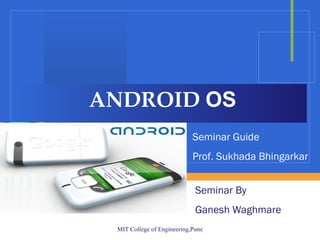
ANDROID  OS Seminar By  Ganesh Waghmare Seminar Guide Prof. Sukhada Bhingarkar
OUTLINE 2.  INTRODUCTION TO PLATFORM   3.  SECURE DATA STORAGE   4.  EXECUTION ENVIRONMENT 1.  INTRODUCTION TO ANDROID
What is ANDROID? Software platform and Operating System Developed by Google and Open Handset Alliance Android is a software stack Operating System Middleware Applications
Why Android Was Created? Software development Run on very small electronic devices Full phone software stack including applications Android is open Android is free
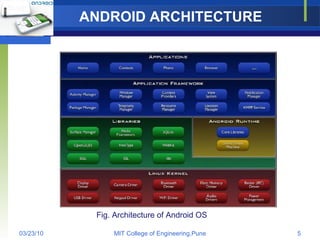
ANDROID ARCHITECTURE Fig. Architecture of Android OS
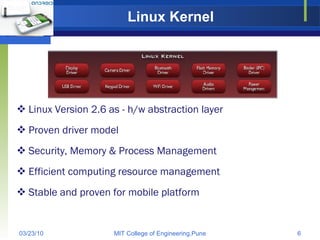
Linux Kernel Linux Version 2.6 as - h/w abstraction layer Proven driver model Security, Memory & Process Management Efficient computing resource management Stable and proven for mobile platform
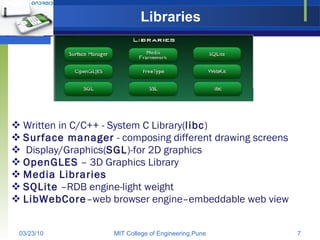
Libraries Written in C/C++ - System C Library( libc ) Surface manager  - composing different drawing screens Display/Graphics( SGL )-for 2D graphics OpenGLES  – 3D Graphics Library Media Libraries SQLite  –RDB engine-light weight LibWebCore –web browser engine–embeddable web view
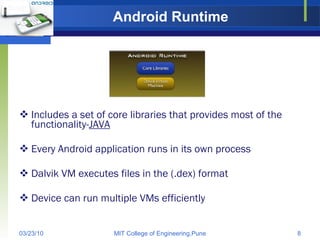
Android Runtime Includes a set of core libraries that provides most of the functionality- JAVA Every Android application runs in its own process Dalvik VM executes files in the (.dex) format Device can run multiple VMs efficiently
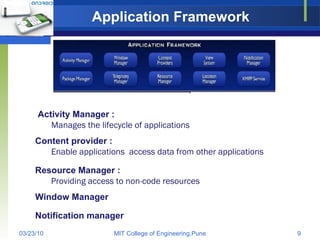
Application Framework Enable applications  access data from other applications Providing access to non-code resources Notification manager Content provider : Resource Manager : Window Manager Manages the lifecycle of applications Activity Manager :
Techniques for saving data SQLite Databases :  relational database library for storing and managing complex data Files :  you can create, write, and read files from the local storage or external media (SD Cards) FileOutputStream, FileInputStream, and Resources classes.
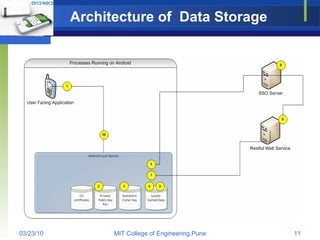
Architecture of  Data Storage
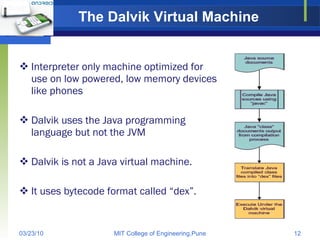
The Dalvik Virtual Machine   Interpreter only machine optimized for use on low powered, low memory devices like phones Dalvik uses the Java programming language but not the JVM  Dalvik is not a Java virtual machine.  It uses bytecode format called “dex”.
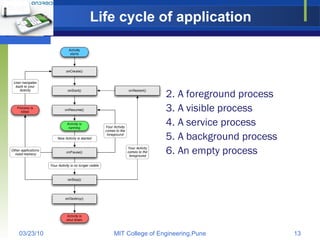
Life cycle of application A foreground process  A visible process  A service process  A background process  An empty process
CONCLUSION Android is a disruptive technology, which was introduced initially on mobile handsets, but has much wider potential.
 

Android Seminar

  • 1.
    ANDROID OSSeminar By Ganesh Waghmare Seminar Guide Prof. Sukhada Bhingarkar
  • 2.
    OUTLINE 2. INTRODUCTION TO PLATFORM 3. SECURE DATA STORAGE 4. EXECUTION ENVIRONMENT 1. INTRODUCTION TO ANDROID
  • 3.
    What is ANDROID?Software platform and Operating System Developed by Google and Open Handset Alliance Android is a software stack Operating System Middleware Applications
  • 4.
    Why Android WasCreated? Software development Run on very small electronic devices Full phone software stack including applications Android is open Android is free
  • 5.
    ANDROID ARCHITECTURE Fig.Architecture of Android OS
  • 6.
    Linux Kernel LinuxVersion 2.6 as - h/w abstraction layer Proven driver model Security, Memory & Process Management Efficient computing resource management Stable and proven for mobile platform
  • 7.
    Libraries Written inC/C++ - System C Library( libc ) Surface manager - composing different drawing screens Display/Graphics( SGL )-for 2D graphics OpenGLES – 3D Graphics Library Media Libraries SQLite –RDB engine-light weight LibWebCore –web browser engine–embeddable web view
  • 8.
    Android Runtime Includesa set of core libraries that provides most of the functionality- JAVA Every Android application runs in its own process Dalvik VM executes files in the (.dex) format Device can run multiple VMs efficiently
  • 9.
    Application Framework Enableapplications access data from other applications Providing access to non-code resources Notification manager Content provider : Resource Manager : Window Manager Manages the lifecycle of applications Activity Manager :
  • 10.
    Techniques for savingdata SQLite Databases : relational database library for storing and managing complex data Files : you can create, write, and read files from the local storage or external media (SD Cards) FileOutputStream, FileInputStream, and Resources classes.
  • 11.
    Architecture of Data Storage
  • 12.
    The Dalvik VirtualMachine Interpreter only machine optimized for use on low powered, low memory devices like phones Dalvik uses the Java programming language but not the JVM Dalvik is not a Java virtual machine. It uses bytecode format called “dex”.
  • 13.
    Life cycle ofapplication A foreground process A visible process A service process A background process An empty process
  • 14.
    CONCLUSION Android isa disruptive technology, which was introduced initially on mobile handsets, but has much wider potential.
  • 15.