Mobile Platform - Android  - The Anatomy - IBM INDIA Bhavya Siddappa Android Evangelist
Agenda Mobile Eco-system Entertainment Android Overview Challenges & Opportunities What's for me ?
Mobile Eco-System
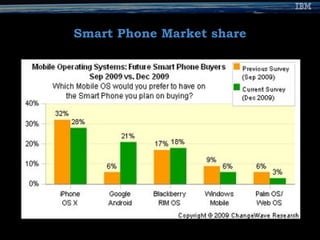
Smart Phone Market share
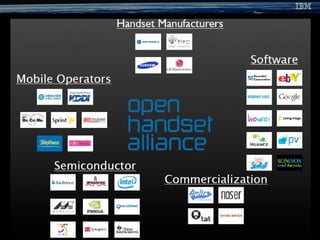
What is Android ? Fully customizable On Linux kernel. Set of software for mobile devices: An operating system Middleware & Key mobile applications. Rich set of APIs  Open source. By Google and OHA
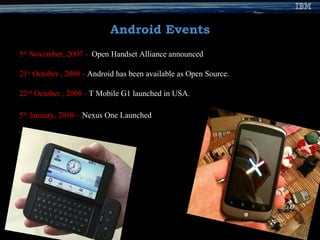
Android Events 5 th  November, 2007 -   Open Handset Alliance announced 21 st  October , 2008 -  Android has been available as Open Source. 22 nd  October , 2008 -  T Mobile G1 launched in USA. 5 th  January, 2010 –  Nexus One Launched
 
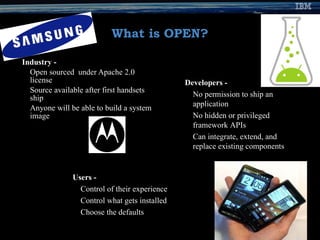
What is OPEN? Industry -   Open sourced  under Apache 2.0 license Source available after first handsets ship Anyone will be able to build a system image Developers - No permission to ship an application No hidden or privileged framework APIs Can integrate, extend, and replace existing components Users -   Control of their experience Control what gets installed Choose the defaults
Android Features Application framework -  Reuse and replacement of components  Dalvik virtual machine -  Optimized VM  Integrated browser -  Open source WebKit  Optimized graphics -  2D graphics library; 3D graphics SQLite - S tructured data storage  Media support -  Audio, Video, and still image formats (MPEG4, H.264, MP3, AAC, AMR, JPG, PNG, GIF)  GSM Telephony -  (hardware dependent)  Bluetooth, 3G, and WiFi -  (hardware dependent)  Camera, GPS, compass, and accelerometer -  (hardware dependent)  Rich development environment  - Emulator, tools for debugging, memory and performance profiling, and a plug-in for the Eclipse IDE
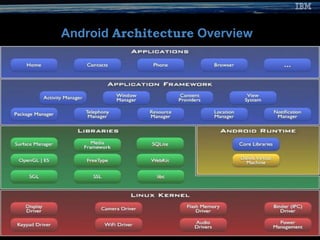
Android  Architecture  Overview
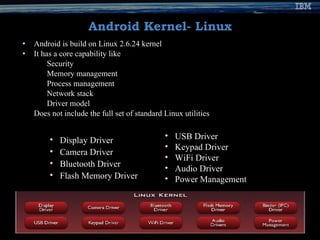
Android Kernel- Linux Android is build on Linux 2.6.24 kernel It has a core capability like Security Memory management Process management Network stack Driver model Does not include the full set of standard Linux utilities Display Driver Camera Driver Bluetooth Driver Flash Memory Driver USB Driver Keypad Driver WiFi Driver Audio Driver Power Management
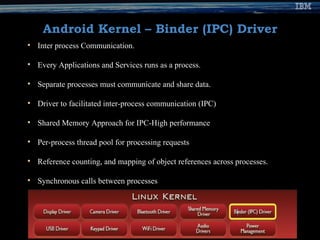
Android Kernel – Binder (IPC) Driver Inter process Communication. Every Applications and Services runs as a process. Separate processes must communicate and share data. Driver to facilitated inter-process communication (IPC) Shared Memory Approach for IPC-High performance  Per-process thread pool for processing requests Reference counting, and mapping of object references across processes. Synchronous calls between processes
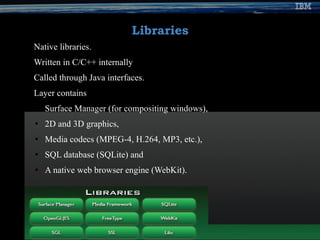
Libraries Native libraries. Written in C/C++ internally Called through Java interfaces. Layer contains Surface Manager (for compositing windows), 2D and 3D graphics, Media codecs (MPEG-4, H.264, MP3, etc.), SQL database (SQLite) and A native web browser engine (WebKit).
Function Libraries- WebKit Open source WebKit browser:  http://webkit.org Renders pages in full (desktop) view Full CSS, Javascript, DOM, AJAX support
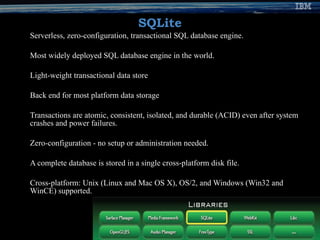
SQLite Serverless, zero-configuration, transactional SQL database engine.  Most widely deployed SQL database engine in the world.  Light-weight transactional data store Back end for most platform data storage Transactions are atomic, consistent, isolated, and durable (ACID) even after system crashes and power failures. Zero-configuration - no setup or administration needed. A complete database is stored in a single cross-platform disk file. Cross-platform: Unix (Linux and Mac OS X), OS/2, and Windows (Win32 and WinCE) supported.
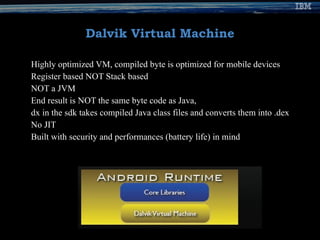
Dalvik Virtual Machine Highly optimized VM, compiled byte is optimized for mobile devices Register based NOT Stack based NOT a JVM End result is NOT the same byte code as Java, dx in the sdk takes compiled Java class files and converts them into .dex No JIT Built with security and performances (battery life) in mind
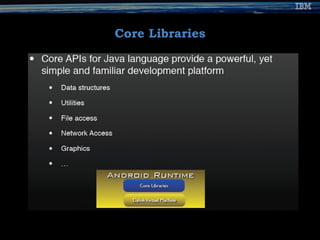
Core Libraries
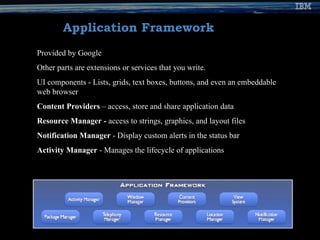
Application Framework Provided by Google Other parts are extensions or services that you write. UI components - Lists, grids, text boxes, buttons, and even an embeddable web browser  Content Providers  – access, store and share application data  Resource Manager -  access to strings, graphics, and layout files  Notification Manager  - Display custom alerts in the status bar  Activity Manager  - Manages the lifecycle of applications
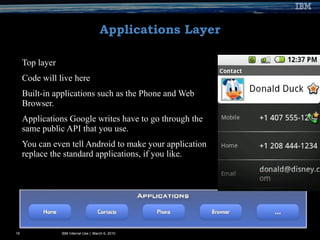
Applications Layer Top layer Code will live here Built-in applications such as the Phone and Web Browser. Applications Google writes have to go through the same public API that you use.  You can even tell Android to make your application replace the standard applications, if you like. IBM Internal Use |  March 6, 2010
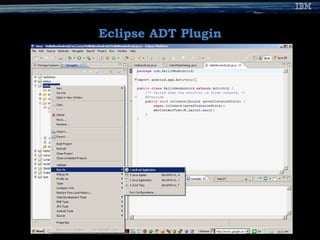
Android SDK 15 tools for developing,, Debugging,  Packaging  Installing applications on the emulator  Android Development Tools ADT plug-in for Eclipse Android Emulator Write application code & designing an application UI. Documentation.
Eclipse ADT Plugin
Installed Application in Emulator IBM Internal Use |  March 6, 2010
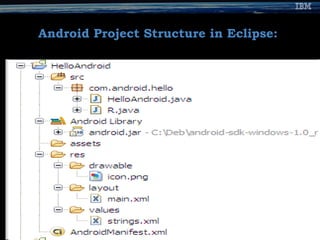
Android Project Structure in Eclipse:
Android Runtime Android application == a process A process == a instance of the Dalvik virtual machine. Dalvik can run multiple VMs efficiently.  Executes classes compiled by a Java language compiler that have been transformed into the .dex format. DVM executes files in the Dalvik Executable (.dex) format which is optimized.
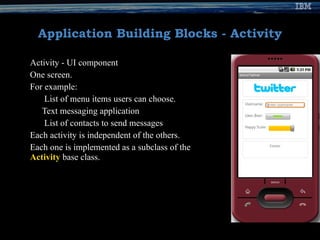
Application Building Blocks - Activity Activity - UI component One screen. For example: List of menu items users can choose. Text messaging application  List of contacts to send messages  Each activity is independent of the others.  Each one is implemented as a subclass of the  Activity  base class.
Application Building Blocks - Intent IntentReceiver Set and respond to notifications or status changes. Can wake up your app. Wakes up a predefined action through the external event.  For example:  Alarm notification, when the user receives email.
Application Building Blocks - Service Faceless task that runs in the background. No visual user interface Runs in the background  Certain period of time For example: Background music  Each service extends the  Service  base class.
Application Building Blocks – Content Providers Enable applications to share data. Makes a specific set of the application's data available to other applications.  Date stored in the file system, in an SQLite database Extends the  ContentProvider  base class Enable other applications to retrieve and store data of the type it controls.
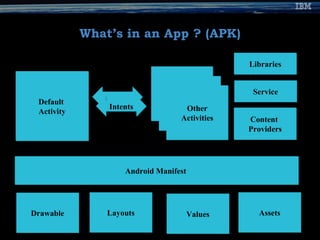
What’s in an App ? (APK) Drawable Layouts Values Assets Android Manifest  Default  Activity Intents Content  Providers Service Libraries Other Activities
Get Started SDK  http://developer.android.com/sdk/index.html Eclipse > 3.5 Galileo Eclipse Plug-in > XP, Vista, Linux, x86 Mac 10.4.8 or later  http://developer.android.com/sdk/eclipse-adt.html Leave the emulator running!
References http://developer.android.com/ http://en.wikipedia.org/wiki/Google_Android http://www.anddev.org/ http://www.ibm.com/developerworks/
Questions and Answers IBM Internal Use |  March 6, 2010
IBMer [email_address] Android Evangelist bhavsidd@gmail.com  Blogger www.bhavyavoice.blogspot.com  Tweeter www.twitter.com/bhavis  LinkedIn www.linkedin.com/in/bhavis   Thank You  !

Android Anatomy

  • 1.
    Mobile Platform -Android - The Anatomy - IBM INDIA Bhavya Siddappa Android Evangelist
  • 2.
    Agenda Mobile Eco-systemEntertainment Android Overview Challenges & Opportunities What's for me ?
  • 3.
  • 4.
  • 5.
    What is Android? Fully customizable On Linux kernel. Set of software for mobile devices: An operating system Middleware & Key mobile applications. Rich set of APIs Open source. By Google and OHA
  • 6.
    Android Events 5th November, 2007 - Open Handset Alliance announced 21 st October , 2008 - Android has been available as Open Source. 22 nd October , 2008 - T Mobile G1 launched in USA. 5 th January, 2010 – Nexus One Launched
  • 7.
  • 8.
    What is OPEN?Industry - Open sourced under Apache 2.0 license Source available after first handsets ship Anyone will be able to build a system image Developers - No permission to ship an application No hidden or privileged framework APIs Can integrate, extend, and replace existing components Users - Control of their experience Control what gets installed Choose the defaults
  • 9.
    Android Features Applicationframework - Reuse and replacement of components Dalvik virtual machine - Optimized VM Integrated browser - Open source WebKit Optimized graphics - 2D graphics library; 3D graphics SQLite - S tructured data storage Media support - Audio, Video, and still image formats (MPEG4, H.264, MP3, AAC, AMR, JPG, PNG, GIF) GSM Telephony - (hardware dependent) Bluetooth, 3G, and WiFi - (hardware dependent) Camera, GPS, compass, and accelerometer - (hardware dependent) Rich development environment - Emulator, tools for debugging, memory and performance profiling, and a plug-in for the Eclipse IDE
  • 10.
  • 11.
    Android Kernel- LinuxAndroid is build on Linux 2.6.24 kernel It has a core capability like Security Memory management Process management Network stack Driver model Does not include the full set of standard Linux utilities Display Driver Camera Driver Bluetooth Driver Flash Memory Driver USB Driver Keypad Driver WiFi Driver Audio Driver Power Management
  • 12.
    Android Kernel –Binder (IPC) Driver Inter process Communication. Every Applications and Services runs as a process. Separate processes must communicate and share data. Driver to facilitated inter-process communication (IPC) Shared Memory Approach for IPC-High performance Per-process thread pool for processing requests Reference counting, and mapping of object references across processes. Synchronous calls between processes
  • 13.
    Libraries Native libraries.Written in C/C++ internally Called through Java interfaces. Layer contains Surface Manager (for compositing windows), 2D and 3D graphics, Media codecs (MPEG-4, H.264, MP3, etc.), SQL database (SQLite) and A native web browser engine (WebKit).
  • 14.
    Function Libraries- WebKitOpen source WebKit browser: http://webkit.org Renders pages in full (desktop) view Full CSS, Javascript, DOM, AJAX support
  • 15.
    SQLite Serverless, zero-configuration,transactional SQL database engine. Most widely deployed SQL database engine in the world. Light-weight transactional data store Back end for most platform data storage Transactions are atomic, consistent, isolated, and durable (ACID) even after system crashes and power failures. Zero-configuration - no setup or administration needed. A complete database is stored in a single cross-platform disk file. Cross-platform: Unix (Linux and Mac OS X), OS/2, and Windows (Win32 and WinCE) supported.
  • 16.
    Dalvik Virtual MachineHighly optimized VM, compiled byte is optimized for mobile devices Register based NOT Stack based NOT a JVM End result is NOT the same byte code as Java, dx in the sdk takes compiled Java class files and converts them into .dex No JIT Built with security and performances (battery life) in mind
  • 17.
  • 18.
    Application Framework Providedby Google Other parts are extensions or services that you write. UI components - Lists, grids, text boxes, buttons, and even an embeddable web browser Content Providers – access, store and share application data Resource Manager - access to strings, graphics, and layout files Notification Manager - Display custom alerts in the status bar Activity Manager - Manages the lifecycle of applications
  • 19.
    Applications Layer Toplayer Code will live here Built-in applications such as the Phone and Web Browser. Applications Google writes have to go through the same public API that you use. You can even tell Android to make your application replace the standard applications, if you like. IBM Internal Use | March 6, 2010
  • 20.
    Android SDK 15tools for developing,, Debugging, Packaging Installing applications on the emulator Android Development Tools ADT plug-in for Eclipse Android Emulator Write application code & designing an application UI. Documentation.
  • 21.
  • 22.
    Installed Application inEmulator IBM Internal Use | March 6, 2010
  • 23.
  • 24.
    Android Runtime Androidapplication == a process A process == a instance of the Dalvik virtual machine. Dalvik can run multiple VMs efficiently. Executes classes compiled by a Java language compiler that have been transformed into the .dex format. DVM executes files in the Dalvik Executable (.dex) format which is optimized.
  • 25.
    Application Building Blocks- Activity Activity - UI component One screen. For example: List of menu items users can choose. Text messaging application List of contacts to send messages Each activity is independent of the others. Each one is implemented as a subclass of the Activity base class.
  • 26.
    Application Building Blocks- Intent IntentReceiver Set and respond to notifications or status changes. Can wake up your app. Wakes up a predefined action through the external event. For example: Alarm notification, when the user receives email.
  • 27.
    Application Building Blocks- Service Faceless task that runs in the background. No visual user interface Runs in the background Certain period of time For example: Background music Each service extends the Service base class.
  • 28.
    Application Building Blocks– Content Providers Enable applications to share data. Makes a specific set of the application's data available to other applications. Date stored in the file system, in an SQLite database Extends the ContentProvider base class Enable other applications to retrieve and store data of the type it controls.
  • 29.
    What’s in anApp ? (APK) Drawable Layouts Values Assets Android Manifest Default Activity Intents Content Providers Service Libraries Other Activities
  • 30.
    Get Started SDK http://developer.android.com/sdk/index.html Eclipse > 3.5 Galileo Eclipse Plug-in > XP, Vista, Linux, x86 Mac 10.4.8 or later http://developer.android.com/sdk/eclipse-adt.html Leave the emulator running!
  • 31.
    References http://developer.android.com/ http://en.wikipedia.org/wiki/Google_Androidhttp://www.anddev.org/ http://www.ibm.com/developerworks/
  • 32.
    Questions and AnswersIBM Internal Use | March 6, 2010
  • 33.
    IBMer [email_address] AndroidEvangelist bhavsidd@gmail.com Blogger www.bhavyavoice.blogspot.com Tweeter www.twitter.com/bhavis LinkedIn www.linkedin.com/in/bhavis Thank You !

Editor's Notes

  • #2 03/06/10
  • #33 IBM Confidential Instructor notes: Include an opportunity for participants to ask questions after presentation of key concepts, examples, and exercises.