Computer Organization and Architecture
• Computer architecture: the definition of basic attributes of hardware
components and their interconnections, in order to achieve certain
specified goals in terms of functions and performance.
• Computer Architecture refers to those attributes of a system that have
a direct impact on;
• the logical execution of a program. Examples:
• the instruction set
• the number of bits used to represent various data types
• I/O mechanisms
• memory addressing techniques
Computer Organization and Architecture
• Computer organization: the design and physical arrangement of
various hardware units to work in tandem, in a orderly manner, in
order to achieve the goals specified in the architecture.
• Computer Organization refers to the operational units and their
interconnections that realize the architectural specifications.
Examples are things that are transparent to the programmer:
• control signals
• interfaces between computer and peripherals
• the memory technology being used
Structure and Function
• Structure is the way in which components relate to each other
• Function is the operation of individual components as part of the
structure
• All computer functions are:
• Data processing: Computer must be able to process data which may take a
wide variety of forms and the range of processing.
• Data storage: Computer stores data either temporarily or
permanently.
• Data movement: Computer must be able to move data between itself
and the outside world.
• Control: There must be a control of the above three functions.
Computer Components
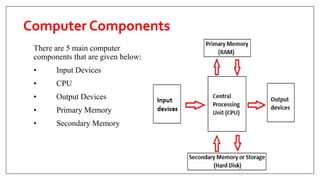
There are 5 main computer
components that are given below:
• Input Devices
• CPU
• Output Devices
• Primary Memory
• Secondary Memory
The Operations of Computer Components
1. Inputting: It is the process of entering raw data, instructions and information
into the computer. It is performed with the help of input devices.
2. Storing: The computer has primary memory and secondary storage to store
data and instructions. It stores the data before sending it to CPU for processing
and also stores the processed data before displaying it as output.
3. Processing: It is the process of converting the raw data into useful information.
This process is performed by the CPU of the computer. It takes the raw data
from storage, processes it and then sends back the processed data to storage.
4. Outputting: It is the process of presenting the processed data through output
devices like monitor, printer and speakers.
5. Controlling: This operation is performed by the control unit that is part of
CPU. The control unit ensures that all basic operations are executed in a right
manner and sequence.
Difference between Input, Output,
Input/Output devices
A computer is a system. All systems have input, processing and output and in most
cases storage (which in itself offer both input and output)
• An input device is a device that gives instructions or data to a computer for
processing.
• Usually, the devices are controlled by user to give instructions to a computer.
• An input device can send data to another device, but it cannot receive data from
another device.
• Examples include: Keyboards, Mouse, Scanner, camera, etc.The information flows
in one direction only. From the device to the processor.
6
Difference between Input, Output,
Input/Output devices
7
• An Output device is a peripheral component that the processor uses to
display information to the user or another device.
• An output device can receive data from another device, but it cannot send
data to another device.
• Examples include a non-touch screen monitor (Visual Display Unit), a
projector, speakers etc.
Difference between Input, Output,
Input/Output devices
8
• Input/Output device is one that allows entering of data and also displaying
or outputting data/information.
• An input/output device can send data to another device and also receive
data from another device.
• Examples include headsets that have speakers and microphone, facsimile
(fax), touch screen monitor etc.
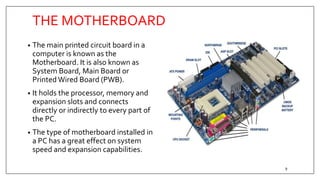
THE MOTHERBOARD
• The main printed circuit board in a
computer is known as the
Motherboard. It is also known as
System Board, Main Board or
Printed Wired Board (PWB).
• It holds the processor, memory and
expansion slots and connects
directly or indirectly to every part of
the PC.
• The type of motherboard installed in
a PC has a great effect on system
speed and expansion capabilities.
9
MOTHERBOARD COMPONENTS
10
The motherboard holds all the major logic components of the PC.These
components include:
• The CPU
• Main Memory (RAM)
• BIOS
• CMOS memory / CMOS Battery
• Level 2 cache RAM
• CPU Clock
• Expansion Bus
• Chipset
• Parallel printer port
• Keyboard interface
• Hard disk controllers
Processor
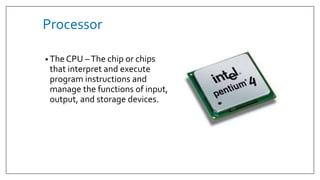
• The CPU –The chip or chips
that interpret and execute
program instructions and
manage the functions of input,
output, and storage devices.
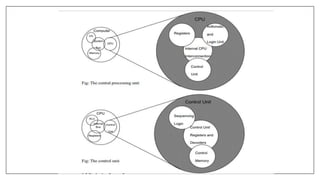
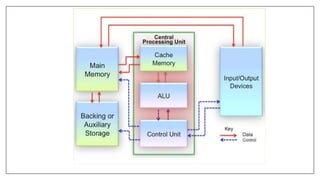
Central Processing Unit
• Registers/Main Memory
• Arithmetic Unit
• Logic Unit
• Control Unit
• Cache Memory
Central Processing Unit
• Registers - CPU contains a few special purpose, temporary storage units known as
registers.They are high-speed memory locations used for holding instructions, data and
intermediate results that are currently being processed.
• Main Memory -The main memory is referred to as the internal memory of primary
memory of the computer. It is also known as Random Access Memory (RAM).
• Arithmetic Unit - Arithmetic Unit is a part of the CPU that performs arithmetic
operations on the data.The arithmetic operations can be addition, subtraction,
multiplication or division.
• Logic Unit - Logic Unit is a part of the CPU that performs logical operations on the data.
• Control Unit - Control Unit is an important component of CPU that controls the flow of
data and information. It maintains the sequence of operations being performed by the
CPU.
• Cache Memory - Cache memory is a small, fast and expensive memory that stores the
copies of data that needs to be accessed frequently from the main memory.
Central Processing Unit
The main operations of the CPU include four phases:
(1) Fetching instructions from the memory
(2) Decoding the instructions to decide what operations to be performed
(3) Executing the instructions
(4) Storing the results back in the memory
Internal Communications
The internal communication of a processor in the computer system can be
divided into two major categories:
(1) Processor to memory communication
(2) Processor to I/O devices communication
Processor to Memory Communication
• The direct communication between the processor and memory of the
computer system is implemented with the help of two registers:
(1) Memory Address Register
(2) Memory Buffer Register
The reading and writing operations performed by the processor are called
memory read and memory write operations.
Processor to I/O Devices Communication
• The communication between I/O devices and processor of the computer
system is implemented using an interface unit.The interface unit acts as an
intermediary between the processor and the device controllers of various
peripheral devices in the computer system.
Machine Cycle
• The cycle during which a machine language instruction is executed by the
processor of the computer system is known as machine cycle.
Instruction Cycle
• Fetching:The CPU retrieves the instruction from the main memory of
the computer system.
• Decoding: Breaking down the instruction into different parts, so that it
can be easily understood before being processed by the CPU.
Execution Cycle
• Executing:The decoded instruction is executed by the ALU of the CPU.
• Storing:The result computed in the execution phase is either sent to the
memory or to an output device.
The Bus
• A bus is a set of wires that is used to connect the different internal
components of the computer system for the purpose of transferring data as
well addresses amongst them.
• Data bus: used to transfer data amongst the different internal components.
Modern computer systems use 32-bit and 64 –bit data buses for data
transfer.
• Address bus: transfers the memory addresses for read and write memory
operations.
Memory and Storage Systems
• Primary Memory: Storing the data that are being currently handled by the
CPU; generally known as “memory”;
• Secondary Memory: Storing the results and the data for future use;
generally known as “storage”;
• Internal Process Memory: Placed either inside the CPU or near the CPU.
Memory Representation
• In the memory, values are represented by sequences of binary digits, know
as bits. Most computers use a group of eight bits, known as a byte, to
represent a character.
• Memory is a “bunch” of bytes or cells into which we can place data. Each
cell, known as a data item, is assigned a unique number known as “address”.
The CPU can identify each cell by its address.
Memory Representation
• The byte is defined as the “smallest addressable unit” of memory. Most
computers use groups of bytes, usually 2 or 4, known as “words” to
represent information.
• Computer memories are often rated in terms of their capacity to store
information.Typically, capacities are described using the unit of byte as
follows:
(1) 1 KB (Kilobyte)=1,024 bytes
(2) 1 MB (Megabyte)=1,048,576 bytes
(3) 1 GB (Gigabyte)=1,073,741,824 bytes
(4) 1TB (Terabyte)=1,099,511,627,776 bytes
RandomAccess Memory
• Random Access Memory (RAM) is a volatile memory and loses all its data
when the power is switched off.
• It is the main memory of the computer system that stores the data
temporarily and allows the data to be accessed in any order.
• RAM can be categorized into two main types, namely, Static RAM and
Dynamic RAM.
RandomAccess Memory
• Static RAM: is a type of RAM in which data is stored till the power of the
computer system is switched on. SRAM uses a number of transistors to
store a single bit of digital information.
• Dynamic RAM: is the RAM in which data is stored in a storage cell,
consisting of a transistor and a capacitor.The DRAM needs to be
continuously refreshed with power supply because the capacitor has the
tendency to get discharged. DRAM retains the data for a very short span of
time, even after the power supply is switched off.
Read Only Memory
• ROM is the memory that stores the data permanently.
• The data can be easily read from this type of memory but cannot
be changed.
• ROM is most commonly used in devices such as calculators, laser
printers, etc.
• ROM does not allow the random access of data, and allows
sequential access of data.
Read Only Memory
ROM is divided into four types:
(1) Programmable ROM: a memory chip on which the write operation of data can be
performed only once. PROM is reliable and stores the data permanently without
making any change in it. It is mostly used in video games and electronic dictionaries.
(2) Erasable PROM: a type of ROM in which data can be erased or destroyed using
Ultraviolet Light.
(3) Electrically Erasable PROM: a type of ROM in which data can be erased or
destroyed by exposing it to an electric charge.
(4) Flash ROM: a type of EEPROM that stores the information using floating-gate
transistors, which can store electric charge for a longer period of time as compared to
the normal transistors.This memory is mainly used in the memory cards of mobile
phones, digital cameras and ipods for storing data. Flash ROM has faster speed of
reading data, as compared to any other type of ROM.

Computer Architecture and Organization.pptx

  • 1.
    Computer Organization andArchitecture • Computer architecture: the definition of basic attributes of hardware components and their interconnections, in order to achieve certain specified goals in terms of functions and performance. • Computer Architecture refers to those attributes of a system that have a direct impact on; • the logical execution of a program. Examples: • the instruction set • the number of bits used to represent various data types • I/O mechanisms • memory addressing techniques
  • 2.
    Computer Organization andArchitecture • Computer organization: the design and physical arrangement of various hardware units to work in tandem, in a orderly manner, in order to achieve the goals specified in the architecture. • Computer Organization refers to the operational units and their interconnections that realize the architectural specifications. Examples are things that are transparent to the programmer: • control signals • interfaces between computer and peripherals • the memory technology being used
  • 3.
    Structure and Function •Structure is the way in which components relate to each other • Function is the operation of individual components as part of the structure • All computer functions are: • Data processing: Computer must be able to process data which may take a wide variety of forms and the range of processing. • Data storage: Computer stores data either temporarily or permanently. • Data movement: Computer must be able to move data between itself and the outside world. • Control: There must be a control of the above three functions.
  • 4.
    Computer Components There are5 main computer components that are given below: • Input Devices • CPU • Output Devices • Primary Memory • Secondary Memory
  • 5.
    The Operations ofComputer Components 1. Inputting: It is the process of entering raw data, instructions and information into the computer. It is performed with the help of input devices. 2. Storing: The computer has primary memory and secondary storage to store data and instructions. It stores the data before sending it to CPU for processing and also stores the processed data before displaying it as output. 3. Processing: It is the process of converting the raw data into useful information. This process is performed by the CPU of the computer. It takes the raw data from storage, processes it and then sends back the processed data to storage. 4. Outputting: It is the process of presenting the processed data through output devices like monitor, printer and speakers. 5. Controlling: This operation is performed by the control unit that is part of CPU. The control unit ensures that all basic operations are executed in a right manner and sequence.
  • 6.
    Difference between Input,Output, Input/Output devices A computer is a system. All systems have input, processing and output and in most cases storage (which in itself offer both input and output) • An input device is a device that gives instructions or data to a computer for processing. • Usually, the devices are controlled by user to give instructions to a computer. • An input device can send data to another device, but it cannot receive data from another device. • Examples include: Keyboards, Mouse, Scanner, camera, etc.The information flows in one direction only. From the device to the processor. 6
  • 7.
    Difference between Input,Output, Input/Output devices 7 • An Output device is a peripheral component that the processor uses to display information to the user or another device. • An output device can receive data from another device, but it cannot send data to another device. • Examples include a non-touch screen monitor (Visual Display Unit), a projector, speakers etc.
  • 8.
    Difference between Input,Output, Input/Output devices 8 • Input/Output device is one that allows entering of data and also displaying or outputting data/information. • An input/output device can send data to another device and also receive data from another device. • Examples include headsets that have speakers and microphone, facsimile (fax), touch screen monitor etc.
  • 9.
    THE MOTHERBOARD • Themain printed circuit board in a computer is known as the Motherboard. It is also known as System Board, Main Board or Printed Wired Board (PWB). • It holds the processor, memory and expansion slots and connects directly or indirectly to every part of the PC. • The type of motherboard installed in a PC has a great effect on system speed and expansion capabilities. 9
  • 10.
    MOTHERBOARD COMPONENTS 10 The motherboardholds all the major logic components of the PC.These components include: • The CPU • Main Memory (RAM) • BIOS • CMOS memory / CMOS Battery • Level 2 cache RAM • CPU Clock • Expansion Bus • Chipset • Parallel printer port • Keyboard interface • Hard disk controllers
  • 11.
    Processor • The CPU–The chip or chips that interpret and execute program instructions and manage the functions of input, output, and storage devices.
  • 12.
    Central Processing Unit •Registers/Main Memory • Arithmetic Unit • Logic Unit • Control Unit • Cache Memory
  • 13.
    Central Processing Unit •Registers - CPU contains a few special purpose, temporary storage units known as registers.They are high-speed memory locations used for holding instructions, data and intermediate results that are currently being processed. • Main Memory -The main memory is referred to as the internal memory of primary memory of the computer. It is also known as Random Access Memory (RAM). • Arithmetic Unit - Arithmetic Unit is a part of the CPU that performs arithmetic operations on the data.The arithmetic operations can be addition, subtraction, multiplication or division. • Logic Unit - Logic Unit is a part of the CPU that performs logical operations on the data. • Control Unit - Control Unit is an important component of CPU that controls the flow of data and information. It maintains the sequence of operations being performed by the CPU. • Cache Memory - Cache memory is a small, fast and expensive memory that stores the copies of data that needs to be accessed frequently from the main memory.
  • 14.
    Central Processing Unit Themain operations of the CPU include four phases: (1) Fetching instructions from the memory (2) Decoding the instructions to decide what operations to be performed (3) Executing the instructions (4) Storing the results back in the memory
  • 15.
    Internal Communications The internalcommunication of a processor in the computer system can be divided into two major categories: (1) Processor to memory communication (2) Processor to I/O devices communication
  • 16.
    Processor to MemoryCommunication • The direct communication between the processor and memory of the computer system is implemented with the help of two registers: (1) Memory Address Register (2) Memory Buffer Register The reading and writing operations performed by the processor are called memory read and memory write operations.
  • 17.
    Processor to I/ODevices Communication • The communication between I/O devices and processor of the computer system is implemented using an interface unit.The interface unit acts as an intermediary between the processor and the device controllers of various peripheral devices in the computer system.
  • 18.
    Machine Cycle • Thecycle during which a machine language instruction is executed by the processor of the computer system is known as machine cycle. Instruction Cycle • Fetching:The CPU retrieves the instruction from the main memory of the computer system. • Decoding: Breaking down the instruction into different parts, so that it can be easily understood before being processed by the CPU.
  • 19.
    Execution Cycle • Executing:Thedecoded instruction is executed by the ALU of the CPU. • Storing:The result computed in the execution phase is either sent to the memory or to an output device.
  • 20.
    The Bus • Abus is a set of wires that is used to connect the different internal components of the computer system for the purpose of transferring data as well addresses amongst them. • Data bus: used to transfer data amongst the different internal components. Modern computer systems use 32-bit and 64 –bit data buses for data transfer. • Address bus: transfers the memory addresses for read and write memory operations.
  • 23.
    Memory and StorageSystems • Primary Memory: Storing the data that are being currently handled by the CPU; generally known as “memory”; • Secondary Memory: Storing the results and the data for future use; generally known as “storage”; • Internal Process Memory: Placed either inside the CPU or near the CPU.
  • 24.
    Memory Representation • Inthe memory, values are represented by sequences of binary digits, know as bits. Most computers use a group of eight bits, known as a byte, to represent a character. • Memory is a “bunch” of bytes or cells into which we can place data. Each cell, known as a data item, is assigned a unique number known as “address”. The CPU can identify each cell by its address.
  • 25.
    Memory Representation • Thebyte is defined as the “smallest addressable unit” of memory. Most computers use groups of bytes, usually 2 or 4, known as “words” to represent information. • Computer memories are often rated in terms of their capacity to store information.Typically, capacities are described using the unit of byte as follows: (1) 1 KB (Kilobyte)=1,024 bytes (2) 1 MB (Megabyte)=1,048,576 bytes (3) 1 GB (Gigabyte)=1,073,741,824 bytes (4) 1TB (Terabyte)=1,099,511,627,776 bytes
  • 26.
    RandomAccess Memory • RandomAccess Memory (RAM) is a volatile memory and loses all its data when the power is switched off. • It is the main memory of the computer system that stores the data temporarily and allows the data to be accessed in any order. • RAM can be categorized into two main types, namely, Static RAM and Dynamic RAM.
  • 27.
    RandomAccess Memory • StaticRAM: is a type of RAM in which data is stored till the power of the computer system is switched on. SRAM uses a number of transistors to store a single bit of digital information. • Dynamic RAM: is the RAM in which data is stored in a storage cell, consisting of a transistor and a capacitor.The DRAM needs to be continuously refreshed with power supply because the capacitor has the tendency to get discharged. DRAM retains the data for a very short span of time, even after the power supply is switched off.
  • 28.
    Read Only Memory •ROM is the memory that stores the data permanently. • The data can be easily read from this type of memory but cannot be changed. • ROM is most commonly used in devices such as calculators, laser printers, etc. • ROM does not allow the random access of data, and allows sequential access of data.
  • 29.
    Read Only Memory ROMis divided into four types: (1) Programmable ROM: a memory chip on which the write operation of data can be performed only once. PROM is reliable and stores the data permanently without making any change in it. It is mostly used in video games and electronic dictionaries. (2) Erasable PROM: a type of ROM in which data can be erased or destroyed using Ultraviolet Light. (3) Electrically Erasable PROM: a type of ROM in which data can be erased or destroyed by exposing it to an electric charge. (4) Flash ROM: a type of EEPROM that stores the information using floating-gate transistors, which can store electric charge for a longer period of time as compared to the normal transistors.This memory is mainly used in the memory cards of mobile phones, digital cameras and ipods for storing data. Flash ROM has faster speed of reading data, as compared to any other type of ROM.