HARDWARE/ANATOMY OF COMPUTER
ANATOMY OF COMPUTERS
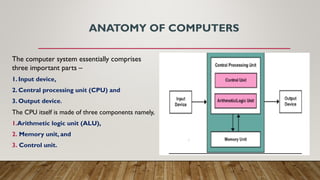
The computer system essentially comprises
three important parts –
1. Input device,
2. Central processing unit (CPU) and
3. Output device.
The CPU itself is made of three components namely,
1.Arithmetic logic unit (ALU),
2. Memory unit, and
3. Control unit.
INPUT DEVICES
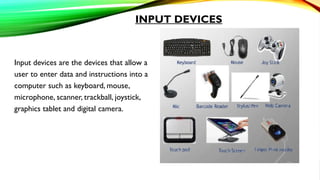
Input devices are the devices that allow a
user to enter data and instructions into a
computer such as keyboard, mouse,
microphone, scanner, trackball, joystick,
graphics tablet and digital camera.
OUTPUT DEVICES
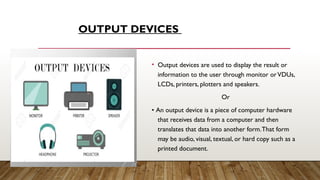
• Output devices are used to display the result or
information to the user through monitor orVDUs,
LCDs, printers, plotters and speakers.
Or
• An output device is a piece of computer hardware
that receives data from a computer and then
translates that data into another form.That form
may be audio, visual, textual, or hard copy such as a
printed document.
CPU (CENTRAL PROCESSING UNIT)
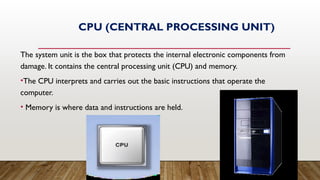
The system unit is the box that protects the internal electronic components from
damage. It contains the central processing unit (CPU) and memory.
•The CPU interprets and carries out the basic instructions that operate the
computer.
• Memory is where data and instructions are held.
CPU
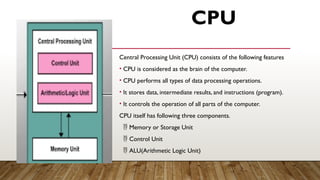
Central Processing Unit (CPU) consists of the following features
• CPU is considered as the brain of the computer.
• CPU performs all types of data processing operations.
• It stores data, intermediate results, and instructions (program).
• It controls the operation of all parts of the computer.
CPU itself has following three components.
 Memory or Storage Unit
 Control Unit
 ALU(Arithmetic Logic Unit)
MEMORY OR STORAGE UNIT
• This unit can store instructions, data, and intermediate results.This unit supplies information to other
units of the computer when needed. It is also known as internal storage unit or the main memory or
the primary storage or Random Access Memory (RAM).
• Its size affects speed, power, and capability. Primary memory and secondary memory are two types of
memories in the computer.
CONTROL UNIT
This unit controls the operations of all parts of the computer but does not carry out any actual data
processing operations.
Functions of this unit are −
 It is responsible for controlling the transfer of data and instructions among other units of a computer.
 It manages and coordinates all the units of the computer.
 It communicates with Input/Output devices for transfer of data or results from storage.
ALU (ARITHMETIC LOGIC UNIT)
This unit consists of two subsections namely,
 Arithmetic Section
 Logic Section
Arithmetic Section:
Function of arithmetic section is to perform arithmetic operations like addition, subtraction, multiplication, and
division.All complex operations are done by making repetitive use of the above operations.
Logic Section:
Function of logic section is to perform logic operations such as comparing, selecting, matching, and merging of
data.
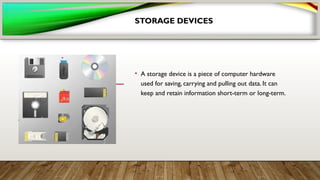
STORAGE DEVICES
• A storage device is a piece of computer hardware
used for saving, carrying and pulling out data. It can
keep and retain information short-term or long-term.
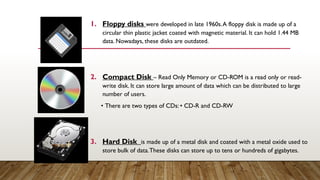
1. Floppy disks were developed in late 1960s.A floppy disk is made up of a
circular thin plastic jacket coated with magnetic material. It can hold 1.44 MB
data. Nowadays, these disks are outdated.
2. Compact Disk – Read Only Memory or CD-ROM is a read only or read-
write disk. It can store large amount of data which can be distributed to large
number of users.
• There are two types of CDs: • CD-R and CD-RW
3. Hard Disk is made up of a metal disk and coated with a metal oxide used to
store bulk of data.These disks can store up to tens or hundreds of gigabytes.
.
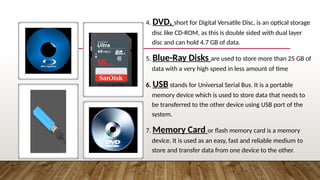
4. DVD, short for Digital Versatile Disc, is an optical storage
disc like CD-ROM, as this is double sided with dual layer
disc and can hold 4.7 GB of data.
5. Blue-Ray Disks are used to store more than 25 GB of
data with a very high speed in less amount of time
6. USB stands for Universal Serial Bus. It is a portable
memory device which is used to store data that needs to
be transferred to the other device using USB port of the
system.
7. Memory Card or flash memory card is a memory
device. It is used as an easy, fast and reliable medium to
store and transfer data from one device to the other.
MEMORY
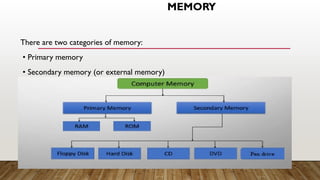
There are two categories of memory:
• Primary memory
• Secondary memory (or external memory)
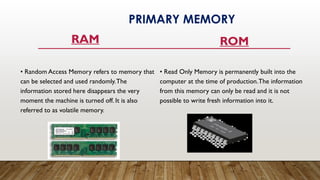
RAM
• Random Access Memory refers to memory that
can be selected and used randomly.The
information stored here disappears the very
moment the machine is turned off. It is also
referred to as volatile memory.
ROM
• Read Only Memory is permanently built into the
computer at the time of production.The information
from this memory can only be read and it is not
possible to write fresh information into it.
PRIMARY MEMORY
SECONDARY MEMORY
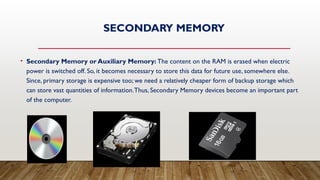
• Secondary Memory or Auxiliary Memory: The content on the RAM is erased when electric
power is switched off. So, it becomes necessary to store this data for future use, somewhere else.
Since, primary storage is expensive too; we need a relatively cheaper form of backup storage which
can store vast quantities of information.Thus, Secondary Memory devices become an important part
of the computer.
UNITS OF MEMORY
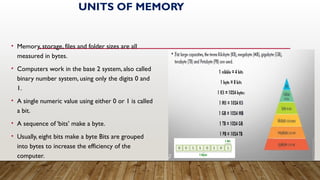
• Memory, storage, files and folder sizes are all
measured in bytes.
• Computers work in the base 2 system, also called
binary number system, using only the digits 0 and
1.
• A single numeric value using either 0 or 1 is called
a bit.
• A sequence of ‘bits’ make a byte.
• Usually, eight bits make a byte Bits are grouped
into bytes to increase the efficiency of the
computer.

COMPUTERS STRUCTURES OS YHE Sblock diagram.ppt

  • 1.
  • 2.
    ANATOMY OF COMPUTERS Thecomputer system essentially comprises three important parts – 1. Input device, 2. Central processing unit (CPU) and 3. Output device. The CPU itself is made of three components namely, 1.Arithmetic logic unit (ALU), 2. Memory unit, and 3. Control unit.
  • 3.
    INPUT DEVICES Input devicesare the devices that allow a user to enter data and instructions into a computer such as keyboard, mouse, microphone, scanner, trackball, joystick, graphics tablet and digital camera.
  • 4.
    OUTPUT DEVICES • Outputdevices are used to display the result or information to the user through monitor orVDUs, LCDs, printers, plotters and speakers. Or • An output device is a piece of computer hardware that receives data from a computer and then translates that data into another form.That form may be audio, visual, textual, or hard copy such as a printed document.
  • 5.
    CPU (CENTRAL PROCESSINGUNIT) The system unit is the box that protects the internal electronic components from damage. It contains the central processing unit (CPU) and memory. •The CPU interprets and carries out the basic instructions that operate the computer. • Memory is where data and instructions are held.
  • 6.
    CPU Central Processing Unit(CPU) consists of the following features • CPU is considered as the brain of the computer. • CPU performs all types of data processing operations. • It stores data, intermediate results, and instructions (program). • It controls the operation of all parts of the computer. CPU itself has following three components.  Memory or Storage Unit  Control Unit  ALU(Arithmetic Logic Unit)
  • 7.
    MEMORY OR STORAGEUNIT • This unit can store instructions, data, and intermediate results.This unit supplies information to other units of the computer when needed. It is also known as internal storage unit or the main memory or the primary storage or Random Access Memory (RAM). • Its size affects speed, power, and capability. Primary memory and secondary memory are two types of memories in the computer.
  • 8.
    CONTROL UNIT This unitcontrols the operations of all parts of the computer but does not carry out any actual data processing operations. Functions of this unit are −  It is responsible for controlling the transfer of data and instructions among other units of a computer.  It manages and coordinates all the units of the computer.  It communicates with Input/Output devices for transfer of data or results from storage.
  • 9.
    ALU (ARITHMETIC LOGICUNIT) This unit consists of two subsections namely,  Arithmetic Section  Logic Section Arithmetic Section: Function of arithmetic section is to perform arithmetic operations like addition, subtraction, multiplication, and division.All complex operations are done by making repetitive use of the above operations. Logic Section: Function of logic section is to perform logic operations such as comparing, selecting, matching, and merging of data.
  • 10.
    STORAGE DEVICES • Astorage device is a piece of computer hardware used for saving, carrying and pulling out data. It can keep and retain information short-term or long-term.
  • 11.
    1. Floppy diskswere developed in late 1960s.A floppy disk is made up of a circular thin plastic jacket coated with magnetic material. It can hold 1.44 MB data. Nowadays, these disks are outdated. 2. Compact Disk – Read Only Memory or CD-ROM is a read only or read- write disk. It can store large amount of data which can be distributed to large number of users. • There are two types of CDs: • CD-R and CD-RW 3. Hard Disk is made up of a metal disk and coated with a metal oxide used to store bulk of data.These disks can store up to tens or hundreds of gigabytes. .
  • 12.
    4. DVD, shortfor Digital Versatile Disc, is an optical storage disc like CD-ROM, as this is double sided with dual layer disc and can hold 4.7 GB of data. 5. Blue-Ray Disks are used to store more than 25 GB of data with a very high speed in less amount of time 6. USB stands for Universal Serial Bus. It is a portable memory device which is used to store data that needs to be transferred to the other device using USB port of the system. 7. Memory Card or flash memory card is a memory device. It is used as an easy, fast and reliable medium to store and transfer data from one device to the other.
  • 13.
    MEMORY There are twocategories of memory: • Primary memory • Secondary memory (or external memory)
  • 14.
    RAM • Random AccessMemory refers to memory that can be selected and used randomly.The information stored here disappears the very moment the machine is turned off. It is also referred to as volatile memory. ROM • Read Only Memory is permanently built into the computer at the time of production.The information from this memory can only be read and it is not possible to write fresh information into it. PRIMARY MEMORY
  • 15.
    SECONDARY MEMORY • SecondaryMemory or Auxiliary Memory: The content on the RAM is erased when electric power is switched off. So, it becomes necessary to store this data for future use, somewhere else. Since, primary storage is expensive too; we need a relatively cheaper form of backup storage which can store vast quantities of information.Thus, Secondary Memory devices become an important part of the computer.
  • 16.
    UNITS OF MEMORY •Memory, storage, files and folder sizes are all measured in bytes. • Computers work in the base 2 system, also called binary number system, using only the digits 0 and 1. • A single numeric value using either 0 or 1 is called a bit. • A sequence of ‘bits’ make a byte. • Usually, eight bits make a byte Bits are grouped into bytes to increase the efficiency of the computer.