Introducing Power BI
Embedded
MOSTAFA ELZOGHBI
SR. TECHNICAL EVANGELIST – MICROSOFT
@MOSTAFAELZOGHBI
Session Objectives & Takeaways
Power BI platform capabilities
Power BI Embedded
Power BI at glance
 Power BI is a suite of cloud-based business analytics tools to analyze data
and share insights. Monitor your business and get answers quickly with
rich dashboards available on every device.
 Why Power BI?
 All your data, whatever it is
 Be informed: always real time
 Ask questions, get answers
 End chaos: everyone on the same page
 Make data –driven decisions, from anywhere
 Share insights on websites or blogs
Power BI Tools
 Tools:
 Power BI on the web (powerbi.microsoft.com)
 Power BI Desktop (Free)
 Power BI Mobile apps (iOS, Android, Win10) -- Free
 Pin Reporting Services 2016 report into a PBI Dashboards
 Power BI Gateway: connect to on-premise data
 Package Power BI components for re-usability through content packs
Working with Data
 You can connect Power BI Reports to:
 Content Packs created by your organization.
 Online Services such as: Google Analytics, Salesforce, VSTS, CRM Online, Zuora,
Stripe, SendGrid…etc.
 Files: CSV, Excel, Power BI Desktop, workbooks.
 Databases: DBs such as Azure SQL.
Platform Capabilities
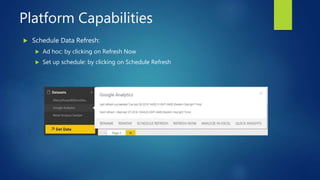
 Schedule Data Refresh:
 Ad hoc: by clicking on Refresh Now
 Set up schedule: by clicking on Schedule Refresh
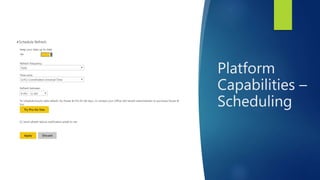
Platform
Capabilities –
Scheduling
Platform Capabilities -
Sharing
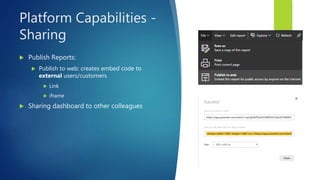
 Publish Reports:
 Publish to web: creates embed code to
external users/customers
 Link
 iframe
 Sharing dashboard to other colleagues
DEMO
 Creating Power BI dashboard from Google Analytics
What is Power BI Embedded
 An easy way to embed Power BI reports in web and mobile apps
 No logins are required or o365 AD accounts
 A new feature that has been announced in BUILD 2016
 Here are some scenarios for using Power BI Embedded in your applications.
 Fully interactive reports that were authored in the Power BI Desktop can be embedded within
your own application using a new application token authentication model.
 Independent software vendors and customers building customer facing applications can use
the Power BI Embedded service, and the Power BI SDK, to embed interactive reports.
 As a developer, you can use the Power BI visualization framework to create custom
visualizations that can be used in your own app. See Extend Power BI with custom visuals.
How Power BI Embedded is different
 This feature is different than integrating Power BI in apps because of the
following:
 Integrating Power BI: requires the following
 AAD app registration
 requires users to login with o365 credentials
 Blog post: http://www.mostafaelzoghbi.com/2016/04/integrate-power-bi-report-
into-app.html
 Power BI Embedded:
 No login is needed for Users
 No AAD app registration
Power BI Embedded basic concepts
 You need to have an Azure subscription
 You need to provision “Power BI Workspace Collection” to provision
from Azure portal.
 You need to create a workspace into Power BI workspace collection.
 You need to import a (.pbix) report file into a workspace.
 Embed a report with one html tag into your application.
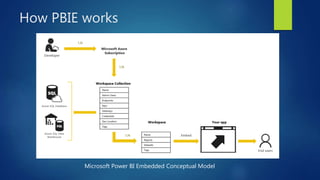
How PBIE works
Microsoft Power BI Embedded Conceptual Model
DEMO
 Provisioning Power BI Embedded in Azure
How to create a workspace
 Microsoft has created a utility to allow you create a workspace into Azure Power BI
workspace collection
 This tool is available in GitHub.
 Download link: https://github.com/Azure-Samples/power-bi-embedded-integrate-
report-into-web-app/
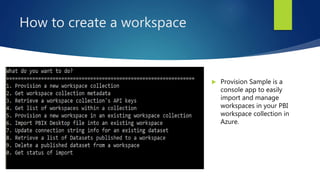
 Run ProvisionSample console app:
 Step #5: To create a workspace
 Step #6: To import pbix report file into a workspace
 Step #7: To update a connection string for imported report
How to create a workspace
 Provision Sample is a
console app to easily
import and manage
workspaces in your PBI
workspace collection in
Azure.
Understanding Authenticating &
Authorizing in PBIE
 The Power BI Embedded service uses Keys and App Tokens for authentication and
authorization, instead of explicit end-user authentication.
 Two Ways to authenticate
 Keys: From Power BI Embedded in Azure Portal (Access Keys)
 App Token: are used for all embedding requests. They’re designed to run client-side so
they’re restricted to a single report. App tokens are JWT (JSON Web Token) that is signed
by one of your keys.
DEMO
 Using Power BI Embedded in ASP.NET MVC application
References
 Demo source code in GitHub Repo:
https://github.com/melzoghbi
 Power BI Embedded Step by step article:
http://www.mostafaelzoghbi.com/2016/04/power-bi-embedded-step-by-
step.html
 Power BI Embedded homepage:
https://azure.microsoft.com/en-us/services/power-bi-embedded/
 Ch9 video series
https://channel9.msdn.com/Blogs/MostafaElzoghbi/Power-BI-Embedded-
Explained-Part-1
Thank you
 Check out my blog for Power BI articles:
http://mostafa.rocks
 Follow me on Twitter: @MostafaElzoghbi

Introducing Power BI Embedded

  • 1.
    Introducing Power BI Embedded MOSTAFAELZOGHBI SR. TECHNICAL EVANGELIST – MICROSOFT @MOSTAFAELZOGHBI
  • 2.
    Session Objectives &Takeaways Power BI platform capabilities Power BI Embedded
  • 3.
    Power BI atglance  Power BI is a suite of cloud-based business analytics tools to analyze data and share insights. Monitor your business and get answers quickly with rich dashboards available on every device.  Why Power BI?  All your data, whatever it is  Be informed: always real time  Ask questions, get answers  End chaos: everyone on the same page  Make data –driven decisions, from anywhere  Share insights on websites or blogs
  • 4.
    Power BI Tools Tools:  Power BI on the web (powerbi.microsoft.com)  Power BI Desktop (Free)  Power BI Mobile apps (iOS, Android, Win10) -- Free  Pin Reporting Services 2016 report into a PBI Dashboards  Power BI Gateway: connect to on-premise data  Package Power BI components for re-usability through content packs
  • 5.
    Working with Data You can connect Power BI Reports to:  Content Packs created by your organization.  Online Services such as: Google Analytics, Salesforce, VSTS, CRM Online, Zuora, Stripe, SendGrid…etc.  Files: CSV, Excel, Power BI Desktop, workbooks.  Databases: DBs such as Azure SQL.
  • 6.
    Platform Capabilities  ScheduleData Refresh:  Ad hoc: by clicking on Refresh Now  Set up schedule: by clicking on Schedule Refresh
  • 7.
  • 8.
    Platform Capabilities - Sharing Publish Reports:  Publish to web: creates embed code to external users/customers  Link  iframe  Sharing dashboard to other colleagues
  • 9.
    DEMO  Creating PowerBI dashboard from Google Analytics
  • 10.
    What is PowerBI Embedded  An easy way to embed Power BI reports in web and mobile apps  No logins are required or o365 AD accounts  A new feature that has been announced in BUILD 2016  Here are some scenarios for using Power BI Embedded in your applications.  Fully interactive reports that were authored in the Power BI Desktop can be embedded within your own application using a new application token authentication model.  Independent software vendors and customers building customer facing applications can use the Power BI Embedded service, and the Power BI SDK, to embed interactive reports.  As a developer, you can use the Power BI visualization framework to create custom visualizations that can be used in your own app. See Extend Power BI with custom visuals.
  • 11.
    How Power BIEmbedded is different  This feature is different than integrating Power BI in apps because of the following:  Integrating Power BI: requires the following  AAD app registration  requires users to login with o365 credentials  Blog post: http://www.mostafaelzoghbi.com/2016/04/integrate-power-bi-report- into-app.html  Power BI Embedded:  No login is needed for Users  No AAD app registration
  • 12.
    Power BI Embeddedbasic concepts  You need to have an Azure subscription  You need to provision “Power BI Workspace Collection” to provision from Azure portal.  You need to create a workspace into Power BI workspace collection.  You need to import a (.pbix) report file into a workspace.  Embed a report with one html tag into your application.
  • 13.
    How PBIE works MicrosoftPower BI Embedded Conceptual Model
  • 14.
    DEMO  Provisioning PowerBI Embedded in Azure
  • 15.
    How to createa workspace  Microsoft has created a utility to allow you create a workspace into Azure Power BI workspace collection  This tool is available in GitHub.  Download link: https://github.com/Azure-Samples/power-bi-embedded-integrate- report-into-web-app/  Run ProvisionSample console app:  Step #5: To create a workspace  Step #6: To import pbix report file into a workspace  Step #7: To update a connection string for imported report
  • 16.
    How to createa workspace  Provision Sample is a console app to easily import and manage workspaces in your PBI workspace collection in Azure.
  • 17.
    Understanding Authenticating & Authorizingin PBIE  The Power BI Embedded service uses Keys and App Tokens for authentication and authorization, instead of explicit end-user authentication.  Two Ways to authenticate  Keys: From Power BI Embedded in Azure Portal (Access Keys)  App Token: are used for all embedding requests. They’re designed to run client-side so they’re restricted to a single report. App tokens are JWT (JSON Web Token) that is signed by one of your keys.
  • 18.
    DEMO  Using PowerBI Embedded in ASP.NET MVC application
  • 19.
    References  Demo sourcecode in GitHub Repo: https://github.com/melzoghbi  Power BI Embedded Step by step article: http://www.mostafaelzoghbi.com/2016/04/power-bi-embedded-step-by- step.html  Power BI Embedded homepage: https://azure.microsoft.com/en-us/services/power-bi-embedded/  Ch9 video series https://channel9.msdn.com/Blogs/MostafaElzoghbi/Power-BI-Embedded- Explained-Part-1
  • 20.
    Thank you  Checkout my blog for Power BI articles: http://mostafa.rocks  Follow me on Twitter: @MostafaElzoghbi

Editor's Notes

  • #2  Session Title: BUILD INTERACTIVE ANALYTICS USING POWERBI , Url: https://2016.syntaxcon.com/session/build-interactive-analytics-using-powerbi/ Session Description: The talk will cover how to build interactive analytics, dashboards and reports in PowerBI. Using multiple data sources, synchronization schedule and sharing capabilities in PowerBI. The PowerBI web and client tool provides sophisticated tools for non-technical users to build interactive dashboards. The session will be demo driven and will cover different use cases that use multiple data formats and sources. -- PowerBI client tool & web capabilities -- Interactive Dashboards and Reporting. -- Platform capabilities such as sharing, scheduling and more.
  • #3  Power BI Capabilities: I will taking about PBI capabilities of building interactive reports and dashboards, platform scheduling and sharing capabilities. Working with data either online data source or on-premise, highlighting connecting to content packs, gateways. Power BI embedded (preview) feature in azure that allows ISVs to integrate PBI reports into their apps.
  • #4  Power BI features: https://powerbi.microsoft.com/en-us/features/
  • #5 ** Power BI Apps: https://powerbi.microsoft.com/en-us/mobile/ ** Power BI Gateway: https://powerbi.microsoft.com/en-us/gateway/ ** How to pin Reporting Services Reports (SSRS) into PBI: https://msdn.microsoft.com/en-us/library/mt604784.aspx
  • #6 Content Packs: Package up and share your own dashboards, reports, Excel workbooks, and datasets with your coworkers. Do you regularly distribute reports by email to your team? Try this instead: Create dashboards and reports in Power BI and publish them as a content pack to your team. Content packs are easy to find — they are all in the content pack library. https://powerbi.microsoft.com/en-us/documentation/powerbi-service-organizational-content-packs-introduction/
  • #10 Retail analysis sample: Click on Get Data Select Services Look for Google Analytics 4) Click on Connect 5) Select oAuth2 and then click on sign In 6) Sign in to your google analytics account 7) Allow Power BI app to access google analytics data. 8) Enter Account Name, Property, View: my blog 9) Click on Import 10) Google Analytics dashboard has been created into your workspace. Embed in SharePoint Page: https://mostafamsft.sharepoint.com/test1/SitePages/PBIDEMO1.aspx
  • #11 Power BI Embedded Feature is still in Preview – April 2016 https://azure.microsoft.com/en-us/documentation/articles/power-bi-embedded-scenarios/
  • #14 https://azure.microsoft.com/en-us/documentation/articles/power-bi-embedded-get-started/
  • #18 Ref: https://azure.microsoft.com/en-us/documentation/articles/power-bi-embedded-app-token-flow/