Power BI for Developers
Developers guide to extending Power BI
PBI MCR JUNE 2019 - Jan Pieter Posthuma
• Microsoft Data Consultant
• DataScenarios – Data Consultancy Company
• Architect roles at multiple projects
• Creator of Power BI Custom Visuals
• HierarchySlicer [∞]
• Box and Whisker chart [∞]
• D3js Visual [∞]
• Contact
• mail@datascenarios.nl
• https://twitter.com/jppp
• https://linkedin.com/in/jpposthuma
• https://github.com/liprec
Jan Pieter Posthuma
2© 2019 – DataScenarios
• Introduction
• Power BI for Developers
• Power BI Embedded
• Power BI Custom Visuals
• Power BI Custom Connectors
3© 2019 – DataScenarios
Outline
What next?
© 2019 – DataScenarios 4
Build a Microsoft Power BI
Embedded Solution
Power BI for Developers series
Jan Pieter Posthuma
• Introduction
• Fundamentals
• Authentication
• Demo – JavaScript API
• Roadmap
6© 2019 – DataScenarios
Session Outline
Introduction
Build a Microsoft Power BI Embedded Solution
© 2019 – DataScenarios 7
• Publish to web
• Publicly available (no license)
• Anonymous access
• Embed in SharePoint Online
• Signing covered by SPS
• Secure Embed
• Users prompted to Sign in
• Power BI account needed
• Embedded analytics
• Capacity via Azure (or Premium)
• No end user license needed
8© 2019 – DataScenarios
Embedding with Power BI
• Power BI is a software-as-a-service analytics solution that gives
organizations a single view of their most critical business data.
• With Power BI Embedded embed intelligence can be added to
apps using the Power BI APIs.
• Developers can spend time focusing on their solution to meet
customer demands, instead of developing visual analytics features
9© 2019 – DataScenarios
Embedded Analytics – Power BI Embedded
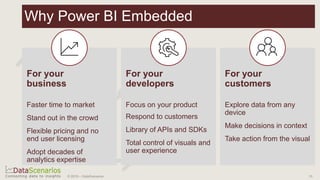
Why Power BI Embedded
For your
business
Faster time to market
Stand out in the crowd
Flexible pricing and no
end user licensing
Adopt decades of
analytics expertise
For your
developers
Focus on your product
Respond to customers
Library of APIs and SDKs
Total control of visuals and
user experience
For your
customers
Explore data from any
device
Make decisions in context
Take action from the visual
© 2019 – DataScenarios 10
Feature
Power BI Embedded
(A SKUs)
Power BI Premium
Capacity
(EM SKUs)
Power BI Premium
Capacity
(P SKUs)
Embed artifacts from a Power BI App
workspace
Azure capacity
(A1: ~$735.913/month)
Office 365 capacity
(EM1: ~$625/month)
Office 365 capacity
(P1: $ 4,995/month)
Consume Power BI reports in an
Embedded application
Consume Power BI reports in
SharePoint
Consume Power BI reports in
Dynamics
Consume Power BI reports in Teams
(excludes mobile app)
Access content with a FREE Power BI
license in Powerbi.com and Power BI
mobile
Access content with a FREE Power BI
license embedded in MS Office apps
11© 2019 – DataScenarios
Power BI Embedded SKUs
Fundamentals
Build a Microsoft Power BI Embedded Solution
© 2019 – DataScenarios 12
Manage all analytic objects
Automate onboarding new customers
Embed reports, dashboards, tiles and visuals
Power BI APIs
Azure APIs for automation
Create and manage capacities
Scale up/down at any time
Monitor performance with Metrics & Alerts
Data
Platform
Programmatic
All data sources supported by
Power BI
REST APIs Azure Resource Manager API
Microsoft Azure
Power BI JavaScript API
Enable client-side integration and interaction
Power BI
The Power BI Embedded API surface
13© 2019 – DataScenarios
Your app
Power BI APIs
Import
Get
reports
Get
dashboards
Get
dashboard
tiles
Push
data
Embed
Embed a
specific report
Enable/
disable the
filter pane
Load a
default report
page
Clone
report and
dashboard
Add/delete
workspaces
Set data
source
connections
Refresh
dataset
Gateway
manage-ment
APIs
Export PBIX
files
Update
report
Rebind
report
Add/delete
workspace
users
Clone
tile
Dataset
manage-ment
APIs
Datasource
manage-ment
APIs
Monitoring
Scale
up/down
(ARM)
Pause resume
(ARM)
Buy capacity
(ARM)
Capacity
manage-ment
Print & reload
events
Page
navigation
Filter reports
Edit
reports
Data selection
events
Set visual
location
in report
Set
visual size
Set visual
filters
Set local
language
Page changed
event
Tile clicked
event
Report
rendered
event
Q&A question
event
Set Q&A
question
Automate
Extend visual
options menu
Extend visual
context menu
Set Colour
Themes
14
Customize Manage
Capacity
Hide/Show
menu items
Sort custom
menu items
Disable/
Enable menu
items
© 2019 – DataScenarios 14
Typical SaaS application
• Each app drives specific value
for users
• Analytics are most valued when
integrated into the application
workflow
© 2019 – DataScenarios 15
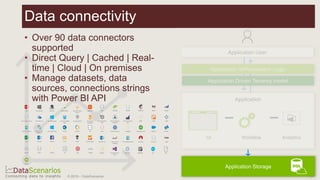
Data connectivity
• Over 90 data connectors
supported
• Direct Query | Cached | Real-
time | Cloud | On premises
• Manage datasets, data
sources, connections strings
with Power BI API
© 2019 – DataScenarios 16
Building in-context analytics
• Integrate analytics seamlessly
into the app workflow
• Use bi-directional API to
increase engagement
© 2019 – DataScenarios 17
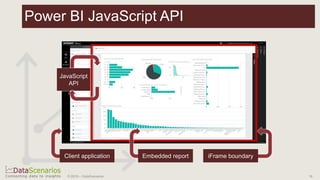
Power BI JavaScript API
© 2019 – DataScenarios 18
Authentication
Build a Microsoft Power BI Embedded Solution
© 2019 – DataScenarios 19
• Registration Tool: https://dev.powerbi.com/apps
• Application Type: Server-side web application
• Choose Power BI APIs
needed
• End result:
• Application ID
• Application secret
20© 2019 – DataScenarios
Register a server-side web application
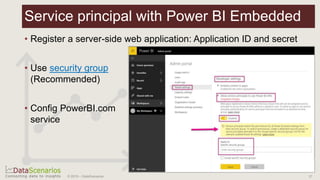
• Register a server-side web application: Application ID and secret
• Use security group
(Recommended)
• Config PowerBI.com
service
21© 2019 – DataScenarios
Service principal with Power BI Embedded
22© 2019 – DataScenarios
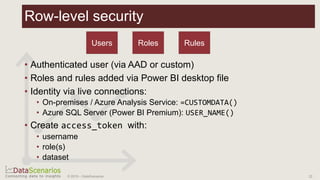
Row-level security
• Authenticated user (via AAD or custom)
• Roles and rules added via Power BI desktop file
• Identity via live connections:
• On-premises / Azure Analysis Service: =CUSTOMDATA()
• Azure SQL Server (Power BI Premium): USER_NAME()
• Create access_token with:
• username
• role(s)
• dataset
Users Roles Rules
Demo – JavaScript API
Build a Microsoft Power BI Embedded Solution
© 2019 – DataScenarios 23
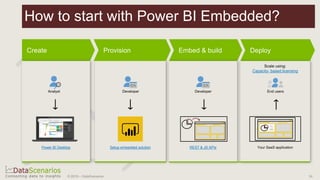
How to start with Power BI Embedded?
24© 2019 – DataScenarios
Power BI Desktop
Capacity- based licensing
Setup embedded solution REST & JS APIs
Roadmap
Build a Microsoft Power BI Embedded Solution
© 2019 – DataScenarios 25
• Service Principle based authentication (GA)
• Embed & automate paginated reports
• Quick visual creator API
• Improved deployment through dynamic binding of reports to
datasets
26© 2019 – DataScenarios
Roadmap
© 2019 – DataScenarios 27
© 2019 – DataScenarios
Build a Microsoft Power BI
Custom Visual
Power BI for Developers series
Jan Pieter Posthuma
• Introduction
• Basic developing
• Demo – Custom Visuals
• Advanced developing
• Demo – External libraries
• Roadmap
30© 2019 – DataScenarios
Session Outline
Introduction
Build a Microsoft Power BI Custom Visual
© 2019 – DataScenarios 31
What are custom visuals?
© 2019 – DataScenarios 32
Power BI Custom Visuals Platform
Developer tool
Open Source
APIs & Utils
Import D3, jQuery,
WebGL, etc…
https://github.com/Microsoft/PowerBI-visuals-tools
Debugging and
testing
See what you code
Sideload into Power BI to
test anytime, anywhere
Marketplace
Developer portal
Integrated into PBI clients
Global reach –
Monitize via ‘In-App
Purchase’ (IAP)
R scripting
Advanced analytics
visualizations
Interactive
© 2019 – DataScenarios 33
• Intuitive visual consumption of
data
• Over 150 visuals in the
marketplace
• Build or buy tailor-made visuals
• Enterprise ready
• Differentiator in the market
The Business Value of Custom Visuals
© 2019 – DataScenarios 34
Why Develop Custom Visuals?
Enrich your solution portfolio
Eye catching reports and
dashboards – Go beyond
the usual pie/bar charts
Build a unique expertise in the
BI solution providers domain
© 2019 – DataScenarios 35
Basic development
Build a Microsoft Power BI Custom Visual
© 2019 – DataScenarios 36
• NodeJS 5.0+ Required. (v5 – 8 are confirmed to work)
• https://nodejs.org/
• PowerBI-Visuals-Tools
• npm install -g powerbi-visuals-tools
• Create and install user SSL certificate: https://github.com/Microsoft/PowerBI-
visuals/blob/master/tools/CertificateSetup.md
• Visual Studio Code
• https://code.visualstudio.com/download
• PBIViz CLI addin:
https://marketplace.visualstudio.com/items?itemName=liprec.vscode-start-pbiviz
• Enable ‘Developer Visual’ in Power BI user
settings
Tools needed
© 2019 – DataScenarios 37
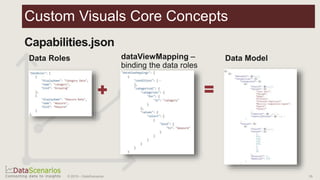
Custom Visuals Core Concepts
© 2019 – DataScenarios 38
Custom Visuals Core Concepts
© 2019 – DataScenarios 39
Create Code Test Package Submit
APIs PowerBI.com
Your favorite IDE
FeedbackLearn more: https://github.com/Microsoft/PowerBI-visuals
Custom Visual Lifecycle
© 2019 – DataScenarios 40
Basic development – Demo
Build a Microsoft Power BI Custom Visual
© 2019 – DataScenarios 41
Advanced development
Build a Microsoft Power BI Custom Visual
© 2019 – DataScenarios 42
• First class citizens:
• D3js – Graphical library for ‘Data-Driven Documents’.
• Lodash – Library to take the hassle out of working with arrays, objects,
strings, numbers, etc.
• Helper classes to support common UI operations, e.g.:
• powerbi-visuals-utils-formattingutils – valueFormatting, TextProperties, …
• powerbi-visuals-utils-dataviewutils – getObject, DataViewObjectsParser
• Change upcoming powerbi-utils (v3.x):
• ECMAScript 2015 (ES6) modules support: use simgle ES modules instead
of full library
43© 2019 – DataScenarios
Custom Visuals External Libraries
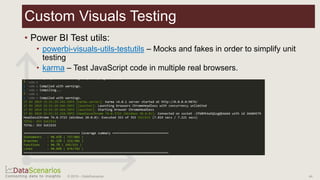
• Power BI Test utils:
• powerbi-visuals-utils-testutils – Mocks and fakes in order to simplify unit
testing
• karma – Test JavaScript code in multiple real browsers.
44© 2019 – DataScenarios
Custom Visuals Testing
Roadmap
Build a Microsoft Power BI Custom Visual
© 2019 – DataScenarios 45
• API v2.6
• Support subtotals customization
• API v2.5
• Analytics Pane Support
• SelectionIdBuilder supports withMatrixNode and withTable methods
• API v2.3
• Landing Page API
• Tuple filter API (Multi column filter)
• Rendering Events API
• API v2.2
• Restoring JSON Filter from DataView
• ContextMenu API
• API v2.1
• Significant performance enhancements: Faster loading times, Significantly smaller
memory footprint, Optimized data and event transactions
46© 2019 – DataScenarios
What’s new in custom visuals API’s
© 2019 – DataScenarios 47
© 2019 – DataScenarios

Power BI for Developers

  • 1.
    Power BI forDevelopers Developers guide to extending Power BI PBI MCR JUNE 2019 - Jan Pieter Posthuma
  • 2.
    • Microsoft DataConsultant • DataScenarios – Data Consultancy Company • Architect roles at multiple projects • Creator of Power BI Custom Visuals • HierarchySlicer [∞] • Box and Whisker chart [∞] • D3js Visual [∞] • Contact • mail@datascenarios.nl • https://twitter.com/jppp • https://linkedin.com/in/jpposthuma • https://github.com/liprec Jan Pieter Posthuma 2© 2019 – DataScenarios
  • 3.
    • Introduction • PowerBI for Developers • Power BI Embedded • Power BI Custom Visuals • Power BI Custom Connectors 3© 2019 – DataScenarios Outline
  • 4.
    What next? © 2019– DataScenarios 4
  • 5.
    Build a MicrosoftPower BI Embedded Solution Power BI for Developers series Jan Pieter Posthuma
  • 6.
    • Introduction • Fundamentals •Authentication • Demo – JavaScript API • Roadmap 6© 2019 – DataScenarios Session Outline
  • 7.
    Introduction Build a MicrosoftPower BI Embedded Solution © 2019 – DataScenarios 7
  • 8.
    • Publish toweb • Publicly available (no license) • Anonymous access • Embed in SharePoint Online • Signing covered by SPS • Secure Embed • Users prompted to Sign in • Power BI account needed • Embedded analytics • Capacity via Azure (or Premium) • No end user license needed 8© 2019 – DataScenarios Embedding with Power BI
  • 9.
    • Power BIis a software-as-a-service analytics solution that gives organizations a single view of their most critical business data. • With Power BI Embedded embed intelligence can be added to apps using the Power BI APIs. • Developers can spend time focusing on their solution to meet customer demands, instead of developing visual analytics features 9© 2019 – DataScenarios Embedded Analytics – Power BI Embedded
  • 10.
    Why Power BIEmbedded For your business Faster time to market Stand out in the crowd Flexible pricing and no end user licensing Adopt decades of analytics expertise For your developers Focus on your product Respond to customers Library of APIs and SDKs Total control of visuals and user experience For your customers Explore data from any device Make decisions in context Take action from the visual © 2019 – DataScenarios 10
  • 11.
    Feature Power BI Embedded (ASKUs) Power BI Premium Capacity (EM SKUs) Power BI Premium Capacity (P SKUs) Embed artifacts from a Power BI App workspace Azure capacity (A1: ~$735.913/month) Office 365 capacity (EM1: ~$625/month) Office 365 capacity (P1: $ 4,995/month) Consume Power BI reports in an Embedded application Consume Power BI reports in SharePoint Consume Power BI reports in Dynamics Consume Power BI reports in Teams (excludes mobile app) Access content with a FREE Power BI license in Powerbi.com and Power BI mobile Access content with a FREE Power BI license embedded in MS Office apps 11© 2019 – DataScenarios Power BI Embedded SKUs
  • 12.
    Fundamentals Build a MicrosoftPower BI Embedded Solution © 2019 – DataScenarios 12
  • 13.
    Manage all analyticobjects Automate onboarding new customers Embed reports, dashboards, tiles and visuals Power BI APIs Azure APIs for automation Create and manage capacities Scale up/down at any time Monitor performance with Metrics & Alerts Data Platform Programmatic All data sources supported by Power BI REST APIs Azure Resource Manager API Microsoft Azure Power BI JavaScript API Enable client-side integration and interaction Power BI The Power BI Embedded API surface 13© 2019 – DataScenarios Your app
  • 14.
    Power BI APIs Import Get reports Get dashboards Get dashboard tiles Push data Embed Embeda specific report Enable/ disable the filter pane Load a default report page Clone report and dashboard Add/delete workspaces Set data source connections Refresh dataset Gateway manage-ment APIs Export PBIX files Update report Rebind report Add/delete workspace users Clone tile Dataset manage-ment APIs Datasource manage-ment APIs Monitoring Scale up/down (ARM) Pause resume (ARM) Buy capacity (ARM) Capacity manage-ment Print & reload events Page navigation Filter reports Edit reports Data selection events Set visual location in report Set visual size Set visual filters Set local language Page changed event Tile clicked event Report rendered event Q&A question event Set Q&A question Automate Extend visual options menu Extend visual context menu Set Colour Themes 14 Customize Manage Capacity Hide/Show menu items Sort custom menu items Disable/ Enable menu items © 2019 – DataScenarios 14
  • 15.
    Typical SaaS application •Each app drives specific value for users • Analytics are most valued when integrated into the application workflow © 2019 – DataScenarios 15
  • 16.
    Data connectivity • Over90 data connectors supported • Direct Query | Cached | Real- time | Cloud | On premises • Manage datasets, data sources, connections strings with Power BI API © 2019 – DataScenarios 16
  • 17.
    Building in-context analytics •Integrate analytics seamlessly into the app workflow • Use bi-directional API to increase engagement © 2019 – DataScenarios 17
  • 18.
    Power BI JavaScriptAPI © 2019 – DataScenarios 18
  • 19.
    Authentication Build a MicrosoftPower BI Embedded Solution © 2019 – DataScenarios 19
  • 20.
    • Registration Tool:https://dev.powerbi.com/apps • Application Type: Server-side web application • Choose Power BI APIs needed • End result: • Application ID • Application secret 20© 2019 – DataScenarios Register a server-side web application
  • 21.
    • Register aserver-side web application: Application ID and secret • Use security group (Recommended) • Config PowerBI.com service 21© 2019 – DataScenarios Service principal with Power BI Embedded
  • 22.
    22© 2019 –DataScenarios Row-level security • Authenticated user (via AAD or custom) • Roles and rules added via Power BI desktop file • Identity via live connections: • On-premises / Azure Analysis Service: =CUSTOMDATA() • Azure SQL Server (Power BI Premium): USER_NAME() • Create access_token with: • username • role(s) • dataset Users Roles Rules
  • 23.
    Demo – JavaScriptAPI Build a Microsoft Power BI Embedded Solution © 2019 – DataScenarios 23
  • 24.
    How to startwith Power BI Embedded? 24© 2019 – DataScenarios Power BI Desktop Capacity- based licensing Setup embedded solution REST & JS APIs
  • 25.
    Roadmap Build a MicrosoftPower BI Embedded Solution © 2019 – DataScenarios 25
  • 26.
    • Service Principlebased authentication (GA) • Embed & automate paginated reports • Quick visual creator API • Improved deployment through dynamic binding of reports to datasets 26© 2019 – DataScenarios Roadmap
  • 27.
    © 2019 –DataScenarios 27
  • 28.
    © 2019 –DataScenarios
  • 29.
    Build a MicrosoftPower BI Custom Visual Power BI for Developers series Jan Pieter Posthuma
  • 30.
    • Introduction • Basicdeveloping • Demo – Custom Visuals • Advanced developing • Demo – External libraries • Roadmap 30© 2019 – DataScenarios Session Outline
  • 31.
    Introduction Build a MicrosoftPower BI Custom Visual © 2019 – DataScenarios 31
  • 32.
    What are customvisuals? © 2019 – DataScenarios 32
  • 33.
    Power BI CustomVisuals Platform Developer tool Open Source APIs & Utils Import D3, jQuery, WebGL, etc… https://github.com/Microsoft/PowerBI-visuals-tools Debugging and testing See what you code Sideload into Power BI to test anytime, anywhere Marketplace Developer portal Integrated into PBI clients Global reach – Monitize via ‘In-App Purchase’ (IAP) R scripting Advanced analytics visualizations Interactive © 2019 – DataScenarios 33
  • 34.
    • Intuitive visualconsumption of data • Over 150 visuals in the marketplace • Build or buy tailor-made visuals • Enterprise ready • Differentiator in the market The Business Value of Custom Visuals © 2019 – DataScenarios 34
  • 35.
    Why Develop CustomVisuals? Enrich your solution portfolio Eye catching reports and dashboards – Go beyond the usual pie/bar charts Build a unique expertise in the BI solution providers domain © 2019 – DataScenarios 35
  • 36.
    Basic development Build aMicrosoft Power BI Custom Visual © 2019 – DataScenarios 36
  • 37.
    • NodeJS 5.0+Required. (v5 – 8 are confirmed to work) • https://nodejs.org/ • PowerBI-Visuals-Tools • npm install -g powerbi-visuals-tools • Create and install user SSL certificate: https://github.com/Microsoft/PowerBI- visuals/blob/master/tools/CertificateSetup.md • Visual Studio Code • https://code.visualstudio.com/download • PBIViz CLI addin: https://marketplace.visualstudio.com/items?itemName=liprec.vscode-start-pbiviz • Enable ‘Developer Visual’ in Power BI user settings Tools needed © 2019 – DataScenarios 37
  • 38.
    Custom Visuals CoreConcepts © 2019 – DataScenarios 38
  • 39.
    Custom Visuals CoreConcepts © 2019 – DataScenarios 39
  • 40.
    Create Code TestPackage Submit APIs PowerBI.com Your favorite IDE FeedbackLearn more: https://github.com/Microsoft/PowerBI-visuals Custom Visual Lifecycle © 2019 – DataScenarios 40
  • 41.
    Basic development –Demo Build a Microsoft Power BI Custom Visual © 2019 – DataScenarios 41
  • 42.
    Advanced development Build aMicrosoft Power BI Custom Visual © 2019 – DataScenarios 42
  • 43.
    • First classcitizens: • D3js – Graphical library for ‘Data-Driven Documents’. • Lodash – Library to take the hassle out of working with arrays, objects, strings, numbers, etc. • Helper classes to support common UI operations, e.g.: • powerbi-visuals-utils-formattingutils – valueFormatting, TextProperties, … • powerbi-visuals-utils-dataviewutils – getObject, DataViewObjectsParser • Change upcoming powerbi-utils (v3.x): • ECMAScript 2015 (ES6) modules support: use simgle ES modules instead of full library 43© 2019 – DataScenarios Custom Visuals External Libraries
  • 44.
    • Power BITest utils: • powerbi-visuals-utils-testutils – Mocks and fakes in order to simplify unit testing • karma – Test JavaScript code in multiple real browsers. 44© 2019 – DataScenarios Custom Visuals Testing
  • 45.
    Roadmap Build a MicrosoftPower BI Custom Visual © 2019 – DataScenarios 45
  • 46.
    • API v2.6 •Support subtotals customization • API v2.5 • Analytics Pane Support • SelectionIdBuilder supports withMatrixNode and withTable methods • API v2.3 • Landing Page API • Tuple filter API (Multi column filter) • Rendering Events API • API v2.2 • Restoring JSON Filter from DataView • ContextMenu API • API v2.1 • Significant performance enhancements: Faster loading times, Significantly smaller memory footprint, Optimized data and event transactions 46© 2019 – DataScenarios What’s new in custom visuals API’s
  • 47.
    © 2019 –DataScenarios 47
  • 48.
    © 2019 –DataScenarios

Editor's Notes

  • #14 13
  • #17 CRMUG Summit 2017
  • #19 18
  • #24 https://microsoft.github.io/PowerBI-JavaScript/demo/v2-demo/index.html
  • #26 https://microsoft.github.io/PowerBI-JavaScript/demo/v2-demo/index.html
  • #33 A visualization extension platform, JavaScript based, to enable the creation of visualizations that would make it easier to understand the data and retrieve insights from the data.