Microsoft Power BI
Bring your data to life with Microsoft Power BI
By Harinda Dias
Business intelligence
Business intelligence (BI) can be described as a
set of techniques and tools for the acquisition
and transformation of raw data into meaningful
and useful information for business
analysis purposes
-Wikipedia-
What is Power BI
Power BI is a cloud-based business analytics service that gives
you a single view of your most critical business data.
Monitor the health of your business using a live dashboard,
create rich interactive reports with Power BI Desktop and access
your data on the go with native Power BI Mobile apps. It’s easy,
fast, and free.
Market Position
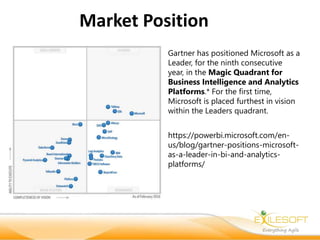
Gartner has positioned Microsoft as a
Leader, for the ninth consecutive
year, in the Magic Quadrant for
Business Intelligence and Analytics
Platforms.* For the first time,
Microsoft is placed furthest in vision
within the Leaders quadrant.
https://powerbi.microsoft.com/en-
us/blog/gartner-positions-microsoft-
as-a-leader-in-bi-and-analytics-
platforms/
Demo
• PowerBI Account creation
• PowerBI Desktop
• Different data sources
• Importing data
• Creating data model
• Creating Columns and Measures
• Creating Reports
• Publishing To Web
• Schedule Synchronization
• On premises data connectivity – Enterprise gateway
• Sharing with users
• Publishing to web
• Integrating with other systems
• SAAS Model
• PAAS Model
• Custom visuals
Norway
+47 959 23 712
oslo@exilesoft.com
Stortorvet 10
0155 Oslo
Norway
Sweden
+46 735 194 442
stockholm@exilesoft.com
Stockholmsvägen 33
181 33 Lidingö
Sweden
Australia
+61 412 446 105
sydney@exilesoft.com
Suite2.14, 32 Delhi Road
North Ryde, NSW 2113
Australia
Sri Lanka
+94 112 300 900
colombo@exilesoft.com
201, Sir James Peiris Mw.
Colombo 02
Sri Lanka
www.exilesoft.com

Introduction to Microsoft Power BI

  • 1.
    Microsoft Power BI Bringyour data to life with Microsoft Power BI By Harinda Dias
  • 2.
    Business intelligence Business intelligence(BI) can be described as a set of techniques and tools for the acquisition and transformation of raw data into meaningful and useful information for business analysis purposes -Wikipedia-
  • 3.
    What is PowerBI Power BI is a cloud-based business analytics service that gives you a single view of your most critical business data. Monitor the health of your business using a live dashboard, create rich interactive reports with Power BI Desktop and access your data on the go with native Power BI Mobile apps. It’s easy, fast, and free.
  • 4.
    Market Position Gartner haspositioned Microsoft as a Leader, for the ninth consecutive year, in the Magic Quadrant for Business Intelligence and Analytics Platforms.* For the first time, Microsoft is placed furthest in vision within the Leaders quadrant. https://powerbi.microsoft.com/en- us/blog/gartner-positions-microsoft- as-a-leader-in-bi-and-analytics- platforms/
  • 5.
    Demo • PowerBI Accountcreation • PowerBI Desktop • Different data sources • Importing data • Creating data model • Creating Columns and Measures • Creating Reports • Publishing To Web • Schedule Synchronization • On premises data connectivity – Enterprise gateway • Sharing with users • Publishing to web • Integrating with other systems • SAAS Model • PAAS Model • Custom visuals
  • 6.
    Norway +47 959 23712 oslo@exilesoft.com Stortorvet 10 0155 Oslo Norway Sweden +46 735 194 442 stockholm@exilesoft.com Stockholmsvägen 33 181 33 Lidingö Sweden Australia +61 412 446 105 sydney@exilesoft.com Suite2.14, 32 Delhi Road North Ryde, NSW 2113 Australia Sri Lanka +94 112 300 900 colombo@exilesoft.com 201, Sir James Peiris Mw. Colombo 02 Sri Lanka www.exilesoft.com

Editor's Notes

  • #5 Execution Models. Provides three different execution models—virtual machines (VMs), web applications, and cloud services, for running applications o Windows Azure Identity Management. Includes Windows Azure Active Directory and Access Control services to help manage identities, authentication, and authorization in a web application. o Data Management. Includes services to host and manage relational database and Blob content o Business Analytics Solutions. Includes services that helps perform business information analysis by using SQL Server Reporting Services and Apache Hadoop. Business analytics solutions support all the data stores distributed across multiple Windows Azure data centers. o Networking Services. Includes services that provide networking capabilities to securely connect multiple services in Microsoft data centers. o Messaging with Service Bus. Includes services that enable applications to communicate on Windows Azure. o Media Management. Includes services that bring content geographically closer to users and help store large volumes of content outside the web application. Storing content outside the application helps improve the performance of the application.
  • #6 Question: What are the benefits of using Windows Azure cloud services? Answer: You can use Windows Azure cloud services to enable Microsoft to manage the entire application. If the application fails on the cloud, Windows Azure cloud services allow you to move the application to other VMs. The following list summarizes the benefits of cloud services: Cloud services provide administrative access to the VM of your application. This access allows you install software that your application needs. Cloud services offer both web-role and worker-role VMs, which is better for multi-tier applications that need separate VMs for their business logic. Cloud services provide separate staging and production environments that allow developers to fully test the application before delivery to ensure that the application is fully functional. Cloud services support the use of Windows Azure Virtual Network and Windows Azure Connect.