Presented by:
WHAT IS BUSINESS INTELLIGENCE
AND WHY NEED BI
1. Business intelligence (BI) leverages software and services to
transform data into actionable insights that inform an
organization’s strategic and tactical business decisions
2. Business intelligence can help companies make better decisions by
showing present and historical data within their business context.
Analysts can leverage BI to provide performance and competitor
benchmarks to make the organization run smoother and more
efficiently. Analysts can also more easily spot market trends to
increase sales or revenue.
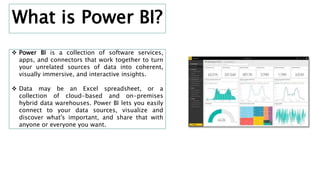
 Power BI is a collection of software services,
apps, and connectors that work together to turn
your unrelated sources of data into coherent,
visually immersive, and interactive insights.
 Data may be an Excel spreadsheet, or a
collection of cloud-based and on-premises
hybrid data warehouses. Power BI lets you easily
connect to your data sources, visualize and
discover what's important, and share that with
anyone or everyone you want.
What is Power BI?
FEATURES & COMPONENTS OF
POWER BI
1. Interactive Power BI Desktop
2. Customized Visualization
3. Visibility
Components of Power BI
1. Power Pivot
2. Power Query
3. Power View
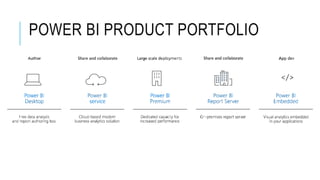
POWER BI PRODUCT PORTFOLIO
POWER BI DESKTOP
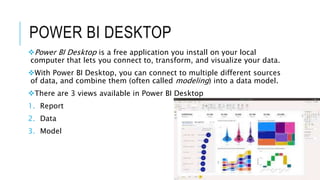
Power BI Desktop is a free application you install on your local
computer that lets you connect to, transform, and visualize your data.
With Power BI Desktop, you can connect to multiple different sources
of data, and combine them (often called modeling) into a data model.
There are 3 views available in Power BI Desktop
1. Report
2. Data
3. Model
POWER BI SERVICE
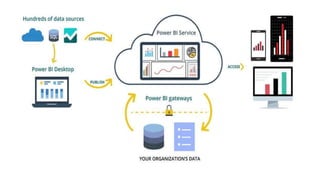
Power BI is a collection of software services, apps, and connectors
that work together to help you create, share, and consume business
insights in the way that serves you and your business most effectively
The Microsoft Power BI service (app.powerbi.com), sometimes
referred to as Power BI online, is the SaaS (Software as a Service) part
of Power BI
In the Power BI service, dashboards display tiles, which you can
select to open reports for exploring further
Dashboards and reports connect to datasets that bring all of the
relevant data together in one place
POWER BI PREMIUM
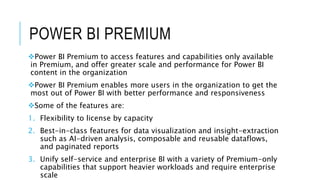
Power BI Premium to access features and capabilities only available
in Premium, and offer greater scale and performance for Power BI
content in the organization
Power BI Premium enables more users in the organization to get the
most out of Power BI with better performance and responsiveness
Some of the features are:
1. Flexibility to license by capacity
2. Best-in-class features for data visualization and insight-extraction
such as AI-driven analysis, composable and reusable dataflows,
and paginated reports
3. Unify self-service and enterprise BI with a variety of Premium-only
capabilities that support heavier workloads and require enterprise
scale
POWER BI REPORT SERVER
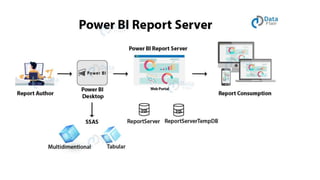
Power BI Report Server is an on-premises report server that is used
to host Power BI reports
The reports hosted on the on-premises report server are displayed
to the users via a web portal
POWER BI EMBEDDED
Embedding for your customers lets you embed dashboards and
reports for users who don't have a Power BI account. This type of
embedding is also known as Power BI Embedded
Power BI Embedded is a Microsoft Azure service that lets
independent software vendors (ISVs) and developers quickly embed
visuals, reports, and dashboards into an application. This embedding
is done through a capacity-based, hourly metered model
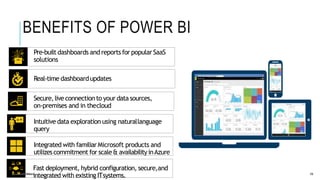
Pre-built dashboards and reports for popularSaaS
solutions
Real-time dashboardupdates
Secure,liveconnectionto your datasources,
on-premises and in thecloud
Intuitive data exploration using naturallanguage
query
Integrated with familiar Microsoft products and
utilizescommitment for scale& availabilityinAzure
Fast deployment, hybrid configuration, secure,and
integrated with existing ITsystems.
@CarterMcGServ 13
BENEFITS OF POWER BI
INTEGRATION WITH OTHER APPS-
EXCEL
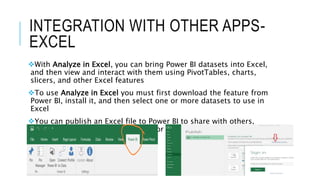
With Analyze in Excel, you can bring Power BI datasets into Excel,
and then view and interact with them using PivotTables, charts,
slicers, and other Excel features
To use Analyze in Excel you must first download the feature from
Power BI, install it, and then select one or more datasets to use in
Excel
You can publish an Excel file to Power BI to share with others,
analyse a Power BI dataset in Excel or import either an Excel
workbook or Excel data to Power BI
MICROSOFT TEAMS
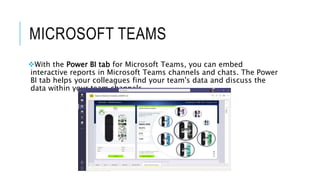
With the Power BI tab for Microsoft Teams, you can embed
interactive reports in Microsoft Teams channels and chats. The Power
BI tab helps your colleagues find your team's data and discuss the
data within your team channels
CASE STUDY – HEATHROW
AIRPORT
The Challenge: Heathrow airport is an international airport in
London. It is the second busiest international airport in the world
Managing over 2,00,000 passengers every day can be quite a
challenging task for airport authorities and ground staff. Every
department needs to be in absolute coordination and sync to be able
to manage the passenger traffic and give them a smooth experience
at the airport
 Issues can arise due to stormy weather, delayed flights, canceled
flights, shifts in jet streams, etc. disturbing the airport’s smooth
functioning. Such problems send the passengers as well as airport
employees into turmoil
The airport needed a central digitalized management system as a
solution to this problem. Such a system would use the large amounts
of data being produced by operational systems at the airport and
transform it into useful visual insights
SOLUTION
The airport has deployed Microsoft Azure technology to collect data
from back-end operational systems at the airport. These systems
are check-in counters, baggage tracking systems, flight schedules,
weather tracking systems, cargo tracking and many more
The operational data from these systems are forwarded to business
intelligence platforms like Power BI. In Power BI, users shape this data
into useful information that the airport staff can use
Power BI transforms the crude information into informative visuals
showing different statuses and statistics of the airport systems. Then,
the ground staff like baggage handlers, gate agents, air traffic
controllers, etc. use this information to properly operate and manage
passengers
LIMITATIONS OF POWER BI
1. Data quality
2. Does not handle large data sources properly
3. Table relationships
4. Complexity

Power BI: Introduction with a use case and solution

  • 1.
  • 2.
    WHAT IS BUSINESSINTELLIGENCE AND WHY NEED BI 1. Business intelligence (BI) leverages software and services to transform data into actionable insights that inform an organization’s strategic and tactical business decisions 2. Business intelligence can help companies make better decisions by showing present and historical data within their business context. Analysts can leverage BI to provide performance and competitor benchmarks to make the organization run smoother and more efficiently. Analysts can also more easily spot market trends to increase sales or revenue.
  • 3.
     Power BIis a collection of software services, apps, and connectors that work together to turn your unrelated sources of data into coherent, visually immersive, and interactive insights.  Data may be an Excel spreadsheet, or a collection of cloud-based and on-premises hybrid data warehouses. Power BI lets you easily connect to your data sources, visualize and discover what's important, and share that with anyone or everyone you want. What is Power BI?
  • 4.
    FEATURES & COMPONENTSOF POWER BI 1. Interactive Power BI Desktop 2. Customized Visualization 3. Visibility Components of Power BI 1. Power Pivot 2. Power Query 3. Power View
  • 5.
  • 6.
    POWER BI DESKTOP PowerBI Desktop is a free application you install on your local computer that lets you connect to, transform, and visualize your data. With Power BI Desktop, you can connect to multiple different sources of data, and combine them (often called modeling) into a data model. There are 3 views available in Power BI Desktop 1. Report 2. Data 3. Model
  • 7.
    POWER BI SERVICE PowerBI is a collection of software services, apps, and connectors that work together to help you create, share, and consume business insights in the way that serves you and your business most effectively The Microsoft Power BI service (app.powerbi.com), sometimes referred to as Power BI online, is the SaaS (Software as a Service) part of Power BI In the Power BI service, dashboards display tiles, which you can select to open reports for exploring further Dashboards and reports connect to datasets that bring all of the relevant data together in one place
  • 8.
    POWER BI PREMIUM PowerBI Premium to access features and capabilities only available in Premium, and offer greater scale and performance for Power BI content in the organization Power BI Premium enables more users in the organization to get the most out of Power BI with better performance and responsiveness Some of the features are: 1. Flexibility to license by capacity 2. Best-in-class features for data visualization and insight-extraction such as AI-driven analysis, composable and reusable dataflows, and paginated reports 3. Unify self-service and enterprise BI with a variety of Premium-only capabilities that support heavier workloads and require enterprise scale
  • 9.
    POWER BI REPORTSERVER Power BI Report Server is an on-premises report server that is used to host Power BI reports The reports hosted on the on-premises report server are displayed to the users via a web portal
  • 10.
    POWER BI EMBEDDED Embeddingfor your customers lets you embed dashboards and reports for users who don't have a Power BI account. This type of embedding is also known as Power BI Embedded Power BI Embedded is a Microsoft Azure service that lets independent software vendors (ISVs) and developers quickly embed visuals, reports, and dashboards into an application. This embedding is done through a capacity-based, hourly metered model
  • 11.
    Pre-built dashboards andreports for popularSaaS solutions Real-time dashboardupdates Secure,liveconnectionto your datasources, on-premises and in thecloud Intuitive data exploration using naturallanguage query Integrated with familiar Microsoft products and utilizescommitment for scale& availabilityinAzure Fast deployment, hybrid configuration, secure,and integrated with existing ITsystems. @CarterMcGServ 13 BENEFITS OF POWER BI
  • 12.
    INTEGRATION WITH OTHERAPPS- EXCEL With Analyze in Excel, you can bring Power BI datasets into Excel, and then view and interact with them using PivotTables, charts, slicers, and other Excel features To use Analyze in Excel you must first download the feature from Power BI, install it, and then select one or more datasets to use in Excel You can publish an Excel file to Power BI to share with others, analyse a Power BI dataset in Excel or import either an Excel workbook or Excel data to Power BI
  • 13.
    MICROSOFT TEAMS With thePower BI tab for Microsoft Teams, you can embed interactive reports in Microsoft Teams channels and chats. The Power BI tab helps your colleagues find your team's data and discuss the data within your team channels
  • 14.
    CASE STUDY –HEATHROW AIRPORT The Challenge: Heathrow airport is an international airport in London. It is the second busiest international airport in the world Managing over 2,00,000 passengers every day can be quite a challenging task for airport authorities and ground staff. Every department needs to be in absolute coordination and sync to be able to manage the passenger traffic and give them a smooth experience at the airport  Issues can arise due to stormy weather, delayed flights, canceled flights, shifts in jet streams, etc. disturbing the airport’s smooth functioning. Such problems send the passengers as well as airport employees into turmoil The airport needed a central digitalized management system as a solution to this problem. Such a system would use the large amounts of data being produced by operational systems at the airport and transform it into useful visual insights
  • 15.
    SOLUTION The airport hasdeployed Microsoft Azure technology to collect data from back-end operational systems at the airport. These systems are check-in counters, baggage tracking systems, flight schedules, weather tracking systems, cargo tracking and many more The operational data from these systems are forwarded to business intelligence platforms like Power BI. In Power BI, users shape this data into useful information that the airport staff can use Power BI transforms the crude information into informative visuals showing different statuses and statistics of the airport systems. Then, the ground staff like baggage handlers, gate agents, air traffic controllers, etc. use this information to properly operate and manage passengers
  • 16.
    LIMITATIONS OF POWERBI 1. Data quality 2. Does not handle large data sources properly 3. Table relationships 4. Complexity