MATLAB

    Basic MATLAB -
                   matrices
                   operators
                   script and function files
                   flow control
                   plotting


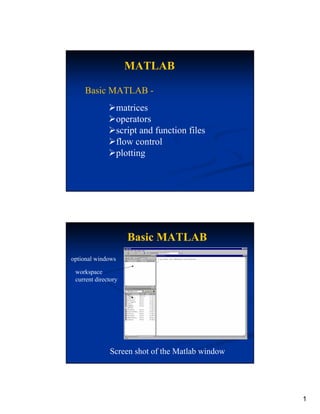
                      Basic MATLAB
optional windows

 workspace
 current directory
                                    s here


                                         command window


              Screen shot of the Matlab window


                                                          1
MATLAB Variables
all variables stored in 32bit floating point format
no distinction between real and integer
          >>a = 3;
                        same assignment for “a”
         >>a = 3.0;
Matlab is case sensitive
      >>A=3;
                    A≠a
      >>a=2;


         MATLAB Variables
can use numbers and underscore in variable names
         >>case34=6.45;
                                  OK
         >>case_34=6.45;
 names must start with a letter
         >>34case=23.45;       syntax error
 string (text) variables enclosed in single quotes.
 The variable is stored as array of characters
        >>title=‘This is the title’;


                                                      2
MATLAB Variables
if a variable is defined,
typing the variable name returns its value
    >>a=45.57;
  >>a
     a=
       45.57

to clear a variable from memory
      >>a=4
      >>clear a


   MATLAB Variables
Matlab will “echo” commands unless a semi-
colon is used
>>a=23.2;
>>
>>a=23.2
a=             Matlab echoes the command
   23.2
>>


                                             3
MATLAB Variables
                         Vectors
 column vectors                       row vectors
       ⎧1 ⎫
       ⎪ ⎪
   a = ⎨2 ⎬                          a = {1 2 3}
       ⎪3 ⎪
       ⎩ ⎭
  >>a=[1;2;3];                       >>a=[1,2,3];
  >>a                                >>a
  a=                                 a=
     1                                1 2 3
     2
     3                               use comma
use semi-colon
to separate rows                     to separate columns


              MATLAB Variables
                          Matrices
                              ⎡1 2 3⎤
2-dimensional matrices      a=⎢     ⎥
                              ⎣4 5 6⎦

                    >>a=[1,2,3;4,5,6];
                    >>a
                    a=
                        1 2 3
                        4 5 6

again, separate columns with commas and rows
with semi-colons


                                                           4
MATLAB Variables
Indexing Matrix elements

  A vector is a special type of matrix
  row vector is a 1 x n matrix, 1 row n columns
   column vector is a n x 1 matrix, n rows 1 column
   >>a=[1,2,3];
   >>a(2)         could also reference by a(1,2)
   ans =          note, a(2,1) would produce an error
        2         because “a” only has one row


           MATLAB Variables
              Indexing Matrix elements
                  more examples

        ⎡1 2 3⎤            >>a=[1,2,3;4,5,6];
      a=⎢     ⎥
        ⎣4 5 6⎦

                                      assigning
     addressing
                                     >>a(2,2)=9;
     >>a(2,3)                        >>a
     ans =                           a=
           6                             1 2 3
                                         4 9 6


                                                        5
MATLAB Variables
          Complex-valued numbers
  Typically, the variable “i” or “j” is used to
  represent the complex variable; e.g.

                i = −1
  Then, a complex number is represented as
           z = a + ib Re(z) = a

                        Im(z) = b


          MATLAB Variables
           Complex-valued numbers
 Unless i or j has been previously defined, Matlab
 assigns i and j the complex variable value
  In Matlab, a complex variable is represented in the
  following format
   >>z=23+i*56;            >>z=23+j*56;
   >>z                     >>z
   z=                      z=
      23.00 + 56.00i          23.00 + 56.00i
Matlab always uses the symbol “i” to represent a
complex number


                                                        6
MATLAB Operations
    Basic operations
          addition              +
          subtraction           -
          multiplication        *
          division
            right division      /
            left division          ?

  >>a=3;b=4;          c1=0.75
  >>c1=a/b;                              so, be careful!
                      c2=1.3333….
  >>c2=ab;


        MATLAB Operations
    Mixed Real and Complex valued Variables

if both variables are real-valued, a real-valued result
is obtained
if one variable is complex-valued, Matlab recasts
the real variable as complex and then performs the
operation. The result is complex-valued
however, the type casting is done internally, the
real-valued variable remains real after the operation


                                                           7
MATLAB Operations
                  Other (Scalar) Operations
Math representation                Matlab interpretation
 z = yx                            >>z=y^x;
  y = ex                           >>y=exp(x);
  y = ln(x)                        >>y=log(x);
  y = log(x)                       >>y=log10(x)

  y = sin(x) y = sin −1 (x)        >>y=sin(x);         >>y=asin(x);
  y = cos(x) y = cos −1 (x)        >>y=cos(x);         >>y=acos(x);
  y = tan(x) y = tan −1 (x)        >>y=tan(x);         >>y=atan(x);


           MATLAB Operations
                             Matrices
Only matrices of the same dimension can be added and subtracted

For multiplication, the inner dimensions must be the same

                                                     ⎡4 5⎤
    ⎡1 2 3⎤               ⎡2 3 4⎤
  A=⎢     ⎥             B=⎢      ⎥               C = ⎢6 7 ⎥
    ⎣4 5 6⎦                                          ⎢    ⎥
                          ⎣5 6 7 ⎦                   ⎢8 9 ⎥
                                                     ⎣    ⎦

       No error                                Error
     >>D=A+B;                                 >>D=A+C;
     >>D=A-B;                                 >>D=A*B;
     >>D=A*C;         Matrix multiplication   >>D=B*A;
     >>D=C*A;         not commutative


                                                                      8
MATLAB Operations
        Left() and Right(/) Matrix “division”

   Math representation       Matlab interpretation

       C = A −1B                >>C=AB;

       C = BA −1                >>C=B/A;


        Remember, A must be square and
        full rank (linearly independent
        rows/columns)


         MATLAB Operations
                   Matrix Transpose
   Math representation       Matlab interpretation
       C = AT                   >>C=A’;
For complex-valued matrices, complex conjugate transpose
      ⎡1 2 3⎤
    A=⎢     ⎥                a = [1 + j2 3 + j4]
      ⎣4 5 6⎦
     >>B=A’;                  >>b=a’;
        ⎡1 4 ⎤
    B = ⎢2 5⎥                  ⎡1 − j2 ⎤
        ⎢    ⎥               b=⎢       ⎥
        ⎢3 6⎥
        ⎣    ⎦                 ⎣3 − j4 ⎦


                                                           9
MATLAB Operations
Concatenation


       MATLAB Operations
         Deleting Rown and Columns


                                     10
MATLAB Operations
                     The ‘.’ operator


      .* does element by element multiplication


      ./ and . : Element by element left and right
      division respectavely


           MATLAB Operations
                 The COLON operator :
                   The expression 1:10
         is a row vector containing numbers 1 to 10
                    1 2 3 ……         10
  To obtain non unit spacing , specify an increment
               For Example 1:2:10 gives
                 1      3    5     7     9
Subscript expressions involving ‘:’ refer to a part of a
  matrix
 A(1:k,j) is the first k elements of the jth column of A


                                                           11
MATLAB Operations
                Some other useful functions :
The sum function : Returns a row vector containing
  sum of all elements in each column.
sum(A)
ans =
           34 34 34 34
The diag function : Returns a row vector containing
  the principal diagonal elements
Diag (A)
ans =
           16 10 7          1


           MATLAB Operations
          The Random number generators
Rand : Generates random numbers following a
 uniform distribution
Randn : Generates random numbers following a
 normal distribution (mean 0 ,variance=1 , sd =1 )


                                                      12
MATLAB Operations
             Some Key Help commands


Help elfun :     Elementary mathematical functions
Help specfun:    Advanced mathematical functions
Help elmat:      Advanced matrix functions


                MATLAB m-files
                 Two types of m-files
 script files
       collection of commands that Matlab executes
       when the script is “run”

 function files
       collection of commands which together
       represent a function, a procedure or a method

  Both types are separate files with a “.m” extension


                                                        13
MATLAB m-files
        To create an m-file, open the Matlab text editor


                            Click on the “page” icon


                          The Matlab text editor window will open


                MATLAB m-files
                           Script Files
On the command line              In the script file named test.m
   >>x=3.0;
   >>y=x^2;
   >>y
   y =
      9.0
   >>
                                     On the command line
                                   >>test
                                   y =
                                       9.0
                                   >>


                                                                    14
MATLAB m-files
                          Script Files
     script files share the workspace memory

                                     test.m script
 >>x=5.0;
 >>test
 >>y
 y =
     25.0
 >>


               MATLAB m-files
                          Script Files
     script files can call other script files
                                    inner.m script


>>outter
y =                                  outter.m script
    36.0
>>


                                                       15
MATLAB m-files
                 Function Files
Matlab identifies function files from script files by
using the “function” and “return” keywords
Syntax: function [list of outputs] = filename (inputs)


    the name of the function file must be
    the same name as the function


        MATLAB m-files
                  Function Files
              The function file x2.m


    >>r=3;                       >>h=x2(4.2);
    >>d=x2(r);                   >>h
    >>d                          h =
    d =                              17.64
        9.0                      >>
    >>


                                                         16
MATLAB m-files
                    Function Files

                Multiple Inputs and Outputs


outputs in square brackets, [ ]   inputs in parentheses ( )


             MATLAB m-files
                     Function Files
   variables created in the function are not
   retained in the workspace, except for the
   output variables

   the function does not have access to
   workspace variables, except for the inputs


   variables passed to the function are “copies” of the
   workspace variables. Changing their value inside
   the function has no effect on their value in the
   workspace.


                                                              17
MATLAB Flow Control
          The “while” and “if” statements
while expression    if expression        if expression
      statements          statements           statements1
end                 end                  else
                                                statements2
                                         end
    Matlab evaluates expression as logical “true” or “false”
      “false” equivalent to zero
      “true” equivalent to any non-zero number

    statements, any valid Matlab command


        MATLAB Flow Control
                   evaluating expression
any valid equation             conditional operators
  a=4;                         ==      equal to
  b=5;                         <       less than
  c=5;                         >       greater than
  if a+b “True”                <= less than or equal to
  if b-c “False”               >= greater than or equal to
watch out for round-off        ~= not equal to
and word length error           logical operators
 if sin(0) “False”               & and
 if sin(pi) “True”               | or
 sin(pi) = 1.22e-16             while(3<=a)&(a<=5)


                                                               18
MATLAB Flow Control
                The “for” statement
          for index = start : [increment :] end
                 statements
          end

 increment is optional, if increment is not specified
 increment defaults to 1
index, start, increment, and end do not need to be integer
valued
index can be incremented positive (increment > 0)
or negative (increment < 0)
loop stops when index > end (or index < end)


     MATLAB Flow Control
                    example


                         script file to cycle through x values


                        function file to generate the y values


                                                                 19
MATLAB Plotting
                    Basic 2D plotting functions

          plot(x1,y1[,x2,y2,x3,y3.....])
          xlabel(‘x axis name’)
          ylabel(‘y axis name’)
          title(‘graph name’)


                       Additional functions
           grid on
           grid off
           axis([xmin,xmax,ymin,ymax])


                MATLAB Plotting
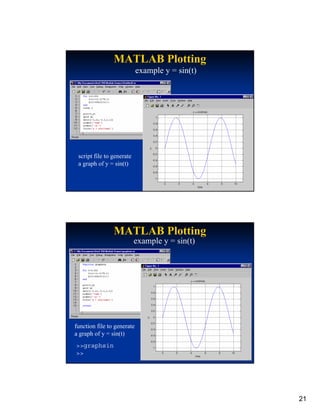
                        example y = sin(t)


the “plot” function alone


                                                  20
MATLAB Plotting
                            example y = sin(t)


 script file to generate
 a graph of y = sin(t)


                MATLAB Plotting
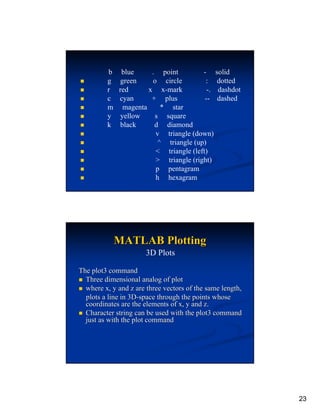
                           example y = sin(t)


function file to generate
a graph of y = sin(t)
>>graphsin
>>


                                                 21
MATLAB Plotting
         Adding a Legend for multiple graphs


“legend” remembers
the order the graphs
were plotted


               MATLAB Plotting
               Plot function in some detail
•PLOT(X,Y) plots vector Y versus vector X
•If X is a scalar and Y is a vector, length(Y) disconnected
       points are plotted.
•If Y is complex, PLOT(Y) is equivalent to PLOT
(real(Y),imag(Y)).
                       Additional functions


         grid on
         grid off
         axis([xmin,xmax,ymin,ymax])


                                                              22
b    blue     . point         - solid
         g   green     o circle         : dotted
         r   red      x x-mark           -. dashdot
         c   cyan      + plus           -- dashed
         m    magenta     * star
         y   yellow     s square
         k   black      d diamond
                        v triangle (down)
                         ^ triangle (up)
                        < triangle (left)
                        > triangle (right)
                        p pentagram
                        h hexagram


             MATLAB Plotting
                       3D Plots

The plot3 command
  Three dimensional analog of plot
  where x, y and z are three vectors of the same length,
  plots a line in 3D-space through the points whose
  coordinates are the elements of x, y and z.
  Character string can be used with the plot3 command
  just as with the plot command


                                                           23
Thank you


            24

Matlab

  • 1.
    MATLAB Basic MATLAB - matrices operators script and function files flow control plotting Basic MATLAB optional windows workspace current directory s here command window Screen shot of the Matlab window 1
  • 2.
    MATLAB Variables all variablesstored in 32bit floating point format no distinction between real and integer >>a = 3; same assignment for “a” >>a = 3.0; Matlab is case sensitive >>A=3; A≠a >>a=2; MATLAB Variables can use numbers and underscore in variable names >>case34=6.45; OK >>case_34=6.45; names must start with a letter >>34case=23.45; syntax error string (text) variables enclosed in single quotes. The variable is stored as array of characters >>title=‘This is the title’; 2
  • 3.
    MATLAB Variables if avariable is defined, typing the variable name returns its value >>a=45.57; >>a a= 45.57 to clear a variable from memory >>a=4 >>clear a MATLAB Variables Matlab will “echo” commands unless a semi- colon is used >>a=23.2; >> >>a=23.2 a= Matlab echoes the command 23.2 >> 3
  • 4.
    MATLAB Variables Vectors column vectors row vectors ⎧1 ⎫ ⎪ ⎪ a = ⎨2 ⎬ a = {1 2 3} ⎪3 ⎪ ⎩ ⎭ >>a=[1;2;3]; >>a=[1,2,3]; >>a >>a a= a= 1 1 2 3 2 3 use comma use semi-colon to separate rows to separate columns MATLAB Variables Matrices ⎡1 2 3⎤ 2-dimensional matrices a=⎢ ⎥ ⎣4 5 6⎦ >>a=[1,2,3;4,5,6]; >>a a= 1 2 3 4 5 6 again, separate columns with commas and rows with semi-colons 4
  • 5.
    MATLAB Variables Indexing Matrixelements A vector is a special type of matrix row vector is a 1 x n matrix, 1 row n columns column vector is a n x 1 matrix, n rows 1 column >>a=[1,2,3]; >>a(2) could also reference by a(1,2) ans = note, a(2,1) would produce an error 2 because “a” only has one row MATLAB Variables Indexing Matrix elements more examples ⎡1 2 3⎤ >>a=[1,2,3;4,5,6]; a=⎢ ⎥ ⎣4 5 6⎦ assigning addressing >>a(2,2)=9; >>a(2,3) >>a ans = a= 6 1 2 3 4 9 6 5
  • 6.
    MATLAB Variables Complex-valued numbers Typically, the variable “i” or “j” is used to represent the complex variable; e.g. i = −1 Then, a complex number is represented as z = a + ib Re(z) = a Im(z) = b MATLAB Variables Complex-valued numbers Unless i or j has been previously defined, Matlab assigns i and j the complex variable value In Matlab, a complex variable is represented in the following format >>z=23+i*56; >>z=23+j*56; >>z >>z z= z= 23.00 + 56.00i 23.00 + 56.00i Matlab always uses the symbol “i” to represent a complex number 6
  • 7.
    MATLAB Operations Basic operations addition + subtraction - multiplication * division right division / left division ? >>a=3;b=4; c1=0.75 >>c1=a/b; so, be careful! c2=1.3333…. >>c2=ab; MATLAB Operations Mixed Real and Complex valued Variables if both variables are real-valued, a real-valued result is obtained if one variable is complex-valued, Matlab recasts the real variable as complex and then performs the operation. The result is complex-valued however, the type casting is done internally, the real-valued variable remains real after the operation 7
  • 8.
    MATLAB Operations Other (Scalar) Operations Math representation Matlab interpretation z = yx >>z=y^x; y = ex >>y=exp(x); y = ln(x) >>y=log(x); y = log(x) >>y=log10(x) y = sin(x) y = sin −1 (x) >>y=sin(x); >>y=asin(x); y = cos(x) y = cos −1 (x) >>y=cos(x); >>y=acos(x); y = tan(x) y = tan −1 (x) >>y=tan(x); >>y=atan(x); MATLAB Operations Matrices Only matrices of the same dimension can be added and subtracted For multiplication, the inner dimensions must be the same ⎡4 5⎤ ⎡1 2 3⎤ ⎡2 3 4⎤ A=⎢ ⎥ B=⎢ ⎥ C = ⎢6 7 ⎥ ⎣4 5 6⎦ ⎢ ⎥ ⎣5 6 7 ⎦ ⎢8 9 ⎥ ⎣ ⎦ No error Error >>D=A+B; >>D=A+C; >>D=A-B; >>D=A*B; >>D=A*C; Matrix multiplication >>D=B*A; >>D=C*A; not commutative 8
  • 9.
    MATLAB Operations Left() and Right(/) Matrix “division” Math representation Matlab interpretation C = A −1B >>C=AB; C = BA −1 >>C=B/A; Remember, A must be square and full rank (linearly independent rows/columns) MATLAB Operations Matrix Transpose Math representation Matlab interpretation C = AT >>C=A’; For complex-valued matrices, complex conjugate transpose ⎡1 2 3⎤ A=⎢ ⎥ a = [1 + j2 3 + j4] ⎣4 5 6⎦ >>B=A’; >>b=a’; ⎡1 4 ⎤ B = ⎢2 5⎥ ⎡1 − j2 ⎤ ⎢ ⎥ b=⎢ ⎥ ⎢3 6⎥ ⎣ ⎦ ⎣3 − j4 ⎦ 9
  • 10.
    MATLAB Operations Concatenation MATLAB Operations Deleting Rown and Columns 10
  • 11.
    MATLAB Operations The ‘.’ operator .* does element by element multiplication ./ and . : Element by element left and right division respectavely MATLAB Operations The COLON operator : The expression 1:10 is a row vector containing numbers 1 to 10 1 2 3 …… 10 To obtain non unit spacing , specify an increment For Example 1:2:10 gives 1 3 5 7 9 Subscript expressions involving ‘:’ refer to a part of a matrix A(1:k,j) is the first k elements of the jth column of A 11
  • 12.
    MATLAB Operations Some other useful functions : The sum function : Returns a row vector containing sum of all elements in each column. sum(A) ans = 34 34 34 34 The diag function : Returns a row vector containing the principal diagonal elements Diag (A) ans = 16 10 7 1 MATLAB Operations The Random number generators Rand : Generates random numbers following a uniform distribution Randn : Generates random numbers following a normal distribution (mean 0 ,variance=1 , sd =1 ) 12
  • 13.
    MATLAB Operations Some Key Help commands Help elfun : Elementary mathematical functions Help specfun: Advanced mathematical functions Help elmat: Advanced matrix functions MATLAB m-files Two types of m-files script files collection of commands that Matlab executes when the script is “run” function files collection of commands which together represent a function, a procedure or a method Both types are separate files with a “.m” extension 13
  • 14.
    MATLAB m-files To create an m-file, open the Matlab text editor Click on the “page” icon The Matlab text editor window will open MATLAB m-files Script Files On the command line In the script file named test.m >>x=3.0; >>y=x^2; >>y y = 9.0 >> On the command line >>test y = 9.0 >> 14
  • 15.
    MATLAB m-files Script Files script files share the workspace memory test.m script >>x=5.0; >>test >>y y = 25.0 >> MATLAB m-files Script Files script files can call other script files inner.m script >>outter y = outter.m script 36.0 >> 15
  • 16.
    MATLAB m-files Function Files Matlab identifies function files from script files by using the “function” and “return” keywords Syntax: function [list of outputs] = filename (inputs) the name of the function file must be the same name as the function MATLAB m-files Function Files The function file x2.m >>r=3; >>h=x2(4.2); >>d=x2(r); >>h >>d h = d = 17.64 9.0 >> >> 16
  • 17.
    MATLAB m-files Function Files Multiple Inputs and Outputs outputs in square brackets, [ ] inputs in parentheses ( ) MATLAB m-files Function Files variables created in the function are not retained in the workspace, except for the output variables the function does not have access to workspace variables, except for the inputs variables passed to the function are “copies” of the workspace variables. Changing their value inside the function has no effect on their value in the workspace. 17
  • 18.
    MATLAB Flow Control The “while” and “if” statements while expression if expression if expression statements statements statements1 end end else statements2 end Matlab evaluates expression as logical “true” or “false” “false” equivalent to zero “true” equivalent to any non-zero number statements, any valid Matlab command MATLAB Flow Control evaluating expression any valid equation conditional operators a=4; == equal to b=5; < less than c=5; > greater than if a+b “True” <= less than or equal to if b-c “False” >= greater than or equal to watch out for round-off ~= not equal to and word length error logical operators if sin(0) “False” & and if sin(pi) “True” | or sin(pi) = 1.22e-16 while(3<=a)&(a<=5) 18
  • 19.
    MATLAB Flow Control The “for” statement for index = start : [increment :] end statements end increment is optional, if increment is not specified increment defaults to 1 index, start, increment, and end do not need to be integer valued index can be incremented positive (increment > 0) or negative (increment < 0) loop stops when index > end (or index < end) MATLAB Flow Control example script file to cycle through x values function file to generate the y values 19
  • 20.
    MATLAB Plotting Basic 2D plotting functions plot(x1,y1[,x2,y2,x3,y3.....]) xlabel(‘x axis name’) ylabel(‘y axis name’) title(‘graph name’) Additional functions grid on grid off axis([xmin,xmax,ymin,ymax]) MATLAB Plotting example y = sin(t) the “plot” function alone 20
  • 21.
    MATLAB Plotting example y = sin(t) script file to generate a graph of y = sin(t) MATLAB Plotting example y = sin(t) function file to generate a graph of y = sin(t) >>graphsin >> 21
  • 22.
    MATLAB Plotting Adding a Legend for multiple graphs “legend” remembers the order the graphs were plotted MATLAB Plotting Plot function in some detail •PLOT(X,Y) plots vector Y versus vector X •If X is a scalar and Y is a vector, length(Y) disconnected points are plotted. •If Y is complex, PLOT(Y) is equivalent to PLOT (real(Y),imag(Y)). Additional functions grid on grid off axis([xmin,xmax,ymin,ymax]) 22
  • 23.
    b blue . point - solid g green o circle : dotted r red x x-mark -. dashdot c cyan + plus -- dashed m magenta * star y yellow s square k black d diamond v triangle (down) ^ triangle (up) < triangle (left) > triangle (right) p pentagram h hexagram MATLAB Plotting 3D Plots The plot3 command Three dimensional analog of plot where x, y and z are three vectors of the same length, plots a line in 3D-space through the points whose coordinates are the elements of x, y and z. Character string can be used with the plot3 command just as with the plot command 23
  • 24.